
bootstrap简单使用
Bootstrap (版本 v3.3.7) 官网教程: https://v3.bootcss.com/css/
row——行 row——列
push——推 pull——拉
col-md-offset-3 在左边偏移3格
col-md-push-5 向右推5格
col-md-pull-2 向左拉2格
结构
<div class="container">

    <div class="row">

       <div class="col-md-4">col-md-4</div>

      <div class="col-md-4">col-md-4</div>

        <div class="col-md-4">col-md-4</div>

    </div>

</div>
<body class="table-responsive">

<table class="table table-striped table-bordered table-hover">

    <thead>

        <tr>

            <th>编号</th>

            <th>姓名</th>

            <th>性别</th>

            <th>年龄</th>

        </tr>

    </thead>

    <tbody>

        <tr>

            <td>1</td>

            <td>王小二</td>

            <td>男</td>

            <td>21</td>

        </tr>

        <tr class="info">

            <td>2</td>

            <td>张溜溜</td>

            <td>女</td>

            <td>23</td>

        </tr>

        <tr>

            <td>3</td>

            <td>程陈晨</td>

            <td>男</td>

            <td>25</td>

        </tr>

        <tr class="success">

            <td>4</td>

            <td>李云龙</td>

            <td>男</td>

            <td>53</td>

        </tr>

    </tbody>

</table>
</body>

{

position:absolute;

background-position: center center;

background-size:cover;

}
jQuery文件。务必在bootstrap.min.js 之前引入(因为是基于jquery)
站点图标 <link rel="shortcut icon" href="favicon.ico" type="image/x-icon" />
快速生成图片 https://www.dummyimage.com/
bootstrap 实现两种方法:1)通过 js 实现 2)通过css3 媒体查询实现
图片:<img src="..." class="img-responsive"/> 图片响应式
用到栅格,应在父元素清除浮动(clearfix)
container 和 container-fluid 的区别
.container类用于固定宽度并支持响应式布局
.container-fluid类用于100%宽度,占据全部视口
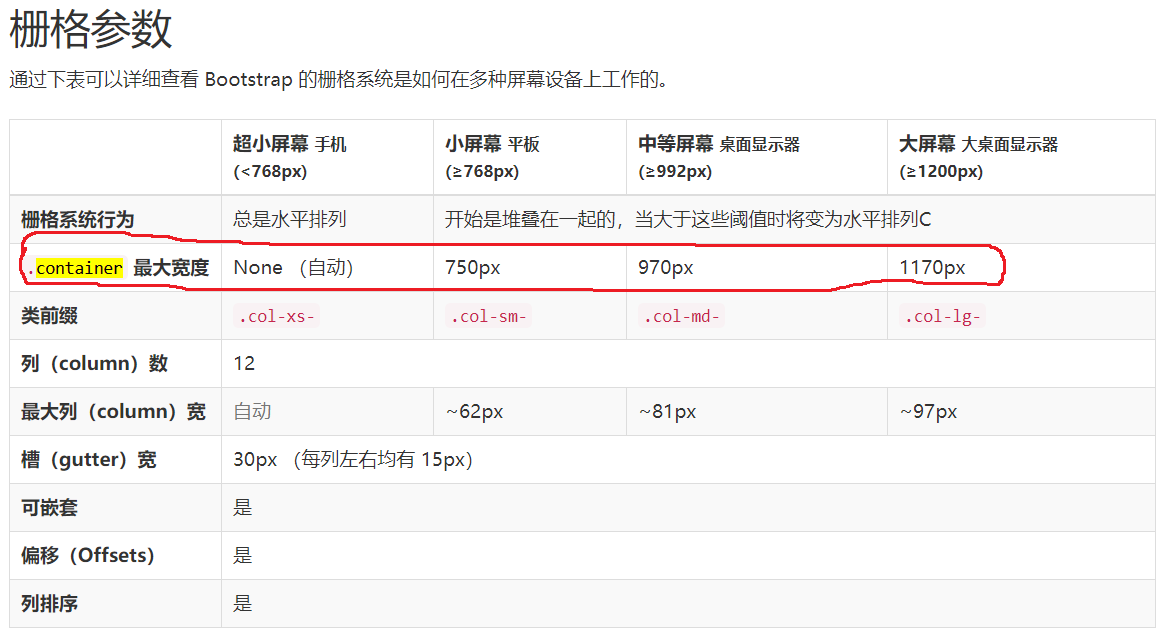
https://www.cnblogs.com/zhangbao/p/6593121.html
一个典型导航条的结构如下:
nav .navbar.navbar-default

        .container

          .nav-header

             a.nav-brand
<div class="form-group">

    <label class="sr-only">用户名:</label>

    <input type="text" class="form-control" name="name" placeholder="输入用户名" />

</div>

<div class="checkbox">
  <label><input type="checkbox" />记住密码</label>
</div>
bootstrap简单使用的更多相关文章
- 基于Bootstrap简单实用的tags标签插件
http://www.htmleaf.com/jQuery/ jQuery之家 自由分享jQuery.html5和css3的插件库 基于Bootstrap简单实用的tags标签插件
- Bootstrap简单入门
Bootstrap简单入门 BootStrap基本模板 <!DOCTYPE html> <html> <head> <meta charset="U ...
- Bootstrap简单Demo(2015年05月-18日)
Bootstrap的简单使用 1.Bootstrap是什么? 这是Bootstrap官网上对它的描述:Bootstrap是最受欢迎的HTML.CSS和JS框架,用于开发响应式布局.移动设备优先的WEB ...
- bootstrap简单图文环绕效果
一. 下载bootstrap-3.3.7 二. 在html页面引入css,js; eg: <link src="bootstrap-3.3.7-dist/css/b ...
- Bootstrap简单HelloWorld入门教程
这篇教程旨在让你在20分钟内学会使用twitter bootstrap创建一个站点.看完这个教程后你应该能够使用bootstrap来建立一个基本的响应式布局的页面,了解栅格系统,并且能够使用boots ...
- mvc area区域和异步表单,bootstrap简单实例
码农最怕眼高手低 今天来练习mvc Area技术和bootstrap以及异步表单的C#代码实现. 1.area区域架构对于建立复杂业务逻辑很有帮助,由 AreaRegistration.Regist ...
- 【Bootstrap简单用法】
一.下载及使用 参考网站:http://www.bootcss.com/ 1.使用 BootCDN 提供的免费 CDN 加速服务(同时支持 http 和 https 协议) <!-- 最新版本的 ...
- bootstrap 简单练习(后续把其它页面也进行练习)
<!DOCTYPE html> <html xmlns="http://www.w3.org/1999/xhtml"> <head> <m ...
- bootstrap简单使用实例
表格实例,包含bootstrap.css 和 2.1.1jquery <!DOCTYPE html> <html> <head> <meta charset= ...
随机推荐
- ASP.NET -- WebForm -- 缓存Cache的使用
ASP.NET -- WebForm -- 缓存Cache的使用 把数据从数据库或文件中读取出来,放在内存中,后面的用户直接从内存中取数据,速度快.适用于经常被查询.但不经常变动的数据. 1. Te ...
- 4.6Python数据处理篇之Matplotlib系列(六)---plt.hist()与plt.hist2d()直方图
目录 目录 前言 (一)直方图 (二)双直方图 目录 前言 今天我们学习的是直方图,导入的函数是: plt.hist(x=x, bins=10) 与plt.hist2D(x=x, y=y) (一)直方 ...
- 终极 Shell——ZSH
Shell是Linux/Unix的一个外壳,你理解成衣服也行.它负责外界与Linux内核的交互,接收用户或其他应用程序的命令,然后把这些命令转化成内核能理解的语言,传给内核,内核是真正干活的,干完之后 ...
- SQLServer插入数据
使用数据库管理工具插入数据 打开数据库,选则要插入数据的表->右键点击->选择插入前200行->在右边视图中输入要插入的数据(如果字段设置为不为空,则必须输入,如果字段设置为可空,则 ...
- JS DOM 实现删除和添加的功能
<!DOCTYPE html> <html> <head> <title>发表评论</title> <link rel="s ...
- ES5-ES6-ES7_async函数
async 函数概述 async/await应该是目前最简单的异步方案,ES7 中新增了 async/await 两个关键词. async 可以声明一个异步函数,此函数需要返回一个 Promise 对 ...
- jsp页面无法使用EL
解决:http://blog.csdn.net/caixiexin/article/details/6958199 在web.xml中头部引入,2.3版本不支持EL,2.4默认开启,2.5默认关闭需要 ...
- Thymeleaf3语法详解
每天学习一点点 编程PDF电子书.视频教程免费下载:http://www.shitanlife.com/code Thymeleaf是Spring boot推荐使用的模版引擎,除此之外常见的还有F ...
- QT socket网络通信
https://blog.csdn.net/u013007900/article/details/50411796 里主要讲解如何实现TCP和UDP的简单通信. socket简介在LINUX下进行网络 ...
- pytorch .detach() .detach_() 和 .data用于切断反向传播
参考:https://pytorch-cn.readthedocs.io/zh/latest/package_references/torch-autograd/#detachsource 当我们再训 ...