
swiper轮播在ie浏览器上遇到的显示问题探索
前言:
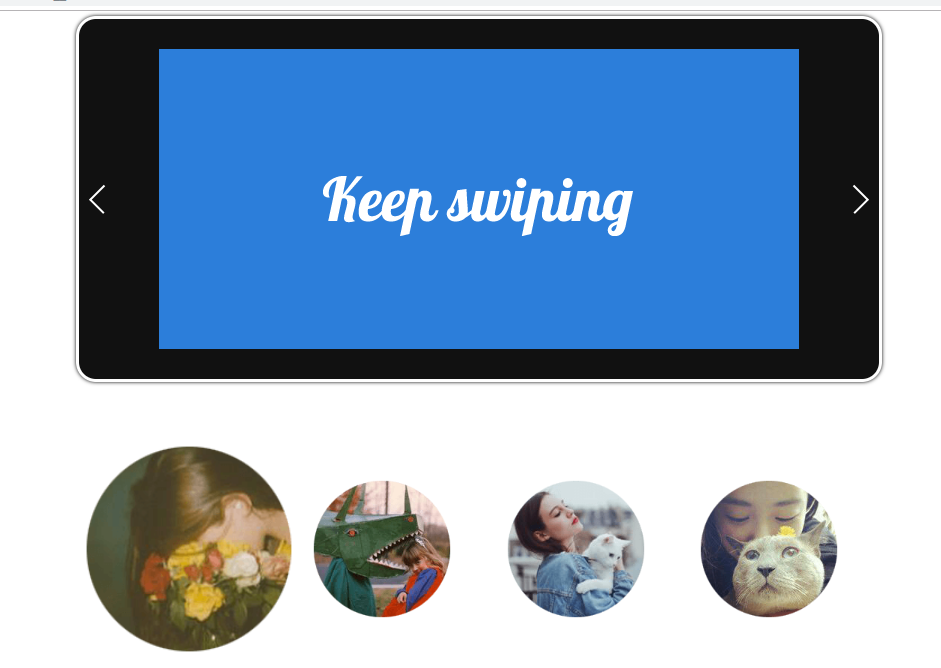
最近项目有一个需求,想要下图效果,鼠标指向头像图片,图片会放大同时上面的轮播会跟着切换;
鼠标移开头像图片,图片变回原来的大小
注:下图是我根据上面需求已经实现的效果,所以截图方便说明
思考:
然后我就想偷懒,直接去网上搜一个这样的效果,但搜了很久也没搜到,并且也不知道这个效果叫什么名字
后来仔细想想,这跟轮播不是很相似吗?只是把切换的小圆点和左右箭头换成了图片而已
以前偶然看到过某网站有类似的效果,我想应该也是用轮播改的,然后就想到结合用swiper轮播插件来实现这个效果
注:如果是在PC端上使用,并且要兼容i8及以上,要使用swiper2.0,swiper3.0开始就不支持PC端了
之前写过一篇博客简单介绍了各版本间的区别:https://www.cnblogs.com/tu-0718/p/9880272.html
问题:
在其它主流浏览器上都没有问题,但是在ie上,轮播图片和用来触发轮播切换的头像图片都无法显示,如下图
另我费解的是,我以为ie8才有这个问题,结果ie11也是这样。于是做了以下尝试
①:检查图片路径是否正确
②:检查引用的css,js路径是否正确
③:检查代码是否有编写错误,比如单词拼写错误
④:把CDN引用换成本地css,和js(我之前引用的是CDN,担心是不是ie不支持CDN)
⑤:把引入的 jquery和swiper js文件换成低版本的
⑥:把swiper 2.0官网的示例代码下载下来进行对比
⑦:检查IE浏览器是否是最新版本,有无更新
本以为通过上面的方式能够找到解决方法,然而全部宣告失败(当时我的内心是崩溃的,一万头羊驼狂奔而过)
解决:
最后,实在想不出到底是什么原因所致,正在抓狂的我,突然有一个念头一闪而过,
会不会是我这个电脑本身的ie浏览器有问题,后来我回家用自己的台式电脑试了一下,
没有任何问题,i8都能够正常显示,这下问题迎刃而解(我的天,不带这么坑的啊)
注:公司的电脑是win10,家里的电脑是win8,我觉得跟系统应该没什么关系
下面附上我的demo,为了方便大家测试,引入的文件都是CDN,只需要把图片和图片路径换一下就行了(业界良心啊23333)
<!DOCTYPE html>

<html>

    <head>

        <meta charset="UTF-8">

        <title>Demo</title>

        <link rel="stylesheet" href="https://cdn.staticfile.org/Swiper/2.7.6/idangerous.swiper.min.css" />

        <style>

            body {

                margin: 0;

                font-family: Arial, Helvetica, sans-serif;

                font-size: 13px;

                line-height: 1.5;

            }

            .device {

                position: relative;

                width: 640px;

                height: 300px;

                padding: 30px 80px;

                border-radius: 20px;

                background: #111;

                border: 3px solid white;

                margin: 5px auto;

                box-shadow: 0px 0px 5px #000;

            }

            .device .arrow-left {

                background: url(img/arrows.png) no-repeat left top;

                position: absolute;

                left: 10px;

                top: 50%;

                margin-top: -15px;

                width: 17px;

                height: 30px;

            }

            .device .arrow-right {

                background: url(img/arrows.png) no-repeat left bottom;

                position: absolute;

                right: 10px;

                top: 50%;

                margin-top: -15px;

                width: 17px;

                height: 30px;

            }

            .swiper-container {

                height: 300px;

                width: 640px;

            }

            .content-slide {

                padding: 20px;

                color: #fff;

            }

            .title {

                font-size: 24px;

                margin-bottom: 10px;

            }

            .pagination {

                position: absolute;

                left: 0;

                text-align: center;

                bottom: -250px;

                z-index: 999;

                width: 100%;

            }

            .pagination img {

                width: 150px;

                height: 150px;

                border-radius: 50%;

                margin: 0 20px;

            }

            .pagination-mouseover {

                -webkit-transform: scale(1.5);

                -webkit-transition: .5s;

                -moz-transform: scale(1.5);

                -moz-transition: .5s;

                -ms-transform: scale(1.5);

                -ms-transition: .5s;

                transform: scale(1.5);

                transition: .5s;

            }

            .pagination-mouseout {

                -webkit-transform: scale(1);

                -webkit-transition: .5s;

                -moz-transform: scale(1);

                -moz-transition: .5s;

                -ms-transform: scale(1);

                -ms-transition: .5s;

                transform: scale(1);

                transition: .5s;

            }

        </style>

    </head>

    <body>

        <div class="device">

            <a class="arrow-left" href="#"></a>

            <a class="arrow-right" href="#"></a>

            <div class="swiper-container">

                <div class="swiper-wrapper">

                    <div class="swiper-slide"> <img src="img/slider1-1.png"> </div>

                    <div class="swiper-slide"> <img src="img/slider1-2.png"> </div>

                    <div class="swiper-slide">

                        <div class="content-slide">

                            <p class="title">Slide with HTML</p>

                            <p>You can put any HTML inside of slide with any layout, not only images, even another Swiper!</p>

                        </div>

                    </div>

                    <div class="swiper-slide">

                        <div class="content-slide">

                            <p class="title">Slide with CSS</p>

                            <p>You can put any CSS inside of slide with any layout, not only images, even another Swiper!</p>

                        </div>

                    </div>

                </div>

            </div>

            <div class="pagination">

                <img src="img/1.png" />

                <img src="img/2.png" />

                <img src="img/3.png" />

                <img src="img/4.png" />

            </div>

        </div>

        <script src="https://cdn.staticfile.org/jquery/1.11.3/jquery.min.js"></script>

        <script src="https://cdn.staticfile.org/Swiper/2.7.6/idangerous.swiper.min.js"></script>

        <script>

            var mySwiper = new Swiper('.swiper-container', {

                loop: true,  //  开启无缝滚动

                grabCursor: true,  //  鼠标覆盖Swiper时指针会变成抓手形状

                paginationClickable: true

            })

            //  左右箭头切换

            $('.arrow-left').on('click', function(e) {

                e.preventDefault();

                mySwiper.swipeNext();

            })

            $('.arrow-right').on('click', function(e) {

                e.preventDefault();

                mySwiper.swipePrev();

            })

            //  鼠标移入移出

            $('.pagination img').on('mouseover', function(e) {

                $('.pagination img').removeClass('pagination-mouseover');

                $(this).addClass('pagination-mouseover');

                mySwiper.swipeNext();

                //$('.pagination img').css({"transform":"scale(1.5)","transition":"1s"});

            })

            $('.pagination img').on('mouseout', function(e) {

                $('.pagination img').removeClass('pagination-mouseout');

                $(this).addClass('pagination-mouseout');

                //$('.pagination img').css({"transform":"scale(1.5)","transition":"1s"});

            })

        </script>

    </body>

</html>
swiper轮播在ie浏览器上遇到的显示问题探索的更多相关文章
- Swiper轮播隐藏再显示后不动
公告用Swiper轮播方式,在某些不需要显示公告的页面进行隐藏,在需要展示公告的页面进行显示时候,公告不能正常轮播,在条件里加入重新设置轮播方法等网上的一些方法仍然不行,最后解决方法: this.my ...
- swiper轮播问题之一:轮播图内容为动态数据生成时轮播图无法自动轮播
本人在用H5做移动端项目中使用Swiper遇到的两个问题,因此加深了对Swiper的掌握,分享出来对刚开始接触Swiper的童鞋们或多或少会有帮助. 首先,new Swiper的初始化最 ...
- 使用Swiper轮播插件引起的探索
提到Swiper轮播插件,小伙伴们应该不会感到陌生.以前我主要在移动端上使用,PC端使用较少. 注:这里需要注意的是,在PC端和移动端使用Swiper是不同的 官方给的版本有三个,分别是Swiper2 ...
- Swiper轮播图
今天咱们来说一下.Swiper轮播图. 超级简单的: 翠花,上代码: <!DOCTYPE html> <html lang="en"> < ...
- 视频swiper轮播
关于本次文章的内容,实际上是咪咕阅读详情页中的一个前端需求要做的效果,不过比起原需求,此次案例已经被删减掉许多部分了.音频部分舍弃,调用客户端接口舍弃,并做一些整理.最后留下的是这个精简版的案例.方便 ...
- swiper轮播图(逆向自动切换类似于无限循环)
swiper插件轮播图,默认的轮播循序是会从右向左,第一张,第二张,第三张,然后肉眼可见是的从第三张从左到右倒回第一张,这样就会有些视觉体验不高, ,不过还是能够用swiper本身的特性更改成无限循环 ...
- 微信小程序_(组件)swiper轮播图
微信小程序swiper轮播图组件官方文档 传送门 Learn: swiper组件 一.swiper组件 indicator-dots:是否显示面板指示点[默认值false] autoplay:是否自动 ...
- Swiper轮播手动后不动
最近项目首页轮播图用了Swiper轮播,今天突然发现轮播图动画初始正常但是手动换过之后就不动了,解决方法有两种,具体根据采用的情况为准: 1.autoplayDisableOnInteraction: ...
- 一个页面多个bootstrip轮播以及一个页面多个swiper轮播 冲突问题
Bootstript轮播冲突 解决方法: 使用不同的id <div id="myCarousel1" class="carousel slide"> ...
随机推荐
- centos 下使用vscode 调试egg.js 注意事项
这两天在centos下,直接用vscode运行egg.js的例子.遇到个问题就是当安装了vscode-egg插件,会遇到一个现象.就是同样的代码,Windows下调试可以顺利进行,但是centos有时 ...
- hive资料
Hive基本操作 Hive 解锁操作 之前使用Hive,出现过一种情况:在代码正在执行insert into或insert overwrite时,中途手动将程序停掉,会出现卡死情况,只能执行查询操作, ...
- 201771010134杨其菊《面向对象程序设计java》第九周学习总结
第九周学习总结 第一部分:理论知识 异常.断言和调试.日志 1.捕获 ...
- P1439 最长公共子序列(nlognLCS问题)
模板 #include <iostream> #include <cstdio> using namespace std; ],loc[],b[],k,n,l,r,mid; i ...
- Codeforces 766D. Mahmoud and a Dictionary 并查集 二元敌对关系 点拆分
D. Mahmoud and a Dictionary time limit per test:4 seconds memory limit per test:256 megabytes input: ...
- 设计模式学习心得<外观模式 Facade>
外观模式(Facade Pattern)隐藏系统的复杂性,并向客户端提供了一个客户端可以访问系统的接口.这种类型的设计模式属于结构型模式,它向现有的系统添加一个接口,来隐藏系统的复杂性. 这种模式涉及 ...
- Finance财务软件(科目标签专题)
为了满足不同业务需求,对凭证中增加一些扩展内容,我们采用自定义科目标签的形式. 怎样自定义标签? 1. 增加科目掩码 这里的代码需要与模板表中tagLabel对应 这里的名称中对应掩码值,为16位整型 ...
- 20175316盛茂淞 2018-2019-2 《Java程序设计》第7周学习总结
20175316盛茂淞 2018-2019-2 <Java程序设计>第7周学习总结 教材学习内容总结 第八章 常用实用类 一.String类 String类在java.lang包中,jav ...
- Java程序设计(第二版)复习 第三章
数组的使用 首先定义,然后用new生成数组,最后通过下标访问 定义 此时只是引用还未分配内存空间,需要使用new去分配内存空间,否则是无法被访问的 定义的两种方法:数据类型 数组名[];数据类型 [] ...
- 解决ORA-30036:无法按8扩展段(在还原表空间‘XXXX’中)
在update一数据量很大的表时,提示“ORA-30036:无法按8扩展段” 度娘了下原因与解决办法: 1.查询了一下undo表空间的使用,发现已经超过了80% SELECT a.tablespa ...