
微信小程序_(组件)swiper轮播图
微信小程序swiper轮播图组件官方文档 传送门
Learn:
swiper组件
一、swiper组件
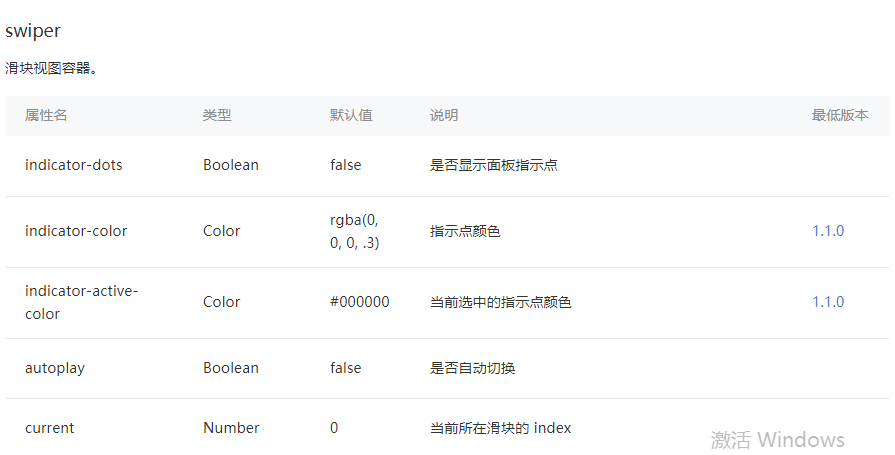
indicator-dots:是否显示面板指示点【默认值false】
autoplay:是否自动切换【默认值false】
interval:自动切换时间间隔【默认值5000】
duration:滑动动画时长【默认值500】
swiper滑块组件代码,初始化indicator-dots,autoplay,interval,duration四个属性
<swiper

  indicator-dots="{{indicatorDots}}"

  autoplay="{{autoplay}}"

  interval="{{interval}}"

  duration="{{duration}}"

>

  <block wx:for="{{imgUrls}}" wx:key="">

    <swiper-item>

      <image src="{{item}}" class="slide-image" width="355" height="150" />

    </swiper-item>

  </block>

</swiper>
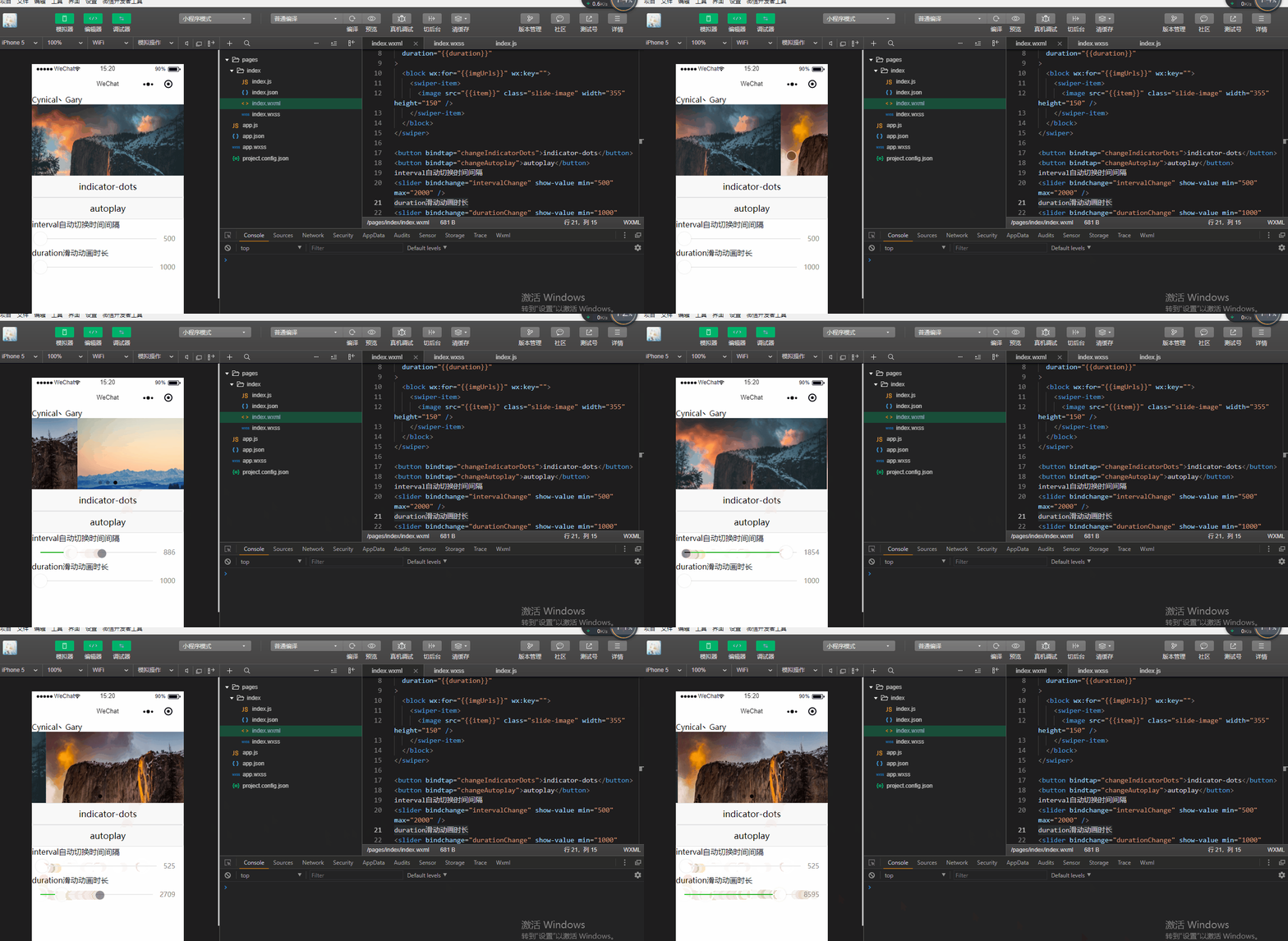
添加<button>组件绑定函数,去修改indicator-dots,autoplay,interval,duration四个属性
<button bindtap="changeIndicatorDots">indicator-dots</button>

<button bindtap="changeAutoplay">autoplay</button>

interval自动切换时间间隔

<slider bindchange="intervalChange" show-value min="500" max="2000" />

duration滑动动画时长

<slider bindchange="durationChange" show-value min="1000" max="10000" />
<!--index.wxml-->

Cynical丶Gary

<!-- 建立swiper代码块 -->

<swiper

  indicator-dots="{{indicatorDots}}"

  autoplay="{{autoplay}}"

  interval="{{interval}}"

  duration="{{duration}}"

>

  <block wx:for="{{imgUrls}}" wx:key="">

    <swiper-item>

      <image src="{{item}}" class="slide-image" width="355" height="150" />

    </swiper-item>

  </block>

</swiper>

<button bindtap="changeIndicatorDots">indicator-dots</button>

<button bindtap="changeAutoplay">autoplay</button>

interval自动切换时间间隔

<slider bindchange="intervalChange" show-value min="500" max="2000" />

duration滑动动画时长

<slider bindchange="durationChange" show-value min="1000" max="10000" />
index.html
Page({

  data: {

    imgUrls: [

      'https://images.unsplash.com/photo-1551334787-21e6bd3ab135?w=640',

      'https://images.unsplash.com/photo-1551214012-84f95e060dee?w=640',

      'https://images.unsplash.com/photo-1551446591-142875a901a1?w=640'

    ],

    indicatorDots: false,

    autoplay: false,

    interval: 5000,

    duration: 1000

  },

  changeIndicatorDots(e) {

    this.setData({

      indicatorDots: !this.data.indicatorDots

    })

  },

  changeAutoplay(e) {

    this.setData({

      autoplay: !this.data.autoplay

    })

  },

  intervalChange(e) {

    this.setData({

      interval: e.detail.value

    })

  },

  durationChange(e) {

    this.setData({

      duration: e.detail.value

    })

  }

})
index.js
微信小程序_(组件)swiper轮播图的更多相关文章
- 微信小程序中自定义swiper轮播图面板指示点的样式
重置样式: .swiper{ width: 100%; height: 240px; margin-bottom: 0.5rem; position:relative; } div.wx-swiper ...
- 【云开发】10分钟零基础学会做一个快递查询微信小程序,快速掌握微信小程序开发技能(轮播图、API请求)
大家好,我叫小秃僧 这次分享的是10分钟零基础学会做一个快递查询微信小程序,快速掌握开发微信小程序技能. 这篇文章偏基础,特别适合还没有开发过微信小程序的童鞋,一些概念和逻辑我会讲细一点,尽可能用图说 ...
- 【微信小程序】:实现轮播图3秒滚动
wxml模板:(数据一维数组) <scroll-view scroll-y="true"> <swiper autoplay="auto" i ...
- 微信小程序_(组件)icon、text、rich-text、progress四大基础组件
微信小程序基础组件官方文档 传送门 Learn 一.icon图标组件 二.rich-text富文本组件 三.text文本组件 四.progress进度条组件 一.icon图标组件 type:icon的 ...
- 微信小程序_(组件)可拖动movable-view
微信小程序movable-view组件官方文档 传送门 Learn 一.moveable-view组件 一.movable-view组件 direction:movable-view的移动方向,属性值 ...
- 微信小程序_(组件)scroll-view可滚动视图
微信小程序scroll-view组件官方文档 传送门 提前准备:使用<view>组件制作五条撑满的横向区域 <!--index.wxml--> Cynical丶Gary < ...
- 微信小程序_(组件)view视图容器
微信小程序view组件官方文档 传送门 Learn 一.hover-class属性 二.hover-start-time与hover-stay-time属性 三.hover-stop-propagat ...
- 微信小程序_(组件)picker
picker组件效果 官方文档:传送门 Page({ data: { array: ['美国', '中国', '巴西', '日本'], objectArray: [ { id: 0, name: '美 ...
- 微信小程序_(组件)组件基础
(progress.text.block) 组件基础效果 官方文档:传送门 Page({ /** * 页面的初始数据 */ data: { text:"Gary 微信小程序\n", ...
随机推荐
- 【其他】BootCDN
BootCDN 稳定.快速.免费的前端开源项目 CDN 加速服务 是 Bootstrap 中文网支持并维护的前端开源项目免费 CDN 服务,致力于为 Bootstrap.jQuery.Angular. ...
- JS基础_关系运算符
<!DOCTYPE html> <html> <head> <meta charset="UTF-8"> <title> ...
- JS和JS是IE上JavaScript或JScript的缩写。
JS和JS是IE上JavaScript或JScript的缩写.javascript是所有浏览器的开放式标准脚本语言JScript是微软自己的开放式脚本语言标准,只有微软的IE浏览器遵循.JScript ...
- ASP.NET数据库连接类(SqlDBHelper)
第一步:创建一个名为SqlDBHelper的类,用来作为联通数据库和系统之间的桥梁. 第二步:引入命名空间,如果System.Configuration.System.Transcations这两个命 ...
- EBS常用表_Dictionary
EBS常用表:转载于 https://blog.csdn.net/xiariqingcao/article/details/8775827 . OU.库存组织 SELECT hou.organizat ...
- 浅谈RPC框架
RPC(Remote Promote Call) RPC(Remote Promote Call):一种进程间通信方式.允许像调用本地服务一样调用远程服务. RPC框架的主要目标就是让远程服务调用更简 ...
- mysql8安装
1.先卸载当前系统中已安装的mariadb rpm -qa | grep mariadb rpm -e --nodeps 文件名 2.安装mysql依赖包 yum install gcc gcc-c+ ...
- JavaWeb【Servlet】
概念 Servlet是在服务器上运行的小程序.一个Servlet请求对应一个Java类(对应一个Wrapper容器),可以通过请求-响应模式访问这个驻留在内存中的小程序. Tomcat容器等级 上图表 ...
- zabbix监控项截图整理
general监控项
- Linux用户组管理及用户权限2
用户.组和权限管理 Multi-tasks,Multi-Users,多任务,多用户的计算机 每个使用者: 用户标识.密码: Authentication ...