
AUTOSAR学习之RTE - 可运行实体
本文介绍RTE的运行体(runnable)。
An AUTOSAR component defines one or more "runnable entities". A runnable entity is a piece of code with a single entry point and an associate set of data. A softwarecomponent description provides definitions for each runnable entity within the softwarecomponent.
For components implemented using C or C++ the entry point of a runnable entity is implemented by a function with global scope defined within a software-component's source code. The following sections consider the function signature and prototype.
组件内部可以定义一组运行体。每个运行体内部有一个入口和与之关联的数据。
例如:
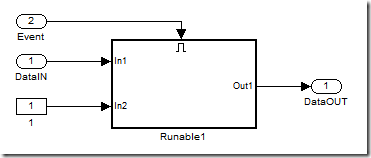
构件运行体为:
/* Model step function */

void Runnable_Component1 ( void )

{

    /* local block i/o variables */

    real_T rtb_BufferInput_InsertedFor_Dat;

    {

        uint8_T rtb_BufferInput_InsertedFor_Eve;

        /* SignalConversion: '<Root>/BufferInput_InsertedFor_DataIN_at_outport_0' incorporates:

        * Inport: '<Root>/DataIN'

        */

        rtb_BufferInput_InsertedFor_Dat = Rte_IRead_Runnable_Component1_DataINPort_Data();

        /* SignalConversion: '<Root>/BufferInput_InsertedFor_Event_at_outport_0' incorporates:

      * Inport: '<Root>/Event'

        */

        Rte_Read_EventPort_Event ( &rtb_BufferInput_InsertedFor_Eve );

        /* Outputs for enable SubSystem: '<Root>/Runable1' incorporates:

        * EnablePort: '<S1>/Enable'

        */

        if ( rtb_BufferInput_InsertedFor_Eve >  )

            {

                /* S-Function (sfun_autosar_clientop): '<S1>/BSW_ADD' incorporates:

                 * Constant: '<Root>/1'

                 */

                Rte_Call_AddPort_Add ( rtb_BufferInput_InsertedFor_Dat, Component1_P._Value, &Component1_B.BSW_ADD );

            }

        /* end of Outputs for SubSystem: '<Root>/Runable1' */

        /* SignalConversion: '<Root>/BufferOutput_InsertedFor_DataOUT_at_inport_0' */

        Rte_Write_DataOutPort_Data ( Component1_B.BSW_ADD );

    }

}
使用一个xml描述这个运行体(可以看作是定义阶段所扫描生成的),结构如下:
<RUNNABLE-ENTITY>

<SHORT-NAME>Runnable_Component1</SHORT-NAME>

<CAN-BE-INVOKED-CONCURRENTLY>false</CAN-BE-INVOKED-CONCURRENTLY>

<DATA-READ-ACCESSS>

    <DATA-READ-ACCESS>

     <SHORT-NAME>IN_DataINPort_Data</SHORT-NAME>

     <DATA-ELEMENT-IREF>

         <R-PORT-PROTOTYPE-REF DEST="R-PORT-PROTOTYPE">/SWC/Component1/DataINPort</R-PORT-PROTOTYPE-REF>

         <DATA-ELEMENT-PROTOTYPE-REF DEST="DATA-ELEMENT-PROTOTYPE">/Component1/if/MathDataInterface/Data</DATA-ELEMENT-PROTOTYPE-REF>

     </DATA-ELEMENT-IREF>

    </DATA-READ-ACCESS>

</DATA-READ-ACCESSS>

<DATA-RECEIVE-POINTS>

    <DATA-RECEIVE-POINT>

     <SHORT-NAME>IN_EventPort_Event</SHORT-NAME>

     <DATA-ELEMENT-IREF>

         <R-PORT-PROTOTYPE-REF DEST="R-PORT-PROTOTYPE">/SWC/Component1/EventPort</R-PORT-PROTOTYPE-REF>

         <DATA-ELEMENT-PROTOTYPE-REF DEST="DATA-ELEMENT-PROTOTYPE">/Component1/if/EventInterface/Event</DATA-ELEMENT-PROTOTYPE-REF>

     </DATA-ELEMENT-IREF>

    </DATA-RECEIVE-POINT>

</DATA-RECEIVE-POINTS>

<DATA-SEND-POINTS>

    <DATA-SEND-POINT>

     <SHORT-NAME>OUT_DataOutPort_Data</SHORT-NAME>

     <DATA-ELEMENT-IREF>

         <P-PORT-PROTOTYPE-REF DEST="P-PORT-PROTOTYPE">/SWC/Component1/DataOutPort</P-PORT-PROTOTYPE-REF>

         <DATA-ELEMENT-PROTOTYPE-REF DEST="DATA-ELEMENT-PROTOTYPE">/Component1/if/MathDataInterface/Data</DATA-ELEMENT-PROTOTYPE-REF>

     </DATA-ELEMENT-IREF>

    </DATA-SEND-POINT>

</DATA-SEND-POINTS>

<SERVER-CALL-POINTS>

    <SYNCHRONOUS-SERVER-CALL-POINT>

     <SHORT-NAME>SC_AddPort_Add</SHORT-NAME>

     <OPERATION-IREFS>

         <OPERATION-IREF>

             <R-PORT-PROTOTYPE-REF DEST="R-PORT-PROTOTYPE">/SWC/Component1/AddPort</R-PORT-PROTOTYPE-REF>

             <OPERATION-PROTOTYPE-REF DEST="OPERATION-PROTOTYPE">/BSW/if/BSW_ADD/Add</OPERATION-PROTOTYPE-REF>

         </OPERATION-IREF>

     </OPERATION-IREFS>

     <TIMEOUT>0.000001</TIMEOUT>

    </SYNCHRONOUS-SERVER-CALL-POINT>

</SERVER-CALL-POINTS>

<SYMBOL>Runnable_Component1</SYMBOL>

</RUNNABLE-ENTITY>
上面的<SYMBOL>Runnable_Component1</SYMBOL> 提示链接器连接这个符号。
1. 签名(Signature)
The definition of all runnable entities, whatever the RTEEvent that triggers their execution, follows the same basic form. [rte sws 1126]
<void|Std_ReturnType> <name>([IN Rte_Instance <instance>], [role parameters])
Where <name> 3 is the symbol describing the runnable's entry point rte sws in 0053. The definition of the role parameters is defined in Section 5.7.3.
所有运行体,不管是怎样触发,函数定义都是下面这个格式:
<void|Std_ReturnType> <name>([IN Rte_Instance <instance>], [role parameters])
如前面的例子:
void Runnable_Component1(void)
参数的意义为:
IN Rte_Instance <instance> - 本实体的指针,因为一个构件可以多重实例化,所以有时候必须要判断一下自己是哪个实体。
role parameters - 指明是谁触发的这个运行体,有时候一个运行体可以被多个事件触发,需要确定一下自己是哪个事件出发的。
Section 5.2.6.4 contains details on a recommended naming conventions for runnable entities based on the RTEEvent that triggers the runnable entity. The recommended naming convention makes explicit the functions that implement runnable entities as well as clearly associating the runnable entity and the applicable data element or operation.
2. 入口点原型(Entry Point Prototype)
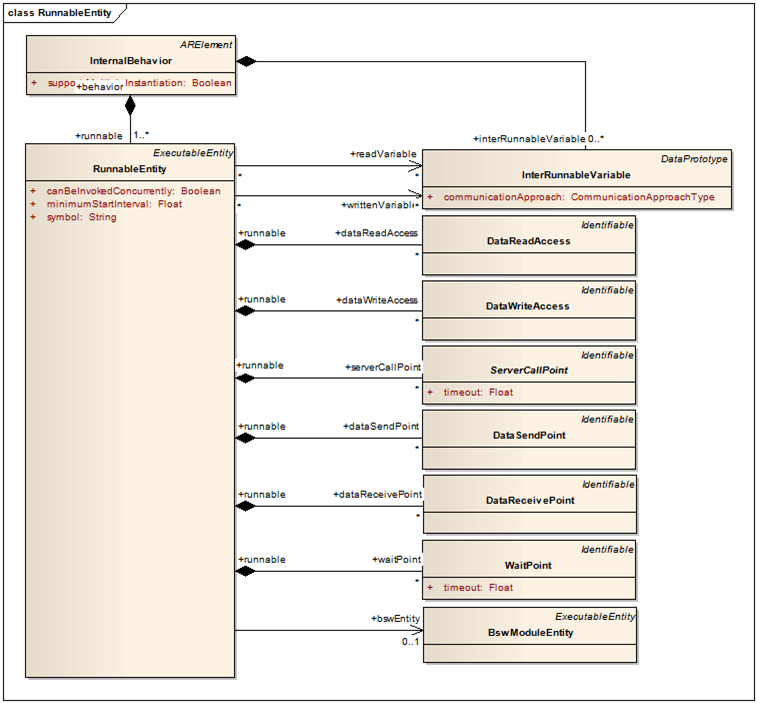
The RTE determines the required role parameters, and hence the prototype of the entry point, for a runnable entity based on information in the input information (see Appendix B). The entry point defined in the component source must be compatible with the parameters passed by the RTE when the runnable entity is triggered by the RTE and therefore the RTE generator is required to emit a prototype for the function. [rte sws 1132] The RTE generator shall emit a prototype for the runnable entity's entry point in the application header file.
RTE通过角色参数判断入口点类型,所以运行体入口必须要定义得复合参数类型,以便于RTE生成函数的触发。
The prototype for a function implementing the entry point of a runnable entity is emitted for both "RTE Contract" and "RTE Generation" phases. The function name for the prototype is the runnable entity's entry point. The prototype of the entry point function includes the runnable entity's instance handle and its role parameters, see Figure 5.2.
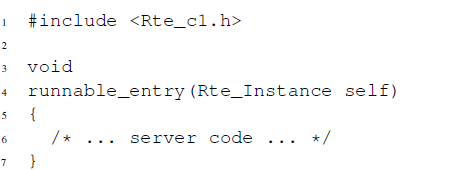
[rte sws 1016] The function implementing the entry point of a runnable entity shall define an instance handle as the first formal parameter.
第一个参数必须是组件实例。
The RTE will ensure that when the runnable entity is triggered the instance handle parameter indicates the correct component instance. The remaining parameters passed to the runnable entity depend on the RTEEvent that triggers execution of the runnable entity.
[rte sws 1130] A function implementing a runnable entity entry point shall only have the return type Std_ReturnType, if the runnable entity represents a server operation and the AUTOSAR interface description of that client server communication lists potential application errors. All other functions implementing a runnable entity entry point shall have a return type of void.
如果运行体是一个server operation,则返回正确与否,否则返回void。
[rte sws ext 2704] Only the least significant six bit of the return value of a server runnable shall be used by the application to indicate an error. The upper two bit shall be zero. See also rte sws 2573.
返回值的最高2位必须是0。
AUTOSAR学习之RTE - 可运行实体的更多相关文章
- AUTOSAR学习之RTE - 基本概念
1.什么是RTE? The Run-Time Environment (RTE) is at the heart of the AUTOSAR ECU architecture. The RTE is ...
- Adaptive AUTOSAR 学习笔记 8 - 干货小结:背景、技术、特征、架构、方法论和 Manifest
官方文档下载方式及介绍情参见 Adaptive AUTOSAR 学习笔记 2 - 官方文档下载及阅读建议. 这是 Adaptive AUTOSAR 学习笔记的第 8 篇,学习笔记 3 - 7 翻译了 ...
- python学习笔记-python程序运行
小白初学python,写下自己的一些想法.大神请忽略. 安装python编辑器,并配置环境(见http://www.cnblogs.com/lynn-li/p/5885001.html中 python ...
- Adaptive AUTOSAR 学习笔记 3 - AP 背景、技术及特征(中文翻译)
本系列学习笔记基于 AUTOSAR Adaptive Platform 官方文档 R20-11 版本.本文从AUTOSAR_EXP_PlatformDesign.pdf开始,一边学习,一边顺带着翻译一 ...
- Adaptive AUTOSAR 学习笔记 1 - Overview
缩写 AP: AUTOSAR Adaptive Platform CP: AUTOSAR Classic Platform AA: Adaptive Application ARA: AUTOSAR ...
- Adaptive AUTOSAR 学习笔记 6 - 架构 - 方法论和 Manifest
本系列学习笔记基于 AUTOSAR Adaptive Platform 官方文档 R20-11 版本 AUTOSAR_EXP_PlatformDesign.pdf 缩写 AP:AUTOSAR Adap ...
- Adaptive AUTOSAR 学习笔记 10 - 执行管理
本系列学习笔记基于 AUTOSAR Adaptive Platform 官方文档 R20-11 版本 AUTOSAR_EXP_PlatformDesign.pdf 缩写 EM:Execution Ma ...
- Adaptive AUTOSAR 学习笔记 16 - 时间同步和网络管理
本系列学习笔记基于 AUTOSAR Adaptive Platform 官方文档 R20-11 版本 AUTOSAR_EXP_PlatformDesign.pdf.作者:Zijian/TENG 原文地 ...
- MFC学习-第一课 MFC运行机制
最近由于兴趣爱好,学习了孙鑫的MFC教程的第一课.看完视频了,自己便用visual studio 2010尝试了MFC编程,其中遇到了一些问题. 1.vs2010不像vs6.0那样可以新建一个空的MF ...
随机推荐
- Mac上PyCharm运行多进程报错的解决方案
Mac上PyCharm运行多进程报错的解决方案 运行时报错 may have been in progress in another thread when fork() was called. We ...
- 大白话五种IO模型
目录 一.I/O模型介绍 二.阻塞I/O模型 2.1 一个简单的解决方案 2.2 该方案的问题 2.3 改进方案 2.4 改进后方案的问题 三.非阻塞I/O模型 3.1 非阻塞I/O实例 四.多路复用 ...
- [Vue 牛刀小试]:第十五章 - 传统开发模式下的 axios 使用入门
一.前言 在没有接触 React.Angular.Vue 这类 MVVM 的前端框架之前,无法抛弃 Jquery 的重要理由,除了优秀的前端 DOM 元素操作性以外,能够非常便捷的发起 http 请求 ...
- hive 之 Cube, Rollup介绍
1. GROUPING SETS GROUPING SETS作为GROUP BY的子句,允许开发人员在GROUP BY语句后面指定多个统维度,可以简单理解为多条group by语句通过union al ...
- CSS属性过滤
在前端领域,当我们想在ie6及以下版本和标准浏览器的样式不同我们怎么做呢 此时此刻不得不提到过滤器:即一种对特定浏览器显示和隐藏规则的声明方法 1.下划线属性过滤器 符合标准的浏览器都会忽略这个声明, ...
- windows美化工具7+ Taskbar Tweaker
今天分享一个windows美化工具 7+ Taskbar Tweaker 调整工具专为 Windows 任务栏工作者量身定制,支持 Windows 7 以及更高版本的(非服务器版)微软操作系统平台. ...
- 浅入深出Vue:注册
基本布局已经有了, 现在我们来开始做我们的注册页面~ 当然需要注册才能发表文章啊(糟老头子坏得很, 我可以只有我一个人能发啊). 这里我们设定只有注册才能发表文章,也就淡化了管理员这个概念.在开发中先 ...
- Bean property 'transactionManagerBeanName' is not writable or has an invalid set
[2017-02-07 11:38:48,458]-[localhost-startStop-1]-[org.springframework.beans.factory.support.Default ...
- mongon库加上权限认证后,java程序连接异常
现象: linux库中mongo库,用超级管理员添加了一个超级管理员,并加了认证. 通过spring等相关的配置文件获取Mongo数据库连接,抛出异常,如下: Caused by: org.sprin ...
- 拓扑排序 (Topological Sorting)
拓扑排序(Topological Sorting) 一.拓扑排序 含义 构造AOV网络全部顶点的拓扑有序序列的运算称为拓扑排序(Topological Sorting). 在图论中,拓扑排序(Topo ...