
使用bean接收ajax表单提交数据包含文件上传
这几天写带图片上传的表单提交,一个配置小程序活动弹出框样式的功能,记录一下一些需要注意的地方
首先是 前端 JSP 文件的表单
<form class="search-wrapper" id="spEsActivitydialogForm" method="post"  role="form">

      <table width="100%" class="table6" id="spEsActivitydialogTable">

       <tbody>

        <tr>

         <td>编号</td>

         <td>

             <input  type="text" name="id" id="id"  value="2" readonly="readonly" placeholder="自动生成"/>

         </td>

         <td>弹出框类型<span class="xi">*</span></td>

         <td><select name="type" id="type" msgg="弹出框类型" >

                 <option value="1">统一弹出框</option>

            </select></td>

          <td>是否显示按钮2<span class="xi">*</span></td>

          <td><select name="hasbtntwo" id="hasbtntwo" msgg="是否显示按钮2" onchange="hasbtntwoChange(this)">

                 <option value="0">否</option>

                 <option value="1">是</option>

            </select></td>

         </tr>

         <tr>

         <td>按钮一文字<span class="xi">*</span></td>

         <td><input  type="text" name="btnonetext" id="btnonetext" msgg="按钮一文字"/></td>

         <td>按钮一颜色<span class="xi">*</span></td>

         <td><input  type="text" name="btnonecolor" id="btnonecolor" msgg="按钮一颜色"/></td>

         <td>按钮二文字<span class="xi">*</span></td>

         <td><input  type="text" name="btntwotext" id="btntwotext" /></td>

         </tr>

         <tr>

         <td>按钮二颜色<span class="xi">*</span></td>

         <td><input  type="text" name="btntwocolor" id="btntwocolor" /></td>

         <td>按钮文字颜色<span class="xi">*</span></td>

         <td><input  type="text" name="btntextcolor" id="btntextcolor" msgg="按钮文字颜色"/></td>

         <td>是否显示<span class="xi">*</span></td>

          <td><select name="show" id="show" msgg="是否显示" >

                 <option value="0">否</option>

                 <option value="1">是</option>

            </select></td>

         </tr>

         <tr>

         <td>提示文字</td>

         <td><input  type="text" name="text" id="text" /></td>

         <td>提示文字颜色</td>

         <td><input  type="text" name="textcolor" id="textcolor" /></td>

         <td>模板ID<span class="xi">*</span></td>

         <td><input  type="text" name="csstemplate" id="csstemplate" class="e_number" msgg="模板ID" /></td>

         </tr>

         <tr>

         <td>开始日期</td>

         <td ><input  type="text" name="begintime" id="begintime"   class="e_ymdhms"/></td>

         <td>结束日期</td>

         <td ><input  type="text" name="endtime" id="endtime"   class="e_ymdhms"/></td>

         <td>按钮一跳转链接</td>

         <td><input  type="text" name="gopageurl" id="gopageurl" /></td>

         </tr>

         <tr>

          <td>录入日期</td>

          <td ><input  type="text" name="bookdate" id="bookdate"   class="e_ymdhms"   /></td>

          <td>录入人</td>

         <td><input  type="text" name="inputman" id="inputman" /></td>

          <td>背景图片<span class="xi">*</span></td>

         <td>

         <a href="javascript:;" class="file">选择文件<input type="file" name="picture" id="picture" accept="image/*" multiple/></a>

         <!-- <span class="showFileName" name="picture">图片上传尺寸大小</span> -->

         <span class="fileerrorTip"></span><!-- 提示 -->

         </td>

         </tr>

       </tbody>

      </table>

     </form>
然后是bean类,SpEsActivitydialog.java
public class SpEsActivitydialog implements java.io.Serializable {

    private Long id;

    private Byte type;

    private String bgimgurl;

    private Byte hasbtntwo;

    private String btnonetext;

    private String btntwotext;

    private String btntextcolor;

    private String btnonecolor;

    private String btntwocolor;

    private String text;

    private String textcolor;

    private Byte csstemplate;

    private String gopageurl;

    private Byte show;

    private Date begintime;

    private Date endtime;

    private Date bookdate;

    private Long inputmanid;

    private String inputman;

    public SpEsActivitydialog() {

    }

    public SpEsActivitydialog(Long id, Byte type, String bgimgurl,

            Byte hasbtntwo, String btnonetext, String btntwotext,

            String btntextcolor, String btnonecolor, String btntwocolor,

            String text, String textcolor, Byte csstemplate, String gopageurl,

            Byte show, Date begintime, Date endtime,Date bookdate,Long inputmanid,String inputman) {

        this.id = id;

        this.type = type;

        this.bgimgurl = bgimgurl;

        this.hasbtntwo = hasbtntwo;

        this.btnonetext = btnonetext;

        this.btntwotext = btntwotext;

        this.btntextcolor = btntextcolor;

        this.btnonecolor = btnonecolor;

        this.btntwocolor = btntwocolor;

        this.text = text;

        this.textcolor = textcolor;

        this.csstemplate = csstemplate;

        this.gopageurl = gopageurl;

        this.show = show;

        this.begintime = begintime;

        this.endtime = endtime;

        this.bookdate = bookdate;

        this.inputmanid = inputmanid;

        this.inputman = inputman;

    }

    @Id

    @Column(name = "id", unique = true, nullable = false, precision = 10, scale = 0)

    public Long getId() {

        return this.id;

    }

    public void setId(Long id) {

        this.id = id;

    }

    @Column(name = "type",  precision = 2, scale = 0)

    public Byte getType() {

        return this.type;

    }

    public void setType(Byte type) {

        this.type = type;

    }

    @Column(name = "bgimgurl", length = 500)

    public String getBgimgurl() {

        return this.bgimgurl;

    }

    public void setBgimgurl(String bgimgurl) {

        this.bgimgurl = bgimgurl;

    }

    @Column(name = "hasbtntwo",  precision = 2, scale = 0)

    public Byte getHasbtntwo() {

        return this.hasbtntwo;

    }

    public void setHasbtntwo(Byte hasbtntwo) {

        this.hasbtntwo = hasbtntwo;

    }

    @Column(name = "btnonetext", length = 15)

    public String getBtnonetext() {

        return this.btnonetext;

    }

    public void setBtnonetext(String btnonetext) {

        this.btnonetext = btnonetext;

    }

    @Column(name = "btntwotext", length = 15)

    public String getBtntwotext() {

        return this.btntwotext;

    }

    public void setBtntwotext(String btntwotext) {

        this.btntwotext = btntwotext;

    }

    @Column(name = "btntextcolor", length = 10)

    public String getBtntextcolor() {

        return this.btntextcolor;

    }

    public void setBtntextcolor(String btntextcolor) {

        this.btntextcolor = btntextcolor;

    }

    @Column(name = "btnonecolor", length = 10)

    public String getBtnonecolor() {

        return this.btnonecolor;

    }

    public void setBtnonecolor(String btnonecolor) {

        this.btnonecolor = btnonecolor;

    }

    @Column(name = "btntwocolor", length = 10)

    public String getBtntwocolor() {

        return this.btntwocolor;

    }

    public void setBtntwocolor(String btntwocolor) {

        this.btntwocolor = btntwocolor;

    }

    @Column(name = "text", length = 100)

    public String getText() {

        return this.text;

    }

    public void setText(String text) {

        this.text = text;

    }

    @Column(name = "textcolor", length = 10)

    public String getTextcolor() {

        return this.textcolor;

    }

    public void setTextcolor(String textcolor) {

        this.textcolor = textcolor;

    }

    @Column(name = "csstemplate",  precision = 2, scale = 0)

    public Byte getCsstemplate() {

        return this.csstemplate;

    }

    public void setCsstemplate(Byte csstemplate) {

        this.csstemplate = csstemplate;

    }

    @Column(name = "gopageurl", length = 30)

    public String getGopageurl() {

        return this.gopageurl;

    }

    public void setGopageurl(String gopageurl) {

        this.gopageurl = gopageurl;

    }

    @Column(name = "show",  precision = 2, scale = 0)

    public Byte getShow() {

        return this.show;

    }

    public void setShow(Byte show) {

        this.show = show;

    }

    @Temporal(TemporalType.TIMESTAMP)

    @Column(name = "begintime", length = 29)

    @DateTimeFormat(pattern = "yyyy-MM-dd HH:mm:ss")

    public Date getBegintime() {

        return this.begintime;

    }

    @JsonDeserialize(using=CustomDateDeserialize.class)

    public void setBegintime(Date begintime) {

        this.begintime = begintime;

    }

    @Temporal(TemporalType.TIMESTAMP)

    @Column(name = "endtime", length = 29)

    @DateTimeFormat(pattern = "yyyy-MM-dd HH:mm:ss")

    public Date getEndtime() {

        return this.endtime;

    }

    @JsonDeserialize(using=CustomDateDeserialize.class)

    public void setEndtime(Date endtime) {

        this.endtime = endtime;

    }

    @Temporal(TemporalType.TIMESTAMP)

    @Column(name = "bookdate", length = 29)

    @DateTimeFormat(pattern = "yyyy-MM-dd HH:mm:ss")

    public Date getBookdate() {

        return bookdate;

    }

    @JsonDeserialize(using=CustomDateDeserialize.class)

    public void setBookdate(Date bookdate) {

        this.bookdate = bookdate;

    }

    @Column(name = "inputmanid",  precision = 10, scale = 0)

    public Long getInputmanid() {

        return inputmanid;

    }

    public void setInputmanid(Long inputmanid) {

        this.inputmanid = inputmanid;

    }

    @Column(name = "inputman", length = 10)

    public String getInputman() {

        return inputman;

    }

    public void setInputman(String inputman) {

        this.inputman = inputman;

    }

}
然后是JS 中ajax提交数据
//保存表单方法

function submitForm(){

    var formData = new FormData($("#spEsActivitydialogForm")[0]); //直接把表单放入FormData()对象中

    showLoading();

        $.ajax({

            type : "POST",  //必须是POST

            url : "saveSpEsActivitydialog?"+_csrfName+"="+_csrfValue,

            data:formData,

            async: false,

            cache: false,

            contentType: false,  //必须有

            processData: false,  //必须有

            success : function(data) {

                if(data.code== 1){

                    location.href = "spEsActivitydialog";

                }else{

                    clearLoading();

                    SimplePop.alert(data.msg);

                }

            },

             error: function(){

                    clearLoading();

                    SimplePop.alert("操作失败");

                }

        });

}
最后 Controller 里配置
@ResponseBody

    @RequestMapping(value = { "/SpEsActivitydialogAPI/saveSpEsActivitydialog" }, method = {RequestMethod.GET, RequestMethod.POST })

    public ResultMsg saveSpEsActivitydialog(@RequestParam(value = "picture") MultipartFile[] picture,SpEsActivitydialog spEsActivitydialog, HttpServletRequest request) {

        ResultMsg msg = new ResultMsg(0, "操作失败");

        try {

            ...省略...

        }catch (Exception e) {

            msg =new ResultMsg(0, e.getMessage());

        }

        return msg;

    }
过程中遇到几点
传到后台一直报400错误,就是转为javabean有问题,找了很久原来是时间类型的参数传递问题,javabean里在时间类型的参数上加上这两句就成功了
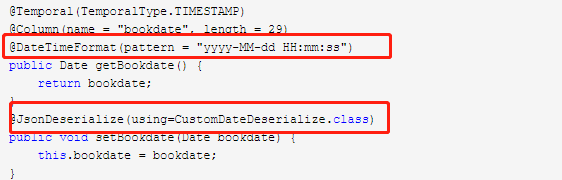
@JsonDeserialize此注解用于setter方法上,用于在反序列化时可以嵌入我们自定义的代码
贴一下 CustomDateDeserialize.class里面的代码
public class CustomDateDeserialize extends JsonDeserializer<Date> {

    private SimpleDateFormat sdf = new SimpleDateFormat("yyyy-MM-dd HH:mm:ss");

    @Override

    public Date deserialize(JsonParser jp, DeserializationContext ctxt)

            throws IOException, JsonProcessingException {

        Date date = null;

        try {

            if(!StringUtils.isBlank(jp.getText())){

                date = sdf.parse(jp.getText());

            }

        } catch (ParseException e) {

            sdf = new SimpleDateFormat("yyyy-MM-dd");

            if(jp!=null){

                try {

                    date = sdf.parse(jp.getText());

                } catch (ParseException e1) {

                }

            }

        }

        return date;

    }

}
使用bean接收ajax表单提交数据包含文件上传的更多相关文章
- Yii2表单提交(带文件上传)
今天写一个php的表单提交接口,除了基本的字符串数据,还带文件上传,不用说前端form标签内应该有这些属性 <form enctype="multipart/form-data&quo ...
- Java后台使用httpclient入门HttpPost请求(form表单提交,File文件上传和传输Json数据)
一.HttpClient 简介 HttpClient 是 Apache Jakarta Common 下的子项目,用来提供高效的.最新的.功能丰富的支持 HTTP 协议的客户端编程工具包,并且它支持 ...
- js_ajax模拟form表单提交_多文件上传_支持单个删除
需求场景: 用一个input type="file"按钮上传多张图片,可多次上传,可单独删除,最后使用ajax模拟form表单提交功能提交到指定方法中: 问题:由于只有一个file ...
- ANDROID使用MULTIPARTENTITYBUILDER实现类似FORM表单提交方式的文件上传
最近在做 Android 端文件上传,要求采用 form 表单的方式提交,项目使用的 afinal 框架有文件上传功能,但是始终无法与php写的服务端对接上,无法上传成功.读源码发现:afinal 使 ...
- 用div漂浮快实现与表单无关的多文件上传功能。
我项目有这个需求,多文件上传,而且要及时显示到表单上,这样的话就不能与表单相关. 由于我对前端不熟,我就实现了这么一个功能,通过button触发一个div漂浮块,然后多文件上传,之后通过js把文件名显 ...
- c# 模拟表单提交,post form 上传文件、大数据内容
表单提交协议规定:要先将 HTTP 要求的 Content-Type 设为 multipart/form-data,而且要设定一个 boundary 参数,这个参数是由应用程序自行产生,它会用来识别每 ...
- c# 模拟表单提交,post form 上传文件、数据内容
转自:https://www.cnblogs.com/DoNetCShap/p/10696277.html 表单提交协议规定:要先将 HTTP 要求的 Content-Type 设为 multipar ...
- 给ajax表单提交数据前面加上实体名称
有时候我们后台做了一个引用类型例如: 下面的实体以C#为例 public class Order{ public string orderId{get;set;} public OrderItem o ...
- form 表单提交数据和文件(fromdata的使用方法)
<!-- 数据和文件一次性提交 --> <form class="form_meren" id="mainForm" name="m ...
随机推荐
- windows10 双系统安装后,grub2 引导修复(亲自实验);grub2 命令行 手动加载内核;fedora 29 系统grub2引导修复;
之前在本机有fedora 29的系统,但是由于错误安装,把windows10 启动安装到 linux 所在的硬盘中,导致原来的 efi中的grub启动被破坏,不能进入到linux中:我首先通过磁盘精灵 ...
- 4.Redux学习4----react-redux
react-redux是配合redux一起使用的,其中核心组件是Provider Provider是store的提供器,用Provider则store就无需直接引入组件内,而且还可以将一个store公 ...
- 群晖NAS再再折腾
问题 最近电信把我的公网地址收回去了,之前做好的网络端口映射失效了,在公司已经不能愉快地访问家里的网络.原先网络结构示意图如下: (直接访问方案网络结构图) 只需要对电信光猫(也是个路由器)和家用 ...
- VS2019 开发Django(二)------hello world!
导航:VS2019开发Django系列 第一篇介绍了安装Django,那么,今天的主题内容是使用VS编写第一个Django应用. 1)新建Django Web项目 选择新建Django Web项目,在 ...
- Android组件体系之Activity启动模式解析
本文主要分析Activity的启动模式及使用场景. 一.Activity启动模式浅析 1.standard 标准模式,系统默认的启动模式.在启动Activity时,系统总是创建一个新的Activity ...
- weblogic的linux静默搭建
前言: Weblogic与Tomcat都是java应用的容器,而这两者有什么大的不同呢?Tomcat是Apache基金会提供的Servlet容器,它支持JSP, Servlet和JDBC等J2EE关键 ...
- C语言函数调用过程,汇编角度查看
C语言函数调用过程,汇编角度查看 把函数的参数按照调用约定压栈或者存储到寄存器中 调用要使用的函数,先把调用者的地址入栈,方便回来 跳转到函数 把函数使用到的一些寄存器压栈,避免修改寄存器的值 执行函 ...
- java开发,入职半年。对未来迷茫,如何发展
蛮多人私密我一些问题,关于面试,关于技术的,我只能说有些路只能靠自己去走,没人可以帮到自己,哪怕偶尔帮一到两次,但是技术的路这么长,总归需要自己独自成长的.附一张自己藏书的照片,与各位共勉 工作三年多 ...
- 操作mysql第一次访问速度慢(远程)
最近在使用java操作远程的mysql数据库的时候,第一次请求非常的慢,而且极其容易引起系统的崩溃报错连接超时 下面就这个问题来解决下把 ------------------------------- ...
- django找不到模板的错误处理django.template.exceptions.TemplateDoesNotExist: blog/list.html
错误提示如下图: 程序出错对于程序员而言是最常见的,一般解决的要点是看清错误提示(读懂英文很重要) 根据错误提示 blog\list.html这个文件不存在,也就是没找到资源 这个时候需要去检查有没有 ...