
NET Excel转换为集合对象
1.仅适用于规则Excel:表头和数据一一对应
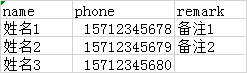
2.涉及到Excel转换为集合对象的部分代码,完整npoi帮助类点击查看
        /// <summary>

        /// 默认把excel第一个sheet中的数据转换为对象集合

        /// </summary>

        /// <typeparam name="T"></typeparam>

        /// <param name="entity"></param>

        /// <param name="filePath">文件路径</param>

        /// <param name="sheetIndex">数据所在sheet索引:默认第一个sheet</param>

        /// <param name="originIndex">数据开始行:表头行索引</param>

        /// <returns></returns>

        public static List<T> ConvertExcelToList<T>(T entity, string filePath, int sheetIndex = , int originIndex = )

            where T : class, new()

        {

            var stream = new FileStream(filePath, FileMode.Open, FileAccess.Read);

            using (stream)

            {

                return ConvertExcelToList(entity, filePath, stream, sheetIndex, originIndex);

            }

        }

        /// <summary>

        /// 把excel转换为对象集合

        /// </summary>

        /// <typeparam name="T"></typeparam>

        /// <param name="entity"></param>

        /// <param name="filePath">文件路径</param>

        /// <param name="stream">文件流</param>

        /// <param name="sheetIndex">数据所在sheet索引:默认第一个sheet</param>

        /// <param name="originIndex">数据开始行:表头行索引</param>

        /// <returns></returns>

        public static List<T> ConvertExcelToList<T>(T entity, string filePath, Stream stream, int sheetIndex = , int originIndex = )

            where T : class, new()

        {

            //  结果集合

            var list = new List<T>();

            //  获取特性和属性的关系字典

            Dictionary<string, string> propertyDictionary = GetPropertyDictionary(entity);

            var isExcel2007 = filePath.IsExcel2007();

            var workBook = stream.GetWorkbook(isExcel2007);

            //  获得数据所在sheet对象

            var sheet = workBook.GetSheetAt(sheetIndex);

            //  获取表头和所在索引的关系字典

            Dictionary<string, int> headerDictionary = GetHeaderDictionary(originIndex, propertyDictionary, sheet);

            //  两个字典对象,只有一个为空,则return

            if (!propertyDictionary.Any() || !headerDictionary.Any())

            {

                return list;

            }

            //  生成结果集合

            BuilderResultList(originIndex, list, propertyDictionary, sheet, headerDictionary);

            return list;

        }

        /// <summary>

        /// 生成结果集合

        /// </summary>

        /// <typeparam name="T"></typeparam>

        /// <param name="originIndex">数据开始行:表头行索引</param>

        /// <param name="list">结果集合</param>

        /// <param name="propertyDictionary">特性和属性的关系字典:属性字典</param>

        /// <param name="sheet">数据所在sheet对象</param>

        /// <param name="headerDictionary">表头和所在索引的关系字典:表头字典</param>

        private static void BuilderResultList<T>(int originIndex, List<T> list, Dictionary<string, string> propertyDictionary, ISheet sheet, Dictionary<string, int> headerDictionary) where T : class, new()

        {

            #region 通过反射,绑定参数

            //  从表头行下一行开始循环,直到最后一行

            for (int rowIndex = originIndex + ; rowIndex <= sheet.LastRowNum; rowIndex++)

            {

                T newEntity = new T();

                var newEntityType = newEntity.GetType();

                var itemRow = sheet.GetRow(rowIndex);

                //  循环表头字典

                foreach (var itemKey in headerDictionary.Keys)

                {

                    //  得到先对应的表头列所在列索引

                    var columnIndex = headerDictionary[itemKey];

                    //  把格式转换为utf-8

                    var itemCellValue = itemRow.GetValue(columnIndex).FormatUtf8String();

                    //  根据表头值,从 属性字典 中获得 属性值 名

                    var propertyName = propertyDictionary[itemKey];

                    newEntityType.GetProperty(propertyName).SetValue(newEntity, itemCellValue);

                }

                list.Add(newEntity);

            }

            #endregion

        }

        /// <summary>

        /// 获取表头和所在索引的关系字典

        /// </summary>

        /// <param name="originIndex">数据开始行:表头行索引</param>

        /// <param name="propertyDictionary">特性和属性的关系字典:属性字典</param>

        /// <param name="sheet">数据所在sheet对象</param>

        /// <returns></returns>

        private static Dictionary<string, int> GetHeaderDictionary(int originIndex, Dictionary<string, string> propertyDictionary, ISheet sheet)

        {

            var headerDictionary = new Dictionary<string, int>();

            #region 获取表头和所在索引的关系字典

            //  获得表头所在row对象

           var itemRow = sheet.GetRow(originIndex);

            //  记录表头行,表头和所在索引的关系,存入字典,暂不考虑表头相同情况

            headerDictionary = new Dictionary<string, int>();

            //  可能会存在无限列情况,设置最大列为200

            var cellTotal = itemRow.Cells.Count() >  ?  : itemRow.Cells.Count();

            for (int columnIndex = ; columnIndex < cellTotal; columnIndex++)

            {

                //  把格式转换为utf-8

                var itemCellValue = itemRow.GetValue(columnIndex).FormatUtf8String();

                //  itemCellValue补等于空 且 不在headerDictionary中 且 在propertyDictionary中

                if (!itemCellValue.IsNullOrWhiteSpace() && !headerDictionary.ContainsKey(itemCellValue) && propertyDictionary.ContainsKey(itemCellValue))

                {

                    headerDictionary.Add(itemCellValue, columnIndex);

                }

            }

            #endregion

            return headerDictionary;

        }

        /// <summary>

        /// 获取特性和属性的关系字典

        /// </summary>

        /// <param name="PropertyArr"></param>

        /// <returns></returns>

        private static Dictionary<string, string> GetPropertyDictionary<T>(T entity)

        {

            //  获取type

            var userType = typeof(T);

            //  获取类中所有公共属性集合

            var propertyArr = userType.GetProperties();

            #region 获取特性和属性的关系字典

            //  属性字典,保存别名和属性的对应关系

            //  key:别名,特性中的值

            //  value:属性名,类中的属性

            var propertyDictionary = new Dictionary<string, string>();

            foreach (var itemProperty in propertyArr)

            {

                //  获取属性上存在AliasAttribute的数组

                var customAttributesArr = itemProperty.GetCustomAttributes(typeof(AliasAttribute), true);

                //  存在该特性

                if (customAttributesArr.Any())

                {

                    var first = (AliasAttribute)customAttributesArr.FirstOrDefault();

                    if (!propertyDictionary.ContainsKey(first.Name))

                    {

                        propertyDictionary.Add(first.Name, itemProperty.Name);

                    }

                }

            }

            #endregion

            return propertyDictionary;

        }
3.调用测试
            var path = @"C:\导入文件.xlsx";

            var result = NpoiHelper.ConvertExcelToList(new UserDto(), path);

            Assert.IsTrue(result.Any());
NET Excel转换为集合对象的更多相关文章
- JAVA中json转换为集合(对象)之间的相互转换
字符串转换为json对象: String strResult = RestUtil.getRestContent(url+"/service/peccancy/myOrderList&quo ...
- NPOI读取Excel到集合对象
之前做过的项目中有个需要读取Excel文件内容的需求,因此使用NPOI实现,写下以下代码,这个只是一个代码段,还有很多地方需要优化,希望能对大家有所帮助 public static IList< ...
- 实体模型集合对象转换为VO对象集合
例如: 数据库中查出来的数据为 List<RptDayMonthTarget> List<RptDayMonthTarget> list = targetService.sel ...
- wpf 导出Excel Wpf Button 样式 wpf简单进度条 List泛型集合对象排序 C#集合
wpf 导出Excel 1 private void Button_Click_1(object sender, RoutedEventArgs e) 2 { 3 4 ExportDataGrid ...
- JSon_零基础_004_将Set集合对象转换为JSon格式的对象字符串,返回给界面
将Set集合对象转换为JSon格式的对象字符串,返回给界面 需要导入的jar包: 编写:servlet: package com.west.webcourse.servlet; import java ...
- JSon_零基础_003_将Map集合对象转换为JSon格式的对象字符串,返回给界面
将Map集合对象转换为JSon格式的对象字符串,返回给界面 需导入的jar包: 编写servlet: package com.west.webcourse.servlet; import java.i ...
- java 数据类型:Stream流 对象转换为集合collect(Collectors.toList()) ;常用方法count,limit,skip,concat,max,min
集合对象.stream() 获取流对象,对元素批处理(不改变原集合) 集合元素循环除了用for循环取出,还有更优雅的方式.forEach 示例List集合获取Stream对象进行元素批处理 impor ...
- 集合学习之"将集合对象List<Product>转换为Map"
将集合对象List<Product>转换为Map key = Product对象的sku value =Product对象 1 List<Product> products = ...
- JavaScript操作JSON的方法总结,JSON字符串转换为JSON对象
JSON(JavaScript Object Notation) 是一种轻量级的数据交换格式,采用完全独立于语言的文本格式,是理想的数据交换格式.同时,JSON是 JavaScript 原生格式,这意 ...
随机推荐
- QTextStream 读取文件乱码的解决办法
通常都是编码转换的问题,注意如以下红字代码那样设置正确的编码 QFile _file(_f_path); try{ if(_file.open(QIODevice::ReadOnl ...
- react 地图发布 cesium 篇
上篇文章介绍了如何搭建 react cesium 开发环境.在开发环境下,项目一切运行正常.最近把项目打包发布出来,却遇见了 cesium 不能正确初始化.打开浏览器的调试面板,出现好多 404,资源 ...
- iOS UIPopoverView的使用
UIViewController *contentViewController = [[UIViewController alloc] init]; contentViewController.vie ...
- 2_Swift基本数据类型
数字和基本数据类型 模型数据与数字,布尔值和其他基本类型. 逻辑值 struct Bool 一个值类型实例, 取值true或者flase Bool表示Swift中的布尔值.Bool通过使用其中一个布尔 ...
- 使用Flask构建一个Web应用
Flask是一个使用Python编写的轻量级Web应用框架. 一.安装Flask 以管理员身份,打开命令提示符窗口,输入下面命令 py -3 -m pip install flask 这个命令会连接到 ...
- 每天一点产品思考(5):Web端链接跳转在当前页面刷新还是新标签页打开?
一.与交互设计师的突然撕逼 今天阿白在验收产品的时候,在博客首页打开一篇博文,是在原先的页面进行刷新,而不是新开一个标签页打开.阿白让开发改成在新标签页中打开,但是开发说这是设计师设计 ...
- 比hive快10倍的大数据查询利器presto部署
目前最流行的大数据查询引擎非hive莫属,它是基于MR的类SQL查询工具,会把输入的查询SQL解释为MapReduce,能极大的降低使用大数据查询的门槛, 让一般的业务人员也可以直接对大数据进行查询. ...
- 数据库报ORA-12514
Listener refused the connection with the following error: ORA-12514, TNS:listener does not currently ...
- [Linux] 纯净ubuntu快速搭建宝塔面板
宝塔官方建议是纯净的系统,我使用docker运行一个ubuntu容器,模拟一个纯净的系统,这样也不会影响到我的其他服务. docker run --name baota -id -p 8888:888 ...
- [视频教程] ubuntu系统下以守护进程方式安装使用Redis
直接访问redis的中国官网,在下载部分,可以看到安装和使用的方式.wget http://download.redis.io/releases/redis-5.0.4.tar.gztar xzf r ...