
C# - VS2019调用ZXing.NET实现条码、二维码和带有Logo的二维码生成
前言
C# WinFrm程序调用ZXing.NET实现条码、二维码和带有Logo的二维码生成。
ZXing.NET导入
GitHub开源库
ZXing.NET开源库githib下载地址:https://github.com/zxing/zxing
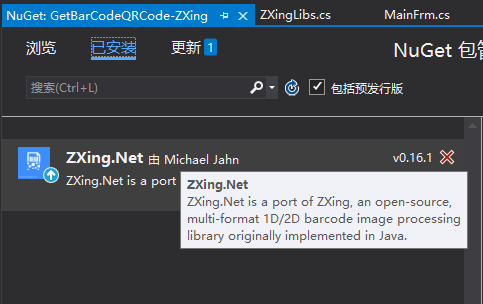
NuGet包管理
选择安装ZXing.NET v0.16.1版本。

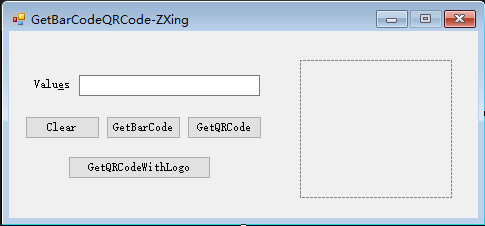
前台部署搭建
如下图,创建WinFrm桌面应用程序后,添加如下必要的控件。
封装ZXingLibs类
核心代码如下:
注意条形码暂时只支持数字(Requested contents should only contain digits, but got 'i');
只支持偶数个(The lenght of the input should be even);
码值最大长度为80(Requested contents should be less than 80 digits long, but got 102)。
 using System;

 using System.Collections.Generic;

 using System.Drawing;

 using System.Drawing.Imaging;

 using System.Linq;

 using System.Text;

 using System.Threading.Tasks;

 using ZXing;

 using ZXing.Common;

 using ZXing.QrCode;

 using ZXing.QrCode.Internal;

 namespace GetBarCodeQRCode_ZXing

 {

     /// <summary>

     /// 重新封装条码、二维码生成方法和带有图片的二维码生成方法

     /// </summary>

     public class ZXingLibs

     {

         /// <summary>

         /// 生成二维码

         /// </summary>

         /// <param name="text">内容</param>

         /// <param name="width">宽度</param>

         /// <param name="height">高度</param>

         /// <returns></returns>

         public static Bitmap GetQRCode(string text, int width, int height)

         {

             BarcodeWriter writer = new BarcodeWriter();

             writer.Format = BarcodeFormat.QR_CODE;

             QrCodeEncodingOptions options = new QrCodeEncodingOptions()

             {

                 DisableECI = true,//设置内容编码

                 CharacterSet = "UTF-8",  //设置二维码的宽度和高度

                 Width = width,

                 Height = height,

                 Margin = //设置二维码的边距,单位不是固定像素

             };

             writer.Options = options;

             Bitmap map = writer.Write(text);

             return map;

         }

         /// <summary>

         /// 生成一维条形码

         /// 只支持数字 Requested contents should only contain digits, but got 'i'

         /// 只支持偶数个 The lenght of the input should be even

         /// 最大长度80  Requested contents should be less than 80 digits long, but got 102

         /// </summary>

         /// <param name="text">内容</param>

         /// <param name="width">宽度</param>

         /// <param name="height">高度</param>

         /// <returns></returns>

         public static Bitmap GetBarCode(string text, int width, int height)

         {

             BarcodeWriter writer = new BarcodeWriter();

             //使用ITF 格式,不能被现在常用的支付宝、微信扫出来

             //如果想生成可识别的可以使用 CODE_128 格式

             //writer.Format = BarcodeFormat.ITF;

             writer.Format = BarcodeFormat.CODE_39;

             EncodingOptions options = new EncodingOptions()

             {

                 Width = width,

                 Height = height,

                 Margin =

             };

             writer.Options = options;

             Bitmap map = writer.Write(text);

             return map;

         }

         /// <summary>

         /// 生成带Logo的二维码

         /// </summary>

         /// <param name="text">内容</param>

         /// <param name="width">宽度</param>

         /// <param name="height">高度</param>

         public static Bitmap GetQRCodeWithLogo(string text, int width, int height)

         {

             //Logo 图片

             string logoPath = System.AppDomain.CurrentDomain.BaseDirectory + @"\img\logo.bmp";

             Bitmap logo = new Bitmap(logoPath);

             //构造二维码写码器

             MultiFormatWriter writer = new MultiFormatWriter();

             Dictionary<EncodeHintType, object> hint = new Dictionary<EncodeHintType, object>();

             hint.Add(EncodeHintType.CHARACTER_SET, "UTF-8");

             hint.Add(EncodeHintType.ERROR_CORRECTION, ErrorCorrectionLevel.H);

             //hint.Add(EncodeHintType.MARGIN, 2);//旧版本不起作用,需要手动去除白边

             //生成二维码

             BitMatrix bm = writer.encode(text, BarcodeFormat.QR_CODE, width + , height+, hint);

             bm = deleteWhite(bm);

             BarcodeWriter barcodeWriter = new BarcodeWriter();

             Bitmap map = barcodeWriter.Write(bm);

             //获取二维码实际尺寸(去掉二维码两边空白后的实际尺寸)

             int[] rectangle = bm.getEnclosingRectangle();

             //计算插入图片的大小和位置

             int middleW = Math.Min((int)(rectangle[] / 3.5), logo.Width);

             int middleH = Math.Min((int)(rectangle[] / 3.5), logo.Height);

             int middleL = (map.Width - middleW) / ;

             int middleT = (map.Height - middleH) / ;

             Bitmap bmpimg = new Bitmap(map.Width, map.Height, PixelFormat.Format32bppArgb);

             using (Graphics g = Graphics.FromImage(bmpimg))

             {

                 g.InterpolationMode = System.Drawing.Drawing2D.InterpolationMode.HighQualityBicubic;

                 g.SmoothingMode = System.Drawing.Drawing2D.SmoothingMode.HighQuality;

                 g.CompositingQuality = System.Drawing.Drawing2D.CompositingQuality.HighQuality;

                 g.DrawImage(map, , , width, height);

                 //白底将二维码插入图片

                 g.FillRectangle(Brushes.White, middleL, middleT, middleW, middleH);

                 g.DrawImage(logo, middleL, middleT, middleW, middleH);

             }

             return bmpimg;

         }

         /// <summary>

         /// 删除默认对应的空白

         /// </summary>

         /// <param name="matrix"></param>

         /// <returns></returns>

         private static BitMatrix deleteWhite(BitMatrix matrix)

         {

             int[] rec = matrix.getEnclosingRectangle();

             int resWidth = rec[] + ;

             int resHeight = rec[] + ;

             BitMatrix resMatrix = new BitMatrix(resWidth, resHeight);

             resMatrix.clear();

             for (int i = ; i < resWidth; i++)

             {

                 for (int j = ; j < resHeight; j++)

                 {

                     if (matrix[i + rec[], j + rec[]])

                         resMatrix[i, j] = true;

                 }

             }

             return resMatrix;

         }

     }

 }
 using System;

 using System.Collections.Generic;

 using System.ComponentModel;

 using System.Data;

 using System.Drawing;

 using System.Linq;

 using System.Text;

 using System.Threading.Tasks;

 using System.Windows.Forms;

 namespace GetBarCodeQRCode_ZXing

 {

     public partial class FrmMain : Form

     {

         public FrmMain()

         {

             InitializeComponent();

         }

         // 实例化ZXingLibs类

         public ZXingLibs zxTools = new ZXingLibs();

         /// <summary>

         /// 清空输入框内容

         /// </summary>

         /// <param name="sender"></param>

         /// <param name="e"></param>

         private void btnClear_Click(object sender, EventArgs e)

         {

             this.tbValues.Text = "";

         }

         /// <summary>

         /// 生成条码

         /// </summary>

         /// <param name="sender"></param>

         /// <param name="e"></param>

         private void btnBarCode_Click(object sender, EventArgs e)

         {

             if (this.tbValues.Text.ToString().Trim() != "")

             {

                 this.pbImage.Image = ZXingLibs.GetBarCode(this.tbValues.Text.ToString(), this.pbImage.Width, this.pbImage.Height);

             }

         }

         /// <summary>

         /// 生成二维码

         /// </summary>

         /// <param name="sender"></param>

         /// <param name="e"></param>

         private void btnQRCode_Click(object sender, EventArgs e)

         {

             if (this.tbValues.Text.ToString().Trim() != "")

             {

                 this.pbImage.Image = ZXingLibs.GetQRCode(this.tbValues.Text.ToString(), this.pbImage.Width, this.pbImage.Height);

             }

         }

         /// <summary>

         /// 生成带有Logo的二维码

         /// </summary>

         /// <param name="sender"></param>

         /// <param name="e"></param>

         private void btnGetQRCodeWithLogo_Click(object sender, EventArgs e)

         {

             this.pbImage.Image = ZXingLibs.GetQRCodeWithLogo(this.tbValues.Text.ToString(), this.pbImage.Width, this.pbImage.Height);

         }

     }

 }
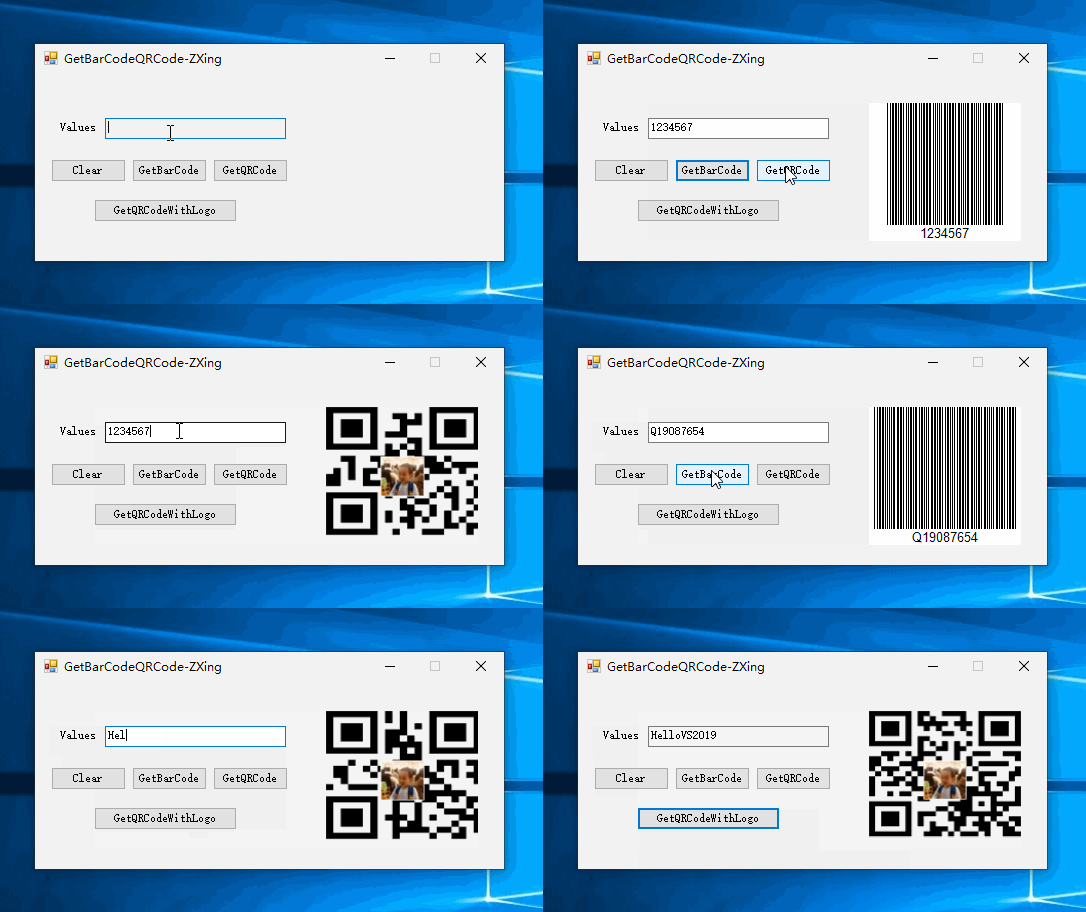
实现效果
参考资料 GitHub
作者:Jeremy.Wu
出处:https://www.cnblogs.com/jeremywucnblog/
本文版权归作者和博客园共有,欢迎转载,但未经作者同意必须保留此段声明,且在文章页面明显位置给出原文连接,否则保留追究法律责任的权利。
C# - VS2019调用ZXing.NET实现条码、二维码和带有Logo的二维码生成的更多相关文章
- C# - VS2019 WinFrm程序调用ZXing.NET实现条码、二维码和带有Logo的二维码的识别
前言 C# WinFrm程序调用ZXing.NET实现条码.二维码和带有Logo的二维码的识别. ZXing.NET导入 GitHub开源库 ZXing.NET开源库githib下载地址:https: ...
- C# 生成二维码,彩色二维码,带有Logo的二维码及普通条形码
每次写博客,第一句话都是这样的:程序员很苦逼,除了会写程序,还得会写博客!当然,希望将来的一天,某位老板看到此博客,给你的程序员职工加点薪资吧!因为程序员的世界除了苦逼就是沉默.我眼中的程序员大多都不 ...
- php--------php库生成二维码和有logo的二维码
php生成二维码和带有logo的二维码,上一篇博客讲的是js实现二维码:php--------使用js生成二维码. 今天写的这个小案例是使用php库生成二维码: 效果图: 使用了 php ...
- (转)ZXing生成二维码和带logo的二维码,模仿微信生成二维码效果
场景:移动支付需要对二维码的生成与部署有所了解,掌握目前主流的二维码生成技术. 1 ZXing 生成二维码 首先说下,QRCode是日本人开发的,ZXing是google开发,barcode4j也是老 ...
- 带有logo的二维码
摘要: 前面介绍了使用javascript生成二维码,但是这样并不能满足我们的需求,我们有时也会看到带有logo的二维码,本文就介绍如何生成带有logo的二维码. 简介: 主要使用了svg的文本和图像 ...
- Thinkphp3.2结合phpqrcode生成二维码(含Logo的二维码),附案例
首先,下载phpqrcode,将其解压到项目ThinkPHP\Library\Vendor目录下.Index_index.html(模板可自行配置) <form action="{:U ...
- 建议收藏备用:.net core使用QRCoder生成普通二维码和带Logo的二维码详细使用教程,源码已更新至开源模板
随着互联网越来越生活化,二维码的使用越来越普遍,不论是扫码支付还是扫码关注引流,似乎我们总是离不开二维码,那么很多需要推广的文章或社区想要自己的二维码,那么你是不是需要在网站直接提供给用户呢?很多开发 ...
- php 使用phpqrcode类生成带有logo的二维码 使logo不失真(透明)
在开发中 发现phpqrcode类在加入logo时,如果 logo 是 png 图像带有透明区域时,二维码上都无法正常完美的显示出来 解决方法便是:修改phpqrcode文件中的 QRimage类下的 ...
- js生成带有logo的二维码并保存成图片下载
生成二维码,需要依赖jquery,先引入一个jquery,然后需要一个插件改变过了jquery-qrcode.js 插件代码(需要的自己打开看): /*! jquery-qrcode v0.14.0 ...
随机推荐
- SPA项目搭建及嵌套路由
Vue-cli: 什么是vue-cli? vue-cli是vue.js的脚手架,用于自动生成vue.js+webpack的项目模板,创建命令如下: vue init webpack xxx 注1:xx ...
- hibernate关联关系(多对多)
数据库的多对多数据库中不能直接映射多对多 处理:创建一个桥接表(中间表),将一个多对多关系转换成两个一对多 注:数据库多表联接查询 永远就是二个表的联接查询 注2:交叉连接 注3:外连接:left(左 ...
- android studio 菜单中的app运行按钮上有个叉号,原因与解决办法(自己去百度)
http://blog.csdn.net/sz0268/article/details/51706397 : 在Android studio写代码中,直接建立项目,写代码然后运行是不会一般是不会出现这 ...
- JDBC连接mysql的url的写法和常见属性
URL=jdbc:mysql://[host][:port]/[database] 其后可以添加性能参数:?[propertyName1=propertyValue1] & [property ...
- iOS UItableview 镶嵌 collectionView ,cell 自适应高度动态布局
最近在写这个功能,之前看到很多,可是需求一直没有涉及到,大致思路是有的,发现,网上的大部分都有缺陷和bug,我也是好无语啦啦啦,也不晓得是不是升级 了xcode,一样的代码,允许的效果都不一样,,,苦 ...
- 一文解读AIoT (转)
AIoT即AI+IoT,指的是人工智能技术与物联网在实际应用中的落地融合.目前,越来越多的行业及应用将AI与IoT结合到了一起,AIoT已经成为各大传统行业智能化升级的最佳通道,也是未来物联网发展的重 ...
- C和C++中的struct的不同
C和C++中的struct的不同: (1)定义变量: C语言中: struct stu { ...... }; struct stu student; C++语言中: struct stu { . ...
- Mysql—事务原理与详解
事务的四大特性 事务的隔离级别 https://www.cnblogs.com/57rongjielong/p/8036418.html https://blog.csdn.net/zwq123211 ...
- 五分钟搞懂什么是B-树(全程图解)【转】
前戏 我们大家都知道动态查找树能够提高查找效率,比如:二叉查找树,平衡二叉查找树,红黑树.他们查找效率的时间复杂度O(log2n),跟树的深度有关系,那么怎么样才能提高效率呢?当然最快捷的方式就是减少 ...
- c++ 模板类,方法返回值类型是typedef出来的,或者是auto,那么此方法在类外面如何定义?
c++ 模板类,方法返回值类型是typedef出来的,或者是auto,那么此方法在类外面如何定义? 比如方法max1的返回值是用typedef定义出来的mint,那么在类外如何定义这个方法呢? tem ...