
C# - VS2019调用ZXing.NET实现条码、二维码和带有Logo的二维码生成
前言
C# WinFrm程序调用ZXing.NET实现条码、二维码和带有Logo的二维码生成。
ZXing.NET导入
GitHub开源库
ZXing.NET开源库githib下载地址:https://github.com/zxing/zxing
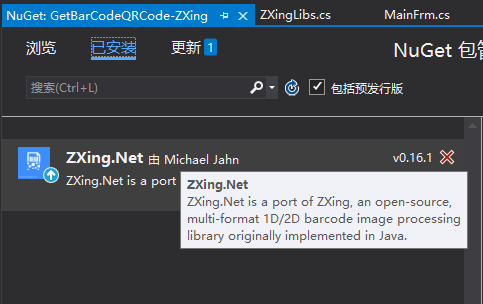
NuGet包管理
选择安装ZXing.NET v0.16.1版本。

前台部署搭建
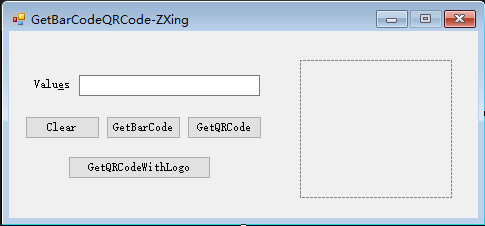
如下图,创建WinFrm桌面应用程序后,添加如下必要的控件。
封装ZXingLibs类
核心代码如下:
注意条形码暂时只支持数字(Requested contents should only contain digits, but got 'i');
只支持偶数个(The lenght of the input should be even);
码值最大长度为80(Requested contents should be less than 80 digits long, but got 102)。
 using System;

 using System.Collections.Generic;

 using System.Drawing;

 using System.Drawing.Imaging;

 using System.Linq;

 using System.Text;

 using System.Threading.Tasks;

 using ZXing;

 using ZXing.Common;

 using ZXing.QrCode;

 using ZXing.QrCode.Internal;

 namespace GetBarCodeQRCode_ZXing

 {

     /// <summary>

     /// 重新封装条码、二维码生成方法和带有图片的二维码生成方法

     /// </summary>

     public class ZXingLibs

     {

         /// <summary>

         /// 生成二维码

         /// </summary>

         /// <param name="text">内容</param>

         /// <param name="width">宽度</param>

         /// <param name="height">高度</param>

         /// <returns></returns>

         public static Bitmap GetQRCode(string text, int width, int height)

         {

             BarcodeWriter writer = new BarcodeWriter();

             writer.Format = BarcodeFormat.QR_CODE;

             QrCodeEncodingOptions options = new QrCodeEncodingOptions()

             {

                 DisableECI = true,//设置内容编码

                 CharacterSet = "UTF-8",  //设置二维码的宽度和高度

                 Width = width,

                 Height = height,

                 Margin = //设置二维码的边距,单位不是固定像素

             };

             writer.Options = options;

             Bitmap map = writer.Write(text);

             return map;

         }

         /// <summary>

         /// 生成一维条形码

         /// 只支持数字 Requested contents should only contain digits, but got 'i'

         /// 只支持偶数个 The lenght of the input should be even

         /// 最大长度80  Requested contents should be less than 80 digits long, but got 102

         /// </summary>

         /// <param name="text">内容</param>

         /// <param name="width">宽度</param>

         /// <param name="height">高度</param>

         /// <returns></returns>

         public static Bitmap GetBarCode(string text, int width, int height)

         {

             BarcodeWriter writer = new BarcodeWriter();

             //使用ITF 格式,不能被现在常用的支付宝、微信扫出来

             //如果想生成可识别的可以使用 CODE_128 格式

             //writer.Format = BarcodeFormat.ITF;

             writer.Format = BarcodeFormat.CODE_39;

             EncodingOptions options = new EncodingOptions()

             {

                 Width = width,

                 Height = height,

                 Margin =

             };

             writer.Options = options;

             Bitmap map = writer.Write(text);

             return map;

         }

         /// <summary>

         /// 生成带Logo的二维码

         /// </summary>

         /// <param name="text">内容</param>

         /// <param name="width">宽度</param>

         /// <param name="height">高度</param>

         public static Bitmap GetQRCodeWithLogo(string text, int width, int height)

         {

             //Logo 图片

             string logoPath = System.AppDomain.CurrentDomain.BaseDirectory + @"\img\logo.bmp";

             Bitmap logo = new Bitmap(logoPath);

             //构造二维码写码器

             MultiFormatWriter writer = new MultiFormatWriter();

             Dictionary<EncodeHintType, object> hint = new Dictionary<EncodeHintType, object>();

             hint.Add(EncodeHintType.CHARACTER_SET, "UTF-8");

             hint.Add(EncodeHintType.ERROR_CORRECTION, ErrorCorrectionLevel.H);

             //hint.Add(EncodeHintType.MARGIN, 2);//旧版本不起作用,需要手动去除白边

             //生成二维码

             BitMatrix bm = writer.encode(text, BarcodeFormat.QR_CODE, width + , height+, hint);

             bm = deleteWhite(bm);

             BarcodeWriter barcodeWriter = new BarcodeWriter();

             Bitmap map = barcodeWriter.Write(bm);

             //获取二维码实际尺寸(去掉二维码两边空白后的实际尺寸)

             int[] rectangle = bm.getEnclosingRectangle();

             //计算插入图片的大小和位置

             int middleW = Math.Min((int)(rectangle[] / 3.5), logo.Width);

             int middleH = Math.Min((int)(rectangle[] / 3.5), logo.Height);

             int middleL = (map.Width - middleW) / ;

             int middleT = (map.Height - middleH) / ;

             Bitmap bmpimg = new Bitmap(map.Width, map.Height, PixelFormat.Format32bppArgb);

             using (Graphics g = Graphics.FromImage(bmpimg))

             {

                 g.InterpolationMode = System.Drawing.Drawing2D.InterpolationMode.HighQualityBicubic;

                 g.SmoothingMode = System.Drawing.Drawing2D.SmoothingMode.HighQuality;

                 g.CompositingQuality = System.Drawing.Drawing2D.CompositingQuality.HighQuality;

                 g.DrawImage(map, , , width, height);

                 //白底将二维码插入图片

                 g.FillRectangle(Brushes.White, middleL, middleT, middleW, middleH);

                 g.DrawImage(logo, middleL, middleT, middleW, middleH);

             }

             return bmpimg;

         }

         /// <summary>

         /// 删除默认对应的空白

         /// </summary>

         /// <param name="matrix"></param>

         /// <returns></returns>

         private static BitMatrix deleteWhite(BitMatrix matrix)

         {

             int[] rec = matrix.getEnclosingRectangle();

             int resWidth = rec[] + ;

             int resHeight = rec[] + ;

             BitMatrix resMatrix = new BitMatrix(resWidth, resHeight);

             resMatrix.clear();

             for (int i = ; i < resWidth; i++)

             {

                 for (int j = ; j < resHeight; j++)

                 {

                     if (matrix[i + rec[], j + rec[]])

                         resMatrix[i, j] = true;

                 }

             }

             return resMatrix;

         }

     }

 }
 using System;

 using System.Collections.Generic;

 using System.ComponentModel;

 using System.Data;

 using System.Drawing;

 using System.Linq;

 using System.Text;

 using System.Threading.Tasks;

 using System.Windows.Forms;

 namespace GetBarCodeQRCode_ZXing

 {

     public partial class FrmMain : Form

     {

         public FrmMain()

         {

             InitializeComponent();

         }

         // 实例化ZXingLibs类

         public ZXingLibs zxTools = new ZXingLibs();

         /// <summary>

         /// 清空输入框内容

         /// </summary>

         /// <param name="sender"></param>

         /// <param name="e"></param>

         private void btnClear_Click(object sender, EventArgs e)

         {

             this.tbValues.Text = "";

         }

         /// <summary>

         /// 生成条码

         /// </summary>

         /// <param name="sender"></param>

         /// <param name="e"></param>

         private void btnBarCode_Click(object sender, EventArgs e)

         {

             if (this.tbValues.Text.ToString().Trim() != "")

             {

                 this.pbImage.Image = ZXingLibs.GetBarCode(this.tbValues.Text.ToString(), this.pbImage.Width, this.pbImage.Height);

             }

         }

         /// <summary>

         /// 生成二维码

         /// </summary>

         /// <param name="sender"></param>

         /// <param name="e"></param>

         private void btnQRCode_Click(object sender, EventArgs e)

         {

             if (this.tbValues.Text.ToString().Trim() != "")

             {

                 this.pbImage.Image = ZXingLibs.GetQRCode(this.tbValues.Text.ToString(), this.pbImage.Width, this.pbImage.Height);

             }

         }

         /// <summary>

         /// 生成带有Logo的二维码

         /// </summary>

         /// <param name="sender"></param>

         /// <param name="e"></param>

         private void btnGetQRCodeWithLogo_Click(object sender, EventArgs e)

         {

             this.pbImage.Image = ZXingLibs.GetQRCodeWithLogo(this.tbValues.Text.ToString(), this.pbImage.Width, this.pbImage.Height);

         }

     }

 }
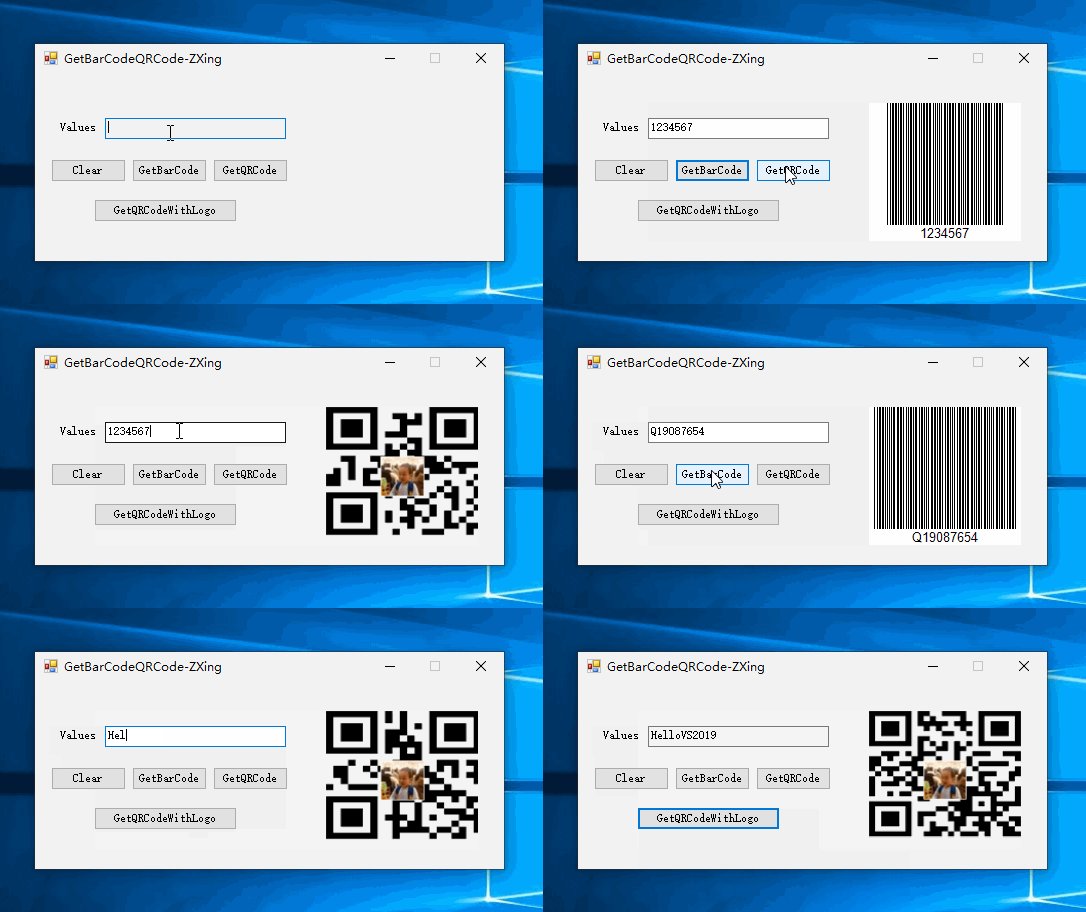
实现效果
参考资料 GitHub
作者:Jeremy.Wu
出处:https://www.cnblogs.com/jeremywucnblog/
本文版权归作者和博客园共有,欢迎转载,但未经作者同意必须保留此段声明,且在文章页面明显位置给出原文连接,否则保留追究法律责任的权利。
C# - VS2019调用ZXing.NET实现条码、二维码和带有Logo的二维码生成的更多相关文章
- C# - VS2019 WinFrm程序调用ZXing.NET实现条码、二维码和带有Logo的二维码的识别
前言 C# WinFrm程序调用ZXing.NET实现条码.二维码和带有Logo的二维码的识别. ZXing.NET导入 GitHub开源库 ZXing.NET开源库githib下载地址:https: ...
- C# 生成二维码,彩色二维码,带有Logo的二维码及普通条形码
每次写博客,第一句话都是这样的:程序员很苦逼,除了会写程序,还得会写博客!当然,希望将来的一天,某位老板看到此博客,给你的程序员职工加点薪资吧!因为程序员的世界除了苦逼就是沉默.我眼中的程序员大多都不 ...
- php--------php库生成二维码和有logo的二维码
php生成二维码和带有logo的二维码,上一篇博客讲的是js实现二维码:php--------使用js生成二维码. 今天写的这个小案例是使用php库生成二维码: 效果图: 使用了 php ...
- (转)ZXing生成二维码和带logo的二维码,模仿微信生成二维码效果
场景:移动支付需要对二维码的生成与部署有所了解,掌握目前主流的二维码生成技术. 1 ZXing 生成二维码 首先说下,QRCode是日本人开发的,ZXing是google开发,barcode4j也是老 ...
- 带有logo的二维码
摘要: 前面介绍了使用javascript生成二维码,但是这样并不能满足我们的需求,我们有时也会看到带有logo的二维码,本文就介绍如何生成带有logo的二维码. 简介: 主要使用了svg的文本和图像 ...
- Thinkphp3.2结合phpqrcode生成二维码(含Logo的二维码),附案例
首先,下载phpqrcode,将其解压到项目ThinkPHP\Library\Vendor目录下.Index_index.html(模板可自行配置) <form action="{:U ...
- 建议收藏备用:.net core使用QRCoder生成普通二维码和带Logo的二维码详细使用教程,源码已更新至开源模板
随着互联网越来越生活化,二维码的使用越来越普遍,不论是扫码支付还是扫码关注引流,似乎我们总是离不开二维码,那么很多需要推广的文章或社区想要自己的二维码,那么你是不是需要在网站直接提供给用户呢?很多开发 ...
- php 使用phpqrcode类生成带有logo的二维码 使logo不失真(透明)
在开发中 发现phpqrcode类在加入logo时,如果 logo 是 png 图像带有透明区域时,二维码上都无法正常完美的显示出来 解决方法便是:修改phpqrcode文件中的 QRimage类下的 ...
- js生成带有logo的二维码并保存成图片下载
生成二维码,需要依赖jquery,先引入一个jquery,然后需要一个插件改变过了jquery-qrcode.js 插件代码(需要的自己打开看): /*! jquery-qrcode v0.14.0 ...
随机推荐
- Promise简单使用,需要在ES6以上
//Promise延时顺序执行 var waitOne = new Promise(function(resolve, reject) { setTimeout(function(){ resolv ...
- linux守护进程start-stop-daemon启动服务
start-stop-daemon #! /bin/sh PATH=/sbin:/bin . /lib/lsb/init-functions do_start () { log_action_msg ...
- 一次Ubuntu16系统的找回root密码的过程
一 背景知识介绍 ubuntn系统的默认配置,超级用户root的密码是随机的,如果没提前对root用户的密码进行设置, 是不能直接通过root的身份来进行某些操作的,必须使用sudo命令,并通过普通用 ...
- Discuz! 全局变量说明
$_G 保存了 Discuz! 中所有的预处理数据 缓存能够很好的提高程序的性能,一些配置数据没必要每次都查询数据库,只要在修改了的时候更新下缓存即可. Discuz! 中所有的缓存保存在 $_G[c ...
- Python 字符串用法总结
一.将某个对象转换为字符串,有str()和repr()两种方法 区别:repr() 转化为供解释器读取的形式str() 转化为适于人阅读的形式 a = 123456 print('repr输出:', ...
- xwiki 知识管理系统
搭建一个知识管理平台, 用于知识库管理/规范管理, 可以作wiki, 可以将word/excel等导入进去, 支持全文搜索, 可以记周报, 会议纪要. 现在有很多文档管理系统, 比如阿里的语雀.腾讯的 ...
- crawlscrapy简单使用方法
crawlscrapy简单使用方法 1.创建项目:scrapy startproject 项目名例如:scrapy startproject wxapp windows下,cmd进入项目路径例如d:\ ...
- Vue中怎样使用swiper组件?
我用的VS Code编译器,首先打开终端,进入项目(我是在13-vue文件夹下面的elem中使用) D:\study\web\13-vue\elem> cnpm install vue-awes ...
- C++中的异常处理(上)
C++内置了异常处理的语法元素try... catch ...-try语句处理正常代码逻辑-catch语句处理异常情况-try语句中的异常由对应的catch语句处理 try { ,); } catch ...
- anaconda换源及创建虚拟环境
0x01:换源,依次输入一下两条命令 conda config --add channels https://mirrors.tuna.tsinghua.edu.cn/anaconda/pkgs/fr ...