
Core源码(三) Lazy<T>
Lazy<T>解决什么问题?
1、大对象加载
考虑下面的需求,有个对象很大,创建耗时,并且要在托管堆上分配一大块空间。我们当然希望,用到它的时候再去创建。也就是延迟加载,等到真正需要它的时候,才去加载。
显然,这里需要加一个中间层,将大对象封装起来,暴露接口,开始并不创建大对象,等到用户真正访问对象的时候,再去创建。另外,这个中间层应该可以封装不同类型的大对象,因此需要类模版。Lazy<T>就是为了解决这个问题。
典型的使用
public Lazy<AccountService> AccountServ = new Lazy<AccountService>();

public Lazy<ProductService> ProductService = new Lazy<ProductService>();
2、将委托或者方法对象保存,并在需要的时候调用。
private readonly Lazy<IDbConnection> _connectionLazy;

public CallHistoryRepository(ConnectionFactory connectionFactory)

{

    _connectionLazy = new Lazy<IDbConnection>(()=>connectionFactory.Connection);

}
一旦使用.Vale,那么对应的变量就会被实例化,IsValueCreated属性也就变成了true。
实现自己的Lazy<T>
在.NET Framework 4.0之前,大对象就是存在的,那么对于一个大型系统而言,怎么样对付一个大对象呢。主要有两点:延迟加载和即时清理。前者解决创建问题,后者解决回收问题。
那么在来看Lazy<T>的.NET Framework实现之前,我们先来自己实现一个简单的Lazy<T>吧。
class MyLazy<T> where T : new()

{

    private T value;

    private bool isLoaded;

    public MyLazy()

    {

        isLoaded = false;

    }

    public T Value

    {

        get

        {

            if (!isLoaded)

            {

                value = new T();

                isLoaded = true;

            }

            return value;

        }

    }

}
这应该是最简单版本的Lazy<T>了,没有线程安全检测,只有着访问时创建真实对象,可是对于我们一般的应用来说也许就已经足够了。
.NET Lazy<T> 实现
.NET Core和我们的实现,有两点主要的不同:
1、 引入了Boxed内部类:
[Serializable]

private class Boxed

{

    // Fields

    internal T m_value;

    // Methods

    [TargetedPatchingOptOut("Performance critical to inline this type of method across NGen image boundaries")]

    internal Boxed(T value)

    {

        this.m_value = value;

    }

}
该内部类取代了我在上面实现中的泛型约束,使之更通用。
但是我们也应该注意到,如果T为结构体,那么由于T很大,所以装箱拆箱反而也许是个更耗费效率的事情,因此,个人建议,对值类型慎用Lazy<T>。
2、 线程安全的控制
在线程安全的控制选项中,.NET Framework为我们提供了这样的枚举选项:
public enum LazyThreadSafetyMode

{

    None,

    PublicationOnly,

    ExecutionAndPublication

}
默认值为ExecutionAndPublication
枚举选项MSDN介绍如下
http://msdn.microsoft.com/en-us/library/system.threading.lazythreadsafetymode%28VS.100%29.aspx
isThreadSafe则应用于多线程环境下,如果isThreadSafe为false,那么延迟加载对象则一次只能创建于一个线程。
Lazy<T>源码
System.Runtime命名空间下
由于core中的lazy源码我只找到了下图这个,再往下lazy的实现并没找
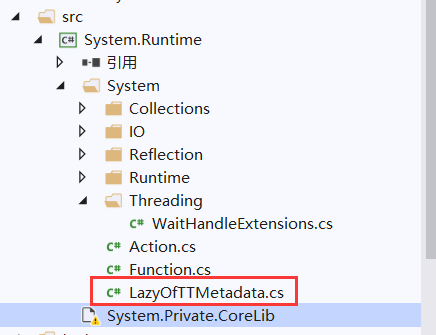
所以我使用.Net 4.5的lazy源码

一、最常使用的属性Value
[DebuggerBrowsable(DebuggerBrowsableState.Never)]

public T Value

{

    get

    {

        Boxed boxed = null;

        if (m_boxed != null )

        {

            // Do a quick check up front for the fast path.

            boxed = m_boxed as Boxed;

            if (boxed != null)

            {

                return boxed.m_value;

            }

            LazyInternalExceptionHolder exc = m_boxed as LazyInternalExceptionHolder;

            Contract.Assert(m_boxed != null);

            exc.m_edi.Throw();

        }

        return LazyInitValue();

    }

}

//null --> value is not created

//m_value is Boxed --> the value is created, and m_value holds the value

//m_value is LazyExceptionHolder --> it holds an exception

private object m_boxed;
如果m_boxed有值,就直接装箱返回对应值(这里就要注意值类型装箱的性能损失了)。这个装箱是为了检验下m_boxed的值,因为其中有可能是异常。
二、LazyInitValue方法
如果m_boxed为空,就调用LazyInitValue方法,这里有针对线程安全模式的判断
/// <summary>

/// local helper method to initialize the value

/// </summary>

/// <returns>The inititialized T value</returns>

private T LazyInitValue()

{

    Boxed boxed = null;

    LazyThreadSafetyMode mode = Mode;

    if (mode == LazyThreadSafetyMode.None)

    {

        boxed = CreateValue();

        m_boxed = boxed;

    }

    else if (mode == LazyThreadSafetyMode.PublicationOnly)

    {

        boxed = CreateValue();

        if (boxed == null ||

            Interlocked.CompareExchange(ref m_boxed, boxed, null) != null)

        {

            // If CreateValue returns null, it means another thread successfully invoked the value factory

            // and stored the result, so we should just take what was stored.  If CreateValue returns non-null

            // but we lose the ---- to store the single value, again we should just take what was stored.

            boxed = (Boxed)m_boxed;

        }

        else

        {

            // We successfully created and stored the value.  At this point, the value factory delegate is

            // no longer needed, and we don't want to hold onto its resources.

            m_valueFactory = ALREADY_INVOKED_SENTINEL;

        }

    }

    else

    {

        object threadSafeObj = Volatile.Read(ref m_threadSafeObj);

        bool lockTaken = false;

        try

        {

            if (threadSafeObj != (object)ALREADY_INVOKED_SENTINEL)

                Monitor.Enter(threadSafeObj, ref lockTaken);

            else

                Contract.Assert(m_boxed != null);

            if (m_boxed == null)

            {

                boxed = CreateValue();

                m_boxed = boxed;

                Volatile.Write(ref m_threadSafeObj, ALREADY_INVOKED_SENTINEL);

            }

            else // got the lock but the value is not null anymore, check if it is created by another thread or faulted and throw if so

            {

                boxed = m_boxed as Boxed;

                if (boxed == null) // it is not Boxed, so it is a LazyInternalExceptionHolder

                {

                    LazyInternalExceptionHolder exHolder = m_boxed as LazyInternalExceptionHolder;

                    Contract.Assert(exHolder != null);

                    exHolder.m_edi.Throw();

                }

            }

        }

        finally

        {

            if (lockTaken)

                Monitor.Exit(threadSafeObj);

        }

    }

    Contract.Assert(boxed != null);

    return boxed.m_value;

}
三、CreateValue方法
返回一个实例对象T,采用传入的func方法,这里会对是否已经返回做出判断,如果已经返回,就返回null
/// <summary>Creates an instance of T using m_valueFactory in case its not null or use reflection to create a new T()</summary>

/// <returns>An instance of Boxed.</returns>

private Boxed CreateValue()

{

    Boxed boxed = null;

    LazyThreadSafetyMode mode = Mode;

    if (m_valueFactory != null)

    {

        try

        {

            // check for recursion

            if (mode != LazyThreadSafetyMode.PublicationOnly && m_valueFactory == ALREADY_INVOKED_SENTINEL)

                throw new InvalidOperationException(Environment.GetResourceString("Lazy_Value_RecursiveCallsToValue"));

            Func<T> factory = m_valueFactory;

            if (mode != LazyThreadSafetyMode.PublicationOnly) // only detect recursion on None and ExecutionAndPublication modes

            {

                m_valueFactory = ALREADY_INVOKED_SENTINEL;

            }

            else if (factory == ALREADY_INVOKED_SENTINEL)

            {

                // Another thread ----d with us and beat us to successfully invoke the factory.

                return null;

            }

            boxed = new Boxed(factory());

        }

        catch (Exception ex)

        {

            if (mode != LazyThreadSafetyMode.PublicationOnly) // don't cache the exception for PublicationOnly mode

                m_boxed = new LazyInternalExceptionHolder(ex);

            throw;

        }

    }

    else

    {

        try

        {

            boxed = new Boxed((T)Activator.CreateInstance(typeof(T)));

        }

        catch (System.MissingMethodException)

        {

            Exception ex = new System.MissingMemberException(Environment.GetResourceString("Lazy_CreateValue_NoParameterlessCtorForT"));

            if (mode != LazyThreadSafetyMode.PublicationOnly) // don't cache the exception for PublicationOnly mode

                m_boxed = new LazyInternalExceptionHolder(ex);

            throw ex;

        }

    }

    return boxed;

}
Core源码(三) Lazy<T>的更多相关文章
- 一起来看CORE源码(一) ConcurrentDictionary
先贴源码地址 https://github.com/dotnet/corefx/blob/master/src/System.Collections.Concurrent/src/System/Col ...
- 一个由正则表达式引发的血案 vs2017使用rdlc实现批量打印 vs2017使用rdlc [asp.net core 源码分析] 01 - Session SignalR sql for xml path用法 MemCahe C# 操作Excel图形——绘制、读取、隐藏、删除图形 IOC,DIP,DI,IoC容器
1. 血案由来 近期我在为Lazada卖家中心做一个自助注册的项目,其中的shop name校验规则较为复杂,要求:1. 英文字母大小写2. 数字3. 越南文4. 一些特殊字符,如“&”,“- ...
- ASP.NET Core[源码分析篇] - Authentication认证
原文:ASP.NET Core[源码分析篇] - Authentication认证 追本溯源,从使用开始 首先看一下我们通常是如何使用微软自带的认证,一般在Startup里面配置我们所需的依赖认证服务 ...
- ASP.NET Core源码学习(一)Hosting
ASP.NET Core源码的学习,我们从Hosting开始, Hosting的GitHub地址为:https://github.com/aspnet/Hosting.git 朋友们可以从以上链接克隆 ...
- asp.net core源码地址
https://github.com/dotnet/corefx 这个是.net core的 开源项目地址 https://github.com/aspnet 这个下面是asp.net core 框架 ...
- ASP.NET Core[源码分析篇] - WebHost
_configureServicesDelegates的承接 在[ASP.NET Core[源码分析篇] - Startup]这篇文章中,我们得知了目前为止(UseStartup),所有的动作都是在_ ...
- ASP .NET CORE 源码地址
ASP .NET CORE 源码地址:https://github.com/dotnet/ 下拉可以查找相应的源码信息, 例如:查找 ASP .NET CORE Microsoft.Extension ...
- DOTNET CORE源码分析之IOC容器结果获取内容补充
补充一下ServiceProvider的内容 可能上一篇文章DOTNET CORE源码分析之IServiceProvider.ServiceProvider.IServiceProviderEngin ...
- AQS源码三视-JUC系列
AQS源码三视-JUC系列 前两篇文章介绍了AQS的核心同步机制,使用CHL同步队列实现线程等待和唤醒,一个int值记录资源量.为上层各式各样的同步器实现画好了模版,像已经介绍到的ReentrantL ...
随机推荐
- Django信号机制相关解释与示例
Django 信号# django自带一套信号机制来帮助我们在框架的不同位置之间传递信息.也就是说,当某一事件发生时,信号系统可以允许一个或多个发送者(senders)将通知或信号(signals)发 ...
- Git教程---由浅入深
初学者很难找到一个由浅入深,学完后能立刻上手的Git教程 Git用户 V&Git专家 Git是一个工具,是目前世界上最先进的分布式版本控制系统(没有之一). 集中式的版本控制系统 V& ...
- vue组件化思想和模块化
组件化 注册组件的基本步骤 创建组件构造器 (调用Vue.extend()方法) 注册组件 (调用Vue.component()方法) 注册组件语法糖 省去了调用Vue.extend()的步骤,而是可 ...
- 【Git教程】如何清除git仓库的所有提交记录,成为一个新的干净仓库
一.引言 马三也算Github的忠实用户了,经常会把一些练手的项目传到Github上面进行备份.其中有一个名为ColaFramework的Unity框架项目,马三开发了一年多了,期间提交代码的时候在L ...
- AES 对称加密
package com.skynet.rimp.common.utils.string; import java.io.UnsupportedEncodingException; import jav ...
- JS 实现动态轮播图
JavaScript实现轮播图思路 + html/css + js源码 整个轮播图的效果是通过js代码,操作dom, 拿到html我们需要的元素,控制整个ul的距离浏览器左边的位置,让排好的图片依次出 ...
- 线程队列queue的使用
其实线程队列queue跟进程Queue的用法一样. 一.先进先出 import queue q = queue.Queue() q.put('kobe') q.put('cxk') print(q.g ...
- vscod如何自定义 python虚拟环境
参考文档:https://code.visualstudio.com/docs/python/environments 1.创建虚拟环境,cd到当前目录 py -3 -m venv env 2.Ctr ...
- Flask 教程 第八章:粉丝
本文翻译自The Flask Mega-Tutorial Part VIII: Followers 这是Flask Mega-Tutorial系列的第八部分,我将告诉你如何实现类似于Twitter和其 ...
- 为做了面向互联网部署(IFD)的Dynamics 365定制登录账号格式
我是微软Dynamics 365 & Power Platform方面的工程师罗勇,也是2015年7月到2018年6月连续三年Dynamics CRM/Business Solutions方面 ...