
maven私服的配置使用
maven的仓库分为本地仓库,远程仓库和私服仓库。
私服仓库一般是公司内部私有的,内部进行维护的。公司员工连接私服,从私服中下载jar,或者将自身的jar传到私服上。私服还可以从中央仓库下载jar,当私服中没用jar的时候,就会从中央仓库下载。
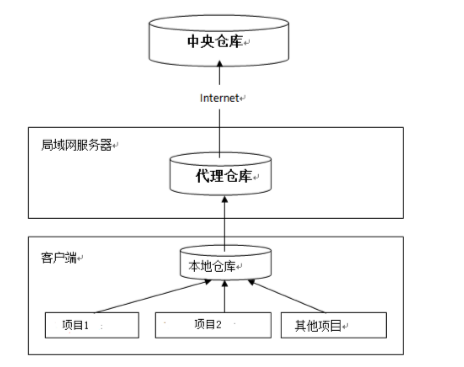
搭建私服
下载
下载 Nexus,下载地址:http://www.sonatype.org/nexus/archived/ 。
可以选择zip和tar,分别对应windows和linux。
安装
将下载的zip解压,使用cmd进入bin目录,执行命令:
nexus.bat install
卸载
执行命令:
nexus.bat uninstall
启动
1、cmd进入目录,执行命令
nexus.bat start
2、在服务中找到nexus,右键启动
nexus配置文件详细
查看 nexus 的配置文件conf/nexus.properties
application-port=8081 # nexus 的访问端口配置
application-host=0.0.0.0 # nexus 主机监听配置(不用修改)
nexus-webapp=${bundleBasedir}/nexus # nexus 工程目录
nexus-webapp-context-path=/nexus # nexus 的 web 访问路径
nexus-work=${bundleBasedir}/../sonatype-work/nexus # nexus 仓库目录
runtime=${bundleBasedir}/nexus/WEB-INF # nexus 运行程序目录
访问私服
http://localhost:8081/nexus/
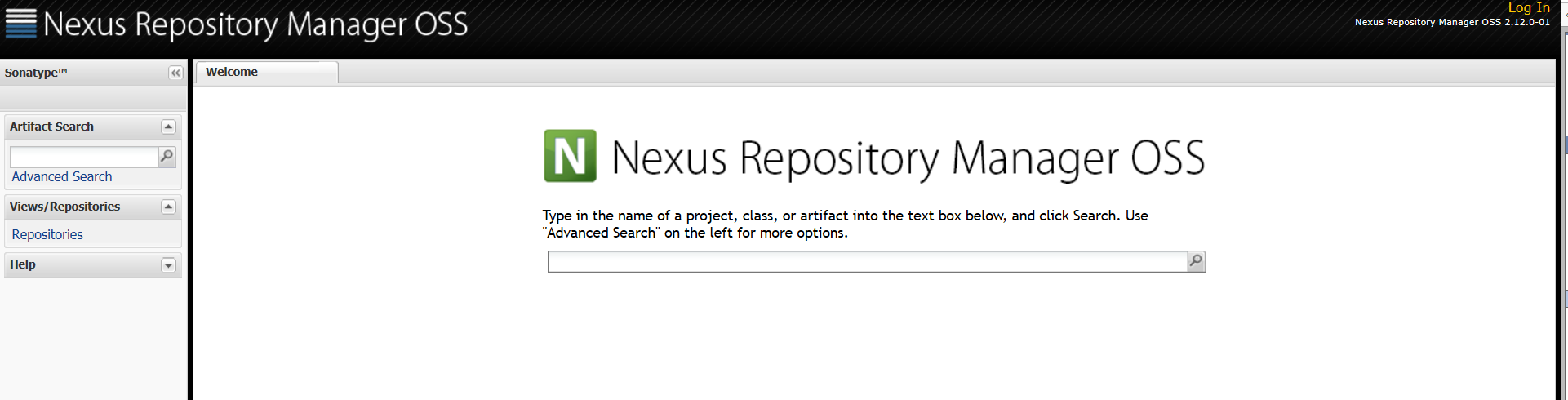
点击右上角log in,输入用户名和密码
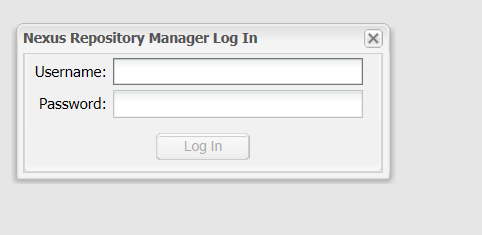
默认是admin/admin123
登录完毕

上传jar包到私服
在maven的setting.xml中配置
    <server>

      <id>releases</id>

      <username>admin</username>

      <password>admin123</password>

    </server>

    <server>

      <id>snapshots</id>

      <username>admin</username>

      <password>admin123</password>

    </server>
配置项目的pom文件
    <distributionManagement>

        <repository>

            <id>releases</id>

            <url>http://localhost:8081/nexus/content/repositories/releases/</url>

        </repository>

        <snapshotRepository>

            <id>snapshots</id>

            <url>http://localhost:8081/nexus/content/repositories/snapshots/</url>

        </snapshotRepository>

    </distributionManagement>
使用deploy命令即可将jar发布到私服,发布工程中的version,如果以snapshot结尾,则可以发布到快照仓库,如果以release结尾,则可以发布到releases版本。
从私服下载jar包
在setting中配置私服仓库
<profile>

 <!--profile 的 id-->

   <id>dev</id>

    <repositories>

      <repository>

  <!--仓库 id,repositories 可以配置多个仓库,保证 id 不重复-->

        <id>nexus</id>

  <!--仓库地址,即 nexus 仓库组的地址-->

        <url>http://localhost:8081/nexus/content/groups/public/</url>

  <!--是否下载 releases 构件-->

        <releases>

          <enabled>true</enabled>

        </releases>

  <!--是否下载 snapshots 构件-->

        <snapshots>

          <enabled>true</enabled>

        </snapshots>

      </repository>

    </repositories>

  <pluginRepositories>

     <!-- 插件仓库,maven 的运行依赖插件,也需要从私服下载插件 -->

        <pluginRepository>

         <!-- 插件仓库的 id 不允许重复,如果重复后边配置会覆盖前边 -->

            <id>public</id>

            <name>Public Repositories</name>

            <url>http://localhost:8081/nexus/content/groups/public/</url>

        </pluginRepository>

    </pluginRepositories>

 </profile>
激活
  <activeProfiles>

    <activeProfile>dev</activeProfile>

  </activeProfiles>
maven私服的配置使用的更多相关文章
- maven私服客户端配置
<?xml version="1.0" encoding="UTF-8"?> <settings xmlns="http://mav ...
- maven私服搭建
一.软件安装 地址:http://www.sonatype.org/nexus/thank-you-for-downloading/?dl=tgz 解压: 启动: >> nexus sta ...
- 【运维技术】Nexus私服安装配置常用问题
maven私服安装配置 软件安装及基本配置 安装配置 # 安装jdk,参考其他教程 mkdir -p /app/nexus2 # 创建目录 wget https://download.sonatype ...
- 【linux】【maven】maven及maven私服安装
前言 系统环境:Centos7.jdk1.8 私服是一种特殊的远程仓库,它是架设在局域网内的仓库服务,私服代理广域网上的远程仓库,供局域网内的用户使用.当Maven需要下载构件的时候,它从私服请求,如 ...
- Gradle系列之从零搭建Maven私服库
原文发于微信公众号 jzman-blog,欢迎关注交流. 前面几篇文章学习了 Gradle 相关知识,Gradle 系列文章如下: Gradle系列之初识Gradle Gradle之Groovy基础篇 ...
- Maven 私服配置 转
1.配置Nexus为maven的私服 第一种方式:在项目的POM中如下配置 <repositories> <repository> <id> ...
- 配置maven从自己的私服下载jar包nexus、maven私服仓库(二)
配置maven项目从私服下载jar包 pom文件配置从maven私服下载jar包 settings文件配置从maven私服下载jar包 (方便自己关键字搜索,所以多写了几行o(* ̄︶ ̄*)o) 今天自 ...
- maven私服 Nexus2.x.x私服安装配置
一.Nexus的下载和安装 1.下载nexus ,下载地址:https://www.sonatype.com/download-oss-sonatype 2.打开目录nexus-2.x.x-xx-b ...
- Maven的下载,安装,配置,测试,初识以及Maven私服
:Maven目录分析 bin:含有mvn运行的脚本 boot:含有plexus-classworlds类加载器框架 conf:含有settings.xml配置文件 lib:含有Maven运行时所需要的 ...
随机推荐
- webpack学习2.1 模块化开发(JS模块化&CSS模块化)
一.JS模块化 命名空间,COMMONJS,AMD/CMD/UMD,ES6 module 1.什么是命名空间 库名.类别名.方法名 弊端:在命名空间重复生命,要记住完整的路径名(而且很长) var N ...
- NodeJS3-2基础API----Buffer(缓冲器)
Buffer(缓冲器) Buffer是用于处理二进制数据流的 实例类似整数数组,大小固定(实例化之后,是多大就多大,不能进行变更) C++代码在V8 对外分配物理内存 Buffer是全局变量,没必要使 ...
- Spring Cloud第十一篇 | 分布式配置中心高可用
本文是Spring Cloud专栏的第十一篇文章,了解前十篇文章内容有助于更好的理解本文: Spring Cloud第一篇 | Spring Cloud前言及其常用组件介绍概览 Spring Cl ...
- ubuntu19_nginx_uwsgi_flask_apt安装
ubuntu19_nginx_uwsgi_flask_apt安装 转载注明来源: 本文链接 来自osnosn的博客,写于 2019-12-21. 在 ubuntu 19.04 apt 安装 apt i ...
- 简单实用的git命令
1.下载项目 先进入目录然后使用jit $ git clone +"url" 2.项目配置 $ composer install 3.上传项目 $ git add . () $ g ...
- centos7配置Memcached
Memcached是一套分布式的高速缓存系统,用于提升网站访问速度,尤其对于一些大型的.需要频繁访问数据库的网站,访问速度提升效果十分显著. 1.安装memcached yum install mem ...
- Sublime Merge真正的Git客户端
Sublime Merge好用吗?借助功能强大的跨平台UI工具包,无与伦比的语法高亮引擎和自定义高性能Git读取库,Sublime Merge为性能设定了标准.所有内容都是可扩展的.键绑定,菜单,主题 ...
- WebShell代码分析溯源(七)
WebShell代码分析溯源(七) 一.一句话变形马样本 <?php $e = $_REQUEST['e'];$arr = array($_POST['POST'],);array_map(ba ...
- 精通awk系列(11):awk的工作流程
回到: Linux系列文章 Shell系列文章 Awk系列文章 awk工作流程 参考自:man awk的"AWK PROGRAM EXECUTION"段. man --pager= ...
- 「SAP技术」如何看Z移动类型是复制哪个标准移动类型而创建的?
[SAP技术]SAP MM 如何看一个自定义移动类型是复制哪个标准移动类型而创建的? 比如项目上有一个自定义移动类型Z59,是复制551移动类型而定义的. OMJJ配置界面里,是有一个Ref字段.如下 ...