
Maven 私服配置 转
1、配置Nexus为maven的私服
第一种方式:在项目的POM中如下配置
<repositories>

    <repository>

        <id>nexus_public</id>

        <url>http://localhost:8081/nexus/content/groups/public/</url>

        <releases>

            <enabled>true</enabled>

        <releases>

        <snapshots>

          <enabled>true</enabled>

        <snapshots>

      </repository>

  </repositories>

  <pluginRepositories>

      <pluginRepository>

               <id>nexus_public</id>

               <url>http://localhost:8081/nexus/content/groups/public/</url>

                <releases>

                       <enabled>true</enabled>

                 <releases>

                 <snapshots>

                       <enabled>true</enabled>

                 </snapshots>

        </pluginRepository>

   </pluginRepositories>
注意:这样的配置(第一个仓库是代码库,第二个是插件库)只对当前的Maven项目有效。实际的项目开发中,我们都想着一次配置就能让本机的所有Maven项目都使用Maven私服,那么我们就要用到下面的方法。
第二种方式:在settings.xml中如下配置:
<settings>

...

    <profiles>

        <profile>

            <id>nexus</id>

            <repositories>

                <repository>

                    <id>nexus_public</id>

                    <url>http://localhost:8081/nexus/content/groups/public/</url>

                    <releases>

                        <enabled>trueenabled>

                    </releases>

                    <snapshots>

                    <enabled>true</enabled>

                </snapshots>

            </repository>

        </repositories>

        <pluginRepositories>

            <pluginRepository>

                <id>nexus_public</id>

                <url>http://localhost:8081/nexus/content/groups/public/</url>

                <releases>

                    <enabled>true</enabled>

                </releases>

                <snapshots>

                    <enabled>true</enabled>

                </snapshots>

             </pluginRepository>

        </pluginRepositories>

    </profile>

</profiles>

<activeProfiles>

    <activeProfile>nexus</activeProfile>

</activeProfiles>

...

settings>
Maven提供的profile是一组可选的配置,可以用来设置或者覆盖配置默认值。有了profile,你就可以为不同的环境定制构建。
上面的配置中,使用了一个id为nexus的profile,这个profile包含了相关的仓库配置,同时配置中又使用了activeProfiles元素将nexus这个profile激活,这样当执行Maven构建的时候,激活的profile会将仓库配置应用到项目中去。
通过上面的配置,我们会发现Maven不仅会从Nexus下载构件外还会从中央仓库下载构件构件,为什么呢?因为超级POM文件定义了一个为central的远程仓库,如果这个ID没有被覆盖,那么请求下载构件时还可能会从central标识的远程仓库下载。既然是私服,那么我们就只希望Maven下载请求都仅仅通过Nexus。我们可以通过镜像实现这一需求。可以创建一个匹配任何仓库的镜像,镜像的地址是私服,这样Maven对任何仓库的构件下载请求都会转到私服中。
central的意思其实是重写了超级POM的资源库,那么这里通过重写导致覆盖,重要的是,镜像效果导致直接走镜像,而不会去理会这些资源库配置了,所以基本上url也失去了意义。不过对于快照和发布版本是否进行更新下载还是要靠这个配置来决定的,只有这个配置决定继续更新时才会走镜像下载资源,镜像其实是像在镜像内部寻找资源,如果没有则会在镜像配置的远程仓库下载资源到镜像中。
把上面的配置修改为如下配置:
<settings>

...

<mirrors>

    <mirror>

        <id>local_mirror</id>

        <mirrorOf>*</mirrorOf>

        <name>local_mirror</name>

        <url>http://localhost:8081/nexus/content/groups/public/</url>

    </mirror>

</mirrors>

<profiles>

    <profile>

         <id>nexus</id>

        <repositories>

        <repository>

            <id>central</id>

            <url>http://repo.maven.apache.org/maven2</url>

            <releases>

                <enabled>true</enabled>

            </releases>

            <snapshots>

                <enabled>true</enabled>

            </snapshots>

        </repository>

        <pluginRepositories>

            <pluginRepository>

                <id>central</id>

                <url>http://repo.maven.apache.org/maven2</url>

                <releases>

                    <enabled>true</enabled>

                </releases>

                <snapshots>

                    <enabled>true</enabled>

                </snapshots>

             </pluginRepository>

        </pluginRepositories>

    </profile>

</profiles>

<activeProfiles>

    <activeProfile>nexus</activeProfile>

</activeProfiles>

...

</settings>
注意:以上两种方法都是配置下载的地址,也就是说项目需要下载插件时、下载代码时请求的地址。如果想要上传自己的代码,那么还需要如下配置,也就是部署构件到私服。
2、部署构件到私服
我们在实际开发过程是多个人的,那么总有一些公共模块或者说第三方构件是无法从Maven中央库下载的。我们需要将这些构件部署到私服上,供其他开发人员下载。用户可以配置Maven自动部署构件至Nexus的宿主仓库,也可以通过界面手动上传构件。
第一种方式:使用Maven部署构件到Nexus私服上
日常开发的快照版本部署到Nexus中策略为Snapshot的宿主仓库中,正式项目部署到策略为Release的宿主仓库中,POM的配置方式如下(这个配置文件同样可以写在settings.xml文件中):
<distributionManagement>

    <repository>

        <id>local_nexus_releases</id>

        <name>core Release Repository</name>

        <url>http://localhost:8081/nexus/content/repositories/releases/</url>

    </repository>

    <snapshotRepository>

        <id>local_nexus_snapshots</id>

        <name>core Snapshots Repository</name>

        <url>http://localhost:8081/nexus/content/repositories/snapshots/</url>

    </snapshotRepository>

</distributionManagement>
Nexus的仓库对于匿名用户只是只读的。为了能够部署构件,我们还需要再settings.xml中配置验证信息(其中,验证信息中service的id应该与POM中repository的id一致):
<servers>

    <server>

        <id>local_nexus_releases</id>

        <username>admin</username>

        <password>admin123</password>

    </server>

    <server>

        <id>local_nexus_snapshots</id>

        <username>admin</username>

        <password>admin123</password>

</server>

</servers>
第二种方式:在Nexus界面上手动部署第三方构件至私服
我们除了自己的构件要部署到Nexus私服上外,我们有可能还要将第三方构件(如:SQLService的JDBC)部署到Nexus上。这个时候,在Nexus界面上选择一个宿主仓库(如3rd party),再在页面下方选择Artifact Upload选项卡。填写对应的Maven坐标。然后点击“Select Artifact(s) for Upload”按钮从本机选择要上传的构件,然后点击“Add Artifact”按钮将其加入到上传列表中。最后,单击页面底部的“Upload Artifact(s)”按钮将构件上传到仓库中。
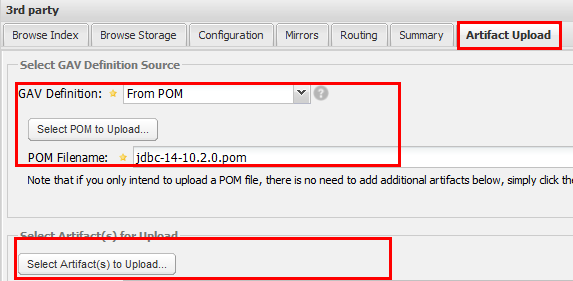
上传成功之后,就可以查看结果了:

测试附件信息
<?xml version="1.0" encoding="UTF-8"?>
<project xsi:schemaLocation="http://maven.apache.org/POM/4.0.0 http://maven.apache.org/xsd/maven-4.0.0.xsd" xmlns="http://maven.apache.org/POM/4.0.0"
xmlns:xsi="http://www.w3.org/2001/XMLSchema-instance">
<modelVersion>4.0.0</modelVersion>
<groupId>oracle.ojdbc</groupId>
<artifactId>jdbc</artifactId>
<version>14-10.2.0</version>
<description>POM was created from install:install-file</description>
</project>
Maven 私服配置 转的更多相关文章
- maven私服配置
1.maven私服setting.xml的配置 <?xml version="1.0" encoding="UTF-8"?> <setting ...
- maven 私服 配置 转
3 . Nexus预置的仓库 点击左侧 Repositories 链接,查看 Nexus 内置的仓库: Nexus 的仓库分为这么几类: hosted 宿主仓库:主要用于部署无法从公共仓库获取的构件( ...
- Maven私服配置Setting和Pom文件
上一遍博客已经在linux服务器上,搭建好nexus私服了 现在就需要配置setting.xml和pom.xml来使nexus作为maven的私服.setting.xml文件在conf下面,pom.x ...
- maven私服-配置本地私服环境之jar包下载环境搭建
我们前面已经搭建好环境了,就是maven里没有代码,如何导入jar包管理jar包 maven-public仓库组:已有 maven-central代理仓库:从直接代理maven中央仓库,修改为代理阿里 ...
- 搭建Maven私服
最近从SVN下载的代码,在本地构建时出现了诸多问题,部分依赖下载超时,就想起在局域网搭建Maven私服,废话不说了,在测试服务器上建的已经成功,就随便找台机子再练习一遍顺道写个日志.1.前往http: ...
- 发布本地项目和源码到maven私服中
有时候我们会使用第三方包到我们的项目中,但是想看源码的时候,需要下载源码查看,十分麻烦. 不如把源码上传到maven私服中,这样查看源码的时候就可以直接从mvaen nexus下载直接查看了. 方法如 ...
- Maven 私服你应该不陌生吧,可你会用 Artifactory 搭建吗?
JFrog Artifactory 是一个 Artifacts 仓库管理平台,它支持所有的主流打包格式.构建工具和持续集成(CI)服务器.它将所有二进制内容保存在一个单一位置并提供一个接口,这使得用户 ...
- 【Maven】---Nexus私服配置Setting和Pom
maven---nexus私服配置setting和pom 上一遍博客已经在linux服务器上,搭建好nexus私服了,博客地址:Linux搭建Nexus3.X私服 现在就需要配置setting.xml ...
- Maven中阿里云私服配置
在国内maven仓库连接速度太慢 ,虽然对于很多互联网企业和大中型软件公司,建个镜像是分分钟的事.但对于个人开发者确实是个问题.解决办法可以用阿里云的MAVEN私服.有两种方法: 1.在$MAVEN_ ...
随机推荐
- JavaWeb学习----JSP简介及入门(JSP结构及JSP处理)
[声明] 欢迎转载,但请保留文章原始出处→_→ 艾水及水:http://www.cnblogs.com/liuhepeng 文章来源:http://www.cnblogs.com/liuhepeng ...
- 校省选赛第一场D题TwoDecks题解
今天晚上第二场比赛,现在还是赛后刷上次的题目,越刷越伤心,发现我赛后一次AC的功力很强大啊!!!(希望今晚变成是赛中一次AC啊!!) 好啦,回归正题. 看题目 D. Merging Two Decks ...
- 一个简单的Hibernate工具类HibernateUtil
HibernateUtil package com.wj.app.util; import org.hibernate.Session; import org.hibernate.SessionFac ...
- sublime text3-代码片段配置
1.Tools->New Snippet-> <snippet> <content><![CDATA[${1:public }function ${2 ...
- ecshop安装程序源码阅读-安装脚本(1)
定义系统判断常量 引入安装初始化文件 设置时区 报告所有错误 定义站点根常量 定义php自身相对路径 引入系统,公共函数库 引入并初始化错误处理对象 引入并初始化模板引擎 引入安装相关业务 发送HTT ...
- UI图标不用愁:矢量字体图标Font-Awesome
Font-Awesome,这个项目主要是css3的一个应用,准确的说是一段css,这里的把很多图标的东西做到了font文件里面,然后通过引用外部font文件的方式,来展现图标. Font Awesom ...
- python 中调用windows系统api操作剪贴版
# -*- coding: utf-8 -*- ''' Created on 2013-11-26 @author: Chengshaoling ''' import win32clipboard a ...
- python随机数
前提:需要导入random模块 >>>import random 1.random.random random.random()用于生成一个0到1的随机符小数: 0 <= n ...
- NWERC 2012 Problem I Idol
又是个2-sat的模板题: 反正评委的选择必须有一个是正确的,1错误,那么2就必须正确: 这就是一个2-sat问题. 直接上白书的模板啊,不过稍微要注意的一点是对于第一个点必须要选择,不然就违反了题意 ...
- 【UVA1379】Pitcher Rotation (贪心+DP)
题意: 你经营者一直棒球队.在接下来的g+10天中有g(3<=g<=200)场比赛,其中每天最多一场比赛.你已经分析出你的n(5<=n<=100)个投手中每个人对阵所有m个对手 ...