
Android Studio [TextView]
MainAcitvity
package com.xdw.secondapp;

import android.content.Intent;
import android.os.Bundle;
import android.support.v7.app.AppCompatActivity;
import android.view.View;
import android.widget.Button;

public class MainActivity extends AppCompatActivity {

    Button mBtnTextView;
    @Override
    protected void onCreate(Bundle savedInstanceState) {
        super.onCreate(savedInstanceState);
        setContentView(R.layout.activity_main);
        mBtnTextView=findViewById(R.id.Text_view1);
        mBtnTextView.setOnClickListener(new View.OnClickListener() {
            @Override
            public void onClick(View v) {
                //跳转到TextView演示界面
                Intent intent =new Intent(MainActivity.this,TextViewActivity.class);
                startActivity(intent);
            }
        });
    }
}
TextViewAcitvity
package com.xdw.secondapp;

import android.graphics.Paint;

import android.support.v7.app.AppCompatActivity;

import android.os.Bundle;

import android.widget.TextView;

public class TextViewActivity extends AppCompatActivity {

    private TextView mTv4;

    @Override

    protected void onCreate(Bundle savedInstanceState) {

        super.onCreate(savedInstanceState);

        setContentView(R.layout.activity_text_view);

        mTv4=findViewById(R.id.tv_4);

        mTv4.getPaint().setFlags(Paint.STRIKE_THRU_TEXT_FLAG);//中划线

        mTv4.getPaint().setAntiAlias(true);//去除锯齿

    }

}
activity_main.xml
<?xml version="1.0" encoding="utf-8"?>

<LinearLayout xmlns:android="http://schemas.android.com/apk/res/android"

    xmlns:app="http://schemas.android.com/apk/res-auto"

    xmlns:tools="http://schemas.android.com/tools"

    android:layout_width="match_parent"

    android:layout_height="match_parent"

    tools:context=".MainActivity">

    <Button

        android:id="@+id/Text_view1"

        android:layout_width="match_parent"

        android:layout_height="wrap_content"

        android:text="TextView"/>

</LinearLayout>
activity_text_view.xml
<?xml version="1.0" encoding="utf-8"?>

<LinearLayout xmlns:android="http://schemas.android.com/apk/res/android"

    xmlns:app="http://schemas.android.com/apk/res-auto"

    xmlns:tools="http://schemas.android.com/tools"

    android:layout_width="match_parent"

    android:layout_height="match_parent"

    tools:context=".TextViewActivity"

    android:orientation="vertical">

    <TextView

        android:id="@+id/tv_1"

        android:layout_width="wrap_content"

        android:layout_height="wrap_content"

        android:text="瑞哥在奔跑"

        android:textColor="#000000"

        android:textSize="24sp" />

    <TextView

        android:id="@+id/tv_2"

        android:layout_width="100dp"

        android:layout_height="wrap_content"

        android:layout_marginTop="10dp"

        android:ellipsize="end"

        android:maxLines="1"

        android:text="瑞哥在奔跑"

        android:textColor="#000000"

        android:textSize="24sp" />

    <TextView

        android:id="@+id/tv_3"

        android:layout_width="100dp"

        android:layout_height="wrap_content"

        android:layout_marginTop="10dp"

        android:drawableRight="@drawable/timm"

        android:drawablePadding="5dp"

        android:text="筛选"

        android:textColor="#000000"

        android:textSize="24sp"

        />

    <TextView

        android:id="@+id/tv_4"

        android:layout_width="wrap_content"

        android:layout_height="wrap_content"

        android:text="瑞哥在奔跑"

        android:textColor="#000000"

        android:textSize="24sp"

        android:layout_marginTop="10dp"/>

</LinearLayout>
我学到的:
定义mTv4
mTv4.getPaint().setFlags(Paint.STRIKE_THRU_TEXT_FLAG);//中划线

mTv4.getPaint().setAntiAlias(true);//去除锯齿
android:text="TextView"//输出文字
定义mBtnTextView
mBtnTextView=findViewById(R.id.Text_view1);
        mBtnTextView.setOnClickListener(new View.OnClickListener() {
            @Override
            public void onClick(View v) {
                //跳转到TextView演示界面
                Intent intent =new Intent(MainActivity.this,TextViewActivity.class);
                startActivity(intent);
            }
        });
//跳转
结果:
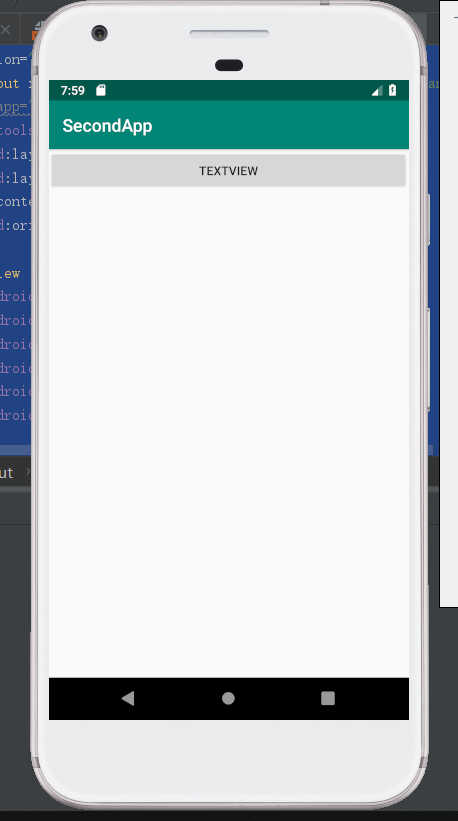
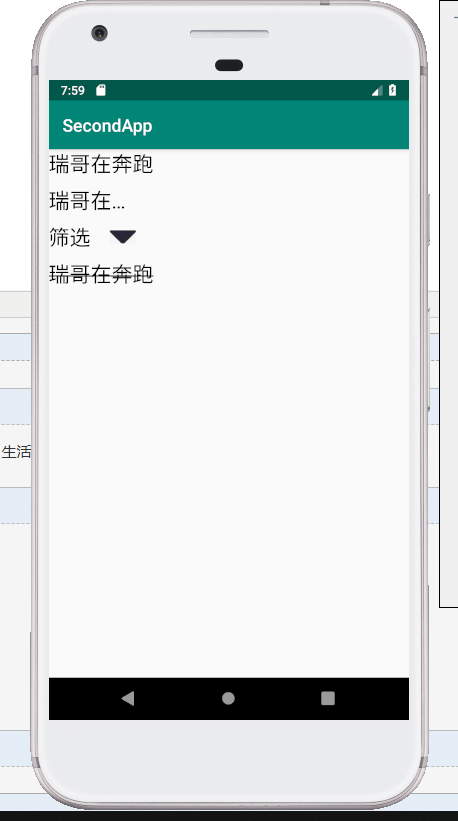
Android Studio [TextView]的更多相关文章
- android textview字体加粗 Android studio最新水平居中和垂直居中
android textview字体加粗 Android studio最新水平居中和垂直居中 Android中字体加粗在xml文件中使用android:textStyle=”bold”但是不能将中文设 ...
- Android Studio 之 TextView基础
•引言 在开始本节内容前,先要介绍下几个单位: dp(dip) : device independent pixels(设备独立像素). 不同设备有不同的显示效果,这个和设备硬件有关 一般我们为了支持 ...
- Android Studio 如何在TextView中设置图标并按需调整图标大小
•任务 相信大家对这张图片都不陌生,没错,就是 QQ动态 向我们展示的界面. 如何实现呢? •添加文字并放入图标 新建一个 Activity,取名为 QQ,Android Studio 自动为我们生成 ...
- Android Studio配置 AndroidAnnotations——Hi_博客 Android App 开发笔记
以前用Eclicps 用习惯了现在 想学学 用Android Studio 两天的钻研终于 在我电脑上装了一个Android Studio 并完成了AndroidAnnotations 的配置. An ...
- android studio你可能忽视的细节——启动白屏?drawable和mipmap出现的意义?这里都有!!!
android studio用了很久了,也不知道各位小伙伴有没有还在用eclipse的,如果还有,楼主真心推荐转到android studio来吧,毕竟亲儿子,你会知道除了启动速度稍微慢些,你找不到一 ...
- Android开发的小技巧,在Android Studio中使用Designtime Layout Attributes
在编写xml文件时,为了预览效果,经常会使用默认填上一些内容,比如TextView时,随便写上一个text <TextView ... android:text="Name:" ...
- 【android 开 发 】 - Android studio 下 NDK Jni 开发 简单例子
Android 开发了一段时间,一方面 ,感觉不留下点什么.有点对不起自己, 另一方面,好记性不如烂笔头,为了往后可以回头来看看,就当做是笔记,便决定开始写博客.废话不多说 ! 今天想搞一搞 ndk ...
- Android开发自学笔记(Android Studio) 目录
开发环境如下: 操作系统:Windows 10 Pro IDE:Android Studio 1.3.X 或更高版本 其它请参见文章说明. 1. 环境搭建 1.1 (番外)AndroidStudio常 ...
- Android开发自学笔记(Android Studio)—4.界面编程与View组件简单介绍
一.引言 Android应用开发最重要的一份内容就是界面的开发,无论你程序包含的内容多么优秀,如若没有一个良好的用户交互界面,最终也只是会被用户所遗弃.Android SDK提供了大量功能丰富的UI组 ...
随机推荐
- 池化层的back proporgation 原理
转载:https://www.jianshu.com/p/6928203bf75b
- 安装tomcat出现的问题
今天在安装tomcat时出现了配置环境不对的问题. 在正确配置Tomcat环境变量后,遇到很多次运行startup.bat后,一个窗口一闪而过的. 解决方法: 1.在tomcat的目录下选中start ...
- ECMAScript---object对象类型详解
普通对象:由大括号包裹起来的,由零到多个属性名和属性值(键值对)组成的 那什么是属性呢? 属性:描述当前对象特征的,属性名是当前具备这个特征,属性值是这个特征的描述(专业语法,属性名称为键[key], ...
- ionic 删除返回按钮文字,及自定义nav两侧的按钮和title格式
1.删除返回按钮文字 1)可以在app.js进行配置 .config(function($stateProvider, $urlRouterProvider,$ionicConfigProvider) ...
- 浅谈jQuery中的Ajax
浅谈jQuery中的Ajax 一.前言 jQuery 对 Ajax 操作进行了封装, 在 jQuery 中最底层的方法时 $.ajax(), 第二层是 load(), $.get() 和 $.post ...
- Javaweb简介
Javaweb简介 一.什么是Javaweb? 在Sun的Java Servlet规范中,对Java Web应用作了这样定义:“Java Web应用由一组Servlet.HTML页.类.以及其它可以被 ...
- [Mysql] GroupBy 分组,按天、周、月
简单说明: 最近在做报表功能的时候,需要将数据按天.周和月进行合并展示(数据记录都是按天20190701). 正文: 说明:数据表中date都是int类型:如 20190701 一.按天 SELECT ...
- nginx-springboot-vue前后端分离跨域配置
nginx-springboot-vue前后端分离跨域配置 引言 接着上篇--简单的springboot-vue前后端分离登录Session拦截的demo,其中跨域是通过springboot后端全局设 ...
- 关于turtle画蟒蛇小实例
import turtle turtle.setup(800,600) turtle.pensize(25) turtle.pencolor('blue') turtle.penup() #抬笔 tu ...
- B-xor_2019牛客暑期多校训练营(第四场)
题意 给出n个数组(每组数个数不定),m个询问 l, r, x 序号在区间\([l,r]\)的每个数组是否都可以取出任意个数异或出x 题解 判断一个数组能否异或出x,是简单的线性基问题 判断多个线性基 ...