
轻量级流程图控件GoJS示例连载(一):最小化
GoJS是一款功能强大,快速且轻量级的流程图控件,可帮助你在JavaScript 和 HTML5 Canvas程序中创建流程图,且极大地简化你的JavaScript / Canvas 程序。
慧都网小编为大家准备了一套完整的GoJS的示例,将以连载的形式展开,供大家学习和交流讨论。
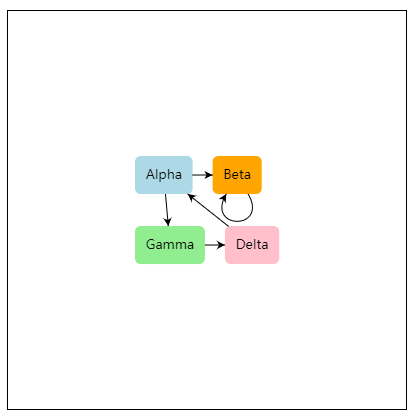
这不是GoJS的真正最小化演示,因为我们确实指定了自定义Node模板,但它非常简单。如果单击链接,示例的完整来源如下所示。
此示例使用Node模板设置Diagram.nodeTemplate,该模板数据绑定文本字符串和形状的填充颜色。
该Diagram.initialContentAlignment设置导致图表内容出现在图的视口的中心。
使用鼠标和常用键盘命令,你可以平移,选择,移动,复制,删除和撤消/重做。在触摸设备上,使用手指作为鼠标,并保持手指静止以显示上下文菜单。默认上下文菜单支持当时为所选对象启用的大多数标准命令。
有关更精细和更有说服力的样本,请参阅基本示例。有关从服务器加载JSON数据的示例,请参阅最小化JSON示例。有关从服务器加载XML数据的示例,请参阅最小化XML示例。
以下为在页面中查看此示例页面的源代码:
  function init() {

    if (window.goSamples) goSamples();  // init for these samples -- you don't need to call this

    var $ = go.GraphObject.make;  // for conciseness in defining templates

    myDiagram = $(go.Diagram, "myDiagramDiv",  // create a Diagram for the DIV HTML element

                  {

                    initialContentAlignment: go.Spot.Center,  // center the content

                    "undoManager.isEnabled": true  // enable undo & redo

                  });

    // define a simple Node template

    myDiagram.nodeTemplate =

      $(go.Node, "Auto",  // the Shape will go around the TextBlock

        $(go.Shape, "RoundedRectangle", { strokeWidth: 0, fill: "white" },

          // Shape.fill is bound to Node.data.color

          new go.Binding("fill", "color")),

        $(go.TextBlock,

          { margin: 8 },  // some room around the text

          // TextBlock.text is bound to Node.data.key

          new go.Binding("text", "key"))

      );

    // but use the default Link template, by not setting Diagram.linkTemplate

    // create the model data that will be represented by Nodes and Links

    myDiagram.model = new go.GraphLinksModel(

    [

      { key: "Alpha", color: "lightblue" },

      { key: "Beta", color: "orange" },

      { key: "Gamma", color: "lightgreen" },

      { key: "Delta", color: "pink" }

    ],

    [

      { from: "Alpha", to: "Beta" },

      { from: "Alpha", to: "Gamma" },

      { from: "Beta", to: "Beta" },

      { from: "Gamma", to: "Delta" },

      { from: "Delta", to: "Alpha" }

    ]);

  }
<div id="sample" deep="0">

  <!-- The DIV for the Diagram needs an explicit size or else we won't see anything.

       This also adds a border to help see the edges of the viewport. -->

  <div id="myDiagramDiv" style="border: solid 1px black; width:400px; height:400px"></div>

  <p>

    This isn't a truly <i>minimal</i> demonstration of <b>GoJS</b>,

    because we do specify a custom Node template, but it's pretty simple.

    The whole source for the sample is shown below if you click on the link.

  </p>

  <p>

    This sample sets the <a>Diagram.nodeTemplate</a>, with a <a>Node</a> template that data binds both the text string and the shape's fill color.

    For an overview of building your own templates and model data, see the <a href="../learn/index.html">Getting Started tutorial.</a>

  </p>

  <p>

    The <a>Diagram.initialContentAlignment</a> setting causes the diagram's contents

    to appear in the center of the diagram's viewport.

  </p>

  <p>

    Using the mouse and common keyboard commands, you can pan, select, move, copy, delete, and undo/redo.

    On touch devices, use your finger to act as the mouse, and hold your finger stationary to bring up a context menu.

    The default context menu supports most of the standard commands that

    are enabled at that time for the selected object.

  </p>

  <p>

    For a more elaborate and capable sample, see the <a href="basic.html">Basic</a> sample.

    For a sample that loads JSON data from the server,

    see the <a href="minimalJSON.html">Minimal JSON</a> sample.

    For a sample that loads XML data from the server,

    see the <a href="minimalXML.html">Minimal XML</a> sample.

  </p>

</div>
以下为在GitHub上查看此示例页面的源代码:
<!DOCTYPE html>

<html>

<head>

<meta name="viewport" content="width=device-width, initial-scale=1">

<title>Minimal GoJS Sample</title>

<meta name="description" content="An almost minimal diagram using a very simple node template and the default link template." />

<!-- Copyright 1998-2018 by Northwoods Software Corporation. -->

<meta charset="UTF-8">

<script src="../release/go.js"></script>

<script src="../assets/js/goSamples.js"></script>  <!-- this is only for the GoJS Samples framework -->

<script id="code">

  function init() {

    if (window.goSamples) goSamples();  // init for these samples -- you don't need to call this

    var $ = go.GraphObject.make;  // for conciseness in defining templates

    myDiagram = $(go.Diagram, "myDiagramDiv",  // create a Diagram for the DIV HTML element

                  {

                    initialContentAlignment: go.Spot.Center,  // center the content

                    "undoManager.isEnabled": true  // enable undo & redo

                  });

    // define a simple Node template

    myDiagram.nodeTemplate =

      $(go.Node, "Auto",  // the Shape will go around the TextBlock

        $(go.Shape, "RoundedRectangle", { strokeWidth: 0, fill: "white" },

          // Shape.fill is bound to Node.data.color

          new go.Binding("fill", "color")),

        $(go.TextBlock,

          { margin: 8 },  // some room around the text

          // TextBlock.text is bound to Node.data.key

          new go.Binding("text", "key"))

      );

    // but use the default Link template, by not setting Diagram.linkTemplate

    // create the model data that will be represented by Nodes and Links

    myDiagram.model = new go.GraphLinksModel(

    [

      { key: "Alpha", color: "lightblue" },

      { key: "Beta", color: "orange" },

      { key: "Gamma", color: "lightgreen" },

      { key: "Delta", color: "pink" }

    ],

    [

      { from: "Alpha", to: "Beta" },

      { from: "Alpha", to: "Gamma" },

      { from: "Beta", to: "Beta" },

      { from: "Gamma", to: "Delta" },

      { from: "Delta", to: "Alpha" }

    ]);

  }

</script>

</head>

<body onload="init()">

<div id="sample">

  <!-- The DIV for the Diagram needs an explicit size or else we won't see anything.

       This also adds a border to help see the edges of the viewport. -->

  <div id="myDiagramDiv" style="border: solid 1px black; width:400px; height:400px"></div>

  <p>

    This isn't a truly <i>minimal</i> demonstration of <b>GoJS</b>,

    because we do specify a custom Node template, but it's pretty simple.

    The whole source for the sample is shown below if you click on the link.

  </p>

  <p>

    This sample sets the <a>Diagram.nodeTemplate</a>, with a <a>Node</a> template that data binds both the text string and the shape's fill color.

    For an overview of building your own templates and model data, see the <a href="../learn/index.html">Getting Started tutorial.</a>

  </p>

  <p>

    The <a>Diagram.initialContentAlignment</a> setting causes the diagram's contents

    to appear in the center of the diagram's viewport.

  </p>

  <p>

    Using the mouse and common keyboard commands, you can pan, select, move, copy, delete, and undo/redo.

    On touch devices, use your finger to act as the mouse, and hold your finger stationary to bring up a context menu.

    The default context menu supports most of the standard commands that

    are enabled at that time for the selected object.

  </p>

  <p>

    For a more elaborate and capable sample, see the <a href="basic.html">Basic</a> sample.

    For a sample that loads JSON data from the server,

    see the <a href="minimalJSON.html">Minimal JSON</a> sample.

    For a sample that loads XML data from the server,

    see the <a href="minimalXML.html">Minimal XML</a> sample.

  </p>

</div>

</body>

</html>
想要查看在线操作示例,可以点击此处>>>>>
轻量级流程图控件GoJS示例连载(一):最小化的更多相关文章
- Xamarin Studio在Mac环境下的配置和Xamarin.iOS常用控件的示例
看过好多帖子都是Win环境装XS,Mac只是个模拟器,讲解在Mac环境下如何配置Xamarin Studio很少,也是一点点找资料,东拼西凑才把Xamarin Studio装在Mac上跑起来,如下: ...
- 【干货分享】JPager.Net MVC超好用轻量级分页控件
JPager.Net MVC好用的轻量级分页控件,好用到你无法想象,轻量到你无法想象. JPager.Net MVC好用的轻量级分页控件,实现非常简单,使用也非常简单. JPager.Net M ...
- Net MVC轻量级分页控件
JPager.Net MVC超好用轻量级分页控件 JPager.Net MVC好用的轻量级分页控件,好用到你无法想象,轻量到你无法想象. JPager.Net MVC好用的轻量级分页控件,实现 ...
- 自定义JS控件-简单示例
1. 业务需求: 制作 一个按钮对象,然后 像 winfrom 那样调用 就可以了: 首先 我们新建一个 MyControls的 JS文件:(插入如下代码) //这里运用的面向对象的思想 ,新建了 ...
- silverlight控件阴影效果示例
<ScrollViewer MaxHeight="400" VerticalScrollBarVisibility="Auto" HorizontalSc ...
- JQuery与GridView控件结合示例
JQuery是一种非常强大的客户端JS编程技术,这里不想过多阐述它的相关背景知识,只想简单演示一下如何与asp.net的控件结合开发. 比如,我们要做一个下面如图所示的功能,效果是状态.编号.数字1. ...
- asp.net微软图表控件使用示例
<configuration> <system.webServer> <handlers> <remove name="ChartImageHand ...
- 大量的QT控件及示例发放
QT属性控件项目https://github.com/lexxmark/QtnProperty 比特币交易软件https://github.com/JulyIGHOR/QtBitcoinTrader ...
- Android自定义组合控件详细示例 (附完整源码)
在我们平时的Android开发中,有时候原生的控件无法满足我们的需求,或者经常用到几个控件组合在一起来使用.这个时候,我们就可以根据自己的需求创建自定义的控件了,一般通过继承View或其子类来实现. ...
随机推荐
- 剑指offer 19:二叉树的镜像
题目描述 操作给定的二叉树,将其变换为源二叉树的镜像. 输入描述: 解题思路 这一问题明显,在进行递归遍历节点时,将根节点的左右子树进行交换,因此完成树的遍历即可. C++实现代码 /* ...
- CODING 2.0:如何通过设计给品牌创造价值?
升级背景 伴随着 CODING 理念的全面升级,CODING 正构建起覆盖构想到交付的全覆盖工具链,用户注册即可实践敏捷开发与 DevOps,提升软件交付质量与速度. 一直以来,CODING 作为软件 ...
- win10安装ubuntu系统出现的一些问题以及解决方案
前言 在win10系统进行安装新的ubuntu环境的时候遇到的一些问题,以及解决方案,供以后参考. 准备 从ubuntu官网下载最近版本的ubuntu系统,Ubuntu最新版本下载地址 操作系统:wi ...
- 有趣的bug——Java静态变量的循环依赖
背景 是的,标题没有错误,不是Spring Bean的循环依赖,而是静态变量之间的循环依赖. 近期的项目均是简单的Maven项目,通过K8S部署在阿里云上,其配置文件读取规则如下所示: (1) 优先读 ...
- 一些有价值bug产生的思考
1.异步处理时防止重复点击的逻辑校验 场景 打款请求时,进入异步处理的队列,生成一个任务号,存在如数据库,且状态为未完成.此时,如果并发操作,如重复点击或者重复调用接口,则发出的两条请求可能被分配到不 ...
- Bn Bp Binder native层关系
Servicemanager 源码在/frameworks/base/cmds/servicemanager/service_manager.c 编译成 systemmanager 可执行文件 sys ...
- 【bzoj4154】(dfs序+kd-tree)
传送门 题意: 给出一颗以\(1\)为根的有根树,初始所有结点的颜色为\(1\). 之后有两个操作,一种是每次将距离\(a\)结点距离不超过\(l\)的所有儿子结点颜色染为\(c\):另一种是询问结点 ...
- socket 与 websocket的区别
区别: socket并不是一个协议,而是抽象出来的一层,应用于应用层和传输控制层之间的一组接口, socket是传输控制层协议,websocket是应用层协议 websocket是什么样的协议,具有什 ...
- session.invalidate() 退出登录
当浏览器第一次请求时,服务器创建一个session对象,同时生成一个sessionId,并在此次响应中将sessionId 以响应报文的方式传回客户端浏览器内存或以重写url方式送回客户端,来保持整个 ...
- Vue.js 创建第一个应用
VUE官网下载Vue.js文件或者用Vue的CDN地址 在项目中引入Vue.js文件 代码: <!doctype html> <html lang="en"> ...