
Elasticsearch教程(五) elasticsearch Mapping的创建
一、Mapping介绍
在Elasticsearch中,Mapping是什么?
mapping在Elasticsearch中的作用就是约束。
1.数据类型声明
它类似于静态语言中的数据类型声明,比如声明一个字段为String, 以后这个变量都只能存储String类型的数据。同样的, 一个number类型的mapping字段只能存储number类型的数据。
2.Mapping它定义了 Type 的属性。
"_ttl": {"enabled": false}
表示 ttl关闭,其实ttl默认就是关闭。
3.指定分词器。
"id": {
"index": "not_analyzed",
"type": "string"
}
指定字段 id不分词,并且类型为 string。
二、创建Mapping
1.下面介绍一下HTTP的创建方式。我一般用Java 创建方式。
PUT http://123.123.123.123:9200/index/type/
{
"settings": {
//设置10个分片,理解为类似数据库中的表分区中一个个分区的概念,不知道是否妥当
"number_of_shards": 10
},
"mappings": {
"trades": {
"_id": {
"path": "id"
},
"properties": {
"id": {
"type": "integer",
//id:自增数字
//要求:查询
"store" : true
},
"name": { //名称
"type": "string"
},
"brand": { //品牌: PG,P&G,宝洁集团,宝洁股份,联想集团,联想电脑等
"type": "string"
},
"orderNo": { //订单号 :如ATTS000928732
"type": "string",
"index": "not_analyzed"
},
"description": {
//描述: 2015款玫瑰香型强生婴儿沐浴露,550ml,包邮
"type": "string",
"sort": true
},
"date": {
"type": "date"
},
"city": {
"type": "string"
},
"qty": {// index分词无效
"type": "float"
},
"price": {
//价格: float index无效
"type": "float"
}
}
}
}
}
2.Java方式创建。
构建Mapping
package com.sojson.core.elasticsearch.mapping;
import static org.elasticsearch.common.xcontent.XContentFactory.jsonBuilder;
import java.io.IOException;
import org.elasticsearch.common.xcontent.XContentBuilder;
public class ZhidaoMapping {
public static XContentBuilder getMapping(){
XContentBuilder mapping = null;
try {
mapping = jsonBuilder()
.startObject()
//开启倒计时功能
.startObject("_ttl")
.field("enabled",false)
.endObject()
.startObject("properties")
.startObject("title")
.field("type","string")
.endObject()
.startObject("question")
.field("type","string")
.field("index","not_analyzed")
.endObject()
.startObject("answer")
.field("type","string")
.field("index","not_analyzed")
.endObject()
.startObject("category")
.field("type","string")
.field("index","not_analyzed")
.endObject()
.startObject("author")
.field("type","string")
.field("index","not_analyzed")
.endObject()
.startObject("date")
.field("type","string")
.field("index","not_analyzed")
.endObject()
.startObject("answer_author")
.field("type","string")
.field("index","not_analyzed")
.endObject()
.startObject("answer_date")
.field("type","string")
.field("index","not_analyzed")
.endObject()
.startObject("description")
.field("type","string")
.field("index","not_analyzed")
.endObject()
.startObject("keywords")
.field("type","string")
.field("index","not_analyzed")
.endObject()
.startObject("read_count")
.field("type","integer")
.field("index","not_analyzed")
.endObject()
//关联数据
.startObject("list").field("type","object").endObject()
.endObject()
.endObject();
} catch (IOException e) {
e.printStackTrace();
}
return mapping;
}
}
创建Mapping
public static void createBangMapping(){
PutMappingRequest mapping = Requests.putMappingRequest(INDEX).type(TYPE).source(ZhidaoMapping.getMapping());
ESTools.client.admin().indices().putMapping(mapping).actionGet();
}
创建的时候,需要 index已经创建才行,要不然会报错。
//构建一个Index(索引)CreateIndexRequest request = new CreateIndexRequest(INDEX);
ESTools.client.admin().indices().create(request);
创建完毕在Head插件里查看或者Get请求。
http://123.123.123.123:9200/index/type/_mapping
得到的结果:
{
"zhidao_index": {
"mappings": {
"zhidao_type": {
"_ttl": {
"enabled": false
},
"properties": {
"answer": {
"type": "string",
"index": "not_analyzed"
},
"answerAuthor": {
"type": "string"
},
"answerDate": {
"type": "date",
"format": "strict_date_optional_time||epoch_millis"//这里出现了复合类型
},
"answer_author": {
"type": "string",
"index": "not_analyzed"
},
"answer_date": {
"type": "string",
"index": "not_analyzed"
},
"author": {
"type": "string",
"index": "not_analyzed"
},
"category": {
"type": "string",
"index": "not_analyzed"
},
"date": {
"type": "string",
"index": "not_analyzed"
},
"description": {
"type": "string",
"index": "not_analyzed"
},
"id": {
"type": "string",
"index": "not_analyzed"
},
"keywords": {
"type": "string",
"index": "not_analyzed"
},
"list": {
"type": "object"
},
"question": {
"type": "string",
"index": "not_analyzed"
},
"readCount": {
"type": "long"
},
"read_count": {
"type": "integer"
},
"title": {
"type": "string"
}
}
}
}
}
}
Head插件查看
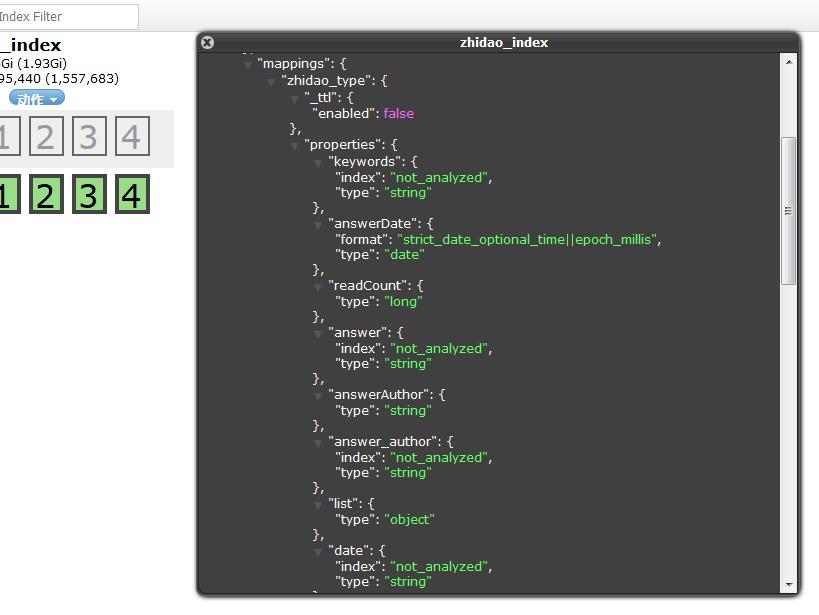
其实Mapping,你接触Elasticsearch久一点也就那么回事。我们虽然知道Elasticsearch有根据数据识别创建Mapping,但是最好是创建,并且指定分词与否。这样高效一点。
Elasticsearch教程(五) elasticsearch Mapping的创建的更多相关文章
- (转)ElasticSearch教程——汇总篇
https://blog.csdn.net/gwd1154978352/article/details/82781731 环境搭建篇 ElasticSearch教程——安装 ElasticSearch ...
- ElasticSearch(五):Mapping和常见字段类型
ElasticSearch(五):Mapping和常见字段类型 学习课程链接<Elasticsearch核心技术与实战> 什么是Mapping Mapping类似数据库中的schema的定 ...
- Elasticsearch入门教程(五):Elasticsearch查询(一)
原文:Elasticsearch入门教程(五):Elasticsearch查询(一) 版权声明:本文为博主原创文章,遵循CC 4.0 BY-SA版权协议,转载请附上原文出处链接和本声明. 本文链接:h ...
- Elasticsearch教程(六) elasticsearch Client创建
Elasticsearch 创建Client有几种方式. 首先在 Elasticsearch 的配置文件 elasticsearch.yml中.定义cluster.name.如下: cluster ...
- ElasticSearch实战系列五: ElasticSearch的聚合查询基础使用教程之度量(Metric)聚合
Title:ElasticSearch实战系列四: ElasticSearch的聚合查询基础使用教程之度量(Metric)聚合 前言 在上上一篇中介绍了ElasticSearch实战系列三: Elas ...
- Elasticsearch 教程--入门
1.1 初识 Elasticsearch 是一个建立在全文搜索引擎 Apache Lucene(TM) 基础上的搜索引擎,可以说 Lucene 是当今最先进,最高效的全功能开源搜索引擎框架. 但是 L ...
- Elasticsearch系列(五)----JAVA客户端之TransportClient操作详解
Elasticsearch JAVA操作有三种客户端: 1.TransportClient 2.JestClient 3.RestClient 还有种是2.3中有的NodeClient,在5.5.1中 ...
- elasticsearch index 之 put mapping
elasticsearch index 之 put mapping mapping机制使得elasticsearch索引数据变的更加灵活,近乎于no schema.mapping可以在建立索引时设 ...
- Elasticsearch教程(二)java集成Elasticsearch
1.添加maven <!--tika抽取文件内容 --> <dependency> <groupId>org.apache.tika</groupId> ...
随机推荐
- HDU 1863 畅通工程 -Kruskal模版
畅通工程 Time Limit: 1000/1000 MS (Java/Others) Memory Limit: 32768/32768 K (Java/Others)Total Submis ...
- Topcoder SRM 603 div1题解
昨天刚打了一场codeforces...困死了...不过赶在睡前终于做完了- 话说这好像是我第一次做250-500-1000的标配耶--- Easy(250pts): 题目大意:有一棵树,一共n个节点 ...
- QLineEdit使用总结(转)
本文转自 https://www.cnblogs.com/hellovenus/p/5183593.html
- git的使用03
之前我们写的都是将代码存在本地,我们还可以将代码github官网上,放在github的服务器上去托管
- Java反射常用API汇总
“JAVA反射机制是在运行状态中,对于任意一个类,都能够知道这个类的所有属性和方法:对于任意一个对象,都能够调用它的任意方法和属性” 一.类对象的获取 1.通过对象获取 Object obj = ne ...
- 高级列表控件ListCtrl关联的MFC中的类:CListCtrl
高级列表控件ListCtrl关联的MFC中的类:CListCtrl■ 报表样式ListCtrl常用操作:1.添加列标题头:InsertColumn2.获取与设置列宽:GetColumnWidth.Se ...
- laravel中建立公共视图的方法
1.用法概要 @include('common.header') 包含子视图 @extends('article.common.base') 继承基础模板 @yield('content') 视图占位 ...
- 使用EventHandler传递参数
1.MouseEventHandler和EventHandler传递参数的局限性分析 开发过程中,特别是使用自定义控件时,常常需要对一个控件的click,mouseDown,mouseUp等事件的处理 ...
- 我在16aspx网上下载了个C#源码,如何能在我自己的计算机上跑起来,很急!求详细操作过程!
先搞清楚是WINDOWS程序还是WEB程序.
- Codeforces Round #109 (Div. 2) A. I_love_%username%【打擂台算法/满足当前数字在已经出现的数字的最大值和最小值之间的个数】
A. I_love_%username% time limit per test 2 seconds memory limit per test 256 megabytes input standar ...