
Elasticsearch教程(二)java集成Elasticsearch
1、添加maven
<!--tika抽取文件内容 -->

<dependency>

    <groupId>org.apache.tika</groupId>

    <artifactId>tika-core</artifactId>

    <version>1.12</version>

</dependency>

<dependency>

    <groupId>org.apache.tika</groupId>

    <artifactId>tika-parsers</artifactId>

    <version>1.12</version>

</dependency>

<!--tika end-->

<!--bboss操作elasticsearch-->

<dependency>

    <groupId>com.bbossgroups.plugins</groupId>

    <artifactId>bboss-elasticsearch-rest-jdbc</artifactId>

    <version>5.5.7</version>

</dependency>

<!--Hanlp自然语言分词-->

<dependency>

    <groupId>com.hankcs</groupId>

    <artifactId>hanlp</artifactId>

    <version>portable-1.7.1</version>

</dependency>

<!-- httpclient -->

<dependency>

    <groupId>org.apache.httpcomponents</groupId>

    <artifactId>httpclient</artifactId>

    <version>4.5.5</version>

</dependency>
注意:与spring集成时需要注意版本号,版本太高会造成jar包冲突,tika-parsers 依赖poi.jar包,所以项目中不需要单独添加poi.jar,会造成冲突。
完整的项目elasticsearch-common
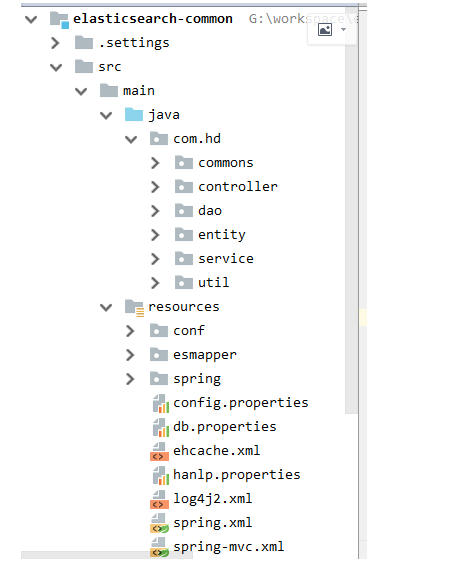
pom.xml内容
<?xml version="1.0" encoding="UTF-8"?>
<project xmlns="http://maven.apache.org/POM/4.0.0" xmlns:xsi="http://www.w3.org/2001/XMLSchema-instance"
xsi:schemaLocation="http://maven.apache.org/POM/4.0.0 http://maven.apache.org/xsd/maven-4.0.0.xsd">
<modelVersion>4.0.0</modelVersion>
<groupId>com.hd</groupId>
<artifactId>elasticsearch-common</artifactId>
<version>1.0-SNAPSHOT</version>
<packaging>war</packaging>
<name>elasticsearch-common Maven Webapp</name>
<url>http://www.example.com</url>
<properties>
<project.build.sourceEncoding>UTF-8</project.build.sourceEncoding>
<maven.compiler.source>1.7</maven.compiler.source>
<maven.compiler.target>1.7</maven.compiler.target>
<mysql.version>5.1.40</mysql.version>
<druid.version>1.0.29</druid.version>
<spring.version>4.2.3.RELEASE</spring.version>
<servlet.version>3.0.1</servlet.version>
<jackson.version>2.8.8</jackson.version>
<commons-io.version>2.5</commons-io.version>
<log4j2.version>2.8.2</log4j2.version>
<hibernate-validator.version>5.3.5.Final</hibernate-validator.version>
<hibernate.version>4.3.11.Final</hibernate.version>
<shiro.version>1.3.2</shiro.version>
<ehcache.version>2.6.11</ehcache.version>
</properties>
<dependencies>
<dependency>
<groupId>junit</groupId>
<artifactId>junit</artifactId>
<version>4.11</version>
<scope>test</scope>
</dependency>
<dependency>
<groupId>javax.el</groupId>
<artifactId>javax.el-api</artifactId>
<version>3.0.0</version>
<scope>test</scope>
</dependency>
<dependency>
<groupId>org.glassfish</groupId>
<artifactId>javax.el</artifactId>
<version>3.0.0</version>
<scope>test</scope>
</dependency>
<!--test end-->
<!--web begin -->
<dependency>
<groupId>javax.servlet</groupId>
<artifactId>javax.servlet-api</artifactId>
<version>${servlet.version}</version>
<scope>provided</scope>
</dependency>
<dependency>
<groupId>javax.servlet</groupId>
<artifactId>jsp-api</artifactId>
<version>2.0</version>
<scope>provided</scope>
</dependency>
<dependency>
<groupId>javax.servlet</groupId>
<artifactId>jstl</artifactId>
<version>1.2</version>
</dependency>
<!-- web end -->
<!-- log4j2 begin -->
<dependency>
<groupId>org.apache.logging.log4j</groupId>
<artifactId>log4j-core</artifactId>
<version>${log4j2.version}</version>
</dependency>
<dependency>
<groupId>org.apache.logging.log4j</groupId>
<artifactId>log4j-jcl</artifactId>
<version>${log4j2.version}</version>
</dependency>
<dependency>
<groupId>org.apache.logging.log4j</groupId>
<artifactId>log4j-slf4j-impl</artifactId>
<version>${log4j2.version}</version>
</dependency>
<!-- log4j2 end -->
<!-- spring核心包 -->
<dependency>
<groupId>org.springframework</groupId>
<artifactId>spring-core</artifactId>
</dependency>
<dependency>
<groupId>org.springframework</groupId>
<artifactId>spring-context</artifactId>
</dependency>
<dependency>
<groupId>org.springframework</groupId>
<artifactId>spring-beans</artifactId>
</dependency>
<dependency>
<groupId>org.springframework</groupId>
<artifactId>spring-expression</artifactId>
</dependency>
<dependency>
<groupId>org.springframework</groupId>
<artifactId>spring-jdbc</artifactId>
</dependency>
<dependency>
<groupId>org.springframework</groupId>
<artifactId>spring-orm</artifactId>
<version>${spring.version}</version>
</dependency>
<dependency>
<groupId>org.springframework</groupId>
<artifactId>spring-tx</artifactId>
</dependency>
<dependency>
<groupId>org.springframework</groupId>
<artifactId>spring-aop</artifactId>
</dependency>
<dependency>
<groupId>org.springframework</groupId>
<artifactId>spring-web</artifactId>
</dependency>
<dependency>
<groupId>org.springframework</groupId>
<artifactId>spring-webmvc</artifactId>
</dependency>
<dependency>
<groupId>org.springframework</groupId>
<artifactId>spring-test</artifactId>
</dependency>
<dependency>
<groupId>org.springframework</groupId>
<artifactId>spring-aspects</artifactId>
</dependency>
<dependency>
<groupId>org.springframework</groupId>
<artifactId>spring-context-support</artifactId>
</dependency>
<!--上传组件-->
<dependency>
<groupId>commons-io</groupId>
<artifactId>commons-io</artifactId>
<version>${commons-io.version}</version>
</dependency>
<dependency>
<groupId>commons-fileupload</groupId>
<artifactId>commons-fileupload</artifactId>
<version>1.3.1</version>
</dependency>
<dependency>
<groupId>org.hibernate</groupId>
<artifactId>hibernate-core</artifactId>
<version>${hibernate.version}</version>
</dependency>
<!--数据库-->
<dependency>
<groupId>mysql</groupId>
<artifactId>mysql-connector-java</artifactId>
<version>${mysql.version}</version>
</dependency>
<dependency>
<groupId>com.alibaba</groupId>
<artifactId>druid</artifactId>
<version>${druid.version}</version>
</dependency>
<!-- jackson begin -->
<dependency>
<groupId>com.fasterxml.jackson.core</groupId>
<artifactId>jackson-databind</artifactId>
<version>${jackson.version}</version>
</dependency>
<!--fastjson-->
<dependency>
<groupId>com.alibaba</groupId>
<artifactId>fastjson</artifactId>
<version>1.2.54</version>
</dependency>
<!-- httpclient -->
<dependency>
<groupId>org.apache.httpcomponents</groupId>
<artifactId>httpclient</artifactId>
<version>4.5.5</version>
</dependency>
<!--tika抽取文件内容 -->
<dependency>
<groupId>org.apache.tika</groupId>
<artifactId>tika-core</artifactId>
<version>1.12</version>
</dependency>
<dependency>
<groupId>org.apache.tika</groupId>
<artifactId>tika-parsers</artifactId>
<version>1.12</version>
</dependency>
<!--tika end-->
<!--bboss操作elasticsearch-->
<dependency>
<groupId>com.bbossgroups.plugins</groupId>
<artifactId>bboss-elasticsearch-rest-jdbc</artifactId>
<version>5.5.7</version>
</dependency>
<!--Hanlp自然语言分词-->
<dependency>
<groupId>com.hankcs</groupId>
<artifactId>hanlp</artifactId>
<version>portable-1.7.1</version>
</dependency>
<!-- shiro begin -->
<dependency>
<groupId>org.apache.shiro</groupId>
<artifactId>shiro-spring</artifactId>
<version>${shiro.version}</version>
<exclusions>
<exclusion>
<artifactId>slf4j-api</artifactId>
<groupId>org.slf4j</groupId>
</exclusion>
</exclusions>
</dependency>
<!-- hibernate-validator -->
<dependency>
<groupId>org.hibernate</groupId>
<artifactId>hibernate-validator</artifactId>
<version>${hibernate-validator.version}</version>
</dependency>
<dependency>
<groupId>net.sf.ehcache</groupId>
<artifactId>ehcache-core</artifactId>
<version>${ehcache.version}</version>
</dependency>
<dependency>
<groupId>com.googlecode.ehcache-spring-annotations</groupId>
<artifactId>ehcache-spring-annotations</artifactId>
<version>1.2.0</version>
</dependency>
</dependencies>
<build>
<finalName>elasticsearch-common</finalName>
<plugins>
<plugin>
<groupId>org.apache.maven.plugins</groupId>
<artifactId>maven-compiler-plugin</artifactId>
<version>3.5.1</version>
<configuration>
<source>${maven.compiler.source}</source>
<target>${maven.compiler.target}</target>
<encoding>${project.build.sourceEncoding}</encoding>
</configuration>
</plugin>
<!--跳过test begin-->
<plugin>
<groupId>org.apache.maven.plugins</groupId>
<artifactId>maven-surefire-plugin</artifactId>
<version>2.4.2</version>
<configuration>
<skip>true</skip>
</configuration>
</plugin>
<!-- jetty:run 添加jetty插件以便启动 -->
<plugin>
<groupId>org.eclipse.jetty</groupId>
<artifactId>jetty-maven-plugin</artifactId>
<!-- <version>9.2.12.M0</version> -->
<version>9.3.10.v20160621</version>
<configuration>
<stopPort>9967</stopPort>
<stopKey>stop</stopKey>
<scanIntervalSeconds>0</scanIntervalSeconds>
<httpConnector>
<port>8878</port>
</httpConnector>
<webApp>
<contextPath>/</contextPath>
</webApp>
</configuration>
</plugin>
<!-- tomcat7:run -->
<plugin>
<groupId>org.apache.tomcat.maven</groupId>
<artifactId>tomcat7-maven-plugin</artifactId>
<version>2.2</version>
<configuration>
<port>8878</port>
<path>/</path>
<uriEncoding>UTF-8</uriEncoding>
<server>tomcat7</server>
</configuration>
<!-- 配置tomcat热部署 -->
<!--<configuration>-->
<!--<uriEncoding>UTF-8</uriEncoding>-->
<!--<url>http://localhost:8080/manager/text</url>-->
<!--<path>/${project.build.finalName}</path>-->
<!--<!–<server>tomcat7</server>–>-->
<!--<username>tomcat</username>-->
<!--<password>123456</password>-->
<!--</configuration>-->
</plugin>
<!-- <plugin>
<groupId>org.zeroturnaround</groupId>
<artifactId>javarebel-maven-plugin</artifactId>
<version>1.0.5</version>
<executions>
<execution>
<id>generate-rebel-xml</id>
<phase>process-resources</phase>
<goals>
<goal>generate</goal>
</goals>
</execution>
</executions>
</plugin> -->
</plugins>
</build>
<!-- 使用aliyun镜像 -->
<repositories>
<repository>
<id>aliyun</id>
<name>aliyun</name>
<url>http://maven.aliyun.com/nexus/content/groups/public</url>
</repository>
</repositories>
<!-- spring-framework-bom -->
<dependencyManagement>
<dependencies>
<dependency>
<groupId>org.springframework</groupId>
<artifactId>spring-framework-bom</artifactId>
<version>${spring.version}</version>
<type>pom</type>
<scope>import</scope>
</dependency>
</dependencies>
</dependencyManagement>
</project>
2、配置文件
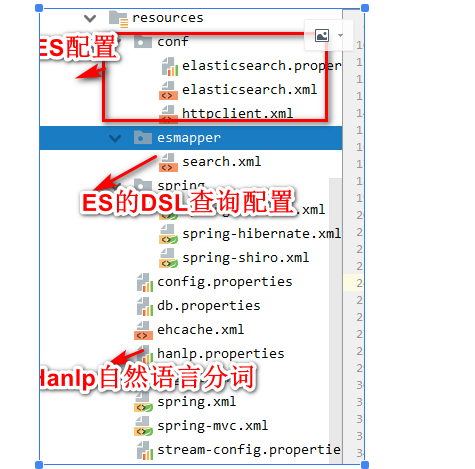
elasticsearch.properties文件内容
#elasticUser=elastic

#elasticPassword=hzhh123

elasticsearch.rest.hostNames=127.0.0.1:9200

#elasticsearch.rest.hostNames=192.168.200.82:9200,192.168.200.83:9200,192.168.200.85:9200

elasticsearch.dateFormat=yyyy.MM.dd

elasticsearch.timeZone=Asia/Shanghai

elasticsearch.ttl=2d

#在控制台输出脚本调试开关showTemplate,false关闭,true打开,同时log4j至少是info级别

elasticsearch.showTemplate=true

#elasticsearch.discoverHost=true

http.timeoutConnection = 400000

http.timeoutSocket = 400000

http.connectionRequestTimeout=400000

http.retryTime = 1

http.maxLineLength = -1

http.maxHeaderCount = 200

http.maxTotal = 400

http.defaultMaxPerRoute = 200
elasticsearch.xml
<properties>

    <config file="conf/elasticsearch.properties"/>

    <property name="elasticsearchPropes">

        <propes>

            <property name="elasticsearch.client" value="${elasticsearch.client:restful}">

                <description> <![CDATA[ 客户端类型:transport,restful ]]></description>

            </property>

            <!--<property name="elasticUser" value="${elasticUser:}">-->

                <!--<description> <![CDATA[ 认证用户 ]]></description>-->

            <!--</property>-->

            <!--<property name="elasticPassword" value="${elasticPassword:}">-->

                <!--<description> <![CDATA[ 认证口令 ]]></description>-->

            <!--</property>-->

            <!--<property name="elasticsearch.hostNames" value="${elasticsearch.hostNames}">

                <description> <![CDATA[ 指定序列化处理类,默认为kafka.serializer.DefaultEncoder,即byte[] ]]></description>

            </property>-->

            <property name="elasticsearch.rest.hostNames" value="${elasticsearch.rest.hostNames}">

                <description> <![CDATA[ rest协议地址 ]]></description>

            </property>

            <property name="elasticsearch.dateFormat" value="${elasticsearch.dateFormat}">

                <description> <![CDATA[ 索引日期格式]]></description>

            </property>

            <property name="elasticsearch.timeZone" value="${elasticsearch.timeZone}">

                <description> <![CDATA[ 时区信息]]></description>

            </property>

            <property name="elasticsearch.ttl" value="${elasticsearch.ttl}">

                <description> <![CDATA[ ms(毫秒) s(秒) m(分钟) h(小时) d(天) w(星期)]]></description>

            </property>

            <property name="elasticsearch.showTemplate" value="${elasticsearch.showTemplate:false}">

                <description> <![CDATA[ query dsl脚本日志调试开关,与log info级别日志结合使用]]></description>

            </property>

            <property name="elasticsearch.httpPool" value="${elasticsearch.httpPool:default}">

                <description> <![CDATA[ http连接池逻辑名称,在conf/httpclient.xml中配置]]></description>

            </property>

            <property name="elasticsearch.discoverHost" value="${elasticsearch.discoverHost:false}">

                <description> <![CDATA[ 是否启动节点自动发现功能,默认关闭,开启后每隔10秒探测新加或者移除的es节点,实时更新本地地址清单]]></description>

            </property>

        </propes>

    </property>

    <!--默认的elasticsearch-->

    <property name="elasticSearch"

              class="org.frameworkset.elasticsearch.ElasticSearch"

              init-method="configure"

              destroy-method="stop"

              f:elasticsearchPropes="attr:elasticsearchPropes"/>

</properties>
httpclient.xml
<properties>

    <config file="conf/elasticsearch.properties"/>

    <property name="default"

              f:timeoutConnection = "${http.timeoutConnection}"

              f:timeoutSocket = "${http.timeoutSocket}"

              f:connectionRequestTimeout="${http.connectionRequestTimeout}"

              f:retryTime = "${http.retryTime}"

              f:maxLineLength = "${http.maxLineLength}"

              f:maxHeaderCount = "${http.maxHeaderCount}"

              f:maxTotal = "${http.maxTotal}"

              f:defaultMaxPerRoute = "${http.defaultMaxPerRoute}"

              class="org.frameworkset.spi.remote.http.ClientConfiguration">

    </property>

</properties>
search.xml
<properties>

    <!--

        创建document需要的索引表结构

    -->

    <property name="document">

        <![CDATA[{

        "settings": {

            "number_of_shards": 6,

            "index.refresh_interval": "5s"

        },

        "mappings": {

            "document": {

                "properties": {

                    "title": {

                        "type": "text",

                        "analyzer": "ik_max_word"

                    },

                    "contentbody": {

                        "type": "text",

                        "analyzer": "ik_max_word"

                    },

                    "fileId": {

                        "type": "text"

                    },

                    "description": {

                        "type": "text",

                        "analyzer": "ik_max_word"

                    },

                    "tags": {

                        "type": "text"

                    },

                    "typeId": {

                        "type": "text"

                    },

                    "classicId": {

                        "type": "text"

                    },

                    "url": {

                        "type": "text"

                    },

                    "agentStarttime": {

                        "type": "date"

                        ## ,"format":"yyyy-MM-dd HH:mm:ss.SSS||yyyy-MM-dd'T'HH:mm:ss.SSS||yyyy-MM-dd HH:mm:ss||epoch_millis"

                    },

                    "name": {

                        "type": "keyword"

                    }

            }

        }

    }

    }]]>

    </property>

    <!--

        一个简单的检索dsl,中有四个变量

        applicationName1

        applicationName2

        startTime

        endTime

        通过map传递变量参数值

        变量语法参考文档:

    -->

    <property name="searchDatas">

        <![CDATA[{

        "query": {

            "bool": {

                "filter": [

                    {  ## 多值检索,查找多个应用名称对应的文档记录

                    "terms": {

                        "applicationName.keyword": [#[applicationName1],#[applicationName2]]

            }

        },

    {   ## 时间范围检索,返回对应时间范围内的记录,接受long型的值

    "range": {

    "agentStarttime": {

    "gte": #[startTime],##统计开始时间

    "lt": #[endTime]  ##统计截止时间

    }

    }

    }

    ]

    }

    },

    ## 最多返回1000条记录

    "size":1000

    }]]>

    </property>

    <!--

       一个简单的检索dsl,中有四个变量

       applicationName1

       applicationName2

       startTime

       endTime

       通过map传递变量参数值

       变量语法参考文档:

   -->

    <property name="searchPagineDatas">

        <![CDATA[{

       "query": {

            "bool": {

                "filter": [

                    {

                    "term": {

                        "classicId": #[classicId]

                   }

                }],

                "must": [

                 {

                   "multi_match": {

                        "query": #[keywords],

                        "fields": ["contentbody","title","description"]

                    }

                 }

                ]

           }

          },

        ## 分页起点

        "from":#[from] ,

        ## 最多返回size条记录

        "size":#[size],

        "highlight": {

            "pre_tags": [

            "<mark>"

            ],

            "post_tags": [

            "</mark>"

            ],

            "fields": {

            "*": {}

            },

            "fragment_size": 2147483647

        }

    }]]>

    </property>

    <property name="searchPagineDatas2">

        <![CDATA[{

       "query": {

            "bool": {

                "filter": [

                    {

                    "term": {

                        "classicId": #[classicId]

                   }

                }]

           }

          },

        ## 分页起点

        "from":#[from] ,

        ## 最多返回size条记录

        "size":#[size],

        "highlight": {

            "pre_tags": [

            "<mark>"

            ],

            "post_tags": [

            "</mark>"

            ],

            "fields": {

            "*": {}

            },

            "fragment_size": 2147483647

        }

    }]]>

    </property>

    <property name="searchPagineDatas3">

        <![CDATA[{

       "query": {

            "bool": {

                "filter": [

                    {

                    "term": {

                        "typeId": #[typeId]

                   }

                }],

                "must": [

                 {

                   "multi_match": {

                        "query": #[keywords],

                        "fields": ["contentbody","title","description"]

                    }

                 }

                ]

           }

          },

        ## 分页起点

        "from":#[from] ,

        ## 最多返回size条记录

        "size":#[size],

        "highlight": {

            "pre_tags": [

            "<mark>"

            ],

            "post_tags": [

            "</mark>"

            ],

            "fields": {

            "*": {}

            },

            "fragment_size": 2147483647

        }

    }]]>

    </property>

    <property name="searchPagineDatas4">

        <![CDATA[{

       "query": {

            "bool": {

                "filter": [

                    {

                    "term": {

                        "typeId": #[typeId]

                   }

                }]

           }

          },

        ## 分页起点

        "from":#[from] ,

        ## 最多返回size条记录

        "size":#[size],

        "highlight": {

            "pre_tags": [

            "<mark>"

            ],

            "post_tags": [

            "</mark>"

            ],

            "fields": {

            "*": {}

            },

            "fragment_size": 2147483647

        }

    }]]>

    </property>

    <!--

        一个简单的检索dsl,中有四个变量

        applicationName1

        applicationName2

        startTime

        endTime

        通过map传递变量参数值

        变量语法参考文档:

    -->

    <property name="searchDatasArray">

        <![CDATA[{

        "query": {

            "bool": {

                "filter": [

                    {  ## 多值检索,查找多个应用名称对应的文档记录

                    "terms": {

                        "applicationName.keyword":[

                            #if($applicationNames && $applicationNames.size() > 0)

                        #foreach($applicationName in $applicationNames)

                        #if($velocityCount > 0),#end "$applicationName"

                        #end

                        #end

                    ]

                    }

                },

                    {   ## 时间范围检索,返回对应时间范围内的记录,接受long型的值

                    "range": {

                        "agentStarttime": {

                            "gte": #[startTime],##统计开始时间

                    "lt": #[endTime]  ##统计截止时间

                    }

                }

                }

                ]

            }

        },

        ## 最多返回1000条记录

        "size":1000

    }]]>

    </property>

    <!--部分更新,注意:dsl不能换行-->

    <property name="updatePartDocument">

        <![CDATA[{"applicationName" : #[applicationName],"agentStarttime" : #[agentStarttime],"contentbody" : #[contentbody]}]]>

    </property>

</properties>
hanlp.properties
#本配置文件中的路径的根目录,根目录+其他路径=完整路径(支持相对路径,请参考:https://github.com/hankcs/HanLP/pull/254)

#Windows用户请注意,路径分隔符统一使用/

root=H:/doc/java/hzhh123

#root=/home/data/software/devsoft/java/hanlp

#好了,以上为唯一需要修改的部分,以下配置项按需反注释编辑。

#核心词典路径

CoreDictionaryPath=data/dictionary/CoreNatureDictionary.txt

#2元语法词典路径

BiGramDictionaryPath=data/dictionary/CoreNatureDictionary.ngram.txt

#自定义词典路径,用;隔开多个自定义词典,空格开头表示在同一个目录,使用“文件名 词性”形式则表示这个词典的词性默认是该词性。优先级递减。

#所有词典统一使用UTF-8编码,每一行代表一个单词,格式遵从[单词] [词性A] [A的频次] [词性B] [B的频次] ... 如果不填词性则表示采用词典的默认词性。

CustomDictionaryPath=data/dictionary/custom/CustomDictionary.txt; 现代汉语补充词库.txt; 全国地名大全.txt ns; 人名词典.txt; 机构名词典.txt; 上海地名.txt ns;data/dictionary/person/nrf.txt nrf;

#停用词词典路径

CoreStopWordDictionaryPath=data/dictionary/stopwords.txt

#同义词词典路径

CoreSynonymDictionaryDictionaryPath=data/dictionary/synonym/CoreSynonym.txt

#人名词典路径

PersonDictionaryPath=data/dictionary/person/nr.txt

#人名词典转移矩阵路径

PersonDictionaryTrPath=data/dictionary/person/nr.tr.txt

#繁简词典根目录

tcDictionaryRoot=data/dictionary/tc

#HMM分词模型

HMMSegmentModelPath=data/model/segment/HMMSegmentModel.bin

#分词结果是否展示词性

ShowTermNature=true

#IO适配器,实现com.hankcs.hanlp.corpus.io.IIOAdapter接口以在不同的平台(Hadoop、Redis等)上运行HanLP

#默认的IO适配器如下,该适配器是基于普通文件系统的。

#IOAdapter=com.hankcs.hanlp.corpus.io.FileIOAdapter

#感知机词法分析器

PerceptronCWSModelPath=data/model/perceptron/pku199801/cws.bin

PerceptronPOSModelPath=data/model/perceptron/pku199801/pos.bin

PerceptronNERModelPath=data/model/perceptron/pku199801/ner.bin

#CRF词法分析器

CRFCWSModelPath=data/model/crf/pku199801/cws.txt

CRFPOSModelPath=data/model/crf/pku199801/pos.txt

CRFNERModelPath=data/model/crf/pku199801/ner.txt

#更多配置项请参考 https://github.com/hankcs/HanLP/blob/master/src/main/java/com/hankcs/hanlp/HanLP.java#L59 自行添加
注意:参考https://github.com/hankcs/HanLP,下载data.zip文件,解压到H:/doc/java/hzhh123下
3、java代码
Hanlp.java
package com.hd.util;

import com.hankcs.hanlp.HanLP;

import com.hankcs.hanlp.corpus.document.sentence.Sentence;

import com.hankcs.hanlp.corpus.document.sentence.word.IWord;

import com.hankcs.hanlp.model.crf.CRFLexicalAnalyzer;

import java.io.IOException;

import java.util.ArrayList;

import java.util.List;

/**

 * hzhh123

 * 2019/3/25 14:05

 *

 * @desciption 自然语言处理 中文分词 词性标注 命名实体识别 依存句法分析

 * 新词发现 关键词短语提取 自动摘要 文本分类聚类 拼音简繁

 * @link https://github.com/hankcs/HanLP

 */

public class HanlpUtil {

    /**

     * @param content

     * @return

     * @description 提取摘要

     */

    public static List<String> summary(String content) {

        List<String> summary = HanLP.extractSummary(content, 3);

        return summary;

    }

    /**

     * @param content

     * @return

     * @desciption 提取短语

     */

    public static List<String> phrase(String content) {

        return HanLP.extractPhrase(content, 5);

    }

    /**

     * @param document

     * @return

     * @throws IOException

     * @desciption 找出相关词性聚合成一个list

     */

    public static List<String> findWordsAndCollectByLabel(List<String> document) throws IOException {

        /* 对词性进行分析,找出合适的词性 */

        CRFLexicalAnalyzer analyzer = new CRFLexicalAnalyzer();

        Sentence analyzeWords = analyzer.analyze(String.valueOf(document));

        List<IWord> wordsByLabell = analyzeWords.findWordsByLabel("n");

        List<IWord> wordsByLabel2 = analyzeWords.findWordsByLabel("ns");

        List<IWord> wordsByLabel3 = analyzeWords.findWordsByLabel("t");

        List<IWord> wordsByLabel4 = analyzeWords.findWordsByLabel("j");

        List<IWord> wordsByLabel5 = analyzeWords.findWordsByLabel("vn");

        List<IWord> wordsByLabel6 = analyzeWords.findWordsByLabel("nr");

        List<IWord> wordsByLabel7 = analyzeWords.findWordsByLabel("nt");

        List<IWord> wordsByLabel8 = analyzeWords.findWordsByLabel("nz");

        wordsByLabell.addAll(wordsByLabel2);

        wordsByLabell.addAll(wordsByLabel3);

        wordsByLabell.addAll(wordsByLabel4);

        wordsByLabell.addAll(wordsByLabel5);

        wordsByLabell.addAll(wordsByLabel6);

        wordsByLabell.addAll(wordsByLabel7);

        wordsByLabell.addAll(wordsByLabel8);

        List<String> words = new ArrayList<>();

        for (IWord word : wordsByLabell) {

            words.add(word.getValue());

        }

        return words;

    }

    public static void main(String[] args) {

        String document = "算法可大致分为基本算法、数据结构的算法、数论算法、计算几何的算法、图的算法、动态规划以及数值分析、加密算法、排序算法、检索算法、随机化算法、并行算法、厄米变形模型、随机森林算法。\n" +

                "算法可以宽泛的分为三类,\n" +

                "一,有限的确定性算法,这类算法在有限的一段时间内终止。他们可能要花很长时间来执行指定的任务,但仍将在一定的时间内终止。这类算法得出的结果常取决于输入值。\n" +

                "二,有限的非确定算法,这类算法在有限的时间内终止。然而,对于一个(或一些)给定的数值,算法的结果并不是唯一的或确定的。\n" +

                "三,无限的算法,是那些由于没有定义终止定义条件,或定义的条件无法由输入的数据满足而不终止运行的算法。通常,无限算法的产生是由于未能确定的定义终止条件。";

        List<String> sentenceList = phrase(document);

        //  List<String> sentenceList = summary(document);

        System.out.println(sentenceList);

    }

}
ElasticsearchResponseEntity.java
package com.hd.util;

import java.util.List;

/**

 * hzhh123

 * 2019/3/22 11:51

 * @descript elasticsearch分页查询查询返回结果内容

 */

public class ElasticsearchResponseEntity<T> {

    private int from=0;

    private int size=10;

    private Long total;

    private List<T> records;

    public ElasticsearchResponseEntity(int from, int size) {

        this.from = from;

        this.size = size;

    }

    public int getFrom() {

        return from;

    }

    public void setFrom(int from) {

        this.from = from;

    }

    public int getSize() {

        return size;

    }

    public void setSize(int size) {

        this.size = size;

    }

    public Long getTotal() {

        return total;

    }

    public void setTotal(Long total) {

        this.total = total;

    }

    public List<T> getRecords() {

        return records;

    }

    public void setRecords(List<T> records) {

        this.records = records;

    }

}
ElasticsearchClentUtil.java
package com.hd.util;

import org.frameworkset.elasticsearch.ElasticSearchException;

import org.frameworkset.elasticsearch.ElasticSearchHelper;

import org.frameworkset.elasticsearch.client.ClientInterface;

import org.frameworkset.elasticsearch.entity.ESBaseData;

import org.frameworkset.elasticsearch.entity.ESDatas;

import java.util.HashMap;

import java.util.Iterator;

import java.util.List;

import java.util.Map;

/**

 * hzhh123

 * <p>

 * ES 增删改查实现

 * @link  https://gitee.com/bboss/bboss-elastic

 * </p>

 */

public class ElasticsearchClentUtil<T extends ESBaseData> {

    private String mappath;

    public ElasticsearchClentUtil(String mappath) {

        this.mappath = mappath;

    }

    /**

     * @param indexName    索引名称

     * @param indexMapping 表结构名称

     * @return

     * @description 创建索引库

     */

    public String createIndex(String indexName, String indexMapping) throws Exception {

        //加载配置文件,单实例多线程安全的

        ClientInterface clientUtil = ElasticSearchHelper.getConfigRestClientUtil(mappath);

        //判断索引表是否存在

        boolean exist = clientUtil.existIndice(indexName);

        if (exist) {

            //创建一个mapping之前先删除

            clientUtil.dropIndice(indexName);

        }

        //创建mapping

        return clientUtil.createIndiceMapping(indexName, indexMapping);

    }

    /**

     * @desciption 删除索引

     * @param indexName

     * @return

     */

    public String dropIndex(String indexName){

        //加载配置文件,单实例多线程安全的

        ClientInterface clientUtil = ElasticSearchHelper.getConfigRestClientUtil(mappath);

        return clientUtil.dropIndice(indexName);

    }

    /**

     * @param indexName 索引库名称

     * @param indexType 索引类型

     * @param id        索引id

     * @return

     * @description 删除文档索引

     */

    public String deleteDocment(String indexName, String indexType, String id) throws ElasticSearchException {

        //加载配置文件,单实例多线程安全的

        ClientInterface clientUtil = ElasticSearchHelper.getConfigRestClientUtil(mappath);

        return clientUtil.deleteDocument(indexName, indexType, id);

    }

    /**

     * @param indexName 索引库名称

     * @param indexType 索引类型

     * @param bean

     * @return

     * @description 添加文档

     */

    public String addDocument(String indexName, String indexType,T bean){

        //创建创建/修改/获取/删除文档的客户端对象,单实例多线程安全

        ClientInterface clientUtil = ElasticSearchHelper.getConfigRestClientUtil(mappath);

        return clientUtil.addDocument(indexName,indexType,bean);

    }

    /**

     *

     * @param path _search为检索操作action

     * @param templateName esmapper/search.xml中定义的dsl语句

     * @param queryFiled 查询参数

     * @param keywords 查询参数值

     * @param from 分页查询的起始记录,默认为0

     * @param size 分页大小,默认为10

     * @return

     */

    public ElasticsearchResponseEntity<T> searchDocumentByKeywords(String path, String templateName, String queryFiled, String keywords,

                                                                   String from, String size, Class <T> beanClass) {

        //加载配置文件,单实例多线程安全的

        ClientInterface clientUtil = ElasticSearchHelper.getConfigRestClientUtil(mappath);

        Map<String,Object> params = new HashMap<String,Object>();

        params.put(queryFiled, keywords);

        //设置分页参数

        params.put("from",from);

        params.put("size",size);

        ElasticsearchResponseEntity<T> responseEntity = new ElasticsearchResponseEntity<T>(Integer.parseInt(from),Integer.parseInt(size));

        //执行查询,search为索引表,_search为检索操作action

        ESDatas<T> esDatas =  //ESDatas包含当前检索的记录集合,最多1000条记录,由dsl中的size属性指定

                clientUtil.searchList(path,//search为索引表,_search为检索操作action

                        templateName,//esmapper/search.xml中定义的dsl语句

                        params,//变量参数

                        beanClass);//返回的文档封装对象类型

        //获取结果对象列表,最多返回1000条记录

        List<T> documentList = esDatas.getDatas();

        System.out.println(documentList==null);

        //获取总记录数

        long totalSize = esDatas.getTotalSize();

        responseEntity.setTotal(totalSize);

        for(int i = 0; documentList != null && i < documentList.size(); i ++) {//遍历检索结果列表

            T doc = documentList.get(i);

            //记录中匹配上检索条件的所有字段的高亮内容

            Map<String, List<Object>> highLights = doc.getHighlight();

            Iterator<Map.Entry<String, List<Object>>> entries = highLights.entrySet().iterator();

            while (entries.hasNext()) {

                Map.Entry<String, List<Object>> entry = entries.next();

                String fieldName = entry.getKey();

                System.out.print(fieldName + ":");

                List<Object> fieldHighLightSegments = entry.getValue();

                for (Object highLightSegment : fieldHighLightSegments) {

                    /**

                     * 在dsl中通过<mark></mark>来标识需要高亮显示的内容,然后传到web ui前端的时候,通过为mark元素添加css样式来设置高亮的颜色背景样式

                     * 例如:

                     * <style type="text/css">

                     *     .mark,mark{background-color:#f39c12;padding:.2em}

                     * </style>

                     */

                    System.out.println(highLightSegment);

                }

            }

        }

        responseEntity.setRecords(documentList);

        return responseEntity;

    }

    /**

     *

     * @param path _search为检索操作action

     * @param templateName esmapper/search.xml中定义的dsl语句

     * @param  paramsMap 包含from和size,还有其他要查询的key-value

     * @return

     */

    public ElasticsearchResponseEntity<T> searchDocumentByKeywords(String path, String templateName, Map<String,String> paramsMap,

                                                                    Class <T> beanClass) {

        //加载配置文件,单实例多线程安全的

        ClientInterface clientUtil = ElasticSearchHelper.getConfigRestClientUtil(mappath);

        ElasticsearchResponseEntity<T> responseEntity = new ElasticsearchResponseEntity<T>(Integer.parseInt(paramsMap.get("from")),Integer.parseInt(paramsMap.get("size")));

        //执行查询,search为索引表,_search为检索操作action

        ESDatas<T> esDatas =  //ESDatas包含当前检索的记录集合,最多1000条记录,由dsl中的size属性指定

                clientUtil.searchList(path,//search为索引表,_search为检索操作action

                        templateName,//esmapper/search.xml中定义的dsl语句

                        paramsMap,//变量参数

                        beanClass);//返回的文档封装对象类型

        //获取结果对象列表,最多返回1000条记录

        List<T> documentList = esDatas.getDatas();

        System.out.println(documentList==null);

        //获取总记录数

        long totalSize = esDatas.getTotalSize();

        responseEntity.setTotal(totalSize);

        for(int i = 0; documentList != null && i < documentList.size(); i ++) {//遍历检索结果列表

            T doc = documentList.get(i);

            //记录中匹配上检索条件的所有字段的高亮内容

            Map<String, List<Object>> highLights = doc.getHighlight();

            Iterator<Map.Entry<String, List<Object>>> entries = highLights.entrySet().iterator();

            while (entries.hasNext()) {

                Map.Entry<String, List<Object>> entry = entries.next();

                String fieldName = entry.getKey();

                System.out.print(fieldName + ":");

                List<Object> fieldHighLightSegments = entry.getValue();

                for (Object highLightSegment : fieldHighLightSegments) {

                    /**

                     * 在dsl中通过<mark></mark>来标识需要高亮显示的内容,然后传到web ui前端的时候,通过为mark元素添加css样式来设置高亮的颜色背景样式

                     * 例如:

                     * <style type="text/css">

                     *     .mark,mark{background-color:#f39c12;padding:.2em}

                     * </style>

                     */

                    System.out.println(highLightSegment);

                }

            }

        }

        responseEntity.setRecords(documentList);

        return responseEntity;

    }

}
具体的代码参考https://gitee.com/hzhh123/elasticsearch-common.git
Elasticsearch教程(二)java集成Elasticsearch的更多相关文章
- Elasticsearch教程(七) elasticsearch Insert 插入数据(Java)
首先我不赞成再采用一些中间件(jar包)来解决和 Elasticsearch 之间的交互,比如 Spring-data-elasticsearch.jar 系列一样,用就得依赖它.而 Elastic ...
- elasticsearch(二) 之 elasticsearch安装
目录 elasticsearch 安装与配置 安装java 安装elastcsearch 二进制安装(tar包) 在进入生产之前我们必须要考虑到以下设置 增大打开文件句柄数量 禁用虚拟内存 合适配置的 ...
- Elasticsearch教程(五) elasticsearch Mapping的创建
一.Mapping介绍 在Elasticsearch中,Mapping是什么? mapping在Elasticsearch中的作用就是约束. 1.数据类型声明 它类似于静态语言中的数据类型声明,比如声 ...
- Elasticsearch教程(六) elasticsearch Client创建
Elasticsearch 创建Client有几种方式. 首先在 Elasticsearch 的配置文件 elasticsearch.yml中.定义cluster.name.如下: cluster ...
- Elasticsearch教程(九) elasticsearch 查询数据 | 分页查询
Elasticsearch 的查询很灵活,并且有Filter,有分组功能,还有ScriptFilter等等,所以很强大.下面上代码: 一个简单的查询,返回一个List<对象> .. ...
- Elasticsearch教程(八) elasticsearch delete 删除数据(Java)
Elasticsearch的删除也是很灵活的,下次我再介绍,DeleteByQuery的方式.今天就先介绍一个根据ID删除.上代码. package com.sojson.core.elasticse ...
- (转)ElasticSearch教程——汇总篇
https://blog.csdn.net/gwd1154978352/article/details/82781731 环境搭建篇 ElasticSearch教程——安装 ElasticSearch ...
- Java操作ElasticSearch之创建客户端连接
Java操作ElasticSearch之创建客户端连接 3 发布时间:『 2017-09-11 17:02』 博客类别:elasticsearch 阅读(3157) Java操作ElasticSe ...
- Elasticsearch入门教程(六):Elasticsearch查询(二)
原文:Elasticsearch入门教程(六):Elasticsearch查询(二) 版权声明:本文为博主原创文章,遵循CC 4.0 BY-SA版权协议,转载请附上原文出处链接和本声明. 本文链接:h ...
随机推荐
- X Window 简单的新手教程
1.X Window 系统的窗体显示原理: http://www.ibm.com/developerworks/cn/linux/l-cn-xwin/ 2.X Window 程式设计入门--第二章 X ...
- kindeditor 4 指定生成文件的时间日期/动态获取My97的时间
最近后台要求要指定上传附件的时间日期,编辑器是kindeditor,仔细研究后发现可以借助clickToolbar事件,传递时间到后台,但是中途发现传递的时间总是初始化my97的时间,改变后的时间只有 ...
- Cordova之打包签名apk
首先是关于apk签名,Android程序的安装是以包名(package name)进行区分的,就是同样的包名会被认作是同一个程序.这样就可以进行升级.替换.但是包名是一个可以被查看的字符串,这样就可能 ...
- .NET CORE的TagHelper智能提示
VisualStudio2017下ASP.NET CORE的TagHelper智能提示不能使用的解决办法 之前在VS2017RC中就发现该问题,安装了依赖,但是前段一直点不出来asp-for,后来 ...
- qLibc 对于C C++都是一个很好的框架,提供Tree Hash Stack String I/O File Time等功能
qLibc Copyright qLibc is published under 2-clause BSD license known as Simplified BSD License. Pleas ...
- windows 10 使用 tricks
全新的环境变量编辑界面, 全新的[任务管理器]⇒ [性能] 0. 添加开机启动项 将要添加的开机自启动软件的快捷方式添加到如下的路径: C:\Users\hasee\AppData\Roaming\M ...
- android Notification分析——
您可能会遇到各种问题
使用的各种总结上线通知,csdn还有一个非常到位的总结,不这样做,反复总结,学生需要能够搜索自己或参考下面给出的链接. 研究开始时仔细阅读一些,今天,功能开发,一些问题和经验自己最近的遭遇给大家分享. ...
- Linux Sed技巧
删除行首空格 sed 's/^[ ]*//g' filename sed 's/^*//g' filename sed 's/^[[:space:]]*//g' filename 匹配行前或后添加空白 ...
- WinEdt && LaTex(四)—— 自定义新命令(newcommand、def)
1. 新建命令 使用如下的命令:\newcommand{name}[num]{definition}: 该命令(newcommand)有两个参数,第一个 name 是你想要建立的命令的名称,第二个def ...
- Matlab Tricks(二十一)—— 软阈值函数的实现
dj,k^=⎧⎩⎨⎪⎪dj,k−λ,dj,k≥λ0,otherwisedj,k+λ,dj,k≤−λ function y = soft(x, T) y = (x - abs(T) > 0) .* ...