
Git--Bug解决篇
Git--公司bug解决篇
作为程序员,我们时常遇到这样的场景,公司的产品上线了,程序员们美滋滋的开始开发新功能希望得到更多的流量。这时候,公司上线的产品发生了很严重的bug,可是我们已经在这个bug的基础上将新功能开发了一半怎么办?
这时候就要用到Git的bug解决方案。
方案一:stash
stash用于将工作区发生变化的所有文件获取临时存储在“某个地方”,将工作区还原当前版本未操作前的状态;stash还可以将临时存储在“某个地方”的文件再次拿回到工作区。
acBook-Pro-:pondo gaoshengyue$ vim app01/views.py             # 开发灭霸功能,刚开发到一半

MacBook-Pro-:pondo gaoshengyue$ git status    #查看一下状态

On branch master

Changes not staged for commit:

  (use "git add <file>..." to update what will be committed)

  (use "git checkout -- <file>..." to discard changes in working directory)

    modified:   app01/views.py

no changes added to commit (use "git add" and/or "git commit -a")

MacBook-Pro-:pondo gaoshengyue$ git stash                     # 将开发到一半的灭霸功能,临时存储到“某个地方”

Saved working directory and index state WIP on master: 0972f4b 复仇者联盟上线

HEAD is now at 0972f4b 复仇者联盟上线

MacBook-Pro-:pondo gaoshengyue$ git status                    # 工作区回到当前版本未做任何操作前

On branch master

nothing to commit, working tree clean

 ###回滚

MacBook-Pro-:pondo gaoshengyue$ vim pondo/settings.py         # 紧急修复bug

MacBook-Pro-:pondo gaoshengyue$ git status

On branch master

Changes not staged for commit:

  (use "git add <file>..." to update what will be committed)

  (use "git checkout -- <file>..." to discard changes in working directory)

    modified:   pondo/settings.py

no changes added to commit (use "git add" and/or "git commit -a")

MacBook-Pro-:pondo gaoshengyue$ git add .                     # 添加到修改bug的代码到暂存状态

MacBook-Pro-:pondo gaoshengyue$ git commit -m '紧急修复bug'     # 提交修复Bug的代码到分支

[master 1300d33] 紧急修复bug

  file changed,  insertion(+)

MacBook-Pro-:pondo gaoshengyue$ git stash pop                 # 将开发到一半的灭霸功能从“某个地方”再次拿会工作区继续开发

On branch master

Changes not staged for commit:

  (use "git add <file>..." to update what will be committed)

  (use "git checkout -- <file>..." to discard changes in working directory)

    modified:   app01/views.py

no changes added to commit (use "git add" and/or "git commit -a")

Dropped refs/stash@{} (059d78ca8fa204f9559bd3ce0ae76235969b4301)
特别的:执行 git stash pop 命令时,可能会遇到冲突,因为在紧急修复bug的代码和通过stash存储在“某个地方”的代码会有重合部分,所以执行 git stash pop 时候就会出现冲突,有冲突解决冲突即可。
a. 原来内容:

    from django.shortcuts import render,HttpResponse

    def index(request):

        return render(request,'index.html')

    def africa(request):

        return HttpResponse('复仇者联盟')

b. 开发到一半直播功能:

    from django.shortcuts import render,HttpResponse

    def index(request):

        return render(request,'index.html')

    def africa(request):

        return HttpResponse('复仇者联盟')

    def live(request):

        print('灭霸开发到一半')

        return HttpResponse('....')

c. 执行git stash,回到当前版本未修改状态:

    from django.shortcuts import render,HttpResponse

    def index(request):

        return render(request,'index.html')

    def africa(request):

        return HttpResponse('复仇者联盟')

d. 修复Bug并提交:

    from django.shortcuts import render,HttpResponse

    def index(request):

        return render(request,'index.html')

    def africa(request):

        return HttpResponse('复仇者联盟金刚狼')

e. 继续开发直播功能 git stash pop,此时会出现冲突:

    MacBook-Pro-:pondo gaoshengyue$ git stash pop

    Auto-merging app01/views.py

    CONFLICT (content): Merge conflict in app01/views.py

    表示app01/views.py存在冲突需要解决,此时文件内容为:

    from django.shortcuts import render,HttpResponse

        def index(request):

            return render(request,'index.html')

        def africa(request):

        <<<<<<< Updated upstream:               # 修复Bug时更改的内容

            return HttpResponse('复仇者联盟金刚狼')

        =======                                  # 修复Bug前正在开发新功能时的内容

            return HttpResponse('复仇者联盟')

        def live(request):

            print('灭霸刚开发到一半')

            return HttpResponse('灭霸')

        >>>>>>> Stashed changes

    需要自行解决冲突,然后继续开发,如:

    from django.shortcuts import render,HttpResponse

        def index(request):

            return render(request,'index.html')

        def africa(request):

            return HttpResponse('复仇者联盟金刚狼')

        def live(request):

            print('灭霸刚开发到一半')

            return HttpResponse('灭霸')
stash相关常用命令:
- git stash 将当前工作区所有修改过的内容存储到“某个地方”,将工作区还原到当前版本未修改过的状态
- git stash list 查看“某个地方”存储的所有记录
- git stash clear 清空“某个地方”
- git stash pop 将第一个记录从“某个地方”重新拿到工作区(可能有冲突)
- git stash apply 编号, 将指定编号记录从“某个地方”重新拿到工作区(可能有冲突)
- git stash drop 编号,删除指定编号的记录
方案二:branch
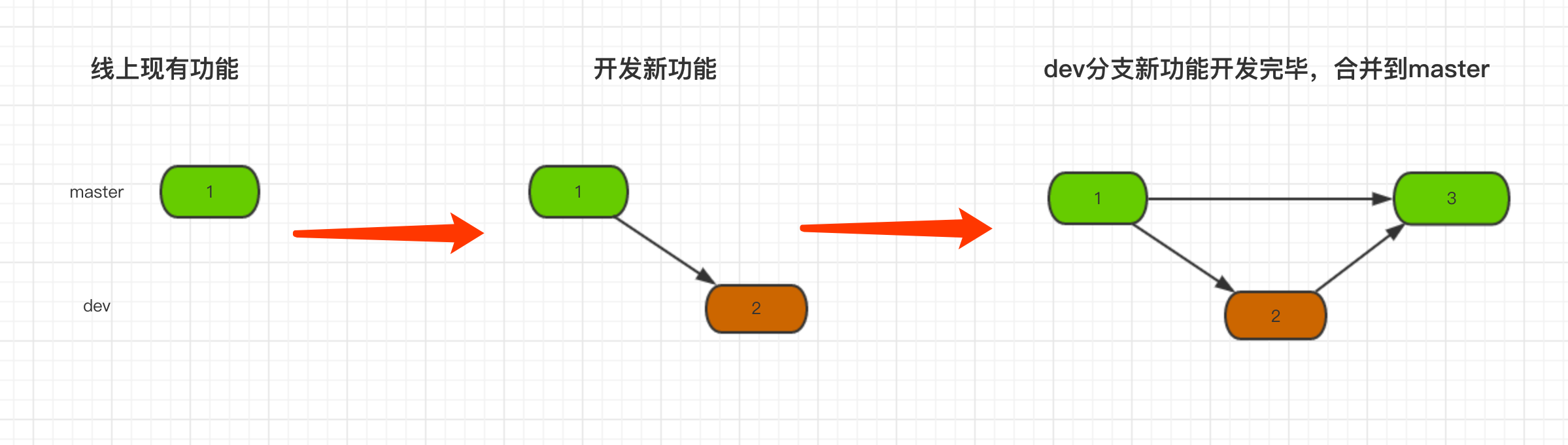
分支学习:branch称为分支,默认仅有一个名为master的分支。一般开发新功能流程为:开发新功能时会在分支dev上进行,开发完毕后再合并到master分支。
MacBook-Pro-:pondo gaoshengyue$ git branch dev                 # 创建新分支,即:拷贝一份当前所在分支代码到新分支

MacBook-Pro-:pondo gaoshengyue$ git checkout dev               # 切换到dev分支

MacBook-Pro-:pondo gaoshengyue$ vim app01/views.py             # 开发功能

MacBook-Pro-:pondo gaoshengyue$ git status                     # 查看状态,即:在dev分支修改了app01/views.py文件

On branch dev

Changes not staged for commit:

  (use "git add <file>..." to update what will be committed)

  (use "git checkout -- <file>..." to discard changes in working directory)

    modified:   app01/views.py

no changes added to commit (use "git add" and/or "git commit -a")

MacBook-Pro-:pondo gaoshengyue$ git add .                      # 将修改文件添加到版本库的暂存区

MacBook-Pro-:pondo gaoshengyue$ git commit -m '新功能开发完毕'    # 将暂存区的内容提交到当前所在分支,即:dev分支

[dev 32b40cd] 新功能开发完毕

  file changed,  insertions(+)

MacBook-Pro-:pondo gaoshengyue$ git checkout master             # 切换回master分支

Switched to branch 'master'

MacBook-Pro-:pondo gaoshengyue$ git merge dev                   # 将dev分支内容合并到master分支

Updating 0972f4b..32b40cd

Fast-forward

 app01/views.py |  ++

  file changed,  insertions(+)
一般流程示例(上图)

按照分支的思路,如果我们在公司产品上线遇到bug的时候,就可以这么来做:
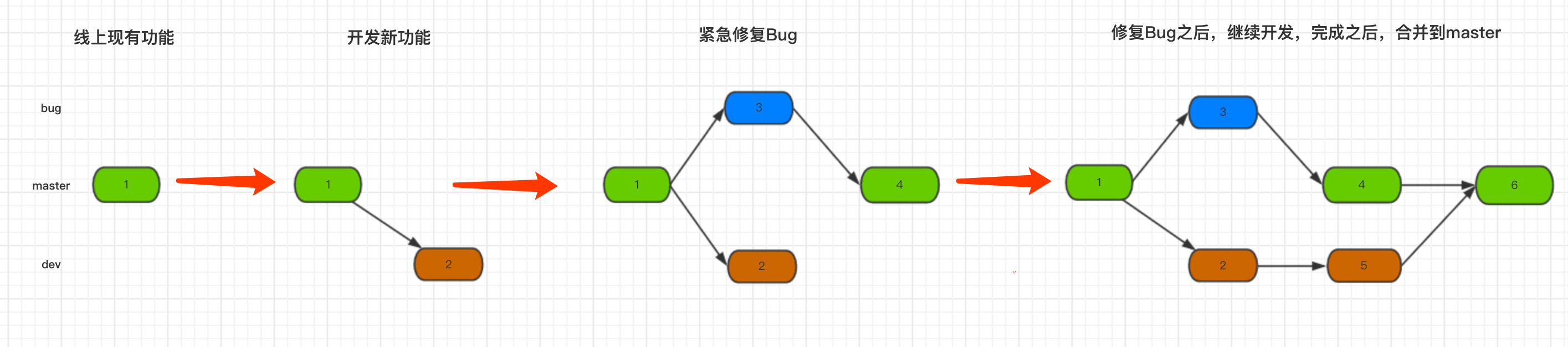
MacBook-Pro-:pondo gaoshengyue$ git branch                     # 当前在master分支

* master

MacBook-Pro-:pondo gaoshengyue$ git branch dev                 # 创建dev分支用于开发新功能

MacBook-Pro-:pondo gaoshengyue$ git checkout dev               # 切换到dev分支

Switched to branch 'dev'

MacBook-Pro-:pondo gaoshengyue$ vim app01/views.py             # 开发新功能到一半,需要紧急修复Bug

MacBook-Pro-:pondo gaoshengyue$ git add .

MacBook-Pro-:pondo gaoshengyue$ git commit -m '新功能开发一半'

[dev b3ac2cb] 新功能开发一半

  file changed,  insertions(+)

MacBook-Pro-:pondo gaoshengyue$ git checkout master            # 切换回master分支

Switched to branch 'master'

MacBook-Pro-:pondo gaoshengyue$ git branch bug                 # 创建bug分支

MacBook-Pro-:pondo gaoshengyue$ git checkout bug               # 切换到bug分支

Switched to branch 'bug'

MacBook-Pro-:pondo gaoshengyue$ vim pondo/settings.py          # 修改bug

MacBook-Pro-:pondo gaoshengyue$ git add .                      # 提交bug

MacBook-Pro-:pondo gaoshengyue$ git commit -m '紧急修复bug'      # 提交bug

[bug f42f386] 紧急修复bug

  file changed,  insertion(+),  deletion(-)

MacBook-Pro-:pondo gaoshengyue$ git checkout master            # 切换会master

Switched to branch 'master'

MacBook-Pro-:pondo gaoshengyue$ git merge bug                  # 将bug分支内容合并到master分支,表示bug修复完毕,可以上线

Updating 0972f4b..f42f386

Fast-forward

 pondo/settings.py |  +-

  file changed,  insertion(+),  deletion(-)

MacBook-Pro-:pondo gaoshengyue$ git checkout dev               # 切换到dev分支,继续开发新功能

Switched to branch 'dev'

MacBook-Pro-:pondo gaoshengyue$ vim app01/views.py             # 继续开发其他一半功能

MacBook-Pro-:pondo gaoshengyue$ git add .                      # 提交新功能

MacBook-Pro-:pondo gaoshengyue$ git commit -m '继续开发完成'      # 提交功能

[dev c0bfb27] 继续开发完成

  file changed,  insertion(+)

MacBook-Pro-:pondo gaoshengyue$ git checkout master            # 切换回master分支

Switched to branch 'master'

MacBook-Pro-:pondo gaoshengyue$ git merge dev                  # 将dev分支合并到master分支

Merge made by the 'recursive' strategy.

 app01/views.py |  +++

  file changed,  insertions(+)
注意:git merge 时也可能会出现冲突,解决冲突的方式上述stash相同,即:找到冲突文件,手动修改冲突并提交。
branch相关常用命令:
- git branch 分支名称 创建分支
- git checkout 分支名称 切换分支
- git branch -m 分支名称 创建并切换到指定分支
- git branch 查看所有分支
- git branch -d 分支名称 删除分支
- git merge 分支名称 将指定分支合并到当前分支
Git--Bug解决篇的更多相关文章
- dede留言板BUG解决
dede留言板刷新后空白BUG解决 DEDE留言板验证码留空或者不正确返回空白页面的解决方法 解决方法如下进入文件/plus/guestbook.php 找到代码ShowMsg("验证码不正 ...
- git 提交解决冲突(转载)
转载 git 提交解决冲突 http://www.cnblogs.com/qinbb/p/5972308.html 一:git命令在提交代码前,没有pull拉最新的代码,因此再次提交出现了冲突. ...
- git 命令(提高篇)的本质理解
上一篇博客:[[git 命令(提高篇)的本质理解] (http://www.cnblogs.com/juking/p/7105744.html)]介绍了Git 的基础知识 -- 提交.分支以及在提交树 ...
- Git使用基础篇
Git使用基础篇 前言 Git是一个分布式的版本控制工具,本篇文章从介绍Git开始,重点在于介绍Git的基本命令和使用技巧,让你尝试使用Git的同时,体验到原来一个版 本控制工具可以对开发产生如此之多 ...
- Git使用基础篇(zz)
Git使用基础篇 您的评价: 收藏该经验 Git是一个分布式的版本控制工具,本篇文章从介绍Git开始,重点在于介绍Git的基本命令和使用技巧,让你尝试使用Git的同时,体 ...
- 从零开始使用git第三篇:git撤销操作、分支操作和常见冲突
从零开始使用git 第三篇:git撤销操作.分支操作和常见冲突 第一篇:从零开始使用git第一篇:下载安装配置 第二篇:从零开始使用git第二篇:git实践操作 第三篇:从零开始使用git第三篇:gi ...
- jenkins持续集成源码管理选项为None,构建失败找不到git.exe解决办法
我的jenkins版本为Jenkins ver. 2.19.1 1.源码管理选项只有None的解决办法: 在插件管理中心,搜索对应的源码管理插件这里以git为例,搜索git plugin点击右下角的安 ...
- 百度编辑器ueditor 异步加载时,初始化没办法赋值bug解决方法
百度编辑器ueditor 异步加载时,初始化没办法赋值bug解决方法 金刚 前端 ueditor 初始化 因项目中使用了百度编辑器——ueditor.整体来说性能还不错. 发现问题 我在做一个编辑页面 ...
- paip.c3p0 nullpointexcept 配置文件根路径读取bug 解决
paip.c3p0 nullpointexcept 配置文件根路径读取bug 解决 windows ok linux犯错误... 查看loging, 初始化的时候儿jdbcurl,user,pwd都是 ...
随机推荐
- HDU 6237.A Simple Stone Game-欧拉函数找素因子 (2017中国大学生程序设计竞赛-哈尔滨站-重现赛)
A Simple Stone Game Time Limit: 2000/1000 MS (Java/Others) Memory Limit: 262144/262144 K (Java/Ot ...
- Python的扩展接口[2] -> 动态链接库DLL[1] -> 组件对象模型 COM 的 Python 调用
组件对象模型 COM 的 Python 调用 关于COM的基本概念,可参考组件对象模型 COM的内容,下面主要介绍两种使用 Python 调用 COM 组件的方法. 1 使用 win32com 1.1 ...
- [LOJ6281]数列分块入门 5
题目大意: 给你一个长度为$n(n\leq50000)$的序列$A(0\leq A_i<2^{31})$,支持进行以下两种操作: 1.将区间$[l,r]$中所有数开方: 2.询问区间$[l,r] ...
- Leave It Behind and Carry On ---- 高一下期末考反思 [补档]
背景 这个学期的前\(\frac{3}{4}\), 我都是在停课集训中度过的, 先是GDKOI, 再是北京集训, 最后是GDOI, 结果GDOI还没进day3就滚粗了. 学校的内容是考完GDOI后回学 ...
- Android入门之文件系统操作
Android入门之文件系统操作(二)文件操作相关指令 (转) (一)获取总根 File[] fileList=File.listRoots(); //返回fileList.length为1 // ...
- NSOperationQueue 和 NSOperation
The NSOperationQueue class regulates the execution of a set of NSOperation objects. After being adde ...
- Ubuntu16.04 -- 后台进程Nohup
nohup用于使程序在用户退出登陆.关闭终端之后仍能继续运行 用法: nohup your_command & #(符号&使程序在后台运行) exit #(退出nohup模式) 启动后 ...
- js获取页面传来参数的方法
function GetQueryString(name) { var reg = new RegExp("(^|&)" + name + "=([^&] ...
- Python-使用Magellan进行数据匹配总结
参考:http://www.biggorilla.org/zh-hans/walkt/ 使用Magellan进行数据匹配过程如下: 假设有两个数据源为A和B, A共有四列数据:(A_Column1,A ...
- Android服务Service具体解释(作用,生命周期,AIDL)系列文章-为什么须要服务呢?
Android服务Service具体解释(作用,生命周期,AIDL) 近期沉迷于上班,没有时间写博客了.解衣入睡,未眠.随起床写一篇博客压压惊! ##我们android系统为什么须要服务Service ...