
收集Nginx的json格式日志(五)
一.配置nginx
[root@linux-node1 ~]# vim /etc/nginx/nginx.conf

#修改日志格式为json格式,并创建一个nginxweb的网站目录

log_format access_json '{"@timestamp":"$time_iso8601",'

                           '"host":"$server_addr",'

                           '"clientip":"$remote_addr",'

                           '"size":$body_bytes_sent,'

                           '"responsetime":$request_time,'

                           '"upstreamtime":"$upstream_response_time",'

                           '"upstreamhost":"$upstream_addr",'

                           '"http_host":"$host",'

                           '"url":"$uri",'

                           '"domain":"$host",'

                           '"xff":"$http_x_forwarded_for",'

                           '"referer":"$http_referer",'

                           '"status":"$status"}';

    access_log  /var/log/nginx/access.log  access_json;

        location /nginxweb {

                root html;

                index index.html index.htm;

        }

[root@linux-node1 ~]# mkdir /usr/share/nginx/html/nginxweb

[root@linux-node1 ~]# echo "<h1> welcome to use Nginx" > /usr/share/nginx/html/nginxweb/index.html

[root@linux-node1 ~]# nginx -t

nginx: the configuration file /etc/nginx/nginx.conf syntax is ok

nginx: configuration file /etc/nginx/nginx.conf test is successful

[root@linux-node1 ~]# systemctl start nginx

二、配置logstash
# vim /etc/logstash/conf.d/nginxlog.conf

input{

    file {

        path => "/var/log/nginx/access.log"

        type => "nginx-access-log"

        start_position => "beginning"

        stat_interval => "2"

    }

}

output{

   elasticsearch {

        hosts => ["10.0.0.22:9200"]

        index => "logstash-nginx-access-log-%{+YYYY.MM.dd}"

   }

}
三、Kibana展示
[[root@saltstack02 ~]# ab -n1000 -c 100 http://10.0.0.22/nginxweb/index.html    #对页面压测

[root@saltstack02 conf.d]# tailf /var/log/nginx/access.log    #nginx的访问日志变成了json格式

{"@timestamp":"2018-06-20T19:14:30+08:00","host":"10.0.0.22","clientip":"10.0.0.22","size":26,"responsetime":0.000,"upstreamtime":"-","upstreamhost":"-","http_host":"10.0.0.22","url":"/nginxweb/index.html","domain":"10.0.0.22","xff":"-","referer":"-","status":"200"}

{"@timestamp":"2018-06-20T19:14:30+08:00","host":"10.0.0.22","clientip":"10.0.0.22","size":26,"responsetime":0.000,"upstreamtime":"-","upstreamhost":"-","http_host":"10.0.0.22","url":"/nginxweb/index.html","domain":"10.0.0.22","xff":"-","referer":"-","status":"200"}

{"@timestamp":"2018-06-22T09:10:42+08:00","host":"10.0.0.22","clientip":"10.0.0.1","size":26,"responsetime":0.000,"upstreamtime":"-","upstreamhost":"-","http_host":"10.0.0.22","url":"/nginxweb/index.html","domain":"10.0.0.22","xff":"-","referer":"-","status":"200"}
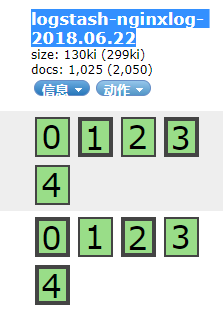
Head插件查看:

收集Nginx的json格式日志(五)的更多相关文章
- filebeat收集nginx的json格式日志
一.在nginx主机上安装filebeat组件 [root@zabbix_server nginx]# cd /usr/local/src/ [root@zabbix_server src]# wge ...
- Logstash动态模板映射收集Nginx的Json格式日志
Logstash传输给ES的数据会自动映射为5索引,5备份,字段都为text的的索引.这样基本上无法进行数据分析.所以必须将Logstash的数据按照既定的格式存储在ES中,这时候就要使用到ES模板技 ...
- 使用filebeat解析nginx的json格式日志,并且保存原始message字段的值,输出到es中并通过grafana图形化显示
1.nginx日志调成json样式 log_format json '{"@timestamp":"$time_iso8601",' '"server ...
- ELK之收集Nginx、Tomcat的json格式日志
1.安装Nginx yum -y install nginx vim /etc/nginx/nginx.conf # 修改日志格式为json格式,并创建一个nginxweb的网站目录 log_form ...
- Nginx 高级配置-自定义json格式日志
Nginx 高级配置-自定义json格式日志 作者:尹正杰 版权声明:原创作品,谢绝转载!否则将追究法律责任. 在大数据运维工作中,我们经常会使用flume,filebeat相关日志收集工具取收集日志 ...
- Docker安装ELK并实现JSON格式日志分析
ELK是什么 ELK是elastic公司提供的一套完整的日志收集以及前端展示的解决方案,是三个产品的首字母缩写,分别是ElasticSearch.Logstash和Kibana. 其中Logstash ...
- nginx 返回json格式内容
例子: #如果访问的ip是192.168.1.1,就直接返回json格式的内容 location / { default_type application/json; #####格式 if ( $re ...
- Maven项目配置Logback输出JSON格式日志
最近,项目提出需求,日志需要固定输出为JSON格式,以便后端Flink程序解析. 项目背景 项目为简单的Maven项目,日志由Filebeat采集,因此不需要配置输出至Logstash. 下面为pom ...
- Logstash处理json格式日志文件的三种方法
假设日志文件中的每一行记录格式为json的,如: {"Method":"JSAPI.JSTicket","Message":"JS ...
随机推荐
- Spring在Web容器启动时执行初始化方法
需求:在tomcat启动时开启一个定时任务. 想法:容器启动时执行方法,最容易想到的就是servlet中可以配置load-on-startup,设置一个正整数也就可以随容器一起启动. 问题:上面的方法 ...
- Storm实现实时大数据分析
当今世界,公司的日常运营经常会生成TB级别的数据.数据来源囊括了互联网装置可以捕获的任何类型数据,网站.社交媒体.交易型商业数据以及其它商业环境中创建的数据.考虑到数据的生成量,实时处理成为了许多机构 ...
- Redis学习八:Redis的事务
一.是什么 可以一次执行多个命令,本质是一组命令的集合.一个事务中的所有命令都会序列化,按顺序地串行化执行而不会被其它命令插入,不许加塞. 二.能干嘛 一个队列中,一次性.顺序性.排他性的执行一系列命 ...
- 20145202马超 2016-2017-2 《Java程序设计》第6周学习总结
20145202马超 2016-2017-2 <Java程序设计>第6周学习总结 教材学习内容总结 进程:是一个正在执行中的程序,每一个进程都有一个执行程序,该顺序是一个执行路径,或者说是 ...
- node的导入导出
node的每一个文件,都是一个域,那么里面所有的变量都不允许被外界引用,除非导出.要使用外界的变量,也必须使用导入的方式来导入.import 文件路径. css可以直接使用import +文件路径导入 ...
- mysql 时间戳
需求:记录表中每条记录创建时间和最新修改时间 一.界面操作 工具:mysql-front 右键添加字段createTime和updateTime,字段类型为timestamp 完成,在表中添加一条新纪 ...
- 24、List三个子类的特点
List的三个子类的特点 因为三个类都实现了List接口,所以里面的方法都差不多,那这三个类都有什么特点呢? ArrayList:底层数据结构是数组,查询快,增删慢.线程不安全,效率高. Vector ...
- cout如何输出十六进制
http://blog.csdn.net/okadler0518/article/details/4962340 cout<<hex<<i<<endl; //输出十 ...
- RabbitMQ--Publish/Subscribe(三)
前言 在先前例子中我们创建了一个work queue,封装一个task到一个message中并发送到queue.一个worker(consumer)取出任务并执行. 像这种producer把messa ...
- simple_tag
from django.template import Library register = Library() @register.simple_tag def func(arg): return ...