
Nginx 高级配置-自定义json格式日志
Nginx高级配置-自定义json格式日志
作者:尹正杰
版权声明:原创作品,谢绝转载!否则将追究法律责任。
在大数据运维工作中,我们经常会使用flume,filebeat相关日志收集工具取收集日志,但这些日志在收集前都日志基本上都是json格式的,通过flume收集日志到hdfs集群,开发人员就直接使用java,scala语言取处理日志,有的时候会使用到spark,fink等框架去处理日志。因此nginx配置为json格式还是非常有必要的。
访问日志是记录客户端即用户的具体请求内容信息,全局配置模块中的error_log是记录nginx服务器运行时的日志保存路径和记录日志的level,因此有着本质的区别,而且Nginx的错误日志一般只有一个,但是访问日志可以在不同server中定义多个,定义一个日志需要使用access_log指定日志的保存路径,使用log_format指定日志的格式,格式中定义要保存的具体日志内容。
一.自定义默认格式日志
如果是要保留日志的源格式,只是添加相应的日志内容,则配置如下。

关于nginx日志使用的变量名称含义,博主推荐阅读:

  https://www.cnblogs.com/yinzhengjie/p/12046613.html
1>.编写主配置文件
[root@node101.yinzhengjie.org.cn ~]# cat /yinzhengjie/softwares/nginx/conf/nginx.conf

worker_processes  4;

worker_cpu_affinity 00000001 00000010 00000100 00001000;

events {

    worker_connections  100000;

    use epoll;

    accept_mutex on;

    multi_accept on;

}

http {

    include       mime.types;

    default_type  text/html;

    charset utf-8;

    log_format my_default_format '$remote_addr - $remote_user [$time_local] "$request"' '$status $body_bytes_sent "$http_referer"' '"$http_user_agent"' '"$http_x_forwarded_

for"' '$server_name:$server_port';

    access_log logs/access.log my_default_format;

    include /yinzhengjie/softwares/nginx/conf.d/*.conf;

}

[root@node101.yinzhengjie.org.cn ~]#

[root@node101.yinzhengjie.org.cn ~]# nginx -t

nginx: the configuration file /yinzhengjie/softwares/nginx/conf/nginx.conf syntax is ok

nginx: configuration file /yinzhengjie/softwares/nginx/conf/nginx.conf test is successful

[root@node101.yinzhengjie.org.cn ~]#
2>.编写子配置文件
[root@node101.yinzhengjie.org.cn ~]# cat /yinzhengjie/softwares/nginx/conf.d/share.conf

server {

    listen 80;

    server_name node101.yinzhengjie.org.cn;

    location / {

        root /yinzhengjie/data/web/nginx/static;

        index index.html;

    }

    location /nginx_status {

        stub_status;

        allow 172.30.1.108;

    deny all;

    }

    location /main {

    index index.html;

    default_type text/html;

        set $name jason;

        set $nginx_name $server_name;

        echo "姓名: $name";

        echo "************";

        echo "Nginx服务器名称: $nginx_name";

    }

}

[root@node101.yinzhengjie.org.cn ~]#

[root@node101.yinzhengjie.org.cn ~]# nginx -t

nginx: the configuration file /yinzhengjie/softwares/nginx/conf/nginx.conf syntax is ok

nginx: configuration file /yinzhengjie/softwares/nginx/conf/nginx.conf test is successful

[root@node101.yinzhengjie.org.cn ~]#
3>.重新加载nginx的配置文件
[root@node101.yinzhengjie.org.cn ~]# ps -ef | grep nginx | grep -v grep

root      9297     1  0 Dec17 ?        00:00:00 nginx: master process nginx

nginx    11823  9297  0 12:50 ?        00:00:00 nginx: worker process

nginx    11824  9297  0 12:50 ?        00:00:00 nginx: worker process

nginx    11825  9297  0 12:50 ?        00:00:00 nginx: worker process

nginx    11826  9297  0 12:50 ?        00:00:00 nginx: worker process

[root@node101.yinzhengjie.org.cn ~]#

[root@node101.yinzhengjie.org.cn ~]# nginx -s reload

[root@node101.yinzhengjie.org.cn ~]#

[root@node101.yinzhengjie.org.cn ~]# ps -ef | grep nginx | grep -v grep

root      9297     1  0 Dec17 ?        00:00:00 nginx: master process nginx

nginx    11890  9297  1 12:57 ?        00:00:00 nginx: worker process

nginx    11891  9297  1 12:57 ?        00:00:00 nginx: worker process

nginx    11892  9297  1 12:57 ?        00:00:00 nginx: worker process

nginx    11893  9297  1 12:57 ?        00:00:00 nginx: worker process

[root@node101.yinzhengjie.org.cn ~]#
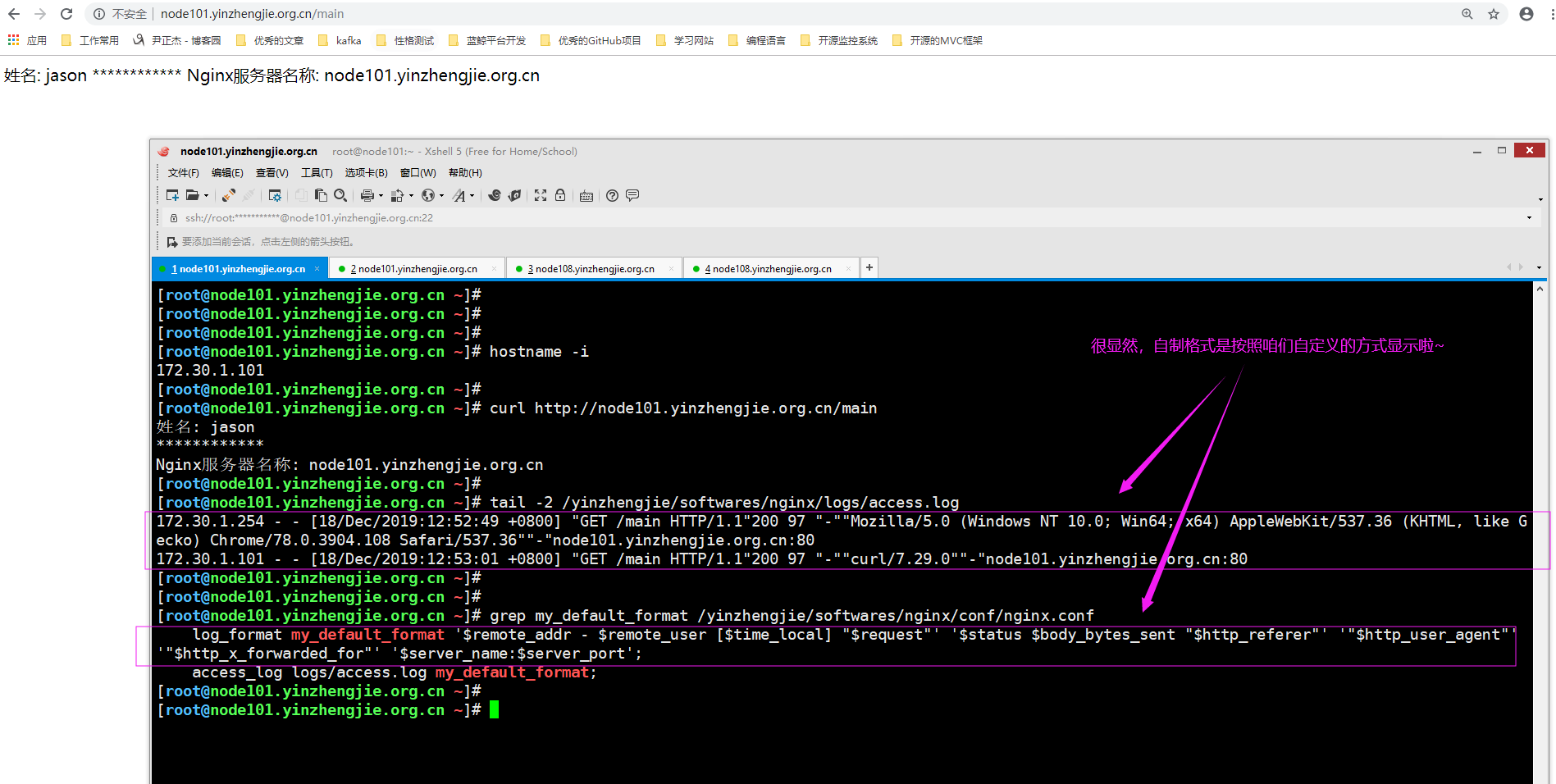
4>.浏览器访问"http://node101.yinzhengjie.org.cn/main"并查看日志格式,如下图所示。
二.自定义json格式日志
Nginx的默认访问日志记录内容相对比较单一,默认的格式也不方便后期做日志统计分析,生产环境中通常将nginx日志转换为json日志,然后配合使用ELK做日志收集-统计-分析。
1>.编辑主配置文件
[root@node101.yinzhengjie.org.cn ~]# cat -n /yinzhengjie/softwares/nginx/conf/nginx.conf

     1    worker_processes  4;

     2    worker_cpu_affinity 00000001 00000010 00000100 00001000;

     3

     4    events {

     5        worker_connections  100000;

     6        use epoll;

     7        accept_mutex on;

     8        multi_accept on;

     9    }

    10

    11    http {

    12        include       mime.types;

    13

    14        default_type  text/html;

    15

    16        charset utf-8;

    17

    18        log_format my_access_json '{"@timestamp":"$time_iso8601",' '"host":"$server_addr",' '"clientip":"$remote_addr",' '"size":$body_bytes_sent,' '"responsetime":$request_time,' '"upstreamtime":"$upstream_response_time",' '"upstreamhost":"$upstream_addr",' '"http_host":"$host",' '"uri":"$uri",' '"domain":"$host",' '"xff":"$http_x_forwarded_for",' '"referer":"$http_referer",' '"tcp_xff":"$proxy_protocol_addr",' '"http_user_agent":"$http_user_agent",' '"status":"$status"}';
   19

    20

    21        access_log logs/access_json.log my_access_json;

    22

    23        include /yinzhengjie/softwares/nginx/conf.d/*.conf;

    24    }

    25

[root@node101.yinzhengjie.org.cn ~]#

[root@node101.yinzhengjie.org.cn ~]# nginx -t

nginx: the configuration file /yinzhengjie/softwares/nginx/conf/nginx.conf syntax is ok

nginx: configuration file /yinzhengjie/softwares/nginx/conf/nginx.conf test is successful

[root@node101.yinzhengjie.org.cn ~]#
2>.编辑子配置文件
[root@node101.yinzhengjie.org.cn ~]# cat -n /yinzhengjie/softwares/nginx/conf.d/share.conf

     1    server {

     2        listen 80;

     3        server_name node101.yinzhengjie.org.cn;

     4

     5        location / {

     6            root /yinzhengjie/data/web/nginx/static;

     7            index index.html;

     8        }

     9

    10        location /nginx_status {

    11            stub_status;

    12            allow 172.30.1.108;

    13        deny all;

    14        }

    15

    16        location /main {

    17        index index.html;

    18        default_type text/html;

    19            set $name jason;

    20            set $nginx_name $server_name;

    21            echo "姓名: $name";

    22            echo "************";

    23            echo "Nginx服务器名称: $nginx_name";

    24        }

    25

    26    }

[root@node101.yinzhengjie.org.cn ~]#

[root@node101.yinzhengjie.org.cn ~]# nginx -t

nginx: the configuration file /yinzhengjie/softwares/nginx/conf/nginx.conf syntax is ok

nginx: configuration file /yinzhengjie/softwares/nginx/conf/nginx.conf test is successful

[root@node101.yinzhengjie.org.cn ~]#

[root@node101.yinzhengjie.org.cn ~]#
3>.重新加载nginx配置文件
[root@node101.yinzhengjie.org.cn ~]# ps -ef | grep nginx | grep -v grep

root      9297     1  0 Dec17 ?        00:00:00 nginx: master process nginx

nginx    11890  9297  0 12:57 ?        00:00:00 nginx: worker process

nginx    11891  9297  0 12:57 ?        00:00:00 nginx: worker process

nginx    11892  9297  0 12:57 ?        00:00:00 nginx: worker process

nginx    11893  9297  0 12:57 ?        00:00:00 nginx: worker process

[root@node101.yinzhengjie.org.cn ~]#

[root@node101.yinzhengjie.org.cn ~]# nginx -s reload

[root@node101.yinzhengjie.org.cn ~]#

[root@node101.yinzhengjie.org.cn ~]# ps -ef | grep nginx | grep -v grep

root      9297     1  0 Dec17 ?        00:00:00 nginx: master process nginx

nginx    11946  9297  1 13:25 ?        00:00:00 nginx: worker process

nginx    11947  9297  1 13:25 ?        00:00:00 nginx: worker process

nginx    11948  9297  0 13:25 ?        00:00:00 nginx: worker process

nginx    11949  9297  1 13:25 ?        00:00:00 nginx: worker process

[root@node101.yinzhengjie.org.cn ~]#
4>.浏览器访问"http://node101.yinzhengjie.org.cn/main"并查看日志格式,如下图所示。

Nginx 高级配置-自定义json格式日志的更多相关文章
- ELK之收集Nginx、Tomcat的json格式日志
1.安装Nginx yum -y install nginx vim /etc/nginx/nginx.conf # 修改日志格式为json格式,并创建一个nginxweb的网站目录 log_form ...
- filebeat收集nginx的json格式日志
一.在nginx主机上安装filebeat组件 [root@zabbix_server nginx]# cd /usr/local/src/ [root@zabbix_server src]# wge ...
- Nginx 核心配置-自定义日志路径及清空日志注意事项
Nginx 核心配置-自定义日志路径及清空日志注意事项 作者:尹正杰 版权声明:原创作品,谢绝转载!否则将追究法律责任. 一.关于日志清空注意事项 1>.nginx服务写访问日志是基于acces ...
- Nginx 高级配置-变量使用
Nginx 高级配置-变量使用 作者:尹正杰 版权声明:原创作品,谢绝转载!否则将追究法律责任. nginx的变量可以在配置文件中引用,作为功能判断或者日志等场景使用,变量可以分为内置变量和自定义变 ...
- Nginx 高级配置--关于favicon.ico
Nginx 高级配置--关于favicon.ico 作者:尹正杰 版权声明:原创作品,谢绝转载!否则将追究法律责任. 一.浏览器会默认帮咱们访问官网的图标 1>.浏览器访问网站"htt ...
- Nginx 高级配置-https 功能
Nginx 高级配置-https 功能 作者:尹正杰 版权声明:原创作品,谢绝转载!否则将追究法律责任. 一.HTTPS工作过程 1>.SSL/TLS SSL(Secure Socket Lay ...
- Nginx 高级配置-实现多域名HTTPS
Nginx 高级配置-实现多域名HTTPS 作者:尹正杰 版权声明:原创作品,谢绝转载!否则将追究法律责任. 一.Nginx支持基于单个IP实现多域名的功能 Nginx支持基于单个IP实现多域名的功能 ...
- Nginx 高级配置-压缩功能
Nginx 高级配置-压缩功能 作者:尹正杰 版权声明:原创作品,谢绝转载!否则将追究法律责任. 一.Nginx压缩相关参数概述 1>.gzip on | off; Nginx支持对指定类型的文 ...
- Nginx 高级配置-第三方模块编译
Nginx 高级配置-第三方模块编译 作者:尹正杰 版权声明:原创作品,谢绝转载!否则将追究法律责任. 第三模块是对nginx 的功能扩展,第三方模块需要在编译安装Nginx 的时候使用参数--add ...
随机推荐
- [LeetCode] 164. Maximum Gap 求最大间距
Given an unsorted array, find the maximum difference between the successive elements in its sorted f ...
- JVM系列之六:内存溢出、内存泄漏 和 栈溢出
1. OOM && SOF OutOfMemoryError异常: 除了程序计数器外,虚拟机内存的其他几个运行时区域都有发生OutOfMemoryError(OOM)异常的可能, 内存 ...
- Oracle性能调优之物化视图用法简介
目录 一.物化视图简介 二.实践:创建物化视图 一.物化视图简介 物化视图分类 物化视图分类,物化视图语法和as后面的sql分为: (1) 基于主键的物化视图(主键物化视图) (2)基于Rowid的物 ...
- git 版本库之间的依赖 --submodule
自己做实验: 在github上建一个版本库B作为submoule: https://github.com/FrankKuiFang/testGit_submodule, 尝试将该版本库作为另一个库A ...
- Create GUID / UUID in JavaScript?
Code function uuidv4() { return ([1e7]+-1e3+-4e3+-8e3+-1e11).replace(/[018]/g, c => (c ^ crypto.g ...
- 【More Effective C++ 条款3】最好不要以多态方式处理数组
1.在数组与多态混用的情况下,数组元素的访问会出现不可预期的结果(因为数组元素的访问会使用到下标运算) 将一个子类对象数组传递给一个父类对象数组声明的函数,编译器会允许这个行为,但是由于子类对象和父类 ...
- Window与Document
Window 表示一个包含DOM文档的窗口,其 document 属性指向窗口中载入的 DOM文档.使用 document.defaultView 属性可以获取指定文档所在窗口.window作为全局变 ...
- request.setAttribute()的用法
分类专栏: Java request在当次的请求的url之间有效一次传参数,速度快,缺点是参数只能取一次 forward是转向,将现在的请求转交,他只能在同一个容器里使用同时保存客户的请求状态. ...
- ASP.NET Core+MongoDB(一)
项目类库:.Net Standar 2.0web:ASP.NET CORE 2.2 版本 先上图,看我们的解决方案结构: 分别对上面的工程进行说明:1.KYSharpCore:为公共的基础类,最底层 ...
- Redis主从复制看这篇就够了
一.概念和作用 概念:主机数据更新后根据配置和策略, 自动同步到备机的master/slaver机制,Master以写为主,Slave以读为主. 作用: 读写分离: 容灾恢复: 二.复制原理 slav ...