
收集Nginx的json格式日志(五)
一.配置nginx
[root@linux-node1 ~]# vim /etc/nginx/nginx.conf

#修改日志格式为json格式,并创建一个nginxweb的网站目录

log_format access_json '{"@timestamp":"$time_iso8601",'

                           '"host":"$server_addr",'

                           '"clientip":"$remote_addr",'

                           '"size":$body_bytes_sent,'

                           '"responsetime":$request_time,'

                           '"upstreamtime":"$upstream_response_time",'

                           '"upstreamhost":"$upstream_addr",'

                           '"http_host":"$host",'

                           '"url":"$uri",'

                           '"domain":"$host",'

                           '"xff":"$http_x_forwarded_for",'

                           '"referer":"$http_referer",'

                           '"status":"$status"}';

    access_log  /var/log/nginx/access.log  access_json;

        location /nginxweb {

                root html;

                index index.html index.htm;

        }

[root@linux-node1 ~]# mkdir /usr/share/nginx/html/nginxweb

[root@linux-node1 ~]# echo "<h1> welcome to use Nginx" > /usr/share/nginx/html/nginxweb/index.html

[root@linux-node1 ~]# nginx -t

nginx: the configuration file /etc/nginx/nginx.conf syntax is ok

nginx: configuration file /etc/nginx/nginx.conf test is successful

[root@linux-node1 ~]# systemctl start nginx

二、配置logstash
# vim /etc/logstash/conf.d/nginxlog.conf

input{

    file {

        path => "/var/log/nginx/access.log"

        type => "nginx-access-log"

        start_position => "beginning"

        stat_interval => "2"

    }

}

output{

   elasticsearch {

        hosts => ["10.0.0.22:9200"]

        index => "logstash-nginx-access-log-%{+YYYY.MM.dd}"

   }

}
三、Kibana展示
[[root@saltstack02 ~]# ab -n1000 -c 100 http://10.0.0.22/nginxweb/index.html    #对页面压测

[root@saltstack02 conf.d]# tailf /var/log/nginx/access.log    #nginx的访问日志变成了json格式

{"@timestamp":"2018-06-20T19:14:30+08:00","host":"10.0.0.22","clientip":"10.0.0.22","size":26,"responsetime":0.000,"upstreamtime":"-","upstreamhost":"-","http_host":"10.0.0.22","url":"/nginxweb/index.html","domain":"10.0.0.22","xff":"-","referer":"-","status":"200"}

{"@timestamp":"2018-06-20T19:14:30+08:00","host":"10.0.0.22","clientip":"10.0.0.22","size":26,"responsetime":0.000,"upstreamtime":"-","upstreamhost":"-","http_host":"10.0.0.22","url":"/nginxweb/index.html","domain":"10.0.0.22","xff":"-","referer":"-","status":"200"}

{"@timestamp":"2018-06-22T09:10:42+08:00","host":"10.0.0.22","clientip":"10.0.0.1","size":26,"responsetime":0.000,"upstreamtime":"-","upstreamhost":"-","http_host":"10.0.0.22","url":"/nginxweb/index.html","domain":"10.0.0.22","xff":"-","referer":"-","status":"200"}
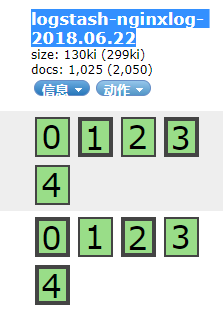
Head插件查看:

收集Nginx的json格式日志(五)的更多相关文章
- filebeat收集nginx的json格式日志
一.在nginx主机上安装filebeat组件 [root@zabbix_server nginx]# cd /usr/local/src/ [root@zabbix_server src]# wge ...
- Logstash动态模板映射收集Nginx的Json格式日志
Logstash传输给ES的数据会自动映射为5索引,5备份,字段都为text的的索引.这样基本上无法进行数据分析.所以必须将Logstash的数据按照既定的格式存储在ES中,这时候就要使用到ES模板技 ...
- 使用filebeat解析nginx的json格式日志,并且保存原始message字段的值,输出到es中并通过grafana图形化显示
1.nginx日志调成json样式 log_format json '{"@timestamp":"$time_iso8601",' '"server ...
- ELK之收集Nginx、Tomcat的json格式日志
1.安装Nginx yum -y install nginx vim /etc/nginx/nginx.conf # 修改日志格式为json格式,并创建一个nginxweb的网站目录 log_form ...
- Nginx 高级配置-自定义json格式日志
Nginx 高级配置-自定义json格式日志 作者:尹正杰 版权声明:原创作品,谢绝转载!否则将追究法律责任. 在大数据运维工作中,我们经常会使用flume,filebeat相关日志收集工具取收集日志 ...
- Docker安装ELK并实现JSON格式日志分析
ELK是什么 ELK是elastic公司提供的一套完整的日志收集以及前端展示的解决方案,是三个产品的首字母缩写,分别是ElasticSearch.Logstash和Kibana. 其中Logstash ...
- nginx 返回json格式内容
例子: #如果访问的ip是192.168.1.1,就直接返回json格式的内容 location / { default_type application/json; #####格式 if ( $re ...
- Maven项目配置Logback输出JSON格式日志
最近,项目提出需求,日志需要固定输出为JSON格式,以便后端Flink程序解析. 项目背景 项目为简单的Maven项目,日志由Filebeat采集,因此不需要配置输出至Logstash. 下面为pom ...
- Logstash处理json格式日志文件的三种方法
假设日志文件中的每一行记录格式为json的,如: {"Method":"JSAPI.JSTicket","Message":"JS ...
随机推荐
- HDU 4857 拓扑排序 优先队列
n个数,已经有大小关系,现给m个约束,规定a在b之前,剩下的数要尽可能往前移.输出序列 大小关系显然使用拓扑结构,关键在于n个数本身就有大小关系,那么考虑反向建图,优先选择值最大的入度为零的点,这样得 ...
- 记录第一次阿里云服务器部署java web工程的经历
起因:测试一个微信小程序,发现所有的请求要求为https的形式,开发工具忽略后手机无法测试,故尝试配置. 准备:阿里云服务器一台 域名一个(解析在服务器) tomcat7.0.54 j ...
- 深入分析Parquet列式存储格式
Parquet是面向分析型业务的列式存储格式,由Twitter和Cloudera合作开发,2015年5月从Apache的孵化器里毕业成为Apache顶级项目,最新的版本是1.8.0. 列式存储 列式存 ...
- just test css
沃尔沃而 public void Commit() { if (_disposed) throw new InvalidOperationException(); if (_transaction = ...
- Hadoop/Spark环境运行过程中可能遇到的问题或注意事项
1.集群启动的时候,从节点的datanode没有启动 问题原因:从节点的tmp/data下的配置文件中的clusterID与主节点的tmp/data下的配置文件中的clusterID不一致,导致集群启 ...
- sparse coding
Deep Learning(深度学习)学习笔记整理系列 zouxy09@qq.com http://blog.csdn.net/zouxy09 作者:Zouxy version 1.0 2013-04 ...
- 命名实体识别(NER)
一.任务 Named Entity Recognition,简称NER.主要用于提取时间.地点.人物.组织机构名. 二.应用 知识图谱.情感分析.机器翻译.对话问答系统都有应用.比如,需要利用命名实体 ...
- imperva命令行查看流量值大小
watch -d -n 1 /proc/hades/status echo clear > /proc/hades/status //清除这些记录
- python3之pymysql模块
1.python3 MySQL数据库链接模块 PyMySQL 是在 Python3.x 版本中用于连接 MySQL 服务器的一个库,Python2中则使用mysqldb. PyMySQL 遵循 Pyt ...
- http://code52.org/DownmarkerWPF/
http://code52.org/DownmarkerWPF/ http://kb.cnblogs.com/page/132209/