
SpringBoot+Swagger2 整合
SpringBoot+Swagger2四步整合
第一步:添加相关依赖
<parent>

    <groupId>org.springframework.boot</groupId>

    <artifactId>spring-boot-starter-parent</artifactId>

    <version>1.5.9.RELEASE</version>

</parent>

<properties>

    <swagger2.version>2.7.0</swagger2.version>

</properties>

<dependencies>

    <!--springBoot 相关依赖-->

    <dependency>

        <groupId>org.springframework.boot</groupId>

        <artifactId>spring-boot-starter-web</artifactId>

    </dependency>

    <!--swagger2 相关依赖-->

    <dependency>

        <groupId>io.springfox</groupId>

        <artifactId>springfox-swagger2</artifactId>

        <version>${swagger2.version}</version>

    </dependency>

    <dependency>

        <groupId>io.springfox</groupId>

        <artifactId>springfox-swagger-ui</artifactId>

        <version>${swagger2.version}</version>

    </dependency>

</dependencies>
创建SrpingBoot启动类
/**

 * Springboot+Swagger整合启动类

 *

 * @author Y.yang

 * @date 2019/3/12

 */

@SpringBootApplication

public class SwaggerApplication {

	public static void main(String[] args) {

		SpringApplication.run(SwaggerApplication.class, args);

	}

}
第二步:配置Swagger2
注意添加@Configuration EnableSwagger2注解
/**

 * Swagger2 接口Api文档 配置文件

 *

 * @author Y.yang

 * @date 2019/3/12

 */

@Configuration

@EnableSwagger2

public class SwaggerConfig {

    /**

     * 初始化创建Swagger Api

     */

    @Bean

	public Docket createRestApi() {

		return new Docket(DocumentationType.SWAGGER_2)

				// 详细信息定制

				.apiInfo(apiInfo())

				.select()

				// 指定当前包路径

				.apis(RequestHandlerSelectors.basePackage("com.fame.controller"))

				// 扫描所有 .apis(RequestHandlerSelectors.any())

				.paths(PathSelectors.any())

				.build();

	}

	/**

	 * 添加摘要信息

	 */

	private ApiInfo apiInfo() {

		// 用ApiInfoBuilder进行定制

		return new ApiInfoBuilder()

				.title("标题:springBoot-Swagger2整合学习")

				.description("描述:文档构建器")

				.contact(new Contact("Fame-springBoot-Swagger2", null, null))

				.version("版本号: 1.0")

				.build();

	}

}
springfox为我们提供了一个Docket(摘要的意思)类,我们需要把它做成一个Bean注入到spring中,
显然,我们需要一个配置文件,并通过一种方式(显然它会是一个注解)告诉程序,这是一个Swagger配置文件。
springfox允许我们将信息组合成一个ApiInfo的类,作为构造参数传给Docket(当然也可以不构造这个类,而直接使用null,但是你的这个API就太low了)。
第三步:创建测试实例
/**

 * Swagger接口测试

 *

 * @author Y.yang

 * @date 2019/3/12

 */

@RestController

public class UserController {

    @GetMapping("/get")

    public String get(){

        return "Hello Swagger2";

    }

}
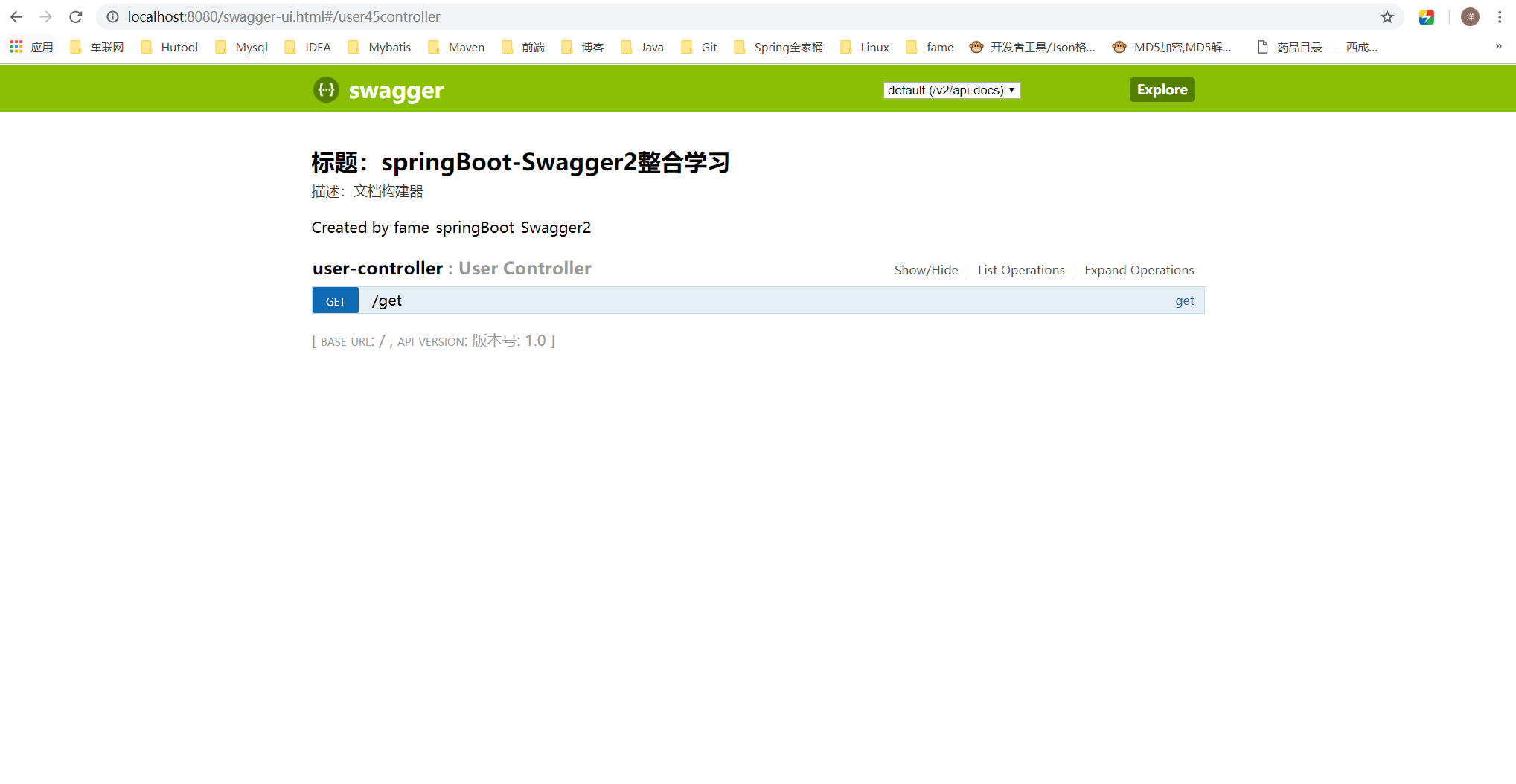
第四步:输入SwaggerUI地址
http://localhost:8080/swagger-ui.html
Swagger2基本使用-常用注解
接口/方法常用注解
/**

 * Swagger接口测试

 *

 * @author Y.yang

 * @date 2019/3/12

 */

@Api(value = "用户信息", tags = { "用户信息" })

@RestController

public class UserController {

	@ApiOperation(value = "用户信息分页查询")

	@GetMapping("/page")

	public String page(User user) {

		return "Hello Swagger2";

	}

	@ApiOperation(value = "用户信息查询")

	@ApiImplicitParams({

		@ApiImplicitParam(name = "id", value = "用户ID", required = true, dataType = "Integer"),

		@ApiImplicitParam(name = "file", value = "文件导入", required = true, dataType = "MultipartFile")

	})

	@GetMapping("/id")

	public UserVo getUser(Long id, MultipartFile file) {

		return new UserVo();

	}

}
@Api: 描述类/接口的主要用途
用于类;表示标识这个类是swagger的资源
tags–表示说明
value–也是说明,不会显示在接口文档上,可以使用tags替代
但是tags如果有多个值,会生成多个list
@Api(value = "用户信息", tags = { "用户信息" })
@ApiOperation: 描述方法用途
@ApiOperation(value = "用户信息分页查询")
@ApiImplicitParam: 描述方法的参数
@ApiImplicitParams: 描述方法的参数(Multi-Params)
@ApiImplicitParams({

	@ApiImplicitParam(name = "id", value = "用户ID", required = true, dataType = "Integer"),

	@ApiImplicitParam(name = "file", value = "文件导入", dataType = "MultipartFile")

})
实体类常用注解
/**

 * 用户信息 数据传输对象 Dto(Data Transfer Object)

 *

 * @author Y.yang

 * @date 2019/3/29

 */

@ApiModel(description = "用户信息请求对象")

@Data

public class User implements Serializable {

	private static final long serialVersionUID = -6986638131456347054L;

	@ApiModelProperty(value = "姓名")

	private String username;

	@ApiModelProperty(value = "性别")

	private String sex;

	@ApiModelProperty(value = "年龄")

	private Integer age;

}
@ApiModel:描述实体类(Dto、Vo、Do等)
@ApiModel(description = "用户信息请求对象")
@ApiModelProperty:描述实体类的字段
@ApiModelProperty(value = "姓名")
SpringBoot+Swagger2 整合的更多相关文章
- SpringBoot与Swagger2整合
一.Swagger简介与优势 相信各位在公司写API文档数量应该不少,当然如果你还处在自己一个人开发前后台的年代,当我没说,如今为了前后台更好的对接,还为了以后交接方便,都有要求写API文档. Swa ...
- SpringBoot+Swagger整合API
SpringBoot+Swagger整合API Swagger:整合规范的api,有界面的操作,测试 1.在pom.xml加入swagger依赖 <!--整合Swagger2配置类--> ...
- 学习SpringBoot,整合全网各种优秀资源,SpringBoot基础,中间件,优质项目,博客资源等,仅供个人学习SpringBoot使用
学习SpringBoot,整合全网各种优秀资源,SpringBoot基础,中间件,优质项目,博客资源等,仅供个人学习SpringBoot使用 一.SpringBoot系列教程 二.SpringBoot ...
- SpringMVC中使用Swagger2整合
Swagger2是什么 Swagger 是一款RESTFUL接口的文档在线自动生成+功能测试功能软件. Swagger 是一个规范和完整的框架,用于生成.描述.调用和可视化 RESTful 风格的 W ...
- springboot+swagger2
springboot+swagger2 小序 新公司的第二个项目,是一个配置管理终端机(比如:自动售卖机,银行取款机)的web项目,之前写过一个分模块的springboot框架,就在那个框架基础上进行 ...
- SpringBoot 同时整合thymeleaf html、vue html和jsp
问题描述 SpringBoot如何同时访问html和jsp SpringBoot访问html页面可以,访问jsp页面报错 SpringBoot如何同时整合thymeleaf html.vue html ...
- SpringBoot+AOP整合
SpringBoot+AOP整合 https://blog.csdn.net/lmb55/article/details/82470388 https://www.cnblogs.com/onlyma ...
- SpringBoot+Redis整合
SpringBoot+Redis整合 1.在pom.xml添加Redis依赖 <!--整合Redis--> <dependency> <groupId>org.sp ...
- springboot+maven整合spring security
springboot+maven整合spring security已经做了两次了,然而还是不太熟悉,这里针对后台简单记录一下需要做哪些事情,具体的步骤怎么操作网上都有,不再赘述.1.pom.xml中添 ...
随机推荐
- WinForm ListView不分页加载大量数据
WinForm的ListView在加载大量数据时会出现闪烁的问题,同时数据加载很慢.如果你的列表中有超过千条的数据且不做特殊处理还是用普通的ListView.Items.Add(),估计你的用户得抱怨 ...
- CEPH 创建 RPM 安装包
1.安装依赖环境 yum install gcc make python-devel openssl-devel graphviz autoconf automake rpm-build redhat ...
- ACTIVEMQ监控项目admin队列详情中文乱码
一.使用ACTIVEMQ队列,传入ObjectMessage时,监控项目admin无法解析消息信息,需要将消息javabean打成jar放入lib文件夹中,重启ACTIVEMQ,注意javabean要 ...
- Flask从入门到精通之跨站请求伪造保护
默认情况下,Flask-WTF 能保护所有表单免受跨站请求伪造(Cross-Site Request Forgery,CSRF)的攻击.恶意网站把请求发送到被攻击者已登录的其他网站时就会引发CSRF ...
- U8API——向U8数据库表导入数据
一.打开API资源管理器 替换两个引用 打开应用实例,选择相应的功能 复制相应的封装类到自己的目录下 在数据库新建临时表,与目标表相同 数据导入: 思路:先将要导入的数据导入到与U8目标表相同的临时表 ...
- 自动安装zabbix_agent脚本 -- python2
#!/usr/bin/env python # -*- coding: utf-8 -*- import os ZABBIX_SERVER_IP='10.171.100.28' if os.path. ...
- (转)windows 2003 远程桌面关闭 运行程序退出解决
windows 2003 远程桌面关闭 运行程序退出解决 原文:http://2798996.blog.51cto.com/2788996/503365 情况:远程桌面到2003,运行一个程序,然后关 ...
- Mac 下安装node.js(转载)
原文地址:http://blog.csdn.net/u011619283/article/details/52368759 Node.js 简介 Node.js 是一个用Chrome's V8 Jav ...
- sublime text3在交互时解决input()函数无法使用的问题
1,打开sublime text3工具栏,依次点击View->Show Console菜单打开命令行, 2,在命令行里 输入代码 import urllib.request,o ...
- centos6.5 + 7 静态ip配置
2017/09/19日更, centos6.5 可用 DEVICE=eth0 TYPE=Ethernet ONBOOT=yes NM_CONTROLLED=yes BOOTPROTO=static D ...