
springboot+swagger2
springboot+swagger2
小序
新公司的第二个项目,是一个配置管理终端机(比如:自动售卖机,银行取款机)的web项目,之前写过一个分模块的springboot框架,就在那个框架基础上进行了改造。改造后的框架可以说能满足普通项目的所有需求,大家可以循环利用哈。后续我会附上摘出来的框架源码,和大家一起学习进步。今天主要是说一下springboot配置在线接口文档swagger2。
添加jar
在你的maven管理的项目的pom.xml中添加
 <dependency>

             <groupId>io.springfox</groupId>

             <artifactId>springfox-swagger2</artifactId>

             <version>2.2.2</version>

         </dependency>

         <dependency>

             <groupId>io.springfox</groupId>

             <artifactId>springfox-swagger-ui</artifactId>

             <version>2.2.2</version>

         </dependency>
添加swagger2的配置类
 import org.springframework.context.annotation.Bean;

 import org.springframework.context.annotation.Configuration;

 import springfox.documentation.builders.ApiInfoBuilder;

 import springfox.documentation.builders.PathSelectors;

 import springfox.documentation.builders.RequestHandlerSelectors;

 import springfox.documentation.service.ApiInfo;

 import springfox.documentation.spi.DocumentationType;

 import springfox.documentation.spring.web.plugins.Docket;

 import springfox.documentation.swagger2.annotations.EnableSwagger2;

 /**

  * Swagger2配置类 在与spring boot集成时,放在与Application.java同级的目录下。

  * 通过@Configuration注解,让Spring来加载该类配置。 再通过@EnableSwagger2注解来启用Swagger2。

  */

 @Configuration

 @EnableSwagger2

 public class Swagger2 {

     /**

      * 创建API应用 apiInfo() 增加API相关信息

      * 通过select()函数返回一个ApiSelectorBuilder实例,用来控制哪些接口暴露给Swagger来展现,

      * 本例采用指定扫描的包路径来定义指定要建立API的目录。

      *

      * @return

      */

     @Bean

     public Docket createRestApi() {

         return new Docket(DocumentationType.SWAGGER_2).apiInfo(apiInfo()).select()

                 .apis(RequestHandlerSelectors.basePackage("com.11.22.33.controller"))//此处改为你的接口所在的包路径

                 .paths(PathSelectors.any()).build();

     }

     /**

      * 创建该API的基本信息(这些基本信息会展现在文档页面中) 访问地址:http://项目实际地址/swagger-ui.html

      *

      * @return

      */

     private ApiInfo apiInfo() {

         return new ApiInfoBuilder().title("title").description("description").contact("作者")

                 .version("1.0").build();//此处改为你自己的项目名称,描述,作者,版本

     }

 }
controller添加swagger2注解
例一
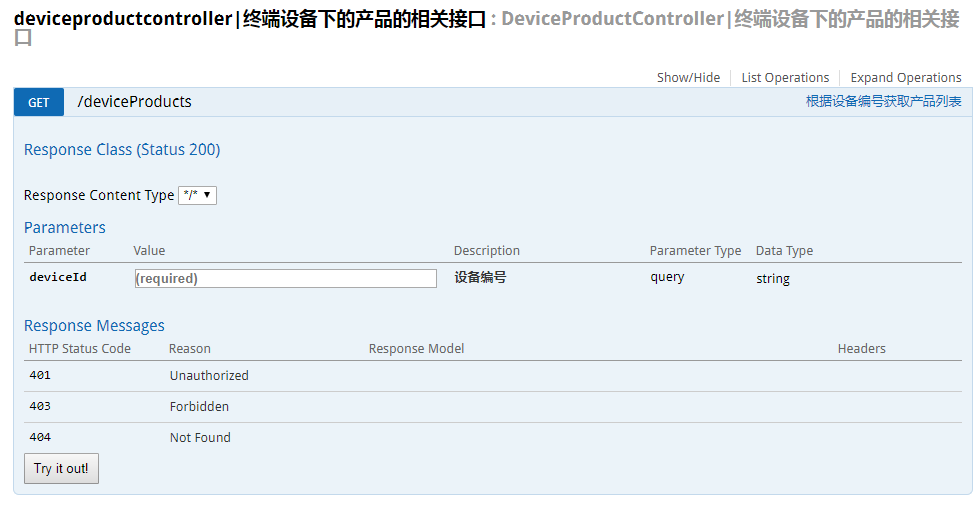
多个参数的话,添加多个@ApiImplicitParam即可,逗号分隔。
import io.swagger.annotations.Api;

import io.swagger.annotations.ApiImplicitParam;

import io.swagger.annotations.ApiImplicitParams;

import io.swagger.annotations.ApiOperation;

@Api(value = "DeviceProductController|终端设备下的产品的相关接口")

@RequestMapping(RequestUrl.DEVEICE_PRODUCT_LIST)

@RestController

public class DeviceProductController {

    @Autowired

    private DeviceProductService deviceProductService;

    @ApiOperation(value="根据设备编号获取产品列表")

    @ApiImplicitParams({

        @ApiImplicitParam(paramType="query", name = "deviceId", value = "设备编号", required = true, dataType = "String")

    })

    @RequestMapping(method = RequestMethod.GET)

    String deveiceInfos(String  deviceId, HttpServletRequest request) {

        String result = deviceProductService.getDeviceProductList(deviceId);

        return result;

    }

}
例二
import io.swagger.annotations.Api;

import io.swagger.annotations.ApiImplicitParam;

import io.swagger.annotations.ApiImplicitParams;

import io.swagger.annotations.ApiOperation;

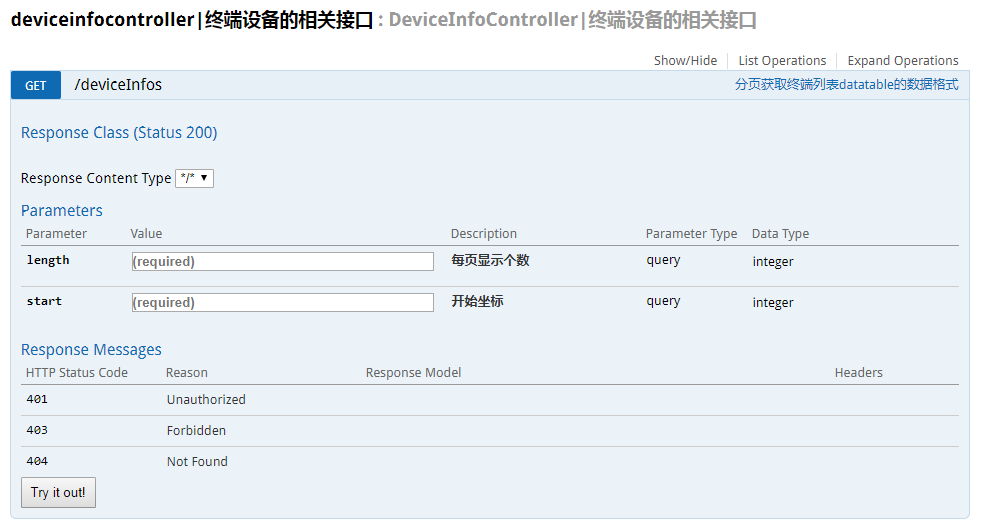
@Api(value = "DeviceInfoController|终端设备的相关接口")

@RequestMapping(RequestUrl.DEVEICE_INFO_LIST)

@RestController

public class DeviceInfoController {

    @Autowired

    private DeviceInfoService deveiceInfoService;

    @ApiOperation(value="分页获取终端列表datatable的数据格式")

    @RequestMapping(method = RequestMethod.GET)

    String deveiceInfos(@ModelAttribute Gpage page, HttpServletRequest request) {

        String result = deveiceInfoService.deveiceInfos(page, request);

        return result;

    }

}
import io.swagger.annotations.ApiModel;

import io.swagger.annotations.ApiModelProperty;

import lombok.Data;

@ApiModel(value="分页对象类型")

@Data

public class Gpage{

    @ApiModelProperty(value="每页显示个数" ,required=true)

    private int length = 10;

    @ApiModelProperty(value="开始坐标" ,required=true)

    private int start;

}
在线接口文档访问路径
我本地启用的是8081端口,所以访问路径是http://localhost:8081/swagger-ui.html
遇到的坑
- 如果你配置了spring.resources.static-locations,那你就需要把swagger-ui.html也要加进去
解决办法:新建类MyWebAppConfigurer,添加如下代码即可
 import org.springframework.context.annotation.Configuration;

 import org.springframework.web.servlet.config.annotation.ResourceHandlerRegistry;

 import org.springframework.web.servlet.config.annotation.WebMvcConfigurerAdapter;

 @Configuration

 public class MyWebAppConfigurer extends WebMvcConfigurerAdapter {

     /**

      * 添加swagger-ui.html

      */

     @Override

     public void addResourceHandlers(ResourceHandlerRegistry registry) {

          registry.addResourceHandler("swagger-ui.html")

          .addResourceLocations("classpath:/META-INF/resources/");

          registry.addResourceHandler("/webjars*")

          .addResourceLocations("classpath:/META-INF/resources/webjars/");

         super.addResourceHandlers(registry);

     }

 }
- 如果你配置了拦截器或者过滤器,也要过滤掉swagger的相关路径
springboot+swagger2的更多相关文章
- SpringBoot+Swagger2 整合
SpringBoot+Swagger2四步整合 第一步:添加相关依赖 <parent> <groupId>org.springframework.boot</groupI ...
- Springboot+swagger2.7集成开发
Springboot+swagger2.7集成开发 本篇文章是介绍最新的springboot和swagger2.7集成开发和2.0稍微有一些出入: Springboot集成环境配置 Swagger2. ...
- MP实战系列(八)之SpringBoot+Swagger2
SpringBoot一个原则,爱好编程的朋友们都知道,那就是"习惯优于配置". 今天一上来主要说的还是代码,个人比较喜欢来的实战系列的,不过有的时候还是比较偏重于理论,理论是造轮子 ...
- springboot+swagger2案例
1.pom.xml <project xmlns="http://maven.apache.org/POM/4.0.0" xmlns:xsi="http://www ...
- Springboot+swagger2的接口文档开发
一.创建一个SpringBoot项目 1. 2. 3. 4. 把web里的web选中,SQL里选择自己需要的,点击next 二.创建各项所需的controller,configure等 1. 项目布局 ...
- SpringBoot + Swagger2 自动生成API接口文档
spring-boot作为当前最为流行的Java web开发脚手架,相信越来越多的开发者会使用其来构建企业级的RESTFul API接口.这些接口不但会服务于传统的web端(b/s),也会服务于移动端 ...
- Springboot swagger2 导出api文档
具体导出的代码,参考了:http://www.spring4all.com/article/699 导出前,首先需要配置好swagger2,参见 https://www.cnblogs.com/yan ...
- springboot + swagger2 生成api文档
直接贴代码: <dependency> <groupId>io.springfox</groupId> <artifactId>springfox-sw ...
- springboot + swagger2 学习笔记
引入步骤 1.添加依赖 <dependency> <groupId>io.springfox</groupId> <artifactId>springf ...
随机推荐
- mysql服务器主从数据库同步配置(转)
<a href=""></a> <p>首先需要在同一个局域网内的两台机器(当然也可以用一台机器虚拟两台机器出来),都安装上mysql服务.< ...
- fodera20安装后的配置
最近安装了Fedora 20 64bit,以下是一些优化配置,使之更适合国人使用. 1,安装gnome-tweak-tool设置工具 Fedora 19自带的系统设置工具十分简单,一些重要的地方都不能 ...
- 基于spring mvc的图片验证码实现
本文实现基于spring mvc的图片验证码,分后台代码和前端页面的展现以及验证码的验证. 首看后台实现代码: @RequestMapping({"authCode"}) publ ...
- 【Ubuntu 16】 wifi连接 并解决无桌面图标问题
笔记本上装了win10和ubuntu16双系统,ubuntu16有半年多没使用了,今天一登录成功后,没有桌面啦,一个干净的壁纸映入眼帘,真操蛋. 上网搜索后总结:应该是应用软件中心出了问题,可是,没法 ...
- angular中封装fancyBox(图片预览)
首先在官网下载最新版的fancyBox(一定要去最新网站,以前依赖的jquery版本偏低),附上链接:http://fancyapps.com/fancybox/3/ 然后在项目中引用jquery,然 ...
- SpringMVC获取页面数据乱码的解决get/post
一.post请求方式的乱码 在web.xml中加入: <filter> <filter-name>CharacterEncodingFilter</filter-name ...
- Java开源连接池c3p0的基本用法
前言:其实c3p0只是一个实现了javax.sql 接口 DataSource的一个工具集,使用c3p0可以帮我们管理宝贵的Connection资源,无须我们去创建连接(免去每次配置数据库驱动,url ...
- 堆排序—Java
堆排序: 一棵完全二叉树,如果父节点的值大于等于左右节点的值,则称此完全二叉树为小根堆(小顶堆):如果父节点的值小于等于左右节点的值,则次完全二叉树为大根堆(大顶堆). 堆排序是建立在大顶堆或小顶堆的 ...
- [2014-02-23]Asp.net Mvc分布式Session存储方案
要玩集群的时候,怎么处理会话状态Session? InProc模式的sessionState是不能用了,因为这是在web服务器本机进程里的,会造成各节点数据不一致.除非在分流的时候用ip hash策略 ...
- PropertiesUtil demo
package com.spl.save.wmos.base.util; import java.io.File; import java.io.FileInputStream; import jav ...