
ListView 实现进度条显示
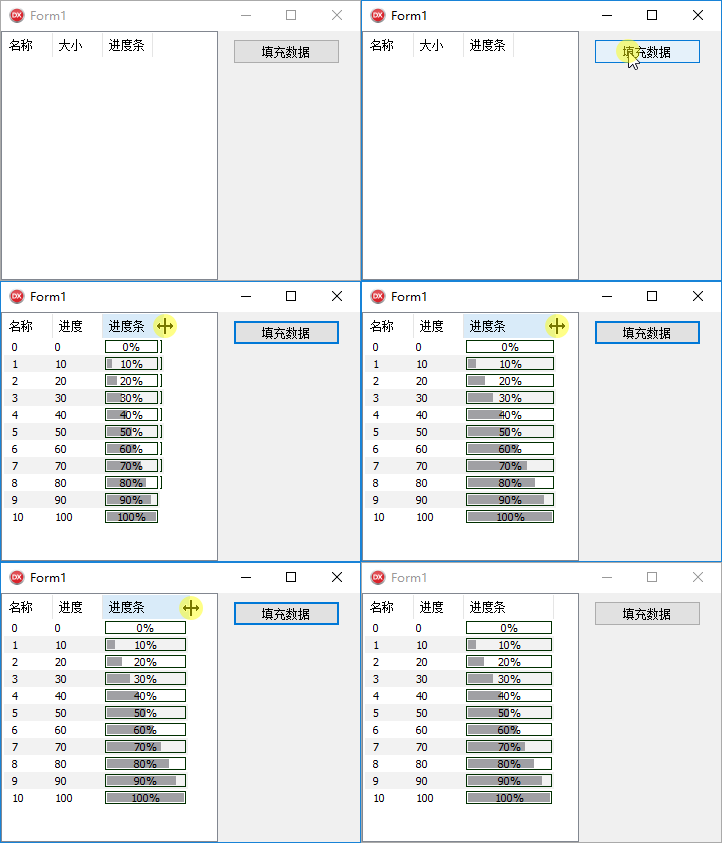
代码参考互联网,本人在Win10 + Delphi 10.3.2 社区版中测试通过,现将测试通过的代码分享如下:
unit Unit1;
interface
uses
Winapi.Windows, Winapi.Messages, System.SysUtils, System.Variants, System.Classes, Vcl.Graphics,
Vcl.Controls, Vcl.Forms, Vcl.Dialogs, Vcl.StdCtrls, Vcl.ComCtrls,
System.ImageList, Vcl.ImgList;
type
TForm1 = class(TForm)
lv1: TListView;
btn1: TButton;
procedure lv1CustomDrawItem(Sender: TCustomListView; Item: TListItem;
State: TCustomDrawState; var DefaultDraw: Boolean);
procedure btn1Click(Sender: TObject);
private
procedure DrawSubItem(ALV: TListView; AItem: TListItem; ASubItem: Integer;
APosition: Single; AMax, AStyle: Integer; AIsShowProgress: Boolean;
ADrawColor: TColor = $00005B00; AFrameColor: TColor = $00002F00);
function ReDrawItem(AHwndLV: HWND; AItemIndex: integer): boolean;
public
{ Public declarations }
end;
var
Form1: TForm1;
implementation
uses
Winapi.CommCtrl;
{$R *.dfm}
procedure TForm1.btn1Click(Sender: TObject);
var
NewColumn: TListColumn;
NewItem: TListItem;
i: Integer;
begin
lv1.Items.Clear;
lv1.Columns.Clear;
NewColumn := lv1.Columns.Add; NewColumn.Caption := '名称';
NewColumn := lv1.Columns.Add; NewColumn.Caption := '进度';
NewColumn := lv1.Columns.Add; NewColumn.Caption := '进度条';
for I := 0 to 10 do
begin
NewItem := lv1.Items.Add;
NewItem.Caption := IntToStr(i);
NewItem.SubItems.Add(IntToStr(i * 10));
NewItem.SubItems.Add(IntToStr(i * 10));
end;
end;
procedure TForm1.DrawSubItem(ALV: TListView; AItem: TListItem; ASubItem: Integer;
APosition: Single; AMax, AStyle: Integer; AIsShowProgress: Boolean;
ADrawColor: TColor = $00005B00; AFrameColor: TColor = $00002F00);
var
PaintRect, r: TRect;
i, iWidth, x, y: integer;
S: string;
function GetItemRect(LV_Handle, iItem, iSubItem: Integer): TRect;
var
Rect: TRect;
begin
ListView_GetSubItemRect(LV_Handle, iItem, iSubItem, LVIR_LABEL, @Rect);
Result := Rect;
end;
begin
with ALV do
begin
PaintRect := GetItemRect(ALV.Handle, AItem.Index, ASubItem);
r := PaintRect;
//这一段是算出百分比
if APosition >= AMax then
APosition := 100
else
if APosition <= 0 then
APosition := 0
else
APosition := Round((APosition / AMax) * 100);
if (APosition = 0) and (not AIsShowProgress) then
begin
//如果是百分比是0,就直接显示空白
Canvas.FillRect(r);
end else begin
//先直充背景色
Canvas.FillRect(r);
Canvas.Brush.Color := Color;
//画一个外框
InflateRect(r, -2, -2);
Canvas.Brush.Color := AFrameColor; //$00002F00;
Canvas.FrameRect(R);
Canvas.Brush.Color := Color;
InflateRect(r, -1, -1);
InflateRect(r, -1, -1);
//根据百分比算出要画的进度条内容宽度
iWidth := R.Right - Round((R.Right - r.Left) * ((100 - APosition) / 100));
case AStyle of
0: //进度条类型,实心填充
begin
Canvas.Brush.Color := ADrawColor;
r.Right := iWidth;
Canvas.FillRect(r);
end;
1: //进度条类型,竖线填充
begin
i := r.Left;
while i < iWidth do
begin
Canvas.Pen.Color := Color;
Canvas.MoveTo(i, r.Top);
Canvas.Pen.Color := ADrawColor;
canvas.LineTo(i, r.Bottom);
Inc(i, 3);
end;
end;
end;
//画好了进度条后,现在要做的就是显示进度数字了
Canvas.Brush.Style := bsClear;
if APosition = Round(APosition) then
S := Format('%d%%', [Round(APosition)])
else
S := FormatFloat('#0.0', APosition);
with PaintRect do
begin
x := Left + (Right - Left + 1 - Canvas.TextWidth(S)) div 2;
y := Top + (Bottom - Top + 1 - Canvas.TextHeight(S)) div 2;
end;
SetBkMode(Canvas.handle, TRANSPARENT);
Canvas.TextRect(PaintRect, x, y, S);
end; // end of if (Prosition = 0) and (not IsShowProgress) then
//进度条全部画完,把颜色设置成默认色了
Canvas.Brush.Color := Color;
end; // end of with LV do
end;
procedure TForm1.lv1CustomDrawItem(Sender: TCustomListView; Item: TListItem;
State: TCustomDrawState; var DefaultDraw: Boolean);
var
BoundRect, Rect: TRect;
i: integer;
TextFormat: Word;
LV: TListView;
// //这个子过程是用来画CheckBox和ImageList的
// procedure Draw_CheckBox_ImageList(r: TRect; aCanvas: TCanvas; Checked: Boolean);
// var
// R1: TRect;
// i: Integer;
// begin
// if Sender.Checkboxes then
// begin
// aCanvas.Pen.Color := clBlack;
// aCanvas.Pen.Width := 2;
// //画CheckBox外框
// aCanvas.Rectangle(R.Left + 2, R.Top + 2, R.Left + 14, R.Bottom - 2);
// if Checked then //画CheckBox的钩
// begin
// aCanvas.MoveTo(R.Left + 4, R.Top + 6);
// aCanvas.LineTo(R.Left + 6, R.Top + 11);
// aCanvas.LineTo(R.Left + 11, R.Top + 5);
// end;
// aCanvas.Pen.Width := 1;
// end;
// //开始画图标
// i := 2; //ImageIndex的值,可以任意
// if i > -1 then
// begin
// //获取图标的RECT
// if Boolean(ListView_GetSubItemRect(sender.Handle, item.Index, 0, LVIR_ICON, @R1)) then
// begin
// //ImageList_Stats.Draw(LV.Canvas, R1.Left, R1.Top, i);
// if item.ImageIndex > -1 then
// LV.SmallImages.Draw(LV.Canvas, R1.Right + 2, R1.Top, item.ImageIndex);
// end;
// end;
// end;
begin
LV := TListView(Sender);
BoundRect := Item.DisplayRect(drBounds);
InflateRect(BoundRect, -1, 0);
//这个地方你可以根据自己的要求设置成想要的颜色,实现突出显示
LV.Canvas.Font.Color := clBtnText;
//查看是否被选中
if Item.Selected then
begin
if cdsFocused in State then
begin
LV.Canvas.Brush.Color := $00ECCCB9; // //clHighlight;
end
else
begin
LV.Canvas.Brush.Color := $00F8ECE5; //clSilver;
end;
end
else
begin
if (Item.Index mod 2) = 0 then
LV.Canvas.Brush.Color := clWhite
else
LV.Canvas.Brush.Color := $00F2F2F2;
end;
LV.Canvas.FillRect(BoundRect); // 初始化背景
for i := 0 to LV.Columns.Count - 1 do
begin
//获取SubItem的Rect
ListView_GetSubItemRect(LV.Handle, Item.Index, i, LVIR_LABEL, @Rect);
case LV.Columns[i].Alignment of
taLeftJustify:
TextFormat := DT_LEFT;
taRightJustify:
TextFormat := DT_RIGHT;
taCenter:
TextFormat := DT_CENTER;
else
TextFormat := DT_CENTER;
end;
case i of
0: //画Caption,0表示Caption,不是Subitem
begin
//先画选择框和图标
//Draw_CheckBox_ImageList(BoundRect, LV.Canvas, Item.Checked);
InflateRect(Rect, -(5 + 0), 0); //向后移3个像素,避免被后面画线框时覆盖
DrawText(
LV.Canvas.Handle,
PCHAR(Item.Caption),
Length(Item.Caption),
Rect,
DT_VCENTER or DT_SINGLELINE or DT_END_ELLIPSIS or TextFormat);
end;
1..MaxInt: //画SubItem[i]
begin
if (i - 1) = 1 then //显示状态条,本示例是第三栏显示,
begin
DrawSubItem(LV, Item, i, StrToFloatDef(Item.SubItems[i - 1], 0), 100, 0, True, clMedGray);
end
else
begin
//画SubItem的文字
InflateRect(Rect, -2, -2);
if i - 1 <= Item.SubItems.Count - 1 then
DrawText(LV.Canvas.Handle, PCHAR(Item.SubItems[i - 1]), Length(Item.SubItems[i - 1]), Rect, DT_VCENTER or DT_SINGLELINE or DT_END_ELLIPSIS or TextFormat);
end;
end;
end; //end case
end; //end for
LV.Canvas.Brush.Color := clWhite;
if Item.Selected then //画选中条外框
begin
if cdsFocused in State then//控件是否处于激活状态
LV.Canvas.Brush.Color := $00DAA07A // $00E2B598; //clHighlight;
else
LV.Canvas.Brush.Color := $00E2B598; //$00DAA07A // clHighlight;
LV.Canvas.FrameRect(BoundRect); //
end;
DefaultDraw := False; //不让系统画了
with Sender.Canvas do
if Assigned(Font.OnChange) then
Font.OnChange(Font);
end;
function TForm1.ReDrawItem(AHwndLV: HWND; AItemIndex: integer): boolean;
begin
Result := ListView_RedrawItems(AHwndLV, AItemIndex, AItemIndex);
end;
end.
ListView 实现进度条显示的更多相关文章
- 【Winform】使用BackgroundWorker控制进度条显示进度
许多开发者看见一些软件有进度条显示进度,自己想弄,项目建好后发现并没有自己想象中的那么简单...看了网上很多教程后,写了一个小Demo供网友们参考~~,Demo的网址:http://pan.baidu ...
- Extjs 使用fileupload插件上传文件 带进度条显示
一.首先我们看看官方给出的插件的解释: 一个文件上传表单项具有自定义的样式,并且可以控制按钮的文本和 像文本表单的空文本类似的其他特性. 它使用一个隐藏的文件输入元素,并在用户选择文件后 在form提 ...
- Ajax上传文件进度条显示
要实现进度条的显示,就要知道两个参数,上传的大小和总文件的大小 html5提供了一个上传过程事件,在上传过程中不断触发,然后用已上传的大 小/总大小,计算上传的百分比,然后用这个百分比控制div框的显 ...
- 【Android】读取sdcard卡上的全部图片而且显示,读取的过程有进度条显示
尽管以下的app还没有做到快图浏览.ES文件浏览器的水平,遇到大sdcard还是会存在读取过久.内存溢出等问题,可是基本思想是这种. 例如以下图.在sdcard卡上有4张图片, 打开app,则会吧sd ...
- Qt flash_eraseall nandwrite 进度条显示擦除、烧录
/***************************************************************************** * Qt flash_eraseall n ...
- MFC读写.txt文件时进度条显示实时进度
整体实现方式:先获得文件长度,然后用每次读取的长度,计算出完成的百分比,用百分比的值设置进度条. 一.MFC进度条 Progress Control 相关函数 1. create() --创建Prog ...
- iOS 获取内存大小使用情况(进度条显示)
一.获取设备内存大小方法 //返回存储内存占用比例 - (NSString *)getFreeDiskspaceRate{ float totalSpace; .f; NSError *error = ...
- ajaxSubmit() 上传文件和进度条显示
1. 首先引用js文件 <script type="text/javascript" src="/js/jquery/jquery.form.js"&g ...
- Python 计算π及进度条显示
一,首先打开命令提示符找到Python路径,输入pip install tqdm下载第三方库tpdm. 二,写程序 法一 from math import * from tqdm import tqd ...
随机推荐
- 关于git回退版本的一点心得
我由于开发中不小心在master分支上开发,忘记了切换分支,最后我直接在master分支上提交,push,在开发分支上merge了master分支. 然后,同事告诉我他的代码要准备上线了,然而我的代码 ...
- [b0015] python 归纳 (一)_python组织方式
结论: xxx.yyyy yyyy 可以是 类.类对象.函数.变量 xxx 可以是 包.模块.类 代码: ref1.py # -*- coding: utf-8 -*- import os class ...
- Fundebug前端异常监控插件更新至 1.9.0,支持监控 HTTP 慢请求
摘要: 1.9.0新增 httpTimeout 配置选项,支持监控 HTTP 慢请求,同时修复了记录的 HTTP 响应时间偏小的 BUG. Fundebug提供专业的前端异常监控服务,可以第一时间捕获 ...
- Git学习笔记1-Git基础
1.创建版本库 $ mkdir /d/learngit #创建空目录 $ cd learngit #进入目录 $ git init #将该目录初始化成Git仓库 2.配置信息 1)配置用户信息: $ ...
- 设计模式小议:state【转】
转自:https://blog.csdn.net/goodboy1881/article/details/635963 这个模式使得软件可以在不同的state下面呈现出完全不同的特征 不同的theme ...
- jenkins使用小技巧:jenkins构建出来的war/jar包如何带上SVN号?
在实际使用过程中,一般会这样比如说打出来的包是 mypackage.jar, 但是每次打出来都是固定的 mypackage.jar如何来区分和上一个包的区别呢? 一般来说,会把打出来的包带上个 svn ...
- ubuntu 16.04下node和pm2安装
一.安装node,这里安装9.0的版本,安装其它版本直接到https://deb.nodesource.com/setup_9.x找相应版本的更改既可 1.sudo apt-get remove no ...
- JAVA基础复习day-01
1.基础语法 1.1.基础语法规则 1.1.1.Java代码实现 代码示例: public class Hello{ public static void main(String[] args){ S ...
- E09【餐厅】Can I have the bill,please?
核心句型: Can I have the bill ,please? 请给我账单,好吗? 场景对话: A:Excuse me. Can I have the bill ,please? 你好,请给我账 ...
- 201871010112-梁丽珍《面向对象程序设计(java)》第十周学习总结
项目 内容 这个作业属于哪个课程 https://www.cnblogs.com/nwnu-daizh/ 这个作业的要求在哪里 https://www.cnblogs.com/nwnu-daizh/p ...