
K8s 集群安装(一)
01,集群环境
三个节点
| master | node1 | node2 | |
| IP | 192.168.0.81 | 192.168.0.82 | 192.168.0.83 |
| 环境 | centos 7 | centos 7 | centos 7 |
02,配置软件
1,配置docker 包(三节点)
wget -O /etc/yum.repos.d/docker-ce.repo https://mirrors.ustc.edu.cn/docker-ce/linux/centos/docker-ce.repo
2,配置k8s包(三节点)
[root@admin ~]# cat /etc/yum.repos.d/kubernetes.repo

[kubernetes]

name=Kubernetes

baseurl=http://mirrors.aliyun.com/kubernetes/yum/repos/kubernetes-el7-x86_64/   ##阿里云的连接

enabled=

gpgcheck=

repo_gpgcheck=

gpgkey=http://mirrors.aliyun.com/kubernetes/yum/doc/yum-key.gpg

        http://mirrors.aliyun.com/kubernetes/yum/doc/rpm-package-key.gpg
3,安装软件
yum install docker-ce kubeadm kubelet -y
03,主库master配置启动
1,启动docker
    systemctl enable docker

    systemctl start docker
2,配置系统环境
vi /etc/sysctl.conf

net.bridge.bridge-nf-call-ip6tables =

net.bridge.bridge-nf-call-iptables =

net.ipv4.ip_forward =

立即生效 指令

    sysctl -p
禁用selinux

setenforce

sed -i 's/^SELINUX=enforcing$/SELINUX=disabled/' /etc/selinux/config
3,kubelet 自动启动
systemctl enable kubelet.service
4,初始化主库
kubeadm init --kubernetes-version=v1.16.1 --pod-network-cidr=10.244.0.0/ --service-cidr=10.96.0.0/

[init] Using Kubernetes version: v1.16.1

发现并不能初始化
一堆信息
[root@admin ~]# kubeadm init --kubernetes-version=v1.16.1 --pod-network-cidr=10.244.0.0/16 --service-cidr=10.96.0.0/12--ignore-preflight-errors=Swap

[init] Using Kubernetes version: v1.16.1

[preflight] Running pre-flight checks

    [WARNING IsDockerSystemdCheck]: detected "cgroupfs" as the Docker cgroup driver. The recommended driver is "systemd". Please follow the guide at https://kubernetes.io/docs/setup/cri/

    [WARNING Swap]: running with swap on is not supported. Please disable swap

    [WARNING SystemVerification]: this Docker version is not on the list of validated versions: 19.03.. Latest validated version: 18.09

[preflight] Pulling images required for setting up a Kubernetes cluster

[preflight] This might take a minute or two, depending on the speed of your internet connection

[preflight] You can also perform this action in beforehand using 'kubeadm config images pull'

error execution phase preflight: [preflight] Some fatal errors occurred:

    [ERROR ImagePull]: failed to pull image k8s.gcr.io/kube-apiserver:v1.16.1: output: Error response from daemon: Get https://k8s.gcr.io/v2/: net/http: request canceled while waiting for connection (Client.Timeout exceeded while awaiting headers)

, error: exit status

    [ERROR ImagePull]: failed to pull image k8s.gcr.io/kube-controller-manager:v1.16.1: output: Error response fromdaemon: Get https://k8s.gcr.io/v2/: net/http: request canceled while waiting for connection (Client.Timeout exceeded while awaiting headers)

, error: exit status

    [ERROR ImagePull]: failed to pull image k8s.gcr.io/kube-scheduler:v1.16.1: output: Error response from daemon: Get https://k8s.gcr.io/v2/: net/http: request canceled while waiting for connection (Client.Timeout exceeded while awaiting headers)

, error: exit status

    [ERROR ImagePull]: failed to pull image k8s.gcr.io/kube-proxy:v1.16.1: output: Error response from daemon: Get https://k8s.gcr.io/v2/: net/http: request canceled while waiting for connection (Client.Timeout exceeded while awaiting headers)

, error: exit status

    [ERROR ImagePull]: failed to pull image k8s.gcr.io/pause:3.1: output: Error response from daemon: Get https://k8s.gcr.io/v2/: net/http: request canceled while waiting for connection (Client.Timeout exceeded while awaiting headers)

, error: exit status

    [ERROR ImagePull]: failed to pull image k8s.gcr.io/etcd:3.3.-: output: Error response from daemon: Get https://k8s.gcr.io/v2/: net/http: request canceled while waiting for connection (Client.Timeout exceeded while awaiting headers)

, error: exit status

    [ERROR ImagePull]: failed to pull image k8s.gcr.io/coredns:1.6.: output: Error response from daemon: Get https://k8s.gcr.io/v2/: net/http: request canceled while waiting for connection (Client.Timeout exceeded while awaiting headers)

, error: exit status
主要是国外的访问不了我们就国内下载吧
[root@admin ~]# docker pull registry.cn-hangzhou.aliyuncs.com/google_containers/coredns:1.6.2  自己一个一个下载国内的

1.6.: Pulling from google_containers/coredns

c6568d217a00: Pull complete

3970bc7cbb16: Pull complete

Digest: sha256:4dd4d0e5bcc9bd0e8189f6fa4d4965ffa81207d8d99d29391f28cbd1a70a0163

Status: Downloaded newer image for registry.cn-hangzhou.aliyuncs.com/google_containers/coredns:1.6.

registry.cn-hangzhou.aliyuncs.com/google_containers/coredns:1.6.

[root@admin ~]# docker pull registry.cn-hangzhou.aliyuncs.com/google_containers/etcd:3.3.15-0

3.3.-: Pulling from google_containers/etcd

39fafc05754f: Pull complete

aee6f172d490: Pull complete

e6aae814a194: Pull complete

Digest: sha256:37a8acab63de5556d47bfbe76d649ae63f83ea7481584a2be0dbffb77825f692

Status: Downloaded newer image for registry.cn-hangzhou.aliyuncs.com/google_containers/etcd:3.3.-

registry.cn-hangzhou.aliyuncs.com/google_containers/etcd:3.3.-

[root@admin ~]# docker pull registry.cn-hangzhou.aliyuncs.com/google_containers/pause:3.1

3.1: Pulling from google_containers/pause

cf9202429979: Pull complete

Digest: sha256:759c3f0f6493093a9043cc813092290af69029699ade0e3dbe024e968fcb7cca

Status: Downloaded newer image for registry.cn-hangzhou.aliyuncs.com/google_containers/pause:3.1

registry.cn-hangzhou.aliyuncs.com/google_containers/pause:3.1

[root@admin ~]# docker pull registry.cn-hangzhou.aliyuncs.com/google_containers/kube-proxy:v1.16.1

v1.16.1: Pulling from google_containers/kube-proxy

39fafc05754f: Already exists

db3f71d0eb90: Pull complete

0a28c030ae66: Pull complete

Digest: sha256:2749948fd5c02fbeaa23180677a06b13b00363ae80e952e1cf13c01bf3eb6087

Status: Downloaded newer image for registry.cn-hangzhou.aliyuncs.com/google_containers/kube-proxy:v1.16.1

registry.cn-hangzhou.aliyuncs.com/google_containers/kube-proxy:v1.16.1

[root@admin ~]# docker pull registry.cn-hangzhou.aliyuncs.com/google_containers/kube-scheduler:v1.16.1

v1.16.1: Pulling from google_containers/kube-scheduler

39fafc05754f: Already exists

9db20b84538e: Pull complete

Digest: sha256:18b23c5b7b435e10eed55154cff61fc695bcc8fe9d99ad45f31551842b300b21

Status: Downloaded newer image for registry.cn-hangzhou.aliyuncs.com/google_containers/kube-scheduler:v1.16.1

registry.cn-hangzhou.aliyuncs.com/google_containers/kube-scheduler:v1.16.1

[root@admin ~]# docker pull registry.cn-hangzhou.aliyuncs.com/google_containers/kube-controller-manager:v1.16.1

v1.16.1: Pulling from google_containers/kube-controller-manager

39fafc05754f: Already exists

428db3d917f6: Pull complete

Digest: sha256:d56678a52f08bd98c26e29ffdcc9e9dcf112d17dea9e6849235ba56fa506b14f

Status: Downloaded newer image for registry.cn-hangzhou.aliyuncs.com/google_containers/kube-controller-manager:v1.16.1

registry.cn-hangzhou.aliyuncs.com/google_containers/kube-controller-manager:v1.16.1

[root@admin ~]# docker pull registry.cn-hangzhou.aliyuncs.com/google_containers/kube-apiserver:v1.16.1

v1.16.1: Pulling from google_containers/kube-apiserver

39fafc05754f: Already exists

010af2aa5529: Pull complete

Digest: sha256:458a6551a3bcadfd94e4cbf5776dca29e39256319c81a210179f0ff1fa7cde79

Status: Downloaded newer image for registry.cn-hangzhou.aliyuncs.com/google_containers/kube-apiserver:v1.16.1

registry.cn-hangzhou.aliyuncs.com/google_containers/kube-apiserver:v1.16.1

[root@admin ~]# docker images

REPOSITORY                                                                    TAG                 IMAGE ID            CREATED             SIZE

registry.cn-hangzhou.aliyuncs.com/google_containers/kube-proxy                v1.16.1             0d2430db3cd0         days ago         .1MB

registry.cn-hangzhou.aliyuncs.com/google_containers/kube-controller-manager   v1.16.1             ba306669806e         days ago         163MB

registry.cn-hangzhou.aliyuncs.com/google_containers/kube-apiserver            v1.16.1             f15aad0426f5         days ago         217MB

registry.cn-hangzhou.aliyuncs.com/google_containers/kube-scheduler            v1.16.1             e15192a92182         days ago         .3MB

nginx                                                                         latest              f949e7d76d63        3weeks ago         126MB

registry.cn-hangzhou.aliyuncs.com/google_containers/etcd                      3.3.-            b2756210eeab        6weeks ago         247MB

registry.cn-hangzhou.aliyuncs.com/google_containers/coredns                   1.6.               bf261d157914        2months ago        .1MB

hello-world                                                                   latest              fce289e99eb9        9months ago        .84kB

registry.cn-hangzhou.aliyuncs.com/google_containers/pause                     3.1                 da86e6ba6ca1         months ago       742kB

[root@admin ~]# docker tag registry.cn-hangzhou.aliyuncs.com/google_containers/kube-apiserver:v1.16.1 k8s.gcr.io/kube-apiserver:v1.16.1  完成后打成认识的包

[root@admin ~]# docker tag registry.cn-hangzhou.aliyuncs.com/google_containers/kube-controller-manager:v1.16.1 k8s.gcr.io/kube-controller-manager:v1.16.1

[root@admin ~]# docker tag registry.cn-hangzhou.aliyuncs.com/google_containers/kube-scheduler:v1.16.1 k8s.gcr.io/kube-scheduler:v1.16.1

[root@admin ~]# docker tag registry.cn-hangzhou.aliyuncs.com/google_containers/kube-proxy:v1.16.1 k8s.gcr.io/kube-proxy:v1.16.1

[root@admin ~]# docker tag registry.cn-hangzhou.aliyuncs.com/google_containers/pause:3.1 k8s.gcr.io/pause:3.1

[root@admin ~]# docker tag registry.cn-hangzhou.aliyuncs.com/google_containers/etcd:3.3.15-0 k8s.gcr.io/etcd:3.3.15-0

[root@admin ~]# docker tag registry.cn-hangzhou.aliyuncs.com/google_containers/coredns:1.6.2 k8s.gcr.io/coredns:1.6.2
5,初始化
配置swap忽略
[root@admin ~]# cat /etc/sysconfig/kubelet

KUBELET_EXTRA_ARGS="--fail-swap-on=false"
[root@admin ~]# kubeadm init --kubernetes-version=v1.16.1 --pod-network-cidr=10.244.0.0/16 --service-cidr=10.96.0.0/12--ignore-preflight-errors=Swap

[init] Using Kubernetes version: v1.16.1

[preflight] Running pre-flight checks

    [WARNING IsDockerSystemdCheck]: detected "cgroupfs" as the Docker cgroup driver. The recommended driver is "systemd". Please follow the guide at https://kubernetes.io/docs/setup/cri/

    [WARNING Swap]: running with swap on is not supported. Please disable swap

    [WARNING SystemVerification]: this Docker version is not on the list of validated versions: 19.03.. Latest validated version: 18.09

[preflight] Pulling images required for setting up a Kubernetes cluster

[preflight] This might take a minute or two, depending on the speed of your internet connection

[preflight] You can also perform this action in beforehand using 'kubeadm config images pull'

[kubelet-start] Writing kubelet environment file with flags to file "/var/lib/kubelet/kubeadm-flags.env"

[kubelet-start] Writing kubelet configuration to file "/var/lib/kubelet/config.yaml"

[kubelet-start] Activating the kubelet service

[certs] Using certificateDir folder "/etc/kubernetes/pki"

[certs] Generating "ca" certificate and key

[certs] Generating "apiserver" certificate and key

[certs] apiserver serving cert is signed for DNS names [admin kubernetes kubernetes.default kubernetes.default.svc kubernetes.default.svc.cluster.local] and IPs [10.96.0.1 192.168.0.81]

[certs] Generating "apiserver-kubelet-client" certificate and key

[certs] Generating "front-proxy-ca" certificate and key

[certs] Generating "front-proxy-client" certificate and key

[certs] Generating "etcd/ca" certificate and key

[certs] Generating "etcd/server" certificate and key

[certs] etcd/server serving cert is signed for DNS names [admin localhost] and IPs [192.168.0.81 127.0.0.1 ::]

[certs] Generating "etcd/peer" certificate and key

[certs] etcd/peer serving cert is signed for DNS names [admin localhost] and IPs [192.168.0.81 127.0.0.1 ::]

[certs] Generating "etcd/healthcheck-client" certificate and key

[certs] Generating "apiserver-etcd-client" certificate and key

[certs] Generating "sa" key and public key

[kubeconfig] Using kubeconfig folder "/etc/kubernetes"

[kubeconfig] Writing "admin.conf" kubeconfig file

[kubeconfig] Writing "kubelet.conf" kubeconfig file

[kubeconfig] Writing "controller-manager.conf" kubeconfig file

[kubeconfig] Writing "scheduler.conf" kubeconfig file

[control-plane] Using manifest folder "/etc/kubernetes/manifests"

[control-plane] Creating static Pod manifest for "kube-apiserver"

[control-plane] Creating static Pod manifest for "kube-controller-manager"

[control-plane] Creating static Pod manifest for "kube-scheduler"

[etcd] Creating static Pod manifest for local etcd in "/etc/kubernetes/manifests"

[wait-control-plane] Waiting for the kubelet to boot up the control plane as static Pods from directory "/etc/kubernetes/manifests". This can take up to 4m0s

[apiclient] All control plane components are healthy after 37.003618 seconds

[upload-config] Storing the configuration used in ConfigMap "kubeadm-config" in the "kube-system" Namespace

[kubelet] Creating a ConfigMap "kubelet-config-1.16" in namespace kube-system with the configuration for the kubelets in the cluster

[upload-certs] Skipping phase. Please see --upload-certs

[mark-control-plane] Marking the node admin as control-plane by adding the label "node-role.kubernetes.io/master=''"

[mark-control-plane] Marking the node admin as control-plane by adding the taints [node-role.kubernetes.io/master:NoSchedule]

[bootstrap-token] Using token: ihvzoa.46437qgsx2x23i8p

[bootstrap-token] Configuring bootstrap tokens, cluster-info ConfigMap, RBAC Roles

[bootstrap-token] configured RBAC rules to allow Node Bootstrap tokens to post CSRs in order for nodes to get long termcertificate credentials

[bootstrap-token] configured RBAC rules to allow the csrapprover controller automatically approve CSRs from a Node Bootstrap Token

[bootstrap-token] configured RBAC rules to allow certificate rotation for all node client certificates in the cluster

[bootstrap-token] Creating the "cluster-info" ConfigMap in the "kube-public" namespace

[addons] Applied essential addon: CoreDNS

[addons] Applied essential addon: kube-proxy

Your Kubernetes control-plane has initialized successfully!

To start using your cluster, you need to run the following as a regular user:

  mkdir -p $HOME/.kube

  sudo cp -i /etc/kubernetes/admin.conf $HOME/.kube/config

  sudo chown $(id -u):$(id -g) $HOME/.kube/config

You should now deploy a pod network to the cluster.

Run "kubectl apply -f [podnetwork].yaml" with one of the options listed at:

  https://kubernetes.io/docs/concepts/cluster-administration/addons/

Then you can join any number of worker nodes by running the following on each as root:

kubeadm join 192.168.0.81: --token ihvzoa.46437qgsx2x23i8p \

    --discovery-token-ca-cert-hash sha256:3a3a8d8fa25a5704690cb5dbe261663c1041e435ffc6beee04b0b678fe44c903
这里主库就成功了
04,集群加入
1,node1 node2 安装好软件(第一步操作过的忽略)
yum install docker-ce kubeadm kubelet -y
2,启动docker
3,添加集群
[root@test01 ~]# cat /etc/sysconfig/kubelet  配置文件

KUBELET_EXTRA_ARGS="--fail-swap-on=false"

[root@test01 ~]# kubeadm join 192.168.0.81:6443 --token ihvzoa.46437qgsx2x23i8p --discovery-token-ca-cert-hash sha256:3a3a8d8fa25a5704690cb5dbe261663c1041e435ffc6beee04b0b678fe44c903

[preflight] Running pre-flight checks

    [WARNING Service-Docker]: docker service is not enabled, please run 'systemctl enable docker.service'

    [WARNING IsDockerSystemdCheck]: detected "cgroupfs" as the Docker cgroup driver. The recommended driver is "systemd". Please follow the guide at https://kubernetes.io/docs/setup/cri/

    [WARNING SystemVerification]: this Docker version is not on the list of validated versions: 19.03.. Latest validated version: 18.09

    [WARNING Service-Kubelet]: kubelet service is not enabled, please run 'systemctl enable kubelet.service'

error execution phase preflight: [preflight] Some fatal errors occurred:

    [ERROR Swap]: running with swap on is not supported. Please disable swap

[preflight] If you know what you are doing, you can make a check non-fatal with `--ignore-preflight-errors=...`

To see the stack trace of this error execute with --v= or higher

[root@test01 ~]# systemctl enable docker.service

Created symlink from /etc/systemd/system/multi-user.target.wants/docker.service to /usr/lib/systemd/system/docker.service.

[root@test01 ~]# vim /etc/sysconfig/kubelet

[root@test01 ~]# kubeadm join 192.168.0.81:6443 --token ihvzoa.46437qgsx2x23i8p --discovery-token-ca-cert-hash sha256:3a3a8d8fa25a5704690cb5dbe261663c1041e435ffc6beee04b0b678fe44c903 --ignore-preflight-errors=Swap

[preflight] Running pre-flight checks

    [WARNING IsDockerSystemdCheck]: detected "cgroupfs" as the Docker cgroup driver. The recommended driver is "systemd". Please follow the guide at https://kubernetes.io/docs/setup/cri/

    [WARNING Swap]: running with swap on is not supported. Please disable swap

    [WARNING SystemVerification]: this Docker version is not on the list of validated versions: 19.03.. Latest validated version: 18.09

    [WARNING Service-Kubelet]: kubelet service is not enabled, please run 'systemctl enable kubelet.service'

[preflight] Reading configuration from the cluster...

[preflight] FYI: You can look at this config file with 'kubectl -n kube-system get cm kubeadm-config -oyaml'

[kubelet-start] Downloading configuration for the kubelet from the "kubelet-config-1.16" ConfigMap in the kube-system namespace

[kubelet-start] Writing kubelet configuration to file "/var/lib/kubelet/config.yaml"

[kubelet-start] Writing kubelet environment file with flags to file "/var/lib/kubelet/kubeadm-flags.env"

[kubelet-start] Activating the kubelet service

[kubelet-start] Waiting for the kubelet to perform the TLS Bootstrap...

This node has joined the cluster:

* Certificate signing request was sent to apiserver and a response was received.

* The Kubelet was informed of the new secure connection details.

Run 'kubectl get nodes' on the control-plane to see this node join the cluster.

第三节点同样操作
4, 主节点检查
[root@admin ~]# kubectl get nodes

NAME     STATUS     ROLES    AGE     VERSION

admin    Ready      master   41m     v1.16.1

test01   NotReady   <none>   6m36s   v1.16.1

test03   NotReady   <none>   23s     v1.16.1
5,从节点启用ready
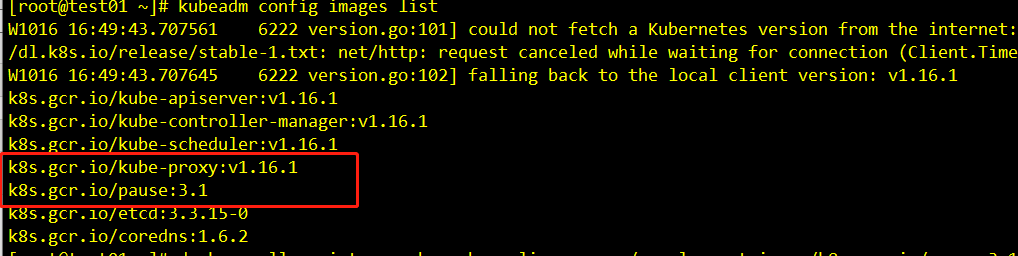
由于网络问题从节点也需要手动下载软件并且打抱
[root@test01 ~]# kubeadm config images list 可以看到需要的版本
[root@test01 ~]# docker pull registry.cn-hangzhou.aliyuncs.com/google_containers/pause:3.1
3.1: Pulling from google_containers/pause

cf9202429979: Pull complete

Digest: sha256:759c3f0f6493093a9043cc813092290af69029699ade0e3dbe024e968fcb7cca

Status: Downloaded newer image for registry.cn-hangzhou.aliyuncs.com/google_containers/pause:3.1

registry.cn-hangzhou.aliyuncs.com/google_containers/pause:3.1

[root@test01 ~]# docker pull registry.cn-hangzhou.aliyuncs.com/google_containers/kube-proxy:v1.16.1

v1.16.1: Pulling from google_containers/kube-proxy

39fafc05754f: Pull complete

db3f71d0eb90: Pull complete

0a28c030ae66: Pull complete

Digest: sha256:2749948fd5c02fbeaa23180677a06b13b00363ae80e952e1cf13c01bf3eb6087

Status: Downloaded newer image for registry.cn-hangzhou.aliyuncs.com/google_containers/kube-proxy:v1.16.1

registry.cn-hangzhou.aliyuncs.com/google_containers/kube-proxy:v1.16.1

[root@test01 ~]# docker tag registry.cn-hangzhou.aliyuncs.com/google_containers/pause:3.1 k8s.gcr.io/pause:3.1

[root@test01 ~]# docker tag registry.cn-hangzhou.aliyuncs.com/google_containers/kube-proxy:v1.16.1 k8s.gcr.io/kube-proxy:v1.16.1

[root@test01 ~]# docker pull quay.io/coreos/flannel:v0.11.0-amd64

v0.11.0-amd64: Pulling from coreos/flannel

cd784148e348: Already exists

04ac94e9255c: Already exists

e10b013543eb: Already exists

005e31e443b1: Already exists

74f794f05817: Already exists

Digest: sha256:7806805c93b20a168d0bbbd25c6a213f00ac58a511c47e8fa6409543528a204e

Status: Image is up to date for quay.io/coreos/flannel:v0.11.0-amd64

quay.io/coreos/flannel:v0.11.0-amd64

两个节点都需要

再次检查

[root@admin ~]# kubectl get nodes
NAME     STATUS   ROLES    AGE   VERSION
admin    Ready    master   51m   v1.16.1
test01   Ready    <none>   16m   v1.16.1
test03   Ready    <none>   10m   v1.16.1

[root@admin ~]# kubectl get pods -n kube-system -o wide
NAME                            READY   STATUS    RESTARTS   AGE     IP             NODE     NOMINATED NODE   READINESS GATES
coredns-5644d7b6d9-htrvs        1/1     Running   0          51m     10.244.0.2     admin    <none>           <none>
coredns-5644d7b6d9-pdtfb        1/1     Running   0          51m     10.244.0.3     admin    <none>           <none>
etcd-admin                      1/1     Running   0          50m     192.168.0.81   admin    <none>           <none>
kube-apiserver-admin            1/1     Running   0          50m     192.168.0.81   admin    <none>           <none>
kube-controller-manager-admin   1/1     Running   0          50m     192.168.0.81   admin    <none>           <none>
kube-flannel-ds-amd64-gj7tf     1/1     Running   0          19m     192.168.0.81   admin    <none>           <none>
kube-flannel-ds-amd64-q7w7c     1/1     Running   0          16m     192.168.0.82   test01   <none>           <none>
kube-flannel-ds-amd64-r9nbk     1/1     Running   0          9m54s   192.168.0.83   test03   <none>           <none>
kube-proxy-2vfvq                1/1     Running   0          9m54s   192.168.0.83   test03   <none>           <none>
kube-proxy-fxwf5                1/1     Running   0          51m     192.168.0.81   admin    <none>           <none>
kube-proxy-zjqbl                1/1     Running   0          16m     192.168.0.82   test01   <none>           <none>
kube-scheduler-admin            1/1     Running   0          50m     192.168.0.81   admin    <none>           <none>

已经成功了
K8s 集群安装(一)的更多相关文章
- K8s集群安装--最新版 Kubernetes 1.14.1
K8s集群安装--最新版 Kubernetes 1.14.1 前言 网上有很多关于k8s安装的文章,但是我参照一些文章安装时碰到了不少坑.今天终于安装好了,故将一些关键点写下来与大家共享. 我安装是基 ...
- [转帖]K8s集群安装--最新版 Kubernetes 1.14.1
K8s集群安装--最新版 Kubernetes 1.14.1 http://www.cnblogs.com/jieky/p/10679998.html 原作者写的比较简单 大略流程和跳转的多一些 改天 ...
- K8S集群安装部署
K8S集群安装部署 参考地址:https://www.cnblogs.com/xkops/p/6169034.html 1. 确保系统已经安装epel-release源 # yum -y inst ...
- K8s集群安装和检查(经验分享)
一.组件方式检查 1. Master节点: root>> kubectl get cs 2. Node 节点: 无 二.服务方式检查 1. Master 节点: root>> ...
- Kubernetes(k8s)集群安装
一:简介 二:基础环境安装 1.系统环境 os Role ip Memory Centos 7 master01 192.168.25.30 4G Centos 7 node01 192.168.25 ...
- install kubernetes cluster k8s集群安装
一,安装docker-ce 17.031,下载rpm包 Wget -P /tmp https://mirrors.aliyun.com/docker-ce/linux/centos/7/x86_64/ ...
- 基于 K8S 集群安装部署 istio-1.2.4
使用云平台可以为组织提供丰富的好处.然而,不可否认的是,采用云可能会给 DevOps 团队带来压力.开发人员必须使用微服务以满足应用的可移植性,同时运营商管理了极其庞大的混合和多云部署.Istio 允 ...
- kubernetes(k8s)集群安装calico
添加hosts解析 cat /etc/hosts 10.39.7.51 k8s-master-51 10.39.7.57 k8s-master-57 10.39.7.52 k8s-master-52 ...
- k8s集群安装
准备三台虚拟机,一台做master,两台做master节点,关闭selinux. 一.安装docker,两node节点上进行 1. 2.安装docker依赖包:yum install -y yum-u ...
随机推荐
- 安利一波ubuntu18.04作为开发环境,极度舒适
乌班图18更新也一年多了吧,除了最开始的尝鲜,最近才真正使用起来.用完的感受是完爆Windows,比起OSX也不差. 开发环境需要的东西: git shell idea chrome firefox ...
- 自己搭建 NuGet.Server 环境
1. 官网 https://github.com/NuGet/NuGet.Server 下载最新的源代码 VS 发布到指定的目录,比如发布到我本地 D:\Workspace\DeploymentPro ...
- Rust从入门到放弃(1)—— hello,world
安装及环境配置 特点:安全,性能,并发 rust源配置 RLS安装 cargo rust管理工具,该工具可以愉快方便的管理rust工程 #!/bin/bash mkdir learn cd learn ...
- C# 关于使用JavaScriptSerializer 序列化与返序列化的操作
//开始解析 //引用 //using System.Web.Script.Serialization; JavaScriptSerializer js = new JavaScriptSerial ...
- XtraReport报表入库单数字转中文大写数字
先看看打印入库单的效果图,看如下: 客户要求合计一行,要求大写中文数字.XtraReport报表是如何做出以上图的效果呢?因为是要把数字转成大写中文数字,得先准备数字转大写中文数字的函数.因网上有很多 ...
- Linux目录和文件——管理目录和文件的命令
Linux目录和文件——管理目录和文件的命令 摘要:本文主要学习了Linux系统中关于目录和文件的操作. cd命令 cd命令用来切换工作目录,是Change Directory的缩写. 基本语法 cd ...
- Java问题记录——IllegalMonitorStateException
Java问题记录——IllegalMonitorStateException 摘要:本文主要分析了IllegalMonitorStateException的产生原因. 部分内容来自以下博客: http ...
- Java生鲜电商平台-销售管理设计与架构
Java生鲜电商平台-销售管理设计与架构 说明:在Java开源生鲜电商平台中,销售人员我们称为跟餐饮店老板沟通与下载APP的一类地推人员.(所谓地推指的就是一个一个上门拜访.) 由于销售人员有以下几类 ...
- 3.InfluxDB-InfluxQL基础语法教程--数据说明
下面是本次演示的示例数据 表名:h2o_feet 数据示例: 数据描述 : 表h2o_feet中所存储的是6分钟时间区间内的数据. 该表有一个tag,即location,该tag有两个值,分别为coy ...
- 9.为什么要进行系统拆分?如何进行系统拆分?拆分后不用 dubbo 可以吗?
作者:中华石杉 面试题 为什么要进行系统拆分?如何进行系统拆分?拆分后不用 dubbo 可以吗? 面试官心理分析 从这个问题开始就进行分布式系统环节了,现在出去面试分布式都成标配了,没有哪个公司不问问 ...