
POJ2632 Crashing Robots 解题报告
Description
In a modernized warehouse, robots are used to fetch the goods. Careful planning is needed to ensure that the robots reach their destinations without crashing into each other. Of course, all warehouses are rectangular, and all robots occupy a circular floor space with a diameter of 1 meter. Assume there are N robots, numbered from 1 through N. You will get to know the position and orientation of each robot, and all the instructions, which are carefully (and mindlessly) followed by the robots. Instructions are processed in the order they come. No two robots move simultaneously; a robot always completes its move before the next one starts moving.
A robot crashes with a wall if it attempts to move outside the area of the warehouse, and two robots crash with each other if they ever try to occupy the same spot.
Input
The first line of input is K, the number of test cases. Each test case starts with one line consisting of two integers, 1 <= A, B <= 100, giving the size of the warehouse in meters. A is the length in the EW-direction, and B in the NS-direction.
The second line contains two integers, 1 <= N, M <= 100, denoting the numbers of robots and instructions respectively.
Then follow N lines with two integers, 1 <= Xi <= A, 1 <= Yi <= B and one letter (N, S, E or W), giving the starting position and direction of each robot, in order from 1 through N. No two robots start at the same position.
Figure 1: The starting positions of the robots in the sample warehouseFinally there are M lines, giving the instructions in sequential order.
An instruction has the following format:
< robot #> < action> < repeat>
Where is one of
- L: turn left 90 degrees,
- R: turn right 90 degrees, or
- F: move forward one meter,
and 1 <= < repeat> <= 100 is the number of times the robot should perform this single move.
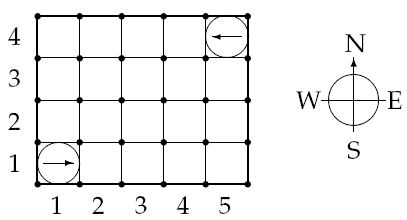
Output
Output one line for each test case:
- Robot i crashes into the wall, if robot i crashes into a wall. (A robot crashes into a wall if Xi = 0, Xi = A + 1, Yi = 0 or Yi = B + 1.)
- Robot i crashes into robot j, if robots i and j crash, and i is the moving robot.
- OK, if no crashing occurs.
Only the first crash is to be reported.
Sample Input
4

5 4

2 2

1 1 E

5 4 W

1 F 7

2 F 7

5 4

2 4

1 1 E

5 4 W

1 F 3

2 F 1

1 L 1

1 F 3

5 4

2 2

1 1 E

5 4 W

1 L 96

1 F 2

5 4

2 3

1 1 E

5 4 W

1 F 4

1 L 1

1 F 20
Sample Output
Robot 1 crashes into the wall

Robot 1 crashes into robot 2

OK

Robot 1 crashes into robot 2
分析:
纯粹的模拟,一开始没有注意到坐标系是从左下开始的,Debug了很久。。。
#include <cstring>

#include <cstdio>

#define INF 111

using namespace std;

struct node {

	int px, py, di;

}f[INF];

int dx[4] = { 1, 0, -1, 0}, dy[4] = {0, 1, 0, -1};

int statu[INF], g[INF][INF];

char tem[] = "NESW";

int n, m, x, y, flag;

int main() {

	int t, i, j, time, k, ans;

	char ch;

	scanf ("%d", &t);

	while (t--) {

		scanf ("%d %d %d %d", &y, &x, &n, &m);

		memset (g, 0, sizeof g);

		for (int k = 1; k <= n; k++) {

			scanf ("%d %d %c", &j, &i, &ch);

			g[i][j] = k, f[k].px = i, f[k].py = j;

			f[k].di = strchr (tem, ch) - tem;

		}

		ans = 0, flag = 1;

		while (m--) {

			scanf ("%d %c %d", &k, &ch, &time);

			if (!flag) continue;

			int i = f[k].px, j = f[k].py, d = f[k].di;

			if (ch == 'F') {

				while (time--) {

					g[i][j] = 0;

					i += dx[d], j += dy[d];

					if (g[i][j]) {

						statu[k] = g[i][j], ans = k, flag = 0;

						break;

					}

					else if (i < 1 || i > x || j < 1 || j > y) {

						statu[k] = -1, ans = k, flag = 0;

						break;

					}

				}

				g[i][j] = k, f[k].px = i, f[k].py = j;

			}

			else {

				if (ch == 'L') f[k].di = (f[k].di - time%4+4) % 4;

				else

					f[k].di = (f[k].di + time%4+4) % 4;

			}

		}

		if (statu[ans] == 0) printf ("OK\n");

		else if (statu[ans] == -1) printf ("Robot %d crashes into the wall\n", ans);

		else

			printf ("Robot %d crashes into robot %d\n", ans, statu[ans]);

	}

	return 0;

}
http://www.cnblogs.com/keam37/ keam所有 转载请注明出处
POJ2632 Crashing Robots 解题报告的更多相关文章
- POJ2632——Crashing Robots
Crashing Robots DescriptionIn a modernized warehouse, robots are used to fetch the goods. Careful pl ...
- poj2632 Crashing Robots
Crashing Robots Time Limit: 1000MS Memory Limit: 65536K Total Submissions: 9859 Accepted: 4209 D ...
- Codeforces Round #335 (Div. 2)B. Testing Robots解题报告
B. Testin ...
- POJ2632 Crashing Robots(模拟)
题目链接. 分析: 虽说是简单的模拟,却调试了很长时间. 调试这么长时间总结来的经验: 1.坐标系要和题目建的一样,要不就会有各种麻烦. 2.在向前移动过程中碰到其他的机器人也不行,这个题目说啦:a ...
- POJ-2632 Crashing Robots模拟
题目链接: https://vjudge.net/problem/POJ-2632 题目大意: 在一个a×b的仓库里有n个机器人,编号为1到n.现在给出每一个机器人的坐标和它所面朝的方向,以及m条指令 ...
- 北大ACM试题分类+部分解题报告链接
转载请注明出处:優YoU http://blog.csdn.net/lyy289065406/article/details/6642573 部分解题报告添加新内容,除了原有的"大致题意&q ...
- 模拟 --- Crashing Robots
Crashing Robots Time Limit: 1000MS Memory Limit: 65536K Total Submissions: 7394 Accepted: 3242 D ...
- CH Round #56 - 国庆节欢乐赛解题报告
最近CH上的比赛很多,在此会全部写出解题报告,与大家交流一下解题方法与技巧. T1 魔幻森林 描述 Cortana来到了一片魔幻森林,这片森林可以被视作一个N*M的矩阵,矩阵中的每个位置上都长着一棵树 ...
- 二模13day1解题报告
二模13day1解题报告 T1.发射站(station) N个发射站,每个发射站有高度hi,发射信号强度vi,每个发射站的信号只会被左和右第一个比他高的收到.现在求收到信号最强的发射站. 我用了时间复 ...
随机推荐
- AJPFX对equals()方法和==异同的比较
equals()方法是Object类的方法,所有的类都集成了此方法,还有部分类重写了这个方法,我们看一下Object类中关于该方法的的源码: public boolean equals(Object ...
- 前端缓存-IndexedDB
IndexedDB 就是浏览器提供的本地数据库,它可以被网页脚本创建和操作.IndexedDB 允许储存大量数据,提供查找接口,还能建立索引.这些都是 LocalStorage 所不具备的.就数据库类 ...
- 掌握Spark机器学习库-07-最小二乘法
1)最小化残差平方和 2)原理,推导过程 3)例子
- R in action读书笔记(10)-第八章:回归-- 异常观测值 改进措施
8.4 异常观测值 8.4.1 离群点 car包也提供了一种离群点的统计检验方法.outlierTest()函数可以求得最大标准化残差绝对值Bonferroni调整后的p值: > library ...
- Node.js——基本服务开启
标注模式 var http = require('http'); var server = http.createServer(); server.on('request', function (re ...
- 在 Windows Server 上搭建 *** 服务端(转载加亲测)
转载自:https://diveng.io/build-shadowsocks-server-on-windows-server.html 下面的教程建议大家使用第一种方法安装,说是比较简单.我则使用 ...
- git 出现 The current branch is not configured for pull No value for key branch.master.merge found in configuration
以下是我在网上找到的不错的文章,我参考后已解决我的问题: http://my.oschina.net/robinsonlu/blog/144085 http://www.cnblogs.com/zha ...
- h5混编问题总结
h5混编总结: 1.fragment 格式错误导致跳转混乱的问题:修改格式: 2.有缓存回退js不执行问题:未解决: 3.无缓存跨域回退白屏问题:解决跨域问题. 4.
- python 内置2to3工具将python2代码转换为python3代码
python2与python3代码不兼容,如果需要python2代码在python3环境下运行,需要将代码进行转换,本文介绍使用python3内置工具2to3.py对代码进行转换 一:2to3.py在 ...
- TabWight
//修改站号void CDlgParamView::OnPushButton_2_Tab8Clicked(){ // int iSel = m_listStation.GetSelectionMark ...