
Monkeyrunner 录制脚本&回放
本文主要解释如何使用monkeyrunner来实现脚本的录制和回放
一:准备条件
在电脑端配置 Android SDK环境 java 环境
下载好 SDK后添加环境变量 E:\android-sdk-windows\tools 添加到path上
查看adb环境搭配成功与否
输入cmd-回车-输入adb shell
显示如下
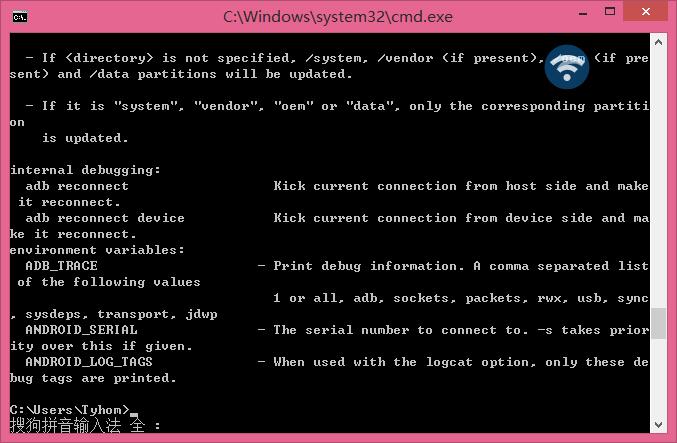
OK 这样就adb配置环境好了
java环境同上原理 就不一一说了
二: 用到的录制、回放脚本
录制脚本: monkey_recorder.py
#!/usr/bin/env monkeyrunner

# Copyright 2010, The Android Open Source Project

#

# Licensed under the Apache License, Version 2.0 (the "License");

# you may not use this file except in compliance with the License.

# You may obtain a copy of the License at

#

#     http://www.apache.org/licenses/LICENSE-2.0

#

# Unless required by applicable law or agreed to in writing, software

# distributed under the License is distributed on an "AS IS" BASIS,

# WITHOUT WARRANTIES OR CONDITIONS OF ANY KIND, either express or implied.

# See the License for the specific language governing permissions and

# limitations under the License.

from com.android.monkeyrunner import MonkeyRunner as mr

from com.android.monkeyrunner.recorder import MonkeyRecorder as recorder

device = mr.waitForConnection()

recorder.start(device)
回放脚本: monkey_playback.py
#!/usr/bin/env monkeyrunner

# Copyright 2010, The Android Open Source Project

#

# Licensed under the Apache License, Version 2.0 (the "License");

# you may not use this file except in compliance with the License.

# You may obtain a copy of the License at

#

#     http://www.apache.org/licenses/LICENSE-2.0

#

# Unless required by applicable law or agreed to in writing, software

# distributed under the License is distributed on an "AS IS" BASIS,

# WITHOUT WARRANTIES OR CONDITIONS OF ANY KIND, either express or implied.

# See the License for the specific language governing permissions and

# limitations under the License.

import sys

from com.android.monkeyrunner import MonkeyRunner

# The format of the file we are parsing is very carfeully constructed.

# Each line corresponds to a single command.  The line is split into 2

# parts with a | character.  Text to the left of the pipe denotes

# which command to run.  The text to the right of the pipe is a python

# dictionary (it can be evaled into existence) that specifies the

# arguments for the command.  In most cases, this directly maps to the

# keyword argument dictionary that could be passed to the underlying

# command.

# Lookup table to map command strings to functions that implement that

# command.

CMD_MAP = {

    'TOUCH': lambda dev, arg: dev.touch(**arg),

    'DRAG': lambda dev, arg: dev.drag(**arg),

    'PRESS': lambda dev, arg: dev.press(**arg),

    'TYPE': lambda dev, arg: dev.type(**arg),

    'WAIT': lambda dev, arg: MonkeyRunner.sleep(**arg)

    }

# Process a single file for the specified device.

def process_file(fp, device):

    for line in fp:

        (cmd, rest) = line.split('|')

        try:

            # Parse the pydict

            rest = eval(rest)

        except:

            print 'unable to parse options'

            continue

        if cmd not in CMD_MAP:

            print 'unknown command: ' + cmd

            continue

        CMD_MAP[cmd](device, rest)

def main():

    file = sys.argv[1]

    fp = open(file, 'r')

    device = MonkeyRunner.waitForConnection()

    process_file(fp, device)

    fp.close();

if __name__ == '__main__':

    main()
三: 使用方法,在CMD下进入android的sdk下的tools目录下,进行下面的操作
录制: 1、在cmd下输入monkeyrunner monkey_recorder.py,将打开下面的窗口
该窗口的功能:
1、可以自动显示手机当前的界面
2、自动刷新手机的最新状态
3、点击手机界面即可对手机进行操作,同时会反应到真机,而且会在右侧插入操作脚本
4:、wait: 用来插入下一次操作的时间间隔,点击后即可设置时间,单位是秒
Press a Button:用来确定需要点击的按钮,包括menu、home、search,以及对按钮的press、down、up属性
Type Something:用来输入内容到输入框
Fling:用来进行拖动操作,可以向上、下、左、右,以及操作的范围
Export Actions:用来导出脚本
Refresh Display:用来刷新手机界面,估计只有在断开手机后,重新连接时才会用到
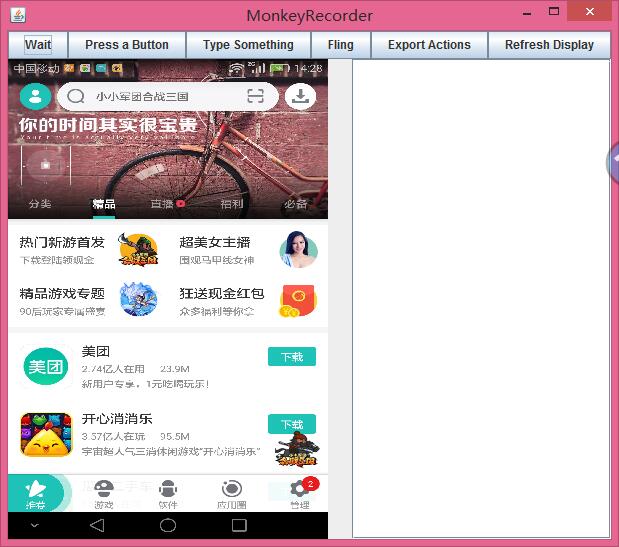
最后一个为录制的文件,这里需要使用绝对路径
PS: 录制后的脚本可以进行二次更改,而且每一步操作需要有时间间隔,以保证测试的正确性
欢迎关注老王公众号

Monkeyrunner 录制脚本&回放的更多相关文章
- Android自动化测试之MonkeyRunner录制和回放脚本
Android自动化测试之MonkeyRunner录制和回放脚本(十一) 分类: 自动化测试 Android自动化 2013-02-22 10:57 7346人阅读 评论(2) 收藏 举报 andro ...
- [转] Android自动化测试之MonkeyRunner录制和回放脚本(四)
测试脚本录制: 方案一: 我们先看看以下monkeyrecoder.py脚本: #Usage: monkeyrunner recorder.py #recorder.py http://mirror ...
- 【转】Android自动化测试之MonkeyRunner录制和回放脚本(四)
测试脚本录制: 方案一: 我们先看看以下monkeyrecoder.py脚本: #Usage: monkeyrunner recorder.py #recorder.py http://mirror ...
- monkeyrunner录制和回放功能
脚本录制 网上先是搜索了一下,说是SDK--tools目录下有monkey_recorder.py和monkey_playback.py的脚本,但是我的没有找到所以可以自己编辑个脚本保存即可~ 先编辑 ...
- 【monkeyrunner】monkeyrunner脚本录制和回放
脚本录制 1.连接你已经打开调试模式的ANDROID设备或模拟器,输入adb devices 2.运行录制脚本.在cmd窗口输入 monkeyrunner recorder.py #recorder. ...
- Monkeyrunner脚本的录制与回放
继上一篇monkeyrunner环境搭建:http://www.cnblogs.com/zh-ya-jing/p/4351245.html 之后,我们可以进一步学习monkeyrunner了. 我也是 ...
- MonkeyRunner Mac环境 录制脚本和回放 批量回放
1.MonkeyRunner是AndroidSDK自带的一个东西,在SDK目录中的tools\bin文件夹中 2.配置环境变量 编辑环境变量:打开终端输入:open ~/.bash_profile 将 ...
- monkeyrunner之录制与回放(七)
monkeyrunner为我们提供了录制 回放的功能. 录制与回放使用原因:实际项目,需求变更频繁,且测试任务多,我们没有足够时间去写测试脚本,这是就可以进行录制脚本,然后通过回放,跑完需要的流程. ...
- Android自动化学习笔记之MonkeyRunner:MonkeyRunner的录制和回放
---------------------------------------------------------------------------------------------------- ...
随机推荐
- 【迷你微信】基于MINA、Hibernate、Spring、Protobuf的即时聊天系统:7.项目介绍之架构(1)
欢迎阅读我的开源项目<迷你微信>服务器与<迷你微信>客户端 前言 <迷你微信>服务器端是使用Java语言,Mina框架编写的,一个良好的架构关系到后期迭代的方便程度 ...
- C++ 关于运算符重载
转载来源:http://c.biancheng.net/cpp/biancheng/view/216.html 重载运算符的函数一般格式如下: 函数类型 operator 运算符名称 (形参表列 ...
- window7防火墙无法更改某些设置,错误代码0×80070422
原因:这是由于管理工具的服务中的windows防火墙被禁用了. 解决方案:在window7中点击控制面板,然后点击管理工具,在点服务,然后找到windows firewall 然后将其改为自动就就可以 ...
- 安装express
就目前来说安装express需要走几个步骤,要不就会出现在检查版本的时候就会出现,expres不是内部的命令或者是这种 安装的步骤: 1. 先是输入npm install -g express-gen ...
- POJ 3734 Blocks (线性递推)
定义ai表示红色和绿色方块中方块数为偶数的颜色有i个,i = 0,1,2. aij表示刷到第j个方块时的方案数,这是一个线性递推关系. 可以构造递推矩阵A,用矩阵快速幂求解. /*********** ...
- 【BZOJ1059】[ZJOI2007] 矩阵游戏(匈牙利算法)
点此看题面 大致题意: 有一个\(N*N\)的\(01\)矩阵,可以任意交换若干行和若干列,问是否有方案使得左上角到右下角的连线上全是\(1\). 题意转换 首先,让我们来对题意进行一波转化. 如果我 ...
- 2018.6.6 基于Oracle数据库的航天信息系统JDBC练习
综合练习 一.语言和环境 A.实现语言 Java B.环境要求 JDK 6.0及其以上版本.MyEclipse7.5及其以上版本.Oracle11g.PL/SQL Developer 二.功能要求 开 ...
- Return-to-dl-resolve浅析
本文介绍一种CTF中的高级rop技巧-Return-to-dl-resolve,不久前的0CTF中的babystack和blackhole就用到了这个技巧. 预备知识 在开始本文前希望大家能预先了解一 ...
- MySQL DBA从小白到大神实战
MySQL5.6 For CentOS 6.6 源码编译安装 o1.关闭防火墙o2.配置sysctl.confo3.检查操作系统上是否安装了MySQLo4.下载mysql源码包o5.添加用户和组o6. ...
- Bank Simulation Program银行管理系统C++ :)
设计并实现简单的银行存取款系统,系统主界面包括登录和注册两个选项,选择登录,提示用户输入银行帐号和密码,验证通过后进入主界面,主界面包括:存款.取款.查询余额.历史记录.修改密码等功能.注册功能让用户 ...