
WebApi发送HTML表单数据:文件上传与多部分MIME
5.3 Sending HTML Form Data
5.3 发送HTML表单数据(2)
本文引自:http://www.cnblogs.com/r01cn/archive/2012/12/20/2826230.html
By Mike Wasson|June 21, 2012
作者:Mike Wasson | 日期:2012-6-21
Part 2: File Upload and Multipart MIME
第2部分:文件上传与多部分MIME
This tutorial shows how to upload files to a web API. It also describes how to process multipart MIME data.
本教程演示如何对Web API上传文件。也描述如何处理多部分MIME数据。
Here is an example of an HTML form for uploading a file:
以下是一个上传文件的HTML表单(如图5-8):
<form name="form1" method="post" enctype="multipart/form-data" action="api/upload">

    <div>

        <label for="caption">Image Caption</label>

        <input name="caption" type="text" />

    </div>

    <div>

        <label for="image1">Image File</label>

        <input name="image1" type="file" />

    </div>

    <div>

        <input type="submit" value="Submit" />

    </div>

</form>
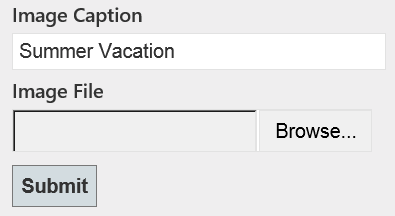
图5-8. 文件上传表单
This form contains a text input control and a file input control. When a form contains a file input control, the enctype attribute should always be "multipart/form-data", which specifies that the form will be sent as a multipart MIME message.
该表单有一个文本输入控件和一个文件输入控件。当表单含有文件输入控件时,其enctype标签属性应当总是“multipart/form-data”,它指示此表单将作为多部分MIME消息进行发送。
The format of a multipart MIME message is easiest to understand by looking at an example request:
通过考察一个示例请求,很容易理解multipart(多部分)MIME消息的格式:
POST http://localhost:50460/api/values/1 HTTP/1.1

User-Agent: Mozilla/5.0 (Windows NT 6.1; WOW64; rv:12.0) Gecko/20100101 Firefox/12.0

Accept: text/html,application/xhtml+xml,application/xml;q=0.9,*/*;q=0.8

Accept-Language: en-us,en;q=0.5

Accept-Encoding: gzip, deflate

Content-Type: multipart/form-data; boundary=---------------------------41184676334

Content-Length: 29278

-----------------------------41184676334

Content-Disposition: form-data; name="caption"

Summer vacation

-----------------------------41184676334

Content-Disposition: form-data; name="image1"; filename="GrandCanyon.jpg"

Content-Type: image/jpeg

(Binary data not shown)(二进制数据,未列出)

-----------------------------41184676334--
This message is divided into two parts, one for each form control. Part boundaries are indicated by the lines that start with dashes.
这条消息分成两个部件(parts),分别用于每个表单控件。部件边界由以一些破折号开始的行指示。
The part boundary includes a random component ("41184676334") to ensure that the boundary string does not accidentally appear inside a message part.
部件边界包含了一个随机组件(“41184676334”),以确保边界字符串不会偶然出现在消息部件之中。
Each message part contains one or more headers, followed by the part contents.
每一个消息部件含有一个或多个报头,后跟部件内容。
- The Content-Disposition header includes the name of the control. For files, it also contains the file name.
Content-Disposition(内容布置)报头包括控件名称。对于文件,它也包括文件名。 - The Content-Type header describes the data in the part. If this header is omitted, the default is text/plain.
Content-Type(内容类型)报头描述部件中的数据。如果该报头被忽略,默认为text/plain(文本格式)。
In the previous example, the user uploaded a file named GrandCanyon.jpg, with content type image/jpeg; and the value of the text input was "Summer Vacation".
在上一示例中,用户上传名为GrandCanyon.jpg的文件,其内容类型为image/jpeg,而文本输入框的值为“Summer Vacation”。
File Upload
文件上传
Now let's look at a Web API controller that reads files from a multipart MIME message. The controller will read the files asynchronously. Web API supports asynchronous actions using the task-based programming model. First, here is the code if you are targeting .NET Framework 4.5, which supports the async and await keywords.
现在,让我们考查从一个多部分MIME消息读取文件的控制器。该控制器将异步读取文件。Web API支持使用“基于任务的编程模型(这是关于.NET并行编程的MSDN文档 — 译者注)”的异步动作。首先,以下是针对.NET Framework 4.5的代码,它支持async和await关键字。
using System.Diagnostics;

using System.Net;

using System.Net.Http;

using System.Threading.Tasks;

using System.Web;

using System.Web.Http;

public class UploadController : ApiController

{

    public async Task<HttpResponseMessage> PostFormData()

    {

        // Check if the request contains multipart/form-data.

        // 检查该请求是否含有multipart/form-data

        if (!Request.Content.IsMimeMultipartContent())

        {

            throw new HttpResponseException(HttpStatusCode.UnsupportedMediaType);

        }

        string root = HttpContext.Current.Server.MapPath("~/App_Data");

        var provider = new MultipartFormDataStreamProvider(root);

        try

        {

            // Read the form data.

            // 读取表单数据

            await Request.Content.ReadAsMultipartAsync(provider);

            // This illustrates how to get the file names.

            // 以下描述如何获取文件名

            foreach (MultipartFileData file in provider.FileData)

            {

                Trace.WriteLine(file.Headers.ContentDisposition.FileName);

                Trace.WriteLine("Server file path: " + file.LocalFileName);

            }

            return Request.CreateResponse(HttpStatusCode.OK);

        }

        catch (System.Exception e)

        {

            return Request.CreateErrorResponse(HttpStatusCode.InternalServerError, e);

        }

    }

}
Notice that the controller action does not take any parameters. That's because we process the request body inside the action, without invoking a media-type formatter.
注意,控制器动作不取任何参数。这是因为我们是在动作中处理请求体的,不必调用media-type格式化器。
The IsMultipartContent method checks whether the request contains a multipart MIME message. If not, the controller returns HTTP status code 415 (Unsupported Media Type).
IsMultipartContent方法检查该请求是否含有多部分MIME消息。如果不是,控制器返回HTTP状态码415(不支持的媒体类型)。
The MultipartFormDataStreamProvider class is a helper object that allocates file streams for uploaded files. To read the multipart MIME message, call the ReadAsMultipartAsync method. This method extracts all of the message parts and writes them into the streams provided by the MultipartFormDataStreamProvider.
MultipartFormDataStreamProvider类是一个辅助器对象,它为上传文件分配文件流。为了读取多部分MIME消息,需调用ReadAsMultipartAsync方法。该方法提取所有消息部件,并把它们写入由MultipartFormDataStreamProvider提供的流中。
When the method completes, you can get information about the files from the FileData property, which is a collection of MultipartFileDataobjects.
当该方法完成时,你可以通过FileData属性获得文件的信息,该属性是一个MultipartFileData对象的集合。
- MultipartFileData.FileName is the local file name on the server, where the file was saved.
MultipartFileData.FileName是保存此文件的服务器上的一个本地文件名。 - MultipartFileData.Headers contains the part header (not the request header). You can use this to access the Content_Disposition and Content-Type headers.
MultipartFileData.Headers含有部件报头(不是请求报头)。你可以用它来访问Content_Disposition和Content-Type报头。
As the name suggests, ReadAsMultipartAsync is an asynchronous method. To perform work after the method completes, use a continuation task (.NET 4.0) or the await keyword (.NET 4.5).
正如名称所暗示的那样,ReadAsMultipartAsync是一个异步方法。为了在该方法完成之后执行一些工作,需要使用“continuation(继续)任务”(.NET 4.0)或await关键字(.NET 4.5)。
Here is the .NET Framework 4.0 version of the previous code:
以下是前述代码的.NET Framework 4.0版本:
public Task<HttpResponseMessage> PostFormData()

{

    // Check if the request contains multipart/form-data.

    // 检查该请求是否含有multipart/form-data

    if (!Request.Content.IsMimeMultipartContent())

    {

        throw new HttpResponseException(HttpStatusCode.UnsupportedMediaType);

    }

    string root = HttpContext.Current.Server.MapPath("~/App_Data");

    var provider = new MultipartFormDataStreamProvider(root);

    // Read the form data and return an async task.

    // 读取表单数据,并返回一个async任务

    var task = Request.Content.ReadAsMultipartAsync(provider).

        ContinueWith<HttpResponseMessage>(t =>

        {

            if (t.IsFaulted || t.IsCanceled)

            {

                Request.CreateErrorResponse(HttpStatusCode.InternalServerError, t.Exception);

            }

            // This illustrates how to get the file names.

            // 以下描述了如何获取文件名

            foreach (MultipartFileData file in provider.FileData)

            {

                Trace.WriteLine(file.Headers.ContentDisposition.FileName);

                Trace.WriteLine("Server file path: " + file.LocalFileName);

            }

            return Request.CreateResponse(HttpStatusCode.OK);

        });

    return task;

}
Reading Form Control Data
读取表单控件数据
The HTML form that I showed earlier had a text input control.
前面显示的HTML表单有一个文本输入控件。
    <div>

        <label for="caption">Image Caption</label>

        <input name="caption" type="text" />

    </div>
You can get the value of the control from the FormData property of the MultipartFormDataStreamProvider.
可以通过MultipartFormDataStreamProvider的FormData属性获取控件的值。
public async Task<HttpResponseMessage> PostFormData()

{

    if (!Request.Content.IsMimeMultipartContent())

    {

        throw new HttpResponseException(HttpStatusCode.UnsupportedMediaType);

    }

    string root = HttpContext.Current.Server.MapPath("~/App_Data");

    var provider = new MultipartFormDataStreamProvider(root);

    try

    {

        await Request.Content.ReadAsMultipartAsync(provider);

        // Show all the key-value pairs.

        // 显示所有“键-值”对

        foreach (var key in provider.FormData.AllKeys)

        {

            foreach (var val in provider.FormData.GetValues(key))

            {

                Trace.WriteLine(string.Format("{0}: {1}", key, val));

            }

        }

        return Request.CreateResponse(HttpStatusCode.OK);

    }

    catch (System.Exception e)

    {

        return Request.CreateErrorResponse(HttpStatusCode.InternalServerError, e);

    }

}
FormData is a NameValueCollection that contains name/value pairs for the form controls. The collection can contain duplicate keys. Consider this form:
FormData是一个NameValueCollection(名字/值集合),它含有表单控件的“名字/值”对。该集合可能含有重复键。考虑以下表单(如图5-9):
<form name="trip_search" method="post" enctype="multipart/form-data" action="api/upload">

    <div>

        <input type="radio" name="trip" value="round-trip"/>

        Round-Trip

    </div>

    <div>

        <input type="radio" name="trip" value="one-way"/>

        One-Way

    </div>

    <div>

        <input type="checkbox" name="options" value="nonstop" />

        Only show non-stop flights

    </div>

    <div>

        <input type="checkbox" name="options" value="airports" />

        Compare nearby airports

    </div>

    <div>

        <input type="checkbox" name="options" value="dates" />

        My travel dates are flexible

    </div>

    <div>

        <label for="seat">Seating Preference</label>

        <select name="seat">

            <option value="aisle">Aisle</option>

            <option value="window">Window</option>

            <option value="center">Center</option>

            <option value="none">No Preference</option>

        </select>

    </div>

</form>

图5-9. 有重复键的表单
The request body might look like this:
该请求体看上去可能像这样:
-----------------------------7dc1d13623304d6

Content-Disposition: form-data; name="trip"

round-trip

-----------------------------7dc1d13623304d6

Content-Disposition: form-data; name="options"

nonstop

-----------------------------7dc1d13623304d6

Content-Disposition: form-data; name="options"

dates

-----------------------------7dc1d13623304d6

Content-Disposition: form-data; name="seat"

window

-----------------------------7dc1d13623304d6--
In that case, the FormData collection would contain the following key/value pairs:
在这种情况下,FormData集合会含有以下“键/值”对:
- trip: round-trip
- options: nonstop
- options: dates
- seat: window
WebApi发送HTML表单数据:文件上传与多部分MIME的更多相关文章
- [原创]java WEB学习笔记49:文件上传基础,基于表单的文件上传,使用fileuoload 组件
本博客为原创:综合 尚硅谷(http://www.atguigu.com)的系统教程(深表感谢)和 网络上的现有资源(博客,文档,图书等),资源的出处我会标明 本博客的目的:①总结自己的学习过程,相当 ...
- Struts2文件上传(基于表单的文件上传)
•Commons-FileUpload组件 –Commons是Apache开放源代码组织的一个Java子项目,其中的FileUpload是用来处理HTTP文件上传的子项目 •Commons-Fil ...
- (转)WebApi发送HTML表单数据:文件上传与多部分MIME
5.3 Sending HTML Form Data5.3 发送HTML表单数据(2) 本文引自:http://www.cnblogs.com/r01cn/archive/2012/12/20/282 ...
- 表单多文件上传样式美化 && 支持选中文件后删除相关项
开发中会经常涉及到文件上传的需求,根据业务不同的需求,有不同的文件上传情况. 有简单的单文件上传,有多文件上传,因浏览器原生的文件上传样式及功能的支持度不算太高,很多时候我们会对样式进行美化,对功能进 ...
- 传统表单提交文件上传,以及FormData异步ajax上传文件
传统的文件上传: 只用将form表单的entype修改成multipart/form-data,然后就可以进行文件上传,这种方式常用并且简单. 以下是另一种方式FormData,有时候我们需要ajax ...
- AJAX 表单提交 文件上传
1. AJAX = 异步 JavaScript 和 XML. AJAX 是一种用于创建快速动态网页的技术.通过在后台与服务器进行少量数据交换,AJAX 可以使网页实现异步更新.这意味着可以在不重新加载 ...
- ajax提交表单,支持文件上传
当我们提交表单但是又不想要刷新页面的时候就可以考虑使用ajax来实现提交功能,但是这有个局限就是当有文件上传的时候是行不通的,下面借助于jquery.form可以很方便满足我们的需求. 1.表单写 ...
- php+form表单的文件上传
<!doctype html> <html> <head> <meta charset="UTF-8"> <title> ...
- 2020最新Servlet+form表单实现文件上传(图片)
servlet实现文件上传接受 这几天学了一点文件上传,有很多不会,在网查了许多博客,但是最新的没有,都比较久了 因为我是小白,版本更新了,以前的方法自己费了好久才弄懂,写个随笔方便以后查找 代码奉上 ...
随机推荐
- Class definition
Prerequisite Articles (None) Related Articles Category Accessor method A class definition is the spe ...
- excel怎么把文本格式的数字转换为数字,且把前面的撇号去掉
excel把文本格式的数字转换为数字,且把前面的撇号去掉方法:1.选中要处理的列,在“数据”菜单下,选择“分列”.2.在“分列”向导对话框里,选择“分隔符号”,并点击下一步.3.在“分列”向导对话框第 ...
- python 工具mouse_find 鼠标定位
import os,time import pyautogui as pag try: while True: print ("Press Ctrl-C to end") x,y ...
- Phpstorm 放大字体的快捷键是什么?
这个功能需要设置才能使用: 步骤:control+shift+A功能可以搜索对应功能 输入mouse 设置Change font size(Zoom) ...的按钮打开,然后就可以通过 ctrl+ ...
- Linux Apache 给 awstats 创建 訪问password
CentOS7 安装最新版本号 awstats ,在httpd.conf 中增加了alias,能够直接訪问网址就进入 浏览.十分不安全. 给訪问加上password的方法: [root@localho ...
- uboot下载地址
非常奇怪百度搜索都搜不到一个好的uboot下载的说明,仅此标记 HOME http://www.denx.de/wiki/U-Boot/SourceCode sourcecode http://www ...
- JSP学习笔记(一)
JSP是基于JAVA语言的,区分大小写,HTML不区分大小写 如何建立Web服务目录? 1.在Webapps下面建立Web服务目录MYJSP 在Webapps下面新建文件夹MYJSP,将写好的jsp文 ...
- EasyNVR将如何能够把内网各种各样的监控摄像机对接到公网云平台
需求 传统监控行业里面,监控客户端.服务器端,设备端都在一个内网里面,搞个电脑开个监控终端,顶多再配一个NVR做一做摄像机的录像存储.上个电视墙(个人感觉这功能除了面子工程,没啥实用的,还特费电!), ...
- cocos2d-js v3新特性
1.游戏对象 使用cc.game单例代替了原有的cc.Application以及cc.AppControl 2.属性风格API 旧的API ...
- UVA 10529 - Dumb Bones(概率+区间dp)
UVA 10529 - Dumb Bones option=com_onlinejudge&Itemid=8&category=518&page=show_problem&am ...