
MapReduce编程之倒排索引
任务要求:
//输入文件格式
18661629496 110
13107702446 110
1234567 120
2345678 120
987654 110
2897839274 18661629496
//输出文件格式格式
11018661629496|13107702446|987654|18661629496|13107702446|987654|
1201234567|2345678|1234567|2345678|
186616294962897839274|2897839274|
mapreduce程序编写:
|
1
2
3
4
5
6
7
8
9
10
11
12
13
14
15
16
17
18
19
20
21
22
23
24
25
26
27
28
29
30
31
32
33
34
35
36
37
38
39
40
41
42
43
44
45
46
47
48
49
50
51
52
53
54
55
56
57
58
59
60
61
62
63
64
65
66
67
68
69
70
71
72
73
74
75
76
77
78
79
80
81
82
83
84
85
86
|
import java.io.IOException;import java.util.StringTokenizer;import org.apache.hadoop.conf.Configuration;import org.apache.hadoop.fs.Path;import org.apache.hadoop.io.IntWritable;import org.apache.hadoop.io.LongWritable;import org.apache.hadoop.io.Text;import org.apache.hadoop.mapreduce.Job;import org.apache.hadoop.mapreduce.Mapper;import org.apache.hadoop.mapreduce.Reducer;import org.apache.hadoop.mapreduce.lib.input.FileInputFormat;import org.apache.hadoop.mapreduce.lib.output.FileOutputFormat;public class Test2 { enum Counter { LINESKIP,//记录出错的行 } public static class Map extends Mapper<LongWritable, Text, Text, Text>{ public void map(LongWritable key, Text value, Context context) throws IOException, InterruptedException { String line = value.toString();//读取源数据 try { //数据处理 String [] lineSplit = line.split(" ");//18661629496,110 String anum = lineSplit[0]; String bnum = lineSplit[1]; //输出格式:110,18661629496 context.write(new Text(bnum), new Text(anum)); } catch(ArrayIndexOutOfBoundsException e) { context.getCounter(Counter.LINESKIP).increment(1);//出错时计数器+1 return; } } } public static class Reduce extends Reducer<Text, Text, Text, Text> { public void reduce(Text key, Iterable<Text> values, Context context) throws IOException, InterruptedException { String valueString; String out=""; for(Text value:values) { valueString=value.toString(); out+=valueString+"|"; } context.write(key, new Text(out)); } } public static void main(String[] args) throws Exception { Configuration conf = new Configuration(); if (args.length != 2) { System.err.println("请配置输入输出路径 "); System.exit(2); } //各种配置 Job job = new Job(conf, "telephone ");//作业名称配置 //类配置 job.setJarByClass(Test2.class); job.setMapperClass(Map.class); job.setReducerClass(Reduce.class); //map输出格式配置 job.setMapOutputKeyClass(Text.class); job.setMapOutputValueClass(Text.class); //作业输出格式配置 job.setOutputKeyClass(Text.class); job.setOutputValueClass(Text.class); //添加输入输出路径 FileInputFormat.addInputPath(job, new Path(args[0])); FileOutputFormat.setOutputPath(job, new Path(args[1])); //任务完毕时退出 System.exit(job.waitForCompletion(true) ? 0 : 1); }} |
将mapreduce程序打包为jar文件:
1.右键项目名称->Export->java->jar file
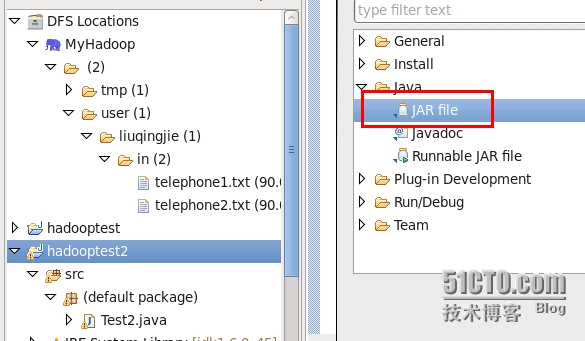
2.配置jar文件存储位置
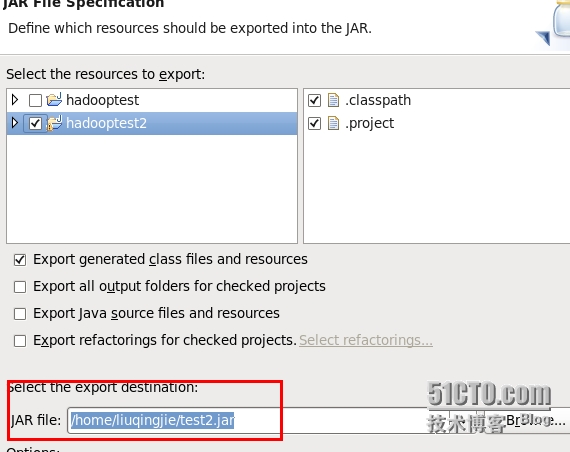
3.选择main calss
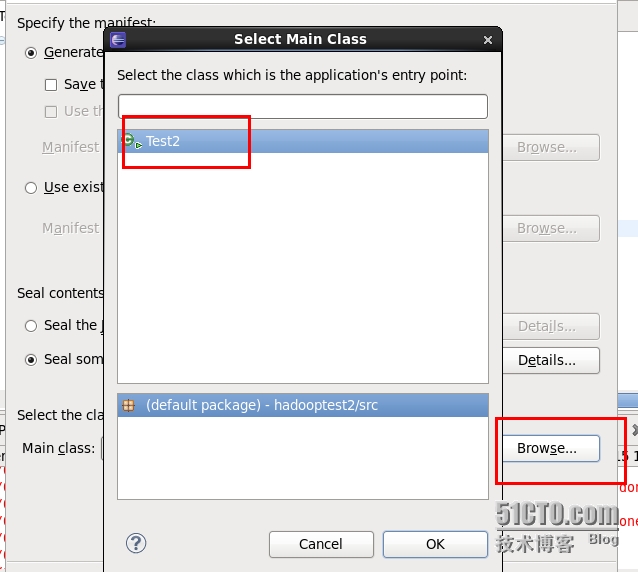
4.执行jar文件
[liuqingjie@master hadoop-0.20.2]$ bin/hadoop jar /home/liuqingjie/test2.jar /user/liuqingjie/in /user/liuqingjie/out
15/05/14 01:46:47 WARN mapred.JobClient: Use GenericOptionsParser for parsing the arguments. Applications should implement Tool for the same.
15/05/14 01:46:47 INFO input.FileInputFormat: Total input paths to process : 2
15/05/14 01:46:48 INFO mapred.JobClient: Running job: job_201505132004_0005
15/05/14 01:46:49 INFO mapred.JobClient: map 0% reduce 0%
15/05/14 01:46:57 INFO mapred.JobClient: map 100% reduce 0%
15/05/14 01:47:09 INFO mapred.JobClient: map 100% reduce 100%
……………………………………………………………………………………
查看结果
[liuqingjie@master hadoop-0.20.2]$ bin/hadoop dfs -cat ./out/*
cat: Source must be a file.
110 18661629496|13107702446|987654|18661629496|13107702446|987654|
120 1234567|2345678|1234567|2345678|
18661629496 2897839274|2897839274|
MapReduce编程之倒排索引的更多相关文章
- [置顶] MapReduce 编程之 倒排索引
本文调试环境: ubuntu 10.04 , hadoop-1.0.2 hadoop装的是伪分布模式,就是只有一个节点,集namenode, datanode, jobtracker, tasktra ...
- MapReduce编程(七) 倒排索引构建
一.倒排索引简单介绍 倒排索引(英语:Inverted index),也常被称为反向索引.置入档案或反向档案,是一种索引方法,被用来存储在全文搜索下某个单词在一个文档或者一组文档中的存储位置的映射. ...
- Hadoop MapReduce编程学习
一直在搞spark,也没时间弄hadoop,不过Hadoop基本的编程我觉得我还是要会吧,看到一篇不错的文章,不过应该应用于hadoop2.0以前,因为代码中有 conf.set("map ...
- hadoop2.2编程:使用MapReduce编程实例(转)
原文链接:http://www.cnblogs.com/xia520pi/archive/2012/06/04/2534533.html 从网上搜到的一篇hadoop的编程实例,对于初学者真是帮助太大 ...
- 三、MapReduce编程实例
前文 一.CentOS7 hadoop3.3.1安装(单机分布式.伪分布式.分布式 二.JAVA API实现HDFS MapReduce编程实例 @ 目录 前文 MapReduce编程实例 前言 注意 ...
- Hadoop MapReduce编程 API入门系列之压缩和计数器(三十)
不多说,直接上代码. Hadoop MapReduce编程 API入门系列之小文件合并(二十九) 生成的结果,作为输入源. 代码 package zhouls.bigdata.myMapReduce. ...
- [Hadoop入门] - 1 Ubuntu系统 Hadoop介绍 MapReduce编程思想
Ubuntu系统 (我用到版本号是140.4) ubuntu系统是一个以桌面应用为主的Linux操作系统,Ubuntu基于Debian发行版和GNOME桌面环境.Ubuntu的目标在于为一般用户提供一 ...
- mapreduce编程模型你知道多少?
上次新霸哥给大家介绍了一些hadoop的相关知识,发现大家对hadoop有了一定的了解,但是还有很多的朋友对mapreduce很模糊,下面新霸哥将带你共同学习mapreduce编程模型. mapred ...
- 《Data-Intensive Text Processing with mapReduce》读书笔记之二:mapreduce编程、框架及运行
搜狐视频的屌丝男士第二季大结局了,惊现波多野老师,怀揣着无比鸡冻的心情啊,可惜随着剧情的推进发展,并没有出现期待中的屌丝奇遇,大鹏还是没敢冲破尺度的界线.想百度些种子吧,又不想让电脑留下污点证据,要知 ...
随机推荐
- 如何卸载Win10自带Xbox、人脉、天气等应用?
Win10中的Modern应用一般可在右键菜单中进行卸载,不过某些自带的Modern应用,比如Xbox.天气.人脉.照片等应用是无法在右键菜单中进行卸载的.如果你有卸载这些应用的需求,可参考下面的方法 ...
- C - Puzzles
Problem description The end of the school year is near and Ms. Manana, the teacher, will soon have t ...
- 《剑指offer 第二版》题解
剑指Offer 按题号排序 面试题 3:数组中重复的数字 面试题 4:二维数组中的查找 面试题 5:替换空格 面试题 6:从头到尾打印链表 面试题 7:重建二叉树 面试题 8:二叉树的下一个节点 面试 ...
- 腾讯新闻多图jQuery相册展示效果代码
腾讯新闻多图jQuery相册代码,带左右切换箭头,带缩略图,可左右切换,点击缩略图展示原图. 在线演示本地下载
- Axis2 1.7.4构建项目
1.下载axis2项目文件 http://axis.apache.org/axis2/java/core/download.html 2.Maven文件的pom.xml文件 3.将下载的axis2-1 ...
- spring中quatz的多定时任务配置图文详解
近来公司让用quatz框架做定时功能,而且还是执行多定时任务,真是苦恼. 虽然从网上搜了很多资料,但是写法上不太尽如人意,最后还是请教了螃蟹大神,给的配置建议就是简单啊,现在拿来分享下: 这里我们需要 ...
- Windows上部署Python
以Python 3.5为例 1.到https://www.python.org/downloads/windows/下载embeddable zip file类型的压缩包python-3.5.1-em ...
- a rel=noopener
看vue-element-admin的源码的时候,看到a 标签使用 rel=noopener: 然后就很奇怪这个是干什么用的:然后百度到一篇文章,涨知识了. 个人的理解是:不加 rel=noopen ...
- python tips: for循环的小问题
在python中,用for对列表进行遍历的时候,迭代器中维护的是列表的索引而不是列表的元素.也就是说,for循环是对索引进行迭代,如果在for循环过程中修改了列表,迭代出来的值是新列表的索引位置,如果 ...
- python 跑服务器,访问自己制作的简单页面
1 python 跑服务器,访问自己制作的简单页面 2 # win+b出现一个网址http:/0.0.1:5000/复制到浏览器查看# http://127.0.0.1:5000/home 做这个首 ...