
21、IIS声卡驱动程序
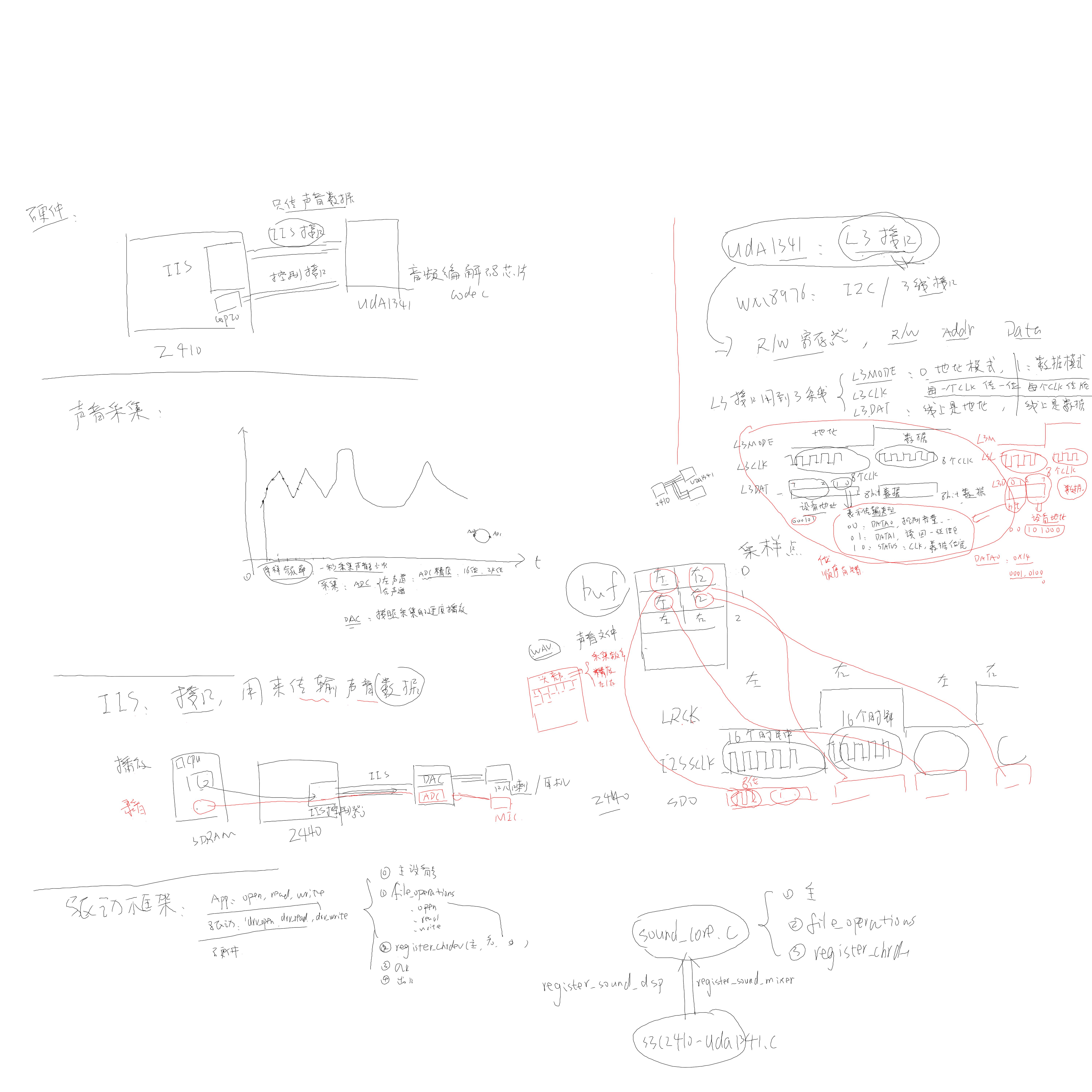
声卡芯片的数据通道一般都是IIS接口,但是控制音量等控制信息的接口都不相同
(新内核在linux-3.4.2\sound\soc\codecs\uda134x.c)
uda134x_codec_probe
snd_soc_register_codec
snd_soc_register_dais
snd_soc_instantiate_cards
snd_soc_instantiate_card
snd_card_register
sound\soc\s3c24xx\s3c2410-uda1341.c(新内核在linux-3.4.2\sound\soc\codecs\uda134x.c)
s3c2410_uda1341_init
driver_register(&s3c2410iis_driver);
.....
s3c2410iis_probe
/* 使能时钟 */
/* 配置GPIO */
/* 设置S3C2440的IIS控制器 */
init_s3c2410_iis_bus
/* 使用L3接口初始化uda1341芯片 */
init_uda1341();
/* 设置两个DMA通道:一个用于播放,另一个用于录音 */
.....
register_sound_dsp(&smdk2410_audio_fops, -1);
sound_insert_unit(&chains[3], fops, dev, 3, 131, "dsp", S_IWUSR | S_IRUSR, NULL); // /dev/dsp
register_sound_mixer(&smdk2410_mixer_fops, -1);
sound_insert_unit(&chains[0], fops, dev, 0, 128, "mixer", S_IRUSR | S_IWUSR, NULL); // /dev/mixer
/dev/dsp: 用于播放/录音
/dev/mixer: 调整音量
register_sound_mixer和register_sound_dsp所在的文件A,其会做下面工作,在register的时候会把新的file_operation告诉A这一层,在A中注册的时候其file_operation只有一个open函数,在open的时候,会找到register的时候关联的新的file_operation
2. 提供file_operations
3. 注册register_chrdev
app: open () // 假设主设备号为14
-------------------------------------------
soundcore_open
int unit = iminor(inode);
s = __look_for_unit(chain, unit);
// 从chains数组里得到, 谁来设置这个数组?
new_fops = fops_get(s->unit_fops);
file->f_op = new_fops;
err = file->f_op->open(inode,file);
录音:
app: read
----------------------
file->f_op->read
播放:
app: write
-------------------------
file->f_op->write
测试:
1. 确定内核里已经配置了sound\soc\s3c24xx\s3c2410-uda1341.c
-> Device Drivers
-> Sound
-> Advanced Linux Sound Architecture
-> Advanced Linux Sound Architecture
-> System on Chip audio support
<*> I2S of the Samsung S3C24XX chips
2. make uImage
使用新内核启动
3. ls -l /dev/dsp /dev/mixer
4. 播放:
在WINDOWS PC里找一个wav文件,放到开发板根文件系统里
cat Windows.wav > /dev/dsp
5. 录音:
cat /dev/dsp > sound.bin
然后对着麦克风说话
ctrl+c退出
cat sound.bin > /dev/dsp // 就可以听到录下的声音
怎么写WM8976驱动程序?
1. IIS部分一样,保持不变
2. 控制部分不同,重写
(WM8976当控制接口设置成两线模式的时候就是IIC接口,三线模式的时候则是特殊的接口模式)
测试WM8976:
1. 确定内核里已经配置了sound\soc\s3c24xx\s3c2410-uda1341.c
-> Device Drivers
-> Sound
-> Advanced Linux Sound Architecture // 兼容OSS
-> Advanced Linux Sound Architecture
-> System on Chip audio support
<*> I2S of the Samsung S3C24XX chips
2. 修改sound/soc/s3c24xx/Makefile
obj-y += s3c2410-uda1341.o
改为:
obj-y += s3c-wm8976.o
3. make uImage
使用新内核启动
4. ls -l /dev/dsp /dev/mixer
5. 播放:
在WINDOWS PC里找一个wav文件,放到开发板根文件系统里
cat Windows.wav > /dev/dsp
6. 录音:
cat /dev/dsp > sound.bin
然后对着麦克风说话
ctrl+c退出
cat sound.bin > /dev/dsp // 就可以听到录下的声音
(mp3是压缩的声音文件,wav是原始的声音文件,用声卡播放的时候需要解压缩mp3声音文件)
使用madplay测试声卡:
1. 解压:
tar xzf libid3tag-0.15.1b.tar.gz // 库
tar xzf libmad-0.15.1b.tar.gz // 库
tar xzf madplay-0.15.2b.tar.gz // APP
2. 编译 libid3tag-0.15.1b
mkdir tmp
cd libid3tag-0.15.1b
./configure --host=arm-linux --prefix=/work/drivers_and_test/21th_sound/app/tmp
make
make install
3. 编译 libmad-0.15.1b
cd libmad-0.15.1b
./configure --host=arm-linux --prefix=/work/drivers_and_test/21th_sound/app/tmp
make
make install
4. 编译madplay(./configure --help可以查看编译帮助)
cd madplay-0.15.2b/
./configure --host=arm-linux --prefix=/work/drivers_and_test/21th_sound/app/tmp LDFLAGS="-L/work/drivers_and_test/21th_sound/app/tmp/lib" CFLAGS="-I /work/drivers_and_test/21th_sound/app/tmp/include"
make
make install
5. 把tmp/bin/* tmp/lib/*so* 复制到根文件系统:
cp ./bin/* /work/nfs_root/first_fs/bin
cp ./lib/*so* /work/nfs_root/first_fs/lib -d(保持连接属性)
6. 把一个mp3文件复制到根文件系统
7. madplay --tty-control /1.mp3
播放过程中不断按小键盘的减号("-")会降低音量
不断按小键盘的加号("+")会降低音量

21、IIS声卡驱动程序的更多相关文章
- 36、ALSA声卡驱动和应用
(注意:内核上电的时候会把一些没运行的控制器模块的时钟都关掉,所有在写驱动的时候需要在使用的使用使用clk_get和clk_enable使能时钟) (说明:与ALSA声卡对应的是OSS架构,第二期视频 ...
- ALSA声卡11_从零编写之调试——学习笔记
1.调试 (1)把程序拷贝到服务器上进行编译 (2)把程序放到内核上面去 重新配置内核,吧原来的声卡驱动程序去掉 a. 修改语法错误 11th_myalsa b. 配置内核去掉原来的声卡驱动 -> ...
- Tiny6410声卡驱动——录音与回放
在Linux下,音频设备程序的实现与文件系统的操作密切相关.Linux将各种设备以文件的形式给出统一的接口,这样的设计使得对设备的编程与对文件的操作基本相同,对Linux内核的系统调用也基本一致,从而 ...
- ALSA声卡12_从零编写之添加音量控制_学习笔记
1.设置音量时应用程序的调用过程 (1)strace分析: amixer cset numid=1 30 (设置音量) /dev/snd/controlC0 open SNDRV_CTL_IOCTL_ ...
- ALSA声卡07_分析调用过程_学习笔记
1.编译新的strace工具分析aplay和amixer应用程序对声卡的调用过程 (1)因为旧的strace工具不能识别不能识别alsa声卡驱动程序里面的ioctrl. (2)编译过程参考http:/ ...
- ALSA声卡笔记3--ASoC驱动重要结构体关系图
1.ASoC中重要的数据结构之间的关联方式 (1)Kernel-2.6.35-ASoC中各个结构的静态关系 ASoC把声卡实现为一个Platform Device,然后利用Platform_devic ...
- ALSA声卡笔记1---ALSA驱动框架
1.声卡驱动程序sound.c (1)入口函数里通过register_chrdev()函数注册file_operations 结构体 (2)file_operations 结构体,里面只有open函数 ...
- linux dev/dsp 声卡学习笔记
原文地址:dev/dsp 声卡学习笔记">linux dev/dsp 声卡学习笔记作者:ziyou飞翔 无论是从声卡读取数据,或是向声卡写入数据,事实上都具有特定的格式(f ...
- 如何以正确的顺序重新安装驱动程序 | Dell 中国
购买 支持 社区 我的帐户 购买 支持 社区 如何以正确的顺序重新安装驱动程序 在戴尔笔记本电脑或台式机上手动重新安装Microsoft Windows操作系统后,您还必须以正确的顺序 ...
随机推荐
- Autoencoders and Sparsity(二)
In this problem set, you will implement the sparse autoencoder algorithm, and show how it discovers ...
- AIX 适配器
1. 查看所有适配卡 lsdev -CHc adapter 2. 物理网卡适配卡 查看到物理网卡的个数与类型 lsdev -Cc adapter|grep ent 查看物理网卡具体插槽位( ...
- js 判断是不是空、值是否存在
判断数组是否存在某个值: Array.indexOf(val) > -1 //存在 (缺陷:一是不够语义化,它的含义是找到参数值的第一个出现位置,所以要去比较是否不等于-1,表达起来不够直观.二 ...
- 通过 chroot 重新设置 root 密码
实例:通过 chroot 重新设置 root 密码 忘记了 root 密码该怎么办?接下来的 demo 将演示如何通过 chroot 命令重新设置 centos7 中被忘记了的 root 密码.sys ...
- pycharm不显示工具栏,自动导入模块,格式化代码快捷键
我们需修改View里面的Toolbar,在前面打上沟,然后就可以显示了 自动导入模块设置:import numpy as np 我们需用鼠标选中numpy,然后在键盘上同时按住Alt+Enter键,通 ...
- 13.AxisUtil
1. package com.glodon.gspm.adapter.plugin.common; import lombok.SneakyThrows; import org.apache.axis ...
- node --进行后台的环境搭建
1.下载winscp --- 输入IP 端口 账号 密码 进入当前的服务器环境 2.下载xshell5 ---- 输入IP 端口 和 winscp 达成连接. 3.把本地代码放置 winscp远 ...
- Filebeat-1.3.1安装和设置(图文详解)(多节点的ELK集群安装在一个节点就好)(以Console Output为例)
前期博客 Filebeat的下载(图文讲解) 前提 Elasticsearch-2.4.3的下载(图文详解) Elasticsearch-2.4.3的单节点安装(多种方式图文详解) Elasticse ...
- 基于TC技术的网络流量控制实战
本文转载在:http://server.it168.com/a2010/0426/878/000000878406.shtml 基于TC技术的网络流量控制实战 650) this.width=650; ...
- BZOJ2780: [Spoj]8093 Sevenk Love Oimaster(广义后缀自动机,Parent树,Dfs序)
Description Oimaster and sevenk love each other. But recently,sevenk heard that a girl named ChuYuXu ...