
如何设计出和 ASP.NET Core 中 Middleware 一样的 API 方法?
由于笔者时间有限,无法写更多的说明文本,且主要是自己用来记录学习点滴,请谅解,下面直接贴代码了(代码中有一些说明):
01-不好的设计
代码:
using System;

namespace DesignSample

{

    public class TrTemplateContext { public string TrAttrPrefix { get; set; } }

    class Program

    {

        public static void Main(string[] args)

        {

            AppendTimeForTrTag(c => string.Format("{0}-id=\"{1}\"", c.TrAttrPrefix, "tr1"));

            //很显然,这是一个糟糕的设计,意味着每增加一个类似 AppendTimeForTrTag 的封装就

            //要增加很多类似于 AppendTimeForTrTag 的代码。参考 ASP.NET Core 中的 middleware

        }

        static void AppendTimeForTrTag(Func<TrTemplateContext, string> trTemplate)

        {/* 假设本方法来自于你们公司的A部门,通过封装,用于给<tr>标签固定附加 ng-time 属性 */

            Func<TrTemplateContext, string> trTimeTemplate =

                c => string.Format("{0}-time=\"{1}\"",

                        c.TrAttrPrefix,

                        DateTime.Now.ToString("yyyy-MM-dd HH:mm:ss"));

            Func<TrTemplateContext, string> trAllTemplate = trTimeTemplate;

            if(trTemplate != null)

            {

                trAllTemplate = c => trTimeTemplate(c) + " " + trTemplate(c);

            }

            PrintTrTag(trAllTemplate);

        }

        static void PrintTrTag(Func<TrTemplateContext, string> trTemplate)

        {/* 假设本方法来自于ASP.NET Core内部。用于给<tr>标签附加一系列以 ng- 开头的属性 */

            string htmlTempl = "<tr {0}></tr>";

            string trInner = null;

            TrTemplateContext templContext = new TrTemplateContext { TrAttrPrefix = "ng" };

            if (trTemplate != null)

            {

                trInner = trTemplate(templContext);

            }

            string fullHtml = string.Format(htmlTempl, trInner);

            Console.WriteLine(fullHtml);

        }

    }

}
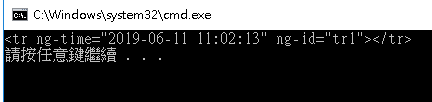
运行结果:
02-中间件设计(未提取公共代码)
代码:
using System;

using System.Collections.Generic;

using System.Linq;

using System.Text;

namespace DesignSample

{

    public class TrAttrTemplateContext

    {

        public string TrAttrPrefix { get; set; }

        private StringBuilder trAttrBuilder = new StringBuilder();

        public void Add(string str)

        {

            if(trAttrBuilder.Length > )

            {

                trAttrBuilder.Append(" ");

            }

            trAttrBuilder.Append(str);

        }

        public string GetAllString()

        {

            return trAttrBuilder.ToString();

        }

    }

    public delegate void RequestDelegate(TrAttrTemplateContext builder);

    public class TrAttrTemplateBuilder

    {

        private readonly List<Func<RequestDelegate, RequestDelegate>> _middlewares

            = new List<Func<RequestDelegate, RequestDelegate>>();

        public TrAttrTemplateBuilder Use(Func<RequestDelegate, RequestDelegate> middleware)

        {

            _middlewares.Add(middleware);

            return this;

        }

        public RequestDelegate Build()

        {

            _middlewares.Reverse();

            RequestDelegate next = c => { };

            foreach (var middleware in _middlewares)

            {

                next = middleware(next);

            }

            return next;

        }

    }

    class Program

    {

        public static void Main(string[] args)

        {

            PrintTrTag(app =>

                app.Use(AppendIdForTrTag) //给 tr 标签增加 ng-id 属性

                   .Use(AppendTimeForTrTag)  //给 tr 标签增加 ng-time 属性

            );

        }

        /* 假设本方法来自于你们公司的B部门,通过封装,用于给<tr>标签固定附加 ng-id 属性 */

        static RequestDelegate AppendIdForTrTag(RequestDelegate next) => context =>

        {

            context.Add($"{ context.TrAttrPrefix }-id=\"tr1\"");

            next(context);

        };

        /* 假设本方法来自于你们公司的A部门,通过封装,用于给<tr>标签固定附加 ng-time 属性 */

        static RequestDelegate AppendTimeForTrTag(RequestDelegate next) => context =>

        {

            context.Add($"{ context.TrAttrPrefix }-time=\"{ DateTime.Now.ToString() }\"");

            next(context);

        };

        /* 假设本方法来自于ASP.NET Core内部。用于给<tr>标签附加一系列以 ng- 开头的属性 */

        static void PrintTrTag(Func<TrAttrTemplateBuilder, TrAttrTemplateBuilder> trBuilderAction)

        {

            string htmlTempl = "<tr {0}></tr>";

            string trAttrInner = null;

            if (trBuilderAction != null)

            {

                TrAttrTemplateBuilder builder = new TrAttrTemplateBuilder();

                builder = trBuilderAction(builder);

                if(builder != null)

                {

                    TrAttrTemplateContext templContext = new TrAttrTemplateContext { TrAttrPrefix = "ng" };

                    builder.Build()(templContext);

                    trAttrInner = templContext.GetAllString();

                }

            }

            string fullHtml = string.Format(htmlTempl, trAttrInner);

            Console.WriteLine(fullHtml);

        }

    }

}
运行截图:和 上图一样。
03-中间件设计(已提取公共代码)
代码:
SpaceMiddlewareBuilder.cs
using System;

using System.Collections.Generic;

using System.Linq;

using System.Text;

using System.Threading.Tasks;

namespace DesignSample

{

    /// <summary>

    /// 空格中间件生成器

    /// </summary>

    /// <typeparam name="TDelegate">委托的类型</typeparam>

    public class SpaceMiddlewareBuilder<TDelegate, TDelegateParam, TChild>

        where TDelegate: Delegate

        where TDelegateParam: SpaceMiddlewareContext

        where TChild : SpaceMiddlewareBuilder<TDelegate, TDelegateParam, TChild>,new()

    {

        private readonly List<Func<TDelegate, TDelegate>> _middlewares

            = new List<Func<TDelegate, TDelegate>>();

        private TDelegate _defaultAction;

        /// <summary>

        /// 构造一个空格中间件生成器

        /// </summary>

        /// <param name="defaultAction">默认执行的动作。无论是否有注册中间件,都会默认执行,除非在某一个中间件中拒绝调用 next(context)。不能为 NULL</param>

        public SpaceMiddlewareBuilder(TDelegate defaultAction)

        {

            this._defaultAction = defaultAction ?? throw new ArgumentNullException(nameof(defaultAction));

        }

        /// <summary>

        /// 使用中间件

        /// </summary>

        /// <param name="middleware"></param>

        /// <returns></returns>

        public TChild Use(Func<TDelegate, TDelegate> middleware)

        {

            _middlewares.Add(middleware);

            return (TChild)this;

        }

        /// <summary>

        /// 生成

        /// </summary>

        /// <returns></returns>

        public TDelegate Build()

        {

            _middlewares.Reverse();

            TDelegate next = this._defaultAction;

            foreach (var middleware in _middlewares)

            {

                next = middleware(next);

            }

            return next;

        }

        /// <summary>

        /// 执行委托,返回附加的所有文本

        /// </summary>

        /// <param name="builderAction"></param>

        /// <param name="delegateParam"></param>

        /// <returns></returns>

        public string Execute(Func<TChild, TChild> builderAction, TDelegateParam delegateParam)

        {

            if(builderAction == null)

            {

                return string.Empty;

            }

            TChild builder = new TChild();

            builder = builderAction(builder);

            if (builder == null)

            {

                return string.Empty;

            }

            TDelegate tDelegate = builder.Build();

            if(tDelegate == null)

            {

                return string.Empty;

            }

            tDelegate.DynamicInvoke(delegateParam);

            return delegateParam.GetAllText();

        }

    }

}
SpaceMiddlewareContext.cs
using System;

using System.Collections.Generic;

using System.Linq;

using System.Text;

using System.Threading.Tasks;

namespace DesignSample

{

    /// <summary>

    /// 空格中间件上下文

    /// </summary>

    public class SpaceMiddlewareContext

    {

        private readonly StringBuilder _textBuilder;

        /// <summary>

        /// 构造函数

        /// </summary>

        public SpaceMiddlewareContext()

        {

            _textBuilder = new StringBuilder();

        }

        /// <summary>

        /// 增加一些文本字符串

        /// </summary>

        /// <param name="text"></param>

        public void Add(string text)

        {

            if (_textBuilder.Length > )

            {

                _textBuilder.Append(" ");

            }

            _textBuilder.Append(text);

        }

        /// <summary>

        /// 获取到目前为止所有增加的文本字符串集合

        /// </summary>

        /// <returns></returns>

        public string GetAllText()

        {

            return _textBuilder.ToString();

        }

    }

}
Program.cs
using System;

using System.Collections.Generic;

using System.Linq;

using System.Text;

namespace DesignSample

{

    public class TrAttrTemplateContext : SpaceMiddlewareContext

    {

        public string TrAttrPrefix { get; set; }

    }

    public delegate void RequestDelegate(TrAttrTemplateContext arg);

    public class TrAttrTemplateBuilder : SpaceMiddlewareBuilder<RequestDelegate, TrAttrTemplateContext, TrAttrTemplateBuilder>

    {

        public TrAttrTemplateBuilder()

            : base(c => { c.Add($"{ c.TrAttrPrefix }-ending=\"true\""); })

        {

        }

    }

    class Program

    {

        public static void Main(string[] args)

        {

            //PrintTrTag(null); //Test 1

            //PrintTrTag(app => app); //Test 2

            PrintTrTag(app =>

                app.Use(AppendIdForTrTag) //给 tr 标签增加 ng-id 属性

                   .Use(AppendTimeForTrTag)  //给 tr 标签增加 ng-time 属性

            );//Test 3

        }

        /* 假设本方法来自于你们公司的B部门,通过封装,用于给<tr>标签固定附加 ng-id 属性 */

        static RequestDelegate AppendIdForTrTag(RequestDelegate next) => context =>

        {

            context.Add($"{ context.TrAttrPrefix }-id=\"tr1\"");

            next(context);

        };

        /* 假设本方法来自于你们公司的A部门,通过封装,用于给<tr>标签固定附加 ng-time 属性 */

        static RequestDelegate AppendTimeForTrTag(RequestDelegate next) => context =>

        {

            context.Add($"{ context.TrAttrPrefix }-time=\"{ DateTime.Now.ToString() }\"");

            next(context);

        };

        /* 假设本方法来自于ASP.NET Core内部。用于给<tr>标签附加一系列以 ng- 开头的属性 */

        static void PrintTrTag(Func<TrAttrTemplateBuilder, TrAttrTemplateBuilder> trBuilderAction)

        {

            string htmlTempl = "<tr {0}></tr>";

            string trAttrInner = new TrAttrTemplateBuilder().Execute(trBuilderAction, new TrAttrTemplateContext

            {

                TrAttrPrefix = "ng"

            });

            string fullHtml = string.Format(htmlTempl, trAttrInner);

            Console.WriteLine(fullHtml);

        }

    }

}
谢谢浏览!
如何设计出和 ASP.NET Core 中 Middleware 一样的 API 方法?的更多相关文章
- ASP.NET Core中Middleware的使用
https://www.cnblogs.com/shenba/p/6361311.html ASP.NET 5中Middleware的基本用法 在ASP.NET 5里面引入了OWIN的概念,大致意 ...
- ASP.NET Core中,UseDeveloperExceptionPage扩展方法会吃掉异常
在ASP.NET Core中Startup类的Configure方法中,有一个扩展方法叫UseDeveloperExceptionPage,如下所示: // This method gets call ...
- ASP.NET Core中使用自定义路由
上一篇文章<ASP.NET Core中使用默认MVC路由>提到了如何使用默认的MVC路由配置,通过这个配置,我们就可以把请求路由到Controller和Action,通常情况下我们使用默认 ...
- 在 ASP.NET CORE 中使用 SESSION
Session 是保存用户和 Web 应用的会话状态的一种方法,ASP.NET Core 提供了一个用于管理会话状态的中间件.在本文中我将会简单介绍一下 ASP.NET Core 中的 Session ...
- 在 ASP.NET CORE 中使用 SESSION (转载)
Session 是保存用户和 Web 应用的会话状态的一种方法,ASP.NET Core 提供了一个用于管理会话状态的中间件.在本文中我将会简单介绍一下 ASP.NET Core 中的 Session ...
- ASP.NET Core WebApi使用Swagger生成api说明文档看这篇就够了
引言 在使用asp.net core 进行api开发完成后,书写api说明文档对于程序员来说想必是件很痛苦的事情吧,但文档又必须写,而且文档的格式如果没有具体要求的话,最终完成的文档则完全取决于开发者 ...
- ASP.NET Core WebApi使用Swagger生成api
引言 在使用asp.net core 进行api开发完成后,书写api说明文档对于程序员来说想必是件很痛苦的事情吧,但文档又必须写,而且文档的格式如果没有具体要求的话,最终完成的文档则完全取决于开发者 ...
- ASP.NET Core WebApi使用Swagger生成api说明文档
1. Swagger是什么? Swagger 是一个规范和完整的框架,用于生成.描述.调用和可视化 RESTful 风格的 Web 服务.总体目标是使客户端和文件系统作为服务器以同样的速度来更新.文件 ...
- 【转】ASP.NET Core WebApi使用Swagger生成api说明文档看这篇就够了
原文链接:https://www.cnblogs.com/yilezhu/p/9241261.html 引言 在使用asp.net core 进行api开发完成后,书写api说明文档对于程序员来说想必 ...
随机推荐
- POJ 2104 - 主席树 / 询问莫队+权值分块
传送门 题目大意应该都清楚. 今天看到一篇博客用分块+莫对做了这道题,直接惊呆了. 首先常规地离散化后将询问分块,对于某一询问,将莫队指针移动到指定区间,移动的同时处理权值分块的数字出现次数(单独.整 ...
- java中的方法返回值使用泛型,实现灵活的返回值类型
痛点: 使用Mybatis框架的时候,想封装一个底层JDBC控制器,用于提供和Mybatis交互的增删改查接口(公用的接口),但由于公用的查询方法可能是用户自定义的任意一个和表对应的java ...
- Java一些基本帮助类
Scanner sc=new Scanner(System.in); sc.nextInt(); sc.next(); Random ran=new Random(); ran.nextInt(); ...
- windows 7、Windows10 系统目录迁移,修改安装的默认路径:Users,Program Files,ProgramData
Tips:本文只针对Win7.windows 10系统有过测试,其他系统尚未测试:不过大家想尝试也可.这次实验是我做的全新 win7_32位系统来测试的,windows10当然64位的系统也可.至少现 ...
- SQLite的查询优化
SQLite是个典型的嵌入式DBMS,它有很多优点,它是轻量级的,在编译之后很小,其中一个原因就是在查询优化方面比较简单,它只是运用索引机制来进行优化的,经过对SQLite的查询优化的分析以及对源代码 ...
- .net remoting 抛出异常
原文:.net remoting 抛出异常 本文告诉大家如何在使用 .net remoting 的时候,抛出异常. 所有在远程软件运行的类,如果需要传输到本地,都需要继承 MarshalByRefOb ...
- Method for performing cache coherency in a computer system
In a computing system, cache coherency is performed by selecting one of a plurality of coherency pro ...
- Vue 兄弟组件之间传递数值
Vue 兄弟组件之间传值 创建一个公用文件夹,在文件夹中设置一个事件处理中心,即 然后在需要设置值的组件中引入该事件处理中心 import Hub from '../../common/eventHu ...
- TCP/UDP 报头格式
参考:https://www.cnblogs.com/MRRAOBX/articles/4540228.html TCP: 源端口号 以及 目的端口号 32位 序列号 seq 确认号 ACK ...
- 在Microsoft Expression Blend 2 中绘制圆角矩形按钮
原文:在Microsoft Expression Blend 2 中绘制圆角矩形按钮 /* 声明:转载请保留此信息:http://www.BrawDraw.com, http://www.ZPXP.c ...