
Ethereum Dapp Tutorial — Part 1
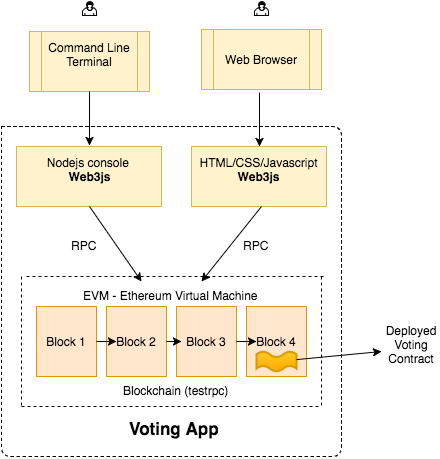
1,搭建开发环境:
npm install ethereumjs-testrpc web3@0.20.1npm install ethereumjs-testrpc web3 ,在web3js的1.0文档版发布之后我会更新这个教程。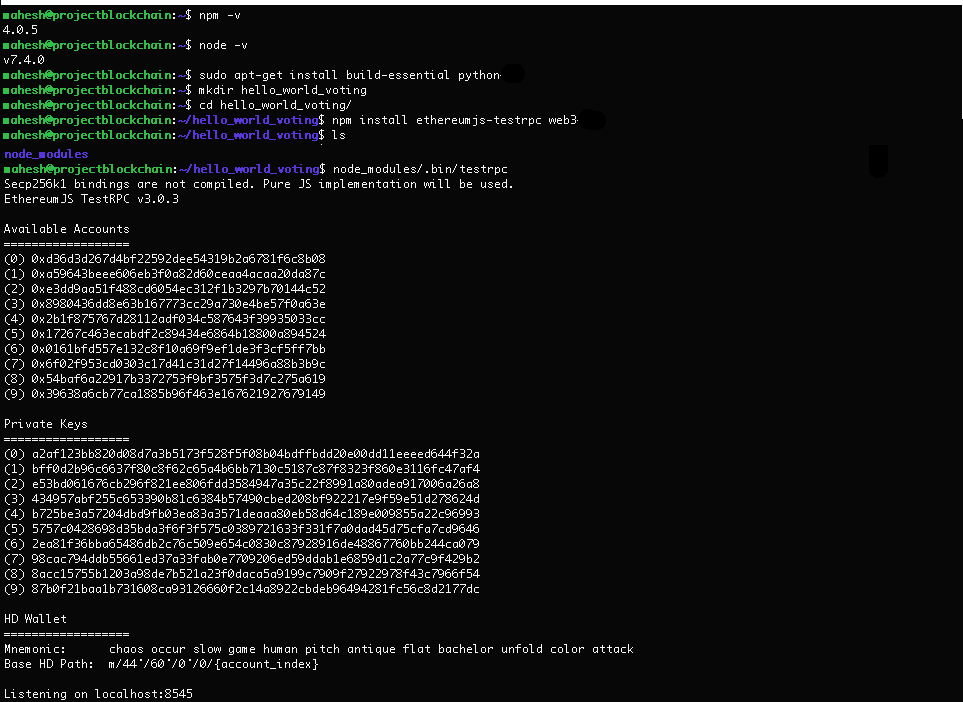
2,简单的投票合约:
pragma solidity ^0.4.;

// We have to specify what version of compiler this code will compile with

contract Voting {

  /* mapping field below is equivalent to an associative array or hash.

  The key of the mapping is candidate name stored as type bytes32 and value is

  an unsigned integer to store the vote count

  */

  mapping (bytes32 => uint8) public votesReceived;

  /* Solidity doesn't let you pass in an array of strings in the constructor (yet).

  We will use an array of bytes32 instead to store the list of candidates

  */

  bytes32[] public candidateList;

  /* This is the constructor which will be called once when you

  deploy the contract to the blockchain. When we deploy the contract,

  we will pass an array of candidates who will be contesting in the election

  */

  function Voting(bytes32[] candidateNames) {

    candidateList = candidateNames;

  }

  // This function returns the total votes a candidate has received so far

  function totalVotesFor(bytes32 candidate) returns (uint8) {

    if (validCandidate(candidate) == false) throw;

    return votesReceived[candidate];

  }

  // This function increments the vote count for the specified candidate. This

  // is equivalent to casting a vote

  function voteForCandidate(bytes32 candidate) {

    if (validCandidate(candidate) == false) throw;

    votesReceived[candidate] += ;

  }

  function validCandidate(bytes32 candidate) returns (bool) {

    for(uint i = ; i < candidateList.length; i++) {

      if (candidateList[i] == candidate) {

        return true;

      }

    }

    return false;

  }

}
mahesh@projectblockchain:~/hello_world_voting$ npm install solc
mahesh@projectblockchain:~/hello_world_voting$ node

> Web3 = require('web3')

> web3 = new Web3(new Web3.providers.HttpProvider("http://localhost:8545"));
> web3.eth.accounts

['0x9c02f5c68e02390a3ab81f63341edc1ba5dbb39e',

'0x7d920be073e92a590dc47e4ccea2f28db3f218cc',

'0xf8a9c7c65c4d1c0c21b06c06ee5da80bd8f074a9',

'0x9d8ee8c3d4f8b1e08803da274bdaff80c2204fc6',

'0x26bb5d139aa7bdb1380af0e1e8f98147ef4c406a',

'0x622e557aad13c36459fac83240f25ae91882127c',

'0xbf8b1630d5640e272f33653e83092ce33d302fd2',

'0xe37a3157cb3081ea7a96ba9f9e942c72cf7ad87b',

'0x175dae81345f36775db285d368f0b1d49f61b2f8',

'0xc26bda5f3370bdd46e7c84bdb909aead4d8f35f3']
> code = fs.readFileSync('Voting.sol').toString()

> solc = require('solc')

> compiledCode = solc.compile(code)
> abiDefinition = JSON.parse(compiledCode.contracts[':Voting'].interface)

> VotingContract = web3.eth.contract(abiDefinition)

> byteCode = compiledCode.contracts[':Voting'].bytecode

> deployedContract = VotingContract.new(['Rama','Nick','Jose'],{data: byteCode, from: web3.eth.accounts[], gas: })

> deployedContract.address

> contractInstance = VotingContract.at(deployedContract.address)
3,在nodes控制台和合约进行交互
> contractInstance.totalVotesFor.call('Rama')

{ [String: ''] s: , e: , c: [  ] }

> contractInstance.voteForCandidate('Rama', {from: web3.eth.accounts[]})

'0xdedc7ae544c3dde74ab5a0b07422c5a51b5240603d31074f5b75c0ebc786bf53'

> contractInstance.voteForCandidate('Rama', {from: web3.eth.accounts[]})

'0x02c054d238038d68b65d55770fabfca592a5cf6590229ab91bbe7cd72da46de9'

> contractInstance.voteForCandidate('Rama', {from: web3.eth.accounts[]})

'0x3da069a09577514f2baaa11bc3015a16edf26aad28dffbcd126bde2e71f2b76f'

> contractInstance.totalVotesFor.call('Rama').toLocaleString()

''
4,web页面链接区块链和投票
<!DOCTYPE html>

<html>

<head>

  <title>Hello World DApp</title>

  <link href='https://fonts.googleapis.com/css?family=Open+Sans:400,700' rel='stylesheet' type='text/css'>

  <link href='https://maxcdn.bootstrapcdn.com/bootstrap/3.3.7/css/bootstrap.min.css' rel='stylesheet' type='text/css'>

</head>

<body class="container">

  <h1>A Simple Hello World Voting Application</h1>

  <div class="table-responsive">

    <table class="table table-bordered">

      <thead>

        <tr>

          <th>Candidate</th>

          <th>Votes</th>

        </tr>

      </thead>

      <tbody>

        <tr>

          <td>Rama</td>

          <td id="candidate-1"></td>

        </tr>

        <tr>

          <td>Nick</td>

          <td id="candidate-2"></td>

        </tr>

        <tr>

          <td>Jose</td>

          <td id="candidate-3"></td>

        </tr>

      </tbody>

    </table>

  </div>

  <input type="text" id="candidate" />

  <a href="#" onclick="voteForCandidate()" class="btn btn-primary">Vote</a>

</body>

<script src="https://cdn.rawgit.com/ethereum/web3.js/develop/dist/web3.js"></script>

<script src="https://code.jquery.com/jquery-3.1.1.slim.min.js"></script>

<script src="./index.js"></script>

</html>
web3 = new Web3(new Web3.providers.HttpProvider("http://localhost:8545"));

abi = JSON.parse('[{"constant":false,"inputs":[{"name":"candidate","type":"bytes32"}],"name":"totalVotesFor","outputs":[{"name":"","type":"uint8"}],"payable":false,"type":"function"},{"constant":false,"inputs":[{"name":"candidate","type":"bytes32"}],"name":"validCandidate","outputs":[{"name":"","type":"bool"}],"payable":false,"type":"function"},{"constant":true,"inputs":[{"name":"","type":"bytes32"}],"name":"votesReceived","outputs":[{"name":"","type":"uint8"}],"payable":false,"type":"function"},{"constant":true,"inputs":[{"name":"x","type":"bytes32"}],"name":"bytes32ToString","outputs":[{"name":"","type":"string"}],"payable":false,"type":"function"},{"constant":true,"inputs":[{"name":"","type":"uint256"}],"name":"candidateList","outputs":[{"name":"","type":"bytes32"}],"payable":false,"type":"function"},{"constant":false,"inputs":[{"name":"candidate","type":"bytes32"}],"name":"voteForCandidate","outputs":[],"payable":false,"type":"function"},{"constant":true,"inputs":[],"name":"contractOwner","outputs":[{"name":"","type":"address"}],"payable":false,"type":"function"},{"inputs":[{"name":"candidateNames","type":"bytes32[]"}],"payable":false,"type":"constructor"}]')

VotingContract = web3.eth.contract(abi);

// In your nodejs console, execute contractInstance.address to get the address at which the contract is deployed and change the line below to use your deployed address

contractInstance = VotingContract.at('0x2a9c1d265d06d47e8f7b00ffa987c9185aecf672');

candidates = {"Rama": "candidate-1", "Nick": "candidate-2", "Jose": "candidate-3"}

function voteForCandidate() {

  candidateName = $("#candidate").val();

  contractInstance.voteForCandidate(candidateName, {from: web3.eth.accounts[0]}, function() {

    let div_id = candidates[candidateName];

    $("#" + div_id).html(contractInstance.totalVotesFor.call(candidateName).toString());

  });

}

$(document).ready(function() {

  candidateNames = Object.keys(candidates);

  for (var i = 0; i < candidateNames.length; i++) {

    let name = candidateNames[i];

    let val = contractInstance.totalVotesFor.call(name).toString()

    $("#" + candidates[name]).html(val);

  }

});

Ethereum Dapp Tutorial — Part 1的更多相关文章
- Truffle 4.0、Geth 1.7.2、TestRPC在私有链上搭建智能合约
目录 目录 1.什么是 Truffle? 2.适合 Truffle 开发的客户端 3.Truffle的源代码地址 4.如何安装? 4.1.安装 Go-Ethereum 1.7.2 4.2.安装 Tru ...
- ConsenSys/eth-lightwallet(browserless)
https://github.com/ConsenSys/eth-lightwallet LightWallet A minimal ethereum javascript wallet.一个小型的钱 ...
- Solidity notes
1. 查询transaction历史记录 https://forum.ethereum.org/discussion/2116/in-what-ways-can-storage-history-be- ...
- 以太坊(ethereum)开发DApp应用的入门区块链技术教程
概述 对初学者,首先要了解以太坊开发相关的基本概念. 学习以太坊开发的一般前序知识要求,最好对以下技术已经有一些基本了解: 一种面向对象的开发语言,例如:Python,Ruby,Java... 前 ...
- 《区块链DAPP开发入门、代码实现、场景应用》笔记3——Ethereum Wallet的安装
以太坊官方网站可以下载最新版本的Ethereum Wallet,用户无需选择,浏览器会根据访问者操作系统版本自动展现合适的版本,点击DOWNLOAD按钮下载即可安装,如图2.9所示,其下载网址: ht ...
- 从零构建以太坊(Ethereum)智能合约到项目实战——第23章 从零构建和部署去中心化投票App,decentralization Voting Dapp
P90 .1-从零构建和部署去中心化投票App-01 P91 .2-从零构建和部署去中心化投票App-02 P92 .3-从零构建和部署去中心化投票App-03 参考博文:http://liyuech ...
- 《区块链DAPP开发入门、代码实现、场景应用》笔记4——Ethereum Wallet中部署合约
账号创建完成之后,账号余额是0,但是部署合约是需要消耗GAS的,因此需要获取一定的以太币才能够继续本次实现.在测试网中获取以太币可以通过挖矿的方式,在开发菜单中可以选择打开挖矿模式,但是这需要将Syn ...
- 区块链入门到实战(21)之以太坊(Ethereum) – 分布式应用(DApp)
作用:用户交互 分布式应用(DApp)是运行在区块链之上的应用程序,支持区块链网络中用户之间的交互. DApp(decentralized application)的后端代码运行在区块链网络上,这个可 ...
- 如何从零开始学习区块链技术——推荐从以太坊开发DApp开始
很多人迷惑于区块链和以太坊,不知如何学习,本文简单说了一下学习的一些方法和资源. 一. 以太坊和区块链的关系 从区块链历史上来说,先诞生了比特币,当时并没有区块链这个技术和名词,然后业界从比特币中提取 ...
随机推荐
- c++中关于用stringstream进行的类型转化
1.将int转化成string类型 #include <iostream> #include <sstream> using namespace std; int main() ...
- [OpenCV-Python] OpenCV 中的图像处理 部分 IV (一)
部分 IVOpenCV 中的图像处理 OpenCV-Python 中文教程(搬运)目录 13 颜色空间转换 目标 • 你将学习如何对图像进行颜色空间转换,比如从 BGR 到灰度图,或者从BGR 到 ...
- compact 创建一个包含变量名为数组的键和它们的值为数组的值的数组
$firstname = "Bill"; $lastname = "Gates"; $age = "60"; $result = compa ...
- HDU 1348 Wall 【凸包】
<题目链接> 题目大意: 给出二维坐标轴上 n 个点,这 n 个点构成了一个城堡,国王想建一堵墙,城墙与城堡之间的距离总不小于一个数 L ,求城墙的最小长度,答案四舍五入. 解题分析: 求 ...
- anaconda3下配置python-3.5+tensorflow-gpu-1.9.0人脸识别项目环境
https://www.cnblogs.com/31415926535x/p/10620732.html 之前为了配置tensorflow-gpu的环境又是装cuda,又是装cudnn,还有tenso ...
- [洛谷P2066]机器分配
题目描述 总公司拥有高效设备M台,准备分给下属的N个分公司.各分公司若获得这些设备,可以为国家提供一定的盈利.问:如何分配这M台设备才能使国家得到的盈利最大?求出最大盈利值.其中M≤15,N≤10.分 ...
- idea 开发插件。
作者:韩梦飞沙 Author:han_meng_fei_sha 邮箱:313134555@qq.com E-mail: 313134555 @qq.com idea 开发插件. Intellij ID ...
- python计算文件夹大小——os.walk
下面提供一种利用os.walk()快捷的计算指定文件夹大小的方法 话不多说,直接上代码 简略版: import os def get_file_size(file_path, size=0): for ...
- git 创建SSH key
可以自己搭建一台运行Git的服务器,不过现阶段,为了学Git先搭个服务器绝对是小题大作.好在这个世界上有个叫GitHub的神奇的网站,从名字就可以看出,这个网站就是提供Git仓库托管服务的,所以,只要 ...
- 与TIME_WAIT相关的几个内核参数修改测试讨论结论
以下来结论自tcpcopy & gryphon讨论群 经过试验测试得出,不保证肯定正确. net.ipv4.tcp_tw_recycle net.ipv4.tcp_tw_reuse net ...