
Elasticsearch Internals: Networking Introduction An Overview of the Network Topology
This article introduces the networking part of Elasticsearch. We look at the network topology of an Elasticsearch cluster, which connections are established between which nodes and how the different Java clients works. Finally, we look a bit closer on the communication channels between two nodes.
Node Topology
Elasticsearch nodes in a cluster form what is known as a full mesh topology, which means that each Elasticsearch node maintains a connection to each of the other nodes.
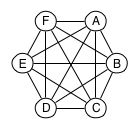
Full mesh topology with 6 cluster nodes
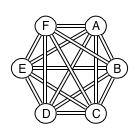
In order to simplify the code base, the connections are used as one-way connections, so the connection topology actually ends up looking like this:
Adding a Node
When a node starts up, it reads a list of seed nodes from its configuration using unicast, and sends multicastmessages looking for other nodes in the same cluster.
As the node discovers more instances in the same cluster, it connects to them one by one, asks them for information about all the nodes they know and then attempts to connect to them all and officially join the cluster. In this way, previously running instances assist in quickly getting fresh instances up to speed on the current nodes in a cluster.
Node Clients
Even “client” Elasticsearch nodes (i.e nodes configured with node.client: true or build with NodeBuilder.client(true)) connect to the cluster this way.
This implies that the client node becomes a full participant in the full mesh network. In other words, once it starts joining the cluster, all the existing nodes in the cluster will connect back to the instance. This means that both the client and server firewalls and publish hosts must be properly configured in order to allow this. Additionally, whenever a node client joins, leaves or experiences networking issues, it causes extra work for all the other nodes in the cluster, such as opening / closing network connections and updating the cluster state with the information about the node.
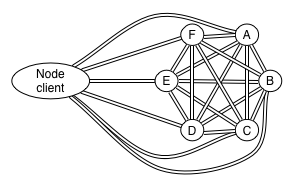
Transport Clients
On the other hand, “transport” clients work differently.
When a Transport client connects to one or more instances in a cluster, the instances do not connect back, nor is the existence of the transport client part of the cluster state. This means that a joining / leaving transport client causes minimum extra work for the other nodes in the cluster.
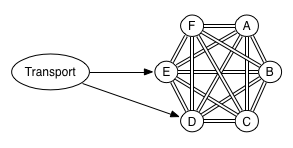
Connections and Channels
What do we mean when we talk about the connection to a Node in Elasticsearch? In the sections above, we refrained from being specific about it and only used the term as a logical connection that allows communication between two nodes. Let’s go into more detail.
Usually, when we talk about connections in the context of networks, we refer to TCP-connections, which provide a reliable line of communication between two nodes.
Elasticsearch uses (by default) TCP for communication between nodes, but in order to prevent important traffic such as fault-detection and cluster state changes from being affected by far less important, slower moving traffic such as query/indexing requests, it creates multiple TCP connections between each node. For each of these connections, Elasticsearch uses the term channel, which encapsulates the serialization / deserialization of messages over a particular connection.
In earlier Elasticsearch versions there used to be three different classes of channels: low, med and high. After a while, ping was added, and a recent change renamed these channels such that they are more descriptive about their intention. At of the time of writing, the following channel classes exist:
recovery: 2 channels for the recovery of indexesbulk: 3 channels for low priority bulk based operations such as bulk indexing. Previously calledlow.reg: 6 channels for medium priority regular operations such as queries. Previous calledmed.state: 1 channel dedicated to state based operations such as changes to the cluster state. Previously calledhigh.ping: 1 channel dedicated to pings between the instances for fault detection.
The default number of channels in each of these class are configured with the configuration prefix of transport.connections_per_node.
Elasticsearch has support for TCP keepalive which is not explicitly set by default. This prevents unused or idle channels from being closed, which would otherwise cascade into a complete disconnect-reconnect cycle as explained above.
Adding an Instance
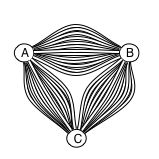
A consequence of the above is that adding a new instance to an existing cluster causes it to establish 13 connections to each node, and each node establishes 13 connections back to the new instance.
Linked Channels
If one of the 13 channels to a particular node is closed due to intermittent network errors for example, all the other channels to the same node are closed and the connections to the node is reconnected. This is done in order to maintain some internal invariants and to ensure the internal consistency of the communication between the nodes.
Ending Remarks
The fact that all the channels between two nodes in a cluster are linked makes it extra vulnerable to network issues, and this is one of the reasons why people are discouraged from trying to create a cluster between data centers that are far apart (and thus adding more sources of failure).
In this article we’ve shown the basic network topology of an Elasticsearch cluster and introduced the concept of channels that are used for communication between nodes. In a later article we’ll take a closer look at what goes on inside each of these channels.
Elasticsearch Internals: Networking Introduction An Overview of the Network Topology的更多相关文章
- 小样本学习最新综述 A Survey on Few-shot Learning | Introduction and Overview
目录 01 Introduction Bridging this gap between AI and humans is an important direction. FSL can also h ...
- [Machine Learning] Probabilistic Graphical Models:一、Introduction and Overview(1、Overview and Motivation)
一.PGM用来做什么 1. 医学诊断:从各种病症分析病人得了什么病,该用什么手段治疗 2. 图像分割:从一张百万像素级的图片中分析每个像素点对应的是什么东西 两个共同点:(1)有非常多不同的输入变 ...
- [Machine Learning] Probabilistic Graphical Models:一、Introduction and Overview(2、Factors)
一.什么是factors? 类似于function,将一个自变量空间投影到新空间.这个自变量空间叫做scope. 二.例子 如概率论中的联合分布,就是将不同变量值的组合映射到一个概率,概率和为1. 三 ...
- ElasticSearch 2 (11) - 节点调优(ElasticSearch性能)
ElasticSearch 2 (11) - 节点调优(ElasticSearch性能) 摘要 一个ElasticSearch集群需要多少个节点很难用一种明确的方式回答,但是,我们可以将问题细化成一下 ...
- OpenStack Networking overview
原文地址:http://docs.openstack.org/newton/install-guide-ubuntu/neutron-concepts.html Networking service ...
- Monitoring and Tuning the Linux Networking Stack: Receiving Data
http://blog.packagecloud.io/eng/2016/06/22/monitoring-tuning-linux-networking-stack-receiving-data/ ...
- 微软职位内部推荐-Sr. SW Engineer for Azure Networking
微软近期Open的职位: Senior SW Engineer The world is moving to cloud computing. Microsoft is betting Windows ...
- Docker部署Elasticsearch集群
http://blog.sina.com.cn/s/blog_8ea8e9d50102wwik.html Docker部署Elasticsearch集群 参考文档: https://hub.docke ...
- Virtual Networking
How the virtual networks used by guests work Networking using libvirt is generally fairly simple, an ...
随机推荐
- textarea去掉右下三角号
/*去掉textarea右下角三角符号*/ resize : none; 修改样式直接覆盖就行,会把默认样式覆盖掉.如border,width,height,border-radius
- Linux命令对应英文全称
https://blog.csdn.net/yrc_note/article/details/72598780 拓展:https://blog.csdn.net/u010613363/article/ ...
- SQLite数据库下载
一:SQLite简介 SQLite是一种嵌入式数据库,它的数据库就是一个文件.体积很小,经常被集成到各种应用程序中,甚至在iOS和Android的App中都可以集成. 要操作关系数据库,首先需要连接到 ...
- Windows和linux 文件互传
一般我是直接在windows下创建一个共享文件夹,然后在linux挂载,我一直都是这么干的. 直到有一天,我需要往一个公网linux上面传几个文件,可是我的Windows是内网的,所以,这种方法行不通 ...
- linux忘记root密码
在选择系统界面选中要修改的系统(我的就是默认的第一个),按e建进入修改,在修改界面一直下到文件末尾,在末尾前一行左右,找到UTF-8那一行,在这一行敲一个空格,然后打init=/bin/sh 修改完成 ...
- MySQL Transaction--事务相关查询
MySQL支持的四种事务隔离级别 READ-UNCOMMITTED READ-COMMITTED REPEATABLE-READ SERIALIZABLE 查看全局事务隔离级别和会话事务隔离级别 SH ...
- Go语言实战 (William,Kennedy 等著)
第1章 关于Go语言的介绍 (已看) 1.1 用Go解决现代编程难题 1.1.1 开发速度 1.1.2 并发 1. goroutine 2. 通道 1.1.3 Go语言的类型系统 1. 类型简单 2. ...
- 数学 它的内容,方法和意义 第一卷 (A. D. 亚历山大洛夫 著)
第一章 数学概观 (已看) 1. 数学的特点 2. 算术 3. 几何 4. 算术和几何 5. 初等数学时代 6. 变量的数学 7. 现代数学 8. 数学的本质 9. 数学发展的规律性 第二章 数学分析 ...
- ios Programming:The Big Nerd Ranch Guid(6th Edition) (Joe Conway & AARON HILLEGASS 著)
Introduction (已看) Prerequisites What Has Changed in the Sixth Edition? Our Teaching Philosophy How t ...
- 移除元素(remove,remove_if...unique...)
remove 因为本算法作用的是iterator,所以并不会改变Container大小,会返回一个新的iterator new_last,是的first到new_last中的元素都不等于value,左 ...