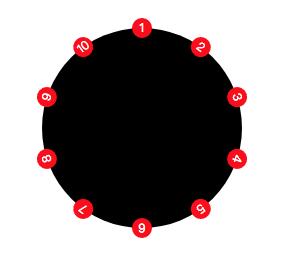
1.  css3


    ul{
                width: 200px;
                height: 200px;
                background-color:black;
                border-radius: 50%;
                position: relative;
      margin: 100px;
            }
            li{
                width: 20px;
                height: 20px;
                position: absolute;
                background-color:red;
                border-radius: 50%;
                line-height: 40px;
                text-align: center;
                left: 50%;
                margin-left: -10px;
                margin-top: -10px;
      font-size: 12px;
            }
            li:nth-of-type(2){
                transform: rotate(36deg);
                transform-origin:10px 110px;
            }
            li:nth-of-type(3){
                transform: rotate(72deg);
                transform-origin:10px 110px;
            }
            li:nth-of-type(4){
                transform: rotate(108deg);
                transform-origin:10px 110px;
            }
            li:nth-of-type(5){
                transform: rotate(144deg);
                transform-origin:10px 110px;
            }
            li:nth-of-type(6){
                transform: rotate(180deg);
                transform-origin:10px 110px;
            }
            li:nth-of-type(7){
                transform: rotate(216deg);
                transform-origin:10px 110px;
            }
            li:nth-of-type(8){
                transform: rotate(252deg);
                transform-origin:10px 110px;
            }
            li:nth-of-type(9){
                transform: rotate(288deg);
                transform-origin:10px 110px;
            }
            li:nth-of-type(10){
                transform: rotate(324deg);
                transform-origin:10px 110px;
            }
    <ul>
      <li>1</li>
      <li>2</li>
      <li>3</li>
      <li>4</li>
      <li>5</li>
      <li>6</li>
      <li>7</li>
      <li>8</li>
      <li>9</li>
      <li>10</li>
    </ul>


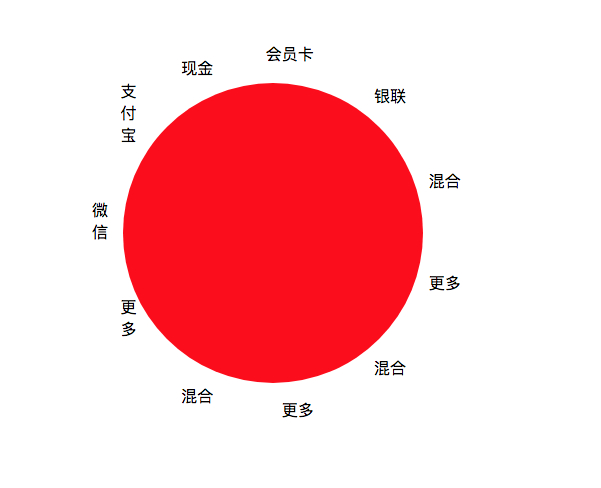
2. js计算+position定位实现
 
  *{ margin: 0; padding: 0;}
  .modepayment-content{
    width: 300px;
    height: 300px;
    background: red;
    border-radius: 100%;
    position: relative;
    left: 300px;
    top: 300px;
  }
  .modepayment-content div{
    position: absolute;
  }
 
 
  <div class="modepayment-content">
    <div class="modepayment-wx">微信</div>
    <div class="modepayment-zfb">支付宝</div>
    <div class="modepayment-xj">现金</div>
    <div class="modepayment-hyk">会员卡</div>
    <div class="modepayment-yl">银联</div>
    <div class="modepayment-hh">混合</div>
    <div class="modepayment-gd">更多</div>
    <div class="modepayment-hh">混合</div>
    <div class="modepayment-gd">更多</div>
    <div class="modepayment-hh">混合</div>
    <div class="modepayment-gd">更多</div>
  </div>


  $(function(){
    var radius =180;
    var avd = 360/$(".modepayment-content div").length;
    var ahd = avd*Math.PI/180;
    $(".modepayment-content").css({"left":800,"top":200});
    $(".modepayment-content div").each(function(index, element){
      $(this).css({"bottom": Math.sin((ahd*index))*radius+140,"right":Math.cos((ahd*index))*radius+135});
    });
  })


div成圆形分布的更多相关文章

  1. (Android)处理图片成圆形

    Android将一张Bitmap处理成圆形是十分常见的,经常见的场合就是作为用户头像,我们可以Canvas来辅助实现这个功能,代码如下 public static Bitmap toRoundCorn ...

  2. Glide的加载图片的帮助类,用来把图片圆角或者改成圆形图片

    Glide虽然非常好用但是没找到把图片圆角的方法,所以百度了一个非常不错的加载类自己实现圆角图 感谢原文章作者:http://blog.csdn.net/weidongjian/article/det ...

  3. 不涉及框架纯java实现将图片裁成圆形

    package com.wtsrui.utils;import java.awt.Color;  import sun.misc.BASE64Encoder;import java.awt.Graph ...

  4. 微信小程序裁剪图片成圆形

    代码地址如下:http://www.demodashi.com/demo/14453.html 前言 最近在开发小程序,产品经理提了一个需求,要求微信小程序换头像,用户剪裁图片必须是圆形,也在gith ...

  5. WPF 中使用附加属性,将任意 UI 元素或控件裁剪成圆形(椭圆)

    不知从什么时候开始,头像流行使用圆形了,于是各个平台开始追逐显示圆形裁剪图像的技术.WPF 作为一个优秀的 UI 框架,当然有其内建的机制支持这种圆形裁剪. 不过,内建的机制仅支持画刷,而如果被裁剪的 ...

  6. 微信小程序之裁剪图片成圆形

    前言 最近在开发小程序,产品经理提了一个需求,要求微信小程序换头像,用户剪裁图片必须是圆形,也在github上看了一些例子,一般剪裁图片用的都是方形,所以自己打算写一个小组件,可以把图片剪裁成圆形,主 ...

  7. android 开发 View _15 导入一张图片将它裁剪成圆形 与 paint图层叠加处理详解

    方法一: /* 实现思维是这样的: 1.首先拿到bitmap图片 2.得到bitmap图片的高度 宽度,并且计算好各个画图尺寸 3.创建一个空白的 bitmap图片: Bitmap output = ...

  8. 将UIImage转换成圆形图片image

    建议写成UIImage分类,如下: .h //变成圆形图片 - (UIImage *)circleImage; .m //变成圆形图片 - (UIImage *)circleImage { // NO ...

  9. GDI+ 如何将图片绘制成圆形的图片

    大概意思就是不生成新的图片,而是将图片转换为圆形图片. 实现代码如下: private Image CutEllipse(Image img, Rectangle rec, Size size) { ...

随机推荐

  1. [jsp] - jsp引入c标签出错

    jsp引入c标签出错, 因为之前使用thymeleaf,将jsp的依赖删除了.(这里应该采用注释而非删除,但以为项目就一直用thymeleaf了) <%@ taglib uri="ht ...

  2. Git stash 常用命令

    参考: Git: How to look at the stash Git学习笔记05--git stash Git stash 常用命令 1.git stash: 保存当前的工作进度: 2.git ...

  3. POJ 3279 Fliptile(翻格子)

    POJ 3279 Fliptile(翻格子) Time Limit: 2000MS    Memory Limit: 65536K Description - 题目描述 Farmer John kno ...

  4. JMeter中关于动态切换不同CSV文件解决方案

    最近写case,需要当前播放节目的数据作为输入数据,所以每个时刻所用的数据只能是当前时刻附件的数据,尝试用CSV Data Set Config动态加载不同的文件,没有成功,好像CSV Data Se ...

  5. JavaScript中 call和apply

    call()方法和apply()方法的作用相同,他们的区别在于接收参数的方式不同. 对于call(),第一个参数是this值没有变化,变化的是其余参数都直接传递给函数.(在使用call()方法时,传递 ...

  6. _itemmod_exchange_item

    物品强化说明 表说明 `item`物品ID `exchangedItem` 升级后的物品ID `upFlag` 物品等级模式0或1,一般为0 `reqId` 需求ID `chance` 升级几率 `c ...

  7. C#双缓冲代码

    private void Form1_Load(object sender, EventArgs e) { //在窗体加载的时候 解决窗体闪烁问题 //将图像绘制到缓冲区减少闪烁 this.SetSt ...

  8. 使用ajax判断登录用户名

    <%@ Page Language="C#" AutoEventWireup="true" CodeBehind="Register.aspx. ...

  9. EndNote基础教程

    endnote的使用方法 http://www.360doc.com/content/17/1211/08/31841004_711998509.shtml 导入文献 File-Import-Flod ...

  10. pipenv+sublime text3 配置

    这半年用docker管理开发环境 + vs code/编码 git + pycharm跑unittest 优点多多,实现了关注点分离 1 dockfile 直接隔离成独立的image 2 code对g ...