
四则运算web最终版
经过若干时间的奋战,终于完成了web版四则运算程序。团队成员:井小普、张贺。
设计思想:
在之前的程序基础上两人结合开发web系统。
首先,进行登录注册界面的编写,不同用户,对应不同的错题库,答题记录;
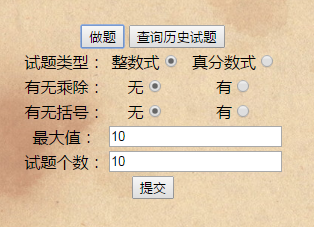
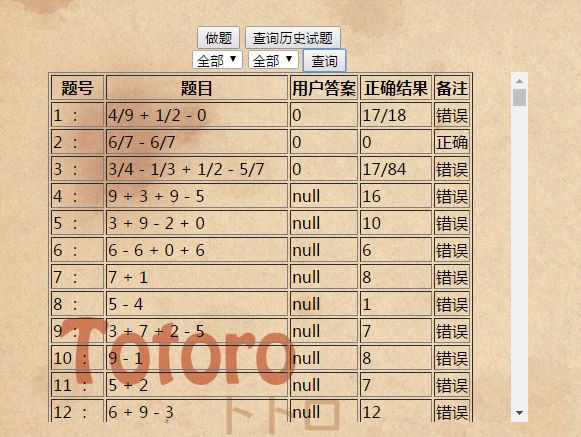
然后进入主页,主页中在登录成功后左上角会显示“您好!用户名”,并有开始答题,查看历史错题和注销三个按钮。开始答题按钮可以供用户选择出题的条件生成题目,查看历史错题会调出数据库中历史的错题,注销会注销当前用户,返回登录界面。
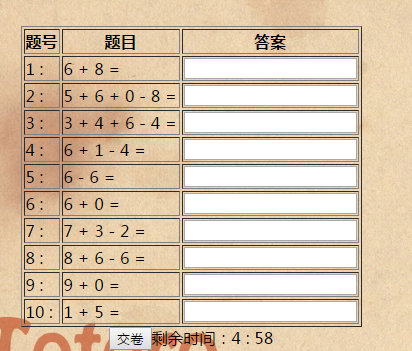
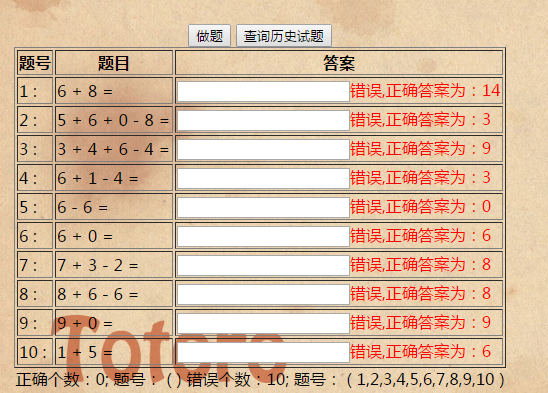
之后便是根据用户设置的不同数目的题目,自动设置倒计时,倒计时时间到后,自动提交试卷,之后显示用户答题结果,如果错误会显示正确结果,错误的题目归到错题库中。
最后对页面使用了Javabean、servlet、ajax、jQuery,并对页面进行了美化。这次程序的完成没有用模板,的确页面可能不是特别美观,但我们期待有一天我们依旧能够不用模版达到非常酷炫、美观的效果。
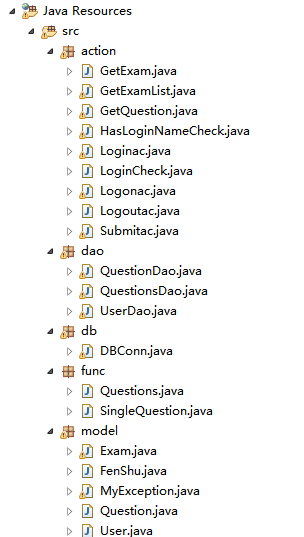
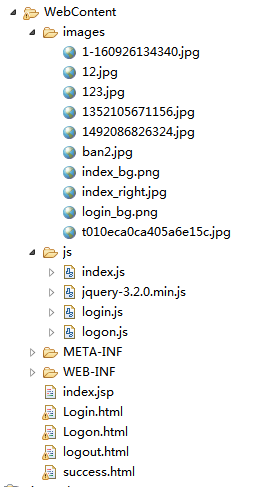
工程文件夹截图如上;
在此只粘贴部分网页代码:
<%@ page language="java" contentType="text/html; charset=UTF-8"

    pageEncoding="UTF-8"%>

<!DOCTYPE html PUBLIC "-//W3C//DTD HTML 4.01 Transitional//EN" "http://www.w3.org/TR/html4/loose.dtd">

<html>

<head>

<meta http-equiv="Content-Type" content="text/html; charset=UTF-8">

<title>主页</title>

<script src="js/jquery-3.2.0.min.js"></script>

<script type="text/javascript" src="js/index.js"></script>

<style type="text/css">

    #logo  {

    position: absolute;

    left: 0px;

    top: 17px;

    width: 100%;

    z-index: 100;

        }

    img {z-index: -1;}

    #logo form h1 {

    font-style: italic;

    font-size: 36px;

    color: #C63;}

    #user{position:absolute;left:5%;top:10px;z-index:200;}

    #login{position:absolute;left:91%;top:10px;z-index:200;}

    #logout{position:absolute;left:95%;top:10px;z-index:200;}

     #wrap {position:absolute;left:0px;top:0px;width:100%;height:100%}

    #menu {display: none;text-align: center;}

    #userInfo {display: none;text-align: center;}

    #zuoTiInput {display: none;}

    #selectInput {display: none;text-align: center;}

    #show {display: none; height: 350px;overflow: auto;}

    #right {position:absolute;left:50%;top:40px;height:80%;width:40%}

    #left {

    position: absolute;

    width: 518px;

    top: 116px;

    left: 48px;

    height: 13px;

}

    #zuoTiFuZhu {text-align: center;}

    #result {text-align: center;}

#user {

    color: #C63;

}

#user {

    font-weight: bold;

}

#user {

    color: #900;

}

#user {

    color: #480000;

}

</style>

</head>

<body>

    <img src="data:images/1492086826324.jpg" width="100%" height="100%">

    <div id="logo">

    <form>

    <center>

    <h1>PH250答题网</h1>

    </center>

    </form>

    </div>

    <!--

    <div id="loginBT" align="right">

            <a href="Login.html"><button>登录</button></a>

    </div>

    !-->

<div id="login">

    <a href="Login.html"><button>登录</button></a>

    </div>

<div id="logout">

    <a href="Logoutac"><button>注销</button></a>

    </div>

<div id="user">

    您好!${user.username}

    </div>

    <div id="wrap">

    <div id="left">

        <div id="loginMessage"></div>

        <!--<div id="userInfo">

            用户名:${user.username}

           <!--  <div id="loginBT" align="right">

            <a href="Logoutac"><button id="logout">注销</button></a>

    </div> !-->

      <div id="menu">

            <button id="zuoTi">做题</button>

            <button id="selectLiShiShiTi">查询历史试题</button>

        </div>

        <div id="zuoTiInput" >

            <table align="center">

                <tr><td>试题类型:</td><td><label>整数式<input type="radio" name="type" value="0" checked="checked"></label></td><td><label>真分数式<input type="radio" name="type" value="1"></label></td></tr>

                <tr><td>有无乘除:</td><td><label>无<input type="radio" name="hasChengChu" value="0" checked="checked"></label></td><td><label>有<input type="radio" name="hasChengChu" value="1"></label></td></tr>

                <tr><td>有无括号:</td><td><label>无<input type="radio" name="hasKuoHao" value="0" checked="checked"></label></td><td><label>有<input type="radio" name="hasKuoHao" value="1"></label></td></tr>

                <tr><td>最大值:</td><td colspan="2"><input type="text" name="maxNum" value="10"><span id="maxNumInfo"></span></td></tr>

                <tr><td>试题个数:</td><td colspan="2"><input type="text" name="num" value="10"><span id="numInfo"></span></td></tr>

                <tr><td colspan="3"><input type="button" id="zuoTiInputTiJiao" value="提交"></td></tr>

            </table>

        </div>

        <div id="selectInput">

            <select id="shiJuanList">

            </select>

            <select id="typeSelect">

                <option value="all" selected="selected">

                    全部

                </option>

                <option value="right">

                    正确

                </option>

                <option value="wrong">

                    错误

                </option>

            </select>

            <button id="selectShiJuan">

                查询

            </button>

    </div>

    <div id="show">

        <table id="showShiTiTable" align="center" border="1">

        </table>

        <div id="zuoTiFuZhu"><button id="jiaoJuanBT">交卷</button><span id="shengYuTime"></span></div>

        <div id="result">

        </div>

    </div>

    </div>

</div>

</body>

</html>
index.jsp
<!DOCTYPE html>

<html>

<head>

<meta charset="UTF-8">

<title>登录</title>

<script type="text/javascript">

</script>

<style type="text/css">

    #input {

            position:absolute;left:0px; top:30%; width:100%;

            }

    #logo  {

    position: absolute;

    left: 0px;

    top: 17px;

    width: 100%;

    z-index: 100;

        }

    img {z-index: -1;}

    #logo form h1 {

    font-style: italic;

    font-size: 36px;

    color: #C63;

}

</style>

</head>

<body>

<img src="data:images/12.jpg" width="100%" height="100%"/>

    <div id="loginMessage">

    </div>

    <div id="logo">

    <form>

    <center>

    <h1>PH250答题网</h1>

    </center>

    </form>

    </div>

    <div id="input">

    <center>

        <form action="Loginac" method="post" onsubmit="return check()">

            <table>

                <tr><td>用户名:</td><td><input type="text" id="n1" name="username"></td><td><span id="userInfo"></span></td></tr>

                <tr><td>密码:</td><td><input type="password" id="pwd" name="pwd"></td><td><span id="pwdInfo"></span></td></tr>

                <tr><td><a href="Logon.html"><input type="button" id="bt1" value="注册"></a></td><td><input type="submit" value="登录"></td></tr>

                <tr><td></td><td><span id="loginResult"></span></td></tr>

            </table>

        </form>

    </center>

    </div>

</body>

</html>
Login.html
<!DOCTYPE html>

<html>

<head>

<meta charset="UTF-8">

<title>注册</title>

<script src="js/logon.js"></script>

<style type="text/css">

    #input {

            position:absolute;left:0px; top:30%; width:100%;z-index: 100;

            }

    #logo  {

    position: absolute;

    left: 0px;

    top: 17px;

    width: 100%;

    z-index: 100;

        }

    img {z-index: -1;}

#logo form h1 {

    font-style: italic;

    font-size: 36px;

    color: #C63;

}

</style>

</head>

<body>

    <img src="data:images/12.jpg" width="100%" height="100%"/>

    <div>

    </div>

    <div id="logo">

    <form>

    <center>

    <h1>PH250答题网</h1>

    </center>

    </form>

    </div>

    <div id="input">

    <center>

    <form id="form2" action="Logonac" onsubmit="return check()">

        <table>

            <tr><td>用户名:</td><td><input type="text" id="n1" name="username"><span id="userInfo"></span></td></tr>

            <tr><td>密码:</td><td><input type="password" id="pwd1" name="pwd1"><span id="pwd1Info"></span></td></tr>

            <tr><td>请再次输入密码:</td><td><input type="password" id="pwd2" name="pwd2"><span id="pwd2Info"></span></td></tr>

            <tr><td><input type="reset" value="重置"></td><td><input type="submit" id="zhuCe" value="注册"></td></tr>

            <tr><td></td><td><a href="login.html">已有账号,点次登录</a></td></tr>

            <tr><td></td><td><span id="logonResult"></span></td></tr>

        </table>

    </form>

    </center>

    </div>

</body>

</html>
Logon.html
<!DOCTYPE html>

<html>

<head>

<meta charset="UTF-8">

<title>注销页面</title>

<script type="text/javascript">

    function f()

    {

        setTimeout("location='Login.html'",2000);

    }

</script>

</head>

<body onload="f()">

<center>

<h1>注销成功,2秒后转至登录界面</h1>

</center>

</body>

</html>
logout.html
<!DOCTYPE html>

<html>

<head>

<meta charset="UTF-8">

<title>成功页面</title>

<style type="text/css">

#re  {

    position: absolute;

    left: 0px;

    top: 17px;

    width: 100%;

    z-index: 100;

        }

    img {z-index: -1;}

#re form h1 {

    font-style: italic;

    font-size: 36px;

    color: #C63;

</style>

<script src="js/jquery-3.2.0.min.js"></script>

<script type="text/javascript">

    function f()

    {

        setTimeout("location='Login.html'",2000);

    }

</script>

</head>

<body onload="f()">

<img src="data:images/ban2.jpg" width="100%" height="100%"/>

<div id="re">

    <form>

    <center>

    <h1>注册成功,2秒后转至登录界面</h1>

    </center>

    </form>

    </div>

</body>

</html>
success.html
截图如下:
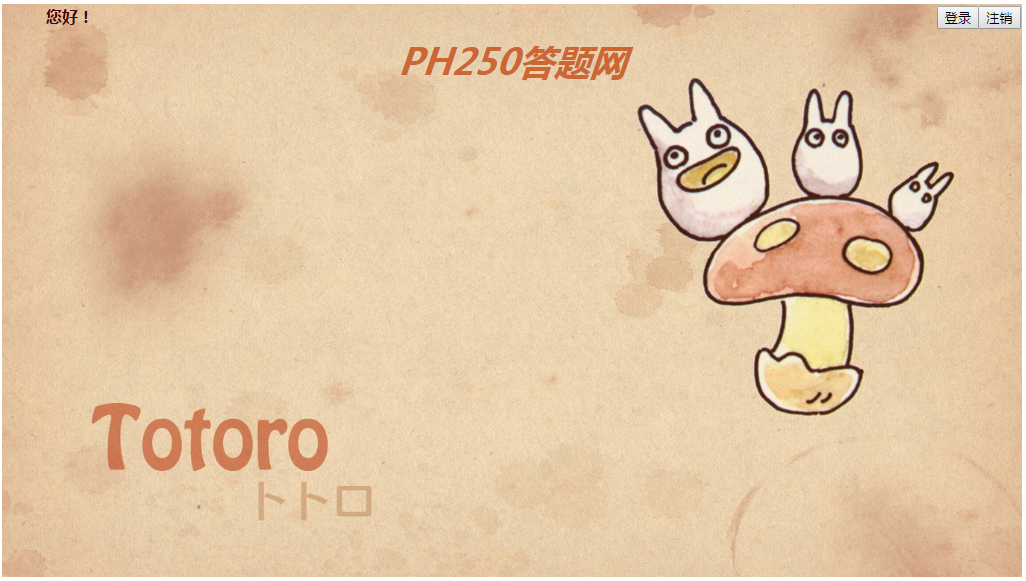
点击“登录”

登录:
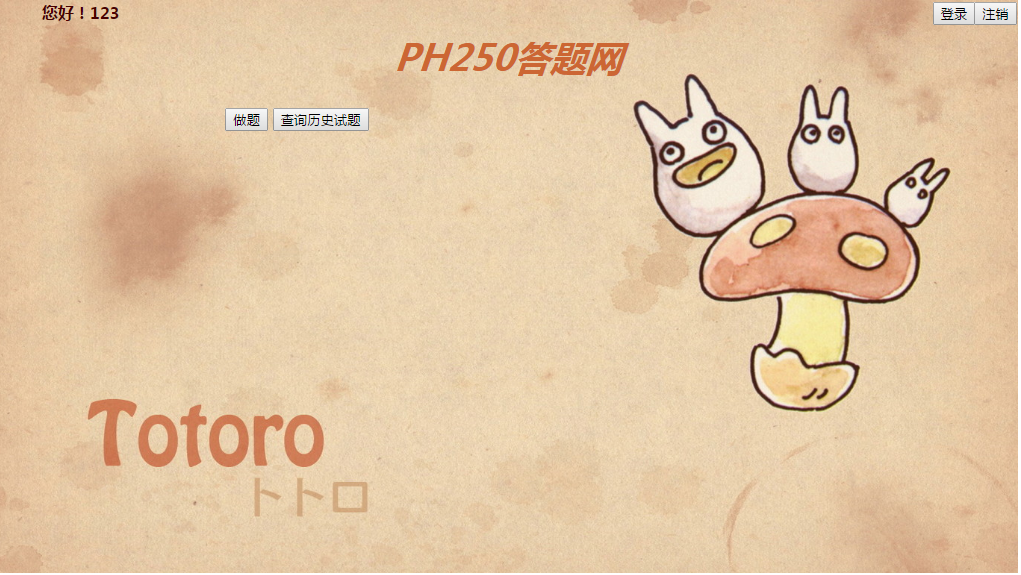
开始做题:
交卷:
查看错题库:
点击注销会出现“两秒后进入登录界面!”。。。。。
我相信,通过这次实践自己付出的努力亦或是学到的东西别人是看不到的,所以不论结果如何,也不管别人怎么看,我们问心无愧就好!
四则运算web最终版的更多相关文章
- 最终版的Web(Python实现)
天啦,要考试了,要期末考试了,今天把最终版的Python搭建Web代码先写这里记下了.详细的过程先不写了. 这次是在前面的基础上重写 HTTPServer 与 BaseHTTPRequestHandl ...
- Angular 2 最终版正式发布
9月15日,Angular 2 的最终版正式发布了. 作为 Angular 1 的全平台继任者 -- Angular 2 的最终版,意味着什么? 意味着稳定性已经得到了大范围用例的验证: 意味着已经针 ...
- jQuery 3.0最终版发布,十大新特性眼前一亮
jQuery 3.0在日前发布了最终的全新版本.从2014年10月,jQuery团队对这个主要大版本进行维护开始,web开发者社区便一直在期待着这一刻的到来,终于在2016年6月他们迎来了这一个最终板 ...
- python---session(最终版)__setitem__和__getitem__方法
一般来说对于其他语言session值一般获取方法为session['name'],赋值使用session['name']=val 对于python类中含有一些魔术方法__setitem__,__get ...
- RHEL 6.0服务器安装Oracle 11G R2 最终版
RHEL6安装Oracle 11g R2最终版 结合网上教程 服务器实战所得 1.使用DVD做yum源新建dvd挂载目录[root@fxq-dp ~]# mkdir /media/iso进入到DVD挂 ...
- 理解JavaScript设计模式与开发应用中发布-订阅模式的最终版代码
最近拜读了曾探所著的<JavaScript设计模式与开发应用>一书,在读到发布-订阅模式一章时,作者不仅给出了基本模式的通用版本的发布-订阅模式的代码,最后还做出了扩展,给该模式增加了离线 ...
- Delphi7/2007/2009/2010/XE/XE2/XE3/XE4/XE5/XE6/XE7/XE8/10最终版
RAD Studio 10.1 Berlin(with Update1)http://altd.embarcadero.com/download/radstudio/10.1/delphicbuild ...
- [oldboy-django][3作业汇总]登录,注册最终版
# 作业(登录,注册)最终版 - 保留上次输入的值 - 用户数据格式的验证
- 10万级etl批量作业自动化调度工具Taskctl之轻量级Web应用版
什么是批量作业: 批量处理是银行业整个信息后台最为重要的技术形态,也是银行核心信息资产数据的分享.传输.演化的重要技术手段.有调查指出,全球70%的数据是经过批量处理得以再次使用,可见批量处理在整个信 ...
随机推荐
- Asp.net MVC 控制器ActionResult的例子
ActionResult 父类型 ViewResult View() 多重载应用 PartialViewResult PartialView() 部分试图 New EmptyResult() 空 如 ...
- Ubuntu yindaoxiufu 引导修复(Boot Repair)
Ubuntu yindaoxiufu 引导修复(Boot Repair) from: http://blog.csdn.net/piaocoder/article/details/50589667 ...
- 利用Python 脚本生成 .h5 文件 代码
利用Python 脚本生成 .h5 文件 import os, json, argparse from threading import Thread from Queue import Queue ...
- 使用python+ffmpeg+youtube-dl下载youtube上的视频
一.准备工作 1.安装python,详见https://www.cnblogs.com/cnwuchao/p/10562416.html 2.安装ffmpeg,详见https://www.cnblog ...
- SAP FI CO模块常用事务代码
...
- python学习 day013打卡 内置函数
本节主要内容: 内置函数: 内置函数就是python给你提供的.拿来直接用的函数,比如print,input等等.截止到python版本3.6.2 python一共提供了68个内置函数.他们就是pyt ...
- 一些常见的第三方UI库
第三方UI库 1 bootstrap Bootstrap是Twitter推出的一个用于前端开发的开源工具包.它由Twitter的设计师Mark Otto和Jacob Thornton合作开发,是一个C ...
- Your CPU supports instructions that this TensorFlow binary was not compiled to use: AVX2 FMA
解决方法: 如果安装的是GPU版本 如果你有一个GPU,你不应该关心AVX的支持,因为大多数昂贵的操作将被分派到一个GPU设备上(除非明确地设置).在这种情况下,您可以简单地忽略此警告: import ...
- Mysql 强行Kill 连接
BEGIN ; ; ; DO KILL @Temp; ; END WHILE ; END
- [原][粒子特效][spark]调节器modifier
深入浅出spark粒子特效连接:https://www.cnblogs.com/lyggqm/p/9956344.html group添加modifier的方式: modifier An abstra ...