
[Canvas]空战游戏进阶 增加发射子弹 敌机中弹爆炸功能
点此下载源码。
图例:
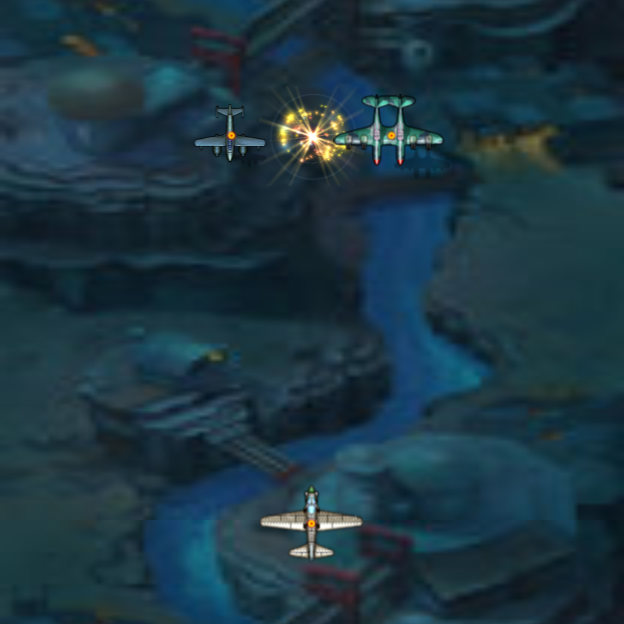
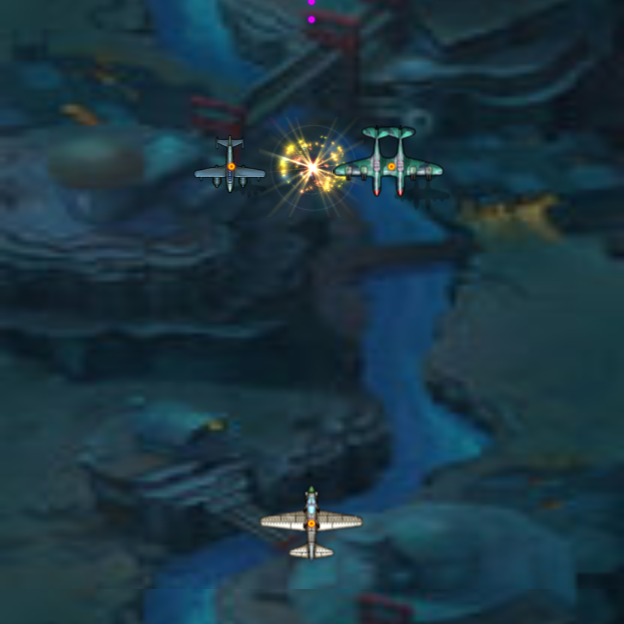
源码:
<!DOCTYPE html>
<html lang="utf-8">
<meta http-equiv="Content-Type" content="text/html; charset=utf-8"/>
<head>
     <title>飞越河谷的战机1.06 19.3.14 9:45 by:逆火狂飙 horn19782016@163.com</title>

     <style>
     *{
        margin:1px;
        padding:1px;
     }
     #canvas{
        background:#ffffff;
     }

     #controls{
        float:left;
     }
     </style>

    </head>

     <body onload="init()">
        <table border="0px">
            <tr>
                <td width="50px"valign="top">
                    <div id="controls">
                        <input id='animateBtn' type='button' value='运动'/>
                    </div>
                </td>
                <td width="100%" align="center">
                    <canvas id="canvas" width="1200px" height="562px" >
                    出现文字表示你的浏览器不支持HTML5
                    </canvas>
                </td>
            </tr>
        </table>

        <div>

        </div>

     </body>
</html>
<script type="text/javascript">
<!--
var paused=true;
animateBtn.onclick=function(e){
    paused=! paused;

    if(paused){
        animateBtn.value="运动";

    }else{
        animateBtn.value="暂停";
        window.requestAnimationFrame(animate);
    }
}

var ctx;        // 绘图环境
var bg;            // 背景
var lastTime=0;
var fps=0;
var myPlane;
var myShells;
var enemyPlaneMng;

function init(){
    // 创建背景对象
    bg=new Background();

    // 初始化CTX
    var canvas=document.getElementById('canvas');
    canvas.width=bg.width*6;
    canvas.height=bg.height*4;
    ctx=canvas.getContext('2d');

    lastTime=+new Date;

    // 创建本机对象
    myPlane=new MyPlane(ctx.canvas.width/2,canvas.height-100);

    myShells=new Array();

    enemyPlaneMng=new EnemyPlaneMng();

    // 响应键盘按下事件
    canvas.addEventListener('keydown', doKeyDown, true);
    window.addEventListener('keydown', doKeyDown, true);

    // 响应键盘弹起事件
    canvas.addEventListener('keyup', doKeyUp, true);
    window.addEventListener('keyup', doKeyUp, true);

    canvas.focus();
};

//------------------------------------
// 响应键盘按下事件
//------------------------------------
function doKeyDown(e) {
    var keyID = e.keyCode ? e.keyCode :e.which;
    if(keyID === 38 || keyID === 87)  { // up arrow and W
        myPlane.toUp=true;
        e.preventDefault();
    }
    if(keyID === 40 || keyID === 83)  { // down arrow and S
        myPlane.toDown=true;
        e.preventDefault();
    }

    if(keyID === 39 || keyID === 68)  { // right arrow and D
        myPlane.toRight=true;
        e.preventDefault();
    }

    if(keyID === 37 || keyID === 65)  { // left arrow and A
        myPlane.toLeft=true;
        e.preventDefault();
    }

    if(keyID === 32 )  { // SpaceBar
        myPlane.isShoot=true;
        e.preventDefault();
    }
}

//------------------------------------
// 响应键盘弹起事件
//------------------------------------
function doKeyUp(e) {
    var keyID = e.keyCode ? e.keyCode :e.which;
    if(keyID === 38 || keyID === 87)  { // up arrow and W
        myPlane.toUp=false;
        e.preventDefault();
    }
    if(keyID === 40 || keyID === 83)  { // down arrow and S
        myPlane.toDown=false;
        e.preventDefault();
    }

    if(keyID === 39 || keyID === 68)  { // right arrow and D
        myPlane.toRight=false;
        e.preventDefault();
    }

    if(keyID === 37 || keyID === 65)  { // left arrow and A
        myPlane.toLeft=false;
        e.preventDefault();
    }

    if(keyID === 32 )  { // SpaceBar
        myPlane.isShoot=false;
        e.preventDefault();
    }
}

// 更新各对象状态
function update(){
    myPlane.move();

    for(var i=0;i<myShells.length;i++){
        var myShell=myShells[i];

        if(myShell.destroyed==false){
            if(enemyPlaneMng.isShooted(myShell.x,myShell.y)==true){
                myShell.destroyed=true;
            }
        }

        myShell.move();
    }

    enemyPlaneMng.move();
}

// 在CTX画出各个对象
function draw(){
    ctx.clearRect(0,0,ctx.canvas.width,ctx.canvas.height);

    fps=calculateFps(new Date);
    bg.setOffset(fps);

    var bgImg=bg.getImage();
    ctx.drawImage(bgImg,0,bg.height-bg.Offset,bg.width,bg.Offset,0,0,ctx.canvas.width,4*bg.Offset);
    ctx.drawImage(bgImg,0,0,bg.width,bg.height-bg.Offset,0,4*bg.Offset,canvas.width,canvas.height-4*bg.Offset);

    myPlane.paint(ctx);

    for(var i=0;i<myShells.length;i++){
        var myShell=myShells[i];
        myShell.paint(ctx);
    }

    enemyPlaneMng.paint(ctx);
}

function calculateFps(now){
    var retval=1000/(now-lastTime);
    lastTime=now;
    // console.log("fps",retval)
    return retval;
}

function animate(){
    if(!paused){
        update();
        draw();
    }

    window.requestAnimationFrame(animate);
}

//>>>>>>>>>>>>>>>>>>>>>>>>>>>>>>>>>>>>>>>>>>>>>>>>>>>>点类定义开始>>>>>>>>>>>>>>>>>>>>>>>>>>>>>>>>>>>>>>>>>>>>>>>>>>>>
Point=function(x,y){
    this.x=x;
    this.y=y;
}
Point.prototype={
    x:0,            // 横坐标
    y:0,            // 纵坐标
}
//<<<<<<<<<<<<<<<<<<<<<<<<<<<<<<<<<<<<<<<<<<<<<<<<<<<<点类定义结束<<<<<<<<<<<<<<<<<<<<<<<<<<<<<<<<<<<<<<<<<<<<<<<<<<<<

//>>>>>>>>>>>>>>>>>>>>>>>>>>>>>>>>>>>>>>>>>>>>>>>>>>>>背景类定义开始>>>>>>>>>>>>>>>>>>>>>>>>>>>>>>>>>>>>>>>>>>>>>>>>>>>>
Background=function(){
    this.width=104;
    this.height=156;
    this.files=['bgBlue.jpg','bgRiver.jpg','bgSky.jpg','bgVolcano.jpg'];
    this.Offset=0;
    this.velocity=40;
}
Background.prototype={
    width:104,                // 背景图片原始宽度
    height:156,                // 背景图片原始高度
    files:[],                // 图片数组
    Offset:0,                // 偏移值
    velocity:40,            // 背景移动速度
    loopValue:0,            // 循环累加值,用来确定时哪一张图片

    getImage:function(){
        this.loopValue++;
        if(this.loopValue>=3999){
            this.loopValue=0;
        }

        var index=Math.floor(this.loopValue/1000);
        var img=new Image();
        img.src=this.files[index];
        return img;
    },

    setOffset:function(fps){
        this.Offset=this.Offset<this.height?this.Offset+this.velocity/fps:0;
    },
}
//<<<<<<<<<<<<<<<<<<<<<<<<<<<<<<<<<<<<<<<<<<<<<<<<<<<<背景类定义结束<<<<<<<<<<<<<<<<<<<<<<<<<<<<<<<<<<<<<<<<<<<<<<<<<<<<

//>>>>>>>>>>>>>>>>>>>>>>>>>>>>>>>>>>>>>>>>>>>>>>>>>>>>我方战机类定义开始>>>>>>>>>>>>>>>>>>>>>>>>>>>>>>>>>>>>>>>>>>>>>>>>>>>>
MyPlane=function(x,y){
    Point.apply(this,arguments);
    this.types=[
                {width:56,height:41,file:'m1.png'},
                {width:56,height:41,file:'m2.png'},
                {width:80,height:54,file:'m3.png'},
                {width:109,height:83,file:'m4.png'},
                {width:109,height:81,file:'m5.png'},
                {width:109,height:91,file:'m6.png'},
               ];
}
MyPlane.prototype={
    files:[],           // 存储图片的数组
    step:4,                // 每次移动多远
    toLeft:false,        // 是否向左移动
    toRight:false,        // 是否向右移动
    toUp:false,            // 是否向上移动
    toDown:false,        // 是否向下移动
    level:3,            // 等级
    isShoot:false,        // 是否开炮

    paint:function(ctx){
        var img=new Image();
        var index=this.level;

        img.src=this.types[index].file;

        ctx.drawImage(img,this.x-this.types[index].width/2,this.y-this.types[index].height/2);

        var img2=new Image();
        img2.src="shoot.png";
        ctx.drawImage(img2,this.x-5.5,this.y-5.5);
    },

    move:function(){
        // 加入边界判断 2019年3月13日19点16分
        var type=this.types[this.level].file;

        if(this.x<0){
            this.x=0;
            this.toLeft=false;
        }
        if(this.x>ctx.canvas.width){
            this.x=ctx.canvas.width;
            this.toRight=false;
        }

        if(this.y<0){
            this.y=0;
            this.toUp=false;
        }

        if(this.y>ctx.canvas.height){
            this.y=ctx.canvas.height;
            this.toDown=false;
        }

        // 运动
        if(this.toLeft==true){
            this.x-=this.step;
        }
        if(this.toRight==true){
            this.x+=this.step;
        }
        if(this.toUp==true){
            this.y-=this.step;
        }
        if(this.toDown==true){
            this.y+=this.step;
        }

        // 开炮
        if(this.isShoot==true){
            var myShell=new MyShell(this.x,this.y);
            myShells.push(myShell);
        }
    },
}
//<<<<<<<<<<<<<<<<<<<<<<<<<<<<<<<<<<<<<<<<<<<<<<<<<<<<我方战机类定义结束<<<<<<<<<<<<<<<<<<<<<<<<<<<<<<<<<<<<<<<<<<<<<<<<<<<<

//>>>>>>>>>>>>>>>>>>>>>>>>>>>>>>>>>>>>>>>>>>>>>>>>>>>>我方炮弹类定义开始>>>>>>>>>>>>>>>>>>>>>>>>>>>>>>>>>>>>>>>>>>>>>>>>>>>>
MyShell=function(x,y){
    Point.apply(this,arguments);
    //this.files=['shell0.png','shell1.png','shell2.png','shell3.png','shell4.png','shell5.png','shell6.png','shell7.png',];

    this.types=[
        {width:11,height:11,file:'shell0.png'},
        {width:11,height:11,file:'shell1.png'},
        {width:11,height:11,file:'shell2.png'},
        {width:11,height:11,file:'shell3.png'},
        {width:11,height:11,file:'shell4.png'},
        {width:11,height:11,file:'shell5.png'},
        {width:11,height:11,file:'shell6.png'},
        {width:18,height:18,file:'shell7.png'},
    ];

}
MyShell.prototype={
    types:[],        // 炮弹型号
    destroyed:false,// 是否被敌机撞毁
    visible:true,    // 是否在CTX显示范围内
    level:3,        // 等级,用以决定炮弹型号

    paint:function(ctx){
        if(this.visible==false){
            return;
        }

        if(this.destroyed==false){
            //var img2=new Image();
            //img2.src=this.files[0];
            //ctx.drawImage(img2,this.x-5.5,this.y-5.5);

            // 没被击毁显示飞机型号
            var img=new Image();
            var index=this.level;
            img.src=this.types[index].file;
            ctx.drawImage(img,this.x-this.types[index].width/2,this.y-this.types[index].height/2);
        }
    },

    move:function(){
        // 设置越界不可见
        if(this.x<0){
            this.visible=false;
        }
        if(this.x>ctx.canvas.width){
            this.visible=false;
        }

        if(this.y<0){
            this.visible=false;
        }

        if(this.y>ctx.canvas.height){
            this.visible=false;
        }

        if(this.visible==true){
            this.y-=18;
        }
    },
}
//<<<<<<<<<<<<<<<<<<<<<<<<<<<<<<<<<<<<<<<<<<<<<<<<<<<<我方炮弹类定义结束<<<<<<<<<<<<<<<<<<<<<<<<<<<<<<<<<<<<<<<<<<<<<<<<<<<<

//>>>>>>>>>>>>>>>>>>>>>>>>>>>>>>>>>>>>>>>>>>>>>>>>>>>>敌方飞机类定义开始>>>>>>>>>>>>>>>>>>>>>>>>>>>>>>>>>>>>>>>>>>>>>>>>>>>>
EnemyPlane=function(x,y,level){
    Point.apply(this,arguments);
    this.level=level;

    this.types=[
        {width:117,height:64,file:'e0.png'},
        {width:117,height:64,file:'e1.png'},
        {width:100,height:77,file:'e2.png'},
        {width:117,height:85,file:'e3.png'},
        {width:117,height:93,file:'e4.png'},
        {width:117,height:93,file:'e5.png'},
        {width:117,height:96,file:'e6.png'},
        {width:117,height:99,file:'e7.png'},
    ];

    this.explosions=[
        {width:105,height:100,file:'explosion0.png'},
        {width:105,height:100,file:'explosion1.png'},
        {width:105,height:100,file:'explosion2.png'},
        {width:105,height:100,file:'explosion3.png'},
        {width:105,height:100,file:'explosion4.png'},
        {width:105,height:100,file:'explosion5.png'},
    ];
}
EnemyPlane.prototype={
    types:[],            // 飞机型号数组
    destroyed:false,    // 是否被击毁
    level:7,            // 等级,用此取飞机型号
    visible:true,        // 是否在ctx显示范围内
    explosions:[],        // 爆炸图片
    destroyTime:0,        // 被摧毁时间

    paint:function(ctx){
        // 不可见则不显示
        if(this.visible==false){
            return;
        }

        if(this.destroyed==false){
            // 没被击毁显示飞机型号
            var img=new Image();
            var index=this.level;

            img.src=this.types[index].file;

            ctx.drawImage(img,this.x-this.types[index].width/2,this.y-this.types[index].height/2);

            var img2=new Image();
            img2.src="shoot.png";
            ctx.drawImage(img2,this.x-5.5,this.y-5.5);
        }else{
            var index=Math.floor(this.destroyTime);

            if(index<this.explosions.length){
                this.destroyTime+=0.05;
                var img=new Image();
                img.src=this.explosions[index].file;
                ctx.drawImage(img,this.x-this.explosions[index].width/2,this.y-this.explosions[index].height/2);
            }
        }
    },

    move:function(){
        // 设置越界不可见
        if(this.x<0){
            this.visible=false;
        }
        if(this.x>ctx.canvas.width){
            this.visible=false;
        }

        if(this.y<0){
            this.visible=false;
        }

        if(this.y>ctx.canvas.height){
            this.visible=false;
        }

        if(this.visible){
            this.y+=1;
        }
    },
}
//<<<<<<<<<<<<<<<<<<<<<<<<<<<<<<<<<<<<<<<<<<<<<<<<<<<<敌方飞机类定义结束<<<<<<<<<<<<<<<<<<<<<<<<<<<<<<<<<<<<<<<<<<<<<<<<<<<<

//>>>>>>>>>>>>>>>>>>>>>>>>>>>>>>>>>>>>>>>>>>>>>>>>>>>>敌方飞机管理类定义开始>>>>>>>>>>>>>>>>>>>>>>>>>>>>>>>>>>>>>>>>>>>>>>>>>>>>
EnemyPlaneMng=function(x,y){
    Point.apply(this,arguments);

    this.planes=new Array();
    this.planes.push(new EnemyPlane(ctx.canvas.width/2,20,0));
    this.planes.push(new EnemyPlane(ctx.canvas.width/2-80,20,1));
    this.planes.push(new EnemyPlane(ctx.canvas.width/2+80,20,3));
}
EnemyPlaneMng.prototype={
    planes:[],

    paint:function(ctx){
        for(var i=0;i<this.planes.length;i++){
            var plane=this.planes[i];
            plane.paint(ctx);
        }
    },

    move:function(){
        for(var i=0;i<this.planes.length;i++){
            var plane=this.planes[i];
            plane.move();
        }
    },

    isShooted:function(x,y){
        for(var i=0;i<this.planes.length;i++){
            var plane=this.planes[i];

            if(plane.visible==true && plane.destroyed==false){
                var xDiff=x-plane.x;
                var yDiff=y-plane.y;
                var distance=Math.sqrt(Math.pow(xDiff,2)+Math.pow(yDiff,2));
                console.log(distance);
                if(distance<5){
                    plane.destroyed=true;
                    return true;
                }
            }
        }

        return false;
    },
}
//<<<<<<<<<<<<<<<<<<<<<<<<<<<<<<<<<<<<<<<<<<<<<<<<<<<<敌方飞机管理类定义结束<<<<<<<<<<<<<<<<<<<<<<<<<<<<<<<<<<<<<<<<<<<<<<<<<<<<
//-->
</script>
2019年3月14日19点54分
[Canvas]空战游戏进阶 增加发射子弹 敌机中弹爆炸功能的更多相关文章
- [Canvas]空战游戏进阶 增加己方子弹管理类
点此下载源码,可用Chrome打开观看. 图例: 代码: <!DOCTYPE html> <html lang="utf-8"> <meta http ...
- [Canvas]空战游戏进阶 增加爆炸管理类
点此下载源码,欲观看效果请用Chrome打开index.html 图例: 源码: <!DOCTYPE html> <html lang="utf-8"> & ...
- [canvas]空战游戏1.18
空战游戏到今天可以玩了,玩法还是方向键(或AWSD)控制飞机位置,空格键开炮,吃五星升级,被敌机打中降级直到击落,与敌机相撞则GG. 点此下载程序1.16版,用CHrome打开index.html试玩 ...
- [Canvas]空战游戏 已经可以玩了 1.13Playable
空战游戏做到这里,己方运动,己方发射子弹,敌方运动,敌方发射子弹,子弹与飞机碰撞,飞机与飞机碰撞都已经具备了,换言之已经可以玩了. 还需要一个奖励升级系统,在上面显示击落敌机数量等,还有己方不幸被击落 ...
- Demo_敌军坦克生成,坦克移动(可以拓展发射子弹,敌军消失获取分数或者添加动画,声音功能)
using UnityEngine; using System.Collections; public class Tank : MonoBehaviour { //坦克面积结构体对象 public ...
- [知了堂学习笔记]_用JS制作《飞机大作战》游戏_第4讲(创建敌方飞机、敌方飞机发射子弹、玩家子弹击中敌方小飞机,小飞机死亡)
一.创建敌方飞机 1.思考创建思路: 创建敌方飞机思路与创建玩家飞机思路一样: (1)思考敌方飞机具备什么属性: 敌方飞机的图片.坐标.飞行速度.状态(是否被击中) 设置小飞机被击中时消失时间.飞机可 ...
- unity零基础开始学习做游戏(四)biu~biu~biu发射子弹打飞机
-------小基原创,转载请给我一个面子 主角都能移动了,那不得做点什么伸张正义,守护世界和平的事嘛,拿起家伙biu~biu~biu~ 首先得做一个好人和一个坏人 老规矩,Canvas下创建两个Im ...
- 用JS制作《飞机大作战》游戏_第4讲(创建敌方飞机、敌方飞机发射子弹、玩家子弹击中敌方小飞机,小飞机死亡)-陈远波
一.创建敌方飞机 1.思考创建思路: 创建敌方飞机思路与创建玩家飞机思路一样: (1)思考敌方飞机具备什么属性: 敌方飞机的图片.坐标.飞行速度.状态(是否被击中) 设置小飞机被击中时消失时间.飞机可 ...
- 《Genesis-3D开源游戏引擎完整实例教程-2D射击游戏篇03:子弹发射》
3.子弹发射 子弹发射概述: 在打飞机游戏中,子弹是自动发射的.子弹与子弹之间间隔一定的时间,玩家通过上下左右控制游戏角色,来达到躲避敌人及击中敌人的操作. 发射原理: 抽象理解为有两个容器存放子弹, ...
随机推荐
- 将模型.pb文件在tensorboard中展示结构
本文介绍将训练好的model.pb文件在tensorboard中展示其网络结构. 1. 从pb文件中恢复计算图 import tensorflow as tf model = 'model.pb' # ...
- html table标签
table标签 table的基本样式 table表格的美化 table表格行合并和列合并 table的基本样式: https://blog.csdn.net/lilongsy/article/deta ...
- Laravel框架中的event事件操作
有时候当我们单纯的看 Laravel 手册的时候会有一些疑惑,比如说系统服务下的授权和事件,这些功能服务的应用场景是什么,其实如果没有经历过一定的开发经验有这些疑惑是很正常的事情,但是当我们在工作中多 ...
- python 全栈开发,Day27(复习, defaultdict,Counter,时间模块,random模块,sys模块)
一.复习 看下面一段代码,假如运行结果有问题,那么就需要在每一步计算时,打印一下结果 b = 1 c = 2 d = 3 a = b+c print(a) e = a + d print(e) 执行输 ...
- 存储过程+Jquery+WebService实现三级联动:
首先看一下数据库的设计:
- Oracle GoldenGate常用配置端口
1 简介 Oracle Golden Gate软件是一种基于日志的结构化数据复制备份软件,它通过解析源数据库在线日志或归档日志获得数据的增量变化,再将这些变化应用到目标数据库,从而实现源数据库与目标数 ...
- Spring Boot自动扫描
进行Spring Boot和Mybatis进行整合的时候,Spring Boot注解扫描的时候无法扫描到Application类的以外的包下面的注解,如下图: App就是Application类,下图 ...
- 第一个Struts2实例之hello world!
Struts官网:http://struts.apache.org/ Struts2框架预先实现了一些功能 1:请求数据自动封装 2:文件上传的功能 3:对国际化功能的简化 4 ...
- python开发环境PyCharm安转注册
0x1 ,安装 0x2 , 调整时间到2038年. 0x3 ,申请30天试用 0x4, 退出pycharm 0x5, 时间调整回来. ##注册方法2### 注册方法:在注册时选择 License se ...
- HDU1211 密文解锁 【扩展欧几里得】【逆元】
<题目链接> <转载于 >>> > 题目大意: RSA是个很强大的加密数据的工具,对RSA系统的描述如下: 选择两个大素数p.q,计算n = p * q,F( ...