
DeviceFamily XAML Views(一)
DeviceFamily Veiws 可以为特定的设备(Mobile、Desktop等)制作特定的XAML视图,这种方式可以完全定制XMAL和共享后台代码。
以 Mobile 和 Desktop 为例:
- 新建两个文件夹 DeviceFamily-Miobile 和 DeviceFamily-Desktop ;
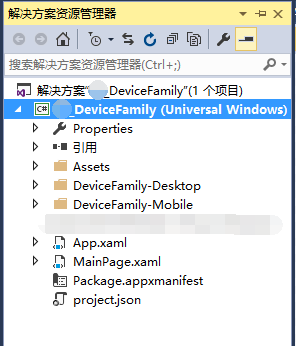
- 然后在两个文件夹中都添加一个 MainPage.xaml ;

- 如果在 Mobile 设备上运行应用程序,它将从DeviceFamily-Mobile/MainPage.xaml 加载 XMAL; 如果在 Desktop 设备上运行应用程序,它将从DeviceFamily-Desktop/MainPage.xaml 加载 XMAL; 对于其他设备将加载主文件夹下的 MainPage.xaml;
- Example
- DeviceFamily-Mobile/MainPage.xaml
 Page
     x:Class="_DeviceFamily.DeviceFamily_Mobile.MainPage"
     xmlns="http://schemas.microsoft.com/winfx/2006/xaml/presentation"
     xmlns:x="http://schemas.microsoft.com/winfx/2006/xaml"
     xmlns:local="using:_DeviceFamily.DeviceFamily_Mobile"
     xmlns:d="http://schemas.microsoft.com/expression/blend/2008"
     xmlns:mc="http://schemas.openxmlformats.org/markup-compatibility/2006"
     mc:Ignorable="d">

     <Grid Background="Blue">
         <TextBlock Text="Hello DeviceFamily-Mobile" VerticalAlignment="Center" FontSize="24" />
     </Grid>
 </Page>
- Mobile 上的运行效果

- DeviceFamily-Desktop/MainPage.xaml
 <Page
     x:Class="_DeviceFamily.DeviceFamily_Desktop.MainPage"
     xmlns="http://schemas.microsoft.com/winfx/2006/xaml/presentation"
     xmlns:x="http://schemas.microsoft.com/winfx/2006/xaml"
     xmlns:local="using:_DeviceFamily.DeviceFamily_Desktop"
     xmlns:d="http://schemas.microsoft.com/expression/blend/2008"
     xmlns:mc="http://schemas.openxmlformats.org/markup-compatibility/2006"
     mc:Ignorable="d">

     <Grid Background="Red">
         <TextBlock VerticalAlignment="Center" Text="Hello DeviceFamily-Desktop" FontSize="56" />
     </Grid>
 </Page>
- Desktop 上的运行效果

- 主文件下的 MainPage.xaml
<Page
    x:Class="_DeviceFamily.MainPage"
    xmlns="http://schemas.microsoft.com/winfx/2006/xaml/presentation"
    xmlns:x="http://schemas.microsoft.com/winfx/2006/xaml"
    xmlns:local="using:_DeviceFamily"
    xmlns:d="http://schemas.microsoft.com/expression/blend/2008"
    xmlns:mc="http://schemas.openxmlformats.org/markup-compatibility/2006"
    mc:Ignorable="d">

    <Grid Background="Yellow">
        <TextBlock VerticalAlignment="Center" Text="Hello DeviceFamily-Desktop" FontSize="48" />
    </Grid>
</Page>
- 运行效果(由于没有 Table 之类的第三种设备,所以此运行效果省略 gg)
DeviceFamily XAML Views(一)的更多相关文章
- Three ways to set specific DeviceFamily XAML Views in UWP
Three ways to set specific DeviceFamily XAML Views in UWP http://igrali.com/2015/08/02/three-ways-to ...
- Windows10-UWP中设备序列显示不同XAML的三种方式[3]
阅读目录: 概述 DeviceFamily-Type文件夹 DeviceFamily-Type扩展 InitializeComponent重载 结论 概述 Windows10-UWP(Universa ...
- Xamarin.Android和UWP之MVVM的简单使用(二)
0x01 前言 前面一篇,Xamarin.Android和UWP之MVVM的简单使用(一),主要讲了MvvmLight的简单使用 这篇主要讲讲MvvmCross的简单使用,例子的话,还是和上篇的一样. ...
- WPF中如何调整TabControl的大小,使其跟随Window的大小而改变?
多年不写技术博客,手生的很,也不知道大家都关注什么,最近在研究Wpf及3d模型的展示,碰到很多问题,这个是最后一个问题,写出来小结一下...... WPF中如何调整TabControl的大小,使其跟随 ...
- 用户控件UserControl图片资源定位(一)---Xaml引用图片
MEF编程实现巧妙灵活松耦合组件化编程,一些细节需要花费不小心思去处理: 其中组件中若包含用户控件,且需要访问图片资源,那么Xaml引用资源需要做以下设置 1. 用户控件(usercontrol)所在 ...
- UAP如何根据DeviceFamily显示不同的页面
背景 微软推出UAP 推荐使用响应式的UI,但是难免遇到一些特殊情况需要使用不同的Page来在不同的设备显示. 微软目前最新的VS2015在10074上安装后能够支持这个功能特性,只是暂时没有文档介绍 ...
- silverlight visifire控件图表制作——silverlight 静态页面xaml
一.silverlight 静态页面 1. 时间控件:DatePicker ,添加引用: xmlns:sdk="clr-namespace:System.Windows.Controls;a ...
- 三种方式设置特定设备UWP XAML view
开发者可以设置UWP特定设备xaml view,在桌面,手机,Iot,这个对于设置对不同设备的不同屏幕有用.我们可以使用RelativePanel,VisualStateTriggers,但是这样我们 ...
- Introducing XAML Standard and .NET Standard 2.0
XAML Standard We are pleased to announce XAML Standard, which is a standards-based effort to unify X ...
随机推荐
- scalac error: bad option: '-make:transitive' on mvn package via command line
1 问题描述: ubuntu环境下用eclipse+maven开发Scala的时候出现错误:scalac error: bad option: '-make:transitive' on mvn pa ...
- 描述Linux下文件删除的原理(计时3分钟)
Linux是通过link的数量来控制文件删除的,只有当一个文件不存在任何link的时候,这个文件才会被删除.一般来说,每个文件都有2个link计数器:i_count 和 i_nlink. i_coun ...
- android JAVA字符串转日期或日期转字符串(转)
用法: SimpleDateFormat sdf = new SimpleDateFormat( " yyyy-MM-dd HH:mm:ss " ); 这一行最重要,它确立了转换的 ...
- C语言数据库编程
----摘自个人C语言数据库项目报告 3.4逻辑结构的SQL语句实现 创建基本表: 3.4-1建立商品表: create table goods(goods_id int primary key,go ...
- ELF Format 笔记(八)—— 符号的类型和属性(st_info)
我是天空里的一片云,偶尔投影在你的波心,你不必讶异,更无须欢喜,在转瞬间消灭了踪影.你我相逢在黑夜的海上,你有你的,我有我的,方向:你记得也好,最好你忘掉,在这交会时互放的光亮! —— 徐志摩·偶然 ...
- Django初体验(一):自定义表单提交
注:本人使用的Django1.8.3版本进行测试 除了使用Django内置表单,有时往往我们需要自定义表单.对于自定义表单Post方式提交往往会带来由CSRF(跨站请求伪造)产生的错误"CS ...
- eclipse PermGen space解决方案
转自网上 这块内存主要是被JVM存放Class和Meta信息的,Class在被Loader时就会被放到PermGen space中,它和存放类实例(Instance)的Heap区域不同,GC(Garb ...
- PHP实现文件上传下载——心在忙而已
这一周都没有写什么东西,是啊,一周时间都没有学习太多新的东西,除了开车. 妈蛋啊,天天中午去学车然后两周没有午觉的日子还是很崩溃的,加上之后工作压力带来的心忙,宝宝不开心啊. 不过,也是自己不是那么能 ...
- java设计模式之适配器模式
说到适配器,我们可能会想到电脑的适配器,没错,其实作用是一样的,电脑的适配器在中国可以使用,在美国也可以使用,它的主要作用是在新接口和老接口之间进行适配..这就是一个适配的过程,适配器模式的类图如下: ...
- 第18章 图元文件_18.2 增强型图元文件(emf)(1)
18.2 增强型图元文件(emf) 18.2.1 创建并显示增强型图元文件的步骤 (1)创建:hdcEMF = CreateEnhMetaFile(hdcRef,szFilename,lpRect,l ...