
bootstrap学习总结-03 常用标签1
1 显示段落
在HTML中,段落使用p标签包起来,重要的文字使用strong标签,em标签。<em> 标签告诉浏览器把其中的文本表示为强调的内容。对于所有浏览器来说,这意味着要把这段文字用斜体来显示。而在BootStramp中通过添加 .lead 类可以让段落突出显示。
<h1>标签添加一个.page-header,可以为内容添加合适的边距,并且在下方显示一条灰色的边线。
<!DOCTYPE html>
<html>

    <head>
        <meta charset="utf-8" />
        <title></title>
        <link rel="stylesheet" href="css/index.css" />
        <meta name="viewport" content="width=device-width,initial-scale=1">
        <meta name="viewport" content="width=device-width, initial-scale=1, maximum-scale=1, user-scalable=no">

        <link rel="icon" href="./img/index.png">
        <link rel="stylesheet" href="http://cdn.bootcss.com/bootstrap/3.3.0/css/bootstrap.min.css">

        <!-- jQuery文件。务必在bootstrap.min.js 之前引入 -->
        <script src="http://cdn.bootcss.com/jquery/1.11.1/jquery.min.js"></script>

        <!-- 最新的 Bootstrap 核心 JavaScript 文件 -->
        <script src="http://cdn.bootcss.com/bootstrap/3.3.0/js/bootstrap.min.js"></script>
    </head>

    <body>
        <div class="container">
            <h1 class="page-header">CSS<small>常用的CSS</small></h1>
            <p>
                在 Bootstrap 2 中,我们对框架中的某些关键部分增加了对移动设备友好的样式。而在 <strong>Bootstrap 3</strong> 中,我们重写了<em>整个框架</em> 使其一开始就是对移动设备友好的。这次不是简单的增加一些可选的针对移动设备的样式,而是直接融合进了框架的内核中。也就是说,Bootstrap 是移动设备优先的。针对移动设备的样式融合进了框架的每个角落,而不是增加一个额外的文件。
            </p>
            <p class="lead">使其一开始就是对移动设备友好的。这次不是简单的增加一些可选的针对移动设备的样式</p>
        </div>
    </body>

</html>
也可以使用blockquote标签来引入重点凸显的内容。
<blockquote  >
                <p>
                    一个知识点,你自己看懂了,那是一个层次;你会用,是另外一个层次;
                </p>
                <footer>引自 <cite title="信平的小屋">信平的小屋</cite></footer>
</blockquote>
可以添加 引入的内容显示的顺序,从右向左。在blockquote标签添加类.blockquote-reverse
<blockquote  class="blockquote-reverse">
                <p>
                    一个知识点,你自己看懂了,那是一个层次;你会用,是另外一个层次;
                </p>
                <footer>引自 <cite title="信平的小屋">信平的小屋</cite></footer>
</blockquote>
2 无序列表,有序列表,内联列表,描述列表
Bootstrap已经设定好了列表显示行的间距,样式和字体大小。
无序列表:列表里的内容没有固定的顺序。
<ul>

  <li>...</li>

</ul>
有序列表:列表里的内容有固定顺序。
<ol>

  <li>...</li>

</ol>
内联列表: 通过设置 .list-inline,将所有元素放置于同一行。
<ul class="list-inline">

  <li>...</li>

</ul>
描述列表: 解释词汇的标签。
<dl>

  <dt>...</dt>

  <dd>...</dd>

</dl>
BootStrap列表例子:
<!DOCTYPE html>
<html>

    <head>
        <meta charset="utf-8" />
        <title></title>
        <link rel="stylesheet" href="css/index.css" />
        <meta name="viewport" content="width=device-width,initial-scale=1">
        <meta name="viewport" content="width=device-width, initial-scale=1, maximum-scale=1, user-scalable=no">

        <link rel="icon" href="./img/index.png">
        <link rel="stylesheet" href="http://cdn.bootcss.com/bootstrap/3.3.0/css/bootstrap.min.css">

        <!-- jQuery文件。务必在bootstrap.min.js 之前引入 -->
        <script src="http://cdn.bootcss.com/jquery/1.11.1/jquery.min.js"></script>

        <!-- 最新的 Bootstrap 核心 JavaScript 文件 -->
        <script src="http://cdn.bootcss.com/bootstrap/3.3.0/js/bootstrap.min.js"></script>
    </head>

    <body>
        <div class="container">
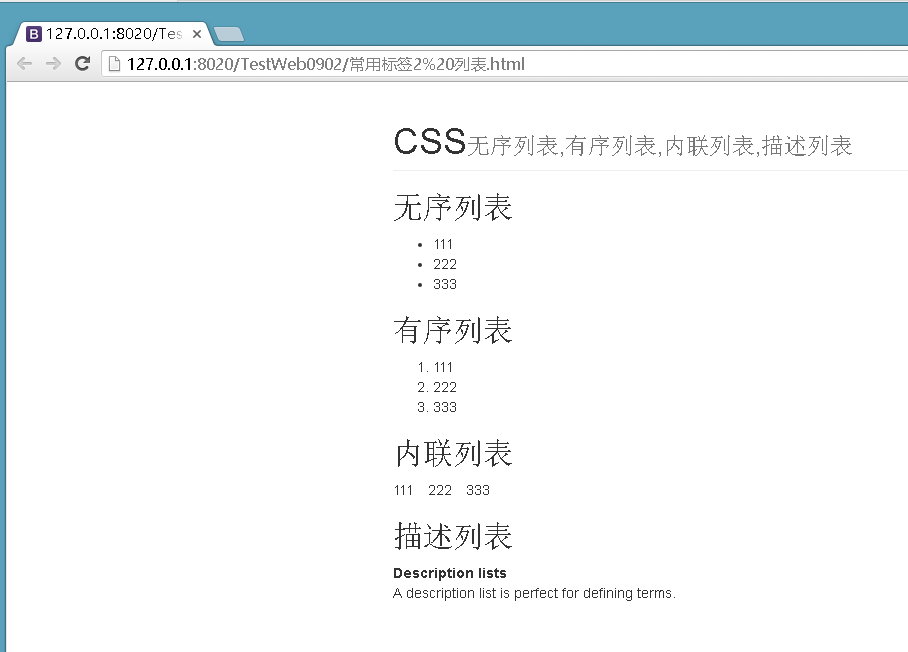
            <h1 class="page-header">CSS<small>无序列表,有序列表,内联列表,描述列表</small></h1>

            <h2>无序列表</h2>
            <ul>
              <li>111</li>
              <li>222</li>
              <li>333</li>
            </ul>

            <h2>有序列表</h2>
            <ol>
              <li>111</li>
              <li>222</li>
              <li>333</li>
            </ol>

            <h2>内联列表</h2>
            <ul class="list-inline">
              <li>111</li>
              <li>222</li>
              <li>333</li>
            </ul>

            <h2>描述列表</h2>
            <dl>
              <dt>Description lists</dt>
              <dd>A description list is perfect for defining terms.</dd>
            </dl>

        </div>
    </body>

</html>
显示效果如下图所示:
3 引入代码
在BootStrap中使用<code>,<pre>标签来标记代码内容。
1)内联代码
通过 <code> 标签包裹格式化的代码片段,要对code标签里的特殊字符进行转移比如( <字符转换为<; >字符转换为> )
举例来说<code><section></code> 包括引入的代码块。
<br/>
使用<code> <h1> </code> 加粗标题
2)代码块
多行代码可以使用 <pre> 标签。为了正确的展示代码,注意将尖括号做转义处理,否则浏览器会认为你想使用标签来渲染某些内容。把代码块放在pre标签里的好处是可以保持代码的排版格式。
<pre><p>Sample text here...</p></pre>
还可以使用 .pre-scrollable 类,其作用是设置 max-height 为 350px ,并在垂直方向展示滚动条。
3)用户输入
通过 <kbd> 标签标记用户通过键盘输入的内容。
To switch directories, type <kbd>cd</kbd> followed by the name of the directory.<br>

To edit settings, press <kbd><kbd>ctrl</kbd> + <kbd>,</kbd></kbd>
4)变量
通过 <var> 标签标记变量。
<var>y</var> = <var>m</var><var>x</var> + <var>b</var>
5)程序输出
通过 <samp> 标签来标记程序输出的内容。
<samp>This text is meant to be treated as sample output from a computer program.</samp>
4 Google-Code-Pretiffy
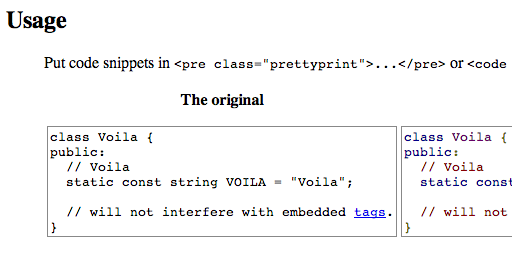
Google-Code-Pretiffy 是 Google 的一个用来对代码进行语法着色的 JavaScript 库,支持 C/C++, Java, Python, Ruby, PHP, VisualBasic, AWK, Bash, SQL, HTML, XML, CSS, JavaScript, Makefiles和部分Perl。从以下地址下载google-code-prettify:
https://code.google.com/archive/p/google-code-prettify/downloads
步骤:
1)导入必要的 google-code-prettify的js和css文件。
2)通过使用在<pre>和<code>标签中引入类.prettyprint 对引入的代码美化。
3)body标签的onload函数,需要加载prettyPrint()事件。
<!DOCTYPE html>

<html>

    <head>

        <meta charset="utf-8" />

        <title></title>

        <link rel="stylesheet" href="css/index.css" />

        <meta name="viewport" content="width=device-width,initial-scale=1">

        <meta name="viewport" content="width=device-width, initial-scale=1, maximum-scale=1, user-scalable=no">

        <link rel="icon" href="./img/index.png">

        <link rel="stylesheet" href="http://cdn.bootcss.com/bootstrap/3.3.0/css/bootstrap.min.css">

        <link rel="stylesheet" href="js/GoogleCodePrettify/prettify.css" />

        <!-- jQuery文件。务必在bootstrap.min.js 之前引入 -->

        <script src="http://cdn.bootcss.com/jquery/1.11.1/jquery.min.js"></script>

        <script src="js/GoogleCodePrettify/prettify.js"></script>

    </head>

    <body onload="prettyPrint()"

        <div class="container">

        <h1 class="page-header">CSS<small>PrettyCode代码</small></h1> 举例来说

        <pre class="prettyprint" >

#include "x.h"

main(){

print("hello world!");

}

select * from users;

        </pre>

        </div>

    </body>

</html>
使用 jQuery 小技巧实现优化,上述方法可以实现代码的高亮,但每次手动为<pre>标签添加"prettyprint"类,显示有些麻烦。使用下边的代码片断来解决这个问题并替换掉 body 的"onload"的事件,关键代码如下:
$(window).load(function(){

     $("pre").addClass("prettyprint");

     prettyPrint();

})
完整代码如下:
<!DOCTYPE html>

<html>

    <head>

        <meta charset="utf-8" />

        <title></title>

        <link rel="stylesheet" href="css/index.css" />

        <meta name="viewport" content="width=device-width,initial-scale=1">

        <meta name="viewport" content="width=device-width, initial-scale=1, maximum-scale=1, user-scalable=no">

        <link rel="icon" href="./img/index.png">

        <link rel="stylesheet" href="http://cdn.bootcss.com/bootstrap/3.3.0/css/bootstrap.min.css">

        <link rel="stylesheet" href="js/GoogleCodePrettify/prettify.css" />

        <!-- jQuery文件。务必在bootstrap.min.js 之前引入 -->

        <script src="http://cdn.bootcss.com/jquery/1.11.1/jquery.min.js"></script>

        <script src="js/GoogleCodePrettify/prettify.js"></script>

    </head>

    <body onload="prettyPrint()" <div class="container">

        <h1 class="page-header">CSS<small>PrettyCode代码</small></h1> 举例来说

        <pre>

#include "x.h"

main(){

print("hello world!");

}

select * from users;

        </pre>

        </div>

        <script>

            $(window).load(function() {

                $("pre").addClass("prettyprint");

                prettyPrint();

            })

        </script>

    </body>

</html>
显示效果如下图,可以看到代码已经美化多了:

资料参考:
http://v3.bootcss.com/css/#type
bootstrap学习总结-03 常用标签1的更多相关文章
- bootstrap学习总结-05 常用标签3
1 单选框,多选框 1)单选框 单选框(radio)用于从多个选项中只选择一个.设置了 disabled 属性的单选或多选框都能被赋予合适的样式.对于和多选或单选框联合使用的 <label> ...
- bootstrap学习总结-04 常用标签2
1 表格 Bootstrap为表格设计了漂亮的样式. 1)表格基本实例 任意 <table> 标签添加 .table. <table class="table"& ...
- JavaWeb学习之JSP常用标签、EL表达式的运算符、JSTL标签库(6)
1.JSP常用标签 * 只要支持JSP文件,常用标签有可以直接使用 * 格式: jsp:xxxx * jsp:forward ,完成jsp页面的转发 * page属性:转发的地址 <% requ ...
- 2019-9-19:渗透测试,基础学习,html常用标签,笔记
HTML常用标签<br>:换行<meta charset="utf-8">:编码标签<script type="路径">:插 ...
- html学习第一弹の常用标签的归类
HTML初步学习: 行内元素:只占据他对应标签的边框所包含的空间,默认横向排布. 块级元素:块级元素占据其父元素(容器)的整个空间,因此创建了一个块,通常浏览器会在块级元素前后另起一行,默认竖向排布. ...
- BootStrap学习(4)_分页&标签&缩略图&警告&进度条
一.分页 分页(Pagination),是一种无序列表,Bootstrap 像处理其他界面元素一样处理分页. .pagination --添加该 class 来在页面上显示分页. .disa ...
- 【html学习整理】常用标签
什么是html 超文本标记语言 html语法规则 所有的命令放到<> 大部分成对存在,以<tag>开始,</tag>结束 网页的基本框架,常用的标记 & ...
- java struts2入门学习--OGNL语言常用符号和常用标签学习
一.OGNL常用符号(接上一篇文章): 1.#号 1)<s:property value="#request.username"/> 作用于struts2的域对象,而不 ...
- jsp学习--JSP运行原理,九大隐式对象和JSP常用标签
一.JSP运行原理 每个JSP 页面在第一次被访问时,WEB容器都会把请求交给JSP引擎(即一个Java程序)去处理.JSP引擎先将JSP翻译成一个_jspServlet(实质上也是一个servlet ...
随机推荐
- ASP.NET 系列:单元测试之ConfigurationManager
通过ConfigurationManager使用.NET配置文件时,可以通过添加配置文件进行单元测试,虽然可以通过测试但达不到解耦的目的.使用IConfigurationManager和Configu ...
- NetworkSocket结构图
分层思想 NetworkSocket使用分层的思想,分基础层和上层: 1.基础层提供基础通讯,重要的对象有SessionBase.TcpServerBase和TcpClientBase: 2.上层实现 ...
- 记、基于react-router的单页应用
现在用react写单页应用基本上都是用react-router做前端路由了吧!最近在使用react-router的过程中遇到了不少问题,在这里总结一下. 浏览器url react-router默认提供 ...
- 前端人员一定要掌握的PS技巧
一.PS与前端知多少 一般我们会认为PS是用来修改图片的,这些工作是美工人员做的事不是前端人员做的,其实这样想你就错了,因为在前端人员也是要学会一些简单的关于PS的技巧的,这样就不会应为一点点小小的需 ...
- 基于canvas实现物理运动效果与动画效果(一)
一.为什么要写这篇文章 某年某月某时某种原因,我在慕课网上看到了一个大神实现了关于小球的抛物线运动的代码,心中很是欣喜,故而写这篇文章来向这位大神致敬,同时也为了弥补自己在运动效果和动画效果制作方面的 ...
- matlab 绘制条形图
Matlab使用bar和barh函数来绘制二维条形图.分别是绘制二维垂直条形图和二维水平条形图. 转自:http://jingyan.baidu.com/article/64d05a02524e63d ...
- Agreeing to the Xcode/iOS license requires admin privileges, please re-run as root via sudo
更新了xcode后使用goland运行项目时提示 Agreeing to the Xcode/iOS license requires admin privileges, please re-run ...
- JNI系列——简便开发流程
1.编写Java代码 2.选中工程目录--右键单击Android Tools--Add Native Support 3.输入要生成的库名 4.到工程目录中jni目录下对自动生成文件和.mk文件进行相 ...
- ASP.NET利用WINRar实现在线解压缩文件
一.肯定是服务器必须装了winrar这个软件了. 二.创建Helper类,如下: using System; using System.Collections.Generic; using Syste ...
- [转]easyui tree 模仿ztree 使用扁平化加载json
原文地址:http://my.oschina.net/acitiviti/blog/349377 参考文章:http://www.jeasyuicn.com/demo/treeloadfilter.h ...