
jQqery EasyUI dategrid行中多列数据的可编辑操作
最近的项目中需要在前台dategrid列表中直接修改某些列的数据,并且修改后的数据需要不通过后台而自动更新在列表中。
带着这一问题开始寻找实现的思路,首先想到的就是去jQqery EasyUI官网找例子,看看有没有类似于这种的功能。当然,官网提供了两种:一是编辑修改datagrid中的某一个列的值;二是编辑修改datagrid中的某一行的值(demo网址:http://www.jeasyui.com/tutorial/datagrid/datagrid12.php)。
效果图如下:
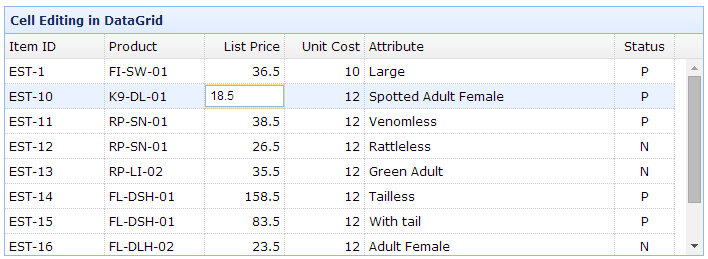
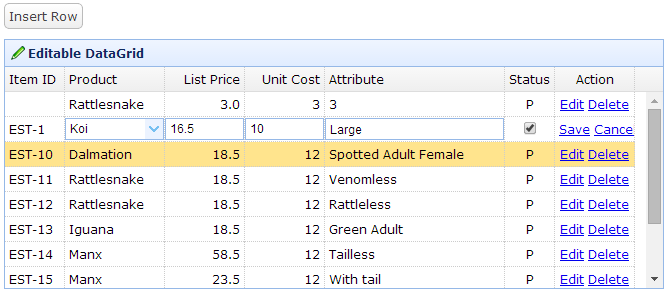
看到这两种demo后,首先肯定的是我想要的功能是可以实现的,通过研究这两种demo的原理就可以实现我想要的功能效果。编辑行的demo写的很简洁,封装了几个小方法,仔细研究一下很容易发现,实现这个功能的主要核心部分主要有以下几点:
1.初始化datagrid的时候在需要编辑的列中,设置editor,其中type将决定编辑状态下输入数据的格式,例如:
{field:'unitcost',title:'Unit Cost',width:80,align:'right',editor:'numberbox'},
{field:'listprice',title:'List Price',width:80,align:'right',editor:{type:'numberbox',options:{precision:1}}}。
2.添加点击响应方法,在这里用的是onClickCell方法。在方法内部进行是否编辑的逻辑判断,完整代码贴在后边。
3.加上结束编辑的响应方法onAfterEdit,这个方法主要做结束编辑,更新datagrid的操作。
<!DOCTYPE html PUBLIC "-//W3C//DTD HTML 4.01 Transitional//EN" "http://www.w3.org/TR/html4/loose.dtd">
<html>
<head>
<meta http-equiv="Content-Type" content="text/html; charset=UTF-8">
<meta name="keywords" content="jquery,ui,easy,easyui,web">
<meta name="description" content="easyui help you build your web page easily!">
<title>DataGrid inline editing - jQuery EasyUI Demo</title>
<link rel="stylesheet" type="text/css" href="http://www.jeasyui.com/easyui/themes/default/easyui.css">
<link rel="stylesheet" type="text/css" href="http://www.jeasyui.com/easyui/themes/icon.css">
<link rel="stylesheet" type="text/css" href="http://www.jeasyui.com/easyui/demo/demo.css">
<script type="text/javascript" src="http://code.jquery.com/jquery-1.6.1.min.js"></script>
<script type="text/javascript" src="http://www.jeasyui.com/easyui/jquery.easyui.min.js"></script>
<script>
var products = [
{productid:'FI-SW-01',name:'Koi'},
{productid:'K9-DL-01',name:'Dalmation'},
{productid:'RP-SN-01',name:'Rattlesnake'},
{productid:'RP-LI-02',name:'Iguana'},
{productid:'FL-DSH-01',name:'Manx'} ];
var _index=-;//记录编辑行号
var _flag=false;//记录是否处于编辑状态
$(function(){
$('#tt').datagrid({
title:'Editable DataGrid',
iconCls:'icon-edit',
width:,
height:,
singleSelect:true,
idField:'itemid',
url:'data/datagrid_data.json',
columns:[[
{field:'itemid',title:'Item ID',width:},
{field:'productid',title:'Product',width:,
formatter:function(value){
for(var i=; i<products.length; i++){
if (products[i].productid == value) return products[i].name;
}
return value;
},
editor:{
type:'combobox',
options:{
valueField:'productid',
textField:'name',
data:products,
required:true
}
},
styler: function (value, row, index) {
return 'background-color:#FFE4E1;color:red;';
}
},
{field:'listprice',title:'List Price',width:,align:'right',editor:{type:'numberbox',options:{precision:}},
styler: function (value, row, index) {
return 'background-color:#FFE4E1;color:red;';
}
},
{field:'unitcost',title:'Unit Cost',width:,align:'right',editor:'numberbox',
styler: function (value, row, index) {
return 'background-color:#FFE4E1;color:red;';
}},
{field:'attr1',title:'Attribute',width:,editor:'text',
styler: function (value, row, index) {
return 'background-color:#FFE4E1;color:red;';
}
},
]],
onClickCell: function (index, field, value) {
var ed; if (field != "itemid" ) {//先排除不需要编辑的列 if (field == "productid") {//依次判断当前编辑的是哪一列 if (_flag) {//如果上一次编辑状态未结束,先结束上一次编辑 $(this).datagrid('endEdit', _index);//结束编辑
}
$(this).datagrid('beginEdit', index);//开始本次编辑
ed = $(this).datagrid('getEditor', { index: index, field: field });
$(ed.target).focus();
_index = index; //记录本次编辑的行号
_flag = true; //将编辑状态设置为true
}
else if (field == "listprice") { if (_flag) { $(this).datagrid('endEdit', _index);
}
$(this).datagrid('beginEdit', index);
ed = $(this).datagrid('getEditor', { index: index, field: field });
$(ed.target).focus();
_index = index;
_flag = true;
}
else if (field == "unitcost") { if (_flag) { $(this).datagrid('endEdit', _index);
}
$(this).datagrid('beginEdit', index);
ed = $(this).datagrid('getEditor', { index: index, field: field });
$(ed.target).focus();
_index = index;
_flag = true;
}
else if (field == "attr1") { if (_flag) { $(this).datagrid('endEdit', _index);
}
$(this).datagrid('beginEdit', index);
ed = $(this).datagrid('getEditor', { index: index, field: field });
$(ed.target).focus();
_index = index;
_flag = true;
}
else if (_flag) { $(this).datagrid('endEdit', _index);
}
}
else if (_flag) { $(this).datagrid('endEdit', _index);
}
},
onAfterEdit: function (index, row) { //执行endEdit时调用该方法,结束编辑状态
$(this).datagrid('updateRow', { //更新当前列的内容
index: index,
row: {}
});
_index = -; //编辑结束后,将记录的编辑行号置为-1
_flag = false; //编辑结束后,将编辑状态置为false
}
});
});
function insert(){
if (_flag) {
$(this).datagrid('endEdit', _index);
}
var row = $('#tt').datagrid('getSelected');
if (row){
var index = $('#tt').datagrid('getRowIndex', row);
} else {
index = ;
}
$('#tt').datagrid('insertRow', {
index: index,
row:{
}
});
$('#tt').datagrid('selectRow',index);
$('#tt').datagrid('beginEdit',index);
_index = index;
_flag = true;
}
</script>
</head>
<body>
<h2>Editable DataGrid Demo</h2>
<div class="demo-info">
<div class="demo-tip icon-tip"> </div>
<div>Click the edit button on the right side of row to start editing.</div>
</div>
<table id="tt"></table>
</body>
</html>
效果如下:

到此,要实现的功能已经完成了,上面的demo只是简单演示了这个过程,但是已经实现了可选择编辑某一行中的一列或多列。
jQqery EasyUI dategrid行中多列数据的可编辑操作的更多相关文章
- ASP.NET MVC搭建项目后台UI框架—8、将View中选择的数据行中的部分数据传入到Controller中
目录 ASP.NET MVC搭建项目后台UI框架—1.后台主框架 ASP.NET MVC搭建项目后台UI框架—2.菜单特效 ASP.NET MVC搭建项目后台UI框架—3.面板折叠和展开 ASP.NE ...
- View中选择的数据行中的部分数据传入到Controller中
将View中选择的数据行中的部分数据传入到Controller中 ASP.NET MVC搭建项目后台UI框架—1.后台主框架 ASP.NET MVC搭建项目后台UI框架—2.菜单特效 ASP.NE ...
- 将excel中某列数据中,含有指定字符串的记录取出,并生成用这个字符串命名的txt文件
Python 一大重要的功能,就是可处理大量数据,那分不开的即是使用Excel表格了,这里我做下学习之后的总结,望对我,及广大同仁们是一个帮助Python处理Excel数据需要用到2个库:xlwt 和 ...
- 在java程序中,对于数据的输入/输出操作以“流”(stream)方式进行
在java程序中,对于数据的输入/输出操作以“流”(stream)方式进行
- mssql sqlserver 使用sql脚本检测数据表中一列数据是否连续的方法分享
原文地址:http://www.maomao365.com/?p=7335 摘要: 数据表中,有一列是自动流水号,由于各种操作异常原因(或者插入失败),此列数据会变的不连续,下文将讲述使用sql ...
- 解决读取Excel表格中某列数据为空的问题 c#
解决同一列中“字符串”和“数字”两种格式同时存在,读取时,不能正确显示“字符串”格式的问题:set xlsconn=CreateObject("ADODB.Connection") ...
- mysql互换表中两列数据
在开发过程中,有时由于业务等需要把一个表中的两列数据进行交换. 解决方案 使用update命令,这完全得益于MySQL SQL命令功能的强大支持. 表格中原来数据类似如下: select * from ...
- 对一个表中所有列数据模糊查询adoquery
如何用adoquery对一个表中所有列进行模糊查询: procedure TForm3.Button4Click(Sender: TObject); var ASql,AKey: string; I: ...
- Easyui datagrid行内【添加】、【编辑】、【上移】、【下移】
前几天项目中遇到一个需求用到了Easyui datagrd行内添加和编辑数据,同时对行内数据上移下移,所以对这几个功能做个总结. 1.首先大概说下这几个功能里用到的主要方法,行内添加数据主要是添加列的 ...
随机推荐
- HDU 4831 Scenic Popularity
Scenic Popularity Time Limit: 2000/1000 MS (Java/Others) Memory Limit: 32768/32768 K (Java/Others ...
- SQL语句中=null和is null
平时经常会遇到这两种写法:IS NOT NULL与!=NULL.也经常会遇到数据库有符合条件!=NULL的数据,但是返回为空集合.实际上,是由于对二者使用区别理解不透彻. 默认情况下,推荐使用 IS ...
- 使用 Eclipse 插件部署 Java 应用
打开 Eclipse,点击顶部的菜单『Help/Install New Software/Add』. 选择对话框顶部『Work with』 后面的『Add』按钮,并点击『Archive』选择下载到本地 ...
- iOS正则表达式之验证问题总结
1.验证输入都是数字: // 判断仅输入数字: + (BOOL)isInputShouldAlphaNum: (NSString *)inputStr { NSString *regex =@&quo ...
- maxiang conf
/**设置你自己的CSS.例如:h1 {border-bottom: 1px solid #ccc;line-height:1.6;}body {background:#FDFFD0} **/ p ...
- NGUI 灰化按钮或图标
在游戏中某些地方可能需要对按钮进行灰化显示,从而表示不能点击!在网上找了一下有些方法是直接用UITexture+灰化shader去做这件事!另外有些方案写的不太清楚,看不懂!不过也基本都是要使用灰化s ...
- JavaScript基础知识整理(1)
粗略理解,努力入门中 1.在html中引入外部脚本: <script src="filename.js"></script> 2.注释: 多于一行的长注 ...
- Firefox每次刷新时自动清空缓存的设置方法
当我们开发网页应用时候,为了保证每次看到的页面是最新的,需要在刷新页面时清除页面缓存. 如果每次都手动清除比较麻烦,好在多数浏览器都支持自动清除缓存的功能. IE下我们可以将缓存设置为"每次 ...
- 使用Fiddler针对Android手机网络请求抓包
本文转载自大牛Trinea的博文:Android利用Fiddler进行网络数据抓包 主要介绍Android及IPhone手机上如何利用Fiddler进行网络数据抓包,比如我们想抓某个应用(微博.微信. ...
- Qt 程序访问 sqlite 权限错误
在Linux桌面上开发应用,想要拥有root权限,可是又需要弹窗申请.所以尽量避免这种情况发生. 另外:gksu,pkexec可以提供gui的root权限索取功能. 因为db文件是安装的时候放到etc ...