
IIS 配置详解 请求长度限制调整
当上传一个超过30M的文件时,服务器会重定向至404.13页面,报错如下:
HTTP Error 404.13 - Not Found
The request filtering module is configured to deny a request that exceeds the request content length.
此请求的查询字符串的长度超过配置的 maxQueryStringLength 值
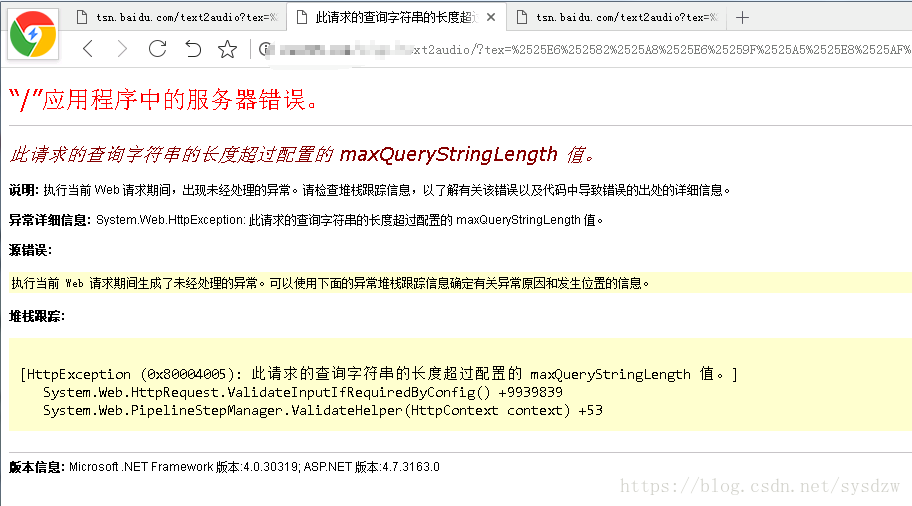
一、全局配置 C:\Windows\System32\inetsrv\config目录下的applicationhost.config (iis配置文件)
1. 配置节system.webServer/security/requestFiltering/ 下增加以下配置
maxAllowedContentLength的单位为Bytes
<system.webServer>

   <security>

       <requestFiltering>

              <requestLimits maxAllowedContentLength="40000000" />

       </requestFiltering>

   <security>

<system.webServer>
二、局部配置
1. applicationhost.config允许配置覆盖, "Deny" to "Allow" like so: (IIS7.5 默认Allow)
<sectionGroup name="security">

                <section name="access" overrideModeDefault="Deny" />

                <section name="applicationDependencies" overrideModeDefault="Deny" />

                <sectionGroup name="authentication">

                    <section name="anonymousAuthentication" overrideModeDefault="Deny" />

                    <section name="basicAuthentication" overrideModeDefault="Deny" />

                    <section name="clientCertificateMappingAuthentication" overrideModeDefault="Deny" />

                    <section name="digestAuthentication" overrideModeDefault="Deny" />

                    <section name="iisClientCertificateMappingAuthentication" overrideModeDefault="Deny" />

                    <section name="windowsAuthentication" overrideModeDefault="Deny" />

                </sectionGroup>

                <section name="authorization" overrideModeDefault="Allow" />

                <section name="ipSecurity" overrideModeDefault="Deny" />

                <section name="isapiCgiRestriction" allowDefinition="AppHostOnly" overrideModeDefault="Deny" />

                <section name="requestFiltering" overrideModeDefault="Allow" />

            </sectionGroup>
2. Web。config文件 system.webServer/security/节下增加以下配置
 <requestFiltering>

        <requestLimits maxUrl="409600" maxQueryString="204800" maxAllowedContentLength="2097152" /> <!--单位字节Byte(2048000)-->

        <fileExtensions>

        </fileExtensions>

      </requestFiltering>
Web,config
<configuration>

  <system.web>
  </system.web>

</configuration>
【参考文献】https://blog.csdn.net/yw1688/article/details/49070633
IIS 配置详解 请求长度限制调整的更多相关文章
- Tomcat安装及配置详解
Tomcat安装及配置详解 一,Tomcat简介 Tomcat 服务器是一个免费的开放源代码的Web 应用服务器,Tomcat是Apache 软件基金会(Apache Software Found ...
- Tomcat 优化方案 和 配置详解(转)
转自 Tomcat 优化方案 和 配置详解 http://201605130349.iteye.com/blog/2298985 Server.xml配置文件用于对整个容器进行相关的配置. <S ...
- Tomcat记录-tomcat常用配置详解和优化方法(转载)
常用配置详解 1 目录结构 /bin:脚本文件目录. /common/lib:存放所有web项目都可以访问的公共jar包(使用Common类加载器加载). /conf:存放配置文件,最重要的是serv ...
- tomcat常用配置详解和优化方法
tomcat常用配置详解和优化方法 参考: http://blog.csdn.net/zj52hm/article/details/51980194 http://blog.csdn.net/wuli ...
- Log4j配置详解(转)
一.Log4j简介 Log4j有三个主要的组件:Loggers(记录器),Appenders (输出源)和Layouts(布局).这里可简单理解为日志类别,日志要输出的地方和日志以何种形式输出.综合使 ...
- log4j.properties配置详解
1.Loggers Loggers组件在此系统中被分为五个级别:DEBUG.INFO.WARN.ERROR和FATAL.这五个级别是有顺序的,DEBUG < INFO < WARN < ...
- Log4J日志配置详解
一.Log4j简介 Log4j有三个主要的组件:Loggers(记录器),Appenders (输出源)和Layouts(布局).这里可简单理解为日志类别,日志要输出的地方和日志以何种形式输出.综合使 ...
- redis配置详解
##redis配置详解 # Redis configuration file example. # # Note that in order to read the configuration fil ...
- Log.properties配置详解
一.Log4j简介 Log4j有三个主要的组件:Loggers(记录器),Appenders (输出源)和Layouts(布局).这里可简单理解为日志类别,日志要输出的地方和日志以何种形式输出.综合使 ...
随机推荐
- CodeForce VKcup C 树形dp
题意: 给出一棵树,一个人可以在树上跳,每次最多跳k(1≤k≤5)个点定义f(s,t)为从顶点ss跳到顶点tt最少需要跳多少次求∑(s<t)f(s,t) 链接: 点我 dp[i][j]表示以i点 ...
- 用canvas写个接水管小游戏
声明:本文为原创文章,如需转载,请注明来源WAxes,谢谢! 过年的十八天假期迷迷糊糊一下子就过去了(LZ还是实习生,鉴于大学最后一个寒假了,所以就多请了好多天假),又要返工上班了.这是年后的第一篇博 ...
- [jzoj]1383.奇怪的问题
Link https://jzoj.net/senior/#main/show/1383 Problem Alice总是会提出很多奇怪的问题,一天他让他的朋友Bob跟他一起研究一个奇怪的问题.问题是: ...
- AES 加密问题
C# 里面封装的Aes算法好像跟网上C++的加密算法差很多.在网上找了很多资料才看到一个很早的文章, 用C#实现网上C++的算法. http://msdn.microsoft.com/zh-cn/ma ...
- eclipse中安装pydev插件出现duplicate location
eclipse中安装pydev插件出现duplicate location,主要是因为之前已经填写了该地址并且已经加载了,具体的解决办法见下链接: http://jingyan.baidu.com/a ...
- Python标准库12 数学与随机数
想用高斯分布生成随机数,在网上看到很强大的总结,保留一下,以备后用 https://www.cnblogs.com/vamei/archive/2012/10/26/2741702.html
- idea其他人把jar更新之后更新不到
昨天下午开始就发现这个问题,其他同事把jar更新了之后,我一直获取不到更新之后的内容.尝试了很多方法,删除具体的更新不到的jar,一直不停的mvn clean install -U -Dmaven.t ...
- 【数论】Factors of Factorial @upcexam6503
问题 G: Factors of Factorial 时间限制: 1 Sec 内存限制: 128 MB提交: 57 解决: 33[提交][状态][讨论版][命题人:admin] 题目描述 You ...
- Unity的Input输入
Unity中的输入管理器由Input类进行操控.官方文档地址:https://docs.unity3d.com/ScriptReference/Input.html 中文翻译的话可以在这里:http: ...
- xhprof 运行结果名词解释
Overall Summary Inclusive Time (或子树时间):包括子函数所有执行时间. Exclusive Time/Self Time:函数执行本身花费的时间,不包括子树执行时间. ...