
React 添加对 Less 的支持, 使用 create-react-app 脚手架
---恢复内容开始---
参考博客与我自己的当前版本有一点出入, 所以就将 参考博客写到文章后面去了。
我的电脑: 系统: Ubuntu16.04,
1, 安装脚手架: create-react-app; 参考: https://ant.design/docs/react/use-with-create-react-app-cn
注意点: 如果这个命令 create-react-app 不是在任何目录下面使用, 说明这个安装的时候没有将 create-react-app 命令变成全局的命令,改变
我自己添加了一个软连接:
pwd: /usr/sbin
lrwxrwxrwx 1 root root 58 Nov 14 08:12 create-react-app -> /usr/local/node/lib/node_modules/create-react-app/index.js*
2, 创建项目: create-react-app demo1;
3, 测试项目: yarn start; 浏览器可以正常打开 React 界面;
4, 添加 less, less-loader 模块: yarn add less less-loader;
5, 执行 命令: yarn run eject; // 这个命令会生成一些文件用来支持 Less 的, 具体原因也是不太清楚;[错误1:]
6, 然后就生成了: webpack.config.js 在 demo1/config/webpack.config.js 这个目录下面;
[ 网上很多说有: webpack.config.dev.js、webpack.config.prod.js] 這两个文件, 但是我的就是没有生成,我的
demo1/package.json 文件如下:
{

  "name": "demo1",

  "version": "0.1.0",

  "private": true,

  "dependencies": {

    "antd": "^3.11.6",

    "less-loader": "^4.1.0",

    "react": "^16.7.0",

    "react-app-rewire-less": "^2.1.3",

    "react-dom": "^16.7.0",

    "react-router-dom": "^4.3.1",

    "react-scripts": "2.1.2"

  },
7, 然后修改 webpack.config.js 文件;
(1) 以前: const cssModuleRegex = /\.module\.css$/;
--> 修改成: const cssModuleRegex = /\.module\.(css|less)$/;
(2) 以前:
{

              test: cssRegex,

              exclude: cssModuleRegex,

              use: getStyleLoaders({

                importLoaders: 1,

                sourceMap: isEnvProduction && shouldUseSourceMap,

              }),

              // Don't consider CSS imports dead code even if the

              // containing package claims to have no side effects.

              // Remove this when webpack adds a warning or an error for this.

              // See https://github.com/webpack/webpack/issues/6571

              sideEffects: true,

 },
修改成: 加上 'less-loader'
{

              test: cssRegex,

              exclude: cssModuleRegex,

              use: getStyleLoaders(

                  {

                      importLoaders: 1,

                      sourceMap: isEnvProduction && shouldUseSourceMap,

                  },

                  'less-loader'

              ),

              // Don't consider CSS imports dead code even if the

              // containing package claims to have no side effects.

              // Remove this when webpack adds a warning or an error for this.

              // See https://github.com/webpack/webpack/issues/6571

              sideEffects: true,

},
(3) 以前:
{

              test: cssModuleRegex,

              use: getStyleLoaders({

                importLoaders: 1,

                sourceMap: isEnvProduction && shouldUseSourceMap,

                modules: true,

                getLocalIdent: getCSSModuleLocalIdent,

              }),

            },
修改后: 添加 'less-loader'
{

              test: cssModuleRegex,

              use: getStyleLoaders(

                  {

                      importLoaders: 1,

                      sourceMap: isEnvProduction && shouldUseSourceMap,

                      modules: true,

                      getLocalIdent: getCSSModuleLocalIdent,

                  },

                  'less-loader'

              ),

            },
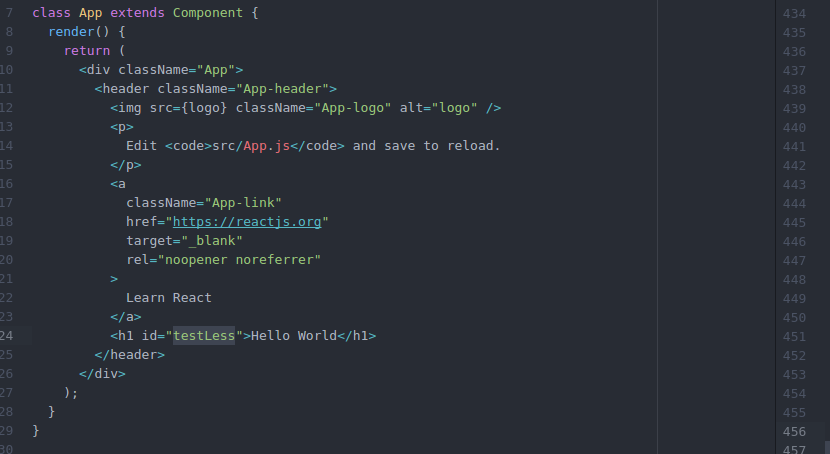
8, 然后在 App.js 同目录下写一个 test.less
#testless {
color: red;
}
然后在 App.js 中引用就好了;
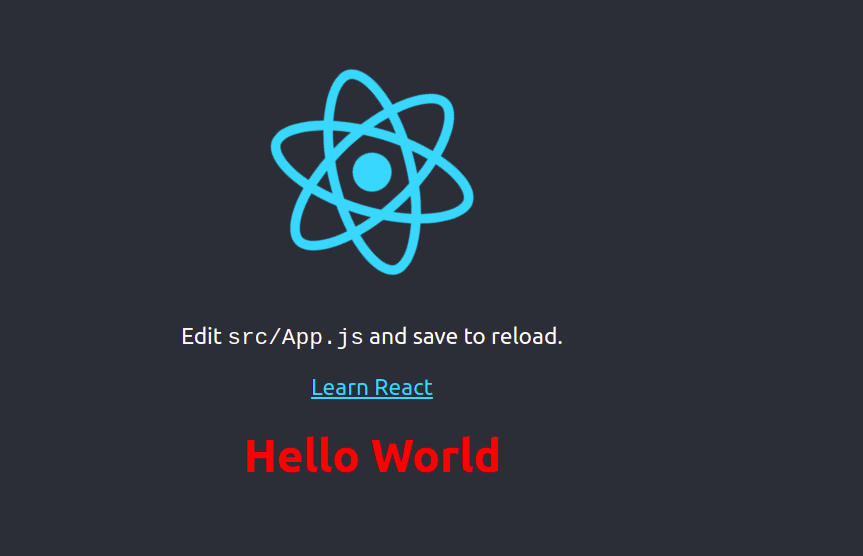
9, 最后在页面上可以看到效果, 就好了
参考博客: https://www.cnblogs.com/esofar/p/9631657.html
错误1:
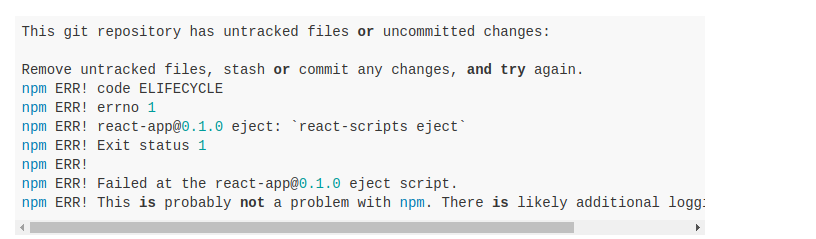
错误: This git repository has untracked files or uncommitted changes:
错误解决: 到 项目根目录 /demo1 下面 先 git add .; 再 git commit -m "init"; 然后就可以 yarn run eject; 了
参考博客: http://react-china.org/t/create-react-app-npm-run-eject/22051/5
错误图片:
---恢复内容结束---
React 添加对 Less 的支持, 使用 create-react-app 脚手架的更多相关文章
- [React] Use the Fragment Short Syntax in Create React App 2.0
create-react-app version 2.0 added a lot of new features. One of the new features is upgrading to Ba ...
- [React] {svg, css module, sass} support in Create React App 2.0
create-react-app version 2.0 added a lot of new features. One of the new features is added the svgr ...
- 利用 Create React Native App 快速创建 React Native 应用
本文介绍的 Create-React-Native-App 是非常 Awesome 的工具,而其背后的 Expo 整个平台也让笔者感觉非常的不错.笔者目前公司是采用 APICloud 进行移动应用开发 ...
- 深入 Create React App 核心概念
本文差点难产而死.因为总结的过程中,多次怀疑本文是对官方文档的直接翻译和简单诺列:同时官方文档很全面,全范围的介绍无疑加深了写作的心智负担.但在最终的梳理中,发现走出了一条与众不同的路,于是坚持分享出 ...
- 在 .NET Core 5 中集成 Create React app
翻译自 Camilo Reyes 2021年2月22日的文章 <Integrate Create React app with .NET Core 5> [1] Camilo Reyes ...
- ABP 适用性改造 - 添加 API 版本化支持
Overview 在前面的文章里有针对 abp 的项目模板进行简化,构建了一个精简的项目模板,在使用过程中,因为我们暴露的 api 需要包含版本信息,我们采取的方式是将 api 的版本号包含在资源的 ...
- CentOS6.5 下在Nginx中添加SSL证书以支持HTTPS协议访问
参考文献: 1. NginxV1.8.0安装与配置 2. CentOS下在Nginx中添加SSL证书以支持HTTPS协议访问 3. nginx配置ssl证书的方法 4.nginx强制使用https访问 ...
- 第12章 添加对外部认证的支持 - Identity Server 4 中文文档(v1.0.0)
注意 对于任何先决条件(例如模板),首先要查看概述. 接下来,我们将添加对外部认证的支持.这非常简单,因为您真正需要的是ASP.NET Core兼容的身份验证处理程序. ASP.NET Core本身支 ...
- tap news:week5 0.0 create react app
参考https://blog.csdn.net/qtfying/article/details/78665664 先创建文件夹 安装create react app 这个脚手架(facebook官方提 ...
随机推荐
- bootstrapTable treegrid的使用
最近打算自己弄一个后台,在整顿树形插件的时候,遇到问题,bootstrapTable treegrid最开始是怎么都显示不了树形,然后是数据出不来, 现在来记录下. 问题1:最开始怎么都显示不出来的问 ...
- 判断当前viewcontroller是push还是present的方式显示的
网上的姿势,反正我用着不管用 最正确的姿势 NSArray *viewcontrollers = self.navigationController.viewControllers; if (view ...
- hdoj:2076
夹角有多大(题目已修改,注意读题) Time Limit: 1000/1000 MS (Java/Others) Memory Limit: 32768/32768 K (Java/Others ...
- js 可拖动div 调整大小
dragBorder: function (parent, right, bottom, bottomRight) { var isDownRight = false; var isDownBotto ...
- XCode10 运行app报错
原因很简单:Xcode10起,苹果摒弃了对libstdc++库的支持转而支持libc++库了.为了保证老代码能跑,必须将几个库复制到对应文件夹(见后).同时修改Build Phases中的Link B ...
- 交换上的FLAPPING事件 (zhuan)
今天在学校的一个三层交换上看到持续的日志信息: Host 00:E0:FC:09:BC:F9is flapping between fa0/x and fa0/y. 思科对此官方的解释是: Error ...
- 【问题】Can't load AMD 64-bit .dll on a IA 32-bit platform
文件下载地址:http://archive.apache.org/dist/tomcat/tomcat-connectors/native/1.2.14/binaries/ 按自己的提示找到32位或者 ...
- ASP.NET MVC+Vue.js实现联系人管理
接触了一天vue.js,简单浏览了一本关于vue的电子书,就开始动手使用ASP.NET MVC和Vue.js开发一个联系人管理的小程序. 先看一下这个联系人管理的小程序的界面,也就是我们大概要实现什么 ...
- kylin 使用RESTful API 请求
目前根据Kylin的官方文档介绍,Kylin的认证是basic authentication,加密算法是Base64,在POST的header进行用户认证我使用的用户和密码是(格式:username: ...
- iOS - 高德地图步行线路规划多点多条线路
项目集成高德地图遇到的问题: 高德地图的官方步行导航只针对单个起始点单条线路,驾车导航才有途径点多线路.现在项目是要步行导航多个点多条线路