
Storm UI说明
一、Storm ui 首页主要分为4块: Cluster Summary,Topology summary,Supervisor summary,Nimbus Configuration
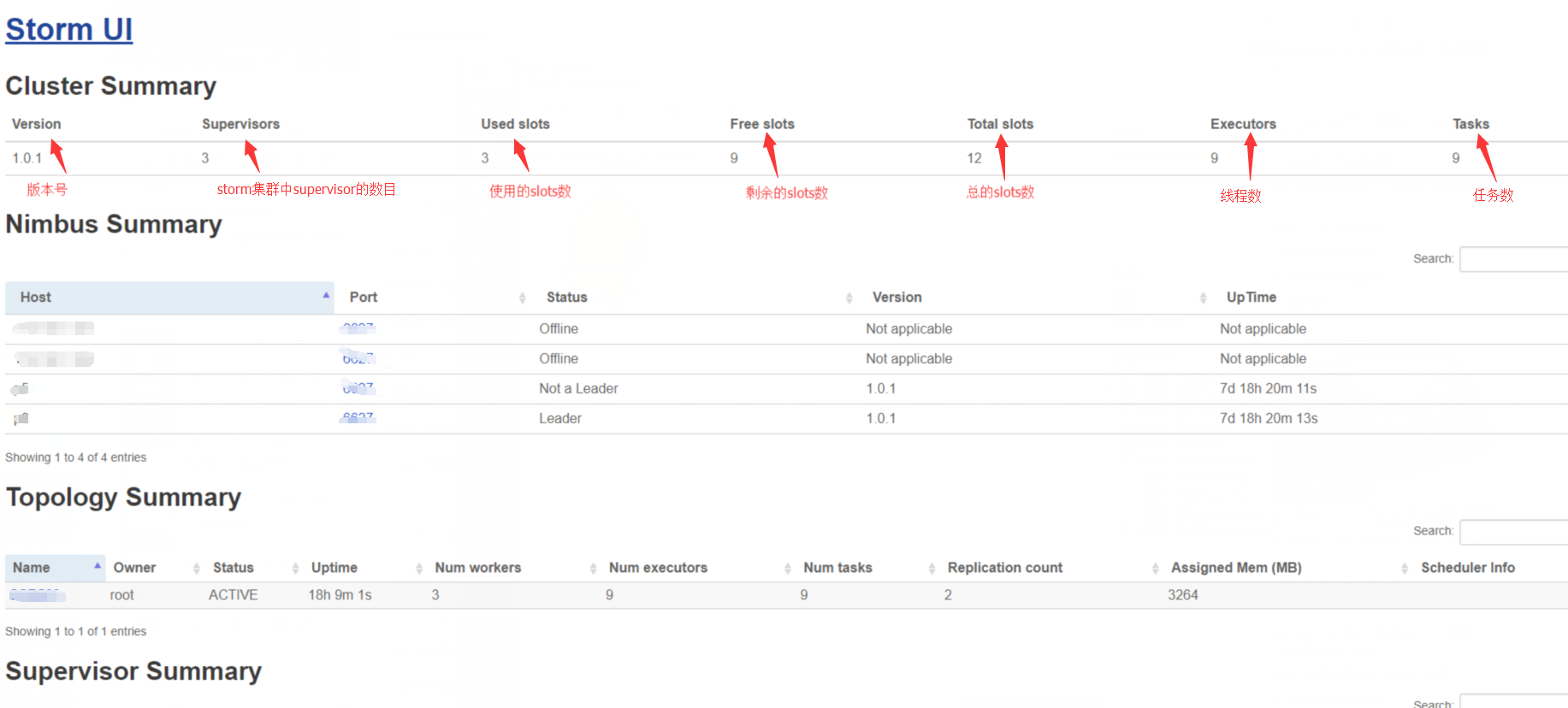
Cluster Summary
Version: storm 版本号
Nimbus uptime: nimbus的运行时间

Supervisors: storm集群中supervisor的数目

used slots: 使用了的slots数

free slots: 剩余的slots数

total slots: 总的slots数(对应配置文件的supervisor.slots.ports 属性配置的端口数,集群的总和)
Executors:线程数
tasks: 运行的任务数
topology summary
Name: topology name

id: topology id (由storm系统生成)

status: topology的运行状态,包括(ACTIVE, INACTIVE, KILLED, REBALANCING)

uptime: topology运行的时间

num workers: 运行的workers数
Num Exectors: workers 运行的线程数

num tasks: 运行的task数
supervisor summary
Id: 系统生成的 supervisor Id
host: supervisor(主机)的主机名

uptime: supervisor运行时间

slots: supervisor的端口数

used slots: 使用的端口数
Nimbus Configuration:nimbus 集群中的配置文件信息
二、Topology Page
(1)Topology summary

(2)Topology actions

(3)Topology stats

(4)Spouts (All time)

(5)Bolts (All time)

(6)Topology Visualization

(7)Topology Configuration
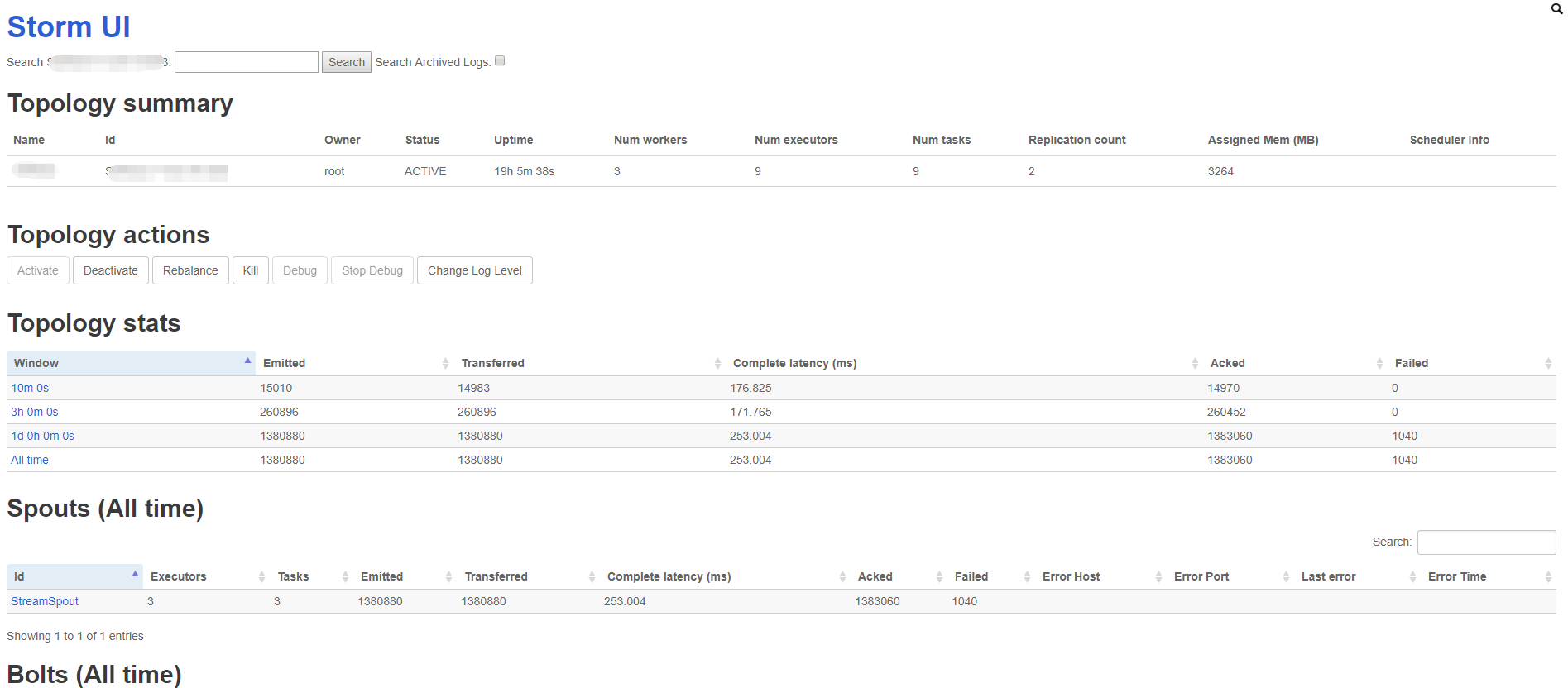
(1)Topology summary
Name: topology name

id: topology id (由storm系统生成)

status: topology的运行状态,包括(ACTIVE, INACTIVE, KILLED, REBALANCING)

uptime: topology运行的时间

num workers: 运行的workers数

Num Exectors: workers 运行的线程数

num tasks: 运行的task数
(2)Topology actions
Topology 运行状态,可以手动更改状态(ACTIVE, DEACTIVATE, KILLED, Rebalance)
(3)Topology stats
Window:时间窗口,显示10m、3h、1d和all time的运行状况

Emitted: emit tuple数

Transferred :  transferred tuple数, 说下与emitted的区别:如果一task,emitted一个tuple到2个task中,则transferred tuple数是emitted tuple数的两倍

complete latency: spout emitting 一个tuple到spout ack这个tuple的平均时间

Acked:成功 tuple数

Failed:失败tuple数
注意事项:
emitted栏显示的数字表示的是调用OutputCollector的emit方法的次数.

transferred栏显示的数字表示的是实际tuple发送到下一个task的计数.

如果一个bolt A使用all group的方式(每一个bolt都要接收到)向bolt B发射tuple, 此时bolt B启动了5个task, 那么trasferred显示的数量将是emitted的5倍.

如果一个bolt A内部执行了emit操作, 但是没有指定tuple的接受者, 那么transferred将为0.

有的bolt的execture方法中并没有emit tuple, 但是storm ui中依然有显示emitted, 主要是因为它调用了ack方法, 而该方法将emit ack tuple到系统默认的acker bolt. 因此如果anchor方式emit一个tuple, emitted一般会包含向acker bolt发射tuple的数量.

另外collector.emit(new Values(xxx))和collector.emit(tuple, new Values(xxx)) 这两种不同的emit方法也会影响后面bolt的emitted和transferred, 如果是前者, 则后续bolt的emited tuple  和transferred tuple这两个值都是0, 因为前一个emit方法是非安全的, 不再使用acker来进行校验.
(4)Spouts (All time)
Id: spout id

Executors:线程数

Emitted: emit tuple数

Transferred :  transferred tuple数,

complete latency: spout emitting 一个tuple到spout ack这个tuple的平均时间

Acked:成功 tuple数

Failed:失败tuple数

Error Host: 发生错误的机器

Error Port: 发生错误的端口号

last error: 最近的错误数
(5)Bolts (All time)
Execute latency(ms) : bolt 执行 execute 方法的平均时间

Executed: tuple 处理数

Process latency(ms):bolt收到一个tuple到bolt ack这个tuple的平均时间
(6)Topology Visualization 拓扑图展示
(7)Topology Configuration 配置说明
Storm UI说明的更多相关文章
- storm UI
Storm UI ——本文主要解释下storm ui上各项属性的含义. 通过http://UI_Server:8080可以打开Storm Web UI看看Storm集群的状态. 1. mainpage ...
- (转)Storm UI 解释
Storm UI link:http://lbxc.iteye.com/category/221265 本文主要解释下storm ui上各项属性的含义. 1. mainpage 首页主要分为3块: a ...
- Storm ui 展示字段说明
1.Storm ui 首页 主要分为4块: Cluster Summary,Topology summary,Supervisor summary,Nimbus Configuration,如下图所示 ...
- Storm ui 显示异常
今天安装storm集群的时候,各个进程也都起来,却发现Storm ui界面下无法观察Storm集群的状态 有很多地方处理不当都会造成这种现象: 1.storm.yaml配置不当 2.防火墙的问题 3. ...
- 访问Storm ui界面,出现org.apache.storm.utils.NimbusLeaderNotFoundException: Could not find leader nimbus from seed hosts ["master"]. Did you specify a valid list of nimbus hosts for confi的问题解决(图文详解)
不多说,直接上干货! 前期博客 apache-storm-0.9.6.tar.gz的集群搭建(3节点)(图文详解) apache-storm-1.0.2.tar.gz的集群搭建(3节点)(图文详解)( ...
- 访问Storm ui界面,出现org.apache.storm.utils.NimbusLeaderNotFoundException: Could not find leader nimbus from seed hosts ["master" "slave1"]. Did you specify a valid list of nimbus hosts for confi的问题解决(图文详解)
不多说,直接上干货! 前期博客 apache-storm-1.0.2.tar.gz的集群搭建(3节点)(图文详解)(非HA和HA) 问题详情 org.apache.storm.utils.Nimbu ...
- 访问Storm ui界面,出现org.apache.thrift7.transport.TTransportException: java.net.ConnectException: Connection refused的问题解决(图文详解)
不多说,直接上干货! 前期博客 apache-storm-0.9.6.tar.gz的集群搭建(3节点)(图文详解) 问题详情 org.apache.thrift7.transport.TTranspo ...
- 修改storm ui 默认端口
vim conf/storm.yaml 在下面添加 ui.port: 8080
- storm ui 网页一直出现提示loading summary
在更换了一次storm的版本之后:访问 http://mini1:8080/index.html 来查看storm的运行情况,但是出现了网页一直出现提示loading summary,但是通过透明的弹 ...
随机推荐
- [转]java List和数组相互转换方法
原文地址:https://blog.csdn.net/zjx2016/article/details/78273192 前言在java项目中数组和list集合(这里指ArrayList)经常需要互相转 ...
- libGDX开发环境搭建-Android Studio 最新版
http://blog.csdn.net/renwuqiangg/article/details/53088720 —————————————————————————————————————————— ...
- 【ORACLE】SQL查询出每个组中的第一条记录
CREATE TABLE [TestTable] ( ) NOT NULL , ) NOT NULL , ) ))) GO ALTER TABLE [TestTable] ADD PRIMARY KE ...
- mac xmind 激活
下载地址 https://www.jb51.net/softjc/624167.html 打开压缩包中的[K].zip 按里面的READ ME!.rtf 文件来操作 嗯,就这样
- 【分布式系列】session跨域及单点登录解决方案
Cookie机制 Cookie技术是客户端的解决方案,Cookie就是由服务器发给客户端的特殊信息,而这些信息以文本文件的方式存放在客户端,然后客户端每次向服务器发送请求的时候都会带上这些特殊的信息. ...
- Go 用JSON加载表格数据
支持热重载reload,但会有一些问题,下面注释有写 package table import ( "runtime/debug" ) //IntArray int类型数组 typ ...
- Spring Security默认的用户登录表单 页面源代码
Spring Security默认的用户登录表单 页面源代码 <html><head><title>Login Page</title></hea ...
- brew 源 & pip 源
brew源: https://www.zhihu.com/question/31360766 摘要 1. 替换formula 索引的镜像(即 brew update 时所更新内容) cd " ...
- python set和get实现
import math class Square: # 正方形 def __init__(self, l): self.length = l # 边长 def __setattr__(self, ke ...
- mobx 添加 isEmpty 装饰器
避免 obj.xxx && obj.xxx.length 这样的写法 store import * as u from "lodash"; function isE ...