
【Azure 应用服务】Azure Function App使用SendGrid发送邮件遇见异常消息The operation was canceled,分析源码逐步最终源端
问题描述
在使用Azure Function App的SendGrid Binging功能,调用SendGrid服务器发送邮件功能时,有时候遇见间歇性,偶发性异常。在重新触发SendGrid部分的Function,又能正常运行。所以本文基于Azure Function使用SendGrid的异常错误消息日志,一步一步,分析源码中的调用。然后调查为什么Azure Function没有自动Retry呢?
(如需要参考如何使用Azure Function SendGrid,参考:Azure Functions SendGrid 绑定)
错误消息:
System.Threading.Tasks.TaskCanceledException : The operation was canceled.

   at System.Runtime.ExceptionServices.ExceptionDispatchInfo.Throw()

   at async System.Net.Http.ConnectHelper.ConnectAsync(String host,Int32 port,CancellationToken cancellationToken)

   at System.Runtime.ExceptionServices.ExceptionDispatchInfo.Throw()

   at System.Threading.Tasks.ValueTask`1.get_Result()

   at async System.Net.Http.HttpConnectionPool.ConnectAsync(HttpRequestMessage request,Boolean allowHttp2,CancellationToken cancellationToken)

   at System.Runtime.ExceptionServices.ExceptionDispatchInfo.Throw()

   at System.Threading.Tasks.ValueTask`1.get_Result()

   at async System.Net.Http.HttpConnectionPool.CreateHttp11ConnectionAsync(HttpRequestMessage request,CancellationToken cancellationToken)

   at System.Runtime.ExceptionServices.ExceptionDispatchInfo.Throw()

   at System.Threading.Tasks.ValueTask`1.get_Result()

   at async System.Net.Http.HttpConnectionPool.GetHttpConnectionAsync(HttpRequestMessage request,CancellationToken cancellationToken)

   at System.Runtime.ExceptionServices.ExceptionDispatchInfo.Throw()

   at System.Threading.Tasks.ValueTask`1.get_Result()

   at async System.Net.Http.HttpConnectionPool.SendWithRetryAsync(HttpRequestMessage request,Boolean doRequestAuth,CancellationToken cancellationToken)

   at System.Runtime.ExceptionServices.ExceptionDispatchInfo.Throw()

   at async System.Net.Http.RedirectHandler.SendAsync(HttpRequestMessage request,CancellationToken cancellationToken)

   at System.Runtime.ExceptionServices.ExceptionDispatchInfo.Throw()

   at async System.Net.Http.DiagnosticsHandler.SendAsync(HttpRequestMessage request,CancellationToken cancellationToken)

   at System.Runtime.ExceptionServices.ExceptionDispatchInfo.Throw()

   at async SendGrid.Helpers.Reliability.RetryDelegatingHandler.SendAsync(HttpRequestMessage request,CancellationToken cancellationToken)

   at System.Runtime.ExceptionServices.ExceptionDispatchInfo.Throw()

   at async System.Net.Http.HttpClient.FinishSendAsyncBuffered(Task`1 sendTask,HttpRequestMessage request,CancellationTokenSource cts,Boolean disposeCts)

   at System.Runtime.ExceptionServices.ExceptionDispatchInfo.Throw()

   at async SendGrid.SendGridClient.MakeRequest(HttpRequestMessage request,CancellationToken cancellationToken)

   at System.Runtime.ExceptionServices.ExceptionDispatchInfo.Throw()

   at async SendGrid.SendGridClient.RequestAsync(Method method,String requestBody,String queryParams,String urlPath,CancellationToken cancellationToken)

   at System.Runtime.ExceptionServices.ExceptionDispatchInfo.Throw()

   at async SendGrid.SendGridClient.SendEmailAsync(SendGridMessage msg,CancellationToken cancellationToken)

   at System.Runtime.ExceptionServices.ExceptionDispatchInfo.Throw()

   at async Client.SendGridClient.SendMessageAsync(SendGridMessage msg,CancellationToken cancellationToken) at C:\azure-webjobs-sdk-extensions\src\WebJobs.Extensions.SendGrid\Client\SendGridClient.cs : 23

   at System.Runtime.ExceptionServices.ExceptionDispatchInfo.Throw()

   at async Microsoft.Azure.WebJobs.Extensions.Bindings.SendGridMessageAsyncCollector.FlushAsync(CancellationToken cancellationToken) at C:\azure-webjobs-sdk-extensions\src\WebJobs.Extensions.SendGrid\Bindings\SendGridMessageAsyncCollector.cs : 56

   at System.Runtime.ExceptionServices.ExceptionDispatchInfo.Throw()

   at async Microsoft.Azure.WebJobs.Host.Bindings.AsyncCollectorValueProvider`2.SetValueAsync[TUser,TMessage](Object value,CancellationToken cancellationToken) at C:\projects\azure-webjobs-sdk-rqm4t\src\Microsoft.Azure.WebJobs.Host\Bindings\AsyncCollector\AsyncCollectorValueProvider.cs : 49

   at System.Runtime.ExceptionServices.ExceptionDispatchInfo.Throw()

   at async Microsoft.Azure.WebJobs.Binder.Complete(CancellationToken cancellationToken) at C:\projects\azure-webjobs-sdk-rqm4t\src\Microsoft.Azure.WebJobs.Host\Bindings\Runtime\Binder.cs : 150

   at System.Runtime.ExceptionServices.ExceptionDispatchInfo.Throw()

   at async Microsoft.Azure.WebJobs.Host.Bindings.Runtime.RuntimeValueProvider.SetValueAsync(Object value,CancellationToken cancellationToken) at C:\projects\azure-webjobs-sdk-rqm4t\src\Microsoft.Azure.WebJobs.Host\Bindings\Runtime\RuntimeValueProvider.cs : 34

   at System.Runtime.ExceptionServices.ExceptionDispatchInfo.Throw()

   at async Microsoft.Azure.WebJobs.Host.Executors.FunctionExecutor.ParameterHelper.ProcessOutputParameters(CancellationToken cancellationToken) at C:\projects\azure-webjobs-sdk-rqm4t\src\Microsoft.Azure.WebJobs.Host\Executors\FunctionExecutor.cs : 925

   at System.Runtime.ExceptionServices.ExceptionDispatchInfo.Throw()

   at async Microsoft.Azure.WebJobs.Host.Executors.FunctionExecutor.ExecuteWithWatchersAsync(IFunctionInstanceEx instance,ParameterHelper parameterHelper,ILogger logger,CancellationTokenSource functionCancellationTokenSource) at C:\projects\azure-webjobs-sdk-rqm4t\src\Microsoft.Azure.WebJobs.Host\Executors\FunctionExecutor.cs : 518

   at System.Runtime.ExceptionServices.ExceptionDispatchInfo.Throw()

   at async Microsoft.Azure.WebJobs.Host.Executors.FunctionExecutor.ExecuteWithLoggingAsync(IFunctionInstanceEx instance,FunctionStartedMessage message,FunctionInstanceLogEntry instanceLogEntry,ParameterHelper parameterHelper,ILogger logger,CancellationToken cancellationToken) at C:\projects\azure-webjobs-sdk-rqm4t\src\Microsoft.Azure.WebJobs.Host\Executors\FunctionExecutor.cs : 279

   at System.Runtime.ExceptionServices.ExceptionDispatchInfo.Throw()

   at async Microsoft.Azure.WebJobs.Host.Executors.FunctionExecutor.ExecuteWithLoggingAsync(IFunctionInstanceEx instance,FunctionStartedMessage message,FunctionInstanceLogEntry instanceLogEntry,ParameterHelper parameterHelper,ILogger logger,CancellationToken cancellationToken) at C:\projects\azure-webjobs-sdk-rqm4t\src\Microsoft.Azure.WebJobs.Host\Executors\FunctionExecutor.cs : 326

   at System.Runtime.ExceptionServices.ExceptionDispatchInfo.Throw()

   at async Microsoft.Azure.WebJobs.Host.Executors.FunctionExecutor.TryExecuteAsync(IFunctionInstance functionInstance,CancellationToken cancellationToken) at C:\projects\azure-webjobs-sdk-rqm4t\src\Microsoft.Azure.WebJobs.Host\Executors\FunctionExecutor.cs : 94
问题分析
查看异常日志:
1)从最后一行看, 根据方法 Microsoft.Azure.WebJobs.Host.Executors.FunctionExecutor.TryExecuteAsync 可以得出,代码已经进入Function平台级别。可以初步排除是自己写的代码错误。
2)在逐行上看,发现 C:\azure-webjobs-sdk-extensions\src\WebJobs.Extensions.SendGrid\Client\SendGridClient.cs : 23 中,调用了 Client.SendGridClient.SendMessageAsync(SendGridMessage msg,CancellationToken cancellationToken) 并抛出异常。
因为Azure Funciton的Source Code已经开源,所以可以在Github中查看到 WebJobs.Extensions.SendGrid\Client\SendGridClient.cs 的源代码。
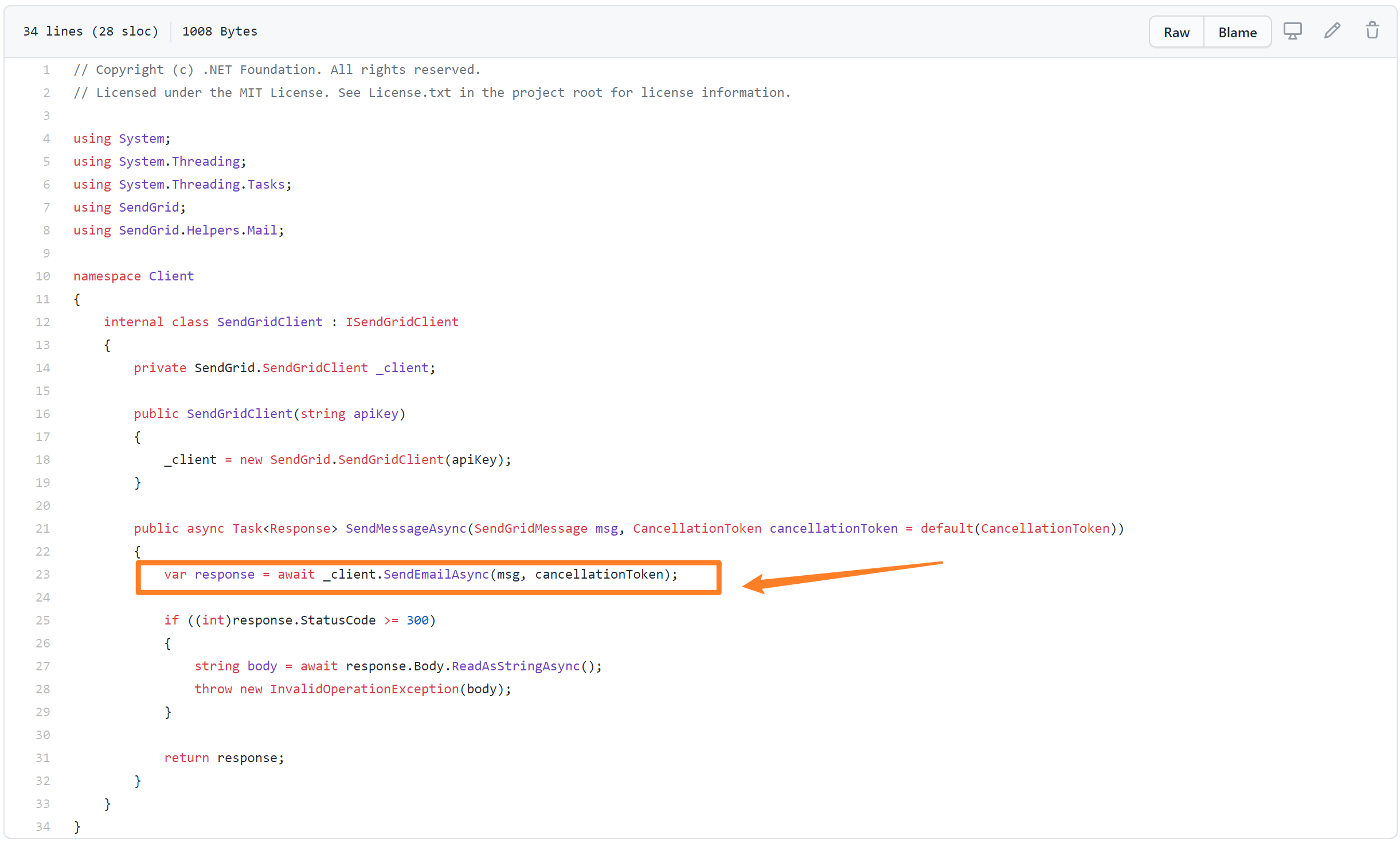
注意: 代码中直接调用SendGird SDK中的Client对象,发送邮件 SendEmailAsync。
3) 继续向上查看,发现进入 SendGrid的 SendGrid.SendGridClient.MakeRequest(HttpRequestMessage request,CancellationToken cancellationToken) 中。同第二步一样,继续在Github中搜索SendGrid的源码,查看MakeRequest方法中进行了那些操作。

注意:方法MakeRequest中也没有多余配置,只是更深一步传递 Request请求。然后对获取的结果进行异常处理或成功还回,外加设置响应编码为UTF8
4) 继续向上查看,进入 SendGrid.Helpers.Reliability.RetryDelegatingHandler.SendAsync(HttpRequestMessage request,CancellationToken cancellationToken) 中。在此,发现可以设置以下四种条件的Retry次数。
       private static readonly List<HttpStatusCode> RetriableServerErrorStatusCodes =

            new List<HttpStatusCode>()

            {

                HttpStatusCode.InternalServerError,

                HttpStatusCode.BadGateway,

                HttpStatusCode.ServiceUnavailable,

                HttpStatusCode.GatewayTimeout,

            };
RetryDeletegatingHandler.SendAsync 代码:
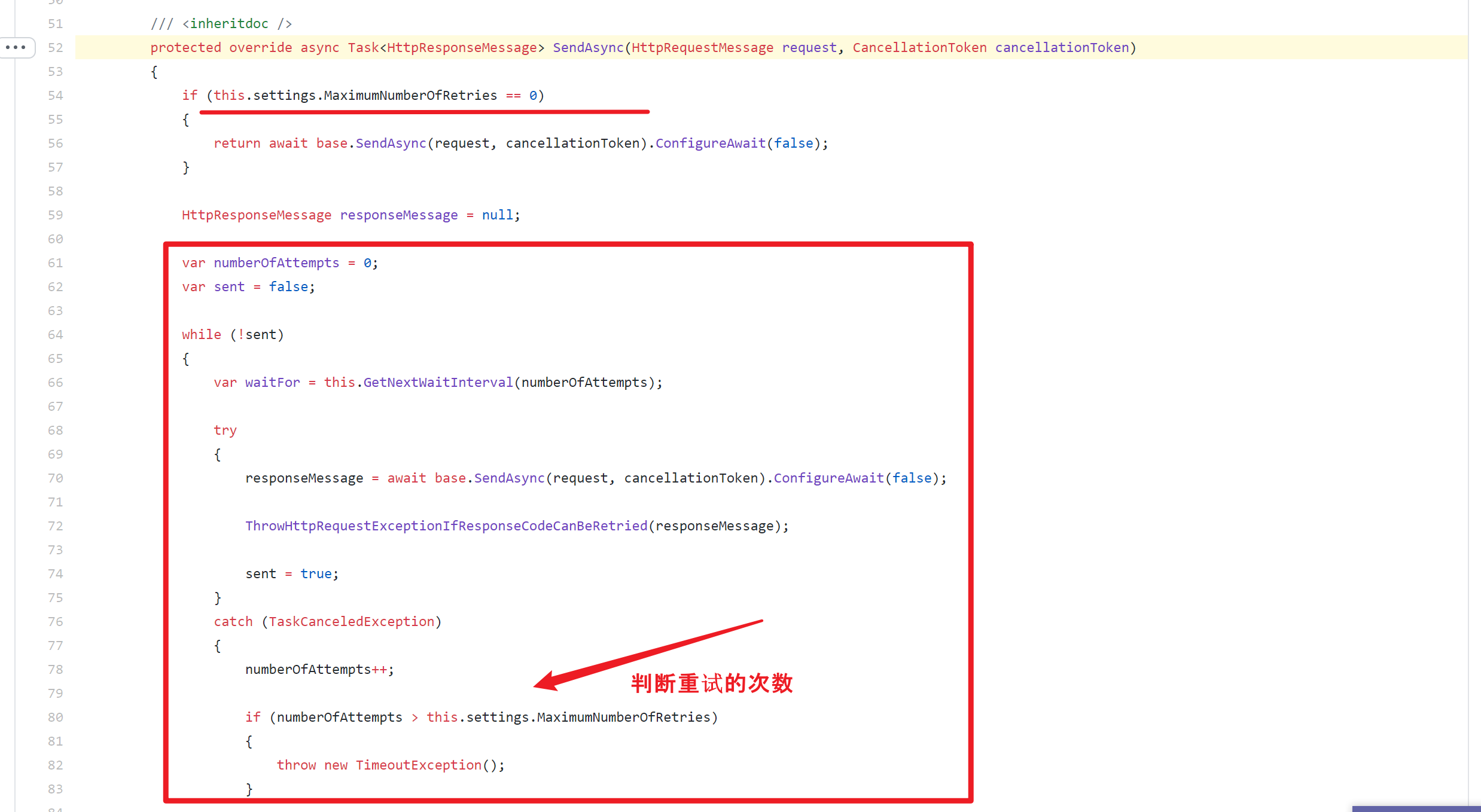
注意:如果设置了MaximumNumberOfRetries值,则当发送请求到SendGrid不成功时,会自动重试所设置的次数。重试次数必须在0 ~ 5 次之间。
            if (maximumNumberOfRetries < 0)

            {

                throw new ArgumentOutOfRangeException(nameof(maximumNumberOfRetries), "maximumNumberOfRetries must be greater than 0");

            }

            if (maximumNumberOfRetries > 5)

            {

                throw new ArgumentOutOfRangeException(nameof(maximumNumberOfRetries), "The maximum number of retries allowed is 5");

            }
5) 继续向上查看,发现后期的方法全是 System.Net.Http 类中对HTTP请求的处理。至此,代码查看到达源端。
6)回看异常消息 System.Threading.Tasks.TaskCanceledException : The operation was canceled. 这是因为参数 cancellationToken 的原因。因为请求为异步 Task操作。当在请求长时间没有处理完成并且cancellationToken中设置的取消时间已到,当前任务会被取消并抛出以上消息:The operation was canceled.
为什么需要取消令牌(CancellationToken) ?
因为Task没有方法支持在外部取消Task,只能通过一个公共变量存放线程的取消状态,在线程内部通过变量判断线程是否被取消,当CancellationToken是取消状态,Task内部未启动的任务不会启动新线程。
通过查看源码,我们找到了为什么出现TaskCanceledException的异常,但是为什么 Function App 没有设置SendGrid的重试参数呢? 继续查看源码,发现,Function App在初始化SendGrid Client对象时,并没有做任何的配置修改。所以Retry默认保持为0.
/// <summary>

/// Gets the maximum number of retries to execute against when sending an HTTP Request before throwing an exception.

/// Defaults to 0 (no retries, you must explicitly enable).

/// </summary>

public int MaximumNumberOfRetries { get; }
Azure Function 的 SendGridOptions.cs源文件中,并没有任何MaximumNumberOfRetries设置。
// Copyright (c) .NET Foundation. All rights reserved.

// Licensed under the MIT License. See License.txt in the project root for license information.

using SendGrid.Helpers.Mail;

namespace Microsoft.Azure.WebJobs.Extensions.SendGrid

{

    /// <summary>

    /// Defines the configuration options for the SendGrid binding.

    /// </summary>

    public class SendGridOptions

    {

        /// <summary>

        /// Gets or sets the SendGrid ApiKey. If not explicitly set, the value will be defaulted

        /// to the value specified via the 'AzureWebJobsSendGridApiKey' app setting or the

        /// 'AzureWebJobsSendGridApiKey' environment variable.

        /// </summary>

        public string ApiKey { get; set; }

        /// <summary>

        /// Gets or sets the default "to" address that will be used for messages.

        /// This value can be overridden by job functions.

        /// </summary>

        /// <remarks>

        /// An example of when it would be useful to provide a default value for 'to'

        /// would be for emailing your own admin account to notify you when particular

        /// jobs are executed. In this case, job functions can specify minimal info in

        /// their bindings, for example just a Subject and Text body.

        /// </remarks>

        public EmailAddress ToAddress { get; set; }

        /// <summary>

        /// Gets or sets the default "from" address that will be used for messages.

        /// This value can be overridden by job functions.

        /// </summary>

        public EmailAddress FromAddress { get; set; }

    }

}
参考资料
Azure Functions SendGrid 绑定: https://docs.azure.cn/zh-cn/azure-functions/functions-bindings-sendgrid?tabs=csharp
WebJobs.Extensions.SendGrid: https://github.com/Azure/azure-webjobs-sdk-extensions/tree/dev/src/WebJobs.Extensions.SendGrid
SendGrid: https://github.com/sendgrid/sendgrid-csharp/tree/main/src/SendGrid
多线程笔记-CancellationToken(取消令牌):https://www.cnblogs.com/fanfan-90/p/12660996.html
【Azure 应用服务】Azure Function App使用SendGrid发送邮件遇见异常消息The operation was canceled,分析源码逐步最终源端的更多相关文章
- 【Azure 应用服务】一个 App Service 同时部署运行两个及多个 Java 应用程序(Jar包)
问题描述 如何在一个AppService下同时部署运行多个Java 应用程序呢? 问题解答 因为App Service的默认根目录为 wwwroot.如果需要运行多个Java 应用程序,需要在 www ...
- 【Azure 应用服务】在 App Service for Windows 中自定义 PHP 版本的方法
问题描述 在App Service for Windows的环境中,当前只提供了PHP 7.4 版本的选择情况下,如何实现自定义PHP Runtime的版本呢? 如 PHP Version 8.1.9 ...
- 【Azure 应用服务】App Service/Azure Function的出站连接过多而引起了SNAT端口耗尽,导致一些新的请求出现超时错误(Timeout)
问题描述 当需要在应用中有大量的出站连接时候,就会涉及到SNAT(源地址网络转换)耗尽的问题.而通过Azure App Service/Function的默认监控指标图表中,却没有可以直接查看到SNA ...
- 【Azure 应用服务】Azure Function App 执行PowerShell指令[Get-Azsubscription -TenantId $tenantID -DefaultProfile $cxt]错误
问题描述 使用PowerShell脚本执行获取Azure订阅列表的指令(Get-Azsubscription -TenantId $tenantID -DefaultProfile $cxt).在本地 ...
- Azure 上通过 SendGrid 发送邮件
SendGrid 是什么? SendGrid 是架构在云端的电子邮件服务,它能提供基于事务的可靠的电子邮件传递. 并且具有可扩充性和实时分析的能力.常见的用例有: 自动回复用户的邮件 定期发送信息给用 ...
- Azure : 通过 SendGrid 发送邮件
SendGrid 是什么? SendGrid 是架构在云端的电子邮件服务,它能提供基于事务的可靠的电子邮件传递.并且具有可扩充性和实时分析的能力.常见的用例有:1. 自动回复用户的邮件2. 定期发送信 ...
- 【Azure 应用服务】Azure App Service For Linux 上实现 Python Flask Web Socket 项目 Http/Https
问题描述 在上篇博文"[Azure 应用服务]App Service for Linux 中实现 WebSocket 功能 (Python SocketIO)"中,实现了通过 HT ...
- 【Azure 应用服务】部署Kafka Trigger Function到Azure Function服务中,解决自定义域名解析难题
问题描述 经过前两篇文章,分别使用VM搭建了Kafka服务,创建了Azure Function项目,并且都在本地运行成功. [Azure Developer]在Azure VM (Windows) 中 ...
- 【应用服务 App Service】Azure 应用服务测试网络访问其他域名及请求超时限制(4分钟 ≈ 230秒)
测试App Service是否可以访问其他DNS 当应用服务(Azure App Service)创建完成后,想通过ping命令来查看是否可以访问其他站点或解析DNS,但是发现ping命令无法使用.这 ...
随机推荐
- Ansible-快速启动
Ansible是一款简单的运维自动化工具,只需要使用ssh协议连接就可以来进行系统管理,自动化执行命令,部署等任务. Ansible的特点 1.ansible轻量级无客户端agentless,只需要双 ...
- githubssh配置
- js--手动实现一个常见的短信验证码输入框
前言 本文记录一下自己手动实现的一个前端常见的短信验证码输入组件,从需求到实现逐步优化的过程. 正文 1.需求分析 首先看一下效果图. 首先页面加载的时候,输入框获取焦点,当用户输入一个数字后,焦点自 ...
- Tomcat 服务器轻松部署 SSL 证书
Tomcat 服务器 SSL 证书安装部署 1准备服务器 购买网上各个产家的云服务器 或者在自己的电脑上装虚拟机 二者皆可,建议选择第一种,因为操作起来相对方便 2安装JDK 2.1上传JDK到Lin ...
- Go语言协程并发---原子操作
package main import ( "fmt" "sync/atomic" ) /* 用原子来替换锁,其主要原因是: 原子操作由底层硬件支持,而锁则由操 ...
- 摄像头ISP系统原理(下)
摄像头ISP系统原理(下) l WDR(Wide Dynamic Range)------宽动态 动态范围(Dynamic Range)是指摄像机支持的最大输出信号和最小输出信号的比值,或者说图像最 ...
- 如何挑选深度学习 GPU?
如何挑选深度学习 GPU? 深度学习是一个对计算有着大量需求的领域,从一定程度上来说,GPU的选择将从根本上决定深度学习的体验.因此,选择购买合适的GPU是一项非常重要的决策.那么2020年,如何选择 ...
- windows 7系统安装与配置Tomcat服务器环境
windows 7系统安装与配置Tomcat服务器环境 学习了一个月的java基础,终于要迈向java web领域.学习java web开发就离不开服务器的支持,由于本人是菜鸟,只好求助度娘谷哥.在此 ...
- pandas的数据结构介绍(一)—— Series
pandas两个主要数据结构之一--Series 类似于一维数组,由一组数据和与其相关的一组索引组成 obj = Series([4, 7, -5, 3], index=['d', 'b', 'a', ...
- 小白学k8s(8)-Bazel部署go应用
Bazel使用了解 Bazel产生的背景 什么是Bazel 快(Fast) 可伸缩(scalable) 跨语言(multi-language) 可扩展(extensible) Bazel中的主要文件 ...