
qt 简单登录界面(一)
widget.h
#ifndef WIDGET_H

#define WIDGET_H

#include <QWidget>

#include<QLineEdit>

class Widget : public QWidget

{

    Q_OBJECT

public slots:

    void foo();

public:

    Widget(QWidget *parent = 0);

    ~Widget();

    QLineEdit *userEdit;

    QLineEdit * passwdEdit;

};

#endif // WIDGET_H
widget.cpp
#include "widget.h"

#include<QBoxLayout>

#include<QGridLayout>

#include<QPushButton>

#include<QLabel>

#include<QLineEdit>

#include<QDebug>

#include <QApplication>

Widget::Widget(QWidget *parent)

    : QWidget(parent)

{

        QGridLayout* grid=new  QGridLayout(this);

        QHBoxLayout* hbox=new QHBoxLayout(this);

        QPushButton *ok=new QPushButton("确认");

        QPushButton *cancel=new QPushButton("取消");

        QLabel *userLabel= new QLabel("用户:");

        userEdit=new QLineEdit;

        QLabel* passwdLabel=new QLabel("密码:");

        passwdEdit=new QLineEdit;

        passwdEdit->setEchoMode(QLineEdit::Password);

        grid->addWidget(userLabel,0,0,1,1);

        grid->addWidget(userEdit,0,1,1,1);

        grid->addWidget(passwdLabel,1,0,1,1);

        grid->addWidget(passwdEdit,1,1,1,1);

        hbox->addWidget(ok);

        hbox->addWidget(cancel);

        grid->addLayout(hbox,2,0,1,2);

        this->setLayout(grid);

        connect(cancel,SIGNAL(clicked()),this,SLOT(close()));

        connect(ok,SIGNAL(clicked()),this,SLOT(foo()));

}

void Widget::foo()

{

    if(userEdit->text()=="admin")

    {

        if(passwdEdit->text()=="123456")

        {

            qDebug()<<"登录成功"<<endl;

        }

        else

        {

          qDebug()<<"密码错误"<<endl;

        }

    }

    else {

        qDebug()<<"用户名不存在"<<endl;

    }

}

Widget::~Widget()

{

}
main.cpp:
#include "widget.h"

#include <QApplication>

int main(int argc, char *argv[])

{

    QApplication a(argc, argv);

    Widget w;

    w.resize(500,300);

    w.show();

    return a.exec();

}
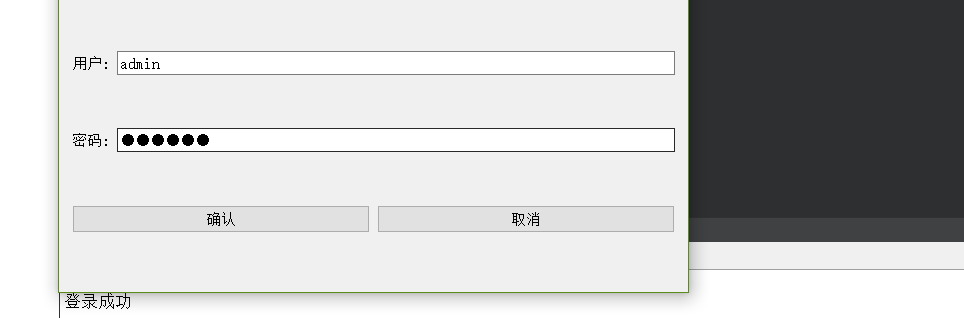
输出:
qt 简单登录界面(一)的更多相关文章
- Cookie案例:简单登录界面中的应用
ServletDemo1.java package ztq.servlet.study; import java.io.IOException; import java.io.PrintWriter; ...
- 以java实现的一个简单登录界面(带验证码)
本文参考于:https://blog.csdn.net/wyf2017/article/details/78831744 https://blog.csdn.net/MengKun822/articl ...
- Qt 用户登录界面
使用QT创建自己的登录窗口: 主要步骤: 1.窗口界面的绘制 2.沟通数据库进行密码验证 void MainWindow::on_pushButton_clicked() { // 连 ...
- 一个基于QT简单登录对话框
1. 登录对话框式样 2. QLoginDialog.h #ifndef DIALOG_H #define DIALOG_H #include <QtGui/QDialog> #inclu ...
- JSP内置对象的cookie和session实现简单登录界面
创建一个index.jsp页面 <%@ page language="java" contentType="text/html; charset=utf-8&quo ...
- 一个基于QT简单登录对话框(带验证码功能)
1. 对话框样式 2. 源代码 ①. main.cpp #include <QtGui/QApplication> #include "QLoginDialog.h" ...
- JAVA语言实现简单登录界面
程序设计思想: 使用Math.random()方法循环生成6个97~122之间的随机整数(对应ASCII码值‘a’~‘z’),将其转化为char型变量,连接成为一个6位字符串作为验证码输出,提示用户输 ...
- 设计简单登录界面(Java web)
程序设计思想: 在Input.jsp中创建一个表格里边分别是课程名称,任课老师,教学地点,并分别用三个文本框来接受输入的三个属性, 并传到另外的Jsp页面中,又来接受三个数据,并判断传来的教师,与教室 ...
- Java简单登录图形界面
本文参考与:https://blog.csdn.net/wyf2017/article/details/78831744 https://blog.csdn.net/MengKun822/articl ...
随机推荐
- 解决Tomcat9打印台乱码问题
问题描述: Tomcat打印台.打印出来的字体全是乱码后的显示.影响视觉体验,不利于bug查找和错误排查.故寻找方法去修改. 解决方法: 1.找到目录 2.对日志参数进行修改 3.改动编码 4.修改成 ...
- 【LeetCode】 Binary Tree Zigzag Level Order Traversal 解题报告
Binary Tree Zigzag Level Order Traversal [LeetCode] https://leetcode.com/problems/binary-tree-zigzag ...
- 【LeetCode】949. Largest Time for Given Digits 解题报告(Python)
作者: 负雪明烛 id: fuxuemingzhu 个人博客: http://fuxuemingzhu.cn/ 目录 题目描述 题目大意 解题方法 日期 题目地址:https://leetcode.c ...
- 震撼,java面试题整合(良心制作)11万多字拿去。持续更新【可以收藏】
一.javaSE面试题整合 Java部分 JDK中哪些类是不能继承的?[信雅达面试题] [参考答案] 不能继承的是类是那些用final关键字修饰的类.一般比较基本的类型或防止扩展类无意间破坏原来方法的 ...
- Oracle VirtualBox 配置宿主机与虚拟机互访
写作原因 之前经常使用 VMware Workstation Pro,由于是非正常付费使用的不打算再用了.替代品就是 Oracle VirtualBox,但是发现了一个问题: "我想用NAT ...
- Globally-Robust Neural Networks
目录 概 主要内容 代码 Leino K., Wang Z. and Fredrikson M. Globally-robust neural networks. In International C ...
- ADVERSARIAL EXAMPLES IN THE PHYSICAL WORLD
目录 概 主要内容 least likely class adv. 实验1 l.l.c. adv.的效用 实验二 Alexey Kurakin, Ian J. Goodfellow, Samy Ben ...
- Flink sql 之 微批处理与MiniBatchIntervalInferRule (源码分析)
本文源码基于flink1.14 平台用户在使用我们的flinkSql时经常会开启minaBatch来优化状态读写 所以从源码的角度具体解读一下miniBatch的原理 先看一下flinksql是如何触 ...
- 每天学一点——python注释规范
python注释规范 python注释语法 这个是注释 注释是不影响代码运行的 当然注释也是有书写规范的,就像图片中的 注释前面#加空格再加上这条代码的注释(单行注释用#) 不然你会得到下面的结果 * ...
- Ranger-Hdfs插件安装
Ranger-Hdfs插件ranger-0.6.0-hdfs-plugin安装到Hdfs的所有NameNode节点, 其他的DataNode节点不需要安装. 1. 登陆hdfs安装的用户,hdfs/z ...