
TensorFlow和pytorch中的pin_memory和non_blocking设置是做什么的,又是否有用???(续2)
接前文:
TensorFlow和pytorch中的pin_memory和non_blocking设置是做什么的,又是否有用???
TensorFlow和pytorch中的pin_memory和non_blocking设置是做什么的,又是否有用???(续)
参考:
如何实现nvidia显卡的cuda的多kernel并发执行???
===========================================
关于How to Overlap Data Transfers in CUDA C/C++中的介绍内容还有一部分没有交代,这里继续。
Demo代码:


/* Copyright (c) 1993-2015, NVIDIA CORPORATION. All rights reserved.

 *

 * Redistribution and use in source and binary forms, with or without

 * modification, are permitted provided that the following conditions

 * are met:

 *  * Redistributions of source code must retain the above copyright

 *    notice, this list of conditions and the following disclaimer.

 *  * Redistributions in binary form must reproduce the above copyright

 *    notice, this list of conditions and the following disclaimer in the

 *    documentation and/or other materials provided with the distribution.

 *  * Neither the name of NVIDIA CORPORATION nor the names of its

 *    contributors may be used to endorse or promote products derived

 *    from this software without specific prior written permission.

 *

 * THIS SOFTWARE IS PROVIDED BY THE COPYRIGHT HOLDERS ``AS IS'' AND ANY

 * EXPRESS OR IMPLIED WARRANTIES, INCLUDING, BUT NOT LIMITED TO, THE

 * IMPLIED WARRANTIES OF MERCHANTABILITY AND FITNESS FOR A PARTICULAR

 * PURPOSE ARE DISCLAIMED.  IN NO EVENT SHALL THE COPYRIGHT OWNER OR

 * CONTRIBUTORS BE LIABLE FOR ANY DIRECT, INDIRECT, INCIDENTAL, SPECIAL,

 * EXEMPLARY, OR CONSEQUENTIAL DAMAGES (INCLUDING, BUT NOT LIMITED TO,

 * PROCUREMENT OF SUBSTITUTE GOODS OR SERVICES; LOSS OF USE, DATA, OR

 * PROFITS; OR BUSINESS INTERRUPTION) HOWEVER CAUSED AND ON ANY THEORY

 * OF LIABILITY, WHETHER IN CONTRACT, STRICT LIABILITY, OR TORT

 * (INCLUDING NEGLIGENCE OR OTHERWISE) ARISING IN ANY WAY OUT OF THE USE

 * OF THIS SOFTWARE, EVEN IF ADVISED OF THE POSSIBILITY OF SUCH DAMAGE.

 */

#include <stdio.h>

// Convenience function for checking CUDA runtime API results

// can be wrapped around any runtime API call. No-op in release builds.

inline

cudaError_t checkCuda(cudaError_t result)

{

#if defined(DEBUG) || defined(_DEBUG)

  if (result != cudaSuccess) {

    fprintf(stderr, "CUDA Runtime Error: %s\n", cudaGetErrorString(result));

    assert(result == cudaSuccess);

  }

#endif

  return result;

}

__global__ void kernel(float *a, int offset)

{

  int i = offset + threadIdx.x + blockIdx.x*blockDim.x;

  float x = (float)i;

  float s = sinf(x);

  float c = cosf(x);

  a[i] = a[i] + sqrtf(s*s+c*c);

}

float maxError(float *a, int n)

{

  float maxE = 0;

  for (int i = 0; i < n; i++) {

    float error = fabs(a[i]-1.0f);

    if (error > maxE) maxE = error;

  }

  return maxE;

}

int main(int argc, char **argv)

{

  const int blockSize = 256, nStreams = 4;

  const int n = 4 * 1024 * blockSize * nStreams;

  const int streamSize = n / nStreams;

  const int streamBytes = streamSize * sizeof(float);

  const int bytes = n * sizeof(float);

  int devId = 0;

  if (argc > 1) devId = atoi(argv[1]);

  cudaDeviceProp prop;

  checkCuda( cudaGetDeviceProperties(&prop, devId));

  printf("Device : %s\n", prop.name);

  checkCuda( cudaSetDevice(devId) );

  // allocate pinned host memory and device memory

  float *a, *d_a;

  checkCuda( cudaMallocHost((void**)&a, bytes) );      // host pinned

  checkCuda( cudaMalloc((void**)&d_a, bytes) ); // device

  float ms; // elapsed time in milliseconds

  // create events and streams

  cudaEvent_t startEvent, stopEvent, dummyEvent;

  cudaStream_t stream[nStreams];

  checkCuda( cudaEventCreate(&startEvent) );

  checkCuda( cudaEventCreate(&stopEvent) );

  checkCuda( cudaEventCreate(&dummyEvent) );

  for (int i = 0; i < nStreams; ++i)

    checkCuda( cudaStreamCreate(&stream[i]) );

  // baseline case - sequential transfer and execute

  memset(a, 0, bytes);

  checkCuda( cudaEventRecord(startEvent,0) );

  checkCuda( cudaMemcpy(d_a, a, bytes, cudaMemcpyHostToDevice) );

  kernel<<<n/blockSize, blockSize>>>(d_a, 0);

  checkCuda( cudaMemcpy(a, d_a, bytes, cudaMemcpyDeviceToHost) );

  checkCuda( cudaEventRecord(stopEvent, 0) );

  checkCuda( cudaEventSynchronize(stopEvent) );

  checkCuda( cudaEventElapsedTime(&ms, startEvent, stopEvent) );

  printf("Time for sequential transfer and execute (ms): %f\n", ms);

  printf("  max error: %e\n", maxError(a, n));

  // asynchronous version 1: loop over {copy, kernel, copy}

  memset(a, 0, bytes);

  checkCuda( cudaEventRecord(startEvent,0) );

  for (int i = 0; i < nStreams; ++i) {

    int offset = i * streamSize;

    checkCuda( cudaMemcpyAsync(&d_a[offset], &a[offset],

                               streamBytes, cudaMemcpyHostToDevice,

                               stream[i]) );

    kernel<<<streamSize/blockSize, blockSize, 0, stream[i]>>>(d_a, offset);

    checkCuda( cudaMemcpyAsync(&a[offset], &d_a[offset],

                               streamBytes, cudaMemcpyDeviceToHost,

                               stream[i]) );

  }

  checkCuda( cudaEventRecord(stopEvent, 0) );

  checkCuda( cudaEventSynchronize(stopEvent) );

  checkCuda( cudaEventElapsedTime(&ms, startEvent, stopEvent) );

  printf("Time for asynchronous V1 transfer and execute (ms): %f\n", ms);

  printf("  max error: %e\n", maxError(a, n));

  // asynchronous version 2:

  // loop over copy, loop over kernel, loop over copy

  memset(a, 0, bytes);

  checkCuda( cudaEventRecord(startEvent,0) );

  for (int i = 0; i < nStreams; ++i)

  {

    int offset = i * streamSize;

    checkCuda( cudaMemcpyAsync(&d_a[offset], &a[offset],

                               streamBytes, cudaMemcpyHostToDevice,

                               stream[i]) );

  }

  for (int i = 0; i < nStreams; ++i)

  {

    int offset = i * streamSize;

    kernel<<<streamSize/blockSize, blockSize, 0, stream[i]>>>(d_a, offset);

  }

  for (int i = 0; i < nStreams; ++i)

  {

    int offset = i * streamSize;

    checkCuda( cudaMemcpyAsync(&a[offset], &d_a[offset],

                               streamBytes, cudaMemcpyDeviceToHost,

                               stream[i]) );

  }

  checkCuda( cudaEventRecord(stopEvent, 0) );

  checkCuda( cudaEventSynchronize(stopEvent) );

  checkCuda( cudaEventElapsedTime(&ms, startEvent, stopEvent) );

  printf("Time for asynchronous V2 transfer and execute (ms): %f\n", ms);

  printf("  max error: %e\n", maxError(a, n));

  // cleanup

  checkCuda( cudaEventDestroy(startEvent) );

  checkCuda( cudaEventDestroy(stopEvent) );

  checkCuda( cudaEventDestroy(dummyEvent) );

  for (int i = 0; i < nStreams; ++i)

    checkCuda( cudaStreamDestroy(stream[i]) );

  cudaFree(d_a);

  cudaFreeHost(a);

  return 0;

}
这个代码是关于overlap data transfer的,原文中给出的是比较老的显卡环境,为此我在2070super显卡上运行,结果如下:
Device : NVIDIA GeForce RTX 2070 SUPER
Time for sequential transfer and execute (ms): 5.685216
max error: 1.192093e-07
Time for asynchronous V1 transfer and execute (ms): 4.635808
max error: 1.192093e-07
Time for asynchronous V2 transfer and execute (ms): 4.183488
max error: 1.192093e-07
上面代码每次运行都是对同一任务使用三次不同GPU调用方式:
第一次,是对总的计算任务用一个和host同步的cudaMemcpy函数实现数据从host到device的传输,然后使用一个stream队列进行kernel运算,最后再将计算好的结果用一个和host同步的cudaMemcpy函数实现数据从device到host的传输;
第二次,是将总的计算任务划分多个子计算任务,以子任务为单位循环的调用每个子计算任务中的从host到device的cudaMemcpy数据传输、单独stream队列的kernel运算、计算结果从device到host的cudaMemcpy数据传输;
第三次,是将总的计算任务划分多个子计算任务,首先执行完所有子计算任务中的从host到device的cudaMemcpy数据传输,然后执行完每个子任务各自stream队列的kernel运算,最后将各子任务的计算结果从device到host的cudaMemcpy数据传输。
使用nvvp查看上面代码运行是CUDA的运行情况:
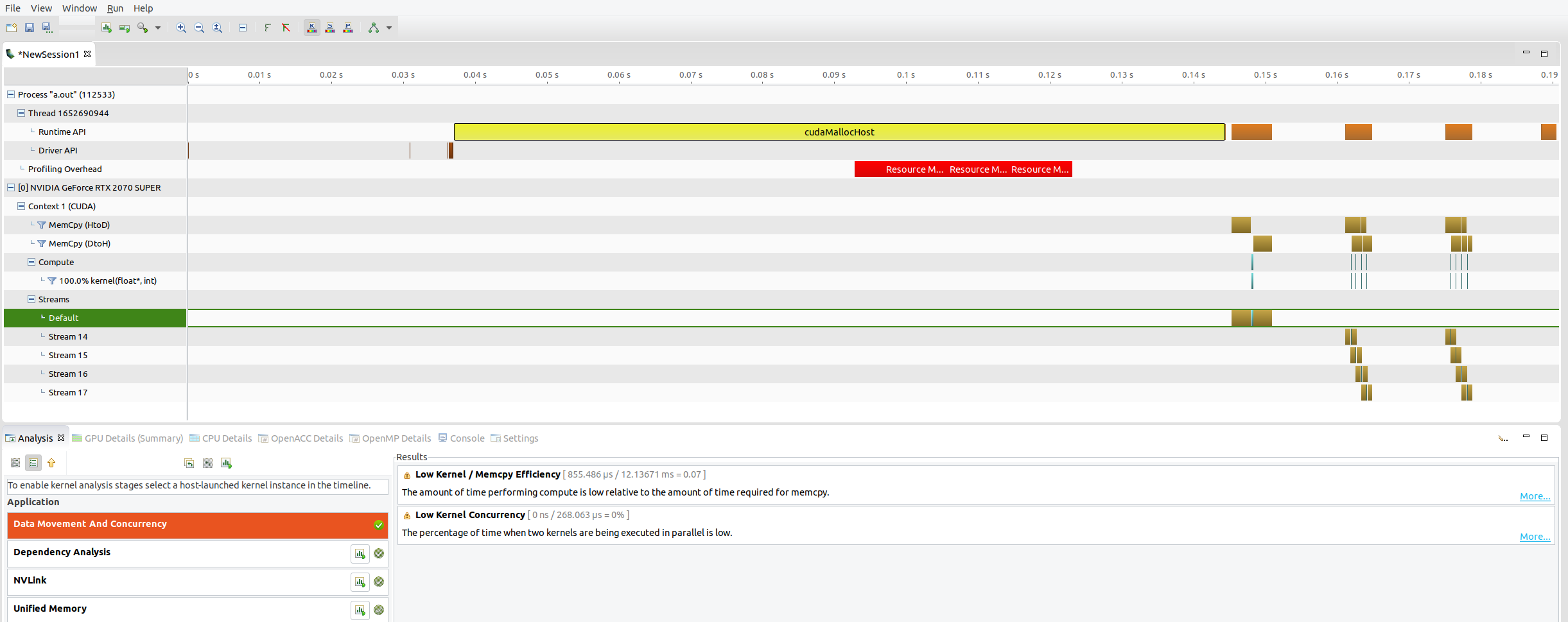
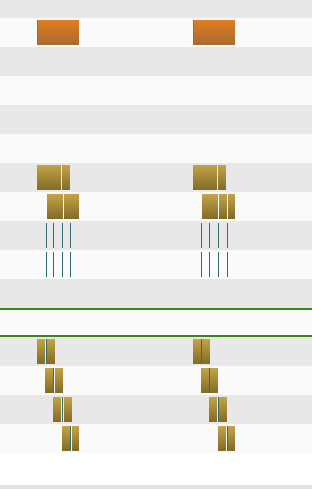
可以看到第二次GPU的调用和第三次的运行图是差不多的,甚至是几乎一样的,那么为啥第三次要比第二次运行时间短呢,没有想到什么比较好的解释。
=============================================
pytorch代码中pin_memory和non_blocking设置性能对比代码(CPU 10700k 5.0Ghz,GPU 2070 super):
import torch

import time

_x = torch.arange(1000000,2000000, device="cpu")

_y = torch.arange(2000000,3000000, device="cpu")

_z = torch.arange(3000000,4000000, device="cpu")

_k = torch.arange(3000000,4000000, device="cpu")

_p = torch.arange(3000000,4000000, device="cpu")

a_time = time.time()

x = _x.to("cuda:1")

b_time = time.time()

print("pytorch的显存管理机制,为保证公平在显存中预先申请空间","用时:", b_time - a_time)

del x

time.sleep(3)

a_time = time.time()

y = _y.to("cuda:1")

b_time = time.time()

print(b_time - a_time)

del y

time.sleep(3)

a_time = time.time()

z = _z.to("cuda:1", non_blocking=True)

b_time = time.time()

print(b_time - a_time)

del z

time.sleep(3)

_k = torch.Tensor.pin_memory(_k)

a_time = time.time()

k = _k.to("cuda:1", non_blocking=True)

b_time = time.time()

print("{:<10f}".format(b_time - a_time))

del k

time.sleep(3)

_p = torch.Tensor.pin_memory(_p)

a_time = time.time()

p = _p.to("cuda:1")

b_time = time.time()

print("{:<10f}".format(b_time - a_time))

del p

time.sleep(30)
运行结果:
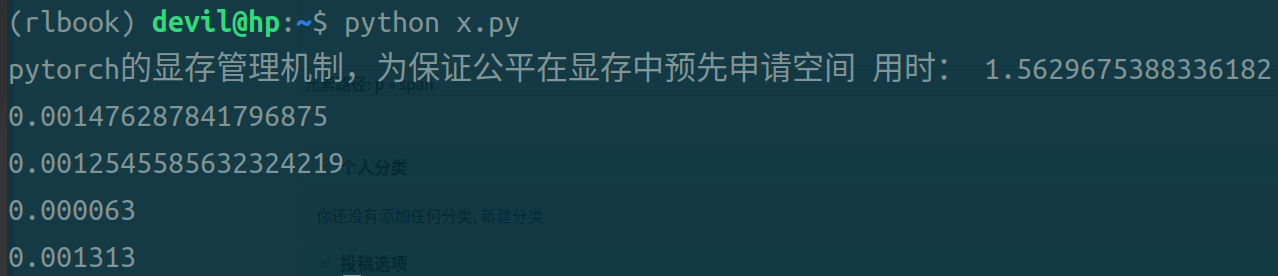
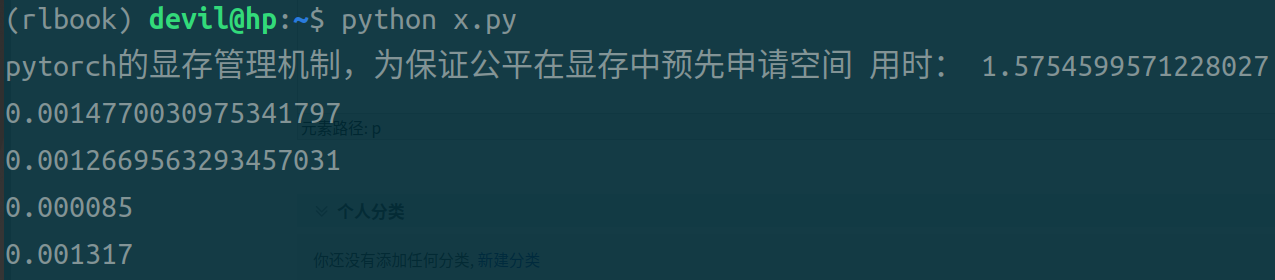
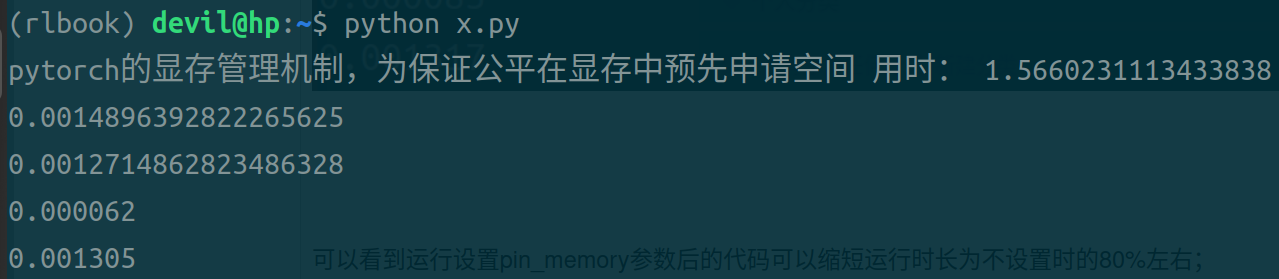
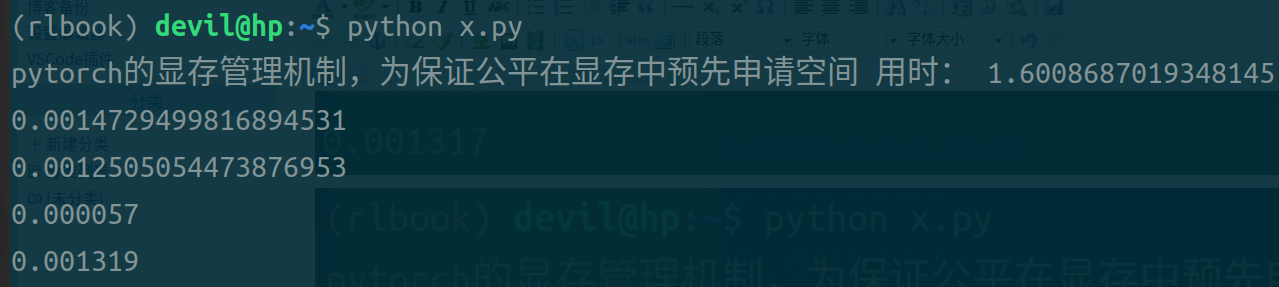
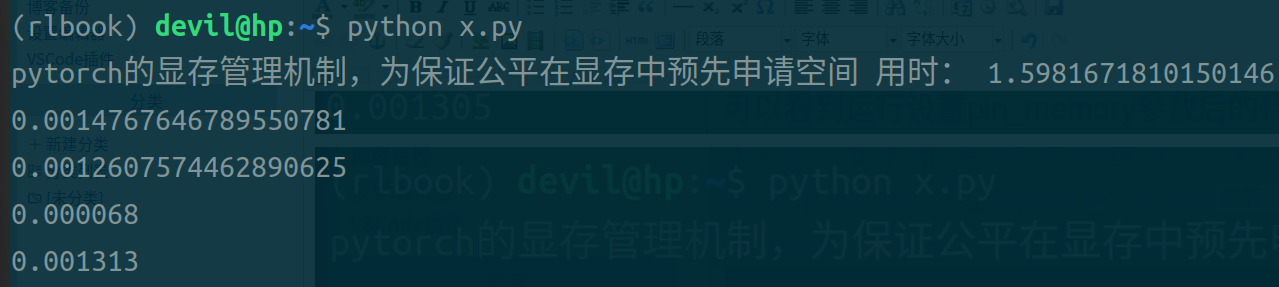
第一条时间是不使用pin_memory和non_blocking参数后的代码,用时最长;
第二条时间是设置non_blocking参数后的代码;
第三条时间是设置pin_memory和non_blocking参数后的代码;
第四条时间是设置pin_memory参数后的代码;
可以看到,同时设置pin_memory和non_blocking参数后的代码运行时间最短;单独设置pin_memory或non_blocking参数后的代码虽然也可以缩短时间但是缩小的幅度不大;只设置pin_memory参数后的代码比只设置non_blocking参数后的代码运行时间快,但是个人观点不认为这个数据可以说明pin_memory就比non_blocking的效果好,由于pytorch本身是对cuda的包装,不能把pytorch的运行效果和naive的CUDA代码等同来看,个人认为不管是是只设置pin_memory还是只设置non_blocking都是需要CPU进行一定的操作的,而在pytorch中很可能只要CPU启动开始做这样的操作都需要一定的时间花费,所以导致只加pin_memory参数和只加non_blocking参数与什么参数都不加的情况也没有太大的提速,而只有不需要CPU做任何操作的两个参数全加的情况还得到了极大的提速效果。
必须要注意的是,即使使用pin_memory和non_blocking参数其主要功能就是使CPU的操作和GPU的copy操作同时运行,其所提高的效率就是CPU避免了阻塞,但是如果CPU立刻再次调用GPU中的model则会隐式implicit的进行再次同步,这样就失去了设置参数的作用,为此给出例子:
不能实现CPU提速的操作,implicit的隐式的再次阻塞CPU:
_k = torch.Tensor.pin_memory(_k)
k = _k.to("cuda:1", non_blocking=True)
target=model(k) // 神经网络
cpu_fun()
可以提高CPU效率的形式:
_k = torch.Tensor.pin_memory(_k)
k = _k.to("cuda:1", non_blocking=True)
cpu_fun()
target=model(k) // 神经网络
其实说白了,就是不阻塞CPU后要CPU做一些和GPU无关联的操作后再必须和GPU同步的时候再同步,由此通过减少CPU阻塞来释放一定的CPU运算能力。
===========================================================
TensorFlow和pytorch中的pin_memory和non_blocking设置是做什么的,又是否有用???(续2)的更多相关文章
- [转] 理解CheckPoint及其在Tensorflow & Keras & Pytorch中的使用
作者用游戏的暂停与继续聊明白了checkpoint的作用,在三种主流框架中演示实际使用场景,手动点赞. 转自:https://blog.floydhub.com/checkpointing-tutor ...
- pytorch中tensorboardX的用法
在代码中改好存储Log的路径 命令行中输入 tensorboard --logdir /home/huihua/NewDisk1/PycharmProjects/pytorch-deeplab-xce ...
- 分别基于TensorFlow、PyTorch、Keras的深度学习动手练习项目
×下面资源个人全都跑了一遍,不会出现仅是字符而无法运行的状况,运行环境: Geoffrey Hinton在多次访谈中讲到深度学习研究人员不要仅仅只停留在理论上,要多编程.个人在学习中也体会到单单的看理 ...
- pytorch 中的重要模块化接口nn.Module
torch.nn 是专门为神经网络设计的模块化接口,nn构建于autgrad之上,可以用来定义和运行神经网络 nn.Module 是nn中重要的类,包含网络各层的定义,以及forward方法 对于自己 ...
- pytorch中如何使用DataLoader对数据集进行批处理
最近搞了搞minist手写数据集的神经网络搭建,一个数据集里面很多个数据,不能一次喂入,所以需要分成一小块一小块喂入搭建好的网络. pytorch中有很方便的dataloader函数来方便我们进行批处 ...
- Tensorflow、Pytorch、Keras的多GPU使用
Tensorflow.Pytorch.Keras的多GPU的并行操作 方法一 :使用深度学习工具提供的 API指定 1.1 Tesorflow tensroflow指定GPU的多卡并行的时候,也是可以 ...
- 【PyTorch】PyTorch中的梯度累加
PyTorch中的梯度累加 使用PyTorch实现梯度累加变相扩大batch PyTorch中在反向传播前为什么要手动将梯度清零? - Pascal的回答 - 知乎 https://www.zhihu ...
- PyTorch中的C++扩展
今天要聊聊用 PyTorch 进行 C++ 扩展. 在正式开始前,我们需要了解 PyTorch 如何自定义module.这其中,最常见的就是在 python 中继承torch.nn.Module,用 ...
- pytorch中DataLoader, DataSet, Sampler之间的关系
转自:https://mp.weixin.qq.com/s/RTv0cUWvc0kuXBeNoXVu_A 自上而下理解三者关系 首先我们看一下DataLoader.__next__的源代码长什么样,为 ...
- TensorFlow or PyTorch
既然你已经读到了这篇文章,我就断定你已经开始了你的深度学习之旅了,并且对人造神经网络的研究已经有一段时间了:或者也许你正打算开始你的学习之旅.无论是哪一种情况,你都是因为发现你陷入了困惑中,才找到了这 ...
随机推荐
- a标签的title属性 换行
使用 title 属性,可以让鼠标悬停在超链接上的时候,显示该超链接的文字注释. <a href="#" title = "123">超链接< ...
- CloseableHttpClient设置超时时间demo 未设置默认是2分钟
# CloseableHttpClient设置超时时间demo 未设置默认是2分钟 import org.apache.http.HttpHeaders; import org.apache.http ...
- Big Exponential Addition
Big Exponential Addition 给定一非负整数n计算2^n的值,一般而言把 2 乘上 n 次,就能得到答案.然而,当n特别大时,2^n要一次次地乘2可能稍嫌太慢,面对此一巨大问题利用 ...
- C# 设置PDF表单不可编辑、或提取PDF表单数据
PDF表单是PDF中的可编辑区域,允许用户填写指定信息.当表单填写完成后,有时候我们可能需要将其设置为不可编辑,以保护表单内容的完整性和可靠性.或者需要从PDF表单中提取数据以便后续处理或分析. 之前 ...
- Linux中的inode
inode是什么 一个文件由两部分组成:元信息和数据. 在Linux中,inode包含文件的元信息,具体来说有以下内容: Size 文件的字节数 Uid 文件拥有者的User ID Gid 文件的Gr ...
- CF1854E Games Bundles
乱搞题 设个 \(dp[i]\) 表示和为 \(i\) 的子序列个数,那么转移是容易的, \(dp[j]+=dp[j-i]\) ,然后就判下 \(dp[60]+dp[60-i]\) 是否大于 \(m\ ...
- 【基础计算】ESDF栅格距离图计算并行加速版
前言与参考 这一部分仅为路径规划源码及论文GPIR的一个小部分,但是有代码实现,第一次看的时候有些懵,所以特此记录:主要是设置好了栅格地图后,添加了障碍物后,对其的欧式距离计算和梯度计算等.原代码中为 ...
- [UG 二次开发 python] 导出BOM表(包含图片)
只导出最底层的零件,零件的属性已经设置好,零件的截图生成后,放在零件的同一个文件夹下 用到了 xlsxwriter # nx: threaded # 导出BOM表 __version__ = &quo ...
- MySQL与Redis数据双写一致性工程落地案例
复习-面试题 多个线程同时去查询数据库的这条数据,那么我们可以在第一个查询数据的请求上使用一个 互斥锁来锁住它. 其他的线程走到这一步拿不到锁就等着,等第一个线程查询到了数据,然后做缓存. 后面的线程 ...
- UE中返回值为数组的时候,无法传递Reference的问题
我如果要修改一个类或者结构体的成员变量, 那么我需要通过函数返回 也就是说Struct目前不能传递引用,只能传递备份