
css设置边框四角样式
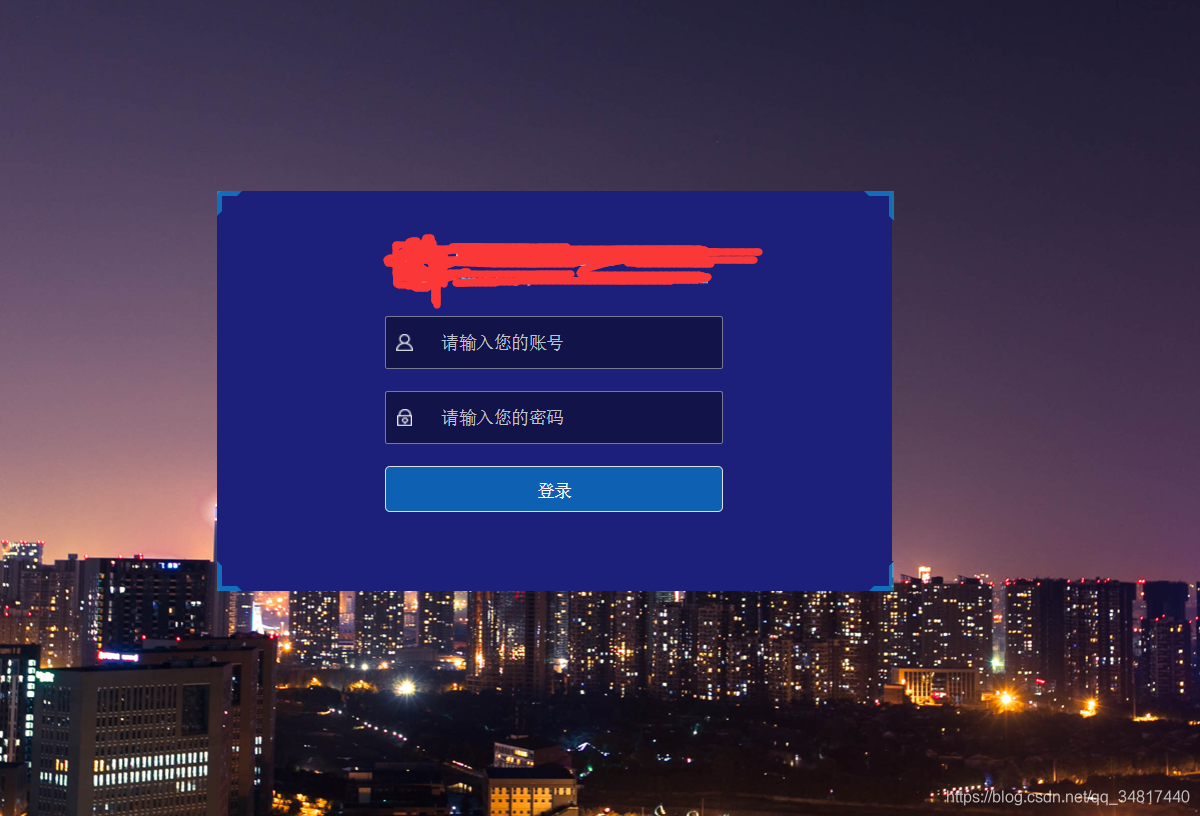
开发中使用css 伪类 是再常见不过的事情了,运用好了能轻松实现许多复杂的样式,大大减少使用图片消耗带宽的问题,今天我们就使用伪类来实现登录框的四角样式
html代码如下
   <div class="form backLoginForm">

      <el-form :model="formData" ref="form">

            <!-- 添加自己的form 内容 -->

      </el-form>

      <div class="angle angle-left-top"></div>

      <div class="angle angle-left-bottom"></div>

      <div class="angle angle-right-top"></div>

      <div class="angle angle-right-bottom"></div>

    </div>
css 样式
  .angle {

    position: absolute;

    width: 20px;

    height: 20px;

  }

  .angle-left-top {

    top: 0;

    left: 0;

    border-left: 4px solid rgba(7,185,255,0.5);

    border-top: 4px solid rgba(7,185,255,0.5);

  }

  .angle-left-top:after{

    content: "";

    border-radius: 0;

    font-size: 0;

    width: 0;

    height: 0;

    position: absolute;

    padding: 0;

    top:-4px;

    right:0;

    border-left: 4px solid transparent;

    border-right: 4px solid rgb(28,32,122);

    border-bottom: 4px solid rgb(28,32,122);;

  }

  .angle-left-top:before{

    content: "";

    border-radius: 0;

    font-size: 0;

    width: 0;

    height: 0;

    position: absolute;

    padding: 0;

    bottom:0;

    left:-4px;

    border-top: 4px solid transparent;

    border-right: 4px solid rgb(28,32,122);

    border-bottom: 4px solid rgb(28,32,122);;

  }

  .angle-right-top {

    top: 0;

    right: -2px;

    border-right: 4px solid rgba(7,185,255,0.5);

    border-top: 4px solid rgba(7,185,255,0.5);

  }

  .angle-right-top:after{

    content: "";

    border-radius: 0;

    font-size: 0;

    width: 0;

    height: 0;

    position: absolute;

    padding: 0;

    bottom:0;

    right:-4px;

    border-right: 4px solid transparent;

    border-left: 4px solid rgb(28,32,122);

    border-bottom: 4px solid rgb(28,32,122);;

  }

  .angle-right-top:before{

    content: "";

    border-radius: 0;

    font-size: 0;

    width: 0;

    height: 0;

    position: absolute;

    padding: 0;

   top:-4px;

    left:0;

    border-top: 4px solid transparent;

    border-left: 4px solid rgb(28,32,122);

    border-bottom: 4px solid rgb(28,32,122);;

  }

  .angle-left-bottom {

    bottom: 0;

    left: 0;

    border-bottom: 4px solid rgba(7,185,255,0.5);

    border-left: 4px solid rgba(7,185,255,0.5);

  }

  .angle-left-bottom:after{

    content: "";

    border-radius: 0;

    font-size: 0;

    width: 0;

    height: 0;

    position: absolute;

    padding: 0;

    bottom:-4px;

    right:0;

    border-left: 4px solid transparent;

    border-top: 4px solid rgb(28,32,122);

    border-right: 4px solid rgb(28,32,122);;

  }

  .angle-left-bottom:before{

    content: "";

    border-radius: 0;

    font-size: 0;

    width: 0;

    height: 0;

    position: absolute;

    padding: 0;

    top:0;

    left:-4px;

    border-left: 4px solid transparent;

    border-top: 4px solid rgb(28,32,122);

    border-right: 4px solid rgb(28,32,122);;

  }

  .angle-right-bottom {

    bottom: 0;

    right: -2px;

    border-right: 4px solid rgba(7,185,255,0.5);

    border-bottom: 4px solid rgba(7,185,255,0.5);

  }

  .angle-right-bottom:after{

    content: "";

    border-radius: 0;

    font-size: 0;

    width: 0;

    height: 0;

    position: absolute;

    padding: 0;

    bottom:-4px;

    left:0;

    border-right: 4px solid transparent;

    border-top: 4px solid rgb(28,32,122);

    border-left: 4px solid rgb(28,32,122);;

  }

  .angle-right-bottom:before{

    content: "";

    border-radius: 0;

    font-size: 0;

    width: 0;

    height: 0;

    position: absolute;

    padding: 0;

    top:0;

    right:-4px;

    border-right: 4px solid transparent;

    border-top: 4px solid rgb(28,32,122);

    border-left: 4px solid rgb(28,32,122);;

  }
- 最终实现
css设置边框四角样式的更多相关文章
- 使用CSS设置边框和背景
一.设置边框 1.边框样式 属性 说明 border-width 设置边框的宽度 boder-style 设置边框的样式 border-color 设置边框的颜色 a.border-width属性 自 ...
- CSS设置边框、符号、背景样式、链接属性
一.CSS边框空白 padding-top:10px; /*上边框留空白*/ padding-right:10px; /*右边框留空白*/ padding-bottom:10px; /*下边框留空白* ...
- 详解CSS设置默认字体样式
浏览器默认的样式往往在不同的浏览器.不同的语言版本甚至不同的系统版本都有不同的设置,这就导致如 果直接利用默认样式的页面在各个浏览器下显示非常不一致,于是就有了类似YUI的reset之类用来尽量重写浏 ...
- css设置网页打印样式
有三种方法 1. 为屏幕显示和打印分别准备一个css文件,如下所示: 用于屏幕显示的css: <link rel="stylesheet" href="css/n ...
- css设置边框阴影;box-shadow的使用
html代码: <!DOCTYPE html> <html> <head> <meta charset="UTF-8"> <t ...
- 使用css设置边框背景图片
使用css的特有属性,给不同的盒子添加边框图片. 为什么会有这一场景呢.因为,UI给我们前端的边框图片可能未必适合我们当前的内容. 这里我们主要使用到的属性有: border-image-source ...
- CSS设置input默认样式
HTML <ul class="box"> <li> <input type="checkbox" name="vehi ...
- CSS——设置边框渐变色
前言 最近在写一个typecho的主题,刚好遇到这样一个问题就记录下吧 步骤 这是一个CSS的过度效果,效果如下. 代码 .object{ width: 50px; height: 50px; bac ...
- CSS设置浏览器滚动条样式
/*定义滚动条高宽及背景 高宽分别对应横竖滚动条的尺寸*/ ::-webkit-scrollbar { width: 5px; height: 110px; background-color: #F5 ...
- css 设置滚动条的样式
/*移动端显示滚动条*/ .layui-table-body::-webkit-scrollbar { -webkit-appearance: none; } .layui-table-body::- ...
随机推荐
- Android笔记--基础的连接数据库的操作
start.java package com.example.myapplication; import androidx.activity.result.ActivityResult; import ...
- D - Swap Free Gym - 102423D 二分图性质:补图最大团 = 点的个数 - 最大匹配数
题意:给你一个串的某些全排列,没有重的,让你求一个最大的集合能有多少个元素,集合的满足条件:交换一个串的任意两个位置上的字母,不能变成集合里的另一个串. 思路:如果一个串不能通过交换一次字母位置变成另 ...
- 【WEB UI自动化】Selenium爬取用户的知乎回答时遇到10002:请求参数异常,请升级客户端后重试
这里分享一个低配版知乎爬虫,利用了Selenium模块 爬取的过程中遇到了10002:请求参数异常,请升级客户端后重试,调用知乎某用户的回答API返回的HTTP状态码是403 Forbidden 之后 ...
- Rancher系列文章-Rancher v2.6使用脚本实现导入集群
概述 最近在玩 Rancher, 先从最基本的功能玩起, 目前有几个已经搭建好的 K8S 集群, 需要批量导入, 发现官网已经有批量导入的文档了. 根据 Rancher v2.6 进行验证微调后总结经 ...
- vue cli3中配置生产环境、开发环境、测试环境
首先在packjson中配置 "scripts": { "serve": "vue-cli-service serve", //调用开发ap ...
- kubernetes(k8s)部署 Metrics Server 资源
资源使用指标,例如容器 CPU 和内存使用率,可通过 Metrics API 在 Kubernetes 中获得.这些指标可以直接被用户访问,比如使用 kubectl top 命令行,或者被集群中的控制 ...
- Burp Suite最新版本专业版激活2022.12.1附原文件
Burp Suite 攻击web 应用程序的集成平台 Burp Suite 是用于攻击web 应用程序的集成平台,包含了许多工具.Burp Suite为这些工具设计了许多接口,以加快攻击应用程序的过程 ...
- LeeCode 字符串问题(一)
剑指Offer 05: 替换空格 题目描述 请实现一个函数,把字符串 s 中的每个空格替换成"%20" 建立模型 这就是一个遍历字符串元素替换的问题 需要注意的就是Python/J ...
- ShardingJDBC配置
Sharding-JDBC定位为轻量级Java框架,在Java的JDBC层提供的额外服务. 它使用客户端直连数据库,以jar包形式提供服务,无需额外部署和依赖,可理解为增强版的JDBC驱动,完全兼容J ...
- TiDB在科捷物流神州金库核心系统的应用与实践
导读:在经过了近半年的测试验证和迁移准备之后,神州金库3.0核心系统 WMS 正式从 MySQL 迁移到了分布式 HTAP 数据库 TiDB,上线后不久即经历了第一次双11的考验,TiDB的性能和稳定 ...