
html+css:小米顶部菜单+二级菜单
1、源码
<!DOCTYPE html>

<html lang="en">

<head>

    <meta charset="UTF-8">

    <title>Title</title>

    <style>

        .header{

            /*height:38px;*/

            background-color: #333;

        }

        .header .menu{

            float: left;

            color: white;

            /*height: 38px;*/

            /*!*垂直居中*!*/

            /*line-height: 38px;*/

        }

        .header .account{

            float: right;

            color: white;

            /*height: 38px;*/

            /*line-height: 38px;*/

        }

        /*将部件放到容器中,实现居中*/

        .container{

            width: 1000px;

            margin-top: 0;

            margin-left: auto;

            margin-right: auto;

        }

        .header a{

            color:#b0b0b0;

            line-height: 40px;

            display: inline-block;

            /*内部有了高度,外部就不用设置了*/

            font-size: 12px;

            margin-right: 10px;

            text-decoration: none;

        }

        .header a:hover{

            color: white;

        }

        .body{

            margin: 0;

        }

        .sub-header{

          height: 100px;

          /*background-color: #b0b0b0;*/

        }

        .sub-header .ht{

          height: 100px;

        }

        .sub-header .logo{

            width: 234px;

            float:left;

            /*border: 1px solid red;*/

        }

        .sub-header .menu-list{

          float: left;

            line-height: 100px;

            /*border: 1px solid red;*/

        }

        .sub-header .menu-list a{

          display: inline-block;

            padding: 0 10px;

            color: #333333;

            font-size: 16px;

            /*去掉标签的下划线*/

            text-decoration: none;

        }

        /*放上鼠标,改变颜色*/

        .sub-header .menu-list a:hover{

            color:#ff6700;

        }

        .sub-header .search{

          float: right;

        }

        .sub-header .logo a{

            /*图片居中只能使用内外边距*/

            margin-top: 22px;

            display:inline-block;

        }

        .sub-header .logo a img{

            height: 56px;width: 56px

        }

    </style>

</head>

<body >

    <div class = "header">

        <div class="container">

            <div class = "menu">

                <a href="https://www.mi.com/index.html">小米商城</a>

                <a href="https://www.mi.com/index.html">MIUI</a>

                <a href="https://www.mi.com/index.html">云服务</a>

                <div style="width: 200px;text-align: center"></div>

            </div>

            <div class = "account">

                <a href="https://www.mi.com/index.html">登录</a>

                <a href="https://www.mi.com/index.html">注册</a>

            </div>

            <div style="clear: both"></div>

        </div>

    </div>

    <div class="sub-header">

        <div class="container">

            <div class = "ht  logo">

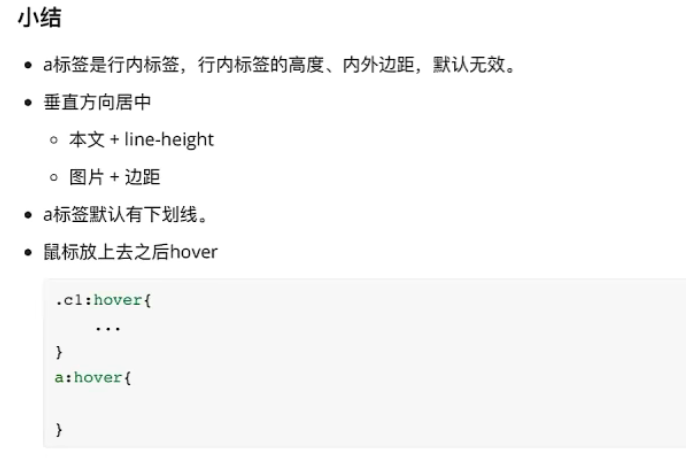
              <!--a标签默认为行内标签,设置高度、边距无效。->变成块级标签 || 块级+行内-->

              <a href="https://www.mi.com/index.html">

                <img src="/static/xiaomi.png">

              </a>

            </div>

            <div class="ht menu-list">

                <a href="https://www.mi.com/index.html" >小米手机</a>

                <a href="https://www.mi.com/index.html">电视</a>

                <a href="https://www.mi.com/index.html">笔记本</a>

            </div>

            <div class = "ht search"></div>

            <div class="clear:both"></div>

        </div>

    </div>

</body>

</html>
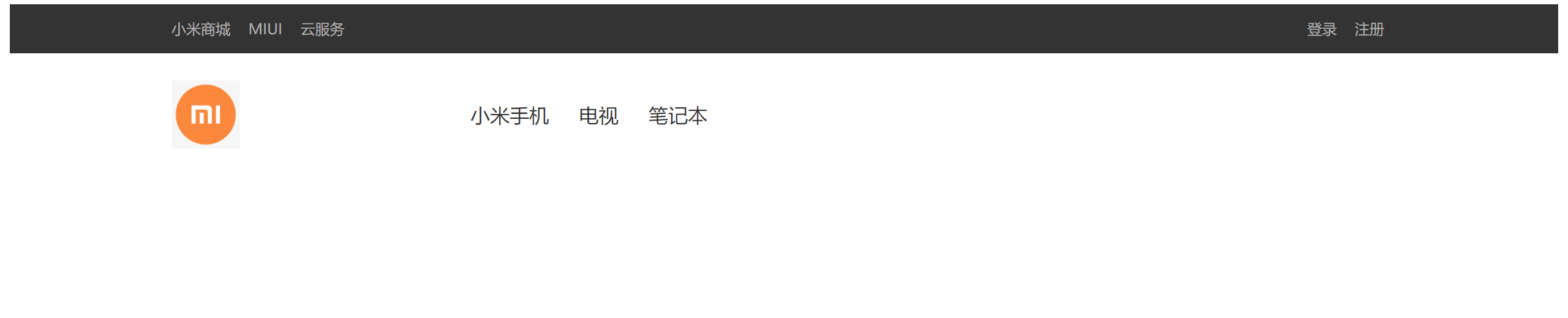
2、效果展示
3、小结
html+css:小米顶部菜单+二级菜单的更多相关文章
- 个人练习:使用HTML+CSS制作二级菜单
最近一直在学习HTML+CSS,刚看完如果制作下拉菜单部分,就想着做一个练练手. 先上成品图: 就是上面这个效果,横向菜单选项能点击,鼠标放在上面也能展开二级菜单,二级菜单也能点击,点击后就会在底下的 ...
- 纯css实现鼠标感应弹出二级菜单
<!DOCTYPE html PUBLIC "-//W3C//DTD XHTML 1.0 Transitional//EN" "http://www.w3.org/ ...
- html和css实现一级菜单和二级菜单学习笔记
实现一级菜单: <!DOCTYPE HTML PUBLIC "-//W3C//DTD HTML 4.01 Transitional//EN"> <html> ...
- css案例学习之ul li dl dt dd实现二级菜单
效果 代码实现 <!DOCTYPE html PUBLIC "-//W3C//DTD XHTML 1.0 Transitional//EN" "http://www ...
- CSS之实现二级菜单动态出现
一直觉得二级菜单的出现效果仅仅有js才干控制.今天研究了一下阿里巴巴站点的首页,才发现,原来二级菜单的动态显示也能够使用CSS来控制,原来对CSS是静态的东西一直是误解它了,CSS也能够实现动态的效果 ...
- HTML+CSS实现导航栏二级下拉菜单完整代码
工具是vs code 代码如下 <!DOCTYPE html> <html lang="en"> <head> <meta charset ...
- CSS制作二级菜单时,二级菜单与一级菜单不对齐
效果如图: 部分代码如图: <li><a href="#" target="_blank">关于我们</a> <ul& ...
- 纯CSS实现带返回顶部右侧悬浮菜单
这是我做个人网页的时候加上的带返回顶部右侧悬浮菜单效果,如下图, 使用工具是Hbuilder. 代码如下: <!DOCTYPE html> <html> <head> ...
- css导航菜单二级显示的问题
m项目中出现了二级菜单的标签是在导航的里面,用css ul>li:hover ul>li>ul>li 这样子实现不了鼠标经过时导航里二级菜单的显示,这里个人感觉是冲突了.最后通 ...
- CSS导航菜单(二级菜单)
index.html <div class="nav"> <ul> <li> <a href="#">Java& ...
随机推荐
- [转帖]7.5 TiKV 磁盘空间占用与回收常见问题
https://book.tidb.io/session4/chapter7/compact.html TiKV 作为 TiDB 的存储节点,用户通过 SQL 导入或更改的所有数据都存储在 TiKV. ...
- [转帖]centos7离线安装postgresql13
https://www.cnblogs.com/summer-88/p/15341918.html 在一台可以联网的centos上安装postgresql源 yum install -y https: ...
- [转帖]unmatched(riscv64)上编译,安装和移植SPEC CPU 2006
https://zhuanlan.zhihu.com/p/429399630 Linux ubuntu 5.11.0-1021-generic #22-Ubuntu SMP Tue Sep 28 15 ...
- [转帖]50年来Intel CPU变化有多大?频率从0.75MHz提升到5.2GHz
https://m.baidu.com/bh/m/detail/ar_9297450181050583423?data_from=lemon 今天(11月15日)是Intel推出4004处理器50周年 ...
- 如何去掉 node.js 获取MySQL数据产生的RowDataPacket
如何去掉 node.js 获取MySQL数据产生的RowDataPacket 利用JSON.stringify()把对象转为对象字符串,可去掉RowDataPacket. router.post('/ ...
- 在Unity中使用SQLite保存配置表数据(For Lua)
在Lua中使用sqlite Lua版本Sqlite文档:http://lua.sqlite.org/index.cgi/doc/tip/doc/lsqlite3.wiki sqlite官网:https ...
- springboot集成swagger之knife4j实战(升级版)
官方文档链接:https://doc.xiaominfo.com/ 一.Knifej和swagger-bootstrap-ui对比 Knife4j在更名之前,原来的名称是叫swagger-bootst ...
- C++ 通过SQLite实现命令行工具
本文介绍了一个基于 C++.SQLite 和 Boost 库的简单交互式数据库操作 Shell.该 Shell 允许用户通过命令行输入执行各种数据库操作,包括添加.删除主机信息,设置主机到特定主机组, ...
- 从嘉手札<2023-10-16>
一.商君书 1)更法 商鞅和甘龙.杜挚同秦孝公商量变法. 后两者认为变法会动移已有的社会结构,"圣人不易民而教,知者不变法而治""法古无过,循礼无邪" 但商鞅( ...
- 安装kali linux操作系统(转) - 初学者系列 - 学习者系列文章
前段时间想到操作系统安全问题,所以对操作系统的防火墙和安全软件都进行了安装.然后,涉及到Linux系统的安全测试问题,所以找到了Linux系统里的安全测试的版本Kali Linux系统.本文仅对该系统 ...