
软件测试:lab1.Junit and Eclemma
软件测试:lab1.Junit and Eclemma
Task:
- Install Junit(4.12), Hamcrest(1.3) with Eclipse
- Install Eclemma with Eclipse
- Write a java program for the triangle problem and test the program with Junit.
a) Description of triangle problem:
Function triangle takes three integers a,b,c which are length of triangle sides; calculates whether the triangle is equilateral, isosceles, or scalene.
Report:
Junit:http://mvnrepository.com/artifact/junit/junit/4.12
Hamcrest:http://mvnrepository.com/artifact/org.hamcrest/hamcrest-all/1.3
Eclemma:https://sourceforge.net/projects/eclemma/
1. Junit(4.12), Hamcrest(1.3)安装与配置
eclipse中新建Java项目scs2015,再在该项目下新建目录lib,将hamcrest-all-1.3.jar,junit-4.12.jar拷贝到lib目录下,并导入项目里;
2. Eclemma的安装与配置
eclipse中—点击Help菜单—Install New Software,在弹出的对话框中,点击Add,之后点击 Archive,找到你下载好的 Eclemma.zip 资源文件,按照提示一步一步的安装重新启动 eclipse就完成了;
3. Test triangle program with Junit
点击安装Eclemma后工具栏上新增的覆盖测试按钮,来使用Eclemma测试Java程序
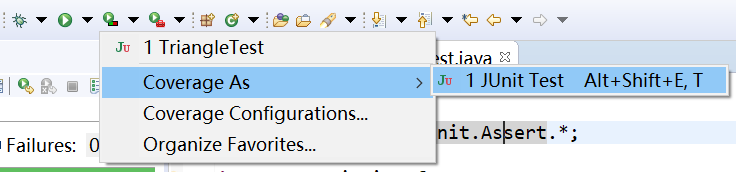
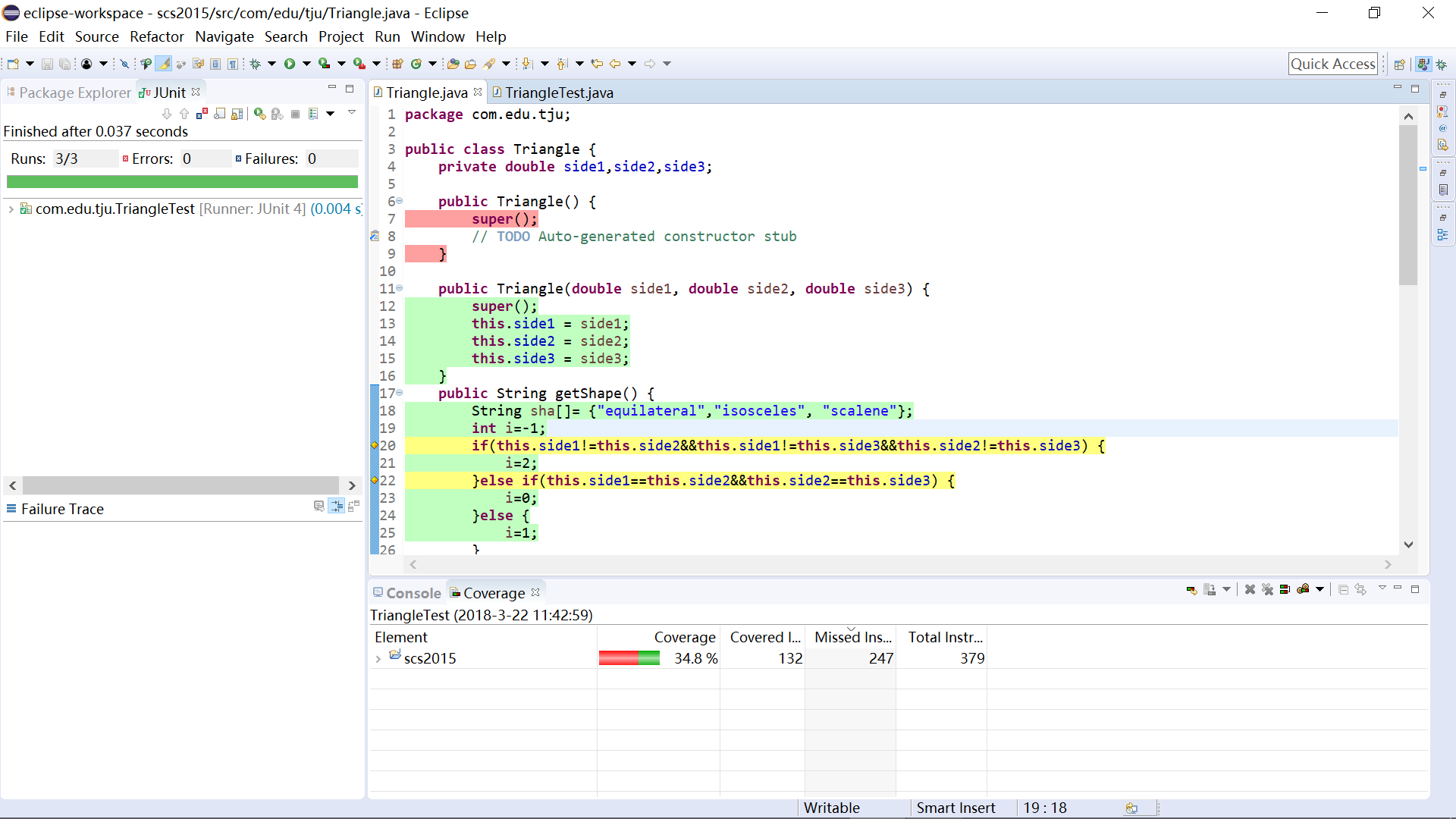
测试结果如上图所示。
在 Java 编辑器中,EclEmma 用不同的色彩标示了源代码的测试情况。其中,绿色的行表示该行代码被完整的执行,红色部分表示该行代码根本没有被执行,而黄色的行表明该行代码部分被执行。黄色的行通常出现在单行代码包含分支的情况,例如上图中的 20 行就显示为黄色。
除了在源代码编辑窗口直接进行着色之外,EclEmma 还提供了一个单独的视图来统计程序的覆盖测试率。
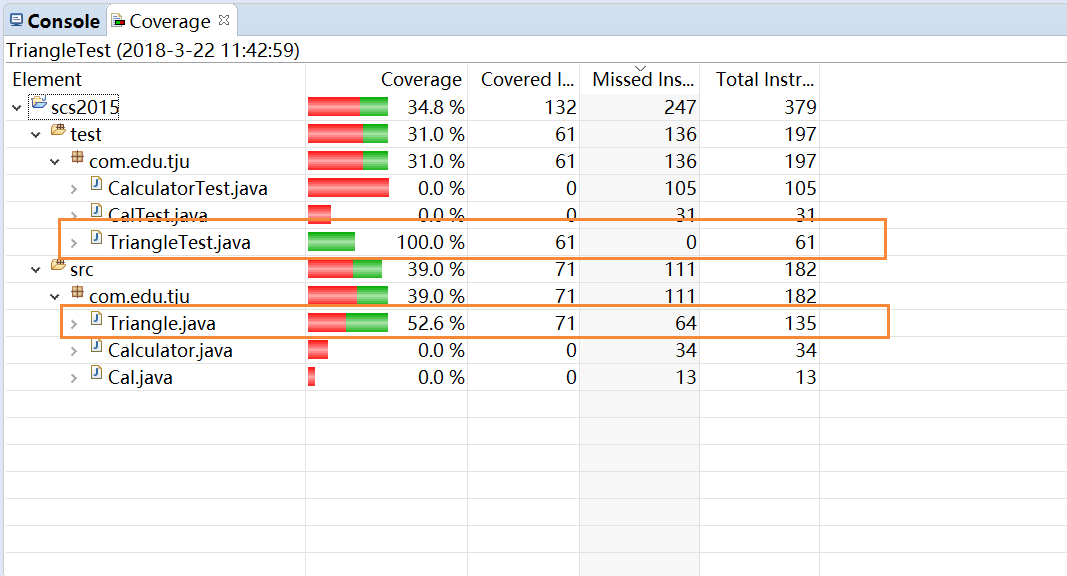
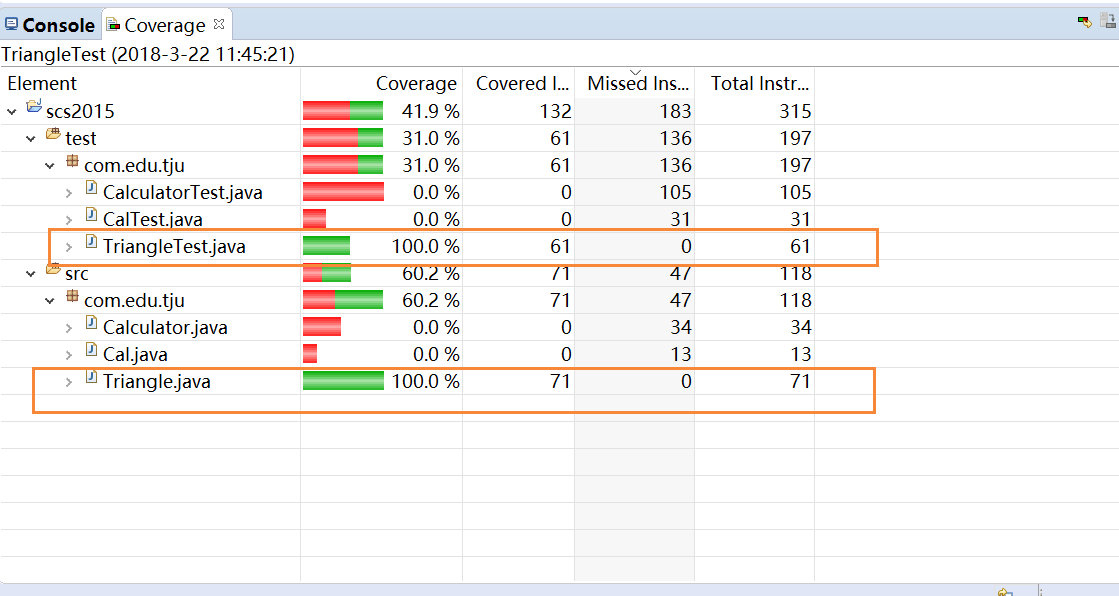
由于Triangle.java中还有一些get set 方法行没有被测试覆盖,上图Coverage为52.6%,尝试删去多余代码行后视图显示如下:
代码附录:
Triangle.java
public class Triangle {
    private double side1,side2,side3;

    public Triangle(double side1, double side2, double side3) {
        super();
        this.side1 = side1;
        this.side2 = side2;
        this.side3 = side3;
    }

    public String getShape() {
        String sha[]= {"equilateral","isosceles", "scalene"};
        int i=-1;
        if(this.side1!=this.side2&&this.side1!=this.side3&&this.side2!=this.side3) {
            i=2;
        }else if(this.side1==this.side2&&this.side2==this.side3) {
            i=0;
        }else {
            i=1;
        }
        return sha[i];
    }
}
TriangleTest.java
public class TriangleTest {

    @Test
    public void testEquilateral() {
        double a1=1,a2=1,a3=1;
        Triangle tria=new Triangle(a1, a2, a3);
        assertEquals("equilateral",tria.getShape());
    }

    @Test
    public void testIsosceles() {
        double b1=1,b2=1,b3=1.2;
        Triangle trib=new Triangle(b1, b2, b3);
        assertEquals("isosceles",trib.getShape());
    }

    @Test
    public void testScalene() {
        double c1=3,c2=4,c3=5;
        Triangle tric=new Triangle(c1, c2, c3);
        assertEquals("scalene",tric.getShape());
    }

}
软件测试:lab1.Junit and Eclemma的更多相关文章
- 软件测试Lab 1 Junit and Eclemma
首先安装eclipse 然后下载hamcrest-core-1.3.jar,下载地址:http://mvnrepository.com/artifact/org.hamcrest/hamcrest-c ...
- ST Lab1 junit test
代码地址: https://github.com/newff/st-lab1 Tasks: Install Junit(4.12), Hamcrest(1.3) with Eclipse Insta ...
- 单元测试系列:如何使用JUnit+JaCoCo+EclEmma完成单元测试
更多原创测试技术文章同步更新到微信公众号 :三国测,敬请扫码关注个人的微信号,感谢! 原文链接:http://www.cnblogs.com/zishi/p/6726664.html -----如 ...
- 使用junit和eclemma进行简单的代码测试
1.Junit和Hamcrest的安装 可以在https://mvnrepository.com/上面下载所需要的Junit和Hamcrest的jar包,然后在项目中新建一个lib文件夹,将下载好的j ...
- 【软件测试】Junit入门
写在前面:本博客为本人原创,严禁任何形式的转载!本博客只允许放在博客园(.cnblogs.com),如果您在其他网站看到这篇博文,请通过下面这个唯一的合法链接转到原文! 本博客全网唯一合法URL:ht ...
- Software Testing Techniques LAB 01: test Junit and Eclemma
1. Installing 1. Install Junit and hamcrest First, I download the Junit-4.12.jar and hamcrest-core- ...
- 软件测试作业3 — PrintPrimes()
一.Use the following method printPrimes() for questions a–d. (a) Draw the control flow graph for the p ...
- 软件测试-homework3
printPrime()代码: public static void printPrimes (int n) { int curPrime; // Value currently considered ...
- 软件测试技术作业3---PrintPrimes()
一.代码部分: private static void printPrimes (int n) { int curPrime; // Value currently considered for pr ...
随机推荐
- 3D数学基础(三)矩阵
3D引擎中对于矩阵的使用非常多,介绍这些知识也是为了告诉开发者原理,更有助于开发者编写逻辑. (1)固定流水线 各种坐标系之间的转化是通过矩阵相乘得到的,这里面就涉及到了3D固定流水线.作为3D游戏开 ...
- 使用hibernate原生sql查询,结果集全为1的问题解决
问题如下: String sqlTest ="select summary,summaryno from F_Summary"; List<Map<Object, Ob ...
- Python学习笔记,day4
Python学习第四天 一.装饰器 函数调用顺序: 其他高级语言类似,Python 不允许在函数未声明之前,对其进行引用或者调用 高阶函数: 满足下列条件之一就可成函数为高阶函数 某一函数当做参数传入 ...
- 【译著】Code First :使用Entity. Framework编程(5)
第五章 对数据库映射使用默认规则与配置 到目前为止我们已经领略了Code First的默认规则与配置对属性.类间关系的影响.在这两个领域内,Code First不仅影响模型也影响数据库.在这一章,你将 ...
- 20164301 Exp2 后门原理与实践
Exp2 后门原理与实践 1.实验内容 (1)使用netcat获取主机操作Shell,cron启动 (2)使用socat获取主机操作Shell, 任务计划启动 (3)使用MSF meterprete ...
- canvas绘图——根据鼠标位置进行缩放的实现原理
以任一点 A 缩放的基本原理: A 点为鼠标位置,正常放大是以原点放大,那么放大后 A 点就会变到 A1 点的位置 x1, y1.然后再将画布进行位移,将 A1 的位置移动到 A,则完成以 A 点缩放 ...
- C# DataView数据处理的几种方法
1.找到刚删除的所有列 DataView dv = dt.DefaultView; dv.Delete(); dv.Delete(); //找出所有刚删除掉的行 1.5 dv.RowStateFilt ...
- java web(一):tomcat服务器的安装和简单介绍,与eclipse关联
一:下载tomcat安装包和安装 这个百度一下就可以了. 安装完以后进入tomcat的安装路径查看 如图所示:有几个目录简单介绍下 bin目录: 存放运行tomcat服务器的相关命令. conf目 ...
- Python error: Microsoft Visual C++ 9.0 is required (Unable to find vcvarsall.bat)解决方案
error: Microsoft Visual C++ 9.0 is required (Unable to find vcvarsall.bat). Get it - 解决方案 python通过pi ...
- 解决thinkPHP3.2.3使用Smarty模板后无法使用系统常量问题
https://blog.csdn.net/u014520745/article/details/52029411 在ThinkPHP/Library/Think/View.class.php 输出模 ...