
iOS开发基础-九宫格坐标(2)之模型
在iOS开发基础-九宫格(1)中,属性变量 apps 是从plist文件中加载数据的,在 viewDidLoad 方法中的第20行、26行中,直接通过字典的键名来获取相应的信息,使得 ViewController 直接与数据打交道,如果频繁这样使用,可能会不小心把键名写错,而程序却不会报错。因此,考虑把字典数据转换成一个模型,把数据封装到模型中去,让 ViewController 与模型交互,而不与数据直接打交道。
修改iOS开发基础-九宫格(1)中的代码:
一、字典转模型介绍
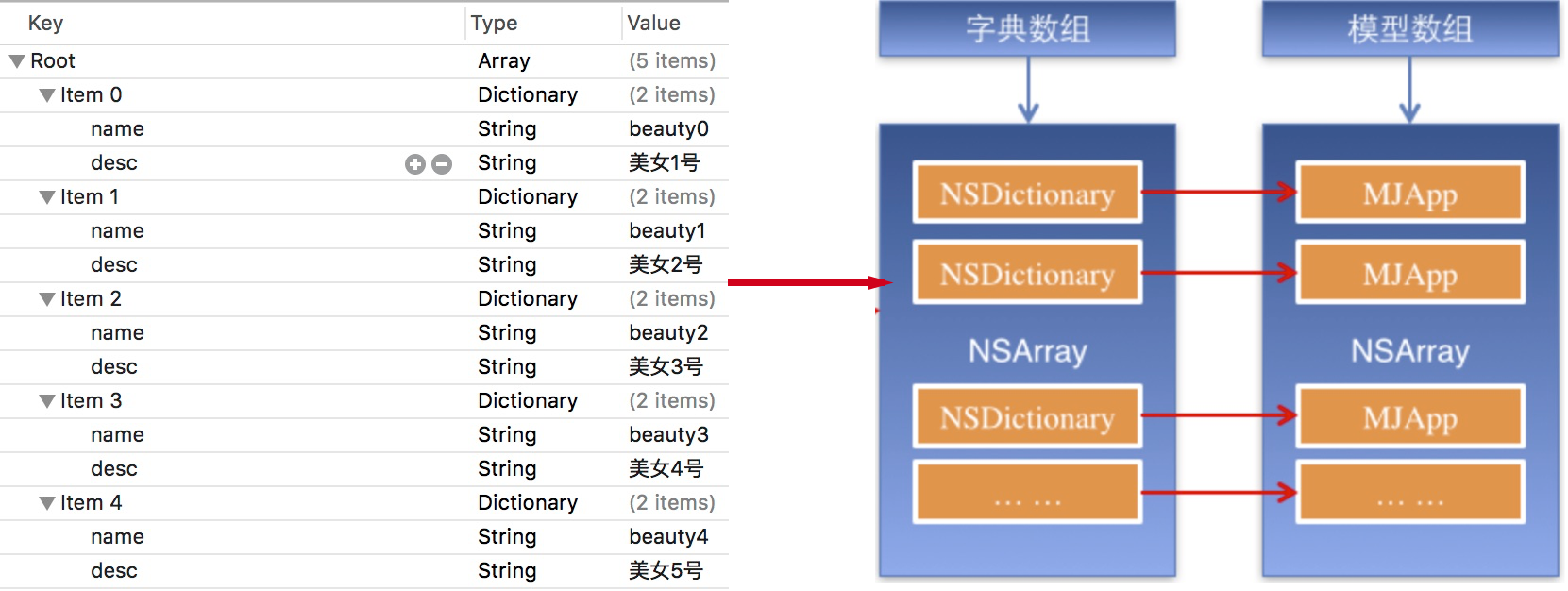
字典转模型的好处:
1)降低代码的耦合度;
2)将字典转模型部分代码集中在一处处理,降低代码出错概率;
3)程序中,直接对模型的属性进行操作,提供编码效率。
4)调用时,不必关心模型内部的任何细节。
二、代码实例
新建一个类命名为 WJQAppInfo 继承自 NSObject ,在 WJQAppInfo.h 头文件中声明公共的属性和方法:
 //WJQAppInfo.h,模型类

 #import <UIKit/UIKit.h>

 @interface WJQAppInfo : NSObject

 @property (nonatomic, copy) NSString *name;     //图片名称

 @property (nonatomic, copy) NSString *desc;     //图片信息描述

 @property (nonatomic, strong, readonly) UIImage *image;

 - (instancetype)initWithDict:(NSDictionary *)dict;

 + (instancetype)appInfoWithDict:(NSDictionary *)dict;       //工厂方法

 @end
定义属性时,会自动生成 setter 和 getter 方法,以及一个带下划线的成员变量。如果是 readonly 属性,则只生成 getter 方法,也没哟成员变量。
instancetype 会让编译器检查实例化对象的准确类型,其只能用于返回类型,不能当做参数使用。
WJQAppInfo 类的实现文件代码如下:
 //WJQAppInfo.m

 #import "WJQAppInfo.h"

 @interface WJQAppInfo ()

 {

     UIImage *_imageABC;

 }

 @end

 @implementation WJQAppInfo

 - (instancetype)initWithDict:(NSDictionary *)dict {

     self = [super init];

     if (self) {

         self.name = dict[@"name"];

         self.desc = dict[@"desc"];

     }

     return self;

 }

 + (instancetype)appInfoWithDict:(NSDictionary *)dict {

     return [[self alloc] initWithDict:dict];

 }

 - (UIImage *)image {

     if (!_imageABC) {

         _imageABC = [UIImage imageNamed:self.name];

     }

     return _imageABC;

 }

 @end
在 ViewController.m 文件中导入 WJQAppInfo 头文件。
修改属性 apps 的 getter 方法,代码如下:
 //字典转换成WJQAppInfo模型

 - (NSArray *)apps {

     if (!_apps) {

         NSString *path = [[NSBundle mainBundle] pathForResource:@"Data" ofType:@"plist"];

         //_apps = [NSArray arrayWithContentsOfFile:path];

         NSArray *array = [NSArray arrayWithContentsOfFile:path];

         NSMutableArray *arrayM = [NSMutableArray array];

         for (NSDictionary *dict in array) {

             //遍历数组,将数据在的字典依次转化为WJQAppInfo对象,并添加到临时对象arrayM中去

             //用字典来实例化对象的工厂方法

             [arrayM addObject:[WJQAppInfo appInfoWithDict:dict]];

         }

         _apps = arrayM;

     }

     return _apps;

 }
修改 viewDidLoad 代码如下:
 - (void)viewDidLoad {

     [super viewDidLoad];

     int totalColumn = ;        //3列

     CGFloat margin = (self.view.frame.size.width - totalColumn*appViewWidth) / (totalColumn + );

     int count = self.apps.count;

     NSLog(@"%d", count);

     for (int i = ; i < count; i++) {

         int row = i/totalColumn;        //行号,从0开始

         int column = i%totalColumn;     //列号,从0开始

         CGFloat appViewX = margin + (margin + appViewWidth) * column;       //子视图的X坐标

         CGFloat appViewY = margin + (margin + appViewHeight) * row;      //子视图的Y坐标

         //创建UIView控件

         UIView *appView = [[UIView alloc] initWithFrame:CGRectMake(appViewX, appViewY, appViewWidth, appViewHeight)];

         [self.view addSubview:appView];

         //创建上述UIView控件的子视图,创建图像信息

         UIImageView *appImageView = [[UIImageView alloc] initWithFrame:CGRectMake(, , , )];

         WJQAppInfo *appInfo = self.apps[i];

         UIImage *appImage = appInfo.image;

         appImageView.image = appImage;      //设置图片

         [appImageView setContentMode:UIViewContentModeScaleAspectFit];

         [appView addSubview:appImageView];

         //创建上述UIView控件的子视图,创建UILabel信息描述标签

         UILabel *appLabel = [[UILabel alloc] initWithFrame:CGRectMake(, , , )];

         [appLabel setText:appInfo.desc];    //设置图片信息描述

         [appLabel setTextAlignment:NSTextAlignmentCenter];

         [appLabel setFont:[UIFont systemFontOfSize:12.0]];

         [appLabel setTextColor:[UIColor blueColor]];

         [appView addSubview:appLabel];

         //创建下载按钮

         UIButton *appButton = [UIButton buttonWithType:UIButtonTypeCustom];

         appButton.frame = CGRectMake(, , , );

         [appButton setBackgroundImage:[UIImage imageNamed:@"download"] forState:UIControlStateNormal];

         [appButton setBackgroundImage:[UIImage imageNamed:@"downloaded"] forState:UIControlStateHighlighted];

         [appButton setTitle:@"下载" forState:UIControlStateNormal];

         appButton.titleLabel.font = [UIFont systemFontOfSize:12.0];

         [appButton setTitleColor:[UIColor blueColor] forState:UIControlStateNormal];

         [appView addSubview:appButton];

         [appButton addTarget:self action:@selector(buttonClicked:) forControlEvents:UIControlEventTouchUpInside];

     }

 }
使用 KVC 重新写模型类中的 initWithDict: 方法:
 //WJQAppInfo.m

 - (instancetype)initWithDict:(NSDictionary *)dict {

     self = [super init];

     if (self) {

         [self setValue:dict[@"name"] forKey:@"name"];

         [self setValue:dict[@"desc"] forKey:@"desc"];

     }

     return self;

 }
或者使用 setValuesForKeysWithDictionary: 方法再对该方法进行修改:
 //WJQAppInfo.m

 - (instancetype)initWithDict:(NSDictionary *)dict {

     self = [super init];

     if (self) {

         [self setValuesForKeysWithDictionary:dict];

     }

     return self;

 }
setValuesForKeysWithDictionary: 方法会遍历形参 dict 中每个键值调用 setValue:forKey: 方法,但是当字典中有某个键值而调用的对象没有相应的属性时,系统会崩溃。
参考博客:iOS开发UI篇—字典转模型
实例代码:http://pan.baidu.com/s/1i4aQTFZ
iOS开发基础-九宫格坐标(2)之模型的更多相关文章
- iOS开发基础-九宫格坐标(6)
继续对iOS开发基础-九宫格坐标(5)中的代码进行优化. 优化思路:把字典转模型部分的数据处理操作也拿到模型类中去实现,即将 ViewController 类实现中 apps 方法搬到 WJQAppI ...
- iOS开发基础-九宫格坐标(5)
继续在iOS开发基础-九宫格坐标(4)的基础上进行优化. 一.改进思路 1)iOS开发基础-九宫格坐标(4)中 viewDidLoad 方法中的第21.22行对控件属性的设置能否拿到视图类 WJQAp ...
- iOS开发基础-九宫格坐标(4)
对iOS开发基础-九宫格坐标(3)的代码进行进一步优化. 新建一个 UIView 的子类,并命名为 WJQAppView ,将 appxib.xib 中的 UIView 对象与新建的视图类进行关联. ...
- iOS开发基础-九宫格坐标(3)之Xib
延续iOS开发基础-九宫格坐标(2)的内容,对其进行部分修改. 本部分采用 Xib 文件来创建用于显示图片的 UIView 对象. 一.简单介绍 Xib 和 storyboard 的比较: 1) X ...
- iOS开发基础-九宫格坐标(1)
一.功能分析 1)以九宫格展示图片信息,每一个 UIView 包含一个 UIImageView .一个 UILabel 和一个 UIButton . 2)加载App数据,根据数据长度创建对应的格子数: ...
- IOS开发基础知识碎片-导航
1:IOS开发基础知识--碎片1 a:NSString与NSInteger的互换 b:Objective-c中集合里面不能存放基础类型,比如int string float等,只能把它们转化成对象才可 ...
- iOS开发——总结篇&IOS开发基础知识
IOS开发基础知识 1:Objective-C语法之动态类型(isKindOfClass, isMemberOfClass,id) 对象在运行时获取其类型的能力称为内省.内省可以有多种方法实现. 判断 ...
- IOS开发基础环境搭建
一.目的 本文的目的是windows下IOS开发基础环境搭建做了对应的介绍,大家可根据文档步骤进行mac环境部署: 二.安装虚拟机 下载虚拟机安装文件绿色版,点击如下文件安装 获取安装包: ...
- iOS开发基础-图片切换(4)之懒加载
延续:iOS开发基础-图片切换(3),对(3)里面的代码用懒加载进行改善. 一.懒加载基本内容 懒加载(延迟加载):即在需要的时候才加载,修改属性的 getter 方法. 注意:懒加载时一定要先判断该 ...
随机推荐
- 打造自己的.NET Core项目模板
前言 每个人都有自己习惯的项目结构,有人的喜欢在项目里面建解决方案文件夹:有的人喜欢传统的三层命名:有的人喜欢单一,简单的项目一个csproj就搞定.. 反正就是萝卜青菜,各有所爱. 可能不同的公司对 ...
- 谈谈.NET Core中基于Generic Host来实现后台任务
目录 前言 什么是Generic Host 后台任务示例 控制台形式 消费MQ消息的后台任务 Web形式 部署 IHostedService和BackgroundService的区别 IHostBui ...
- 使用开源项目Alipay.AopSdk.Core完成支付宝网页登录
核心方法: public IActionResult UserInfoCallBackAli() { var alipayClient = new DefaultAopClient(ConfigAli ...
- [T-SQL] NCL INDEX 欄位選擇效能影響-解析
因為這篇文章寫的比較長一些,我就將總結先列出來 總結 1. 除了WHERE條件外,JOINColumn除了記得建立索引,也要注意到選擇性的高低,如果真的找不到可用的Column,可以考慮在兩邊關聯的表 ...
- 聊聊我的 Java 自学之路
最近经常在知乎收到类似『没基础,java 如何自学』.『怎么才能掌握编程』等等问题,再加上发现高中同学也在自学.有感而发,讲讲我的自学之路. 1.1. 大学 高考没正常发挥,考入一所二流的学校,当时分 ...
- arcgis api 3.x for js 入门开发系列十叠加 SHP 图层(附源码下载)
前言 关于本篇功能实现用到的 api 涉及类看不懂的,请参照 esri 官网的 arcgis api 3.x for js:esri 官网 api,里面详细的介绍 arcgis api 3.x 各个类 ...
- Windows7 WIN 7 64位 环境编译6sv2.1版本的大气传输模型
从来没见过Fortran...这次为了添加国产卫星光谱响应的支持,只能从零开始肯了. 6S模型主页:http://6s.ltdri.org/index.html. 下载最新的2015年更新的6SV2. ...
- office2019下载以及激活密钥(亲测可用)
office2019激活密钥 W8W6K-3N7KK-PXB9H-8TD8W-BWTH9 或者: 链接:https://pan.baidu.com/s/1Ch0rc2ZN9I_lwmbjGESTuw ...
- C# Math的说有函数 以及说明
Math.Abs(x) x绝对值 Math.Acos(x) ...
- 爬虫基础--IO多路复用单线程异步非阻塞
最近一直的学习爬虫 ,进行基础的学习 性能相关 参考 https://www.cnblogs.com/wupeiqi/p/6229292.html # 目标:单线程实现并发HTTP请求 # # so ...