
十三.spring-boot使用spring-boot-thymeleaf
thymeleaf 比如freemaker的要高,thymeleaf是一个支持html原型的自然引擎,它在html 标签增加额外的属性来达到模板+数据的展示方式,由于 浏览器解释html时,忽略未定义的标签属性,因此thym eleaf的模板可以静态运行。
由于thymeleaf在内存缓存解析后的模板,解析后的模板 是基于tree的dom节点树,因此thymeleaf适用于一般 的web页面,不适合基于数据的xml。
thymeleaf 的context,即提供数据的地方,基于web 的context,即WebContext相对context增加 param,s ession,application变量,并且自动将request atttribu tes添加到context variable map,可以在模板直接访 问。
在模板处理前,thymeleaf还会增加一个变量execInf o,例:${execInfo.templateName},${execInfo.n ow}等。
数据访问模式: ${...},变量引用模式,例:${myBean.propert y},如果用springDialect,则使用的是spring EL,如 果不用spring,则用的ognl。
1、*{...},选择表达式,一般是th:object之后,直接取ob ject中的属性。当没有选取对象时,其功能等同${...},
2、* {firstName}也等同于${#object.firstName},#obje ct代表当前选择的对象。
3、@{...}链接url的表达式。th:href="@{/xxx/aa.do(I d=${o.id})",会自动进行urlencoding的处 理。
4、@{...}内部可以是需要计算的表达式,比如: th:href=”@{'/details/'+${user.login}(orderI d=${o.id})}"
后续我会补上thymeleaf 指令的是用法…
一、创建maven web project

二、编写测试类
1、新建一个sysuser类
package com.example.entry;

public class SysUser  {

    private Long id;

    private String name;

    private String Phone;

    public SysUser() {

    }

    public SysUser(Long id, String name, String phone) {

        this.id = id;

        this.name = name;

        Phone = phone;

    }

    public Long getId() {

        return id;

    }

    public void setId(Long id) {

        this.id = id;

    }

    public String getName() {

        return name;

    }

    public void setName(String name) {

        this.name = name;

    }

    public String getPhone() {

        return Phone;

    }

    public void setPhone(String phone) {

        Phone = phone;

    }

    @Override

    public String toString() {

        return "SysUser [id=" + id + ", name=" + name + ", Phone=" + Phone + "]";

    }

}
2、编写SysUserController类 :这里需要注意倒入的包
package com.example.controller;

import java.util.ArrayList;

import java.util.List;

import org.springframework.stereotype.Controller;

import org.springframework.ui.Model;

import org.springframework.web.bind.annotation.RequestMapping;

import org.springframework.web.bind.annotation.RestController;

import org.springframework.web.servlet.ModelAndView;

import com.example.entry.SysUser;

@Controller

@RequestMapping("sysUser")

public class SysUserController {

    @RequestMapping("index")

    public String index(Model m) {

        List<SysUser> sysUserList = new ArrayList<SysUser>();

        SysUser u1 = new SysUser(11L, "AAAAA", "123456");

        SysUser u2 = new SysUser(22L, "BBBBB", "123456");

        SysUser u3 = new SysUser(33L, "CCCCC", "123456");

        sysUserList.add(u1);

        sysUserList.add(u2);

        sysUserList.add(u3);

        m.addAttribute("sysUserList", sysUserList);

        m.addAttribute("message", sysUserList.hashCode());

        return "SysUser/list";

    }

}
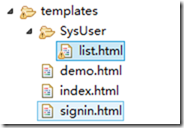
3、加入html文件 :这里使用的是bootstrap-3.3.7
<html xmlns:th="http://www.thymeleaf.org"

    xmlns:layout="http://www.ultraq.net.nz/web/thymeleaf/layout">

<head>

<meta content="text/html;charset=utf-8"></meta>

<meta name="viewport" content="width=device-width, initial-scale=1"></meta>

<script sec="../jquery-2.1.1/jquery.min.js"></script>

<link rel="stylesheet" href="../bootstrap-3.3.7/dist/css/bootstrap.min.css"></link>

<script sec="../bootstrap-3.3.7/dist/js/bootstrap.min.js"></script>

<title>用户</title>

</head>

<body>

    <div class="container">

        <table class="table">

            <div th:if="${message!=null}">

                <caption th:text="${message}"></caption>

            </div>

            <thead>

                <tr>

                    <th>First Name</th>

                    <th>Last Name</th>

                    <th>User Name</th>

                </tr>

            </thead>

            <tbody>

                <tr>

                    <td>aehyok</td>

                    <td>leo</td>

                    <td>@aehyok</td>

                </tr>

                <tr>

                    <td>lynn</td>

                    <td>thl</td>

                    <td>@lynn</td>

                </tr>

            </tbody>

            <tbody th:each="SysUser:${sysUserList}">

                <tr>

                    <td th:text="${SysUser.id}"></td>

                    <td th:text="${SysUser.name}"></td>

                    <td th:text="${SysUser.Phone}"></td>

                </tr>

            </tbody>

        </table>

    </div>

</body>

</html>
4、配置application.properties支持thymeleaf
spring.thymeleaf.suffix=.html

spring.thymeleaf.content-type=text/html

# set to false for hot refresh

spring.thymeleaf.cache=false

spring.resources.chain.strategy.content.enabled=true

spring.resources.chain.strategy.content.paths=/**
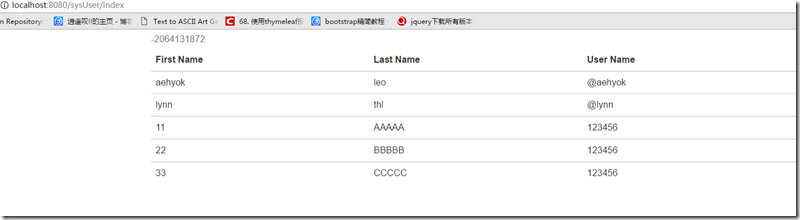
5、测试访问
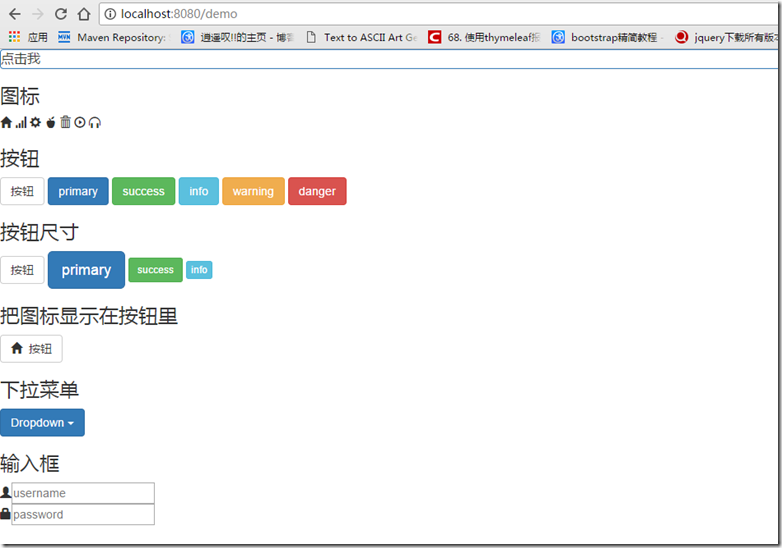
6、访问view层
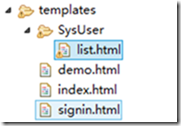
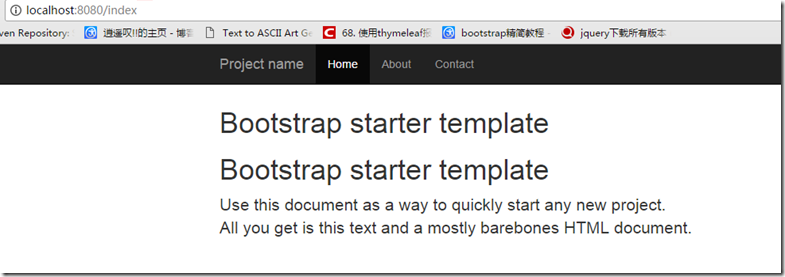
默认响应的view是的路径是templates这个目录
package com.example.controller;

import org.springframework.beans.factory.annotation.Autowired;

import org.springframework.stereotype.Controller;

import org.springframework.web.bind.annotation.ModelAttribute;

import org.springframework.web.bind.annotation.RequestMapping;

import org.springframework.web.servlet.ModelAndView;

import org.springframework.web.servlet.resource.ResourceUrlProvider;

@Controller

public class HelloController {

    @Autowired

    ResourceUrlProvider resourceUrlProvider;

    @RequestMapping("index")

    public ModelAndView index() {

        ModelAndView mv = new ModelAndView("index");

        return mv;

    }

    @RequestMapping("demo")

    public ModelAndView demo() {

        ModelAndView mv = new ModelAndView("demo");

        return mv;

    }

    @RequestMapping("signin")

    public ModelAndView signin() {

        ModelAndView mv = new ModelAndView("signin");

        return mv;

    }

}

十三.spring-boot使用spring-boot-thymeleaf的更多相关文章
- Spring boot(三)整合mybaties+thymeleaf实现基础crud
工程结构: 首先在pom文件中引入依赖 <?xml version="1.0" encoding="UTF-8"?> <project xml ...
- Spring Boot学习记录(二)--thymeleaf模板 - CSDN博客
==他的博客应该不错,没有细看 Spring Boot学习记录(二)--thymeleaf模板 - CSDN博客 http://blog.csdn.net/u012706811/article/det ...
- Spring Boot 2.0 整合Thymeleaf 模板引擎
本节将和大家一起实战Spring Boot 2.0 和thymeleaf 模板引擎 1. 创建项目 2. 使用Spring Initlizr 快速创建Spring Boot 应用程序 3. 填写项目配 ...
- Spring Boot + MyBatis + Druid + Redis + Thymeleaf 整合小结
Spring Boot + MyBatis + Druid + Redis + Thymeleaf 整合小结 这两天闲着没事想利用**Spring Boot**加上阿里的开源数据连接池**Druid* ...
- 在Spring MVC和Spring Boot中使用thymeleaf模板
Spring MVC: POM: <!-- thymeleaf模板 --> <!-- https://mvnrepository.com/artifact/org.thymeleaf ...
- 9、Spring Boot 2.x 集成 Thymeleaf
1.9 Spring Boot 2.x 集成 Thymeleaf 完整源码: Spring-Boot-Demos 1.9.1 在pom中引入依赖 <dependency> <grou ...
- Spring Boot 2.x教程-Thymeleaf 原理是什么
layout: post title: Spring Boot 2.x教程-Thymeleaf 原理是什么 categories: SpringBoot description: Spring Boo ...
- Spring Boot WebFlux-04——WebFlux 整合 Thymeleaf
第04课:WebFlux 整合 Thymeleaf 上一篇介绍的是用 MongoDB 来实现 WebFlux 对数据源的操作,那么有了数据需要渲染到前台给用户展示,这就是本文关心的 View 层,Vi ...
- Spring boot 整合spring Data JPA+Spring Security+Thymeleaf框架(上)
近期上班太忙所以耽搁了给大家分享实战springboot 框架的使用. 以下是spring boot 整合多个框架的使用. 首先是准备工作要做好. 第一 导入框架所需的包,我们用的事maven 进行 ...
- 一:Spring Boot、Spring Cloud
上次写了一篇文章叫Spring Cloud在国内中小型公司能用起来吗?介绍了Spring Cloud是否能在中小公司使用起来,这篇文章是它的姊妹篇.其实我们在这条路上已经走了一年多,从16年初到现在. ...
随机推荐
- Author name disambiguation using a graph model with node splitting and merging based on bibliographic information
Author name disambiguation using a graph model with node splitting and merging based on bibliographi ...
- C++变量类型转换
1:int转换为CString CString str; str.Format("As string: %d", int); 2:double转换为CString CString ...
- Linux下批量Kill多个进程的方法
转自http://www.jb51.net/LINUXjishu/43534.html ps -ef|grep tt.py|grep -v grep|cut -c 9-15|xargs kill -9 ...
- Linux下几种并发服务器的实现模式
Linux下的几种并发服务器的设计模式 1>单线程或者单进程 相当于短链接,当accept之后,就开始数据的接收和数据的发送,不接受新的连接,即一个server,一个client 不存在并发. ...
- redis 安装配置
reids 安装配置 1.1 下载软件包 [root@node01 ~]# mkdir -p /data/src/ [root@node01 ~]# cd /data/src/ [root@node0 ...
- poj 1724(最短路+优先队列)
ROADS Time Limit: 1000MS Memory Limit: 65536K Total Submissions: 13436 Accepted: 4921 Descriptio ...
- python 几种循环性能测试: while, for, 列表生成式, map等
直接上代码: #!/usr/bin/env python # -*- coding: utf-8 -*- # @Time : 2018/07/24 16:23 import itertools imp ...
- gulp-connect插件浏览器实时同步刷新
1.在站点路径里打开cmd控制台. 输入:cnpm install gulp-connect --save-dev 2.编辑gulpfile.js 3.控制台执行gulp任务 输入gulp serve ...
- Java Control Statements
Java Control Statements Java For Loop public class ForExample1 { public static void main(String[] ar ...
- vue-music 关于playlist (底部播放列表组件)
建立playlist.vue 组件,在player.vue 组件中引用,点击迷你播放器的播放列表按钮由下至上弹出这个层,所以在player.vue 播放器组件中引用 在playlist.vue 组件中 ...