
css 样式 记录
/* Track */
::-webkit-scrollbar-track {
-webkit-box-shadow: inset 0 0 6px rgba(0,0,0,0.3);
-webkit-border-radius: 5px;
border-radius: 5px;
}
/* Handle */
::-webkit-scrollbar-thumb {
-webkit-border-radius:5px;
border-radius: 6px;
background: rgba(158, 79, 104, 0.8);
-webkit-box-shadow: inset 0 0 6px rgba(0,0,0,0.5);
}
::-webkit-scrollbar-thumb:window-inactive {
background: rgba(158, 79, 104, 0.8);
}
/*取消A默认点击背景色*/
a,a:hover,a:active,a:visited,a:link,a:focus{
-webkit-tap-highlight-color:rgba(0,0,0,0);
-webkit-tap-highlight-color: transparent;
outline:none;
background: none;
text-decoration: none;
}
//css限制显示行数
display: -webkit-box;
display: -moz-box;
/*white-space: pre-wrap; */
word-wrap: break-word;
overflow: hidden;
text-overflow: ellipsis;
-webkit-box-orient: vertical;
-webkit-line-clamp:8;
文字竖布局
writing-mode: tb-rl;
-webkit-writing-mode:vertical-rl;
writing-mode: vertical-rl;
移动端1px解决方案
.user-header .user-tags .tags-list{

  position: relative;

  border-radius: 40rpx;

  height: 60rpx;

  line-height: 60rpx;

  box-sizing: border-box;

  padding: 0 40rpx;

  background: #fdcf47;

  color: #49381d;

  font-size: 26rpx;

  margin:0 10rpx;

}

.user-header .user-tags .tags-list::before{

    display: block;

    content: "";

    pointer-events: none; /* 防止点击触发 */

    box-sizing: border-box;

    position: absolute;

    width: 200%;

    height: 200%;

    left:;

    top:;

    border-radius: 54rpx;

    border:1px solid #49381d;

    -webkit-transform:scale(0.5);

    -webkit-transform-origin: 0 0;

    transform:scale(0.5);

    transform-origin: 0 0;

}
按钮hover样式
 hover后
<div class="btn"></div>

/*css 样式*/

.btn{

      width: 150px;

      height: 50px;

      background: red linear-gradient(to right,rgba(0,255,0,0),rgba(0,255,0,0.7));

      transition: background-color 0.5s;

}

.btn:hover{

     background-color: rebeccapurple;

}
文字叠加效果

<div class="mix">

     <span data-text="css纹理叠加"></span>

    css纹理叠加

 </div>

    /*css 样式*/

    .mix{

            font-size: 80px;

            font-family: '微软雅黑';

            background-image: url("58db48fa0edb9.jpg");

            -webkit-text-fill-color: transparent;
        -webkit-background-clip: text;

        }

        .mix>span{

            position: absolute;

            background-image: linear-gradient(to right,#f00,#f00);

            mix-blend-mode: overlay;

            -webkit-text-fill-color: transparent;

        -webkit-background-clip: text;
} .mix>span::before{ content:attr(data-text); }
文字渐变
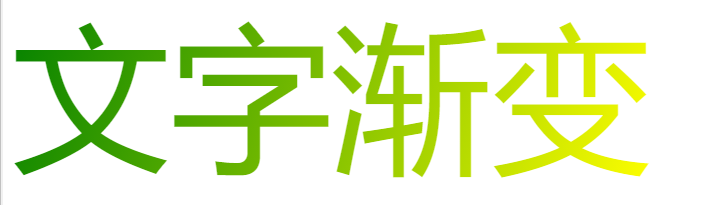
<div class="font-color">文字渐变</div>

/*css 样式*/

        .font-color{

            display: inline-block;

            color: #f00;

            font-size: 10em;

            background-image: -webkit-gradient(linear,0 0,100% 100%,from(green),to(yellow));

            -webkit-text-fill-color: transparent;
-webkit-background-clip: text;
}
流光字体

<div class="font-animate">

    <h2>这是一个可以变色的文字</h2>

</div>

/*css 样式*/

       .font-animate{

            font-size: 5em;

            background-image: -webkit-linear-gradient(left,#f00,#54e 25%, #f00 50%,#54e 75%,#f00);

            -webkit-text-fill-color: transparent;

            background-size: 200% 100%;

            animation: fontAnimate 4s infinite linear;
-webkit-background-clip: text;
} @keyframes fontAnimate{ 0%{ background-position: 0 0; } 100%{ background-position: -100% 0; } }
按轨迹运动(path)
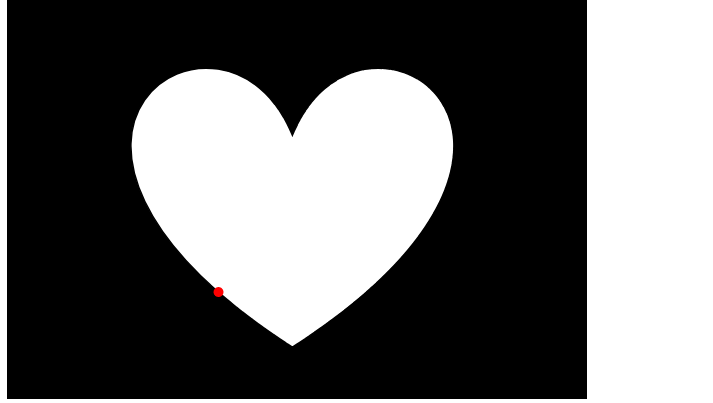
<div>

    <div class="circle"></div>

    <svg width="580" height="400" xmlns="http://www.w3.org/2000/svg">

     <!-- Created with Method Draw - http://github.com/duopixel/Method-Draw/ -->

     <g>

      <title>background</title>

      <rect fill="#000" id="canvas_background" height="402" width="582" y="-1" x="-1"/>

      <g display="none" overflow="visible" y="0" x="0" height="100%" width="100%" id="canvasGrid">

       <rect fill="url(#gridpattern)" stroke-width="0" y="0" x="0" height="100%" width="100%"/>

      </g>

     </g>

     <g>

      <title>Layer 1</title>

      <path id="svg_1" d="m285.38772,136.28634c66.58567,-164.79148 327.47049,0 0,211.87475c-327.47049,-211.87475 -66.58567,-376.66623 0,-211.87475z" stroke-width="1.5" stroke="#000" fill="#fff"/>

     </g>

    </svg>

</div>

/*css 样式*/

       .circle{

            position: absolute;

            width: 10px;

            height: 10px;

            background:red;

            border-radius: 50%;

            motion-path:path("m285.38772,136.28634c66.58567,-164.79148 327.47049,0 0,211.87475c-327.47049,-211.87475 -66.58567,-376.66623 0,-211.87475z");

            offset-path:path("m285.38772,136.28634c66.58567,-164.79148 327.47049,0 0,211.87475c-327.47049,-211.87475 -66.58567,-376.66623 0,-211.87475z");

            animation: move 6s linear infinite;

        }

        @keyframes move{

            100%{

               motion-offset:100%;

            }

            100%{

               offset-distance:100%;

            }

        }
css 样式 记录的更多相关文章
- 常用的 css 样式 记录
1.font-style 属性指定文本的字体样式. 对应的值有: normal 默认值.浏览器显示一个标准的字体样式; italic 浏览器会显示一个斜体的字体样式; oblique 浏览器会显 ...
- css样式记录
样式一 #sideBar,#blog_post_info_block { display: none; } #under_post_news { display: none; } /*评论框大小*/ ...
- (转载)记录函数 getStyle() 获取元素 CSS 样式
设置元素(element)的css属性值可以用element的style属性,例如要将element的背景色设置为黑色,可以这么做: element.style.backgroundColor = ' ...
- jquery操作CSS样式全记录
$(this).click(function(){ if($(this).hasClass(“zxx_fri_on”)){ $(this).removeClass(“zxx_fri_on”); ...
- 对于一些css样式的巧妙方法进行总结。
针对之前遇到过的一些特殊样式的实现,我今天做个总结,目的有二:一是将这些方法记录下来,以便将来需要用到时查找使用.二为将这些大神们智慧的结晶发扬光大,让广大前端程序猿们能够少走弯路.此贴为更新帖,以后 ...
- HTML标记语言和CSS样式的简单运用(Nineteenth Day)
曾经励志下去要坚持把每天所学的知识记录下来,可是坚持了几天后,就觉得自己坚持不下去了....这几天自己好好的想了想,觉得不能坚持也得要坚持,因为要对自己负责,所以得学会逼着自己去做,只有这样才能把一件 ...
- PHP使用echo输出标签设置CSS样式问题
使用php是可以输出HTML标签的,这为页面设计带来很大方便. 在此记录php输出标签设置CSS样式的问题: echo可使用''.""或你不用引号,如果想要输出带CSS样式的HTM ...
- 常用css样式(布局)
兼容css3新属性 在css3中,我们可以使用prefixfree.min.js这个插件来自动为css3的相关属性加上兼容浏览器属性,使我们不用为每个css3新属性再加上属性(需要用到大量css3的项 ...
- IIS发布,无法显示CSS样式和图片
描述: 最近给同事安装web程序时,把IIS安装好后,发布网站时,图片和css样式不显示. 程序没问题,发布也没问题. 后来网上一查,出错的原因可能是IIS的配置问题. 果然,按照网上的方法,顺利显示 ...
随机推荐
- 4.mycat部署
1.准备工作 mycat依赖Java环境,所以必须安装jdk yum install java-1.8.0-openjdk-devel.x86_64 配置JAVA_HOME环境变量 ls -lrt / ...
- mysql中间件
一.分类为:负载均衡类和数据切分类 1.负载均衡中间件提供了请求的转发,降低了单节点的负载,如haproxy,mysql-proxy,mysql-router 2.数据切分中间件按照不同的路由算法分发 ...
- Java--- Ambiguous mapping. Cannot map "***Controller" been method解决办法
打开网页报错: Ambiguous mapping. Cannot map 'handController' method public com.smallchill.core.toolbox.aj ...
- Redis + keepalived 高可用行配置检测脚本
Redis 在生产配置中:除redis集群.哨兵模式之外:主从模式还是比较普遍的. 配置 redis 多主从:由 keepalived 做 VIP 地址漂移.可以实现redis的高可用性. keepa ...
- Kali Linux之常见后门工具介绍
1.Meterpreter 它是Metasploit框架中功能强大的后渗透模块.可以通过Meterpreter的客户端执行攻击脚本,远程调用目标主机上运行的Meterpreter服务端. 命令 作用 ...
- Coursera, Deep Learning 4, Convolutional Neural Networks, week3, Object detection
学习目标 Understand the challenges of Object Localization, Object Detection and Landmark Finding Underst ...
- 【如何使用jQuery】【jQuery弹出框】【jQuery对div进行操作】【jQuery对class,id,type的操作】【jquery选择器】
1.如何使用jQuery jQuery是一个快速.简洁的JavaScript框架,是继Prototype之后又一个优秀的JavaScript代码库(或JavaScript框架).jQuery设计的宗旨 ...
- Hibernate注解与JPA
Hibernate注解与JPA - charming的专栏 - CSDN博客http://blog.csdn.net/zxc123e/article/details/51499652 之前记录的一些东 ...
- vue购物车实战项02
1.数据循环.绑定 v- 绑定的属性 都是变量 ( 小程序这块需要花括号 不同点) 2.列表点击 当绑定变量为一个对象的时候{} 属性根据里面的属性值 bool 值 是否返回 当前的属性 转化成cl ...
- python编程 之 json包
1,json是什么? JSON(JavaScript Object Notation) 是一种轻量级的数据交换格式,易于人阅读和编写. 我的理解就是:json是一种统一的格式化的文件,比如,一个jso ...